
IMI NORGREN 54D Manuale utente

Operation manual
54D-xxxxx-DD0-xx 2 x PNP
Electronic
Pressure Sensor
54D
2
Electronic Pressure Sensor 54D
Operation manual
7503761000000050 05/2019
Content
1. Preliminary note 4
1.1 Symbols used 4
2 Safety information 4
3. Functions and features 4
4. Function 5
4.1 Processing of the measured signals 5
4.2 Switching function 5
4.3 Diagnostic function 6
5. Installation 6
5.1 Mounting accessories 6
5.2 DIN rail mounting 7
5.3 Panel mounting 7
6 Electrical connection 8
7. Operating and display elements 9
8. Menu 10
8.1 Menu structure 10
8.2 Explanation of the menu 11
9. Parameter setting 12
9.1 Parameter setting in general 12
9.2 Set output signals 14
9.2.1 Set the unit of measurement for system pressure 14
9.2.2 Set the output function 14
9.2.3 Set the switching limits (hysteresis function) 14
9.2.4 Set the switching limits (window function) 14
9.3 User settings (optional) 14
9.3.1 Set delay for the switching outputs 14
9.3.2 Set damping for the switching outputs 15
9.3.3 Configuration of the display 15
9.3.4 Zero-point calibration 16
3
Electronic Pressure Sensor 54D
Operation manual
7503761000000050 05/2019
9.4 Service functions 17
9.4.1 Read min/max values for the system pressure 17
9.4.2 Reset all parameters to factory setting 17
10. Operation 17
10.1 Read set parameters 17
10.2 Error indications 17
10.3 Setting ranges 18
11. Factory setting 18

4
Electronic Pressure Sensor 54D
Operation manual
7503761000000050 05/2019
1. Preliminary note
1.1 Symbols used
►Instructions
> Reaction, result
[…] Designation of keys, buttons or indications
→Cross-reference
Important note
Non-compliance can result in malfunction or interference.
2. Safety instructions
Please read this document prior to set-up of the unit. Ensure that the product is suitable for your
application without any restrictions.
If the operating instructions or the technical data are not adhered to, personal injury and/or
damage to property can occur.
Check the compatibility of the product materials with the media to be measured in all
applications.).
3. Functions and features
The unit monitors the system pressure/differential pressure in compressed air networks and
pneumatic systems of machines and plants.
Avoid static and dynamic overpressure exceeding the specified overload pressure by taking
appropriate measures.
The indicated bursting pressure must not be exceeded.
Even if the bursting pressure is exceeded only for a short time, the unit may be destroyed.
ATTENTION: Risk of injury!
Pressure Equipment Directive (PED): The units comply with section 3, article (3) of the
Directive 97/23/EC and are designed and manufactured for media of fluid group 2 (stable
gases and non-superheated liquids) in accordance with the sound engineering practice.
Type of pressure: relative pressure
Order number Measuring range Permissible
overpressure
Bursting pressure
bar
PSI
bar
PSI
bar
PSI
54D-V101…
-1…1
-14,5 …14,5
20
290
30
435
54D-V110…
-1 …10
-14,5 …145
20
290
30
435

5
Electronic Pressure Sensor 54D
Operation manual
7503761000000050 05/2019
4. Function
4.1 Processing of the measured signals
The unit displays the current system pressure.
It generates 2 output signals according to the parameter setting.
OUT1 Switching signal for limit value
OUT2 2 options
• Switching signal for system pressure limit value.
• Diagnostic signal (output 1 is inactive in case of a fault).
4.2 Switching function
OUT1 changes its switching state if it is above or below the set switching limits (SP1, rP1). The
following switching functions can be selected:
Hysteresis function / normally open: [ou1] = [Hno] (→ fig. 1)
Hysteresis function / normally closed: [ou1] = [Hnc] (→ fig. 1)
First the set point (SP1) is set, then the reset point (rP1) with the requested difference.
Window function / normally open: [ou1] = [Fno] (→ fig. 2).
Window function / normally closed: [ou1] = [Fnc] (→ fig. 2).
The width of the window can be set by means of the difference between FH1 and FL1. FH1 =
upper value, FL1 = lower value.
P = system pressure / differential pressure; HY = hysteresis; FE = window
t
SP
rP
1
0
1
Hno
Hnc
HY
t
P
FH
FL
1
0
1
0
FE
Fno
Fnc
1
2

6
Electronic Pressure Sensor 54D
Operation manual
7503761000000050 05/2019
4.3 Diagnostic function
Output 2 is used as diagnostic output based on the DESINA specification if [ou2] = [diA].
If there is no fault, the output is switched and carries Ub+ .
In case of malfunctions in the following areas, the output is inactive:
oshort circuit in output 1.
oEPROM function.
oRAM function.
oparameter setting.
oprocessor function.
5. Installation
Before installing and removing the unit: Make sure that no
pressure is applied to the system.
►Screw the pressure connection or adapter G1/8 to the main
pressure connection (1) and tighten:
Maximum tightening torque: 8 Nm.
Maximum thread length: 7.5mm
►If required: Screw the pressure connection or adapter M5 to the
auxiliary pressure connection (2) and slightly tighten to avoid
damage to the thread:
Maximum tightening torque: 2.5 Nm.
Maximum thread length: 7.5mm
5.1 Mounting accessories
The following components can be supplied as accessories: Order no.
Mounting set for DIN rail mounting
(DIN rail TH 35-7.5 to EN 60715)
54D-DINRAIL-CLIP

7
Electronic Pressure Sensor 54D
Operation manual
7503761000000050 05/2019
5.2 DIN rail mounting
DIN rail TH 35-7.5 to EN 60715
►Fix the mounting clip (1) with the M4 x 35 screws (2) to the flange.
Maximum tightening torque: 0,5 Nm.
►Hook the unit into the DIN rail and clip it into place.
Removal:
►Lever out the mounting clip with a screwdriver at the top or at the bottom and remove the unit.
5.3 Panel mounting
►Fix the unit with 2 M4 x 35 screws (1) (not included) to the rear panel. Maximum tightening
torque: 0.5 Nm.
20
20

8
Electronic Pressure Sensor 54D
Operation manual
7503761000000050 05/2019
6. Electrical connection
The unit must be connected by a qualified electrician.
The national and international regulations for the installation of electrical equipment must be
adhered to.
Voltage supply according to EN 50178, SELV, PELV.
►Disconnect power.
►Connect the unit as follows:
Pin 1 Ub+
Pin 3 Ub-
Pin 4 (OUT1) Binary switching output pressure monitoring
Pin 2 (OUT2) • binary switching output if [ou2] = [Hno], [Hnc], [Fno] or [Fnc]
• diagnostic output if [ou2] = [diA]

9
Electronic Pressure Sensor 54D
Operation manual
7503761000000050 05/2019
7. Operating and display elements
1 to 8: Indicator LEDs
LED 1 to LED 4 system pressure / differential pressure in the unit of
measurement
which is indicated on the label.
LEDs 5, 6
not used.
LED 7, 8
switching status of the corresponding output
9: Alphanumeric display, 4 digits
Display of the current system pressure.
Indication of the parameters and parameter values.
10: Set button
Setting of the parameter values (scrolling by holding pressed; incrementally by pressing once)
11: Mode/Enter button
Selection of the parameters and acknowledgement of the parameter values.
1
2
3
4
5
6
7
8
10
9
11
Mode/Enter
Set
10
Electronic Pressure Sensor 54D
Operation manual
7503761000000050 05/2019
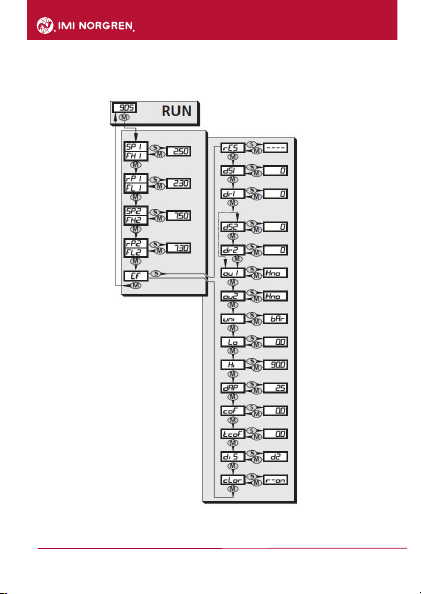
8. Menu
8.1 Menu structure
Indice
Altri manuali IMI NORGREN Accessori


