
ImmersionRC Vortex 230 Mojo Manuale utente

Quick Start Guide
International edition
Rev 1.0 - Oct 2017
Every Vortex 230 Mojo is flight tested before
leaving the factory.
Flight Tested By:

WARNING
Congratulations on your purchase of one of the world’s finest ARF pure-bred freestyle/racing mini-quads. A
product designed by FPV pilots, for FPV pilots.
Do not expect it to fly like a DJI Phantom™ . It does not have a return-to-home feature, no GPS, and it does
not have stabilization features that will allow your little brother to fly it.
Take it easy if you are new to the world of FPV racing, find an empty field for your first flight and get
comfortable with flying the quad first before you hit that downtown bando.
Acro mode is something that should be learned as soon as possible, flying any other mode is a bit like
driving a Lamborghini around a parking-lot in reverse… not exactly what you bought the Lambo for.
Please carefully read the recommendations in this getting started guide, as far as equipment/battery
selection, and how to run the Vortex 230 Mojo setup Wizard.
REMOVE PROPS
Mini-quad props can do serious damage when coming in contact with human skin, risk of deep cuts and
lacerations should be avoided at all cost.
When you are working on a quad with the battery connected, it is highly recommended to REMOVE ALL
PROPS, unless you are just about to fly. Keep in mind that when setting up mini-quads, there is always a
remote chance that a configuration change can spin up motors unexpectedly.
ImmersionRC accepts no responsibility, or liability, for any injury, or damage, to persons or property, caused
by the use of the Vortex.
INSTALL ANTENNA
The Video Transmitter included in the Vortex may be damaged permanently if run without the supplied
SpiroNET Antenna. Please take care to install this antenna before every flight, and when powering up the
Vortex for even a short time period.
ImmersionRC accepts no responsibility for damage caused to the Vortex by operating without a suitable Tx
antenna installed.
2

4 Steps: Unboxing to Racing
To get your ARF Vortex ready to race, follow the simple 4-step process below.
1) Install Compatible R/C Receiver
2)Install suitable battery
3) Setup the video link
4) Run the wizard
3
1) Install Compatible R/C Receiver
The Vortex 230 Mojo is shipped with three receiver interface cables, supporting 4 commonly used
interfaces.
a) 3-Pin 0.1” Servo Cable, for S-Bus, and CPPM (5V)
b) 5-pin Picoblade for FrSky XSR receivers (5V)
c) 3-pin JST-ZH for Spektrum DSMX receivers (3V)
Receivers may be mounted externally on the tail-end of the quad, or internally. Internally is definitely the
preferred solution but does require a suitably small receiver and means having to remove the top plate to
install the receiver.
The following are recommended for internal installation:
1) FrSky XSR, using the supplied XSR cable
2) FrSky X4R-SB, ‘Naked’ version with SBus output
Requires some soldering to wire sbus cable
3) Spektrum SPM4648 Auto-bind receiver with supplied DSMX cable
Remove plastic case and heat-shrink for optimal fit
4) Spektrum SPM9646 Carbon fuse receiver
5) Spektrum SPM9649T Telemetry receiver
To access the receiver bay for internal receiver mounting, remove the 8 screws which secure the top plate
to the arms, and carefully remove the top assembly, which includes the camera unit.
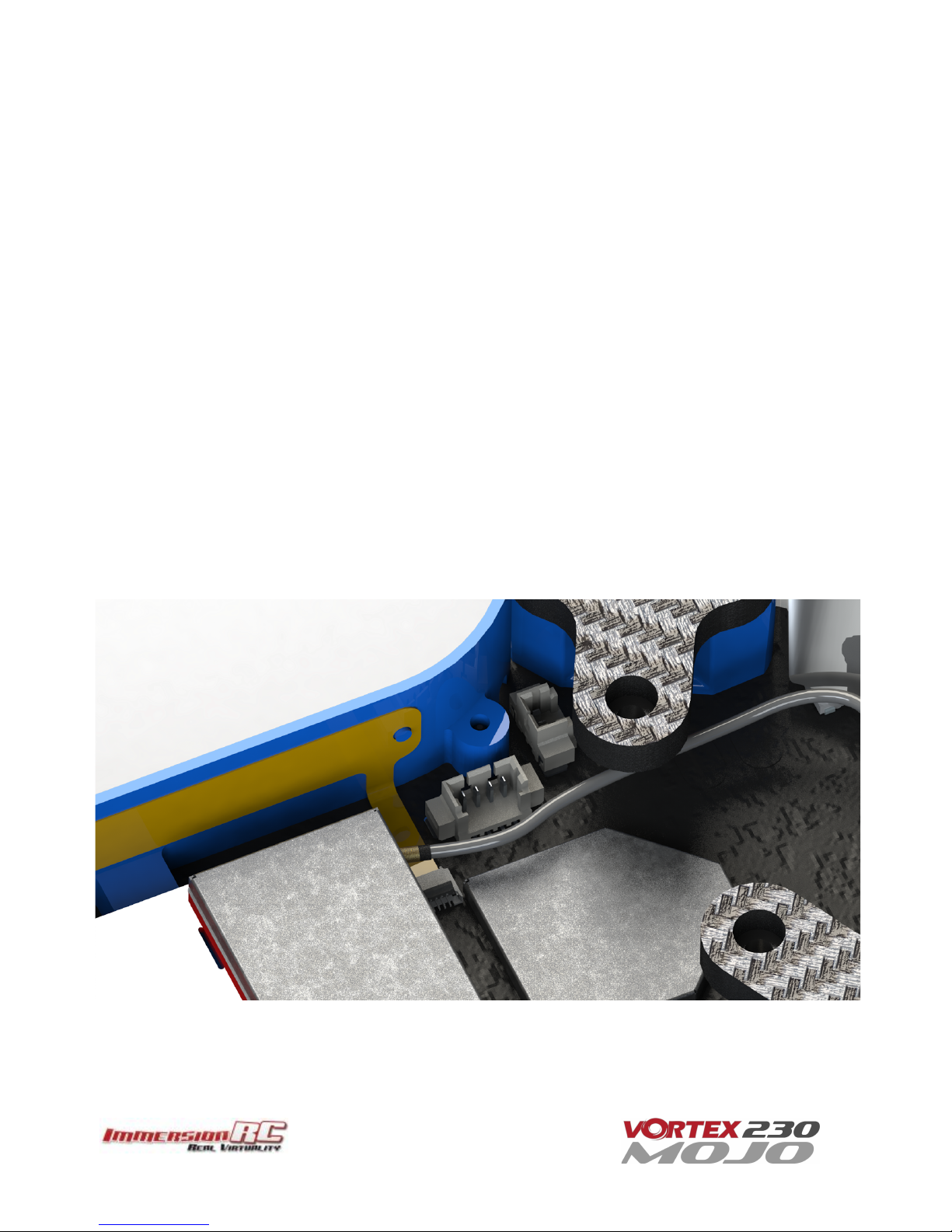
The (4-pin) receiver connector is pictured below. To mount the receiver, a small piece of double-sided tape
may be used on the top of the metal can in the receiver bay.
4

Finally, the receiver antennas may be routed through the two notches in the bottom of the LED diffuser, or
through the two notches in front of the two rear arms, which is the preferred solution. Make sure you apply
some extra shrinkwrap to the fragile antenna wires to make sure they put up with some abuse from rough
landings and crashes as well as handling the mini-quad.
Notes on Receiver Selection
One critical parameter to keep to a minimum in a race quad setup is latency. Latency from what the camera
sees to the display device, and also from the control stick to the flight controller.
For minimum latency, with reasonable range, the Spektrum™ radios and satellite receivers are a great
choice. If you desire a bit more range and more features the FrSky Taranis X9D or QX7 radio with a XSR
receiver is an excellent choice.
For longer-range FPV, there’s several UHF options available, but this is beyond the scope of this Quick Start
Guide.
5

Receiver Auto-Detection
A unique feature of the Vortex family of quadcopters is that the receiver type is auto-detected by the OSD
when running the Tx Wizard. There’s no need to set things up prior to hooking up the receiver, provided it
outputs a summed RC signal such as S-bus, PPM sum etc.
R/C Transmitter Configuration
The advanced wizard used in the Vortex 230 Mojo is cable of detecting most transmitter configurations.
Channel order, stick range and endpoints, center position, etc. are all learned by the wizard.
In most cases it is better to start from a ‘default’ model on the R/C transmitter. On the Taranis for example,
select the quadcopter option, and leave all settings as defaults.
2) Install a Suitable Battery
The Vortex 230 Mojo has a flexible battery mounting system, with a silicone pad to keep the battery firmly
in place (make sure to remove the protective liner) and two battery straps. It uses an industry-standard
XT60 connector. This allows it to use a wide range of different batteries.
To help select a suitable battery for your flying-style, read this section carefully:
Voltage
First things first, voltage. For starting out with the Vortex, and not having any prior experience flying a
mini-quad, a 3S (11.1V) battery is recommended.
A Vortex running a 4S (14.8V) battery is an extremely fast machine, which can easily get a pilot into trouble.
A 3S pack calms things down a bit and is a good way to ease into the hobby, hence novice pilots should
certainly start out on 3S.
Note that the 30A ESCs installed in the Vortex 230 Mojo do support ‘LiHV’ packs, with a cell voltage of 4.35V
as opposed to the standard 4.20V cell voltage with LiPo packs.
Capacity
For capacity, there are a few things to remember. Firstly, keeping weight down on a mini-quad is the best
way to increase crash survivability as well as improve acceleration, climb speed and general agility of the
quad.
Also remember that most races are just a few laps, so a huge capacity battery is just dead weight, and will
never be drained in the typical race.
1300-1500mAh packs, would be ImmersionRC’s recommendation for the Vortex 230 Mojo. 3S for
beginners, 4S for intermediates and pros.
6
C - Rating
Battery C’ rating is a particularly inflated specification for mini-quad batteries, as a rule of thumb we’d
suggest purchasing the highest C rated pack available.
NOTE: Ensure that the battery is securely mounted on the anti-slip pad. The battery should not be able
to move around in flight. Also make sure the plastic liner on the anti-slip pad is removed!
ANOTHER NOTE: Ensure that your main battery cables, and also the balance leads are secured in the
straps, and cannot, under any circumstance, touch the props.
Sliced battery cables and/or balance leads are a cause of expensive shorts, fires, and crashes!
7

3) Setup the Video Link
To avoid the traditional fiddling with DIP switches to set up your video transmitter, the Vortex does not use
a DIP switch to set up Vtx channels or bands. Instead, the OSD is responsible for setting the channel, and
band, or alternatively our NFC Wand or NFC app for Android can be used to accomplish the same thing.
The Vortex ships with a default Tx frequency of 5740MHz, which corresponds to ImmersionRC/FatShark
frequencies, Channel 1. If you are running ImmersionRC receivers, or a FatShark headset using the standard
5.8GHz module, just select Channel 1, and the wizard image should be shown.
If you are running non-ImmersionRC/FatShark gear which cannot tune to 5740MHz, it may be necessary to
switch bands on the Vortex before the wizard image is displayed. To do this, set your receiver to Channel 1
on your band of choice and use the small button on the left side of the quad.
To switch bands, press the button on the LED board for approx. 2 seconds until you hear the first beep, and
release. The Vortex will subsequently beep a number of times, representing the band number. Each time the
button is pressed, the band number will be incremented and will cycle back to Band 1 after Band 5.
The band/beep order is as follows:
Band 1 - one beep - IRC/FS (5740MHz)
Band 2 - two beeps - RaceBand (5658MHz)
Band 3 - three beeps - Band E (5705MHz)
Band 4 - four beeps - Band B (5733MHz)
Band 5 - five beeps - Band A (5865MHz)
Alternatively the NFC Wand or NFC Android app can be used to set the channel/band arbitrarily. After setup
the band/channel can be changed through the OSD or via the NFC Wand or NFC Android app. The NFC
antenna is on the right side of the quad, behind the Vortex 230 sticker.
8

4) Run the Tx Wizard
In the world of R/C, there is little standardization between equipment manufacturers as far as control stick
to channel mapping. There is also little agreement between users as to which of the 4 control modes
should be used.
Since in the Vortex, both the OSD, and the Flight Controller need to know the channel mappings, a Tx Setup
Wizard is included to greatly simplify the process.
This Wizard also configures various flight controller parameters which would normally require a personal
computer, with a USB connection to the quadcopter.
NOTE: The wizard should allow a brand-new, unconfigured Vortex, to be prepared for flight in less than
a minute after the receiver and battery have been installed, with no tools, or USB hookups required.
The first time the Vortex is powered up, the Tx Wizard is presented, as shown after the mode 1/mode 2
control descriptions below.
Following the instructions on-screen, 5 simple steps, will configure the 4 flight channels, and one auxiliary
control (CH5) which will control the flight mode.
Mode 2 Controls
Mode 2, arguably the most common stick mode, is common in the USA, and is a natural fit to helis, and
multirotors.
A Mode 2 transmitter is easily identified with the un-sprung (i.e. doesn’t return to center) throttle control on
the left stick.
For this mode, the multi-rotor controls are typically as follows:
Throttle
Pitch
Yaw
Roll
9

Mode 1 Controls
Mode 1 is common in Europe.
A Mode 1 transmitter is easily identified with the un-sprung (i.e. doesn’t return to center) throttle control on
the right stick.
For this mode, the multi-rotor controls are typically as follows:
Pitch
Throttle
Yaw
Roll
Note: Modes 3 and 4 are intentionally left out of this abbreviated Getting Started guide. It is assumed that
pilots flying these more ‘uncommon’ modes, are already very familiar with their remote, and their control
mapping.
10
Altri manuali per Vortex 230 Mojo
1
Indice
Altri manuali ImmersionRC Quadricottero


