
Infans INF-WGP-01 Manuale utente

User's Guide
包裝內容
指揮者無線控制器 x 1
USB數據充電線 x1
使用說明書 x1
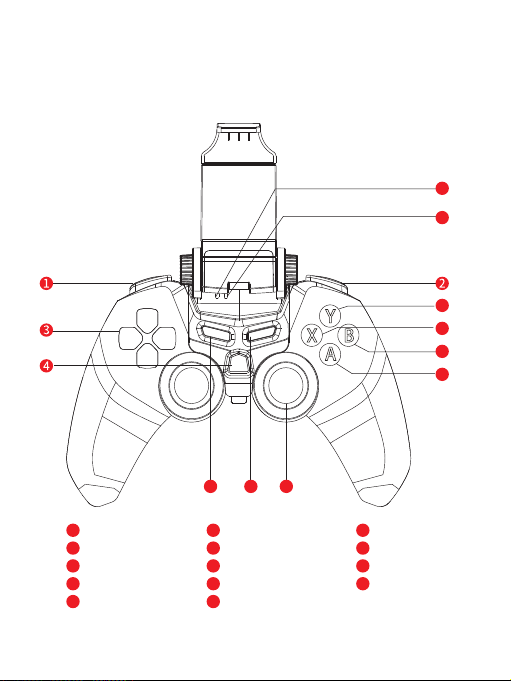
L1/L2按鍵
R1/R2按鍵
十字按鍵
開機鍵
左邊3D類比搖桿
右邊3D類比搖 桿
藍牙指示燈
充電/電源指示燈
SELECT鍵
START鍵
Y. Y鍵
X. X鍵
A. A鍵
B. B鍵
5
Y
X
A
B
系統需求
Android 3.2或是更高版本
Win10/8.1/8/7/Vista/XP
iCade
7
8
9
1
2
3
4
5
Y
X
A
B
6
7
8
9
10
10
按鍵配置
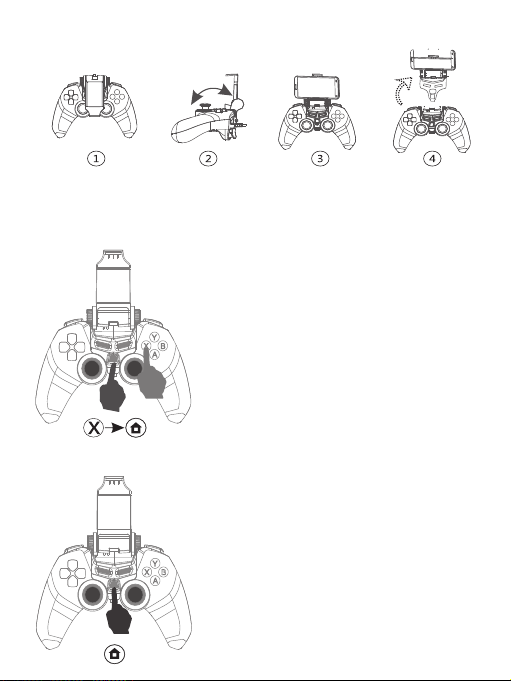
夾具使用方法
初次連接
安卓版本藍牙配對操作方法:
1. 短按HOME鍵 1 秒, 開機
(開機指示燈進入慢閃狀態)
2. 待藍牙指示燈熄滅後,按住”X”鍵不放,
再按下HOME鍵1 秒,等藍牙LED指示燈
快閃進入可配對狀態後放開按鍵
(長按HOME鍵 3 秒,所有指示燈熄滅,
手把會關機)
3. 藍牙LED指示燈快閃代表進入可配對狀態
4. 打開手機藍牙搜索選擇手把並點選配對
(需在手把處於可配對模式)
5. 配對成功後,LED指示燈常亮
二次連接 / 回連:
1. 待藍牙指示燈熄滅後,按住”X”鍵不放,
再按下HOME鍵1 秒,等藍牙LED指示燈
快閃進入可配對狀態後放開按鍵
2. 打開手機藍牙搜索選擇手把並點選配對
(需在手把處於可配對模式)
3. 配對成功後,LED指示燈常亮

i Cade連接方式
有線連接
1. 安卓模式:需要在手柄與設備之間利用OTG與傳輸線進行連接。
當手柄上的紅色充電燈亮起時,表示連接成功,可正常在安卓設備上使用
2. PC平台:將數據線的 USB端插入PC的USB接口,另一端插入手柄,手柄
上的紅色充電燈亮起時,表示連接成功,可正常在PC設備上使用
1. 按住”B”鍵不放,再按下HOME鍵1 秒,等藍牙LED指示燈
快閃進入可配對狀態後放開按鍵
2. 藍牙LED指示燈快閃代表進入可配對狀態
3. 打開手機藍牙搜索選擇手把並點選配對(需在手把處於可配對模式)
4. 配對成功後,LED指示燈常亮
註 1:
手機藍牙不同版本連接時會有不同的操作要求,如果手機端顯示需要輸入密碼,
預設密碼為0000 或 1234 (需在藍牙指示燈持續閃爍期間完成輸入並連接)
註 2:
若需要將 ” INF-WGP-01 ” 配對至另一隻手機,請將原先手機的配對解除,或是
將原手機的藍牙關閉,即可透過另外一隻手機連線配對

1.當手把無法正常操作的時候,可使用背面的左下角的小孔回覆手把預設狀態
2.請不要將產品儲存在潮濕或是高溫的地方
3.請勿自行拆解產品,以免造成不必要的損傷
4.產品內置電池,請勿隨意丟棄
5.第一次使用時請先充飽電
6.建議連續充電時間不要超過兩個小時
7.請勿自行拆解、重摔與接近水/火源
指示燈狀態說明
未連接:慢閃
等待配對:快閃
配對成功:常亮
類型 顏色 狀態描述
充電時:常亮
充滿:紅燈熄滅
低電量:紅燈閃爍
藍牙指示燈
充電指示燈
藍色
紅色
本產品符合低功率電波輻射性電機管理辦法 第十二條~第十四條等條文規定
*經型式認證合格之低功率射頻電機,非經許可,公司、商號或使用者均不得擅
自變更頻率、加大功率或變更原設計之特性及功能。
*低功率射頻電機之使用不得影響飛航安全及干擾合法通信;經發現有干擾現
象時,應立即停用,並改善至無干擾時方得繼續使用。
*前項合法通信,指依電信法規定作業之無線電通信。
*低功率射頻電機須忍受合法通信或工業、科學及醫療用電波輻射性電機設備
之干擾。
CCAJ17LP1560T0
www.infans.com.tw
注意事項
遊戲相容網址

1
2
3
4
5
Y
X
A
B
6
7
8
9
10
5
Y
X
A
B
7
8
910
Package contents
Leader Wireless Gamepad
USB cable
User’s Guide
Buttons & function
L1 /L2 Button
R1/R2 Button
Direction Button
Home Button
Left Analog Stick
Right Analog Stick
Bluetooth LED
Charging LED
SELECTION Button
START Button
Y emission Button
X emission Button
A emission Button
B emission Button
System requirements
Android 3.2 or up
Windows system PC
iCade
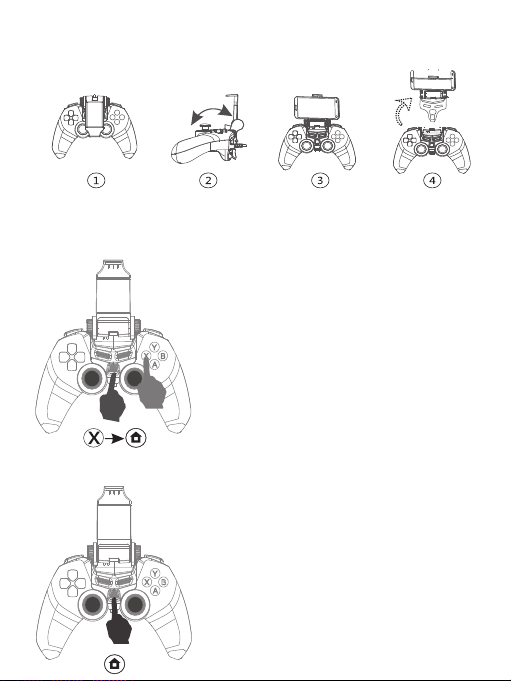
Retractable Smart Phone Holder
Android Connect
1. Press “HOME” button in 1s, the indicator
flashes, then it starts to work.
2. Press X and Home buttons together about 1
seconds and then release as Blue LED
is flashing
(Hold the HOME button for 3 second to turn it off.)
3. It enters into the Bluetooth paining mode
while the Bluetooth LED indicator flashes.
4. Open Bluetooth function of Android device
to pair.( Need to be in the could paired mode)
5. It will be in connected mode while the indicator
keeps on.
succeeding connection
1. Press X and Home buttons together about 1
seconds and then release as Blue LED
is flashing
2. Open Bluetooth function of Android device
to pair.( Need to be in the could paired mode)
3. It will be in connected mode while the indicator
keeps on.

i Cade Connect
1.Press B and Home buttons together about 1 seconds and then release as
Blue LED is flashing
2.It enters into the Bluetooth paining mode while the Bluetooth LED
indicator flashes.
3.Open Bluetooth function of Android device to pair.
( Need to be in the could paired mode)
4.It will be in connected mode while the indicator keeps on.
Note1:
There will be different operating requirements for different Bluetooth versions.
If the mobile phone requires password,the default password is 0000 or 1234
(To complete the input and connect while the Bluetooth indicator is flashing
continuously)
Note2:
If you want to have ”INF-WGP-01” pairing with another phone, please get the
original paired phone disconnected or turn off Bluetooth on original
mobilephone.
So you can start to connect it with another mobile phone.

1.When it can not be normal operated, you can use clip to press the reset
button at the left back of the controller.
2.Do not use and stone it in a hot or humid environment.
3.Do not resolve it to avoid damaging it.
4.Do not throw it away , due to its built-in battery.
5.Please charge fully before using it for the first time
6.Recommended continuous charging time of not more than two hours
7.Do not disassemble, fall, or approach water / fire sources
LED Indicator Status
Power Off:
Hold the HOME button for 3 second to turn it off.
Type color Status
Stay light on : On charge
Stay light off : Full charge
Flash slowly : Low power
Flash slowly : No connection
Flash quickly : Gonna to Bluetooth pair
Stay light on : Pair successfully
Blue LED
indicator
Red indicator
Blue
Red
Wired Connect
1.Android Mode: Use OTG line to connect. When the red indicator stay light on,
it indicates that the connection is successful.
2.PC Mode:Use USB cable to connect PC and gamepad. When the red indicator
stay light on, it indicates that the connection is successful.
www.infans.com.tw
Precautions
保證書
販售店
店章
購買人資料
購買日期
姓名
連絡電話
公司地址 : 台北市松山區八德路四段277之1號3樓
客服地址 : 新北市五股區五工路124號5樓
公司電話 : (02)2793-1260
客服專線 : (02)2793-1260
感謝您購買本公司產品
請妥善保管本保證書
以確保完善的售後服務
● 產品自售出之七日內正常使用時出現故障,消費者可選擇免費退、換貨或是修理。購買日起一
年內,在正常使用狀況下,如發生故障,由本公司提供免費維修服務。
● 購買時間以經銷商所開出購買發票或收據日期為準。
● 本保證書,請詳填購買日期,並加蓋店章,否則恕不生效。
● 如購機後出現故障,請攜帶發票至經銷商做後續保修服務事宜,如未得到解決,請致電本公司
客服,將會在最短的時間內為您服務。
● 下述情況恕不在本公司保固範圍 :
1.因天災或外力等人為破壞而導致損壞。 2.未經本公司同意,自行拆機、修復、改裝。
3.正常使用之磨損、破裂、生鏽、浸染。 4.無法出示有效購買憑證或保證書。
英菲斯國際有限公司
INFANS INTERNATIONAL CO., LTD.
Indice


