
Influx Technology Rebel Dash Manuale dell'operatore

User Documentation
Rebel Dash
Influx Technology
WWW.INFLUXTECHNOLOGY.COM Version 1.2
19/08/2016

1Rebel Dash............................................................................................................................................................................. 3
1.1 What Is Included in The Box?....................................................................................................................................... 3
1.2 Optional Extras Available............................................................................................................................................. 4
1.3 Introduction ................................................................................................................................................................. 4
1.4 Connecting the Rebel Dash to a CT or LT Logger ......................................................................................................... 4
2The Rebel Dash Software ...................................................................................................................................................... 5
2.1 Installing the Rebel Dash Config Software................................................................................................................... 5
2.2 Configuring the Rebel Dash using the Rebel Dash Software ....................................................................................... 6
2.2.1 Creating a Configuration Ready to send to the Rebel Dash .................................................................................... 6
2.2.2 Installing the Kvaser Drivers (Only required to configure the Rebel Dash through a Kvaser Device) ..................... 9
2.2.3 Sending the Configuration to the Rebel Dash via the CAN bus through a Kvaser Device. .................................... 12
2.2.4 Sending the Configuration to the Rebel Dash via USB stick .................................................................................. 14
3Configuring the Rebel Dash using DiaLog............................................................................................................................ 16
4Using the Rebel Dash to Display the Signals ....................................................................................................................... 26
4.1 Config Menu .............................................................................................................................................................. 26
4.1.1 CAN Viewer............................................................................................................................................................ 27
4.2 Changing between Signals ......................................................................................................................................... 28
4.2.2 Meter Display ........................................................................................................................................................ 29
4.2.3 Binary Display ........................................................................................................................................................ 29
4.2.4 Graphical Display ................................................................................................................................................... 29
4.3 Changing the Display Mode ....................................................................................................................................... 30
4.3.1 Single Display......................................................................................................................................................... 30
4.3.2 Multi Display.......................................................................................................................................................... 30
4.3.3 List Display............................................................................................................................................................. 30
5Updating the Firmware in the Rebel Dash .......................................................................................................................... 31
Appendix 1 Pinout of the Rebel Dash Cable......................................................................................................................... 33
Appendix 2 Pinout of the OBD2 to DB9 Cable...................................................................................................................... 34
Appendix 3 Pinout of the Multi Connect Cable.................................................................................................................... 35
Appendix 4 Technical Specifications: ................................................................................................................................... 38

1 Rebel Dash
The Rebel Dash is a compact, highly flexible, rugged CAN bus display. It is extremely bright making it ideal for in vehicle
development tasks, where engineers need to rapidly configure it to display information to be used for various testing tasks.
The Rebel Dash is designed to be integrated with all the Rebel range of data loggers, and the K-Box instrumentation but can
also be used as a standalone CAN display, it can even be used to view RAW can messages:
The use it to display variables from a Rebel Data Logger, the items that should be available in the display can simply
be added to an output signal in the Data Logger Configuration and when this is sent to the Data Logger the Dash is
automatically configured, items can then be selected within the display via the displays buttons.
The use it to display variables from a K-Box, simply load the DBC description file into the configuration utility, select
the items that should be available for display and configure the Dash via USB or a supported Kvaser device, items
can then be selected within the display via the displays buttons.
The use it to display variables broadcast on a vehicles CAN bus, simply load the DBC description file into the
configuration utility, select the items that should be available for display and configure the Dash via USB or a
supported Kvaser device, items can then be selected within the display via the displays buttons.
To use it as a CAN Message viewer no configuration is required the can viewer is accessed via the Main Menu.
The Rebel Dash is configurable from DiaLog or its configuration tool, and with the straightforward mounting system, or the
optional windscreen mounting system, you can be monitoring vehicle data graphically within minutes.
1.1 What Is Included in The Box?
Rebel Dash device
Standard display cable Deutsch to 9pin D Sub
Mounting System –The Dash can be fixed to the vehicle via the fixed mounting bracket or mounted on the
windscreen via a twist activated suction cup with an arm utilising 5 ball joints allowing for multi directional
adjustments (both included)

1.2 Optional Extras Available
OBDII (type A) to 9 way D-sub
OBDII (type B) to 9 way D-sub
Multi-connect cable to link to a current Influx Technology CT or LT Logger
1.3 Introduction
The Rebel Dash exemplifies a product that is both easy to install and easy to use:
It can be plugged straight into the OBD2 to 9 way Sub D cable allowing it to be directly plugged into a vehicles diagnostics
CAN Bus.
The supplied cable is also directly compatible with the Influx Technology multi-connect cable that is available for the Rebel
CT and LT data Loggers, simply connect it to the AUX output on the multi connect cable. The simple cable options with
standard CiA® 102 pinout allow for rapid connection and configuration whether used in a configuration with a Rebel CT or LT
Logger, stand alone in a vehicle or when used with other tools.
When connected to the LT or CT data loggers through the multi connect cable the display is automatically switched on or off
by the data logger when in sleep mode so no user intervention is required.
The Rebel Dash display is a high brightness QVGA (320x240pixels) colour display that is viewable in full sunlight on a 3.5inch
colour display with integrated input and output features.
The Display is electrically and environmentally rugged, the new Rebel Dash display is ready to meet the challenge of
providing tough, flexible and maintenance - free instrumentation in the harshest of environments.
Display features:
A list of the parameters
Dials and digital LEDs
A graphing mode
A CAN trace viewer mode
1.4 Connecting the Rebel Dash to a CT or LT Logger
The Rebel Dash can be connected to a Rebel Logger using the supplied cable and an Influx Technology Multi Connect Cable,
The picture below also shows the Rebel Logger powered via an OBD II to 9 pin D Sub cable.
Influx CT or LT Influx Multi Connect Cable Top Deutsch to 9pin D Sub Rebel Dash
Bottom 9pin D Sub to OBDII

2 The Rebel Dash Software
2.1 Installing the Rebel Dash Config Software
STEP 1
To begin the installation for the software, double-click on the Rebel Dash Config setup icon to proceed.
STEP 2
A pop-up will appear for the verification of install the software. Click ‘Run’ to confirm the installation of the software.
STEP 3
Wait till the installation is finished.
Click ‘Finish’ with the ‘Launch the
program’ checkbox checked to launch
the software.
2.2 Configuring the Rebel Dash using the Rebel Dash Software
The Rebel Dash software provides a software that is easy for the user to configure on the Rebel Dash, just follow the simple
steps below and the device will be ready to collect the data. This is used when you wish to configure the Dash to display data
from a vehicles CAN Bus or from the K-Box instrumentation (or both), it could also be used to display data from any other
device that broadcasts simple CAN Messages on a CAN bus e.g. sensors.
2.2.1 Creating a Configuration Ready to send to the Rebel Dash
A DBC file (containing the Description of the Messages broadcast on the CAN bus) can be loaded and then used to configure
the Rebel Dash.
Step 1
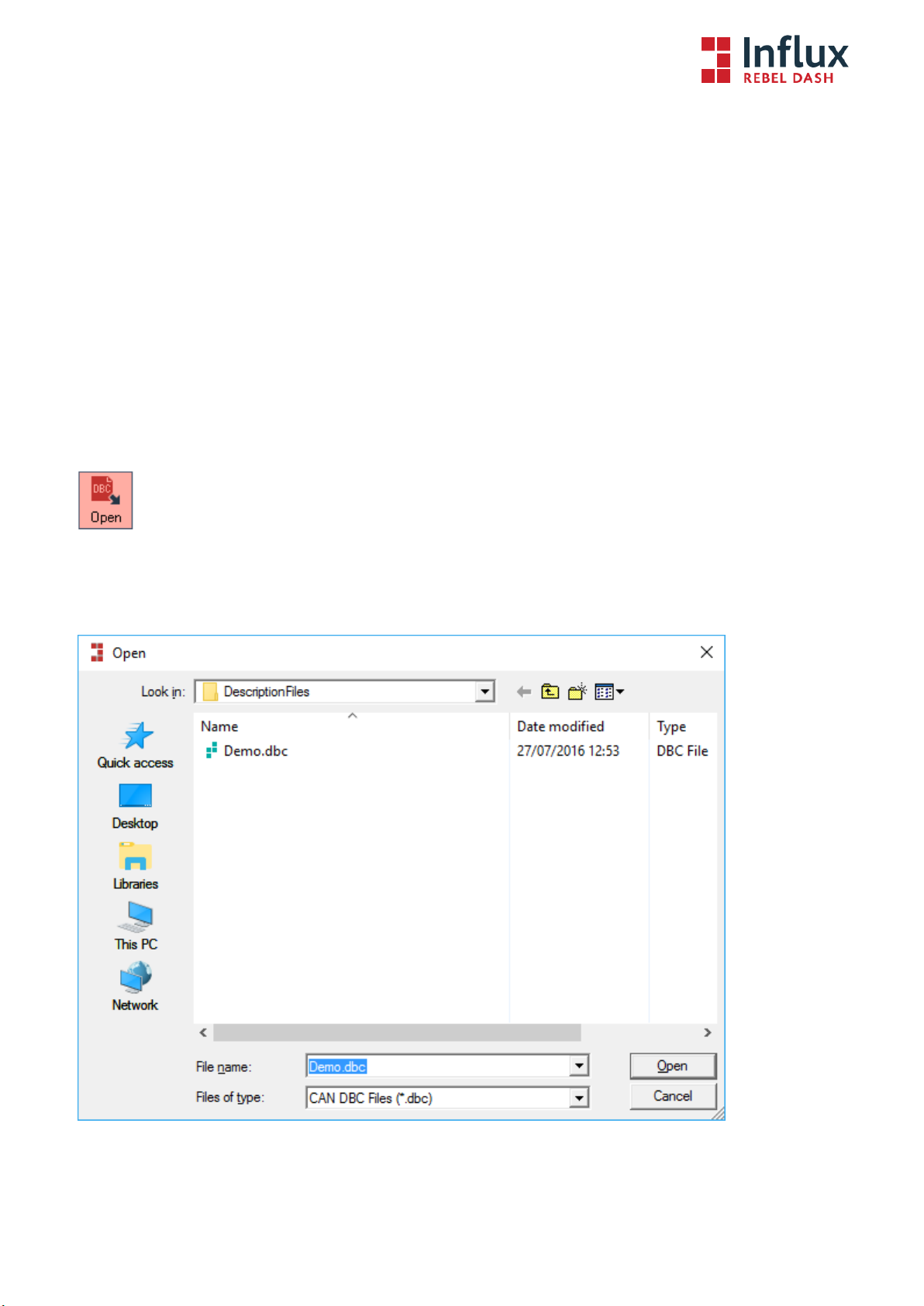
Click on the Open icon on the toolbar.
Step 2
Locate the DBC file using the window browser.
Step 3
Then click Open to import it.

Step 4
A list of messages from the DBC file will then be appear on the “Messages” panel.
The user has can select the signal or identifier to be imported into the configuration setup. In this case follow steps 5-8
alternatively all items may be added by simply pressing the >> button.
Step 5
To choose the signal(s) to be logged onto the Rebel Dash, click on an identifier to select it, a list of available signal(s) will
appear under the ‘Signal’ panel.
Step 6
The user can choose the available signal(s) by clicking on the name of the signal.
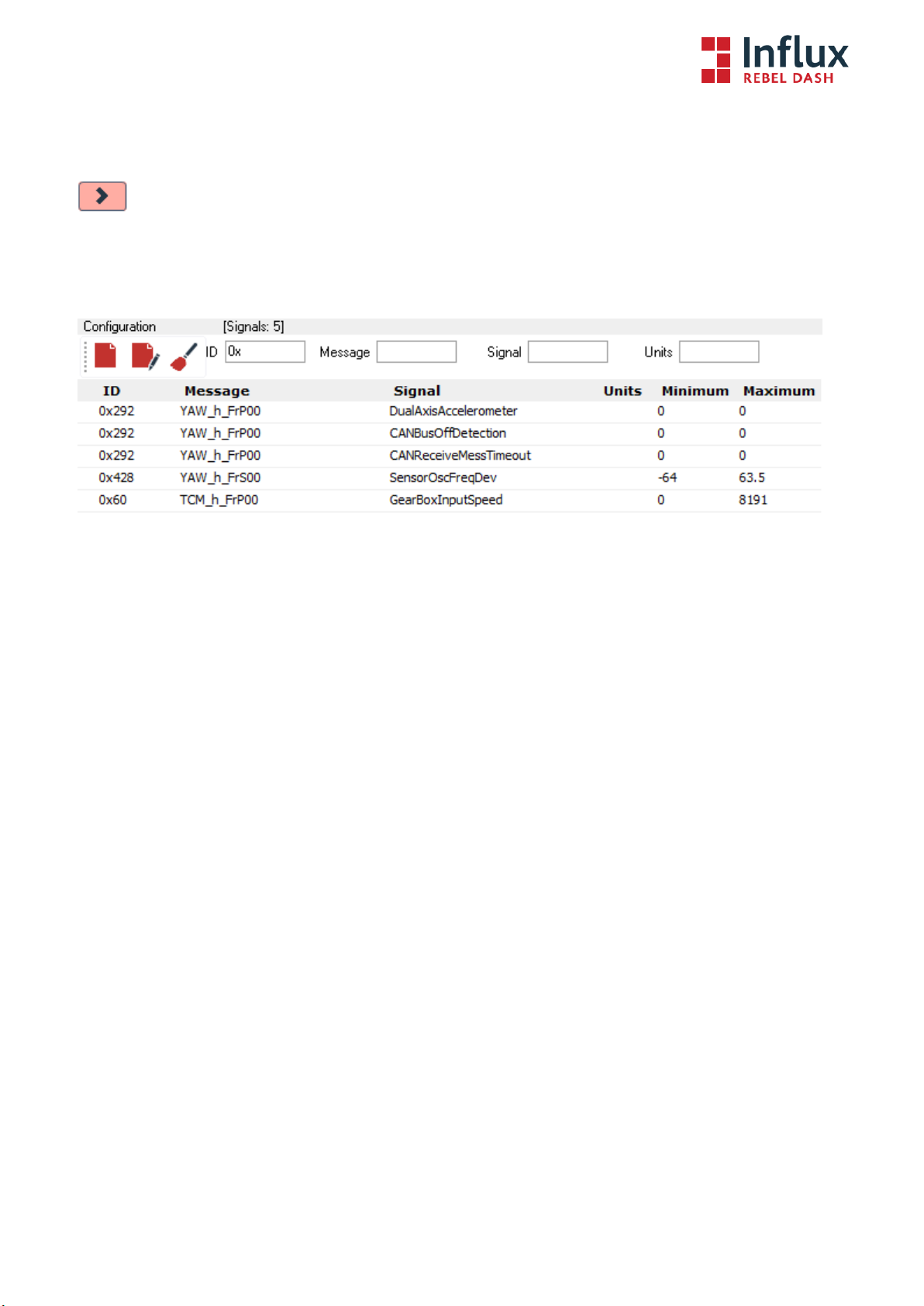
Step 7
The user can then click on the ‘>’ button to add the signal to the configuration or the ‘<’ button to undo the process.
Step 8
Repeat Steps 5 to 8 until all the signals that are desired in the configuration have been added.
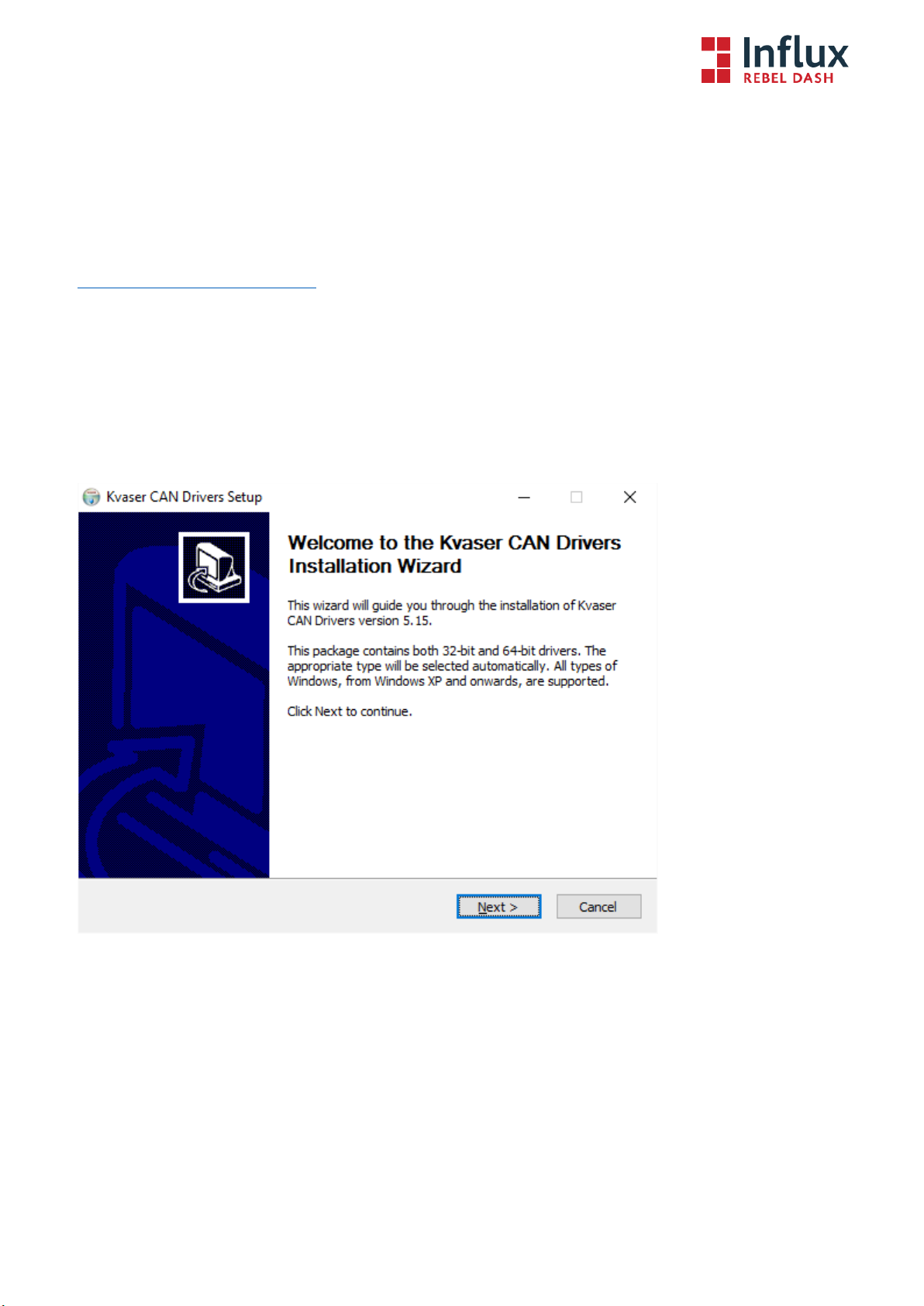

Step 4
Click Next after viewing the documentation (optional).
Step 5
Select the item(s) you wish to install, you will need to install at least the Drivers.
Altri manuali per Rebel Dash
1
Indice
Altri manuali Influx Technology Monitor


