InHand CR202 Manuale utente

InHand Networks CR202 Portable 4G Router
User Manual
Issue: V1.0—March, 2023

Declaration
Thank you for choosing our product. Before using the product, read this manual carefully.
The contents of this manual cannot be copied or reproduced in any form without the written
permission of InHand.
Due to continuous updating, InHand cannot promise that the contents are consistent with the
actual product information, and does not assume any disputes caused by the inconsistency of
technical parameters. The information in this document is subject to change without notice.
InHand reserves the right of final change and interpretation.
© 2020 InHand Networks. All rights reserved.
Conventions
Symbol
Indication
< >
Content in angle brackets “<>” indicates a button name. For example, the <OK> button.
""
'''' indicates a window name or menu name. For example, the pop-up window "New
User."
>
A multi-level menu is separated by the double brackets ">". For example, the
multi-level menu File > New > Folder indicates the menu item [Folder] under the
sub-menu [New], which is under the menu [File].
Cautions
Means reader be careful. Improper action may result in loss of data or device damage.
Note
Notes contain detailed descriptions and helpful suggestions.
Contact Us
43671 Trade Center Place, Suite 100, Dulles, VA20166
E-mail: support@inhandneworks.com
T: +1 (703) 348-2988
URL: www.inhandnetworks.com

Contents
I. INTRODUCTION................................................................................................................................. 1
1.1 OVERVIEW.................................................................................................................................... 1
1.2 PANELINTRODUCTION............................................................................................................. 2
1.3 LED INDICATION &SIGNAL ...................................................................................................... 2
1.4 RESET TO DEFAULT SETTINGS........................................................................................................... 2
II. INSTALLATION.................................................................................................................................. 4
2.1 PREPARATIPNS............................................................................................................................ 4
2.2 INSTALLATION............................................................................................................................ 4
2.2.1 SIM/UIM Card ........................................................................................................................ 4
2.2.2 Antenna.................................................................................................................................... 5
2.2.3 Power Supply........................................................................................................................... 6
2.3 LOGIN ROUTER ........................................................................................................................... 6
III. WEB CONFIGURATION .................................................................................................................. 8
3. 1SYSTEM........................................................................................................................................ 8
3.1.1 Basic Setup.............................................................................................................................. 8
3.1.2 System Time............................................................................................................................ 8
3.1.3 Admin Access.......................................................................................................................... 9
3.1.4 System Log.............................................................................................................................11
3.1.5 Configuration Management....................................................................................................11
3.1.6 Scheduler............................................................................................................................... 12
3.1.7 Upgrade ................................................................................................................................. 13
3.1.8 Reboot.................................................................................................................................... 13
3.1.9 Logout.................................................................................................................................... 13
3.2 NETWORK................................................................................................................................... 13
3.2.1 CELLULAR .......................................................................................................................... 13
3.2.2 WAN/LAN Switch................................................................................................................. 15
3.2.3 LAN....................................................................................................................................... 18
3.2.4 Switch WLAN Mode............................................................................................................. 18

3.2.5 WLAN Client (AP Mode) ..................................................................................................... 19
3.2.6 WLAN Client (STA Mode) ................................................................................................... 19
3.2.7 IP Passthrough....................................................................................................................... 20
3.2.8 Static Route ........................................................................................................................... 21
3.3 SERVICES.................................................................................................................................... 21
3.3.1 DHCP Service........................................................................................................................ 21
3.3.2 DNS....................................................................................................................................... 22
3.3.3 DNS Relay............................................................................................................................. 23
3.3.4 DDNS.................................................................................................................................... 24
3.3.5 Device Manager..................................................................................................................... 25
3.3.6 SMS....................................................................................................................................... 26
3.3.7 Traffic Manager..................................................................................................................... 26
3.3.8 Alarm Settings ....................................................................................................................... 27
3.3.9 User Experience Plan ............................................................................................................ 27
3.4 FIREWALL................................................................................................................................... 27
3.4.1 Basic...................................................................................................................................... 28
3.4.2 Filtering ................................................................................................................................. 28
3.4.3 Device Access Filtering......................................................................................................... 29
3.4.4 Content Filtering.................................................................................................................... 29
3.4.5 Port Mapping......................................................................................................................... 30
3.4.6 Virtual IP Mapping ................................................................................................................ 30
3.4.7 DMZ...................................................................................................................................... 31
3.4.8 MAC-IP Binding ................................................................................................................... 31
3.4.9 NAT ....................................................................................................................................... 32
3.5 QOS............................................................................................................................................... 32
3.5.1 IP BW Limit .......................................................................................................................... 33
3.6TOOLS.......................................................................................................................................... 33
3.6.1 PING...................................................................................................................................... 33
3.6.2 Traceroute.............................................................................................................................. 34
3.6.3 Link Speed Test..................................................................................................................... 34

3.6.4 TCPDUMP............................................................................................................................ 34
3.8APPLICATION............................................................................................................................. 34
3.8.1 SMBC.................................................................................................................................... 35
3.9 STATUS........................................................................................................................................ 35
3.9.1 System ................................................................................................................................... 35
3.9.2 Modem................................................................................................................................... 35
3.9.3 Traffic Statistics..................................................................................................................... 35
3.9.4 Alarm..................................................................................................................................... 36
3.9.5 WLAN................................................................................................................................... 36
3.9.6 Network Connections............................................................................................................ 36
3.9.7 Device Manager..................................................................................................................... 37
3.9.8 Route Table............................................................................................................................ 37
3.9.9 Device List............................................................................................................................. 37
3.9.10 Log....................................................................................................................................... 37
3.9.11 Third Party Software Notices.............................................................................................. 38
APPENDIXA FAQ................................................................................................................................. 39
APPENDIX B INSTRUCTION OF COMMAND LINE....................................................................... 41

1
I. INTRODUCTION
1.1 OVERVIEW
The mobile 4G cellular router CR202 greatly increases the access flexibility in remote
office/study, mobile scenarios, and field scenarios with a reliable Internet connectivity. It can also
guarantee a smooth business operation for small and medium-sized branches and self-service
terminal scenarios and avoid any network failure may exist.
CR202 supports wired networks to wireless access, which increases the diversity of device access
to the network and can effectively ensure that the network is not interrupted. The powerful built-in
battery also allows you to work anytime and anywhere. With the lightweight design, it allows for
unrestricted device mobility.
Combined with InHand Device Manager cloud management platform, CR202 guarantees efficient
device management capabilities, provides customers with high-speed network access, simple and
convenient network management services to empower the core network.

2
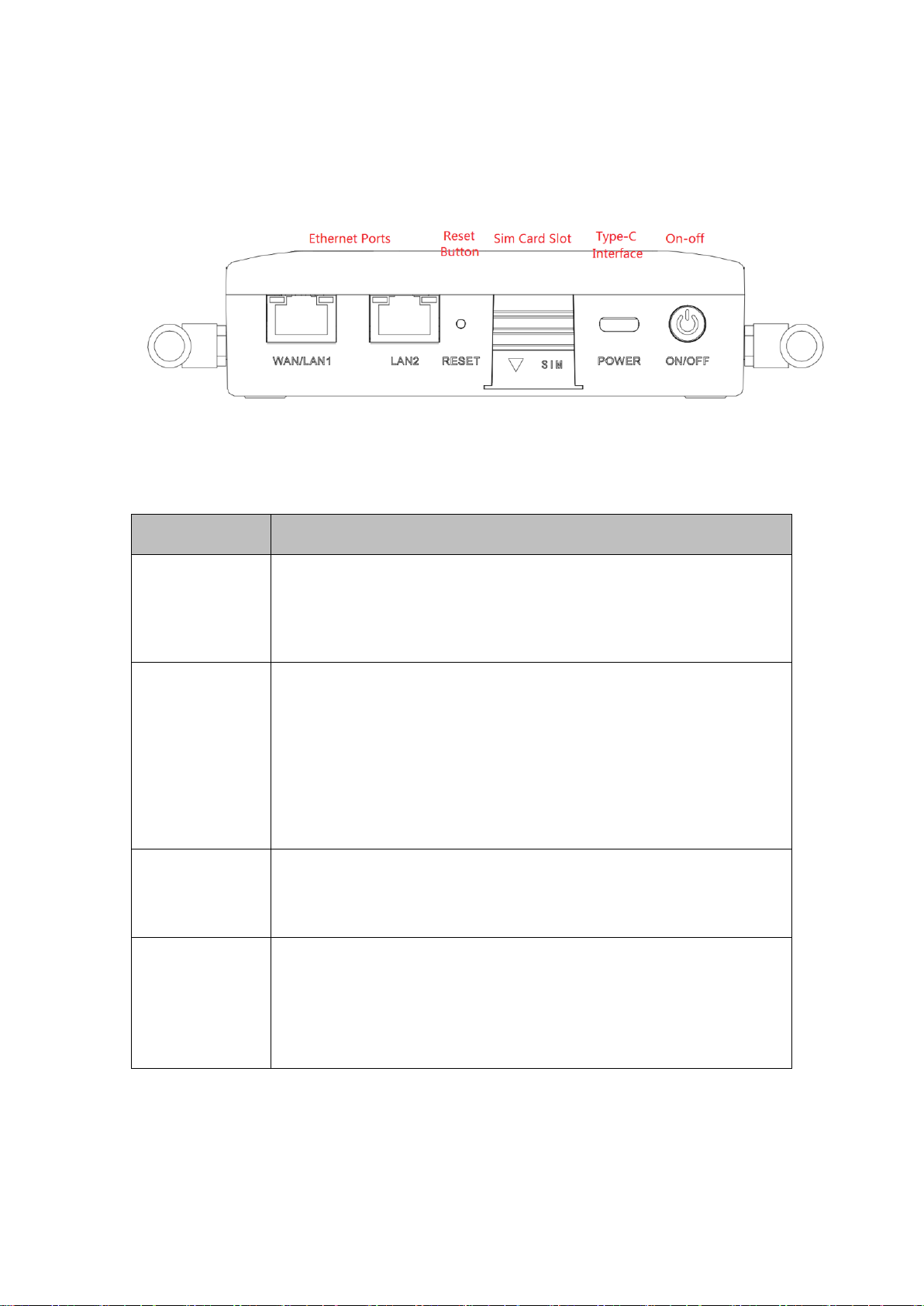
1.2 PANEL INTRODUCTION
1.3 LED INDICATION &SIGNAL
CR202 LED
Status
System
Off --- Power off
Blink in green --- Device starting
Steady in green --- Device working
Blink in yellow --- Upgrading
Network
Off --- Cellular disable
Blink in green --- Dialing up
Blink in yellow --- Dialing abnormal
Blink in red --- No SIM card, cannot read SIM card or modem abnormal
Steady in green --- Dialed up, signal level≥20
Steady in yellow --- Dialed up, 19≥signal level≥10
Steady in red --- Dialed up, 9≥signal level
Wi-Fi
Off --- Wi-Fi disable
Blink in green --- Wi-Fi connected, data transmitting
Steady in green --- Wi-Fi enable
Battery
Blink --- Battery charging
Steady --- Battery discharging
Green --- 80%<battery level ≤100%
Yellow --- 20%<battery level ≤80%
Red --- 0<battery level ≤20%
1.4 Reset to default settings

3
To restore to default settings via the reset button, please perform the following steps:
1. Press the RESET button immediately after power on the device.
2. When System LED is steady on, release RESET button, system LED will blink, and press the
RESET button again.
4. When System LED blinks slowly, release the RESET button. The device has been restored to
default settings and will start up normally later.

4
II. INSTALLATION
2.1 PREPARATIPNS
Precautions:
Please be sure there is 3G/4G network coverage. Avoid direct sunlight, away from heat source or
strong electromagnetic interference. First installation shall be done under direction of the engineer
recognized by InHand Networks.
•1 PC
OS: Windows 7, Windows 10, Windows 11
Ethernet port: At least one (10M/100M)
•1 SIM card:
Ensure the card is enabled with data service and its service is not suspended
because of an overdue charge.
•Power supply:
5V/2A Type-C interface
Internal battery
•Fixation:
Please place CR202 on flat level and have it installed in an environment with small
vibrational frequency.
The device shall be installed and operated in powered-off status!
2.2 INSTALLATION
2.2.1 SIM/UIM Card
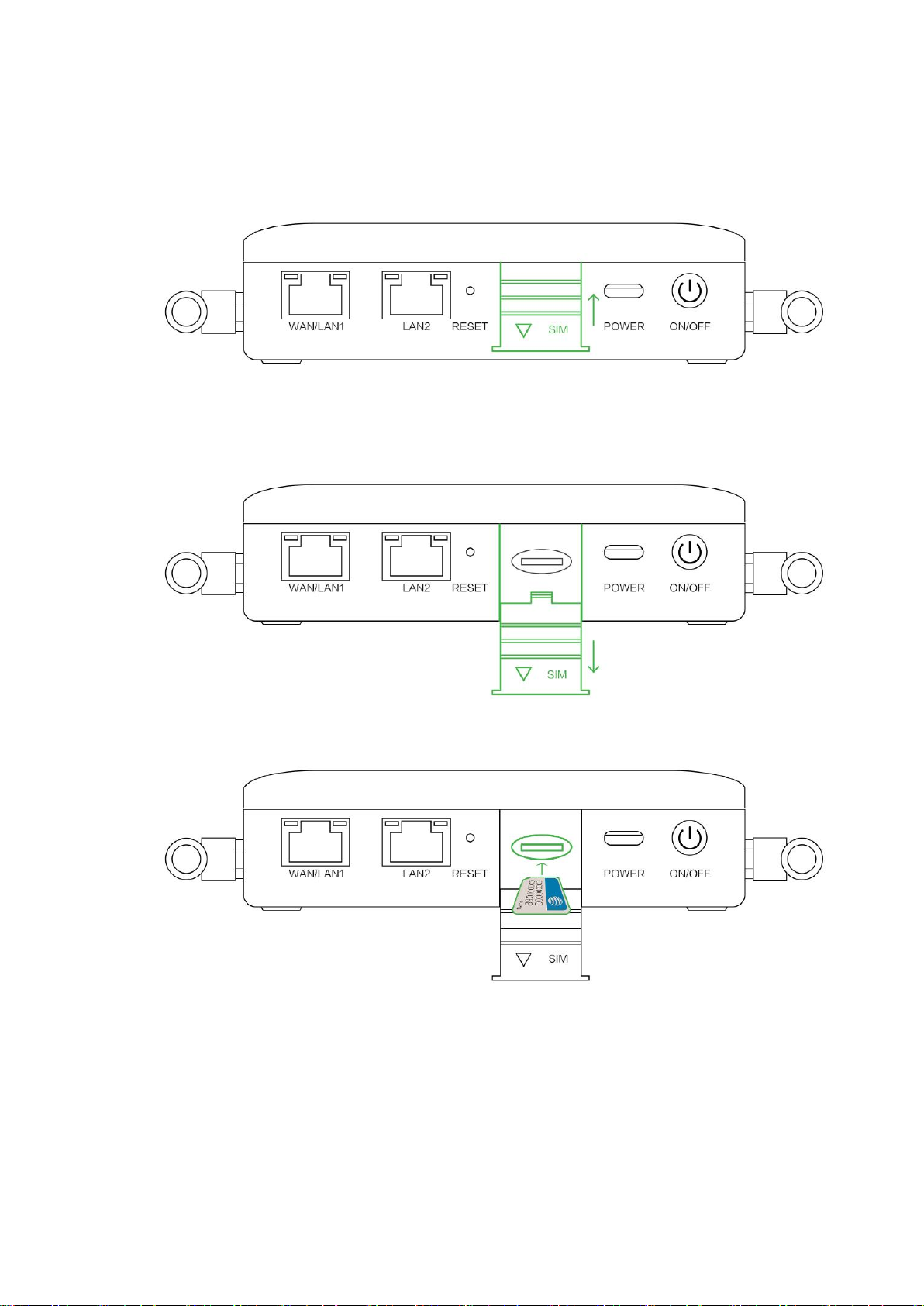
CR202 supports single nano SIM card or eSIM. Please install the SIM card like below if use nano

5
SIM card.
2.2.2Antenna
Slightly rotate the movable part of metal SMA-J interface until it cannot be rotated (at this time,
external thread of antenna cable cannot be seen). Do not forcibly screw the antenna by holding
Indice
Altri manuali InHand Router wireless