
INQ T2-218U Manuale utente

INQ T2-218U
User Guide

i
Contents
1Your phone ................................................ 1
Phone overview ............................................ 1
2Installation and Charging...........................2
Install the SIM card....................................... 2
Install the microSD card ................................ 2
Install the battery ......................................... 3
Charge the battery........................................ 3
3Getting Started ..........................................5
Turn phone on/off ......................................... 5
Set up screen lock ........................................ 5
Home screen................................................ 5
Monitor your phone’s status............................ 6
Open and switch applications .......................... 9
PIN and PUK .............................................. 10
4Calls ........................................................ 11
Make a call ................................................ 11
In-call options ............................................ 12
Answer & reject a call .................................. 12
Manage multiple calls .................................. 13
Work with the call log .................................. 14
Dial by voice .............................................. 15
5Text Entry................................................ 16
Use the onscreen keyboard .......................... 16
Edit text .................................................... 17

ii
Enter text by speaking................................. 18
6Messaging ............................................... 19
Create and send a text message ................... 19
Create and send a multimedia message.......... 19
Change messaging settings .......................... 20
7Email ....................................................... 21
Open email and the accounts screen .............. 21
Read and respond to a message.................... 21
Compose and send email ............................. 22
Add and edit email accounts ......................... 22
8Browser ................................................... 23
Open browser............................................. 23
Connect .................................................... 24
Download files............................................ 24
Change browser settings.............................. 25
9Contacts .................................................. 26
Open your contacts ..................................... 26
Create a contact ......................................... 27
Search for a contact .................................... 27
Import, export and share contacts................. 27
Call, text or email contacts ........................... 28
Synchronize contacts................................... 28
10 Settings ................................................... 29
Wireless & networks .................................... 29
Call settings ............................................... 29
Sound settings ........................................... 30

iii
Display settings .......................................... 30
Location & security settings .......................... 30
Application settings ..................................... 30
Account & sync settings ............................... 31
Privacy settings .......................................... 31
SD card & phone storage settings.................. 31
Language & keyboard settings ...................... 31
Voice input & output settings ........................ 31
Accessibility settings ................................... 31
Date & time settings.................................... 32
About phone .............................................. 32
11 Music ....................................................... 33
Open and play music ................................... 33
Use a song as a ringtone.............................. 35
12 Camera & camcorder................................ 36
Start camera & camcorder............................ 36
Camera ..................................................... 36
Camcorder................................................. 37
13 Gallery..................................................... 39
Open Gallery and view your albums ............... 39
Work with albums ....................................... 40
Work with pictures ...................................... 40
Work with videos ........................................ 41
14 Tools ....................................................... 42
Calculator .................................................. 42
Calendar ................................................... 42

iv
Clock ........................................................ 43
15 Applications ............................................. 45
FM Radio ................................................... 45
Google search ............................................ 45
Latitude .................................................... 46
Maps......................................................... 47
Navigation ................................................. 48
News and Weather ...................................... 48
Places ....................................................... 48
SIM Toolkit ................................................ 48
Warning
1
1Your phone
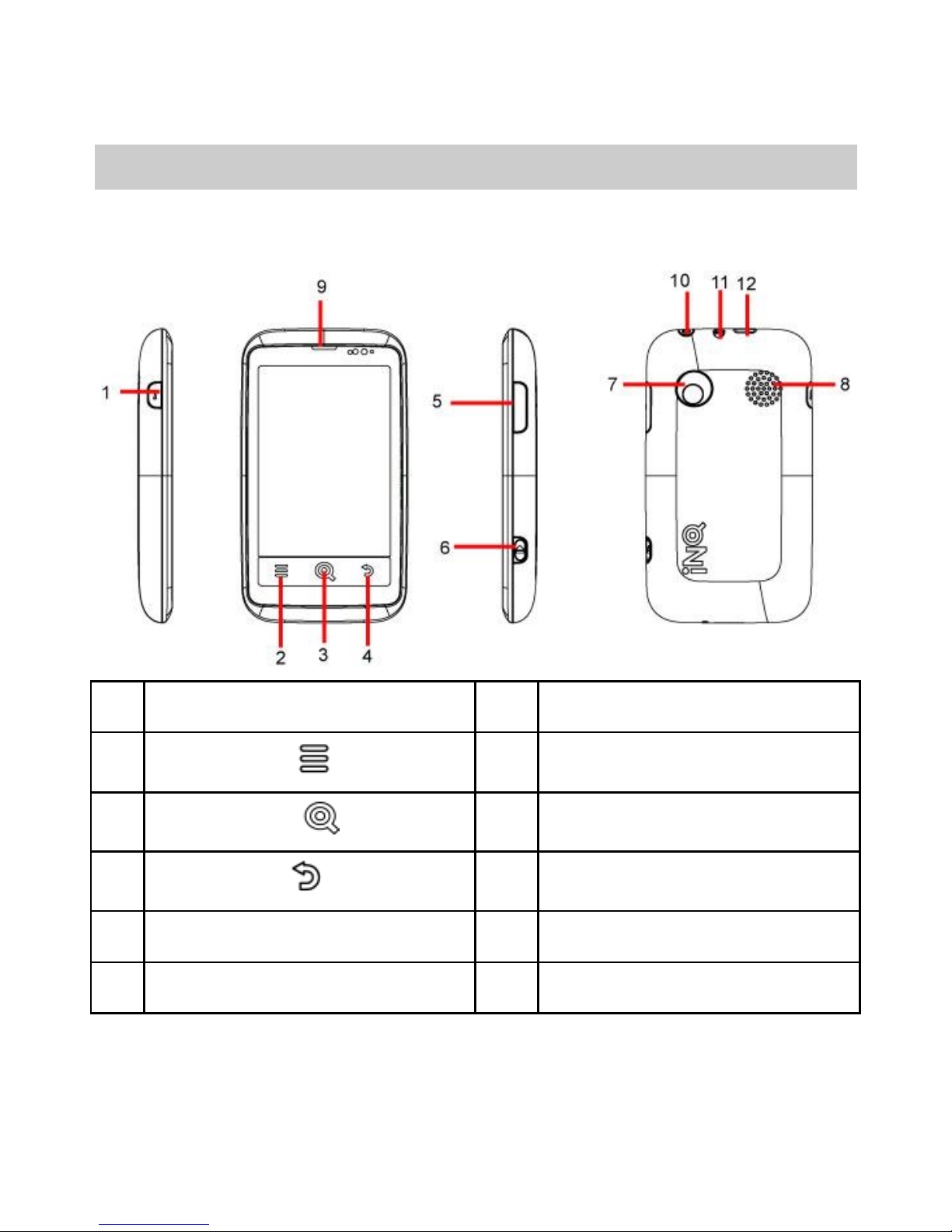
Phone overview
The following figure shows the appearance of your
phone and it is for your reference only.
1.
i key
7.
Camera
2.
Menu key
8.
Speaker
3.
Home key
9.
Earpiece
4.
Back key
10.
Power key
5.
Volume key
11.
Headset connector
6.
Camera key
12.
Micro USB connector
Tip: i key-press it first then press power key to come
into recovery mode.
2
2Installation and Charging
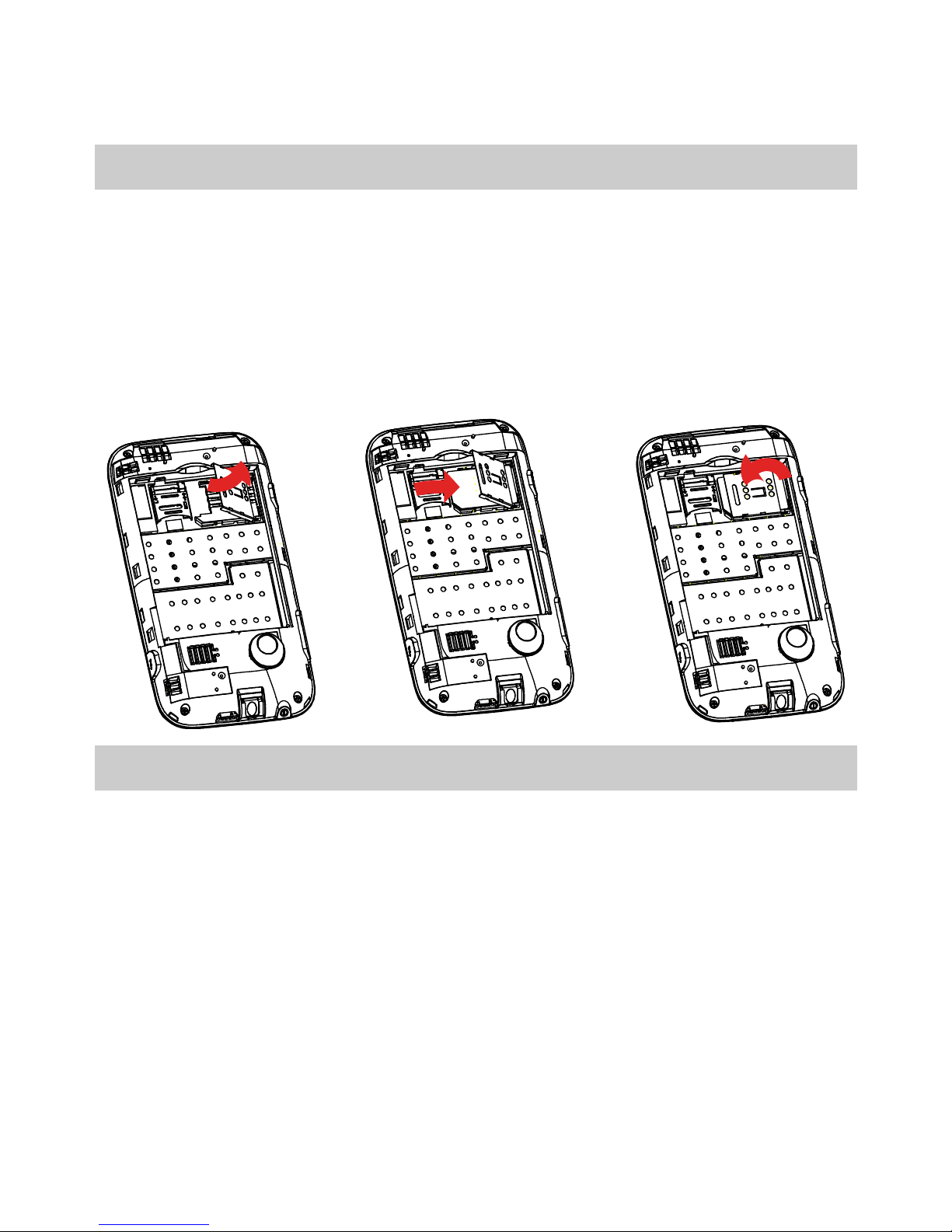
Install the SIM card
1. First unlock the cover shown as the graphic.
2. Install the SIM card, ensure that the golden contact
area on the SIM card is facing downward and that the
beveled edge of the SIM card is properly aligned with
that of the SIM card slot.
3. Finally, lock the cover.
Install the microSD card
1. Push up to unlock the back cover of the slot and then
open it.
2. Place the microSD card in the slot.
3. Close the back cover of the slot and then push down
to lock it.
Shown as the graphics:

3
Note:If no microSD card is included in the packing box,
a microSD card might be provided as a giveaway or you
need to purchase a microSD card separately.
Install the battery
1. Remove the back cover.
2. Insert the battery.
Do as follows:
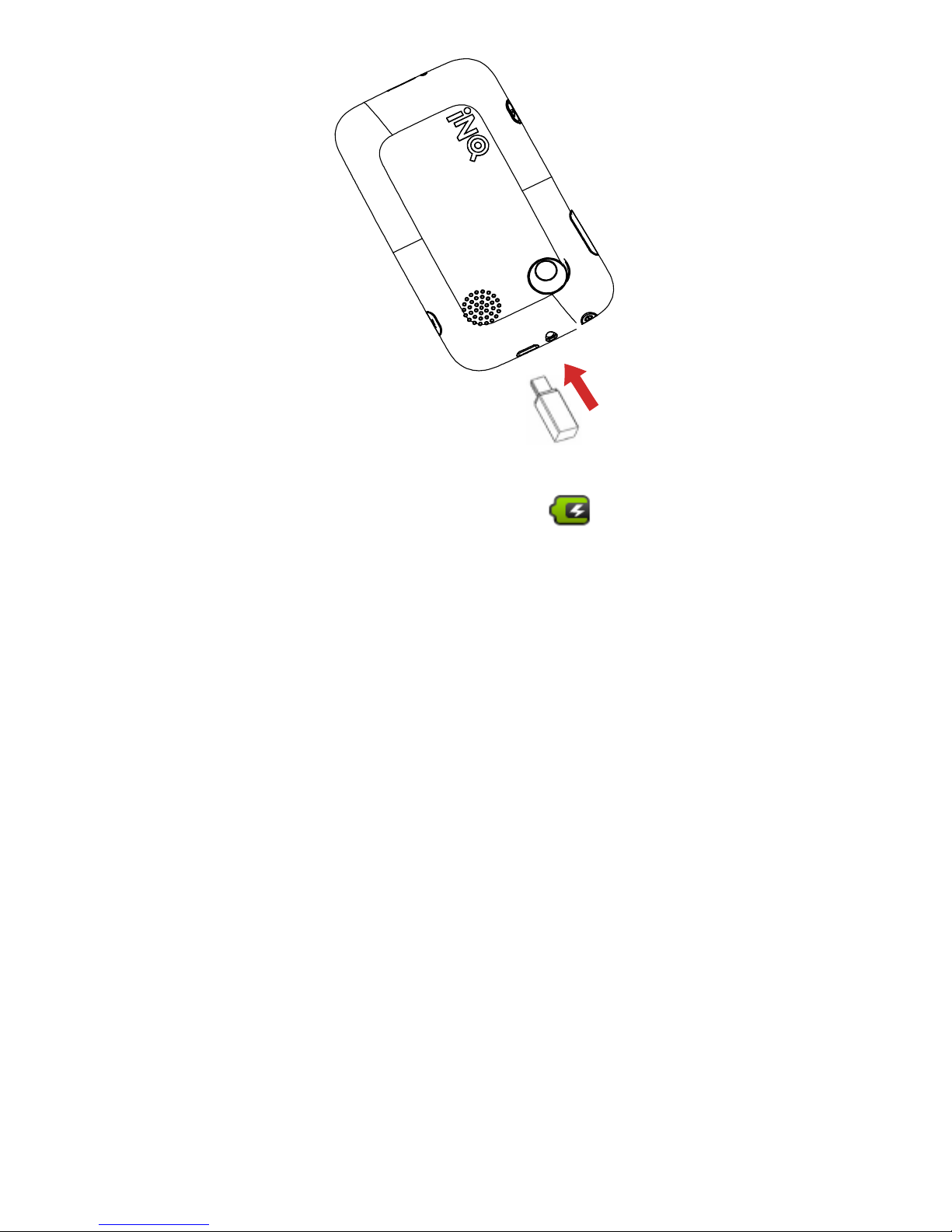
Charge the battery
1. Connect the charger to the charger jack on the
phone.
4
2. Connect the charger to a power socket. The charging
starts, with the charging icon displayed in an
animated state.
Note:If the battery power is exhausted when you
charge the battery, the charging icon might appear on the
screen a few minutes later when charger is connected to
the power socket.
3. When the charging icon becomes static, indicating
that the battery is full, disconnect the charger from
the power socket.
4. Disconnect the charger from the phone.
5
3Getting Started
Turn phone on/off
To turn on your phone, press and hold the Power key
(on top of the phone). To turn off your phone, press and
hold the Power key, then touch Power off on the
screen.
Set up screen lock
Select > Settings > Location & security > Set
up screen lock. You can choose Pattern, PIN, or
Password to set up screen lock.
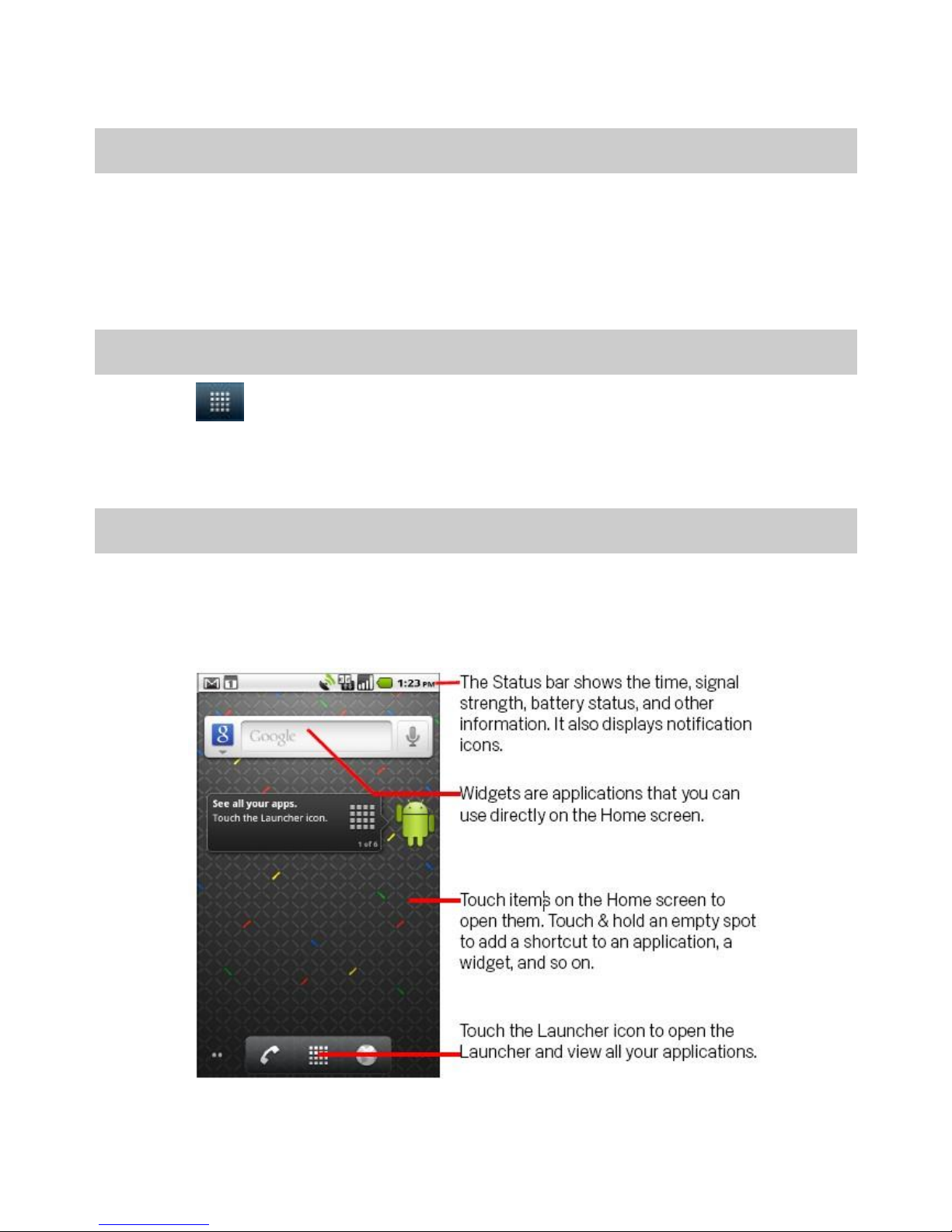
Home screen
If you don’t use the phone for a while, press the power
key to wake up the phone, then drag the lock icon to the
right.
Indice
Altri manuali INQ Telefono cellulare


