
InstaBox i50 Manuale utente

i50
USER’S MANUAL
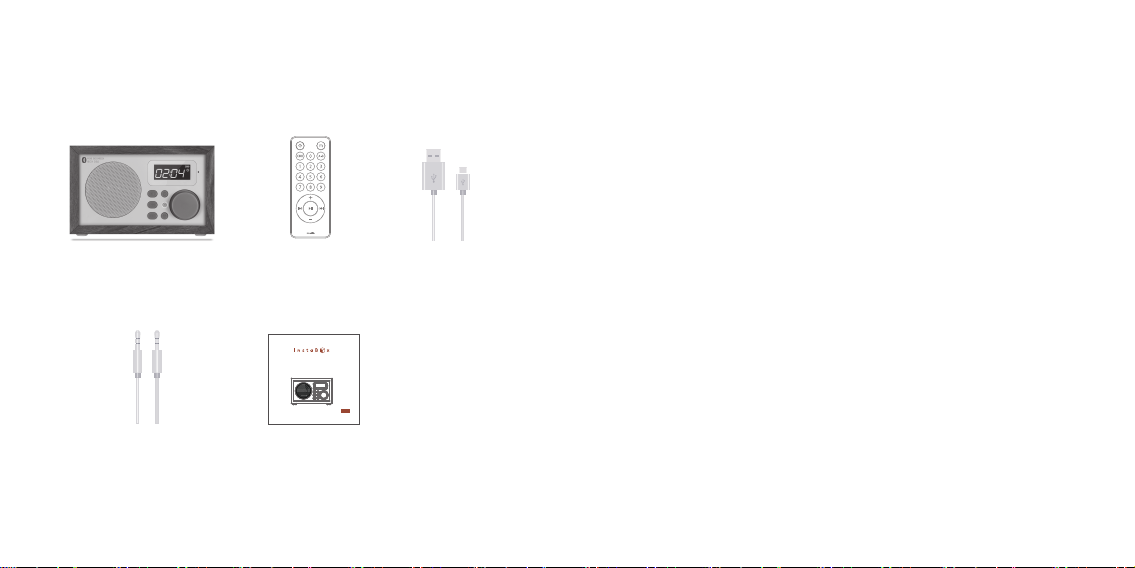
② Remote x1 ③ USB Cable x1
④ Audio Cable x1 ⑤ User’s Manual x1
① i50 x 1
• Output power: RMS 4W (THD + N = 10%, f0 = 1KHZ)
• Signal to noise ratio: ≥ 70dBA
• Distortion (%): ≤1%
• Frequency response: 100Hz ~ 18KHz
• Audio input mode: Bluetooth, AUX, USB, TF card, FM
• Volume adjustment form: 360 degree knob adjustment
• Speaker: Φ57mm, 4 , 5W
• Power supply: lithium polymer rechargeable battery 1800mAh 3.7V
• Charging power: DC5V ≥ 600mA
• AUX maximum input sensitivity: 800mV
• Working environment temperature: 0ºC ~ +50 ºC
• Product specifications: 155mm / 73mm / 101mm
• Net weight: 0.6kg
Package Includes Specification
RF50
User’s Manual
01 0201 02
01
01
07
04
05
06
03
02
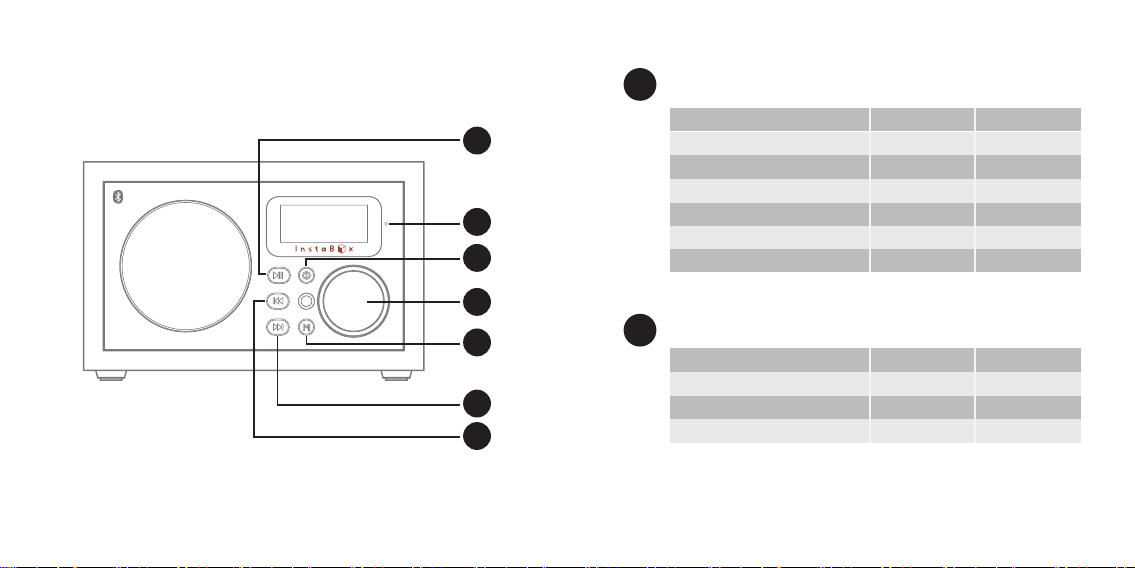
i50 Front View Play / Pause Button
03 04
Radio Mode
Bluetooh Mode
Bluetooh Mode(Call received)
Time Mode
When Playing External Audio
When Playing U disk/TF Card Music
Short Press
mute / play
play / pause
answer / hand up
-
mute
play / pause
auto search
pairing
-
alarm set
-
-
Long Press
02 Back Button
Music Mode (U Disk/SD/TF card)
Bluetooh Music Mode
Radio Mode
Short Press
previous track
previous track
previous channel
rewind
-
reverse search
Long Press

03
04
06
08
09
10
13
11
12
Forward Button
Long press—
for 3 seconds for ON/OFF;
for 8 seconds to clear all settings
Short press to select: CLOCK/USB/SD/FM/AUX /BLUETOOTH
Note: any input not present will be skipped.
Time Mode: Long press —clock setting mode (see below).
Bluetooth Mode: Long press—refuse incoming phone call
On / Off Button 05
Works in any Playing Status
Turn clockwise —-increase the volume
Turn counterclockwise —-reduce the volume
Volume Control
Mode Button
07 Microphone
i50 Rear View
05 06
Music Mode (U Disk/SD/TF card)
Bluetooh Music Mode
Radio Mode
Short Press
next track
next track
next channel
fast forward
-
forward search
Long Press

11
09
08
12
10
13
Insert micro USB cable for charging internal battery or for USB
audio cable input
Reset Hole
Audio cable connection for computer, phone, or other source for audio input.
Insert paper clip or other pointed device and hold button for 3 seconds to reset
i50 to factory defaults settings.
When charging, the indicator will illuminate red, when fully charged, green.
Charging time may be increased if i50 unit is in use during charging cycle.
TF card input for MP3 audio files.
USB port for audio input
AUX Audio Input Port
Charging Indicator
TF or micro SD Card Input Port
USB Type A Input Port
USB Micro B Input/Charging Port
i50 Remote Control
07 08
① On / Off Button
Long press— place radio in
standby mode
Note: the remote is only available
when the radio is on or in standby.
② Music Function Button
Loop, Single Play, Random
③ 0-9 Number Buttons
Music mode: Long press ‘0’
selects equalizers
Normal, Rock, Pop, Class, Jazz,
Bass
④ Volume Increase
⑤ Back Button
Music mode:
Short press - previous track
Long press - rewind
Bluetooth Music Mode:
Short press - previous track
Radio Mode:
Short press - previous channel
Long press - reverse search
⑥ Volume Decrease

Installing the battery in the remote
You must install the battery with the positive (+) side up.
Note: The i50 comes with a CR2025, 3-volt Li cell. If you want longer life for your
remote, use a CR2032. The only difference is that the CR2032 is a tiny bit thicker but it
still fits nicely in the remote control.
When installing the battery ensure that the positive contact pin is located next to the
rim of the battery and not forced below the disc.
09 10
⑩ Play / Pause Button
Radio Mode: Short press—mute/play
Long press—auto-search
Bluetooth Mode: Short press — play/pause
Long press— pairing
Bluetooth Mode (Call received): Short press—answer/hang up
Time Mode:
Long press—alarm set
When Playing External Audio: Short press—mute
When Playing U disk / TF Card Music::Short press—play/pause
⑦ Mode Button
Short press to select:
CLOCK/USB/SD/FM/AUX /BLUETOOTH
Note: any input not present will be skipped.
Time Mode:
Long press —clock setting mode (see below).
Bluetooth Mode: Long press—refuse incoming phone call
⑧ A to B Replay
⑨ Forward Button
Music Mode: (U Disk / SD Card):
Short press—next track
Long press—fast forward
Bluetooth Music Mode:
Short press—next track
Radio Mode:
Short press—next channel
Long press—forward search

1. Short press the Mode and make sure the radio in clock display
2. Press and hold the Mode button for 3 seconds then release.
3. Use the Volume knob to adjust settings, then press and release Mode button to
select settings
4. Set the hour
5. Set the minutes
6. Press the Mode to finish settings
7. The clock will only display in 24-hour (military time) format.
8. After setting the clock choose the desired Sleep time for the i50. Choices available
are: OFF, 30, 60, 90, 120 minutes.
The Instabox i50 has 2 convenient alarms that can be set independently. Once set, the
alarms will repeat twice daily.
1.Press Mode to get to the time function then press and hold Play for 3 seconds.
2.Press Mode to set the hour. Use the volume control to select the desired hour.
3.Press Mode and repeat the same steps to set the minutes.
4.Press Mode to confirm setting. The alarm sign will be flashing.
5.Press Play to turn the alarm ON or OFF. When ON is selected the alarm sign will
remain on the screen.
6.Once the alarm is set, long press Mode or Play to exit the settings or wait for 10
seconds.
7.To set additional alarms follow the steps above. After step 1, use the Volume
Control to choose which of the two alarms to set – then follow the remaining steps.
Setting the clock
Setting the alarm
11 12
There are three choices for the alarm ring:
1.The beep sound of the radio is automatically set for the alarm. This is the default.
2.Your favorite FM station can be selected as the alarm ring. Follow these steps using
the remote:
a)Select your favorite FM station, long press “1”. The screen shows “ON”
when complete.
b)To change your selection, long press “1”, when the screen shows “OFF”,
alarm clock ring is set to the default “Beep” sound.
Note: once the ring is set to an FM station, it will last for 30 minutes.
3.You can use the TF/SD Card/USB music as your alarm clock ring
a)Select a favorite song (MP3 format) from the TF/SD card or USB input. Using the
remote control, long press “1”. The screen shows “ON” when complete.
b)To change your selection, long press “1”, when the screen shows “OFF”,
alarm clock ring is set to the default “Beep” sound.
Note: You must have the TF/SD card/U disk in inserted when the alarm is ON.
Setting the alarm clock ring

Using the FM Radio
1.You can scan the FM band and save desired stations.
a) Click Mode and select the FM function
b)Long press Play on the radio or the remote control. The radio will automatically
scan the FM band from 87.5-108.5MHz and save stations found as P01-P50.
The Instabox i50 can store 50 preset radio stations.
2.You can step through saved stations using the forward and back buttons on the
front panel or on the remote. Select any previously stored channel by pressing the
numbers (1-50) on the remote, then press Play. If no station has been saved in a
selected channel Err will display.
3.You can semi-automatically scan and save FM stations:
a)Hold the forward or back button to scan through available radio stations. To save
a selected station, long press ‘2’. Your selection is saved in the next available
preset position.
4.You may select any FM station directly by entering the station frequency then press
Play.
(e.g.: for 105.1MHz = Press 1051 + Play).
5.To momentarily mute the radio press the Play button on the remote or on the front
panel.
Note: The i50 is equipped with only an internal antenna. Reception may be improved
by relocating the radio or placing it near a window. Signal reception may be better
outdoors.
Playing music from a micro-SD card or a Flash
Ports are provided on the rear panel of the i50 for a Micro-SD card and for a USB
Flash drive. When either type of device is plugged into the i50, TF or USB will appear
on the screen and MP3 format music will begin to play. The i50 supports memory
sources up to 32GB at a maximum bit rate of 320kbps. All music selections must be in
MP3 format.
13 14
• Press the forward or back button to play the next or previous selection.
• Press and hold the forward or back button to fast-forward or rewind a selection
• Press the play button to pause/play the music.
• You can use the remote to numerically select a track. (Press 30 + Play= Play song
30)
• Press and hold ‘0’ to select one of six different sound profiles:
NORMAL / ROCK / POP / CLASS / JAZZ / BASS
• You can record segments of a selection for a playback repeat. Press A-B. “P—A”
will show on the display as the segment is saved. End the segment by again
pressing A-B, “P—B” will display. The segment will now play repeatedly until A-B
is pressed again. The segment will stop and “P—E” will display.

Using the external audio cable provided, you can play audio from any external source
using the rear panel Aux audio input port. “AUX” will display on the front panel
when the cable is used. Use the play button to mute the input. Note: this is an input
only port.
1.The InstaBox i50 supports Bluetooth version V4.0+EDR
2.Press the Mode button or ‘m’ on the remote to turn on Bluetooth. ‘BLUE’
appears on the screen. When you hear ‘DO-DI’ the Bluetooth is on and ready to
pair.
3.Turn on the Bluetooth on your device and search for D50.
4.The i50 will connect in about 20 seconds and the external device content will begin
to play.
5.Press the play button to play/pause the device playback
6.If the device content has tracks use the forward or back controls to play next or
previous tracks.
7.The i50 will receive phone call audio and display ‘HP’ during a call. Press and
hold the Play button to disconnect or auto-connect a call.
Using the External Auxiliary Input
Bluetooth and InstaBox i50
Battery Charging Management
Friendly Reminder
• The battery indicator on the upper right of the screen displays the amount of
battery charge
• The i50 is charge from a micro USB connector on the rear panel. It requires DC 5v
600MA for charging. The battery reaches full charge in 4 to 6 hours. The charge
light on the rear panel changes from red to green when the battery is fully charged.
• The battery has a capacity of 1800 mAH. You can also use this battery as an
emergency backup for charging a cell phone. Plug your USB phone charging cable
into the USB audio input on the back of the i50 and your phone will commence
charging.
• It is normal that the radio may get hot when charging or using.
• Please turn off the power and disconnect all the outside devices of your radio
before cleaning.
• Please do not expose to fire or cigarettes and prevent contact with water or
moisture.
• Please make sure your radio and the accessories stay dry and do not drop, throw or
use your radio violently.
• Please use any antistatic soft cloth to clean your radio. Do not use any detergent
which contains any chemical material such as alcohol, benzene etc.
• Avoid using your radio and the accessories in extreme heat or cold temperatures.
• Do not attempt to take apart or repair your radio, or free warranty is void.
15 16
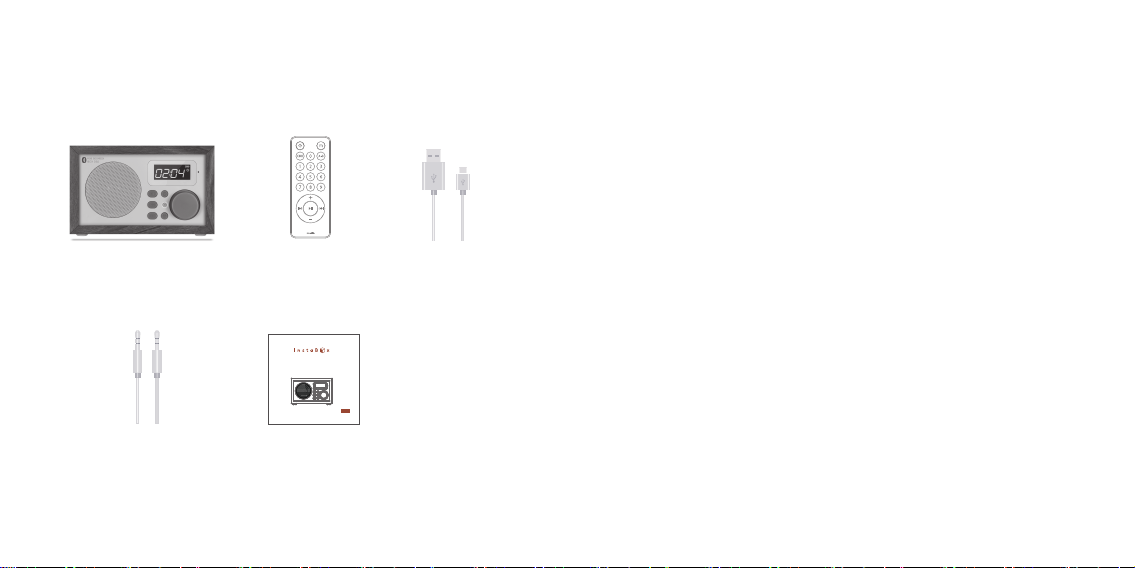
② Fernbedienung x1 ③ USB Kable x1
④ Audio Kable x1 ⑤ Bedienungsanleitungl x1
① i50 x 1
• Ausgangsleistung: RMS 4W (THD + N = 10%, f0 = 1KHZ)
• Vorgeschriebener Störabstand: ≥ 70dBA
• Verzerruung (%): ≤1%
• Frequenzgang: 100Hz ~ 18KHz
• Audio Eingangsschnittstelle: Bluetooth, AUX, USB, TF card, FM
• Typ der Lautstärke-Steuerung: 360°Knopf Steuerung
• Lautsprecher: Φ57mm, 4 , 5W
• Stromversorgung: Lithium polymer aufladbare Batterie 1800mAh 3.7V
• Ladestrom: DC5V ≥ 600mA
• AUX max. Eingangsempfindlichkeit: 800mV
• Arbeitstemperatur: 0ºC ~ +50 ºC
• Abmessungs: 156mm / 116mm / 101mm
• Netto Gewicht: 0.7kg
Lieferumfang Technische Daten
RF50
User’s Manual
01 0201 02
Indice
Lingue:


