
IPEX PH232U-2 Series Manuale utente

Doc No: PH232Ux2-UM-001
USER’S MANUAL
IPEX
(IP Electronix)
13 January 2022
PH232Ux2
#2 RS-232 Over USB ISOLATED MULTIPORT

www.ipelectronix.com
IPEX (IP Electronix) PH232Ux2: User’s Manual
Page 2 of 27 Doc No. : PH232Ux2-UM-001
13 January 2022

www.ipelectronix.com
IPEX (IP Electronix) PH232Ux2: User’s Manual
Page 3 of 27 Doc No. : PH232Ux2-UM-001
13 January 2022
CONTENTS
1. INTRODUCTION ........................................................................ 4
2. SPECIFICATIONS ....................................................................... 4
3. PACKAGE CHECKLIST................................................................. 5
4. TOP VIEW................................................................................. 6
5. BOTTOM VIEW ......................................................................... 6
6. FRONT VIEW............................................................................. 6
7. BACK VIEW............................................................................... 6
8. INSTALLATION ON WINDOWS................................................... 7
9. MANUAL INSTALLATION ON WINDOWS.................................. 14
10. CHANGING COM PORT NUMBER .......................................... 20
11. IDENTIFYING DEVICE PORTS COM NUMBER.......................... 23
12. RS-232 SERIAL PORTS PIN CONFIGURATION ......................... 23
13. RS-232 CONNECTING METHODS ........................................... 24
14. GUARANTEE......................................................................... 27
15. TECHNICAL SUPPORT ........................................................... 27
www.ipelectronix.com
IPEX (IP Electronix) PH232Ux2: User’s Manual
Page 4 of 27 Doc No. : PH232Ux2-UM-001
13 January 2022
1. INTRODUCTION
IPEX PH232Ux2 is a USB Adapter Multiport that provides #2 Serial COM Ports via its USB connection
and is compatible with RS-232 standard devices RXD, TXD, RTS, CTS, DTR, DSR and GND signals.
PH232Ux2 is fully Plug & Play a and enables your laptop or workstation with the ability to
communicate between a USB port and up to #2 RS-232 serial peripherals with baud-rate from
300bps to 230400bps simultaneously.PH232Ux2 is Full-Duplex converter and supports Point-to-
Point connection.
PH232Ux2 supports a wide range power supply and is working with DC voltage between 8V to 48V.
Protection against Surge, ESD and EMI is considered in its design and also has 3kV insulation between
USB and RS-232 sides. Furthermore, all the ports are insulated from each other too.
PH232Ux2 is designed for industrial usage and is useful for Industrial Automation,
Telecommunications, SCADA Systems and DCS Systems …
PH232Ux2 comes complete with drivers for Microsoft Windows. Drivers are also available for Linux,
Mac OS and Android.
2. SPECIFICATIONS
USB to RS-232 Bi-Directional Converter;
Number of Ports: #2 RS-232 Serial Port, #1 USB Port;
Serial Standard: Meets or Exceeds the Requirements of TIA/EIA-232-F and ITU v.28 Standards;
RS-232 Signal (Full Handshake Support): TxD, RxD, DTR, RTS, DSR, DCD, GND;
RS-232 Parity: Even, Odd, None, Mark and Space; Selectable;
Hi-speed USB 2.0 supported (up to 480 Mbps);
Fully Plug & Play;
Bus Powered (No External Power Supply Required);
Serial Transmission Speed up to 230.4 kbps;
Driver Supported: Microsoft Windows, Linux, Mac OS and Android (32 & 64 Bits) Operating
Systems;
Power (Green) LED Indicator;
Transmit (Blue) and Receive (Yellow) LED Indicator for All Ports;
ESD Protection: RS-232 Bus-Pin ESD Protection Exceeds ±15 kV Using Human-Body Model (HBM);
Dimensions: 145mm x 118mm x 27mm (5.70in x 4.65in x 1.06in);
Operating Temperature: -10°C to +70°C (+14°F to +158°F);
1 Year Guarantee and 5 Years Support.

www.ipelectronix.com
IPEX (IP Electronix) PH232Ux2: User’s Manual
Page 5 of 27 Doc No. : PH232Ux2-UM-001
13 January 2022
3. PACKAGE CHECKLIST
Before installing the PH232Ux2, verify that the package contains the following items:
1) #1 PH232Ux2 Multiport 2) #1 USB Cable
3) #1 Document and Driver CD-ROM 4) #2 DB9 Female Connector
5) #1 220V AC to 12V DC Adaptor 6) #2 Din Rail Brackets with the corresponding screws
NOTE: Notify your sales representative if any of the above items is missing or damaged.

www.ipelectronix.com
IPEX (IP Electronix) PH232Ux2: User’s Manual
Page 6 of 27 Doc No. : PH232Ux2-UM-001
13 January 2022
4. TOP VIEW
5. BOTTOM VIEW
6. FRONT VIEW
7. BACK VIEW
www.ipelectronix.com
IPEX (IP Electronix) PH232Ux2: User’s Manual
Page 7 of 27 Doc No. : PH232Ux2-UM-001
13 January 2022
8. INSTALLATION ON WINDOWS
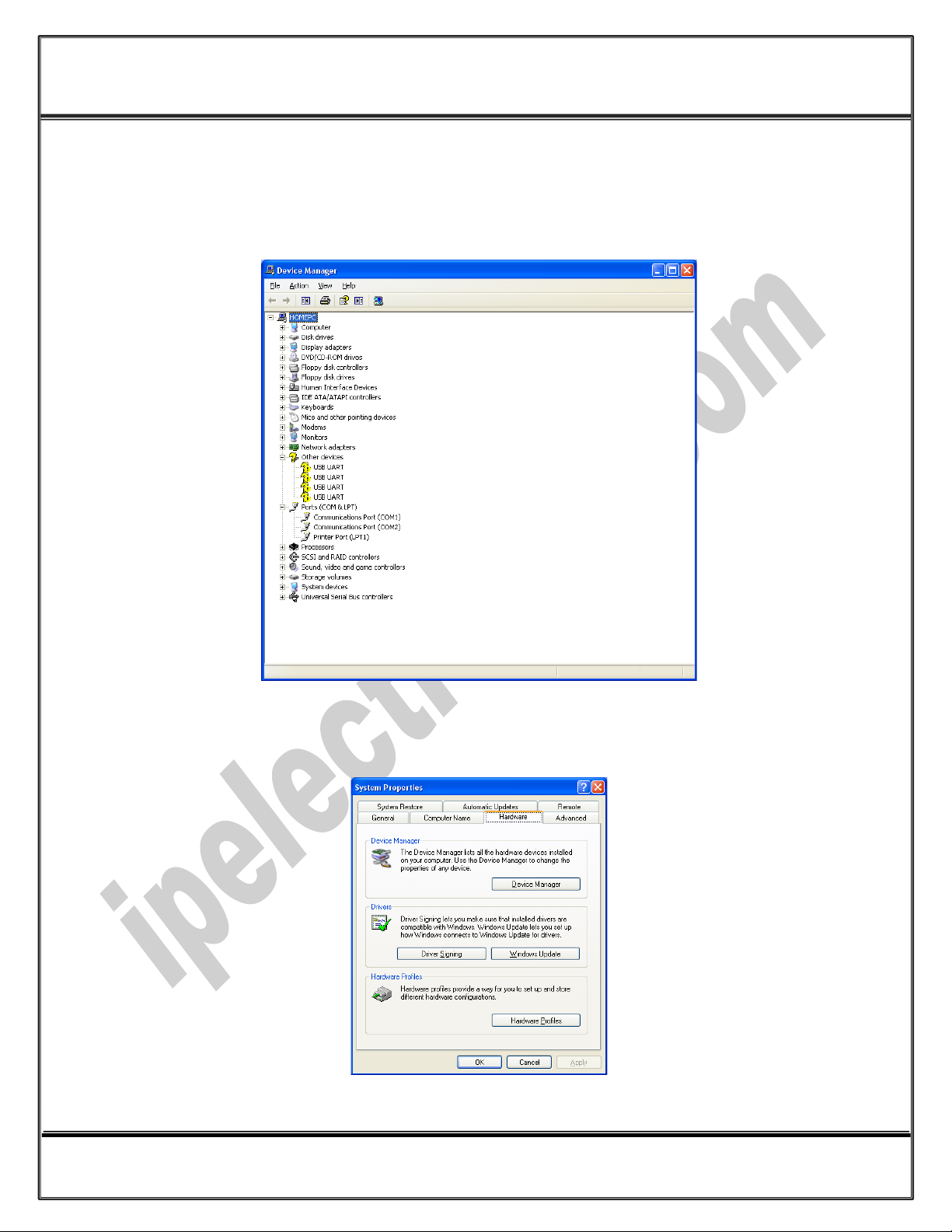
After you plug PH232Ux2 to USB port, you can see new devices in the Device Manager window as
below:
(To run Device Manager, right click on My Computer, select Properties and then select Hardware tab,
finally click on Device Manager button like following picture or simply use "WIN-KEY + R" and then type
DEVMGMT and press Enter)

www.ipelectronix.com
IPEX (IP Electronix) PH232Ux2: User’s Manual
Page 8 of 27 Doc No. : PH232Ux2-UM-001
13 January 2022
However, installation progress will be start automatically, and following window will be seen,
Select option "No, not this time" and then click "Next",

www.ipelectronix.com
IPEX (IP Electronix) PH232Ux2: User’s Manual
Page 9 of 27 Doc No. : PH232Ux2-UM-001
13 January 2022
Select "Install from a list or specific location (Advanced)" and click "Next",
Select "Include this location in the search:" and click on "Browse",

www.ipelectronix.com
IPEX (IP Electronix) PH232Ux2: User’s Manual
Page 10 of 27 Doc No. : PH232Ux2-UM-001
13 January 2022
Select "Driver Folder" on the Installation CD and click OK.
Now, click on "Next",
Indice
Altri manuali IPEX Hardware per computer

Manuali Hardware per computer popolari di altre marche

EMC2
EMC2 VNX Series Manuale del proprietario

Panasonic
Panasonic DV0PM20105 Manuale utente

Mitsubishi Electric
Mitsubishi Electric Q81BD-J61BT11 Manuale utente

Gigabyte
Gigabyte B660M DS3H AX DDR4 Manuale utente

Raidon
Raidon iT2300 Manuale utente

National Instruments
National Instruments PXI-8186 Manuale utente


