
iSMA CONTROLLI iSMA-B-AAC20 Manuale utente

www.ismacontrolli.com
DMP236en | 1st Issue rev. 2 | 02/2022
iSMA-B-AAC20
User Manual
MailService Kit

iSMA-B-AAC20 MailService Kit User Manual
www.ismacontrolli.com
DMP236en | 1st Issue rev. 2 | 02/2022
page 2 of 11
Table of Contents
1 Introduction .................................................................................................................................... 3
1.1 Revision History.......................................................................................................................................3
2 Installation of iSMA Mail Service Kit .......................................................................................... 4
2.1 Sockets Available in the iSMA-B-AAC20 Controller ........................................................................4
2.2 Installing Kit..............................................................................................................................................4
2.3 Removing Kit ............................................................................................................................................5
3 MailService Kit ................................................................................................................................ 6
3.1 EMailService.............................................................................................................................................7
3.2 OutAccount ..............................................................................................................................................8
3.3 EMailAlarmRecipient..............................................................................................................................9

iSMA-B-AAC20 MailService Kit User Manual
www.ismacontrolli.com
DMP236en | 1st Issue rev. 2 | 02/2022
page 3 of 11
1 Introduction
This manual contains information about the iSMA MailService kitin the AAC20 controller.
The iSMA MailService kit was developed in order to give the user a possibility to send
alarm notifications via e-mail. The iSMA MailService kit can be used in all AAC20 hardware
versions with all firmware versions.
Figure 1. AAC20-LCD controller
1.1 Revision History
Rev. Date Description
1.0 23 Feb 2018 First edition
1.1 22 Apr 2020 Company data update
1.2 28 Feb 2022 Rebranded
Added information about available sockets
Table 1. Revision history
iSMA-B-AAC20 MailService Kit User Manual
www.ismacontrolli.com
DMP236en | 1st Issue rev. 2 | 02/2022
page 4 of 11
•
•
•
2 Installation of iSMA Mail Service Kit
2.1 Sockets Available in the iSMA-B-AAC20 Controller
The iSMA-B-AAC20 controller has 16 sockets for Modbus network. 3 out of 16 sockets are
permanently occupied for:
Modbus Server;
SOX;
web server.
Consequently, there are 13 sockets left to use in the device, for example, the Modbus TCP
network can communicate with 13 devices with different IP addresses and connect them
to application (adding more devices automatically forces them into the fault status). Also,
adding any of the iSMA Weather or iSMA MailService kits occupies 1 socket per each kit
(which becomes apparent after adding the kit and its components, saving the application,
and rebooting the controller). The iSMA MailService kit can occupy more sockets if the
mail service is configured for one account on one host–each next host occupies next
sockets.
2.2 Installing Kit
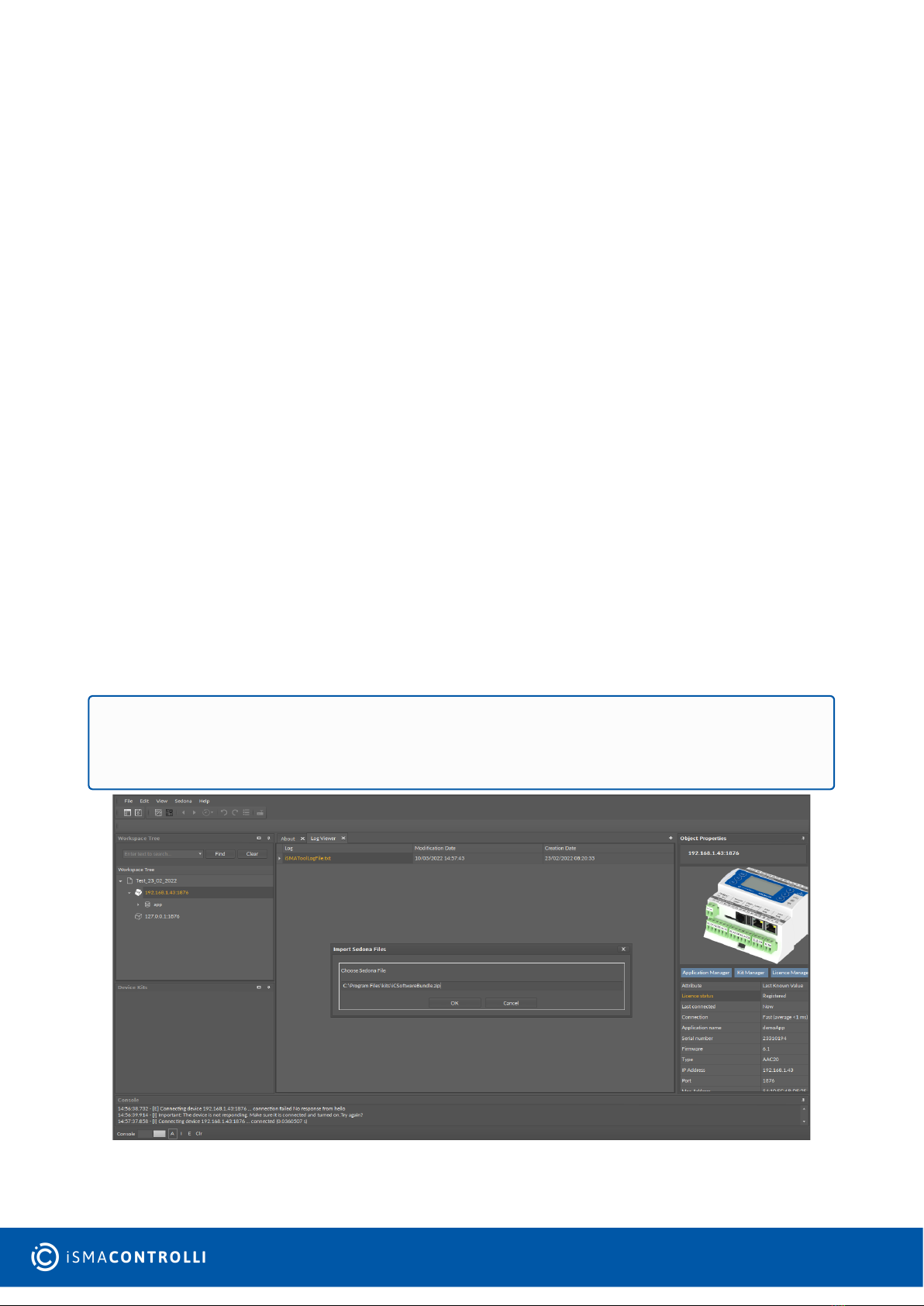
To install the iSMA MailService kit, import the kit to the iSMA Tool software (possibly as
part of the package of various kits in a zip file). In order to do this, use an application from
the Sedona -> Import Sedona Files.
After a successful import of files, upload them to the device using the Kit Manager from
Sedona Tools package.
Figure 2. Sedona installer
WARNING! Before programming the iSMA MailService, please check if the latest kit
version is used. The latest kit is available at iSMA CONTROLLI support web site:
ismacontrolli.com.
iSMA-B-AAC20 MailService Kit User Manual
www.ismacontrolli.com
DMP236en | 1st Issue rev. 2 | 02/2022
page 5 of 11
After a successful import of all packages, upload the files to your device using the Kit
Manager tab, available from the Object Properties window or at the right-click on the
device name in the iSMA Tool Tree window.
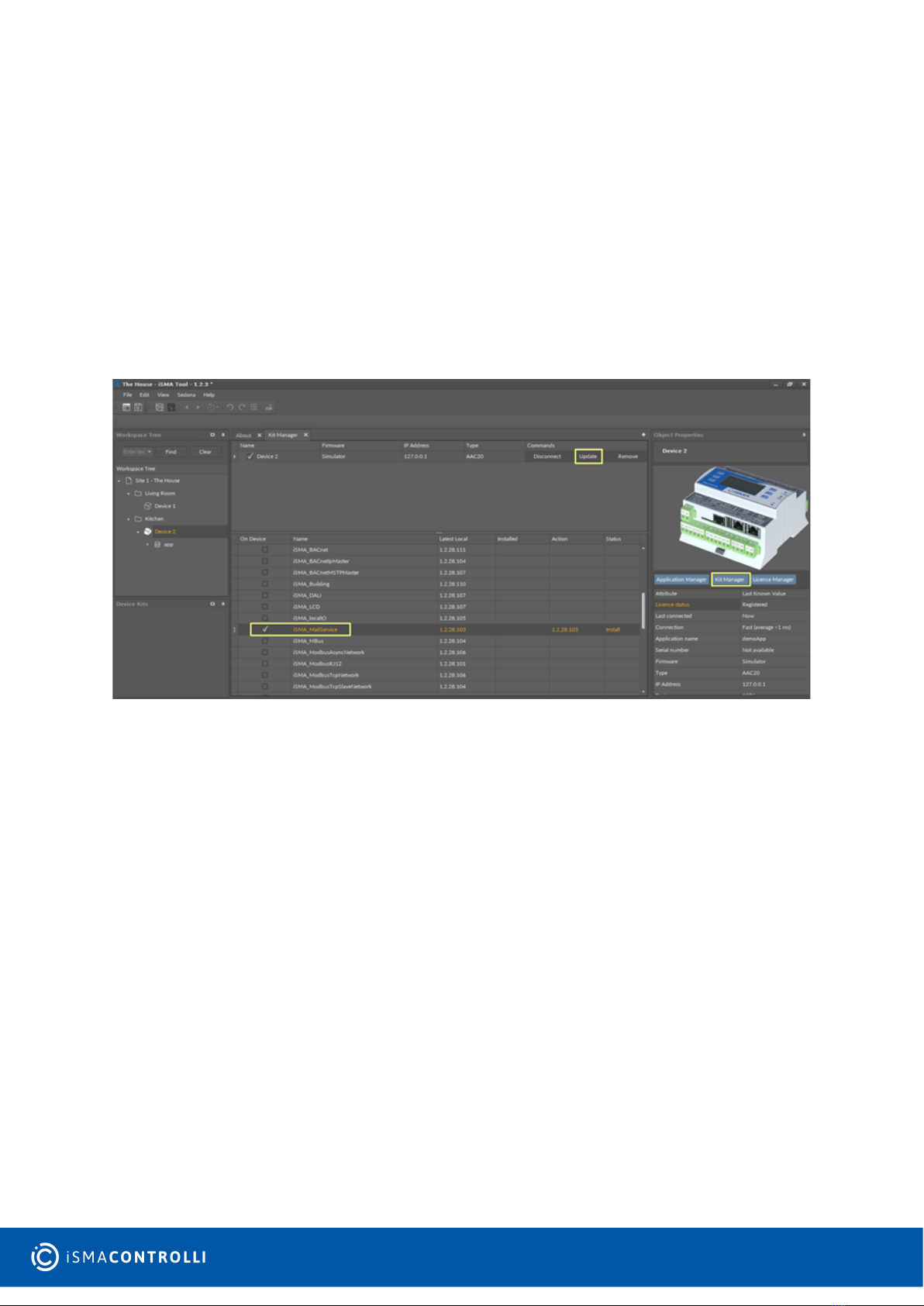
To install a selected kit:
Step 1: Open the iSMA Tool, connect to the device, and go to the Kit Manager tab,
available from the Object Properties window or at the right-click on the device name in
the Workspace Tree window;
Step 2: Select the iSMA MailService kit, then click the Update command as per the figure
below;
Step 3: The component is installed successfully.
Figure 3. Installing the kit
2.3 Removing Kit
To remove the selected kit:
Step 1: Open the iSMA Tool, connect to the device, and remove all iSMA MailService kit’s
components from the application;
Step 2: Go to the Kit Manager tab, available from the Object Properties window or at the
right-click on the device name in the Workspace Tree window;
Step 3: Uncheck the iSMA MailService kit, then click the Update command;
Step 4: Components uninstallation was successful.

iSMA-B-AAC20 MailService Kit User Manual
www.ismacontrolli.com
DMP236en | 1st Issue rev. 2 | 02/2022
page 6 of 11
•
•
•
3 MailService Kit
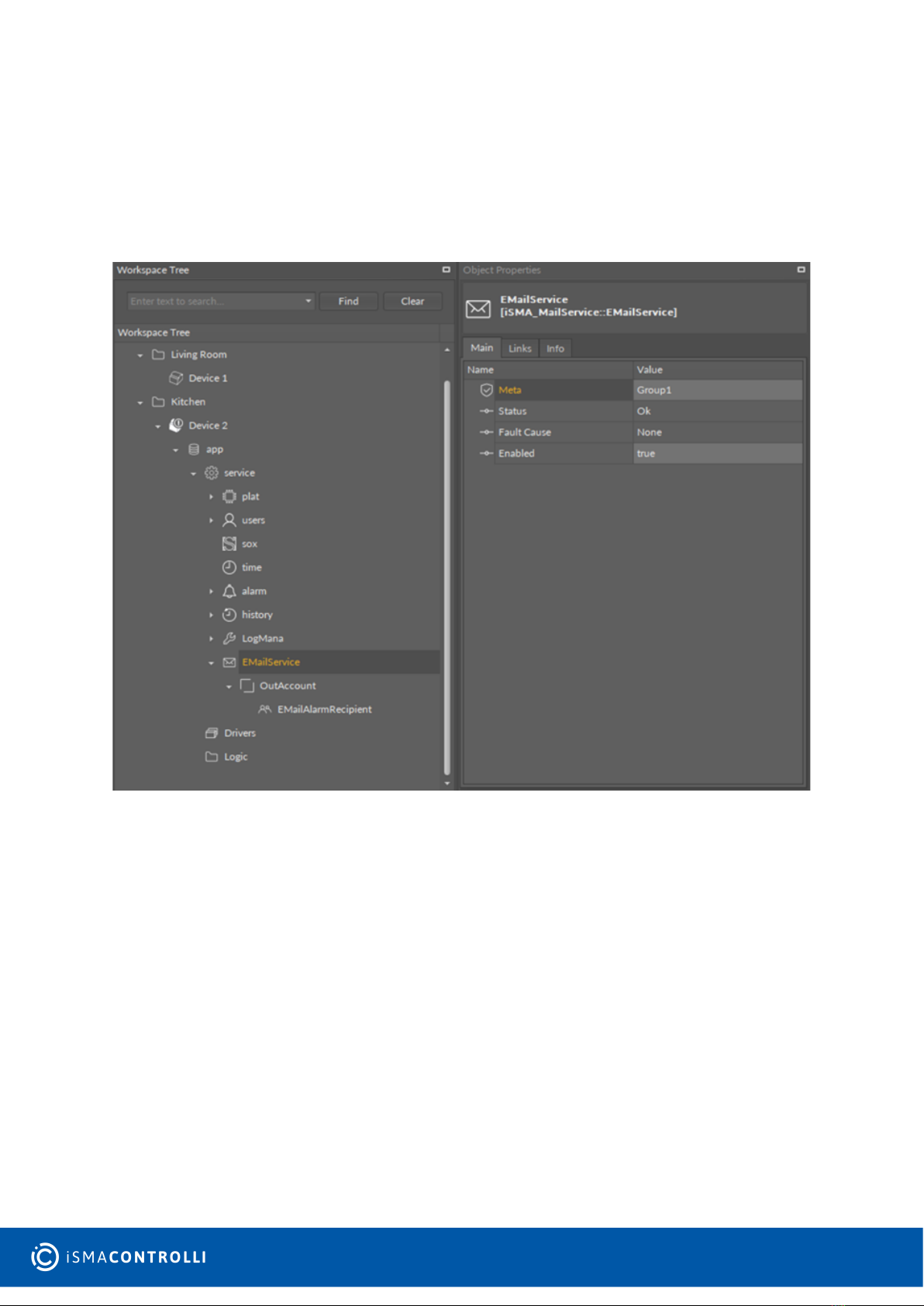
The iSMA MailService kit consists of three components:
Email Service: main component;
Out Account: defines e-mail server account credentials;
Email Alarm Recipient: defines e-mail recipients.
All three components should be located in a service branch one under another as per the
figure below:
Figure 4. The MailService components hierarchy
To create a new e-mail service, select the EMailService component from the Device Kits
window, drag and drop it to the Workspace Tree, Device > app > service. In the Enabled
slot choose true. To configure the parameters for a sending account, add an OutAccount
component (by drag-and-drop from the Device Kits window) to the previously added
EMailService component. To configure the recipient’s account parameters, add
EMailAlarmRecipient component (by drag-and-drop from the Device Kits window) to the
previously added OutAccount component. Fill in the To address slot with an e-mail
WARNING! Prior to starting the e-mail service on the iSMA-B-AAC20 controller, make
sure that the controller’s default gateway and DNS (if the Obtain DNS Server Address
Automatically slot is set to false) are properly set in the plat service.
iSMA-B-AAC20 MailService Kit User Manual
www.ismacontrolli.com
DMP236en | 1st Issue rev. 2 | 02/2022
page 7 of 11
address, which the messages will be sent to. Change the Enabled slot to true. To ensure
proper working of the service, the controller must be connected to the internet.
Note: Only non-encrytpted e-mail server shall be used to send out alarm messages.
Recommended servers are: http://www.lycos.com (64.98.36.139) or http://mail.mosk.ru
(195.19.71.19). Fill in the account and password slots according to previously created
credentials on the e-mail server.
Figure 5. EMailService component view
3.1 EMailService
The EMailService component is the main component, enabling functioning of the e-mail
service.

iSMA-B-AAC20 MailService Kit User Manual
www.ismacontrolli.com
DMP236en | 1st Issue rev. 2 | 02/2022
page 8 of 11
•
•
•
Figure 6. The EMailService component
The EMailService component has the following slots:
Status: component’s status, available statuses:
OK: service is working properly,
Disabled: service is disabled (the Enabled slot is in false);
Fault;
Fault Cause: Fault cause description:
None: service is working properly,
Duplicate network: more than one EMailService component is added to the
controller;
Enabled: switches the EMailService component on/off.
3.2 OutAccount
The OutAccount component defines the e-mail server account credentials.

iSMA-B-AAC20 MailService Kit User Manual
www.ismacontrolli.com
DMP236en | 1st Issue rev. 2 | 02/2022
page 9 of 11
•
•
•
•
•
•
•
•
•
•
•
•
•
•
Figure 7. OutAccount component
The OutAccount component has the following slots:
Status: component’s status, available statuses:
OK: component is working properly,
Disabled: component is disabled (the Enabled slot is in false);
Fault;
Fault Cause: Fault cause description:
None: service is working properly,
Not in network: the component is not placed under the EMailService component;
Enabled: switches the component on/off;
Hostname or IP: server IP address or hostname;
Port: selection of the port;
Account: account name on the e-mail server;
Password: account password on the e-mail server;
Last Send Success: date and time of a last successful notification action;
Last Send Failure: date and time of a last unsuccessful notification action;
Connection timeout: time value which restricts maximum connection time;
Use Authentication: activation of the authentication:
True: active authentication process,
False: inactive authentication process;
Send From Name: sender’s name;
Send From Address: sender’s e-mail address;
Number Sent: quantity of sent e-mail notifications.
3.3 EMailAlarmRecipient
The EMailAlarmRecipient component defines e-mail recipients.

iSMA-B-AAC20 MailService Kit User Manual
www.ismacontrolli.com
DMP236en | 1st Issue rev. 2 | 02/2022
page 10 of 11
•
•
•
•
•
•
•
•
•
•
•
•
•
•
•
•
Figure 8. EMailAlarmRecipient component
The EMailAlarmRecipient component has the following slots:
Status: component’s status, available statuses:
OK: component is working properly,
Disabled: component is disabled (the Enabled slot is in false);
Fault;
Fault Cause: fault cause description:
Could not connect: no connection could have been established;
Timeout: the maximum connection time has been exceeded;
Some Error with Alarm Database: the Alarm Db Status slot indicates database
error;
None: service is working properly;
Enabled: switches the component on/off;
To Address: first recipient’s e-mail address;
Cc Address: carbon copy recipient’s e-mail address;
Bcc Address: blind carbon copy recipient’s e-mail address;
Alarm Class To Send: restriction by alarm class:
Any (default): all alarms will be sent regardless of their classes,
Life Safety: only alarms with the Life Safety class will be sent,
Critical: only alarms with the Critical class will be sent,
Maintenance: only alarms with the Maintenance class will be sent;
Subject: subject for recipient’s message;
Source Name: source name information for the recipient’s message;
Source Path: source path information for the recipient’s message;
Update Time: date and time of the alarm event;
Value: alarm value which caused the event;
Alarm Class: alarm class information for the recipient’s message;
Alarm State: state of alarm value;
Alarm Message: additional text information for the recipient’s message;
Alarm Db Status: alarm database status information.
Altri manuali per iSMA-B-AAC20
1
Indice
Altri manuali iSMA CONTROLLI Controllori

iSMA CONTROLLI
iSMA CONTROLLI MDS420R Manuale utente

iSMA CONTROLLI
iSMA CONTROLLI iSMA-B-MAC36NL Manuale utente

iSMA CONTROLLI
iSMA CONTROLLI MDLX2B Manuale utente

iSMA CONTROLLI
iSMA CONTROLLI iSMA-B-AAC20 Manuale utente

iSMA CONTROLLI
iSMA CONTROLLI MVC503R-MB Manuale utente

iSMA CONTROLLI
iSMA CONTROLLI MVH56Ex Manuale utente

iSMA CONTROLLI
iSMA CONTROLLI iSMA-B-FCU Manuale utente

iSMA CONTROLLI
iSMA CONTROLLI iSMA-B-MAC36NL Manuale utente

iSMA CONTROLLI
iSMA CONTROLLI MDS520R Manuale utente

iSMA CONTROLLI
iSMA CONTROLLI MVT5 Series Manuale utente


