
ITS Telecom CGW-I Istruzioni operative

CGW-I
April 2009
Installation and
Operation Guide
Version 3.18 Release 1

CGW-I Cellular Gateway
BRI-GSM Interface
Installation and Operation Manual
VERSION 3.18 ED. 1
APRIL, 2009

NOTICE
No part of this document may be reproduced or transmitted in any form or by
any means (electronic, photocopying, recording, or otherwise) without the prior
written permission of ITS.
The trademark and service marks of ITS, including the ITS mark and logo, are the
exclusive property of ITS, and may not be used without permission. All other
marks mentioned in this material are the property of their respective owners.
ITS reserves the right to modify the hardware and software described in the
manual without prior notice. However, changes made to the hardware or
software described does not necessarily render this publication invalid.
WARRANTY
In the event this product proves to be defective in workmanship or materials
within a period of one year from date of shipment, ITS will repair or replace the
product at its discretion. Transportation will be the responsibility of the
dealer/distributor.
Under no circumstances shall ITS be liable for consequential or special damages,
loss of revenue or user/dealer expenses arising out of or in connection with the
use or performance of the product, whether based on contract, tort, or any
other legal agreement.
The following shall void the above warranty: malfunctions resulting from fire,
accident, neglect, abuse, or acts of God; use of improper electrical power; or
repair of, tampering with or alteration of the product by anyone other than ITS
authorized personnel.

CGW-I Cellular Gateway BRI-GSM : Installation and Operation Manual i
Table of Contents
1. Overview................................................................................. 1
1.1. About this Manual...................................................................................... 1
1.2. Updates In This Version............................................................................ 1
1.3. Main Features ........................................................................................... 2
2. 2. Setting Up Your CGW-I...................................................... 4
2.1. Package Contents..................................................................................... 4
2.2. CGW-I Physical Description ...................................................................... 5
2.3. Pre-Installation .......................................................................................... 6
2.4. PBX Trunk Configurations......................................................................... 7
Basic PBX / CGW-I without Synchronization .............................................................7
NT1 / CGW-I Synchronization....................................................................................7
ISDN Extension / CGW-I Synchronization .................................................................8
PBX Proprietary Telephone Interface with NT Card for CGW-I Synchronization ......8
PBX NT / CGW...........................................................................................................9
External Synchronization Feature............................................................................10
2.5. Installation ............................................................................................... 10
Hanging Up the CGW-I ............................................................................................10
SIM Card Insertion ...................................................................................................11
Connecting to the CGW-I .........................................................................................12
Turning on Your CGW-I ...........................................................................................14
2.6. LED Indicators......................................................................................... 14
2.7. LCD Messages........................................................................................ 15
3. 3. CGW-I Manager................................................................ 18
3.1. Setting Up the CGW-I Manager Software ............................................... 18
Installing the CGW-I Manager Software ..................................................................18
GUI Requirements ...................................................................................................18
3.2. General Features .................................................................................... 18
Toolbar .....................................................................................................................18
Status Bar.................................................................................................................19
Help ..........................................................................................................................19
Buttons .....................................................................................................................19
File Menu..................................................................................................................19
View Menu................................................................................................................20
3.3. Communication Menu ............................................................................. 21
Communication Selection ........................................................................................21
Device Selection ......................................................................................................23
Network Settings ......................................................................................................25
Reading Current Parameters ...................................................................................25
Sending Current Parameters ...................................................................................25

CGW-I Cellular Gateway BRI-GSM : Installation and Operation Manual ii
Setting a Password ..................................................................................................26
3.4. System Menu .......................................................................................... 27
ISDN Settings...........................................................................................................27
System Settings .......................................................................................................28
Toll Restrictions........................................................................................................30
Channel Settings......................................................................................................32
Adjusting the Volume Gain Level.............................................................................33
Operation System Parameters.................................................................................34
Application System Parameters ...............................................................................35
Prepaid Settings.......................................................................................................39
Controlling the CGW-I ..............................................................................................41
3.5. Report Menu............................................................................................ 42
Properties .................................................................................................................42
Statistics ...................................................................................................................43
Reading the CDR (Call Detail Record) ....................................................................45
System Alarms .........................................................................................................46
System Statuses ......................................................................................................48
4. Appendix A: Technical Specifications.............................. 50

CGW-I Cellular Gateway BRI-GSM : Installation and Operation Manual 1
1. Overview
Your new CGW-I cellular gateway connects your PBX (Private Branch
eXchange) directly to a GSM cellular network, using the ISDN BRI interface.
By routing your outgoing calls made to cellular numbers through your new
device, you bypass the landline carrier and eliminate excessive
interconnection fees, thus cutting your telephone costs significantly.
The CGW-I offers 2 voice connections and your choice of integrated dual-
band GSM modules (900/1800, 850/1900 MHz), enabling you to work with
2 different GSM network operators simultaneously.
Also included with your new device is the CGW-I Manager, the BRI-GSM
Utility Program, needed to configure your device with a rich variety of
features that you will learn about as you read through this manual.
1.1. About this Manual
This manual describes the installation, setup and operation of your new
Cellular GateWay for ISDN (BRI interface), which we will now simply refer to
as the CGW-I throughout this manual. It is intended for System Installers and
Administrators and should be read before the installation, setup and
programming of your device.
1.2. Updates In This Version
The following table provides a brief overview of fields that have most
recently been added, moved or removed.
Field Screen Page
Cellular Daily Restart Added to the System Control screen. 41
Remaining Prepaid SIM Time Added to the Statistics screen. 44
Reset Parameters Added to the System Operation screen. 34
SIM Operation Time Replaced by Prepaid Time in the Prepaid
Setting screen (Removed from Statistics
screen).
39
SIM Operation Time Alarm Functionality updated. 47
SIM Setup Moved to the Prepaid Setting screen. 39
Time Unit Moved to the Prepaid Setting screen. 39
DISA Parameters Added to the System Operation screen. 37
Global Time Added to the Prepaid Settings screen. 38
Call Back and Call Through
Features
Added to the Operation screen. 35

CGW-I Cellular Gateway BRI-GSM : Installation and Operation Manual 2
Field Screen Page
Call Through instead of Call
back
Add to the Application System parameters
screen
1.3. Main Features
The following table provides a brief overview of the variety of powerful
features available in your new CGW-I.
Feature Functionality
Incoming and Outgoing Call Features
Intelligent Routing Return up to 1,500 mobile calls directly to the calling
DDI (Direct Dial-In). CGW-I stores the link between the
dialing extension and the dialed cellular number. When
a missed mobile call is returned, CGW-I recognizes the
Caller ID and routes the caller to the dialer’s extension.
MSN Routing Route incoming cellular calls to default Multi-Subscriber
Number (MSN), such as a specific extension,
Automated Attendant or Voice Mail system.
Call Barring Dedicate your SIM to handle only incoming calls,
outgoing calls, or both.
Call Diversion Automatically reroute incoming calls to an alternate
channel when SIM is busy.
Toll Restrictions Define which cellular operator prefixes to allow the
CGW-I to call and which ones not to allow.
Redirect Call Override Toll Restrictions and setup a cross-network
connection.
Call Duration Limit the length of calls to protect you from connections
that are accidentally left open.
Disable Channel Limit calls to channels that have Prepaid Time SIM time.
Call Back Automatically returning a call to a caller, who is a
gateway’s database subscriber and providing him a dial
tone for internal and external dialing as PBX extension.
Call Through Automatically providing a dial tone to a caller, who is a
gateway’s database subscriber for internal and external
dialing as PBX extension
System Management & Monitoring
Full Device Control Configure system parameters and view system status
levels directly from your PC with included user-friendly
Windows-based utility program.
Alarms Set thresholds to trigger selected SMS and Email
alarms.
Statistics View Reception Level and each SIM card’s accumulated
traffic.
CDR Call Detail Recording log for up to 2,500 records.
Balance Call Distribution Evenly distribute call traffic sent to each SIM.

CGW-I Cellular Gateway BRI-GSM : Installation and Operation Manual 3
Feature Functionality
Configurable Controls & Maintenance
CLIP / CLIR Display or hide SIM card numbers using Calling Line
Identification Presentation/Restriction setting.
SIM PIN Functionality Protect each SIM within the CGW-I from unauthorized
use if removed.
Network Lock Configure your CGW-I to work permanently with only a
specific operator.
Roaming Allow calls to automatically connect to the strongest
available signal or restrict them to a specific network
operator.
Dialing Mode Support Overlap or En Block.
End of Dialing Digit Reduce the time required to connect a dialed number.
Gain Control Adjust volume levels for both incoming and outgoing
calls on each channel.
2 Voice Channels Each with Integrated GSM Cellular Module
Built-in LCD Verify Signal Strength, Operational Status and Cellular
Operator Name to simplify maintenance.
Indicator LEDs LAN Status (Line and Active), Module Status (2)
Additional system and hardware specifications can be found in Appendix A.

CGW-I Cellular Gateway BRI-GSM : Installation and Operation Manual 4
2. 1. Setting Up Your CGW-I
This section lists the full contents of what you have received with your new
CGW-I device, describes how it looks and explains how to physically install it
and verify that it is working properly. Subsequent chapters will explain how
to configure your device using the CGW-I Manager software.
2.1. Package Contents
The following table describes the contents of your device package.
Note:
Should the package be damaged or should items from the packing list be missing,
contact your distributor directly.
Table 1: Contents List
No. Item Qty
1 CGW-I device 1
2 Installation CD with CGW-I Manager Utility Program software and this
Installation and Operation Manual in PDF format
1
3 Power Supply
(Input: 110VAC, 60Hz or 220VAC, 50Hz)
(Output 9VDC, 13.5W)
1
4 Antenna (with cable) 2
5 RS-232 cable (RJ-11 – D-Type 9 pin female) 1
6 ISDN Cable (RJ-45 - RJ-45) 2
7 Template for wall mounting 1
8 Screws and plugs necessary for wall mounting 2
CGW-I Cellular Gateway BRI-GSM : Installation and Operation Manual 5
2.2. CGW-I Physical Description
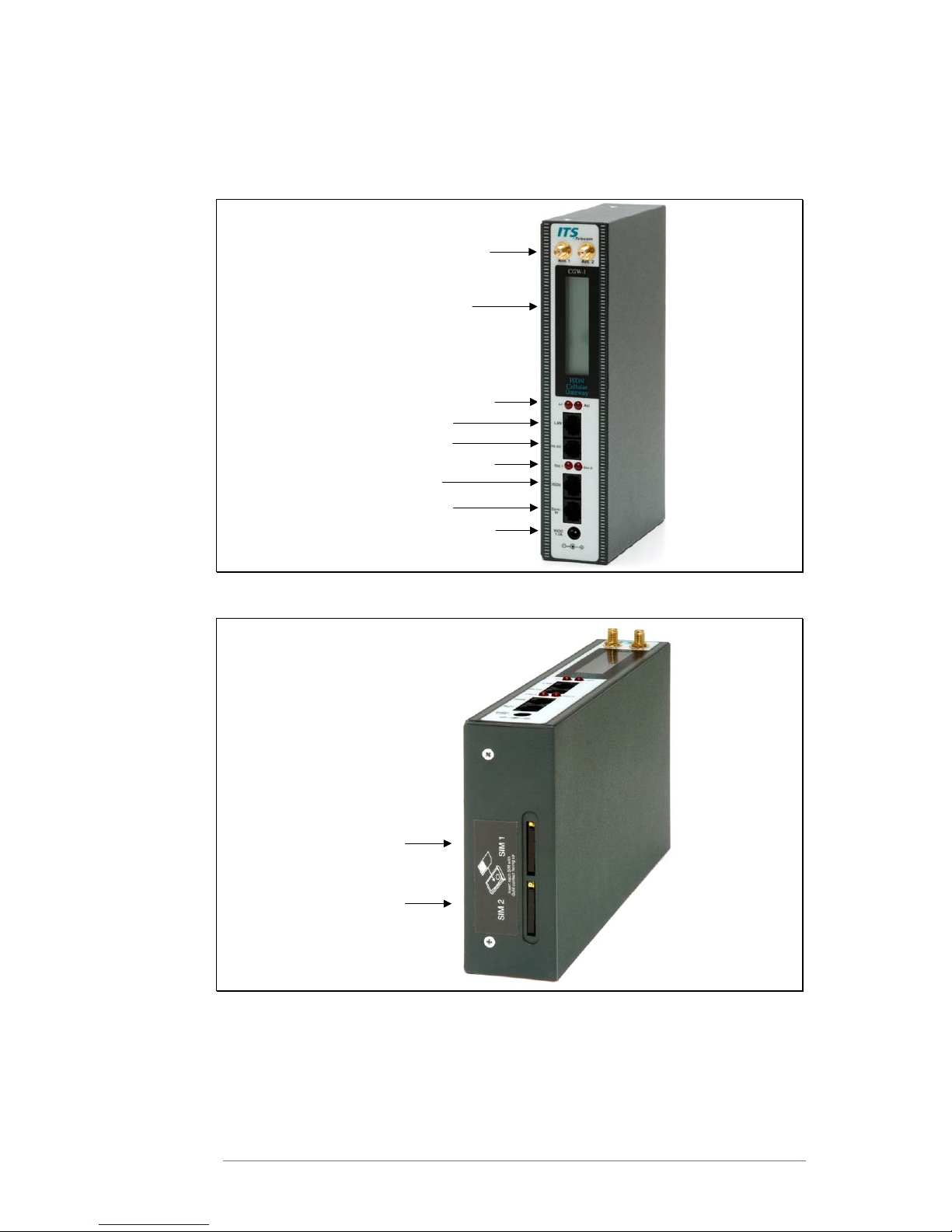
Your device is housed in secure metal box, of which the height is 215mm,
depth 125mm and width 42mm.
Antenna Connectors
Liquid Crystal Display
LAN (LI & ACT) Indicators
RS-232 Connector
Cellular Engine Indicators
Sync-In Connector
ISDN Connector
Power Supply Connector
LAN Connector
Figure 2-1: Front View of the CGW-I Box
SIM 1 Slot
SIM 2 Slot
Figure 2-2: Bottom View of the CGW-I Box
Indice
Altri manuali ITS Telecom Portale

ITS Telecom
ITS Telecom CGW-D Istruzioni operative

ITS Telecom
ITS Telecom CelluLine CGW-T Istruzioni per il montaggio

ITS Telecom
ITS Telecom CGW-D Manuale utente

ITS Telecom
ITS Telecom CGW-T Istruzioni per il montaggio

ITS Telecom
ITS Telecom CGW-T4 Istruzioni per il montaggio

ITS Telecom
ITS Telecom CelluLine CGW-TS Istruzioni per il montaggio
Manuali Portale popolari di altre marche

LST
LST M500RFE-AS Manuale utente

Kinnex
Kinnex Media Gateway Manuale utente

2N Telekomunikace
2N Telekomunikace 2N StarGate Manuale utente

Mitsubishi Heavy Industries
Mitsubishi Heavy Industries Superlink SC-WBGW256 Manuale utente

ZyXEL Communications
ZyXEL Communications ZYWALL2 ET 2WE Manuale utente

Telsey
Telsey CPVA 500 - SIP Manuale utente


