
iWantit iPHUDK10 Manuale utente

(iPod, iPhone not included)
instruction manual
iPHUDK10
universal dock for
iPhone and iPod
iPHUDK10_100901.indd 1 9/1/10 5:06 PM

Content
Unpacking�������������������������������������������������������������������������������4
Product Overview�������������������������������������������������������������������5
Rear View���������������������������������������������������������������������������������������������������������������������5
Top View�����������������������������������������������������������������������������������������������������������������������5
Remote Control���������������������������������������������������������������������������������������������������������6
Replace the Remote Control Battery�������������������������������������7
Dock Adapter ��������������������������������������������������������������������������9
Charging��������������������������������������������������������������������������������10
For Viewing Photos and Movie��������������������������������������������11
For Enjoying Music ���������������������������������������������������������������12
Hints and Tips �����������������������������������������������������������������������13
Specications������������������������������������������������������������������������15
Safety Warnings��������������������������������������������������������������������16
iPHUDK10_100901.indd 2 9/1/10 5:06 PM

Congratulations on the purchase of your
new iWantit Universal Dock for iPhone
and iPod� We recommend that you
spend some time to read this Instruction
Manual in order to fully understand how
to install and operate it�
Read all the safety instructions carefully
before use and keep this instruction
manual for future reference�
iPHUDK10_100901.indd 3 9/1/10 5:06 PM
GB-4
Product Overview
and Getting Started
Before Use Operation Maintenance, Hints and
Tips and Specification
Safety Warnings
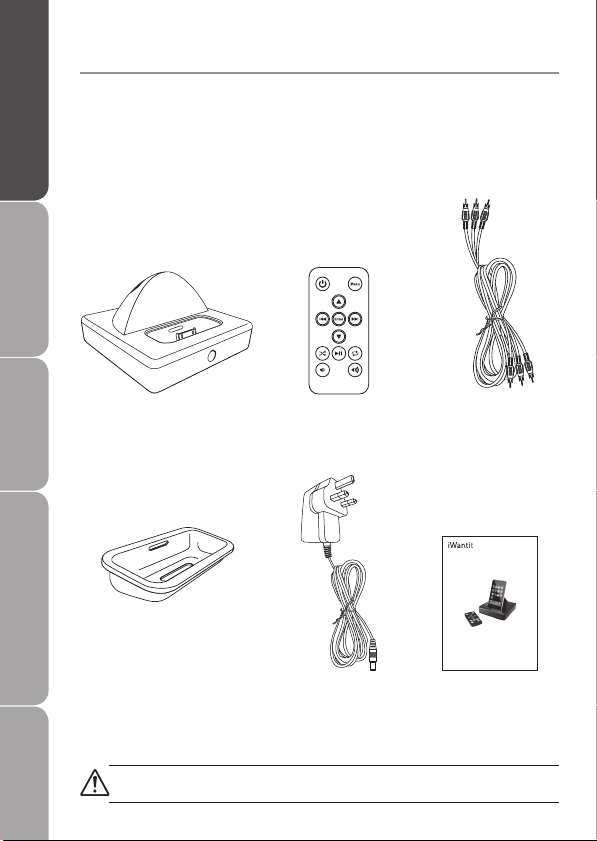
Docking Station x 1 Remote Control x 1
PN:501380811113
Power Adapter x 1
PN:506165812013
Dock Adapter PN:
No�10: 603429081145
No�14: 603429081147
No�15: 603425628129
No�16: 603425628130
No�17: 603000017010
Instruction Manual
PN:840504970001
RCA AV Cable x 1
PN:509622995500
If items are missing, or damaged please contact Partmaster (UK only)�
Tel: 0844 800 3456 for assistance�
Unpacking
Remove all packaging from the unit� Retain the packaging� If
you dispose of it please do so according to local regulations�
The following items are included:
(iPod,iPhone not included)
instruction manual
iPHUDK10
universal dock for
iPhone and iPod
iPHUDK10_100901.indd 4 9/1/10 5:06 PM

Product Overview
and Getting Started
Before UseOperationMaintenance, Hints and
Tips and Specification
Safety Warnings
GB-5
Product Overview
Rear View
Top View
OUTPUT
S-VIDEO VIDEO L
- -
RAUDIO 7.5V DC IN
Remote Control Slot
iPod/iPhone Slot
S-Video Output
For best picture quality,
connect your docking station
to your video system using an
S-VIDEO cable (not included)�
Power LED
Lights up when
the dock is on�
Mains Power Socket
Video, Audio Left, Audio Right Output
To view photos or videos, connect your
docking station to your TV’s AV input using the
included AV cable�
iPHUDK10_100901.indd 5 9/1/10 5:06 PM

GB-6
Product Overview
and Getting Started
Before Use Operation Maintenance, Hints and
Tips and Specification
Safety Warnings
Remote Control
1 Power Turn on/o the Universal Dock & iPod/iPhone�
2 Menu Up iPod/iPhone menu, press the button to
navigate upwards�
3Previous /
Rewind
Press to skip to the previous song or video� Press
and hold to rewind song�
4Menu
Down
iPod/iPhone menu, press the button to
navigate downwards�
5Shue
Playlist Press to have song shue� Press again to cancel�
6Volume
Down
Press to turn docking station volume down�
(iPod/iPhone volume is not controlled)
7 Menu Press to go back to the Previous Menu�
8 Enter Press to choose a menu item�
Press to start videos or songs�
9Next / Fast-
forward
Press to skip to the next song or video�
Press and hold to fast-forward song�
10 Play / Pause Press to play; press again to pause�
11 Repeat
Playlist
Press to repeat a song; press again to repeat the
album� Press again to cancel�
12 Volume Up Press to turn docking station volume up� (iPod/
iPhone volume is not controlled)
126
115
10
4
93
82
71
iPHUDK10_100901.indd 6 9/1/10 5:06 PM

Product Overview
and Getting Started
Before UseOperationMaintenance, Hints and
Tips and Specification
Safety Warnings
GB-7
Replace the Remote Control Battery
Replace the remote control battery when it stops (normally
every two years)� Only use a CR2025 lithium cell battery� Keep
in mind that lighting and other room conditions, in addition
to battery age, can aect the operating range of the remote
control�
1� Remove the battery case from the remote control�
2� Put the battery into the case�
3� Insert the battery case back into the remote control�
3
21
Remote Control
Battery Case
Battery
iPHUDK10_100901.indd 7 9/1/10 5:06 PM

GB-8
Product Overview
and Getting Started
Before Use Operation Maintenance, Hints and
Tips and Specification
Safety Warnings
Handling the Battery
• Improper or incorrect use of batteries may cause corrosion
or battery leakage, which could cause re, personal injury or
damage to property�
• Install the battery correctly by following the polarity (+ and
-) indications in the battery compartment�
• When the battery is exhausted, the remote control will not
function�
• Only use the battery type indicated in this manual�
• Do not dispose of the used battery as domestic waste�
Dispose of it in accordance with local regulations�
• Small button cell batteries such as the one used in the
remote control are easily swallowed by young children and
this is dangerous� Keep loose button cells away from young
children and make sure that the battery holder tray is secure
in the remote control� Seek medical advice if you believe a
cell has been swallowed�
Handling the Remote Control
• Take care of your ngernails when you press and hold the
battery release tab�
• Do not drop or cause impact to the remote control�
• Do not spill water or any liquid on the remote control�
• Do not place the remote control on a wet object�
• Do not place the remote control under direct sunlight or
near sources of excessive heat�
• Remove the battery from the remote control when not in
use for a long period of time, as it could cause corrosion
or battery leakage and may result in physical injury and/or
property damage including re�
iPHUDK10_100901.indd 8 9/1/10 5:06 PM

Product Overview
and Getting Started
Before UseOperationMaintenance, Hints and
Tips and Specification
Safety Warnings
GB-9
Dock Adapter
Insert the dock adapter that ts your iPod/iPhone model, then
plug in your iPod/iPhone� The adapter number is marked at the
back of each dock adapter� The below adapters are provided
with the product� For other iPod/iPhone models, please contact
the store where you purchased your iPod/iPhone�
Adapter No� iPod/iPhone model
10 iPod with video (60GB and 80GB) /
iPod Classic (160G)
14 iPod Touch (1st Generation)
15 iPhone 3G / 3GS
16 iPod Touch (2nd Generation)
17 iPod nano (4th Generation)
The docking station does not support iPod shue or iPods with scroll
wheels or touch wheels�
Adapter Number
At the back of the dock
adapter�
Dock Adapter
Lift from this slot to
remove�
iPHUDK10_100901.indd 9 9/1/10 5:06 PM

GB-10
Product Overview
and Getting Started
Before Use Operation Maintenance, Hints and
Tips and Specification
Safety Warnings
Charging
To charge your iPod/iPhone with power adapter:
1� Connect your adapter to the power socket on the docking
station�
2� Plug the adapter into the mains socket�
3� Connect your iPod/iPhone to the docking station using the
correct dock adapter�
OUTPUT
S-VIDEO VIDEO L
- -
RAUDIO 7.5V DC IN
iPHUDK10_100901.indd 10 9/1/10 5:06 PM
Indice
Altri manuali iWantit Stazione di attracco

iWantit
iWantit iPHUDK11 Manuale utente

iWantit
iWantit iPD1312 Manuale utente

iWantit
iWantit iPHWAV10 Manuale utente

iWantit
iWantit IHFUSBN13 Manuale utente

iWantit
iWantit iPH1212 Manuale utente

iWantit
iWantit ISDK13 Manuale utente

iWantit
iWantit iW300 Manuale utente

iWantit
iWantit iPOD1010 Manuale utente

iWantit
iWantit IBTLI14 Manuale utente

iWantit
iWantit iPHBABY10 Manuale utente


