Jadever JDI-800 Manuale utente

1
Content
Introduction........................................................................................................3
Components ......................................................................................................3
Chapter 1: JDI-800 Introduction.........................................................................5
Product Introduction...........................................................................................5
Chapter 2: Installation........................................................................................6
Installation Introduction......................................................................................6
Chapter 2: Operation .......................................................................................10
Basic Introduction ............................................................................................10
Keys:.........................................................................................................10
Capacity Setting and Calibration...............................................................10
WEIGHT FUNCTION................................................................................15
TARE FUNCTION.....................................................................................16
PRETARE FUNCTION..............................................................................17
GROSS/NET WEIGHT FUNCTION..........................................................18
AUTO TARE FUNCTION:.........................................................................19
WEIGHT CK .............................................................................................20
ACCUMULATION SET .............................................................................21
Serial Number Setting:..............................................................................23
Dual Scale Switch:....................................................................................24
Dual Scale Display:...................................................................................24
SAMPLE...................................................................................................25
Unit Weight, Store UW, UW Lookup: ........................................................27
Clear Count:..............................................................................................29
Quantity Check:........................................................................................29
Chapter 4:Scale Setup..................................................................................30
Parameter setting...........................................................................................30
Weight CK.................................................................................................31
QYT CK ....................................................................................................32
Auto Tare ..................................................................................................33
Serial Set:.................................................................................................33
UnitsSet....................................................................................................34
Acc Set .....................................................................................................34
CommPort.................................................................................................35
SW Setting................................................................................................36
Accuracy...................................................................................................37
Zero Range...............................................................................................37
FilterSet ....................................................................................................38
Stable level...............................................................................................38
Minus value print.......................................................................................38
ACC ToZero..............................................................................................39
Weight recording.......................................................................................39

JADEVER ▍
2
Trans. speed.............................................................................................40
AD Gain....................................................................................................40
JOW Param..............................................................................................40
Units .........................................................................................................41
Chapter 5: Network Setting..............................................................................41
Network............................................................................................................41
Wifi Connection.........................................................................................42
Chapter 6: System Setting...............................................................................44
System Setting.................................................................................................44
Auto-off.....................................................................................................44
Sound.......................................................................................................44
Manual Update .........................................................................................45
Theme ......................................................................................................45
Language..................................................................................................45
Time..........................................................................................................46
AutoSleep.................................................................................................46
Setting password......................................................................................47
Chapter 7: Printing Label Setting.....................................................................47
Label Edit.........................................................................................................47
New Label.................................................................................................47
Edit ...........................................................................................................48
Input designed label into printer................................................................50
Chapter 8: Advanced Applications ...................................................................51
Expanding Usage.............................................................................................51
Material system.........................................................................................51
System Initialization..................................................................................51
Touch screen adjustment..........................................................................51
Error message and troubleshooting..........................................................53

JADEVER ▍
3
Introduction
Thank you for deciding to purchase a JDI-800 weighing indicator, and it is
recommended to read this manual in full before using it for good function
application.
Components
Front Sides:
1)7 inches Touch screen
2)Zero button
3)Tare button
4)Gross/Net button
5)Sleep/Wake button
6)On/Off
7)Power light
-----------------------------------------------------------
Left Side:
1)Audio output interface
2)Audio input interface
3)RJ45 interface
2
3
4
5
6
7
1
1
2
3

JADEVER ▍
4
Right Side:
1) USB interface
2)RS-232 interface
3)RS-232 interface
------------------------------------------------------------
Back Side:
1)load cell interface for Scale 1
2)load cell interface for Scale 2
3)stylus
1
2
3
3
1
2

JADEVER ▍
5
Chapter 1: JDI-800 Introduction
Product Introduction
Specification:
------------------------------------------------------------
Model
JDI-800
Resolution
Up to 1/300000
Unit
Kg/g/lb/oz/台两/港两/ton
Excitation Voltage of
Load Cell
DC:5V; Up to 8 pcs 350ohm Load Cell
Dimension(mm)
265×165×102
Display
7 inches LCD display, Resolution: 800×3(RGB)×480,
Display Area: 152.4(W)×91.44(H)mm
External Interface
◎RS-232 interface ◎RJ45 interface
◎Relay interface ◎USB interface
◎Audio interface
Power Supply
6V/2.5A; Rechargeable battery( optional)
Feature:
------------------------------------------------------------
◎Touch screen together with 5 keys operation.
◎Multiple theme options, intuitive menu operation in Chinese, English and
Spanish with weighing speak.
◎Settable label with multiple templates.
◎Come with auto inventory management software.
◎Powerful storage space and system expansivity.
◎Cable and wireless network connection.
◎Dual channel.
◎Multiple application modes: zero, weighing, counting, tare, accumulation,
serial No. , check weighing &quantity, stock control and so on.
◎Chinese Pinyin spell.
◎Combine with JOW wireless module for wireless weighing solution.

JADEVER ▍
6
Icon Introduction:
------------------------------------------------------------
Icon
Meaning
Stable mark
Stable indication
Zero mark
Zero function within the arrange
of 2% max. weight
(Zero range is within 2%
of maximum capacity.
Initial zero point range is
within 20% of maximum
capacity)
Auto tare mark
Turn on the tare function
(Tare range is over 20d
but less than maximum
capacity)
Weighing Inspection
Turn on the weighing
inspection function
lower than min. unit weight
The unit weight is less
than 0.8e of division.
insufficient sampling data
Enter the sample quantity
and make it less than 10
Counting Inspection
Turn on the counting
inspection function
JOW signal
Turn on the wireless
module device
U disk mark
U disk is dected
Wi-Fi signal
Wireless network
connection(unavailable
now)
Chapter 2: Installation
Installation Introduction
Precautions
------------------------------------------------------------

JADEVER ▍
7
◎Place the indicator on a flat and stable surface.
◎Verify the input voltage and the plug type matches the local AC power
supply.
◎Warm up the scale for 15 minutes before using it the first time.
◎Keep the indicator away from EMI noise, strong wind and vibration, which
might cause incorrect reading.
◎Avoid sudden temperature changes(suitable operating temperature is
between 0℃~ 40℃)
◎Disconnect the power supply before cleaning the indicator.
◎Don’t immerse the indicator in water or other liquids.
◎Service should be performed by authorized personnel only.
Package:
------------------------------------------------------------
The package should contain:
◎JDI indicator
◎Adaptor
◎U disk
◎User manual
Power Supply:
------------------------------------------------------------
Adapter Input: 100-240~50/60Hz 800mA
Output: DC 6.0V, 2.5A
Load Cell Connection:
------------------------------------------------------------
CONN
1
2
3
4
5
E+
E-
S+
S-
LOAD-CELL
Shield
LOAD CELL
CONNECTION
PIN
SIGNAL
1
E+
2
E-
3
S+
4
S-
5
SHIELD

JADEVER ▍
8
Serial Port Connection:
------------------------------------------------------------
1) Connection with BP545D、DODEX、ZEBRA Printer:
2) Connection with SH-24 Printer:
3) Connection with PC:
(1) Using the cable shown in the following picture to connect the PC and
Indicator.
(2) Set the printing mode to CONTINUE.
(3) Ensure there is receive program in the PC.

JADEVER ▍
9
4) Connection with alarming light tower:
Universal 25 pin (male) to 25 pin
(female) connecting cable.
Note:The hollow dots represent male connectors and the black dots
represents female connectors.
Note:The hollow dots represent
male connectors and the black
dots represent female
connectors.

JADEVER ▍
10
Chapter 2: Operation
Basic Introduction
Keys:
------------------------------------------------------------
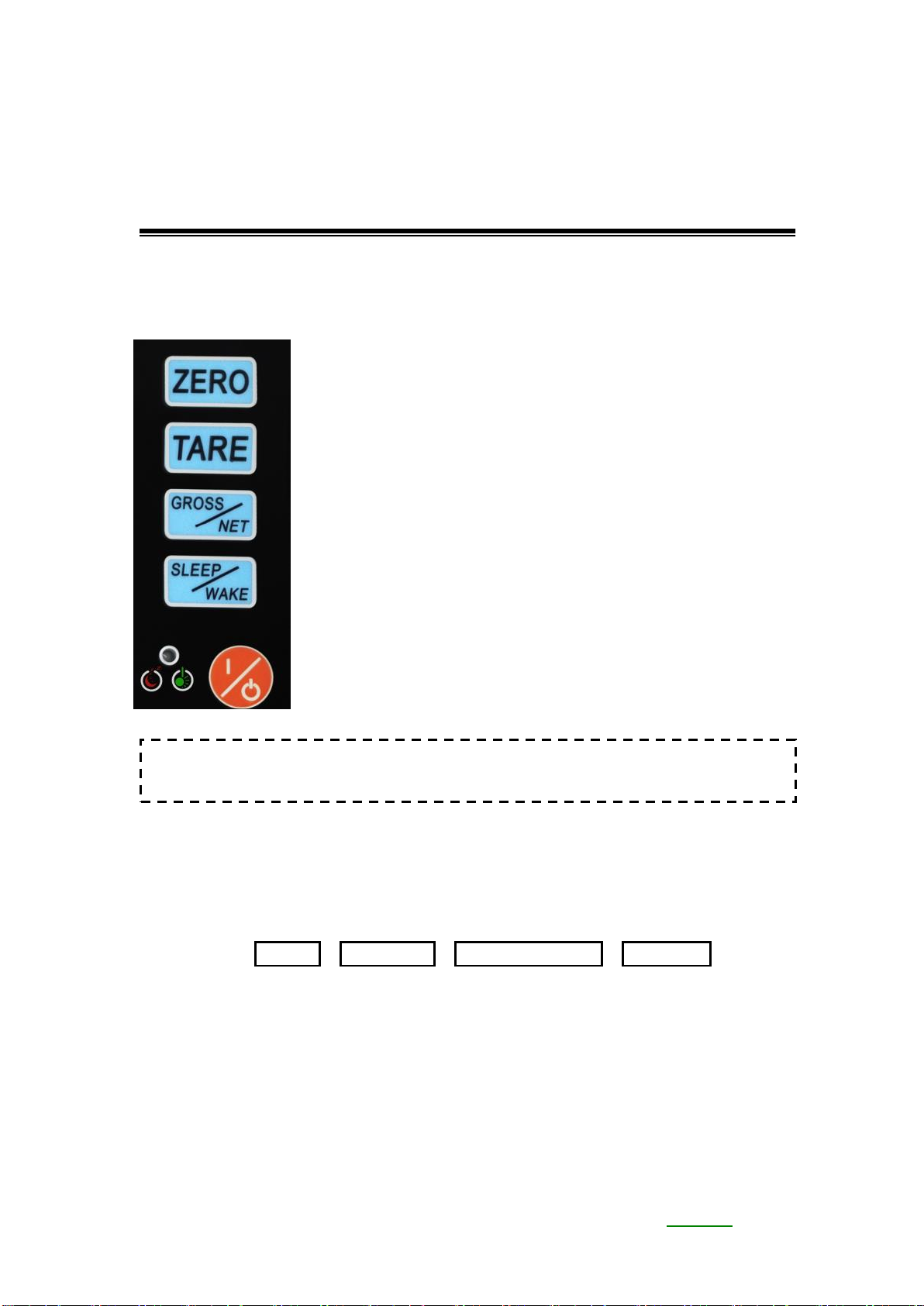
1) ZERO Key:
Sets the display to zero.
2) Tare Key:
Tares the weight or cancels tare on the scale
platform. Long press to enter pre-tare mode.
3) GROSS/NET Key:
Toggles between gross and net weight.
4) SLEEP/WAKE Key:
Toggles between standby mode and working
mode.
5) I/O Key:
Power on or off the scale.
Capacity Setting and Calibration
------------------------------------------------------------
▍Capacity and Resolution:
1. Press Key SETUP→Set Weight→Advanced Param→Accuracy , you will
see the following screen:
Note: Scale will turn black when download data at the beginning of
power on the scale.
Indice
Altri manuali Jadever Accessori