JB T20 Manuale utente

JB
∆
M10600
JB-20
The Big Button Phone
©Plantronics, Inc., 12082 Western Avenue, Garden Grove, California 928 1
VOICE: (800) 87 -3005 TTY:(800)772-2889 FAX: (71 ) 897- 703
E-Mail: [email protected] Web: www.ameriphone.com
© Plantronics, Inc. JB-20 uk 5270-3391 A07/03
Operating Instructions
English

Important Safety
Instructions
When using your telephone equipment, always follow
basic safety precautions to reduce the risk of fire, electric
shock, and injury to persons, including the following:
1. Read and understand all instructions. Observe all
warnings and other markings on the product.
2. During thunderstorms, avoid using telephones except
cordless models. There may be a slight chance of
electric shock from lightning.
3. Do not use a telephone near a gas leak. If you sus-
pect a gas leak, report it immediately, but use a tele-
phone away from the area where gas is leaking.
4. Do not use this product near water, or when you are
wet. For example, do not use it in a wet basement or
shower, or next to a swimming pool, bathtub, kitchen
sink or laundry tub. Do not use liquids or aerosol
sprays for cleaning. If the product comes in contact
with any liquids, unplug any phone line or power cord
immediately. Do not plug the product back in until it
has dried thoroughly.
5. Install this product in a protected location where no
one can trip over any phone line or power cord.
Protect cords from damage or abrasion.
6. If this product does not operate normally, review the
“Troubleshooting” section. If you cannot resolve the
problem, or if the product is damaged, refer to the
Ameriphone Warranty. Do not open this product
except as may be directed in this owner’s manual.
Opening this product or reassembling it incorrectly
may expose you to hazardous voltages or other risks.
Opening this product automatically voids the warranty.
7. If this product uses batteries as power back-up during
power outages, replace batteries only as described in
this owner’s manual. Do not burn or puncture used
batteries — they contain caustic chemicals.
8. Unplug this product from the wall outlet and refer
servicing to qualified service personnel under the fol-
lowing conditions:
A. When the power supply cord or plug is damaged
or frayed.
B. If liquid has been spilled on the product.
C. If the product has been exposed to rain or water.
D. If the product does not operate normally by follow-
ing the operating instructions. Adjust only those
controls that are covered by the operating instruc-
tions because improper adjustment of other con-
trols may result in further damage.
E. If the product has been dropped or appears
damaged.
F. If the product exhibits a distinct change in perfor-
mance.
9. If this product has a polarized plug with one wide
prong, it may not fit in non-polarized outlets. Do not
defeat the purpose of these plugs. If they do not fit in
your outlet, the outlet should be replaced by an
electrician.
ADDITIONAL SAFETY NOTES FOR
CANADIAN USERS
NOTICE: The Canadian Department of Communications
label identifies certified equipment. This certification means
that the equipment meets certain telecommunications net-
work protective, operational and safety requirements. The
Department does not guarantee the equipment will operate
to the user's satisfaction.
Before installing the equipment, users should ensure that it
is permissible to be connected to the facilities of the local
telecommunications company. The equipment must also be
installed using an acceptable method of connection. The
customer should be aware that compliance with the above
conditions may not prevent degradation of service in some
situations. Repairs to certified equipment should be made
by an authorized Canadian maintenance facility designat-
ed by the supplier. Any repairs or alteration made by the
user to this equipment, or equipment malfunctions, may
give the telecommunications company cause to request the
user to disconnect the equipment.
Users should ensure for their own protection that the electri-
cal ground connections of the power utility, telephone
lines and internal metallic water pipe system, if present,
are connected together. This precaution may be particularly
important in rural areas.
CAUTION: Users should not attempt to make such connec-
tions themselves, but should contact the appropriate electric
inspection authority, or electrician, as soon as possible.
NOTICE: The LOAD NUMBER (LN) assigned to each
terminal device denotes the percentage of the total load to
be connected to a telephone loop which is used by the
device, to prevent overloading. The termination on a loop
may consist of any combination of devices subject only to
the requirement that the sum of the load numbers of all
devices does not exceed 100.
SAVETHESE INSTRUCTIONS

Contents
1
CHAPTER 1: INTRODUCTION ..................................................................2
CHAPTER 2: PACKAGE CHECKLIST ..........................................................2
CHAPTER 3: FEATURES IDENTIFICATION ..............................................3
CHAPTER 4: INSTALLATION......................................................................4
Desk mounting........................................................................4
Wall mounting ........................................................................4
CHAPTER 5: OPERATINGYOUR
JB-20
....................................................5
Dialing......................................................................................5
Adjusting the ringer tone..........................................................5
Adjusting handset volume ......................................................5
Ringer volume..........................................................................6
Hold ........................................................................................6
Last number redial ..................................................................6
Programming the Emergency buttons ....................................6
Dialing with an Emergency button ..........................................7
Programming frequently dialed numbers ................................8
Memory dialing........................................................................8
Direct Audio Output ................................................................9
CHAPTER 6: TROUBLESHOOTING ........................................................10
CHAPTER 7: FCC INFORMATION ............................................................11
CHAPTER 8: WARRANTY ........................................................................16
CHAPTER 9: SPECIFICATIONS ................................................................17
INDEX ........................................................................................................17

CHAPTER 1
INTRODUCTION
Please make sure your
JB-20
package includes the items as
shown below:
2
Phone Cords
CHAPTER 2
PACKAGE CHECKLIST
Phone Base Plate
Fig. 1 - Package Components
Coiled Handset
Cord
DIALOGUE
JB-20
OPERATING
INSTRUCTIONS
Handset
Operating
Instructions
Thank you for selecting the amplified
telephone
JB-20
from Ameriphone.
These Operating Instructions and the
associated Quick Operating Guide pro-
vide you with the information you need
to use your
JB-20
effectively and
safely. Read this manual thoroughly
before using your telephone. Keep the
manual near the telephone for easy reference.
Warranty Service
Your telephone is designed to provide
years of quality service. Should the
phone malfunction and the Trouble-
shooting Chart on page 9 does not
resolve the problem, follow the
Warranty procedure on page 10.
Sales Receipt
Be sure to save your sales receipt as
proof of purchase date should you
need warranty service.
Help from Ameriphone
For help with using your
JB-20
, call
our Customer Relations department at
800-894-3005.
Please make sure your
JB-20
pack-
age includes the items shown in
Figure 1.
CHAPTER 2
PACKAGE CHECKLIST
Base Unit

3
CHAPTER 3
FEATURES IDENTIFICATION
Fig. 2 - Features on
JB-20
Ringer
control switch (volume)
Audio Output jack
Tone / Pulse switch
Emergency buttons
Braille characters
Raised letters for
easy identification
REDIAL button
MEMORY button
HANDSET VOL
control (volume)
FLASH button
PROG button (program)
RINGER TONE
selector
HOLD
button

CHAPTER 4
INSTALLATION
1. Pull the handset hook out
and reverse its position so
that the hook points up.
2. Install the Base Plate by
sliding the small tabs
into the upper slots. Push
on the bottom of the Base
Plate until it snaps into
place.
Desk Mounting
1. Plug in the long phone
cord.
2. Plug the handset cord
into the telephone.
3. Lift the handset and listen
for a dial tone.
. Your
JB-20
is ready to
use.
Wall Mounting
Fig.3 - Connections and installation
Fig. 5 - Phone base installation
for wall mounting
MANUAL
AUTO
Fig. - Reversing the hook

Dialing
Pick up the handset and dial like
any other telephone.
If you read Braille, you can use
the small bump on the 5button to
help identify correct buttons. You
can also use the Braille characters
on the buttons to find the letters
on each button. For example, the
2button has Braille characters for
A, B and C.
Adjusting the RingerTone
1.Adjust the Ringer Tone
selector to suit your hearing
Adjusting HandsetVolume
1.Pick up the handset.
2. Adjust the HANDSET
VOLUME slider to suit your
hearing.
CHAPTER 4
(CONTINUED)
5
3. Plug in the short phone
cord.
. Align the posts on the wall
mount with the holes in
back of the
DIALOGUE
JB-
20
.
Slide the phone down
on the posts to secure it.
5. Lift the handset and listen
for a dial tone.
6. Your
JB-20
is ready to
use.
Fig. 6 - Wall mounting installation.
CHAPTER 5
OPERATING YOUR
DIALOGUE
JB-20
Fig. 7 - Adjusting ringer tone

CHAPTER 5
(CONTINUED
2.To return to your call, pick up
the handset.
Note: When the DIALOGUE
JB-
20
is on HOLD, if you pick up
another phone that is on the
same line, the DIALOGUE
JB-
20
will automatically hang up.
You can continue your call on
the other phone.
Last Number Redial
Lift the handset and press the
REDIAL button to dial the last
number you dialed.
Programming the Emergency
Buttons
The Emergency Buttons can be
programmed to dial numbers
with one touch. You may wish to
use these buttons for police, fire
or medical response.
6
RingerVolume
Adjust the RINGER volume
control to suit your hearing.
Hold
1.To put the phone on hold,
press the HOLD button and
put the handset in its cradle.
The red light in the Ring
Flasher shows HOLD is on.
Fig. 9 - Ringer volume
Fig. 10 - Hold Button and indicator
Fig. 11 - Redial button
Fig. 8 - Adjusting the call volume

1.Lift the handset and press the
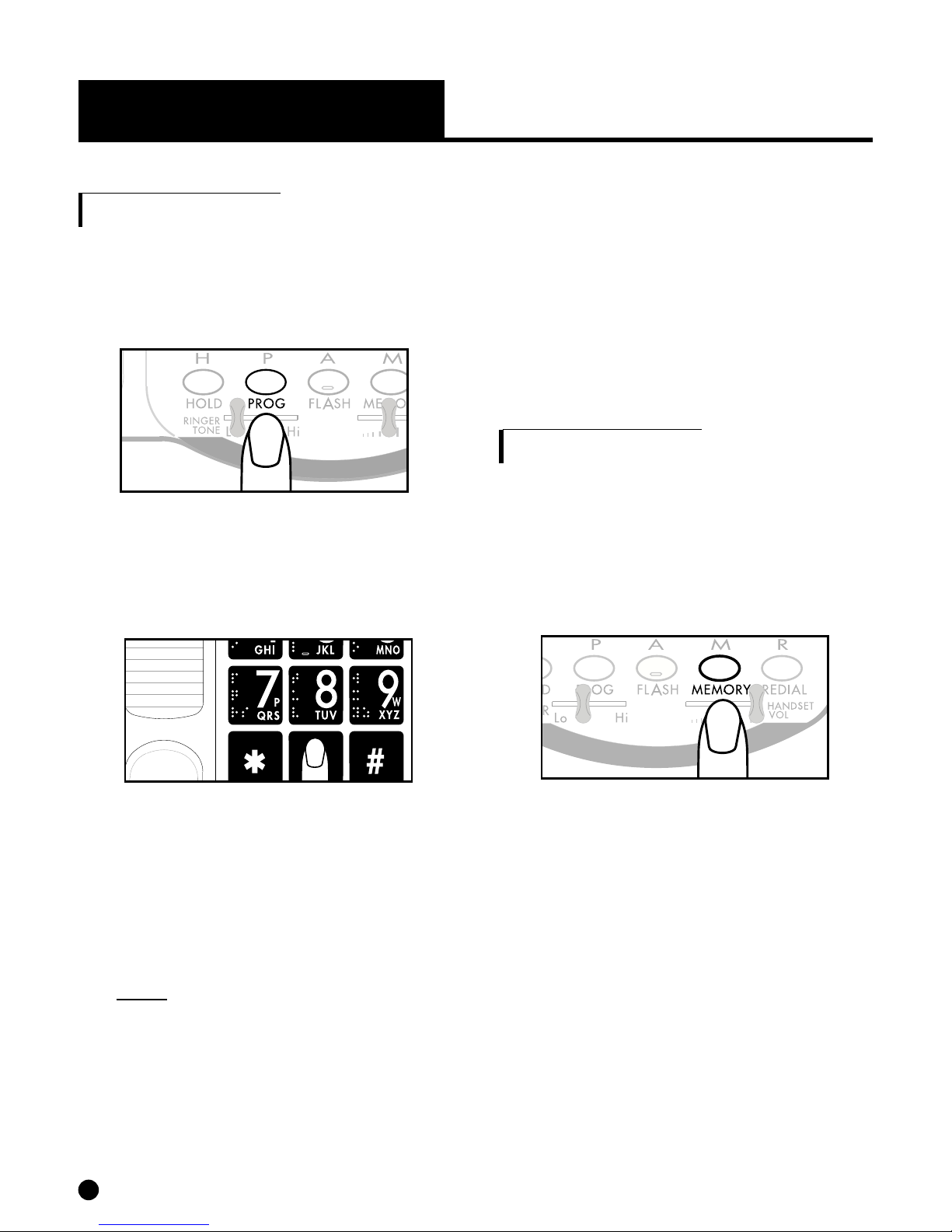
PROG button.
2.Enter the phone number as you
would normally dial it.
3.Press PROG button again.
7
Fig. 12 - Prog button
Fig. 13 - Telephone keypad
Fig. 1 - Prog button
Fig. 15 - Emergency button
. Press one of the Emergency
buttons.
5.Hang up the handset.
6.The number is now stored into
the Emergency button you
selected.
7.To change a stored number or
to program another memory
button, repeat this process from
step 1.
DialingWith An Emergency
Button
1.Lift the handset.
2.Press one of the Emergency
buttons.
The number you have stored
for that button will be automati-
cally dialed.
CHAPTER 5
(CONTINUED

CHAPTER 5
(CONTINUED)
6.The number is now stored into
the number button you selected.
7.To change a stored number or
to program another memory
button, repeat this process from
step 1.
Memory Dialing
1.Lift the handset.
2.Press MEMORY and one of
the number buttons.
The number you have stored for
that button will be automatically
dialed.
8
Programming Frequently
Dialed Numbers
1.Lift the handset and press
the PROG button.
2.Enter the phone number as you
would normally dial it.
3.Press the PROG button again.
.Press MEMORY, then one of
the number buttons: 0, 1, 2, 3,
etc.
Note: #and *keys are not
available for this function.
5.Hang up the handset.
Fig. 17 - Telephone keypad Fig. 18 - Memory button
Fig. 16 - Prog button
Questo manuale è adatto per i seguenti modelli
1
Indice