
jbc TESE-QA Manuale utente

Precision Hot Air Station
without extractor desk
Ref. TESE-QA
INSTRUCTION MANUAL
www.jbctools.com

Manual ............................1 unit
Ref. 0019044
Power cable ...................1 unit
Ref. 0009417 (100V / 120V)
0009401 (230V)
Precision Hot Air Station
without extractor desk
Ref. TESE-QA
Thermocouple type K ..................................1 unit
Ref. PH218
Packing List
The following items are included:
Nozzles ........................................................... 3 units
Ref. TN9209 Ø 3mm (0.12 in)
TN9208 Ø 4mm (0.16 in)
TN9080 Ø 5mm (0.20 in)
Heater hose set .............1 unit
Ref. TE-TB (100V / 120V / 230V)
Stand ................................1 unit
Ref. TE-SE
TESE Control Unit .........1 unit
Ref. TESE-1A (100V / 120V)
TESE-2A (230V)
INSTRUCTION MANUAL
Kapton Tape ................ 1 unit
Ref. PH217
2
www.jbctools.com

Hot Air button
(On / Off)
Power Socket
Fuse
USB connector
Robot RS232
connector
P-005 Pedal connector
Equipotential
connector
Auxiliar
connector
Heating element
Heater Hose set
Ref. TE-TB
Stand
Ref. TE-SE
Suction Tube
Ref. 0932330
For tripods and extractors
Thermocouple type K
Activates de suction pump
USB-A connector
Features
Main Switch
www.jbctools.com
3

17:14
20ºC
Power
45% 120ºC Selected
TC
Temp.
4m 38s
400ºC 80%
400ºC Selected
Protection
Hot Air Temp. Air Flow Selec.
Menu Options
Station
Information
Current
air
temp.
Air
temp.
selected
Instant power
supplied to
heater
Status
indicator
Selected
Air flow
Selected
External Tc
temp.
JTSE / TESE Work Screen
Status bar
The JTSE/TESE offers an intuitive user interface which provides quick access to station parameters.
Default PIN: 0105
Current
External
TC temp.
Station Tools Counters
ResetLanguage
Set the station
parameters
Set the tool
parameters
Display the hours
worked in each cycle
It is possible to
choose the language
from a list.
Allows you to carry
out an overall station
reset restoring all the
parameters to their
default values.
4

Point
2/5
Temp
250
ºC
Flow
60
%
Time
2m 30s
3m 18s
Hot Air Temp
240
ºC ºC %
Ext. TC Temp
20
Air Flow
80
3m 18s
· Add point
· Delete point
· Load profile
· Save profile
· Exit
Current
air temp.
Data for
these points
Profile name
Current
air flow
Current
External
TC temp.
In this mode you can set up or edit as many as 25 profiles of temperature and air flow.
Edit Mode
Menu
Options
Profiles
Advanced functionalities
To work with profiles it is essential to use the RWB / RWS / RWT rework arms. The
Rework Arms supports the Hot Air Heater maintaining the distance and position to
the component.
www.jbctools.com
5

450
400
350
300
250
150
100
50
200
Power Temp
17:14
JBC Net
USB flash drive is connected.
Station is controlled by a PC.
Station is controlled by a robot.
System notifications
Station software update.
Press INFO to start the process.
Warning.
Press INFO for failure description.
Error.
Press INFO for failure description,
the type of error and how to proceed.
The following icons will be displayed on the screen’s status bar.
By pressing Graphics in the main MENU, temperature and power figures in real time
are displayed. This helps you decide which tip to use to obtain the best quality solder
joints.
Graphics
Temperature
Power (%) External
temp.
Ext. temp
Export graphics
Insert a USB flash drive into the USB-A
connector to save your soldering process
in csv format.
The first system to optimize traceability in soldering
- Get greater quality and control in your production
- Manage your whole soldering process remotely in real time
Station update
Download the JBC Update File from
www.jbctools.com/software.html
Insert the USB flash drive with the file down-
loadedto the station.
Files
Update
6

We recommend using the protector + tripod We recommend using the manual extractors
Protectors & Extractors
1 2 3 4
For small components (fig. 1 and 2). For large components (fig. 3 and 4).
Position the extractor with the
appropriate suction cup and
press the suction button.
Heat the component. The component lifts off
automatically when the
solder melts.
Operation
3. Extracting1. Placing 2. Heating
Adjustable Stand
Adjust the tool holder angle to suit your work position.
www.jbctools.com
7

IPC* does not recommend exceeding ramp-up rates
over 3 - 4 °C / sec (5 - 7 °F / sec) so as to reduce the
risk of thermal stress on the PCB.
* IPC was founded in the U.S. in 1957 as the Institute for
Printed Circuits.
Using the Thermocouple type K
You can choose from two work modes:
Regulation: the station regulates the air
temperature automatically to maintain the
External Thermocouple (TC) temperature.
Fix the TC with Kapton Tape (Ref. PH217) as near as possible to the component
being worked on. If Kapton tape is not ESD you must use an ionizer.
Protection: the station cuts the air supply off
when the External Thermocouple (TC)
temperature is reached.
Connect a TC type K (PH218) to the station and use it as a protection or regulation sensor.
You can define its use mode by means of the “Ext TC mode” option in the “Tool” menu.
Extractor Desk
Ref. 0008752
Protectors and extractors not included.
This accessory lets you quickly switch
between different models of extractors and
protectors.
There are two drawers for storage.
8

Turn the tool off
and handle with
care. The heating
element and the
nozzle are still hot.
2
1
Quick Nozzle Changer
Changing nozzles quickly and safely.
*Ref. Shape Ø Size
(mm)
Ø
Size (in)
*TN9209 Straight Ø 3 Ø 0.12
*TN9208 Straight Ø 4 Ø 0.16
*TN9080 Straight Ø 5 Ø 0.20
TN9787 Bent Ø 3 Ø 0.12
TN9785 Bent Ø 4 Ø 0.16
TN9782 Bent Ø 5 Ø 0.20
TN8851 Bent Ø 3mm 45º Ø 0.12 45º
TN8905 Bent Ø 4 mm 45º Ø 0.16 45º
TN9561 Bent Ø 5 mm45º Ø 0.20 45º
Straight Bent
* Included in TE Accessory set (Ref. 0010300)
Ø mm Ø mm
www.jbctools.com
9
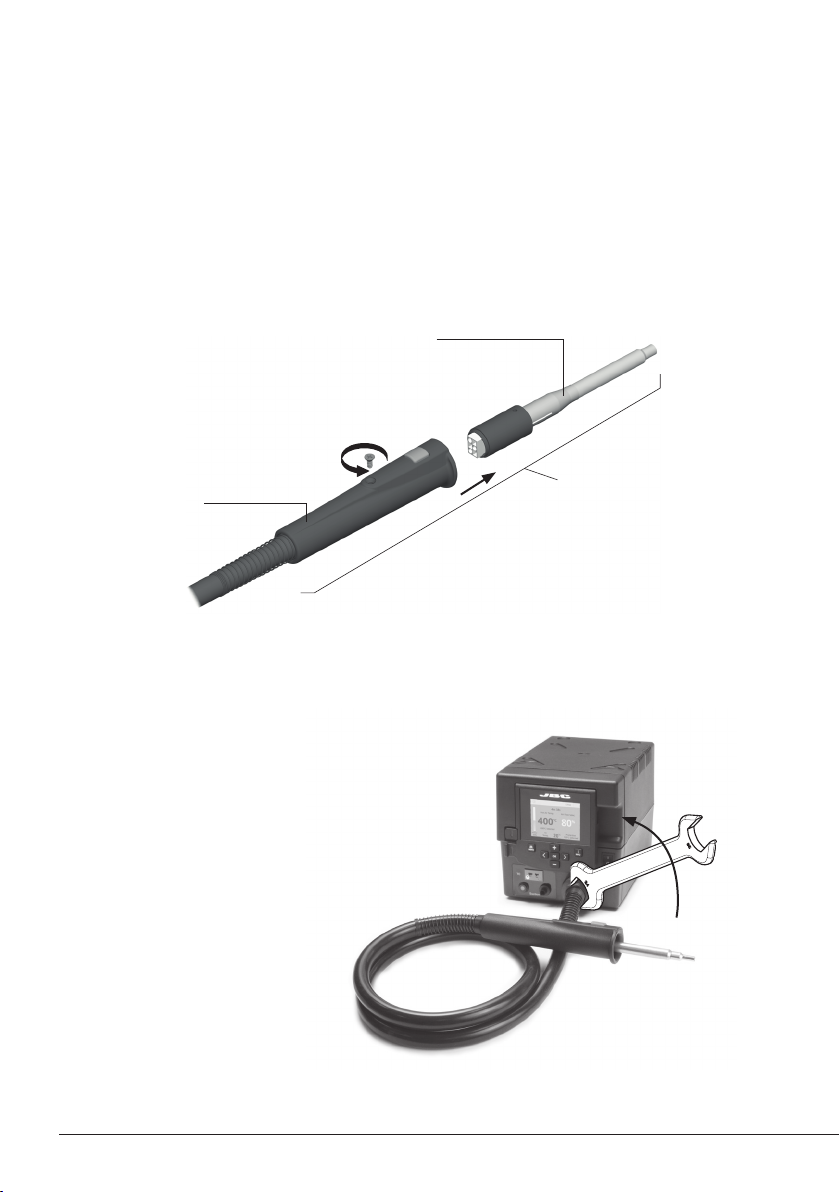
1. Ensure that the tool is turned off.
2. Use a spanner to unscrew the nut.
3. Make sure that the new heater tube fits into
the grooves in the socket.
4. Tighten the screw.
Changing the TE-TB Heater Hose Set
Only perform this operation when the element is cold and the unit is disconnected from the mains.
1. Loosen the screw.
2. Pull the heating element away from the handle.
3. Connect the new heating element, ensuring it is pushed all the way in.
4. Tighten the screw.
Replacing the Heating Element
Precision Heater
Hose Set
Ref. TE-TB
Heating Element
Ref. 0012374
(100V - 230V - 120V)
TE Handle
Ref. TE-B
10
Questo manuale è adatto per i seguenti modelli
8
Indice