
Jiecang JC35VT Guida all'installazione

JC35VT TV lift
ASSEMBLINGINSTRUCTIONS
madeinChinaJiecangLinearMotionTechnologyCo.,Ltd.|www.jiecang.compage1of14
customerservice:sale[email protected]
JC35VT TV lift
ASSEMBLINGINSTRUCTIONS
Thank you for purchasing the JC35VT TV lift. lease take time to identify all the parts and hardware prior to assembly.
Please all components on a padded/carpeted area to avoid damage. For safety, we recommend two people for
assembly.
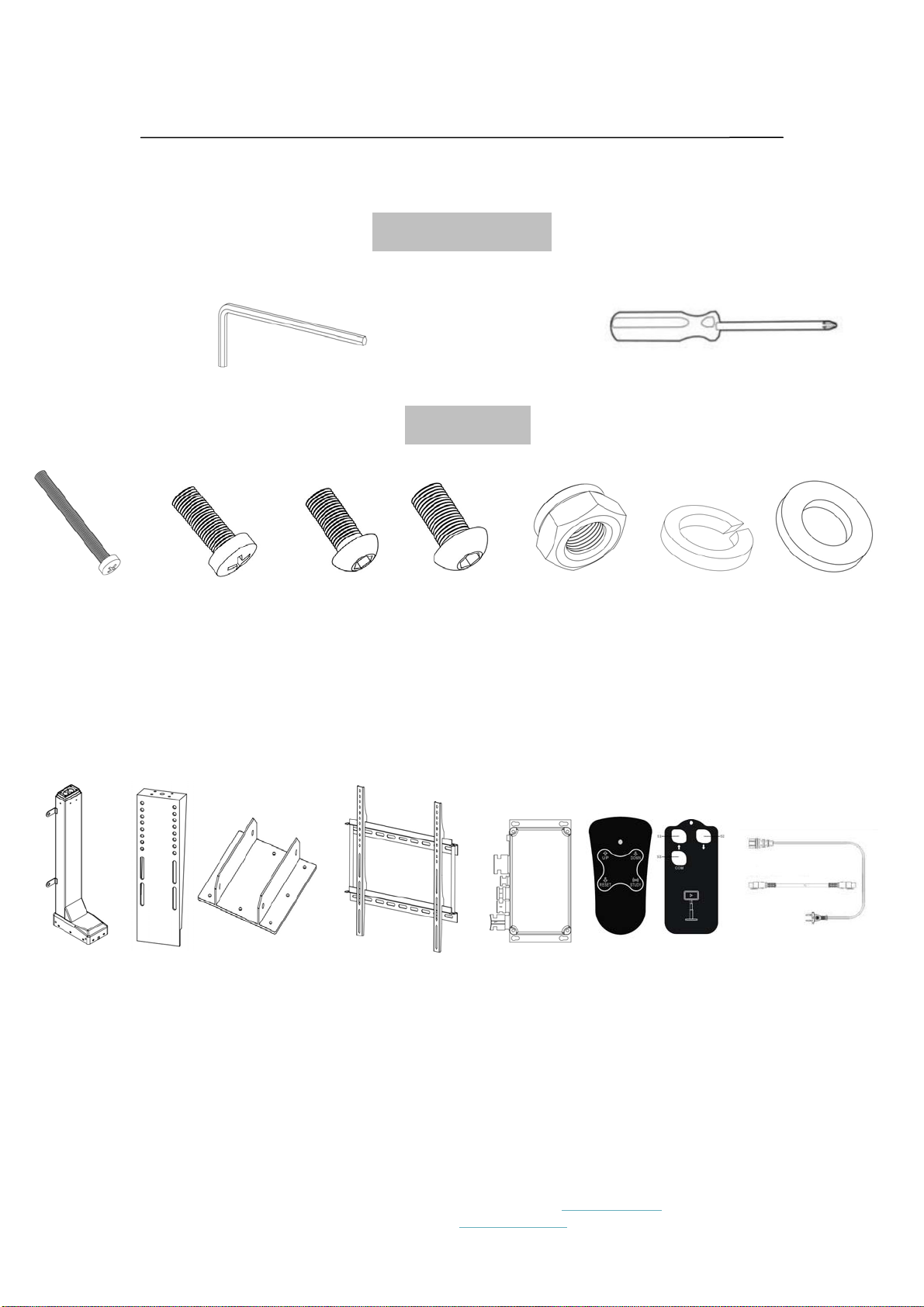
Tools Required
Allen Wrenches
M6 M8 Philips head screw
Hardware
8
Spring washers M6
4
Nuts M8
2
Screws M5×50
4
Screws M6×16
4
Hex Bolts
M8×16
8
Hex Bolts
M6×14
8
Washers M6
1
Mounting base
2
Connection cable
/ power cable
1
Remote
1
Handset
1
Control box
1
TV mounting bracket
1
Mountin
g
bracke
t
1
Column
madeinChinaJiecangLinearMotionTechnologyCo.,Ltd.|www.jiecang.compage1of14
customerservice:sale[email protected]

JC35VT TV lift
ASSEMBLINGINSTRUCTIONS
No. Type Qty
1 Mounting base 1
2 Column 1
3 Washers M6 8
4 Spring washers M6 8
5 Hex Bolts M6x14 8
6 Screws M5x50 2
7 TV mounting bracket 1
8 Nuts M8 4
9 Mounting bracket 1
10 Screws M6x16 4
11 Screws M8X16 4
12 Connection cable and power
cable
2
13 Remote 1
14 Handset 1
15 Control box 1
madeinChinaJiecangLinearMotionTechnologyCo.,Ltd.|www.jiecang.compage1of14
customerservice:sale[email protected]

JC35VT TV lift
ASSEMBLINGINSTRUCTIONS
① Use 4 Hex Bolts M6x16, each with Spring washer and
Washer, to attach Bases to the bottom of the Column. Tighten the 4
Screws (2 per side).
madeinChinaJiecangLinearMotionTechnologyCo.,Ltd.|www.jiecang.compage1of14
customerservice:sale[email protected]

JC35VT TV lift
ASSEMBLINGINSTRUCTIONS
② Use 4 Hex Bolts M6x16, each with Spring washer and
Washer, to attach Mounting bracket to the top of the Column.
Tighten the 4 Screws.
madeinChinaJiecangLinearMotionTechnologyCo.,Ltd.|www.jiecang.compage1of14
customerservice:sale[email protected]

JC35VT TV lift
ASSEMBLINGINSTRUCTIONS
③ Use 4 Screws M6x16, to assemble the TV mounting
bracket as following.
madeinChinaJiecangLinearMotionTechnologyCo.,Ltd.|www.jiecang.compage1of14
customerservice:sale[email protected]

JC35VT TV lift
ASSEMBLINGINSTRUCTIONS
④ Use 4 Hex Bolts M8x16, each with Spring washer and
Washer, to attach TV mounting bracket on to the Mounting bracket.
Tighten the 4 Screws.
madeinChinaJiecangLinearMotionTechnologyCo.,Ltd.|www.jiecang.compage1of14
customerservice:sale[email protected]

JC35VT TV lift
ASSEMBLINGINSTRUCTIONS
⑤ Secure another 2 parts of the TV mounting bracket onto the
backside of the TV set with 4 screws included with TV set. And then
hang the TV set onto the TV mounting bracket as following. Use 2
M5x50 screws to tighten on the bottom.
madeinChinaJiecangLinearMotionTechnologyCo.,Ltd.|www.jiecang.compage1of14
customerservice:sale[email protected]

JC35VT TV lift
ASSEMBLINGINSTRUCTIONS
⑥ Connect the Wires as per the diagram below. Now your TV
lift is ready for use. (press the buttons of the handset and column
will move up/down)
⑦ Operating: You can use the remote or handset operate the
TV lift. (1) remote: Press S1+S3, TV lift move up, press S2+S3, TV
lift move down. (2) handset: Press UP button, TV lift move up,
press DOWN button, TV lift move down. (3) During the movement,
you can press any button on remote or handset (not the RESET
button on handset), TV lift stop at once.
madeinChinaJiecangLinearMotionTechnologyCo.,Ltd.|www.jiecang.compage1of14
customerservice:sale[email protected]

JC35VT TV lift
ASSEMBLINGINSTRUCTIONS
⑧ Set the TOP and BOTTOM position:According to the
dimension of the TV set, you can reset the top and bottom position
of TV lift. Press UP button on handset, TV lift moves up. Press the
UP button (red) on control box, then you have the TOP position of
the TV lift. Press DOWN button on handset, TV lift moves down.
Press the DOWN button (black) on control box, then you have the
BOTTOM position of the TV lift. Now, you can only move the TV lift
from TOP and BOTTOM positions by handset and remote.
⑨ Reset the TOP and BOTTOM position: Sometime, you want
madeinChinaJiecangLinearMotionTechnologyCo.,Ltd.|www.jiecang.compage1of14
customerservice:sale[email protected]
Indice


