
JVC KD-S675 Manuale utente

INSTRUCTIONS
§”·π–π”
GET0012-001A
[U]
For installation and connections, refer to the separate manual.
°√ÿ≥“¥Ÿ§ŸË¡◊Õ∑’Ë·¬°µË“ßÀ“° „π°“√µ‘¥µ—Èß·≈–°“√‡™◊ËÕ¡µËÕ
KD-S675
CD RECEIVER KD-S675
ENGLISH
∂“
¥
„Ë´’¥’
KD-S675
!"#$
!"#$%&'()*+,-./0
‰∑¬
!"
RM-RK31
For customer Use:
Enter below the Model No. and
Serial No. which are located on
the top or bottom of the cabinet.
Retainthisinformationforfuture
reference.
Model No.
Serial No.
COMPACT
DIGITAL AUDIO
CD
COVER.KD-S675[U]/1 14/12/00, 11:07 AM1
2
ENGLISH
BEFORE USE
*For safety....
• Do not raise the volume level too much, as this
will block outside sounds, making driving
dangerous.
• Stop the car before performing any complicated
operations.
*Temperature inside the car....
If you have parked the car for a long time in hot
or cold weather, wait until the temperature in the
car becomes normal before operating the unit.
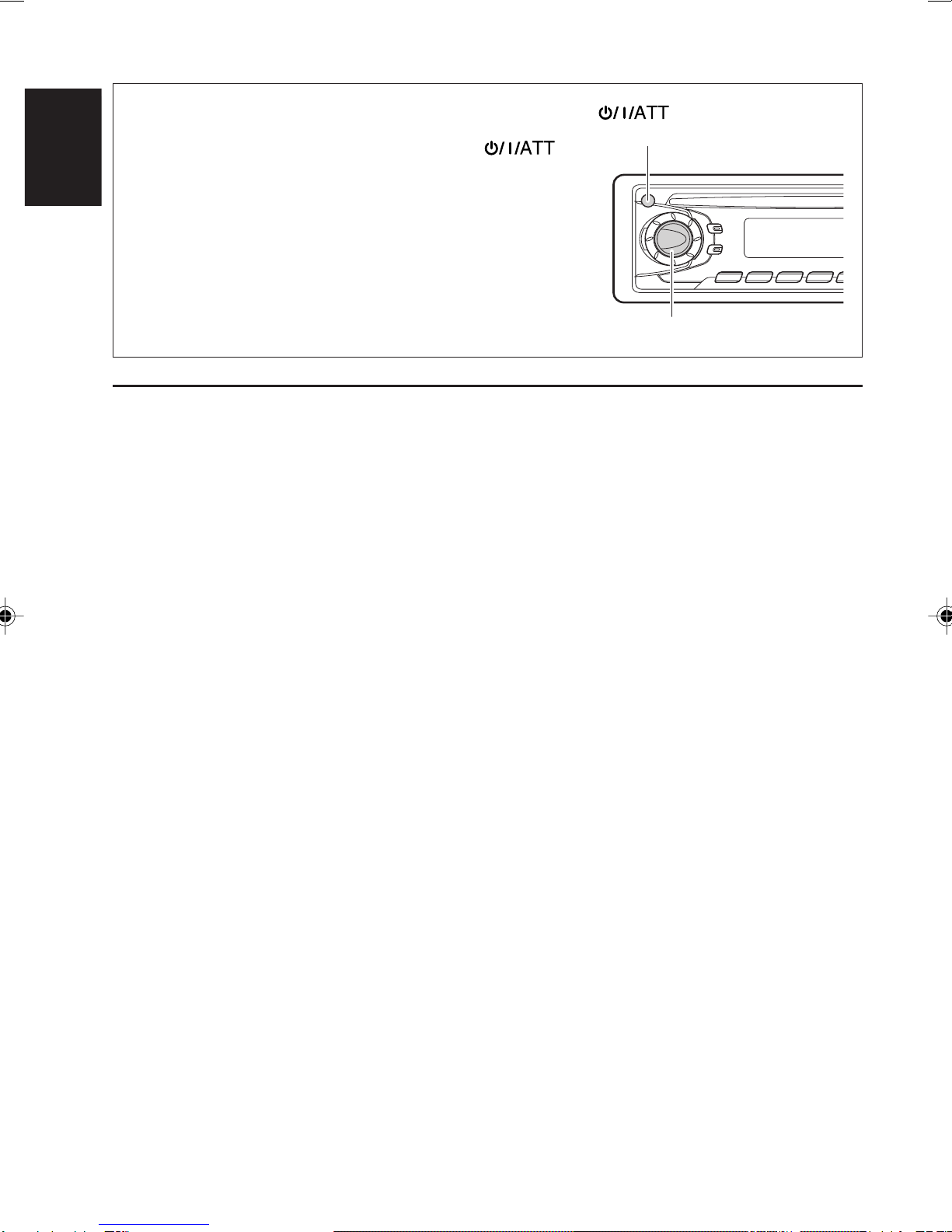
How to reset your unit
Press and hold both the SEL (Select) and
(Standby/On/ATT) buttons at the same time for
severalseconds.
This will reset the built-in microcomputer.
NOTES: Your preset adjustments — such as preset
channels or sound adjustments — will also be
erased.
IfaCDisintheunit,itwillejectwhenyoureset
the unit. Pay attention not to drop the CD. SEL (Select)
(Standby/On/ATT)
EN02-04.KD-S675[U] 24/3/05, 8:44 PM2
3
ENGLISH
CONTENTS
How to reset your unit.......................................................................... 2
BASIC OPERATIONS .................................................... 4
RADIO OPERATIONS ...................................................5
Listening to the radio .....................................................................5
Storing stations in memory............................................................6
FM station automatic preset: SSM ...............................................6
Manual preset.............................................................................. 7
Tuning into a preset station ...........................................................8
Other convenient tuner functions .................................................9
Scanning broadcast stations ........................................................9
Selecting FM reception sound......................................................9
CD OPERATIONS .......................................................10
Playing a CD .................................................................................10
Locating a track or a particular portion on a CD ..................... 11
Selecting CD playback modes......................................................12
Other convenient CD functions ...................................................12
Prohibiting CD ejection.............................................................. 12
SOUND ADJUSTMENTS .............................................13
Adjusting the sound......................................................................13
Turning on/off the loudness function ............................................... 14
Using the Sound Control Memory (SCM)..................................15
Selecting and storing the sound modes.....................................15
Recalling the sound modes........................................................16
Canceling Advanced SCM ...........................................................17
Storing your own sound adjustments .........................................18
OTHER MAIN FUNCTIONS .........................................19
Setting the clock............................................................................19
Selecting the level display ............................................................21
Selecting the telephone muting....................................................22
Detaching the control panel .........................................................23
REMOTE OPERATIONS...............................................24
Installing the battery ....................................................................24
Using the remote controller .........................................................25
MAINTENANCE......................................................... 26
Handling CDs................................................................................26
TROUBLESHOOTING .................................................27
SPECIFICATIONS .......................................................28
Thank you for purchasing a JVC product. Please read all instructions carefully before operation, to
ensure your complete understanding and to obtain the best possible performance from the unit.
EN02-04.KD-S675[U] 24/3/05, 8:44 PM3
4
ENGLISH
BASIC OPERATIONS
Note:
Whenyouusethisunitforthe
first time, set the built-in
clock correctly, see page 19.
Note on One-Touch Operation:
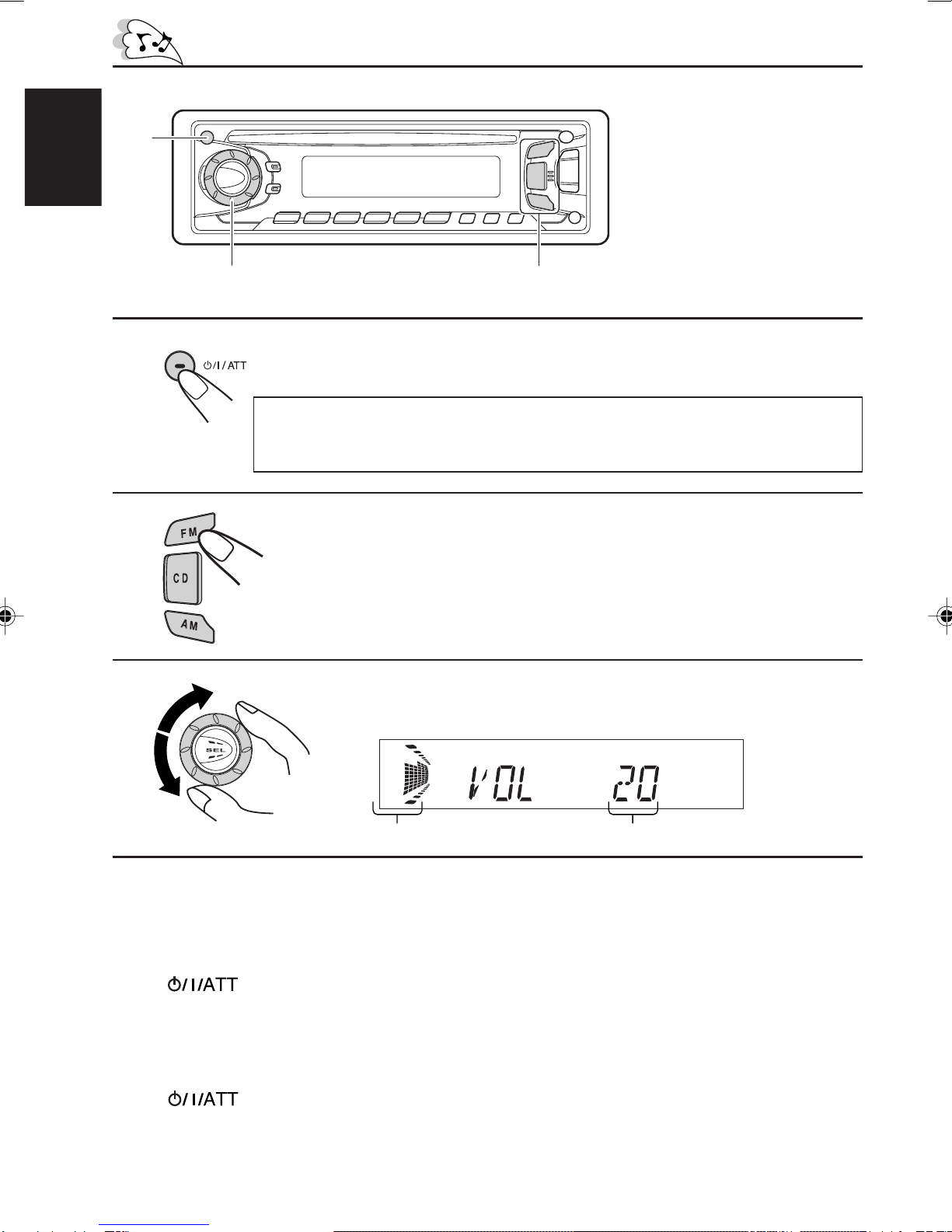
When you select a source in step 2 below, the power automatically comes on.
You do not have to press this button to turn on the power.
1
Turn on the power.
2
Select the source.
To operate the tuner, see pages 5 – 9.
To operate the CD player, see pages 10 – 12.
3
Adjust the volume.
4
Adjust the sound as you want (see pages 13 – 18).
To drop the volume in a moment
Press briefly while listening to any source. “ATT” starts flashing on the display, and
the volume level will drop in a moment.
To resume the previous volume level, press the button briefly again.
To turn off the power
Press for more than 1 second.
32
1
Volume level appearsVolume level indicator
EN02-04.KD-S675[U] 24/3/05, 8:44 PM4

5
ENGLISH
RADIO OPERATIONS
Listening to the radio
1
Select the band (FM1, FM2, FM3 or AM).
You can select any one of FM1, FM2, and FM3 to listen to an
FM station.
2
Start searching a station.
When a station is received, searching stops.
To stop searching before a station is received, press the same button you have pressed
for searching.
To tune in a particular frequency without searching:
1Select the band (FM or AM).
Press FM or AM repeatedly.
2Press and hold ¢or 4until “M” starts flashing on the display.
Now you can manually change the frequency while “M” is flashing.
3Press ¢or 4repeatedly until the frequency you want is reached.
• If you hold down the button, the frequency keeps changing until you release the button.
To search stations
of higher
frequencies.
To search stations
of lower
frequencies.
FM1 FM2 FM3
AM
Audio or volume level indicator
selected band appears
1
2
EN05-09.KD-S675[U] 24/3/05, 8:45 PM5

6
ENGLISH
Storing stations in memory
You can use one of the following two methods to store broadcasting stations in memory.
• Automatic preset of FM stations: SSM (Strong-station Sequential Memory)
• Manual preset of both FM and AM stations
FM station automatic preset: SSM
You can preset 6 local FM stations in each FM band (FM1, FM2, and FM3).
1
Select the FM band number (FM1, FM2 or
FM3) you want to store FM stations into.
2
Pressandholdthebothbuttonsfor morethan
2 seconds.
Local FM stations with the strongest signals are searched and stored automatically in the
bandnumberyouhaveselected(FM1,FM2orFM3).Thesestationsarepresetinthenumber
buttons — No. 1 (lowest frequency) to No. 6 (highest frequency).
When automatic preset is over, the station stored in number button 1 will be automatically
tuned in.
“SSM” appears, then disappears when
automatic preset is over.
FM1 FM2 FM3
1
2
EN05-09.KD-S675[U] 24/3/05, 8:46 PM6
7
ENGLISH
Manual preset
You can preset up to 6 stations in each band (FM1, FM2, FM3 and AM) manually.
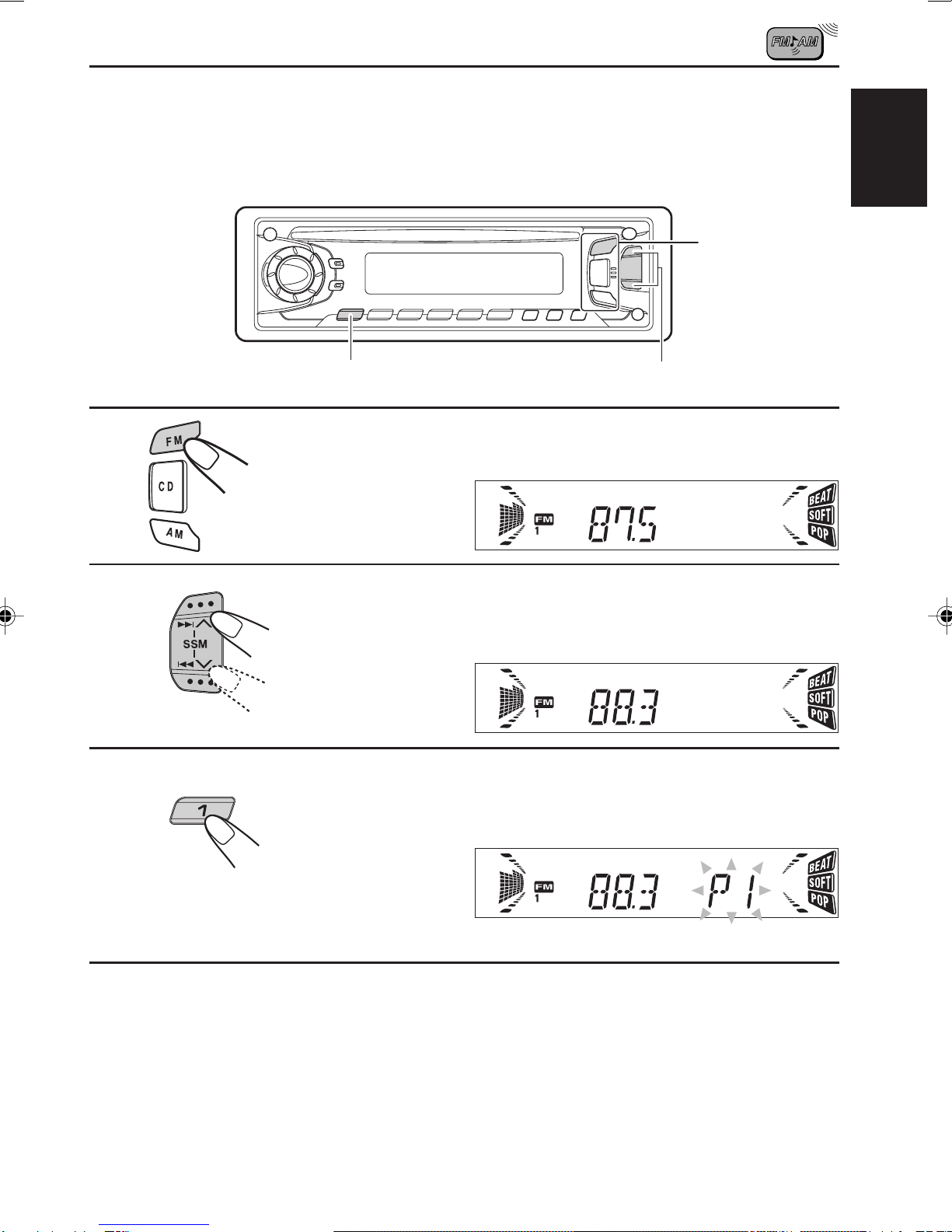
EXAMPLE: Storing an FM station of 88.3 MHz into the preset number 1 of the FM1 band
1
Select the FM1 band.
2
Tune into a station of 88.3 MHz.
See page 5 to tune into a station.
3
Press and hold the button for more than 2
seconds.
4
Repeat the above procedure to store other stations into other
preset numbers.
Notes:
• A previously preset station is erased when a new station is stored in the same preset number.
• Preset stations are erased when the power supply to the memory circuit is interrupted (for example,
during battery replacement). If this occurs, preset the stations again.
“P1” flashes for a few seconds.
32
1
EN05-09.KD-S675[U] 24/3/05, 8:46 PM7

8
ENGLISH
1
Select the band (FM1, FM2, FM3 orAM) you
want.
2
Selectthenumber(1–6)forthe presetstation
you want.
Tuning into a preset station
You can easily tune into a preset station.
Remember that you must store stations first. If you have not stored them yet, see pages 6
and 7.
2
1
FM1 FM2 FM3
AM
EN05-09.KD-S675[U] 24/3/05, 8:46 PM8

9
ENGLISH
Scanning broadcast stations
When you press RPT/SCAN while listening to the radio, station scanning starts. Each time a
broadcast is tuned in, scanning stops for about 5 seconds (tuned frequency number flashes
on the display), and you can check what program is now being broadcasted.
If you want to listen to that program, press the same button again to stop scanning.
Selecting FM reception sound
When an FM stereo broadcast is hard to receive:
Press MO/RND (Mono/Random) while listening to an FM stereo broadcast. The sound you
hear becomes monaural but reception will be improved.
To restore the stereo effect, press the same button again.
Other convenient tuner functions
A
Lights up when receiving an FM broadcast in stereo.
MO/RNDRPT/SCAN
EN05-09.KD-S675[U] 24/3/05, 8:46 PM9

10
ENGLISH
CD OPERATIONS
Playing a CD
1
Insert a disc into the loading slot.
The unit turns on, draws a CD and starts playback
automatically.
• When a CD is inserted upside down, “EJECT” appears on
the display and the CD automatically ejects.
To stop play and eject the CD
Press 0.
CD play stops and the CD automatically ejects from the loading slot. The source changes to
the tuner (you will hear the last received station).
If you change the source to FM or AM, the CD play also stops (without ejecting the CD this
time).
• If the ejected disc is not removed for about 15 seconds, the disc is automatically inserted again into
the loading slot to protect it from dust. (CD play will not start this time.)
• You can eject the CD even when the unit is turned off.
CAUTION on Volume Setting
CDs produces very little noise compared with other sources. If the volume level is adjusted
for the tuner, for example, the speakers may be damaged by the sudden increase in the
output level. Therefore, lower the volume before playing a CD and adjust it as required
during playback.
Note on One-Touch Operation:
When a CD is already in the loading slot, pressing CD turns on the unit and starts playback
automatically.
A
A
1
0
Elapsed playing
time Current track
Total playing time of
the inserted disc Total track number
of the inserted disc
EN10-12.KD-S675[U] 14/12/00, 10:58 PM10
Altri manuali per KD-S675
1
Indice
Altri manuali JVC Ricevitore per auto


