
JVC KS-FX470 Manuale utente

INSTRUCTIONS
MANUAL DE INSTRUCCIONES
MANUEL D’INSTRUCTIONS
GET0015-001A
[J]
For customer Use:
Enter below the Model No. and
Serial No. which are located on
the top or bottom of the cabinet.
Retain this information for future
reference.
Model No.
Serial No.
For installation and connections, refer to the separate manual.
Para la instalación y las conexiones, refiérase al manual separado.
Pour l’installation et les raccordements, se référer au manuel séparé.
Scan
Music
Multi
MO
DISP
DISP
SCAN
SCAN
LOUD
LOUD
8 9 10 11 127
ENGLISH
ESPAÑOL
FRANÇAIS
CASSETTE RECEIVER KS-FX470
RECEPTOR-REPRODUCTOR DE CASSETTE KS-FX470
RADIOCASSETTE KS-FX470
RM-RK31
ENCOVER KS-FX470[J]f 13/12/00, 11:483
2
ENGLISH
Thank you for purchasing a JVC product. Please read all instructions carefully before operation, to
ensure your complete understanding and to obtain the best possible performance from the unit.
CONTENTS
How to reset your unit .................................................................... 2
BASIC OPERATIONS .................................................... 4
RADIO OPERATIONS ................................................... 5
Listening to the radio ..................................................................... 5
Storing stations in memory ............................................................ 6
FM station automatic preset: SSM .............................................. 6
Manual preset .............................................................................. 7
Tuning into a preset station ........................................................... 8
Other convenient tuner functions ................................................. 9
Scanning broadcast stations ....................................................... 9
Selecting FM reception sound ..................................................... 9
TAPE OPERATIONS ................................................... 10
Listening to a tape ........................................................................ 10
Finding the beginning of a tune ................................................... 12
Other convenient tape functions ................................................. 13
Skipping the blank portions on the tape .................................... 13
Playing the current track repeatedly .......................................... 13
Prohibiting cassette ejection ...................................................... 13
SOUND ADJUSTMENTS ............................................. 14
Adjusting the sound ...................................................................... 14
Turning on/off the loudness function .......................................... 15
Using the Sound Control Memory .............................................. 16
Selecting and storing the sound modes .................................... 16
Recalling the sound modes ....................................................... 17
Storing your own sound adjustments ......................................... 18
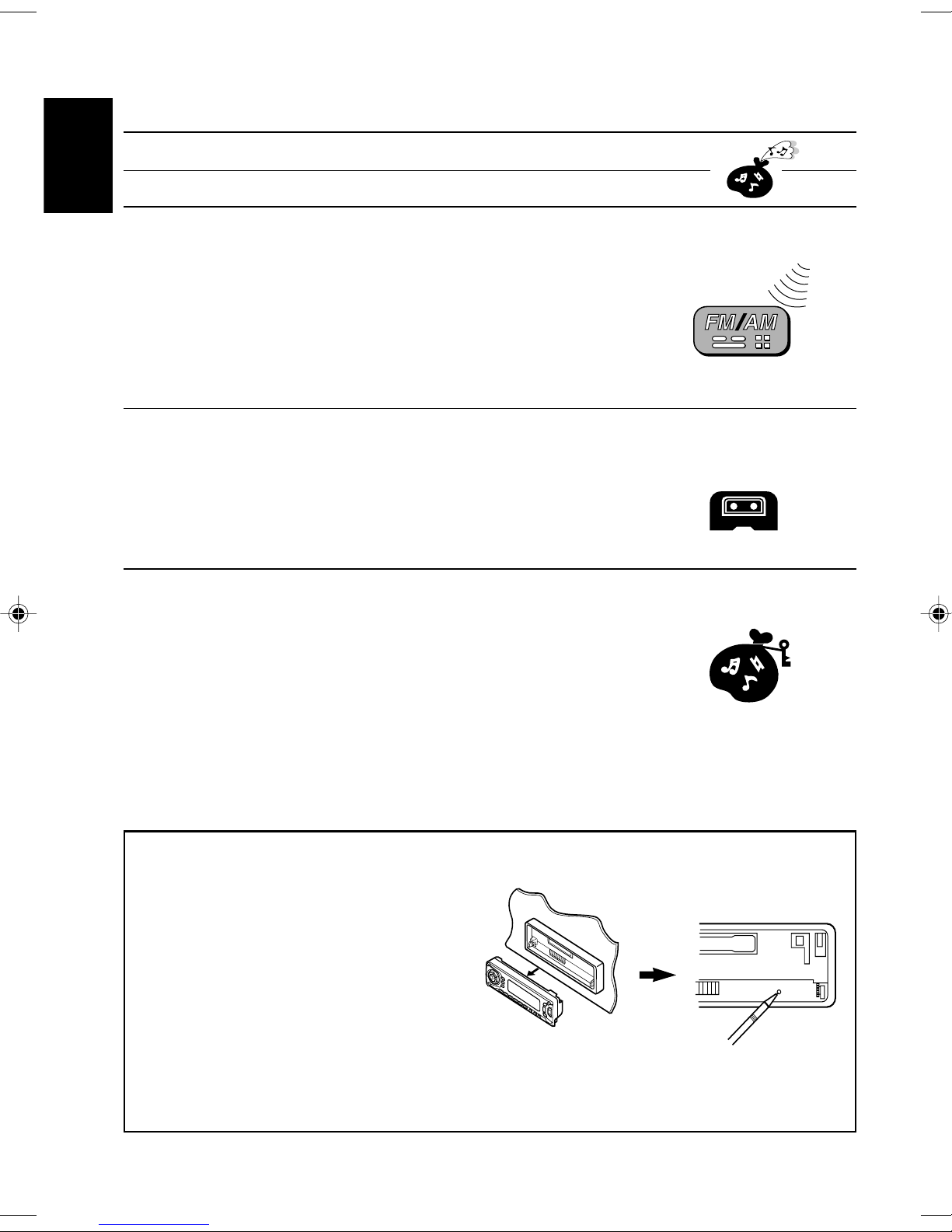
How to reset your unit
After detaching the control panel, press reset
button on the panel holder using a ball-point
pen or similar tool.
This will reset the built-in microcomputer.
NOTE:
Your preset adjustments — such as preset channels
or sound adjustments will also be erased.
EN02-04 KS-FX470[J]f 13/12/00, 11:302

3
ENGLISH
BEFORE USE
* For safety....
• Do not raise the volume level too much, as this
will block outside sounds, making driving
dangerous.
• Stop the car before performing any complicated
operations.
* Temperature inside the car....
If you have parked the car for a long time in hot
or cold weather, wait until the temperature in the
car becomes normal before operating the unit.
OTHER MAIN FUNCTIONS ......................................... 19
Setting the clock ............................................................................ 19
Changing the general settings (PSM) ........................................ 20
Basic Procedure ........................................................................ 20
Canceling Advanced SCM ......................................................... 21
Selecting the level display ......................................................... 21
Selecting the dimmer mode ....................................................... 22
Selecting the external component to use .................................. 22
Detaching the control panel ......................................................... 23
REMOTE OPERATIONS .............................................. 24
Installing the batteries .................................................................. 24
Using the remote controller ......................................................... 25
CD CHANGER OPERATIONS ...................................... 26
Playing CDs ................................................................................... 26
Selecting CD playback modes ..................................................... 28
EXTERNAL COMPONENT OPERATIONS ...................... 29
Playing an external component ................................................... 29
MAINTENANCE ........................................................ 30
To extend the lifetime of the unit ................................................. 30
TROUBLESHOOTING ................................................. 31
SPECIFICATIONS ....................................................... 32
EN02-04 KS-FX470[J]f 13/12/00, 11:303

4
ENGLISH
1
Turn on the power.
“HELLO” appears on the display.
2
Select the source.
To operate the tuner, see pages 5 – 9.
To operate the cassette deck, see pages 10 – 13.
To operate the CD changer, see pages 26 – 28.
To operate the external component, see page 29.
3
Adjust the volume.
4
Adjust the sound as you want (see pages 14 – 18).
To drop the volume in a moment
Press briefly while listening to any source. “ATT” starts flashing on the display, and
the volume level will drop in a moment.
To resume the previous volume level, press the button briefly again.
To turn off the power
Press for more than 1 second.
BASIC OPERATIONS
Note:
When you use this unit for the
first time, set the built-in clock
correctly. (See page 19.)
1
32
Note on One-Touch Operation:
When you select a source in step 2 below, the power automatically comes on.
You do not have to press this button to turn on the power.
Volume level indicator
Volume level appears
EN02-04 KS-FX470[J]f 13/12/00, 11:304

5
ENGLISH
RADIO OPERATIONS
Listening to the radio
1
Select the band (FM1, FM2, FM3 or AM).
You can select any one of FM1, FM2, and FM3 to listen to an
FM station.
2
Start searching a station.
While searching stations, "SEEK" appears
on the display.
When a station is received, searching stops.
To stop searching before a station is received, press the same button you have pressed
for searching.
To tune in a particular frequency without searching:
1Press FM/AM repeatedly to select the band (FM or AM).
2Press and hold ¢or 4until “MANU (Manual)” starts flashing on the display.
Now you can manually change the frequency while “MANU” is flashing.
3Press ¢or 4repeatedly until the frequency you want is reached.
• If you hold down the button, the frequency keeps changing until you release the button.
To search stations of
higher frequencies
To search stations of
lower frequencies
F1
(FM1)
F2
(FM2)
F3
(FM3)
AM
Audio (see page 21) or
volume level indicator
Selected band (or clock time:
see page 19) appears
12
EN05-09 KS-FX470[J]f 13/12/00, 11:305

6
ENGLISH
1
Select the FM band number (FM1, FM2 or
FM3) you want to store FM stations into.
2
Press and hold both buttons for more than
2 seconds.
Local FM stations with the strongest signals are searched and stored automatically in the
band number you have selected (FM1, FM2 or FM3). These stations are preset in the number
buttons — No. 1 (lowest frequency) to No. 6 (highest frequency).
When automatic preset is over, the station stored in number button 1 will be automatically
tuned in.
Storing stations in memory
You can use one of the following two methods to store broadcasting stations in memory.
• Automatic preset of FM stations: SSM (Strong-station Sequential Memory)
• Manual preset of both FM and AM stations
FM station automatic preset: SSM
You can preset 6 local FM stations in each FM band (FM1, FM2 and FM3).
“SSM” appears, then disappears when
automatic preset is over.
F1
(FM1)
F2
(FM2)
F3
(FM3)
AM
12
EN05-09 KS-FX470[J]f 13/12/00, 11:306

7
ENGLISH
Manual preset
You can preset up to 6 stations in each band (FM1, FM2, FM3 and AM) manually.
EXAMPLE: Storing an FM station of 88.3 MHz into the preset channel number 1 of the FM1 band
1
Select the FM1 band.
2
Tune into a station of 88.3 MHz.
See page 5 to tune into a station.
3
Press and hold the number button (in this
example, 1) for more than 2 seconds.
4
Repeat the above procedure to store other stations into other
preset channel numbers.
Notes:
• A previously preset station is erased when a new station is stored in the same preset channel number.
• Preset stations are erased when the power supply to the memory circuit is interrupted (for example,
during battery replacement). If this occurs, preset the stations again.
Selected band,preset number and
“MEMO” flash alternately for a while.
132
EN05-09 KS-FX470[J]f 13/12/00, 11:307

8
ENGLISH
Tuning into a preset station
You can easily tune into a preset station.
Remember that you must store stations first. If you have not stored them yet, see pages 6
and 7.
1
Select the band (FM1, FM2, FM3 or AM)
you want.
2
Select the number (1 – 6) for the preset station
you want.
F1
(FM1)
F2
(FM2)
F3
(FM3)
AM
12
EN05-09 KS-FX470[J]f 13/12/00, 11:308

9
ENGLISH
Other convenient tuner functions
SCAN MO RND
Lights up when receiving an FM broadcast in stereo.
Scanning broadcast stations
When you press SCAN while listening to the radio, station scanning starts. Each time a
broadcast is tuned in, scanning stops for about 5 seconds (tuned frequency number flashes
on display), and you can check what program is now being broadcasted.
If you want to listen to that program, press the same button again to stop scanning.
Selecting FM reception sound
When an FM stereo broadcast is hard to receive:
Press MO RND (Monaural/Random) while listening to an FM stereo broadcast. The MONO
indicator lights up on the display. The sound you hear becomes monaural but reception will
be improved.
To restore the stereo effect, press the same button again.
EN05-09 KS-FX470[J]f 13/12/00, 11:309

10
ENGLISH
1
Open the control panel.
2
1. Insert a cassette into the cassette
compartment.
The unit turns on and tape play starts automatically.
2. Close the control panel by hand.
• When one side of the tape reaches its end during play, the other side of the tape
automatically starts playing. (Auto Reverse)
3
Select the tape direction.
Each time you press the button, the tape direction changes
alternately – forward ( ) and reverse ( ).
TAPE OPERATIONS
Listening to a tape
Note on One-Touch Operation:
When a cassette is already in the cassette compartment, pressing TAPE 23 turns on the
unit and starts tape play automatically.
To play back tapes recorded with the Dolby B NR
Press RPT (Dolby NR/Repeat) for more than 2 seconds to set the Dolby B NR* system.
The indicator lights up, and “DOLBY B” appears on the display for several seconds.
To cancel the Dolby B NR, press the same button again.
* Dolby noise reduction manufactured under license from Dolby Laboratories Licensing
Corporation.
“DOLBY” and the double-D symbol are trademarks of Dolby Laboratories Licensing
Corporation.
RPT
1
3
EN10-13 KS-FX470[J]f 13/12/00, 11:3310
Altri manuali per KS-FX470
2
Questo manuale è adatto per i seguenti modelli
2
Indice
Altri manuali JVC Ricevitore per auto


JVC
JVC KD-SH99 Manuale utente

JVC
JVC KD-G815 Manuale utente

JVC
JVC KW-AB71BT Guida

JVC
JVC KD-AVX2 - DVD Player With LCD Monitor Guida

JVC
JVC CD Receiver KD-G387 Guida

JVC
JVC KD-AVX40 - DVD Player With LCD monitor Manuale utente

JVC
JVC KD-DB52 Manuale utente

JVC
JVC EXAD KD-AV7000 Manuale utente

JVC
JVC KD-X70BT Manuale utente

JVC
JVC KS-FX12 Manuale utente


