JVC UX-EP25 Manuale utente

UX-EP25
—
Consists of CA-UXEP25 and SP-UXEP25
COMPACT COMPONENT SYSTEM
MICRO COMPONENT SYSTEM
INSTRUCTIONS
LVT1598-003B
[
B]

G-1
Warnings, Cautions and Others
IMPORTANT for the U.K.
DO NOT cut off the mains plug from this equipment. If the
plug fitted is not suitable for the power points in your home or
the cable is too short to reach a power point, then obtain an
appropriate safety approved extension lead or consult your
dealer.
BE SURE to replace the fuse only with an identical approved
type, as originally fitted.
If nontheless the mains plug is cut off ensure to remove the
fuse and dispose of the plug immediately, to avoid a possible
shock hazard by inadvertent connection to the mains supply.
If this product is not supplied fitted with a mains plug then
follow the instructions given below:
IMPORTANT:
DO NOT make any connection to the terminal which is
marked with the letter E or by the safety earth symbol or
coloured green or green-and-yellow.
The wires in the mains lead on this product are coloured in
accordance with the following code:
Blue : Neutral
Brown : Live
As these colours may not correspond with the coloured
markings identifying the terminals in your plug proceed as
follows:
The wire which is coloured blue must be connected to the
terminal which is marked with the letter N or coloured black.
The wire which is coloured brown must be connected to the
terminal which is marked with the letter L or coloured red.
IF IN DOUBT - CONSULT A COMPETENT ELECTRICIAN.
Caution — STANDBY/ON button!
Disconnect the mains plug to shut the power off
completely (all lamps and indications go off).The
STANDBY/ON button in any position does not
disconnect the mains line.
•When the unit is on standby, the STANDBY lamp
lights red.
•When the unit is turned on, the STANDBY lamp
goes off.
The power can be remote controlled.
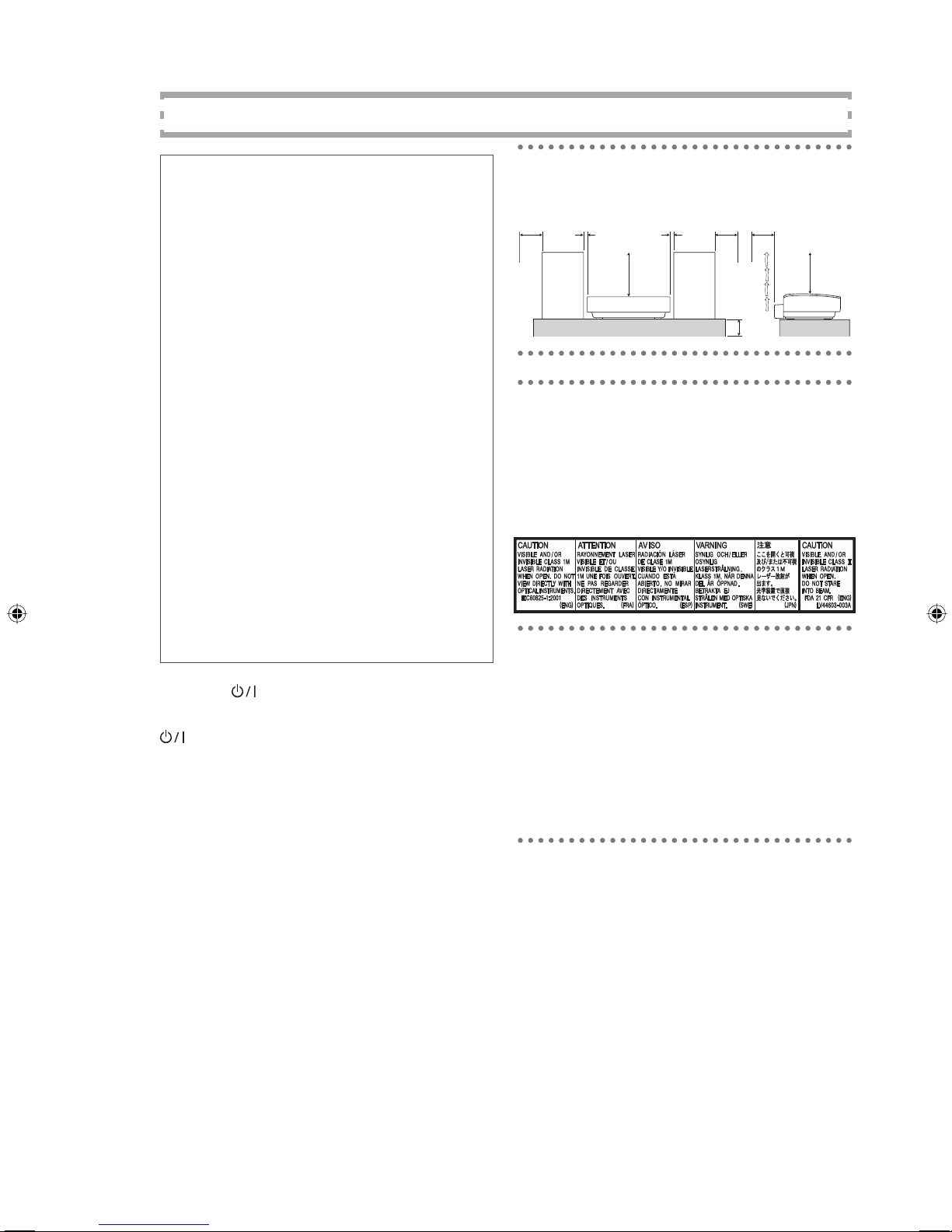
Caution: Proper Ventilation
To avoid risk of electric shock and fire, and to
prevent damage, locate the apparatus as follows:
1Front: No obstructions and open spacing.
2Sides/ Top/ Back: No obstructions should be placed in
the areas shown by the dimensions below.
3Bottom: Place on the level surface. Maintain an
adequate air path for ventilation by placing on a stand
with a height of 10 cm or more.
About the cooling fan
A cooling fan is mounted on the right side of the
unit to prevent abnormal temperature inside the
unit, thus assuring normal operation of the unit.The
cooling fan automatically starts rotating to intake
external cool air when the volume is increased up
to more than a certain level.
CAUTION
To reduce the risk of electric shocks, fire, etc.:
1Do not remove screws, covers or cabinet.
2Do not expose this appliance to rain or moisture.
10 cm
15 cm
2 cm
15 cm
15 cm 2 cm 15 cm
15 cm
IMPORTANT FOR LASER PRODUCTS
1. CLASS 1 LASER PRODUCT
2. CAUTION: Do not open the top cover. There are no user
serviceable parts inside the Unit; leave all servicing to
qualified service personnel.
3. CAUTION: Visible and invisible laser radiation when open
and interlock failed or defeated. Avoid direct exposure to
beam.
4. REPRODUCTION OF LABEL: CAUTION LABEL, PLACED
INSIDE THE UNIT.
CAUTION
1 Do not block the ventilation openings or holes. (If
the ventilation openings or holes are blocked by a
newspaper or cloth, etc., the heat may not be able to get
out.)
2 Do not place any naked flame sources, such as lighted
candles, on the apparatus.
3 When discarding batteries, environmental problems
must be considered and local rules or laws governing
the disposal of these batteries must be followed strictly.
4 Do not expose this apparatus to rain, moisture, dripping
or splashing and that no objects filled with liquids, such
as vases, shall be placed on the apparatus.
Dear Customer,
This apparatus is in conformance with the valid
European directives and standards regarding
electromagnetic compatibility and electrical
safety.
European representative of Victor Company of
Japan, Limited is:
JVCTechnology Centre Europe GmbH
P.O. Box 10 05 52
61145 Friedberg
Germany

G-2
SAFETY INSTRUCTIONS
“SOME DOS AND DON’TS ON THE SAFE USE OF EQUIPMENT”
This equipment has been designed and manufactured to meet international safety standards but, like any electrical equip-
ment, care must be taken if you are to obtain the best results and safety is to be assured.
Do read the operating instructions before you attempt to use the equipment.
Do ensure that all electrical connections (including the mains plug, extension leads and interconnections between pieces of
equipment) are properly made and in accordance with the manufacturer’s instructions. Switch off and withdraw the mains
plug when making or changing connections.
Do consult your dealer if you are ever in doubt about the installation, operation or safety of your equipment.
Do be careful with glass panels or doors on equipment.
DON’T continue to operate the equipment if you are in any doubt about it working normally, or if it is damaged in any
way–switch off, withdraw the mains plug and consult your dealer.
DON’T remove any fixed cover as this may expose dangerous voltages.
DON’T leave equipment switched on when it is unattended unless it is specifically stated that it is designed for unattended
operation or has a standby mode.
Switch off using the switch on the equipment and make sure that your family know how to do this.
Special arrangements may need to be made for infirm or handicapped people.
DON’T use equipment such as personal stereos or radios so that you are distracted from the requirements of traffic safety. It
is illegal to watch television whilst driving.
DON’T listen to headphones at high volume as such use can permanently damage your hearing.
DON’T obstruct the ventilation of the equipment, for example with curtains or soft furnishings.
Overheating will cause damage and shorten the life of the equipment.
DON’T use makeshift stands and NEVER fix legs with wood screws — to ensure complete safety always fit the manufactur-
er’s approved stand or legs with the fixings provided according to the instructions.
DON’T allow electrical equipment to be exposed to rain or moisture.
ABOVE ALL
— NEVER let anyone, especially children, push anything into holes, slots or any other opening in the case - this
could result in a fatal electrical shock.;
— NEVER guess or take chances with electrical equipment of any kind.
It is better to be safe than sorry!
Information for Users on Disposal of Old Equipment
[European Union]
Attention:
This symbol is only
valid in the
European Union.
This symbol indicates that the electrical and electronic equipment should not be
disposed as general household waste at its end-of-life. Instead, the product
should be handed over to the applicable collection point for the recycling of
electrical and electronic equipment for proper treatment, recovery and recycling in
accordance with your national legislation.
By disposing of this product correctly, you will help to conserve natural resources
and will help prevent potential negative effects on the environment and human
health which could otherwise be caused by inappropriate waste handling of this
product. For more information about collection point and recycling of this product,
please contact your local municipal office, your household waste disposal service
or the shop where you purchased the product.
Penalties may be applicable for incorrect disposal of this waste, in accordance
with national legislation.
(Business users)
If you wish to dispose of this product, please visit our web page www.jvc-
europe.com to obtain information about the take-back of the product.
[Other Countries outside the European Union]
If you wish to dispose of this product, please do so in accordance with applicable
national legislation or other rules in your country for the treatment of old electrical
and electronic equipment.

1
Contents
Introduction ...............................................................................................................................2
Precautions............................................................................................................................................................2
How to Read This Manual...................................................................................................................................3
Getting Started..........................................................................................................................4
Step 1: Unpack ......................................................................................................................................................4
Step 2: Prepare the Remote Control..................................................................................................................4
Step 3: Hook Up.....................................................................................................................................................5
To assemble and connect the AM loop antenna.............................................................................................7
To connect the speaker cords............................................................................................................................7
Before Operating the System .................................................................................................8
Daily Operations— Playback —...........................................................................................9
Listening to the Radio.........................................................................................................................................10
Playing Back a Disc............................................................................................................................................11
Playing back from iPod......................................................................................................................................12
Playing Back from the USB mass storage class device..............................................................................13
Playing Back from the PC..................................................................................................................................15
Playing Back from Other Equipment................................................................................................................16
Receiving FM Stations with Radio Data System ...........................................................................................16
Daily Operations— Sound & Other Adjustments —........................................................20
Adjusting the Volume .........................................................................................................................................20
Adjusting the Sound
Remote
ONLY
.............................................................................................................................20
Changing the Display Brightness — DIMMER
Remote
ONLY
................................................................................21
Setting the Clock
Remote
ONLY
..................................................................................................................................21
Turning Off the Power Automatically
Remote
ONLY
................................................................................................22
Advanced Disc/USB mass storage class device Operations ........................................23
Programming the Playing Order — Program Play
Remote
ONLY
...........................................................................23
Playing at Random — Random Play
Remote
ONLY
.................................................................................................24
Playing Repeatedly — Repeat Play
Remote
ONLY
..................................................................................................25
Timer Operations ....................................................................................................................26
Setting the Timer
Remote
ONLY
..................................................................................................................................26
Additional Information...........................................................................................................28
Learning More about This System...................................................................................................................28
Troubleshooting ..................................................................................................................................................29
Maintenance .......................................................................................................................................................30
Specifications......................................................................................................................................................30
Parts Index...........................................................................................................................................................31

2
Introduction
Thank you for purchasing the JVC Micro
Component System.
We hope it will be a valued addition to your
home, giving you years of enjoyment.
Be sure to read this instruction manual carefully
before operating your new stereo system.
In it you will find all the information you need to
set up and use the system.
If you have a query that is not answered by the
manual, please contact your dealer.
Precautions
Installation
•Install in a place which is level, dry and neither
too hot nor too cold—between 5°C and 35°C.
•Install the System in a location with adequate
ventilation to prevent internal heat buildup
inside the System.
DO NOT install the System in a location
near heat sources, or in a place subject to
direct sunlight, excessive dust or vibration.
•Leave sufficient distance between the System
and theTV.
•Keep the speakers away from theTV to avoid
interference withTV.
Power sources
•When unplugging the System from the wall
outlet, always pull on the plug, not the AC
power cord.
DO NOT handle the AC power cord with
wet hands.
Moisture condensation
Moisture may condense on the lenses inside the
System in the following cases:
•After starting to heat the room
•In a damp room
•If the System is brought directly from a cold to
a warm place
Should this occur, the System may malfunction.
In this case, leave the System turned on for a
few hours until the moisture evaporates, unplug
the AC power cord, then plug it in again.
Internal heat
•A cooling fan is mounted on the right side
of the unit to prevent heat buildup inside the
main unit (see page G-1).
For safety, observe the following carefully:
•Make sure there is good ventilation the
main unit. Poor ventilation could overheat
and damage the System.
•DO NOT block the cooling fan and the
ventilation openings or holes. If they are
blocked by a newspaper or cloth, etc.,
the heat may not be able to get out.

3
Others
•Should any metallic object or liquid fall into
the System, unplug the AC power cord and
consult your dealer before operating any
further.
DO NOT disassemble the System since
there are no user serviceable parts inside.
•If you are not going to operate the System for
an extended period of time, unplug the AC
power cord from the wall outlet.
If anything goes wrong, unplug the AC power
cord and consult your dealer.
How to Read This Manual
To make this manual as simple and easy-to-
understand as possible, we have adapted the
following methods:
•Button and control operations are explained
as listed in the table below. In this manual, the
operations using the remote control is mainly
explained; however, you can use the buttons
and controls on the main unit if they have the
same (or similar) name and marks.
•Some related tips and notes are explained
later in the sections “Learning More about
This System”and “Troubleshooting,”but not
in the same section explaining the operations.
If you want to know more about the functions,
or if you have a doubt about the functions,
go to these sections and you will find the
answers.
Indicates that you press the button
briefly.
Indicates that you press the button
briefly and repeatedly until an
option you want is selected.
Indicates that you press one of the
buttons.
2sec.
Indicates that you press and hold
the button for specified seconds.
•The number above indicates the
period of press (in this example,
2 seconds).
•If no number is indicated,press
and hold until the entire
procedure is complete or until
you get a result you want.
Remote
ONLY
Indicates that this operation is only
possible using the remote control.

4
Getting Started
Step 1: Unpack the package and check the
accessories.
Step 2: Prepare the remote control.
Step 3: Hook up the components such as
AM/FM antennas, speakers, etc. (see
pages 5 to 7).
Finally plug the AC power cord.
Now you can operate the System.
Step 1: Unpack
After unpacking, check to be sure that you
have all the following items.The number in
parentheses indicates the quantity of each piece
supplied.
•FM antenna (1)
•AM loop antenna (1)
•Speaker cords (2)
•Remote control (1)
•Batteries (2)
•iPod connection cable (1)
•iPod stand (1)
If any item is missing, consult your dealer immediately.
Step 2: Prepare the Remote Control
Insert the batteries into the remote control by
matching the polarity (+ and –) correctly.
1
2
3
•DO NOT use an old battery together with
a new one.
•DO NOT use different types of batteries
together.
•DO NOT expose batteries to heat or
flame.
•
DO NOT leave the batteries in the battery
compartment when you are not going to use
the remote control for an extended period of
time. Otherwise, the remote control will be
damaged from battery leakage.
R6P(SUM-3) / AA (15F)

5
Step
3 Hook Up
If you need more detailed information, see page 7.
Illustrations of the input/output terminals below are typical examples.
When you connect other components, refer also to their manuals since the terminal names actually printed on the
rear may vary.
Turn the power off to all components before connections.
For better FM/AM reception
Outdoor FM
antenna
(not supplied)
AM loop antenna
Keep it connected.
Vynil-covered wire (not supplied)
Extend it horizontally.
Disconnect the supplied FM antenna, and connect to an outdoor FM
antenna using a 75 Ωwire with coaxial type connector.
To a wall outlet
Plug the AC power cord only after all connections are complete.

6
AM loop antenna (supplied)
Turn it until the best reception is
obtained.
FM antenna (supplied)
Extend it so that
you can obtain
the best reception.
Speaker cord (supplied)
Connect the black cord to
the black (−) terminal. Speaker cord (supplied)
Connect the white cord to the
red (+) terminal.

7
To assemble and connect the AM loop
antenna
To assemble the AM loop antenna
To connect the AM loop antenna
Make sure to connect the wire correctly.
•If the AM loop antenna wire or speaker cords
are covered with vinyl, remove the vinyl to
expose the tip of the antenna by twisting the
vinyl.
•Make sure the antenna conductors do not
touch any other terminals, connecting cords
and power cord. Also, keep the antennas away
from metallic parts of the System, connecting
cords, and the AC power cord.This could
cause poor reception.
To connect the speaker cords
Make sure the both speakers are connected
correctly and firmly.
When connecting the speaker cords, match the
polarity of the speaker terminals.
Red (+) terminal : white cord of the speaker
cord
Black (–) terminal : black cord of the speaker
cord
•DO NOT connect more than one speaker
to each terminal.
•DO NOT allow the conductor of the
speaker cords to be in touch with the
metallic parts of the System.
Altri manuali per UX-EP25
3
Indice
Altri manuali JVC Impianto stereo

JVC
JVC UX-G68 Manuale utente

JVC
JVC Micro Component System UX-G200 Manuale utente

JVC
JVC CA-MXDK51 Manuale utente

JVC
JVC UX-G3 Manuale utente

JVC
JVC UX-M3R Manuale utente

JVC
JVC UX-G60 Manuale

JVC
JVC MX-G71R Manuale utente

JVC
JVC UX-D427S Manuale utente

JVC
JVC UX-H330 Manuale utente

JVC
JVC XU-301 Manuale utente

JVC
JVC CA-UXZ7MDR Guida rapida

JVC
JVC HX-Z3 Guida per l'amministratore

JVC
JVC UX-H100 Manuale utente

JVC
JVC MX-J500 Manuale utente

JVC
JVC EX-AK1 Manuale utente

JVC
JVC UX-V55R Manuale utente

JVC
JVC SP-PCX290 Manuale utente

JVC
JVC UX-GP5 Manuale utente

JVC
JVC SP-MXK30 Manuale utente

JVC
JVC MX-KA3 - Mini Shelf System Manuale utente


