
Kid Galaxy Hyper Flyer Manuale utente

Hyper Flyer
Charger Dock Instruction Manual
Transmitter & Antenna
Box Contents
1) Unpack And Set Up
Unwind and fully extend
wire antenna. It should extend
loosely behind plane.
Screw metal antenna into
top of transmitter and extend
fully.
Hyper Flyer Transmitter
Charger Dock
Unscrew battery cover on rear
of transmitter. Insert one (1)
9 volt battery with correct
polarity (see inside of battery
compartment)
Open compartment door and
extend charger plug as shown.
Congratulations!
You are now ready to fly your
Hyper Flyer!
Please read on to see more
information and basic
flying tips!
Attach charge plug to the top of
plane as shown. Be sure that plane
switch is “off” as shown. The charger dock
light will blink during charging. This will
take 5 minutes. Light will shut off when
charge is complete.
Turn transmitter power switch to “on”.
The red light will illuminate,
indicating that power is “on”.
Remove charge plug from
Hyper Flyer. Turn power
switch at top of plane
to “on”.
Unscrew battery cover on rear
of charging dock. Insert ten (10)
“C” batteries with correct
polarity (see inside of
battery compartment) as shown,
replace cover and secure.
AB
CD
E
F
G
Warning: battery MUST
be installed as shown,
with correct polarity.
+ -
2) Part Identification
3) Basic Operation & Use
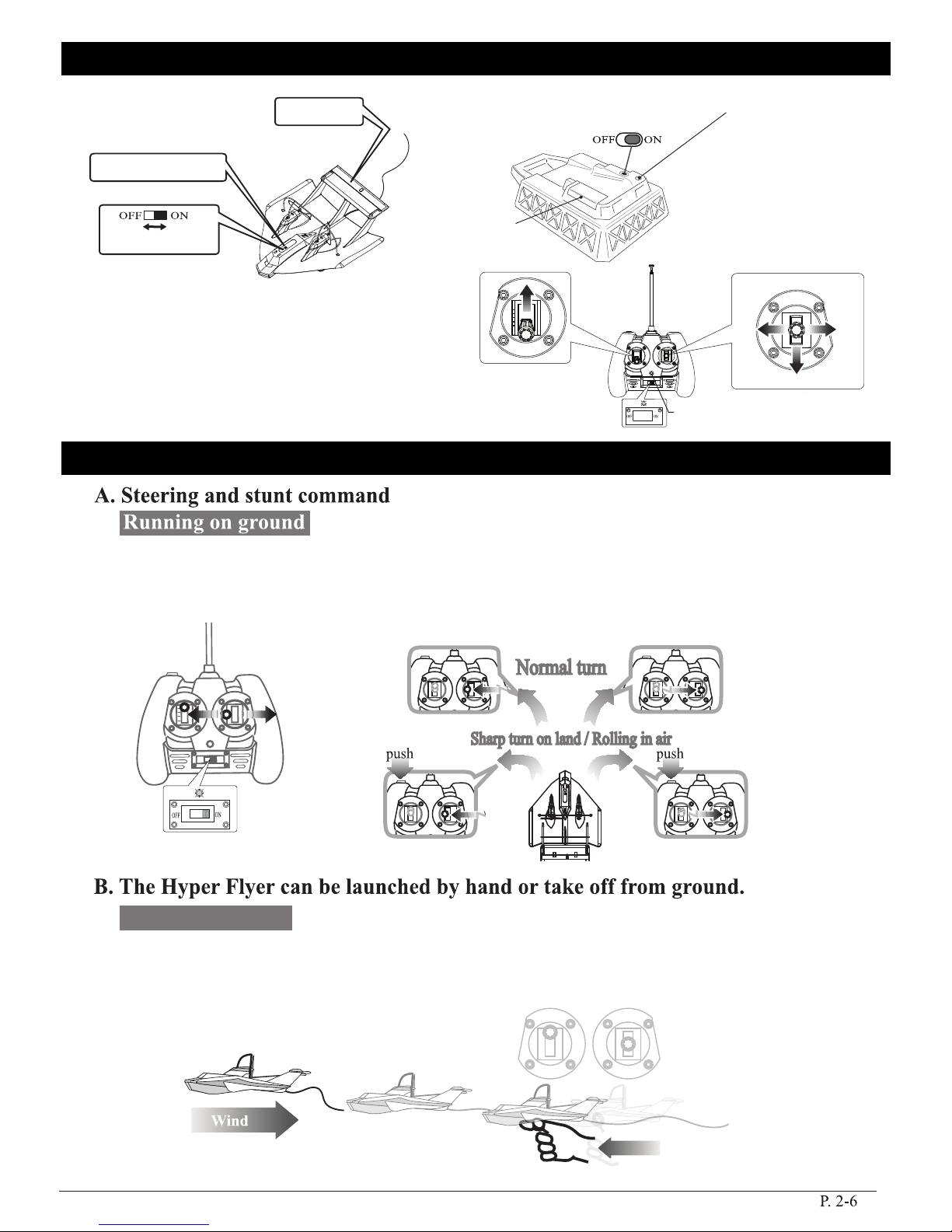
Elevator
Charging Port
Charger DockHyper Flyer
Transmitter
Power Switch
Battery charger
cord compartment
Red LED
Throttle Joystick Steering Joystick
Push the throttle joystick forward halfway to keep Hyper Flyer running on the ground. Press the
“sharp turn” button (on upper left corner of transmitter) while pushing the steering joystick
left or right. HyperFlyer will steer left or right as it runs on the ground in a large circle.
To hand launch: Push the throttle joystick all the way forward so Hyper Flyer reaches full speed
for take off. Gently throw the plane forward in a horizontal path (into the breeze). Keep Hyper Flyer
flying into the breeze until it gains altitude before attempting maneuvers.
Throttle
Joystick
Steering
Joystick
Loop
Turn
Left
Turn
Right
Light will flash while
charging, then will
turn off when charging
is complete.
Launch by hand
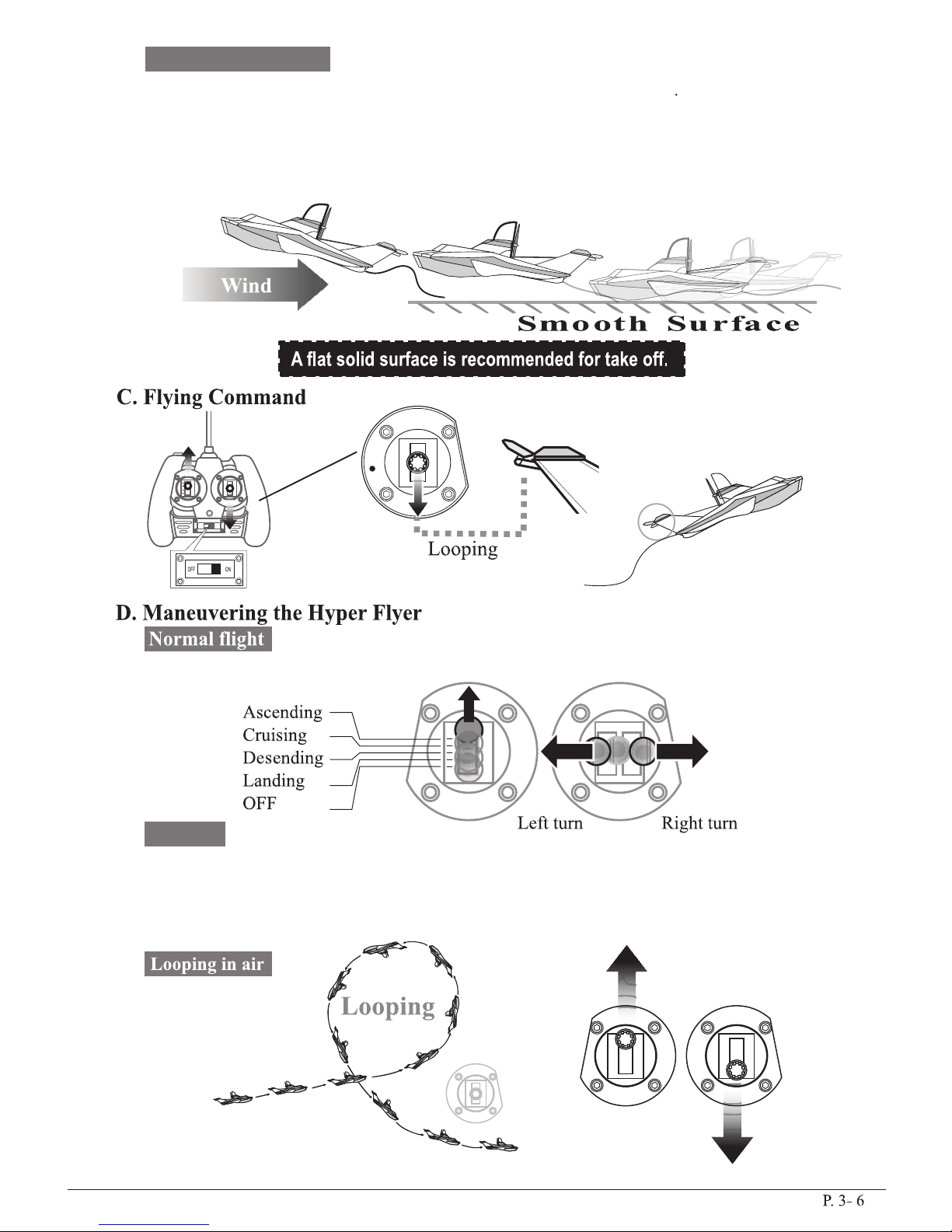
Place Hyper Flyer on smooth ground surface, (asphalt, blacktop, etc.). Avoid grass or other rough
surfaces. Push throttle joystick on transmitter fully forward to reach take off speed. Hyper Flyer
will start to slide forward on ground. Be sure that it is moving directly into the wind direction.
Hyper Flyer will take off after moving approx. 30 feet (Minimum take off room should be 35 feet).
Guide Hyper Flyer straight for several seconds before attempting any maneuvers.
Steering Joystick
Steering
Joystick
Steering
Joystick
Throttle
Joystick
Pull back on steering joystick to
raise elevator to “up” position for
a loop
TapTap
Shift both joysticks (throttle and steering) simultaneously for desired flight patterns
When Hyper Flyer has achieved 50 ft. altitude (approx.), you can shut your propellors
down by allowing the throttle joystick to move all the way back to “OFF” position. Hyper Flyer
can then steer right or left by “tapping” the steering joystick. Allowing Hyper Flyer to
glide in this manner will extend flight times significantly.
Ground Launch
Gliding

IMPORTANT: If your Hyper Flyer begins to steer
towards a building or any obstacle you should
immediately pull the speed lever (left lever on
your controller) down for descending or turn
the “On/Off” switch on the controller to “off”
position to shut down the propeller.
This will help avoid crashing and protect against
unnecessary propeller or plane damage.
When Hyper Flyer reaches approx.
50 feet in altitude, depress the
transmitter “roll” button, push the
steering joystick right for a
clock-wise roll, left for a
counterclockwise roll. Hyper Flyer
normally loses some altitude during
rolls, avoid continuous rolls at lower
altitudes
Steer Hyper Flyer into the wind while allowing throttle joystick to move partway
back towards “off”. When Hyper Flyer is approx. 4 feet above ground, allow
throttle joystick to return completely to “off” position
to land plane. Throttle joystick
at center position
Throttle joystick
at “off” position
Off course, due to side wind
Steering to the right side
for regulating course
Allow “roll” button and steering
joystick to return to neutral
E. Landing
“Tap” the steering joystick to make turns. Never hold the steering joystick
in either left or right direction continuously or Hyper Flyer will spiral
down until it crashes into the ground. Your turns should be gentle and applied
in increments, never continuously
To stop turns, tap the steering joystick in opposite direction
and then allow steering joystick to return to neutral position.
When flying into the wind, Hyper Flyer both turns and gains
altitude more quickly than when flying away from the wind.
When Hyper Flyer is flying straight, a sudden side wind
will disturb its course. Tap the steering joystick in the direction
(left or right) from which the wind is coming to Guide Hyper Flyer back
on course. For example, if a breeze pushes the Hyper Flyer to the left,
tap the steering joystick to the right
4) Some Tips For Maneuvering Hyper Flyer
If Hyper Flyer does not climb at full throttle, even with freashly
charged battery, adjust the elevator so it angles “up” slightly more
by lengthening elevator pushrod as shown
Unscrew clevis to lengthen
Throttle seems ineffective for climbing
Adjusting for straight flight
The Hyper Flight may tend to turn left or right during launch
or flight. This can be adjusted the vertical rudder panel by bending it
slightly left or right. Affix clear tape over bend line to
hold adjustment
Rudder position
for right turn
adjustment
Rudder position
for left turn
adjustment

5) Caution
6) Warning
7) FCC Requirement
8) Warranty

Common Questions
Question: Should I remove the clear tape on the elevator surface?
Answer: No, the tape keeps the elevator in neutral position.
Question: Is the battery in the Hyper Flyer replaceable?
Answer: No, the battery is factory installed and is rechargeable, no replacements are needed.
Question: The light on the transmitter will not illuminate.
Answer: Check that batteries are properly installed. Also check if batteries are fresh. Check that the
transmitter switch is in “on” position.
Question: Can I use rechargeable batteries in transmitter?
Answer: No, we only recommend that you use alkaline batteries.
Question: How long is a typical Hyper Flyer flight?
Answer: Hyper Flyer Flight time is approximately 3 minutes.
Question: How long do the charging dock batteries last?
Answer: Depending on battery brand and how fresh they are, 25 flights (approx.) per set are normal.
P.6-6
Question: How long will Hyper Flyer Hold a charge?
Answer: Hyper Flyer holds its charge for approx. 2-3 minutes before needing recharging.
Question: The elevator is not responding to transmitter joystick movements.
Answer: There may be a problem with the servo, please call Customer Service.
Answer: See page 4....” adjusting for straight flight”.
Question: The motor cuts out during flight
Answer: There are several potential causes of this. You may be experiencing localized radio
interference so relocate to a different field or park. If this persists, please call customer
service for additional help.
Question: The transmitter does not seem to be communicating with the Hyper Flyer.
Answer: Check that: Both Hyper Flyer and transmitter switches are in “on” position
Batteries are correctly installed in both charge dock and transmitter.
Transmitter antenna is securely installed and fully extended.
Question: Hyper Flyer always flys towards one direction, either left or right.
Indice


