
King Quest VQ4100 Manuale utente

VQ4100 Owner’s Manual
For DIRECTV®
This manual contains detailed information on your KING Quest.
To start watching TV right away,
use the Quick Reference Guide.
TM
For Sales Information Please Contact
RoadTrucker Inc (www.RoadTrucker.com)
8312 Sidbury Rd.
Wilmington, NC 28411
(800) 507-0482 / (910) 686-4281
For Sales Information Please Contact RoadTrucker Inc (www.RoadTrucker.com)
8312 Sidbury Rd.; Wilmington, NC 28411 - (800) 507-0482 / (910) 686-4281
Page 1
Bell TV is an ofcial trademark of Bell Canada.
DIRECTV is a registered trademark of DIRECTV, L.L.C.
DISH is a registered trademark of DISH Network L.L.C.
KING and Dome Magic are registered trademarks of Electronic Controlled Systems, Inc. which is not afliated with DIRECTV, L.L.C.
KING Quest and Simply better, by design. are trademarks of Electronic Controlled Systems, Inc. which is not afliated with DIRECTV, L.L.C.
TABLE OF CONTENTS
Section Contents Page
1. INTRODUCTION ................................................................2
2. APPLY RUBBER FEET TO ANTENNA UNIT . . . . . . . . . . . . . . . . . . . . . . . . . . . . . . . . . . . . . . . . . . .3
3. SET UP TV AND RECEIVER .......................................................3
4. OPERATION ..................................................................4-5
5. USING A SECOND RECEIVER .....................................................5
6. ROOF INSTALLATION ..........................................................6-9
7. TROUBLESHOOTING ...........................................................10
8. SECURITY FEATURE ...........................................................10
9. ACCESSORIES ................................................................11
10. LIMITED WARRANTY ...........................................................12
PRODUCT REGISTRATION
To provide ongoing technical support and to better
facilitate warranty processing, please register your product
at www.kingconnect.com/products/product-registration/.
IMPORTANT!
This KING Quest is specically designed to work with the DIRECTV 101 satellite to receive your favorite SD
programming from DIRECTV.
The KING Quest will not work with SWM only receivers nor will it receive channels broadcast from DIRECTV’s
Ka band satellites at 99° and 103°.
The satellite TV market is expanding and changing. The information in this manual was accurate at the time of
printing. If your KING Quest does not operate as outlined in this manual, please call KING at (952) 922-6889 or
visit our website at www.kingconnect.com. KING is not responsible for changes outside of its control.
For Sales Information Please Contact RoadTrucker Inc (www.RoadTrucker.com)
8312 Sidbury Rd.; Wilmington, NC 28411 - (800) 507-0482 / (910) 686-4281
Page 2
1 INTRODUCTION
Thank you for purchasing a KING antenna!
This KING Quest is specically designed to work with the DIRECTV 101 satellite to receive your
favorite SD programming from DIRECTV.
The KING Quest may be used as a portable satellite antenna or as a roof mounted antenna (see
Section 6 for roof installation instructions).
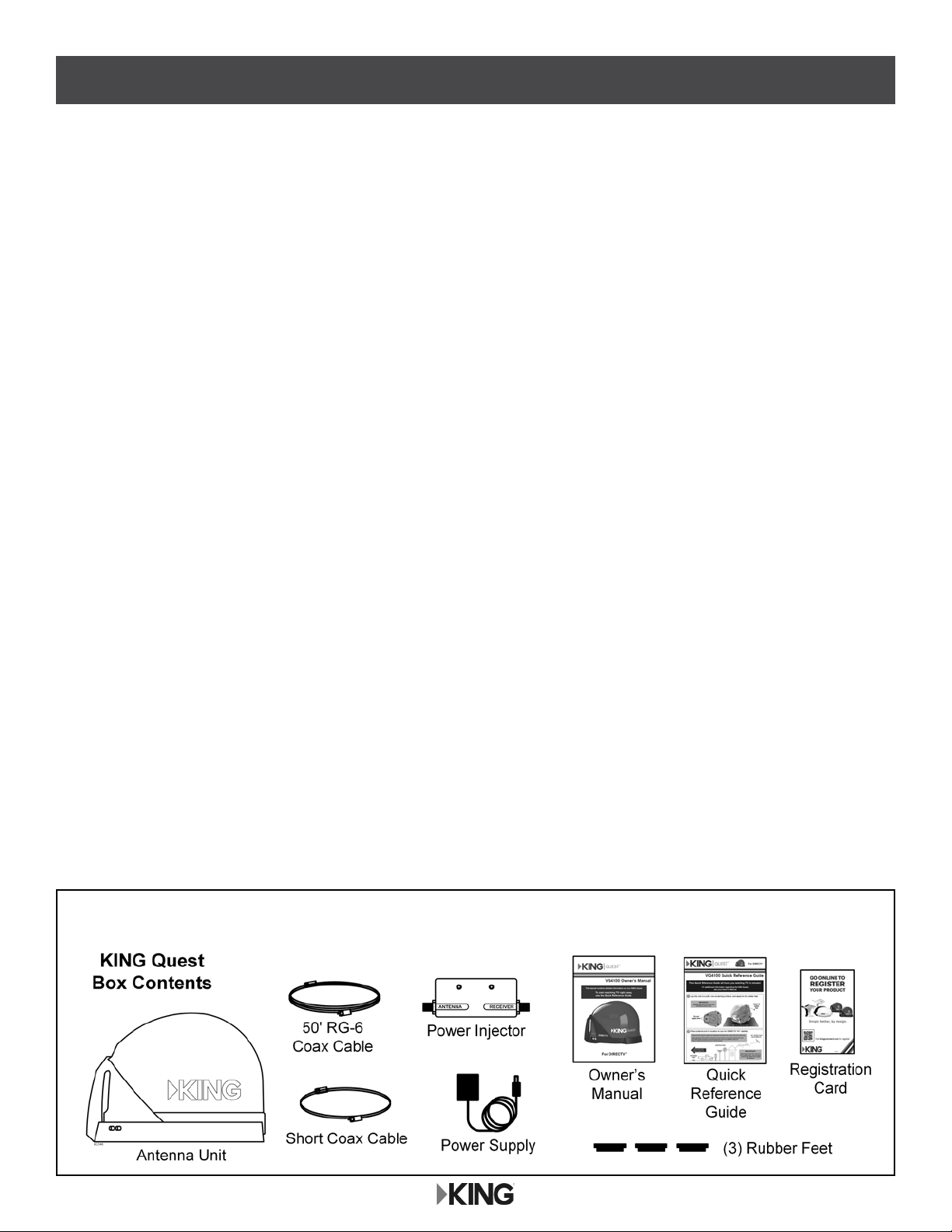
Unbox your KING Quest and verify all components are present.
SAFETY INFORMATION
1. Please read this Owner’s Manual thoroughly before using the KING Quest.
2. Keep this Owner’s Manual and the included Quick Reference Guide in a safe place for future reference.
3. Follow all instructions and warnings. Set up and operate the KING Quest in accordance with the instructions.
4. Always handle the KING Quest product carefully. Do not drop the KING Quest. Avoid excessive shock or
vibration to the KING Quest.
5. Use caution when carrying the KING Quest. Always carry the KING Quest by the handle.
6. Do not operate near any indoor or outdoor heat source such as radiators, heat registers, stoves, barbecues,
campres, or other items that produce heat.
7. Do not stack the KING Quest on top of or below other electronic devices as this can cause heat buildup or block
the satellite signal from reaching the KING Quest.
8. Keep the enclosure clean from dirt, bugs, and other debris by hand washing with mild soap and water.
9. Do not power wash the KING Quest. Do not submerge the KING Quest or place in standing water.
10. To avoid risk of electrical shock, unplug the power injector before connecting the KING Quest in damp or wet
conditions.
11. Do not remove the cover of the KING Quest without prior authorization. Doing so will void the Limited Warranty.
12. Do not coat or paint the KING Quest with any substance. (KING Dome Magic® may be applied to the KING
Quest to help keep snow and rain from building up on the surface.)
13. Tighten all of the coax cable connections only by hand. If you use a wrench, you may over tighten the
connections and damage your equipment.
14. Servicing may be required if the unit has been dropped or damaged in any way or if the unit does not operate
normally. Call the KING Service Department at (952) 345-8147.
The KING Quest has been designed to be maintenance and trouble free. If not using the KING Quest
for long periods of time, it is recommended that you set up the system on a quarterly basis (every
three months) to keep all moving parts of the KING Quest in good working order.
If you have any comments or questions, please contact the KING Service Department at
(952) 345-8147, or by email at [email protected].
For Sales Information Please Contact RoadTrucker Inc (www.RoadTrucker.com)
8312 Sidbury Rd.; Wilmington, NC 28411 - (800) 507-0482 / (910) 686-4281

Page 3
2 APPLY RUBBER FEET TO ANTENNA UNIT
Lay the antenna unit on a soft, non-scratching surface, and apply the (3) rubber feet.
3 SET UP TV AND RECEIVER
All components
sold separately.
You must congure the receiver as shown above. Once completed, the receiver will default to these settings
unless they are changed.
You must have a DIRECTV programming subscription.
IMPORTANT! The KING Quest will not work with SWM only receivers.
For a list of compatible receivers, see www.kingconnect.com/dtv-receivers.
Set up your TV and receiver.
IMPORTANT!
If you are going to roof mount the antenna unit,
DO NOT apply the rubber feet.
See the roof installation section later in this manual.
For Sales Information Please Contact RoadTrucker Inc (www.RoadTrucker.com)
8312 Sidbury Rd.; Wilmington, NC 28411 - (800) 507-0482 / (910) 686-4281

Page 4
4 OPERATION
IMPORTANT!
Plug in power supply last.
Do not move antenna unit after
plugging in power supply as the
antenna has begun scanning.
PLEASE BE PATIENT!
The antenna unit may lock on the satellite in as little as 2 minutes,
but may occasionally take up to 10-15 minutes.
IMPORTANT!
Place power injector in
an accessible location.
IMPORTANT!
Any tall objects can block
the signal from reaching
the antenna.
Do not over tighten the coax connections.
Do not route the coax cable where it can be tripped on or run over by a vehicle.
Do not put sharp bends or kinks in the coax cable.
Place the antenna unit in a position with a clear view of
the southern sky to scan for the DIRECTV 101 satellite.
Make connections 1-3 in the order shown.
Place the KING Quest on a stable and reasonably level surface with a clear view of the southern sky.
When placing the KING Quest in position, be sure surface is dry and free of loose dirt or sand.
When all connections are made, the antenna unit will scan for the DIRECTV 101 satellite.
When the satellite is found, your programming will appear. Enjoy!
The KING Quest is not programmed to lock on the 119 satellite, so you will not receive your local channels if they
are broadcast from the 119. If you wish to receive programming from the 119 as well as the 101, you can replace
the power injector with the KING UC1000 Controller (sold separately - see your dealer or our website
www.kingconnect.com for details.)
For Sales Information Please Contact RoadTrucker Inc (www.RoadTrucker.com)
8312 Sidbury Rd.; Wilmington, NC 28411 - (800) 507-0482 / (910) 686-4281

Page 5
You can connect a second receiver and TV to the AUX port on the antenna unit.
5 USING A SECOND RECEIVER
Second receiver must be congured the same as
the main receiver (see Section 3, page 3).
Second receiver must not be a SWM only receiver.
If your main receiver has a second “satellite in” port and built in DVR, you can connect this input to the AUX
port to record programs on a different channel than the one you are watching.
All components sold
separately.
If you wish to start a new scan (for example, the unit gets moved and you lose reception):
Pressing the power injector’s RESET button is the preferred method to start a new scan, but there are two
alternate methods as well:
• Disconnect and reconnect the coax from the MAIN port on the antenna unit.
• Press the RESET button on the receiver (this option works for select receivers only, such as
models D12, H24, and HR24).
For Sales Information Please Contact RoadTrucker Inc (www.RoadTrucker.com)
8312 Sidbury Rd.; Wilmington, NC 28411 - (800) 507-0482 / (910) 686-4281

Page 6
6 ROOF INSTALLATION
1. Make sure you have the following tools and materials before starting.
ANTENNA UNIT LOCATION (See Illustration on next page)
2. Select an area on the roof for the antenna unit and the location where the wiring will enter the
vehicle through the roof to the satellite receiver inside using the following criteria:
• A shorter distance between the antenna unit and the satellite receiver is most desirable.
• Make sure you have enough room to mount the antenna unit.
• The antenna unit should be mounted on the center line of the vehicle, and not tilted more
than 2 degrees in any direction.
• There must be no “line of sight” obstructions. Air conditioning units, other antennas, and
storage areas that are too close to the antenna unit may prevent the satellite signal from
reaching the antenna unit.
• Mount the antenna unit with the handle to rear of the vehicle.
NOTE: Many RVs are prewired with RG-6 coax cable for satellite antennas. Contact the manufacturer of your RV or
your local RV dealer to verify where this cable is located.
If prewired, run the existing coax cable from the prewire location in the roof to the antenna unit. When
choosing the antenna unit location, make sure the prewiring will reach the antenna unit.
For Sales Information Please Contact RoadTrucker Inc (www.RoadTrucker.com)
8312 Sidbury Rd.; Wilmington, NC 28411 - (800) 507-0482 / (910) 686-4281

Page 7
HEIGHT OF
OBSTRUCTION
APPROXIMATE MINIMUM DISTANCE
TO EDGE OF ANTENNA UNIT
10” 8”
11” 10”
12” 12”
13” 14”
14” 16”
15” 18”
16” 20”
ANTENNA UNIT LOCATION
For Sales Information Please Contact RoadTrucker Inc (www.RoadTrucker.com)
8312 Sidbury Rd.; Wilmington, NC 28411 - (800) 507-0482 / (910) 686-4281

Page 8
3. If the rubber feet have been installed,
lay the unit on a soft, non-scratching surface
and remove them from the bottom of the unit.
DO NOT INSTALL UNIT ON ROOF
WITH RUBBER FEET IN PLACE.
4. Mount the antenna unit using the
(4) mounting holes. Make sure to
seal mounting holes with roof
compatible sealant.
5. Connect one end of 50 foot coax cable to the MAIN port and tighten connection (see below).
DO NOT OVER TIGHTEN.
If using a second receiver, connect end of second coax (sold separately) to the AUX port.
Tighten connection. DO NOT OVER TIGHTEN.
NOTE: The installer is responsible for determining the most appropriate fastener to secure the antenna unit to the roof.
Depending on the roof material, fasteners such as lag screws, well nuts, sheet metal screws, toggle bolts and T
anchors may be used, and should always be used in combination with a roof compatible sealant.
IMPORTANT! The installer is responsible for weatherproong all holes with sealant.
NOTE: There are two coax ports on the back of the antenna unit. The one labeled “MAIN” MUST be connected to the
main receiver in vehicle. The one labeled “AUX” can be used for an additional receiver if desired.
For roof mounting, do not apply the rubber feet.
If present, remove rubber feet.
MOUNTING TO ROOF
WITH RUBBER FEET VOIDS WARRANTY.
IMPORTANT!
Coax connections should be snug.
DO NOT OVER TIGHTEN!
For Sales Information Please Contact RoadTrucker Inc (www.RoadTrucker.com)
8312 Sidbury Rd.; Wilmington, NC 28411 - (800) 507-0482 / (910) 686-4281
Page 9
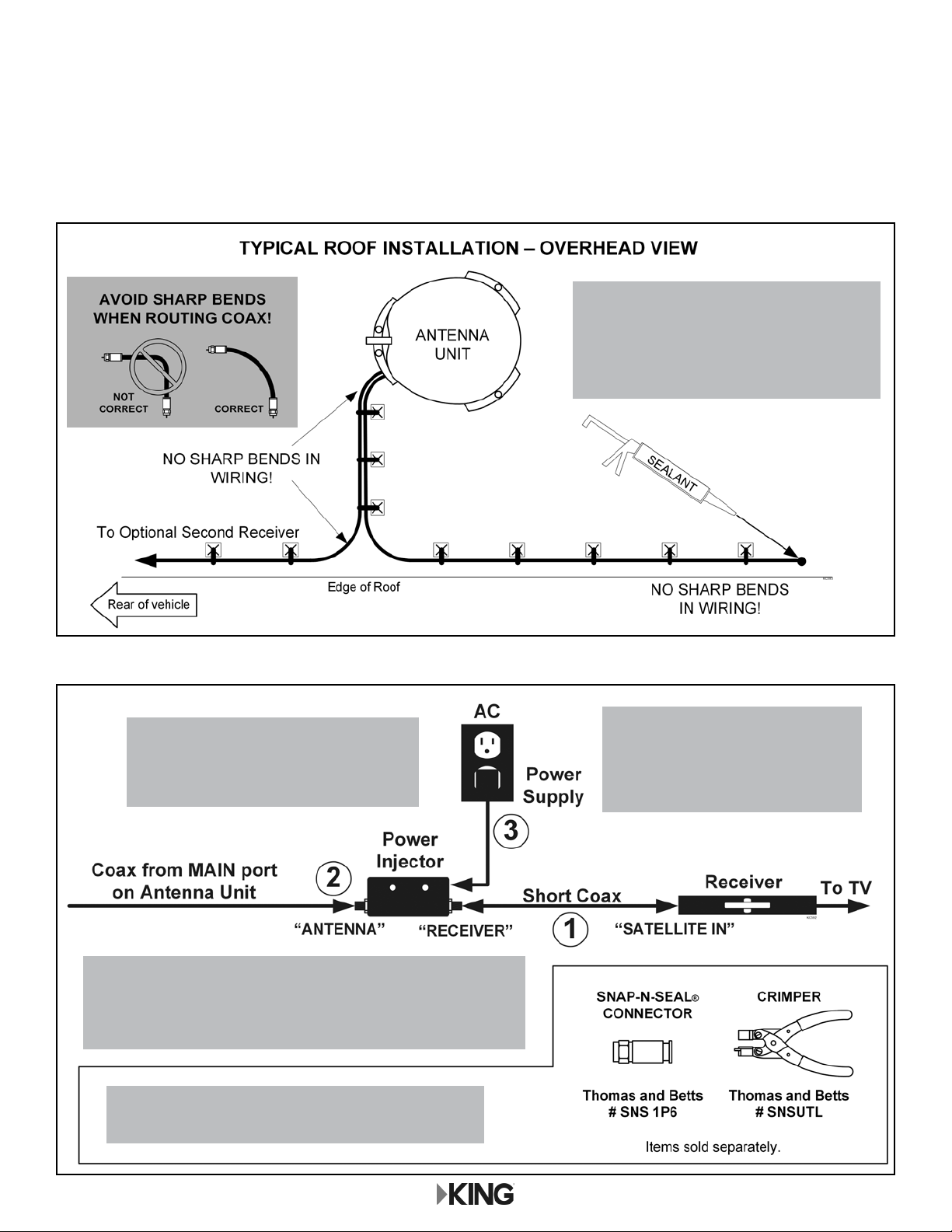
6. Run coax from the antenna unit to the roof edge, then along edge to location where coax will
be fed into the vehicle. If installing an optional second receiver, run second coax to location
where it will enter the vehicle. Secure (both) coax to roof every 12-18 inches (see below).
7. Drill 3/4” hole through the roof and into the cabinet where receiver is stored. Feed coax down
through hole. Seal opening with roof compatible sealant so that it is completely waterproof
(inside and outside of the 3/4” hole). Repeat for second coax if present.
8. Inside vehicle, make connections 1-3 in order shown below.
You can cut the coax to length but you must
terminate the coax with Snap-n-Seal Connectors.
IMPORTANT!
Plug in power supply last.
Antenna begins scanning when
power supply is connected.
IMPORTANT!
Place power injector in a convenient
and accessible location.
AUX coax connects directly to second receiver (see page 5).
Do not over tighten the coax connections.
Do not put sharp bends or kinks in the coax cable.
IMPORTANT!
Roof hole(s) for wiring must be sealed
so they are completely waterproof.
Sealant must be roof compatible.
For Sales Information Please Contact RoadTrucker Inc (www.RoadTrucker.com)
8312 Sidbury Rd.; Wilmington, NC 28411 - (800) 507-0482 / (910) 686-4281
Altri manuali per VQ4100
6
Indice
Altri manuali King Quest Antenna


Manuali Antenna popolari di altre marche

Alfa Network
Alfa Network APA-L01 Manuale utente

Naval
Naval PR-422CA Manuale utente

Feig Electronic
Feig Electronic ID ISC.ANTH200/200 Series Manuale utente

TERK Technologies
TERK Technologies TV44 Manuale utente

Directive Systems & Engineering
Directive Systems & Engineering DSE2324LYRMK Manuale utente

HP
HP J8999A Manuale utente


