
KLIM 10U Manuale utente

User’s Guide
www.klim.com
for Klim Krios Helmets
English

10U
© 1998-2016 Sena Technologies, Inc. All rights reserved.
Sena Technologies, Inc reserves the right to make any changes and improvements to its product without providing prior notice.
Sena™ is a trademark of Sena Technologies, Inc. or its subsidiaries in the USA and other countries. Prism™, Bluetooth Audio Pack for GoPro®,
Tufftalk™, 20S™, 10S™, 10C™, 10U™, 10R™, 3S™, SMH10™, SMH10R™, SMH5™, SMH5-FM™, SMH3™, SPH10™, SPH10H™, SPH10H-FM™,
SPH10S™, Expand™, Bluetooth Mic&Intercom™, Handlebar Remote™, Wristband Remote™, SM10™, SR10™, SR10i™ are trademarks of Sena
Technologies, Inc. or its subsidiaries. These trademarks may not be used without the express permission of Sena.
GoPro® is a registered trademark of Woodman Labs of San Mateo, California. Sena Technologies, Inc. (“Sena”) is not afliated with Woodman
Labs. The Sena Bluetooth Pack for GoPro®is an after-market accessory specially designed and manufactured by Sena Technologies, Inc. for the
GoPro®Hero3 and Hero4 allowing for Bluetooth capabilities.
The Bluetooth®word mark and logos are owned by the Bluetooth SIG, Inc. and any use of such marks by Sena is under license. iPhone, iPod
touch are registered trademarks of Apple Inc. Zumo™ is a trademark of Garmin Ltd. or its subsidiaries. TomTom™ is the trademark or registered
trademark owned by TomTom International B.V. Other trademarks and tradenames are those of their respective owners.

English
10U
CONTENTS
1 INTRODUCTION .......................................................................................................5
2 PACKAGE CONTENTS ............................................................................................6
3 INSTALLING THE 10U ON YOUR HELMET............................................................7
3.1 Installing the Main Unit............................................................................................................8
4 GETTING STARTED.............................................................................................. 11
4.1 Button Operation...................................................................................................................11
4.2 Powering On and Off.............................................................................................................11
4.3 Charging................................................................................................................................12
4.4 Checking the Battery Level...................................................................................................12
4.5 Volume Adjustment ...............................................................................................................13
4.6 Sena Softwares .....................................................................................................................13
5 PAIRING THE 10U WITH BLUETOOTH DEVICES .............................................. 14
5.1 Mobile Phone Pairing - Mobile Phone, Bluetooth Stereo Device .........................................14
5.2 Second Mobile Phone Pairing - Second Mobile Phone, GPS, and SR10............................15
5.3 Advanced Selective Pairing - A2DP Stereo or Handsfree ...................................................16
5.4 Intercom Pairing ....................................................................................................................17
6 MOBILE PHONE, GPS, SR10 ............................................................................... 19
6.1 Mobile Phone Call Making and Answering...........................................................................19
6.2 Speed Dialing........................................................................................................................20
6.3 GPS Navigation.....................................................................................................................21
6.4 Sena SR10, Two-Way Radio Adapter ...................................................................................21
7 STEREO MUSIC .................................................................................................... 21
7.1 Bluetooth Stereo Music .........................................................................................................21
7.2 Music Sharing .......................................................................................................................22
8 INTERCOM............................................................................................................. 22
8.1 Two-way Intercom .................................................................................................................22
8.2 Three-way Intercom ..............................................................................................................23
8.3 Four-way Intercom.................................................................................................................25
9 THREE-WAY CONFERENCE PHONE CALL WITH INTERCOM
PARTICIPANT........................................................................................................ 26
10 GROUP INTERCOM .............................................................................................. 28
11 UNIVERSAL INTERCOM....................................................................................... 28
11.1 Universal Intercom Pairing....................................................................................................29
11.2 Two-way Universal Intercom .................................................................................................30
11.3 Three-way Universal Intercom ..............................................................................................30
11.4 Four-way Universal Intercom ................................................................................................32
12 FM RADIO .............................................................................................................. 34
12.1 FM Radio On and Off ............................................................................................................34
12.2 Preset Stations.......................................................................................................................34
12.3 Seek and Save ......................................................................................................................34
12.4 Scan and Save ......................................................................................................................35
12.5 Temporary Preset ..................................................................................................................35
12.6 Region Selection ...................................................................................................................36
13 FUNCTION PRIORITY........................................................................................... 36

10U
14 CONFIGURATION SETTING ................................................................................ 37
14.1 Mobile Phone Pairing ............................................................................................................38
14.2 Second Mobile Phone Pairing ..............................................................................................38
14.3 Phone selective pairing.........................................................................................................39
14.4 Media Selective Pairing ........................................................................................................39
14.5 Assigning Speed Dial ...........................................................................................................39
14.6 Enabling/Disabling Audio Boost ...........................................................................................40
14.7 Enabling/Disabling Voice Activated Phone Answering........................................................40
14.8 Enabling/Disabling Voice Activated Intercom ......................................................................41
14.9 Enabling/Disabling HD Intercom ..........................................................................................41
14.10 Setting Intercom Vox Sensitivity ........................................................................................42
14.11 Enabling/Disabling Voice Prompts....................................................................................42
14.12 Enabling/Disabling RDS AF ..............................................................................................42
14.13 Enabling/Disabling Sidetone.............................................................................................43
14.14 Enabling/Disabling Advanced Noise Control™ ...............................................................43
14.15 Delete All Bluetooth Pairing Information ...........................................................................43
14.16 Remote Control Pairing .....................................................................................................43
14.17 Universal Intercom Pairing ................................................................................................44
14.18 Factory Reset ....................................................................................................................44
14.19 Exit Voice Conguration Menu ..........................................................................................44
15 REMOTE CONTROL ............................................................................................. 46
16 FIRMWARE UPGRADE......................................................................................... 47
17 TROUBLESHOOTING ........................................................................................... 48
17.1 Intercom Failure.....................................................................................................................48
17.2 Intercom Reconnection.........................................................................................................48
17.3 Fault Reset.............................................................................................................................48
17.4 Factory Reset ........................................................................................................................48
18 QUICK OPERATION REFERENCE ...................................................................... 49
CERTIFICATION AND SAFETY APPROVALS ........................................................... 50
• FCC Compliance Statement......................................................................................................50
• FCC RF Exposure Statement.....................................................................................................50
• FCC Caution ..............................................................................................................................50
• CE Declaration of Conformity ....................................................................................................51
• Industry Canada Statement ......................................................................................................51
• Bluetooth License .....................................................................................................................51
• WEEE (Waste Electrical and Electronic Equipment).................................................................51
SAFETY INFORMATION.............................................................................................. 52
• Product Storage and Management...........................................................................................52
• Product Use ...............................................................................................................................52
• Battery........................................................................................................................................53
PRODUCT WARRANTY AND DISCLAIMER .............................................................. 54
• Limited Warranty ........................................................................................................................54
• Warranty Exclusions ..................................................................................................................56
• Warranty Service........................................................................................................................57
• Return for Full Refund................................................................................................................57

10U
5
English
1 INTRODUCTION
Thank you for choosing the 10U for Klim Krios Helmets. With the 10U,
you can call handsfree on your Bluetooth mobile phone, listen to
stereo music or voice instructions of GPS navigations wirelessly, and
have intercom conversations in full duplex with a passenger or other
motorcycle riders.
The 10U is compliant with the Bluetooth 4.1 supporting the following
proles: Headset Prole, Hands-Free Prole (HFP), Advanced Audio
Distribution Prole (A2DP), and Audio Video Remote Control Prole
(AVRCP). Please check with the manufacturers of other device to
determine their compatibility with this headset.
Please read this User’s Guide carefully before using the headset. Also
check www.klim.com for the latest version of the User’s Guide and
additional information related to Sena Bluetooth products.
The 10U features:
• Bluetooth 4.1
• Invisible beauty with custom design
• Safe and easy operations by Bluetooth Low Energy Handlebar Remote
• Bluetooth intercom up to 1.6 kilometer (1.0 miles)*
• Four-way intercom
• Voice prompts
• Smartphone App for iPhone and Android
• Built-in FM radio tuner with a station scan and save function
• Universal Intercom™
• Music sharing
• Advanced Noise Control™
• Firmware upgradeable
* in open terrain

10U
6
Key Specications:
• Bluetooth 4.1
• Supporting proles: Headset Prole, Hands-Free Prole (HFP),
Advanced Audio Distribution Prole (A2DP), and Audio Video
Remote Control Prole (AVRCP).
2 PACKAGE CONTENTS
•10UHeadset
•WiredMicrophone
•AdhesiveTapesfortheControlUnit
•HookandLoopFastenerforWiredMicrophone

10U
7
English
3 INSTALLING THE 10U ON YOUR HELMET
DCPowerCharging&
FirmwareUpgradePort
Microphoneconnector
StatusLED
Speakers
FMAntenna
Wired
Microphone
Antenna
MainUnit
HeadsetButtons
•HookandLoopFastenersfortheMainUnit
•HookandLoopFastenersforSpeakers
•FMAntenna

10U
8
3.1 Installing the Main Unit
1. Before you install the 10U, remove the cheek pads and the
neckroll.
2. Insert the battery unit between the external shell and the inner
shell. Align its snap holders with the rear snaps, then click them
through the snap holders.
3. Slide in the antenna between the external shell and the rear left
inner shell.

10U
9
English
4. Peel off the cover of the adhesive tape of the control unit and
attach it to the helmet.
5. Peel off the cover of the adhesive tape of the hook and loop
fastener for microphone and attach it on the inside of the helmet’s
chin guard. Attach the wired microphone on the hook and loop
fastener and insert the microphone cable into the microphone
connector.
10U
10
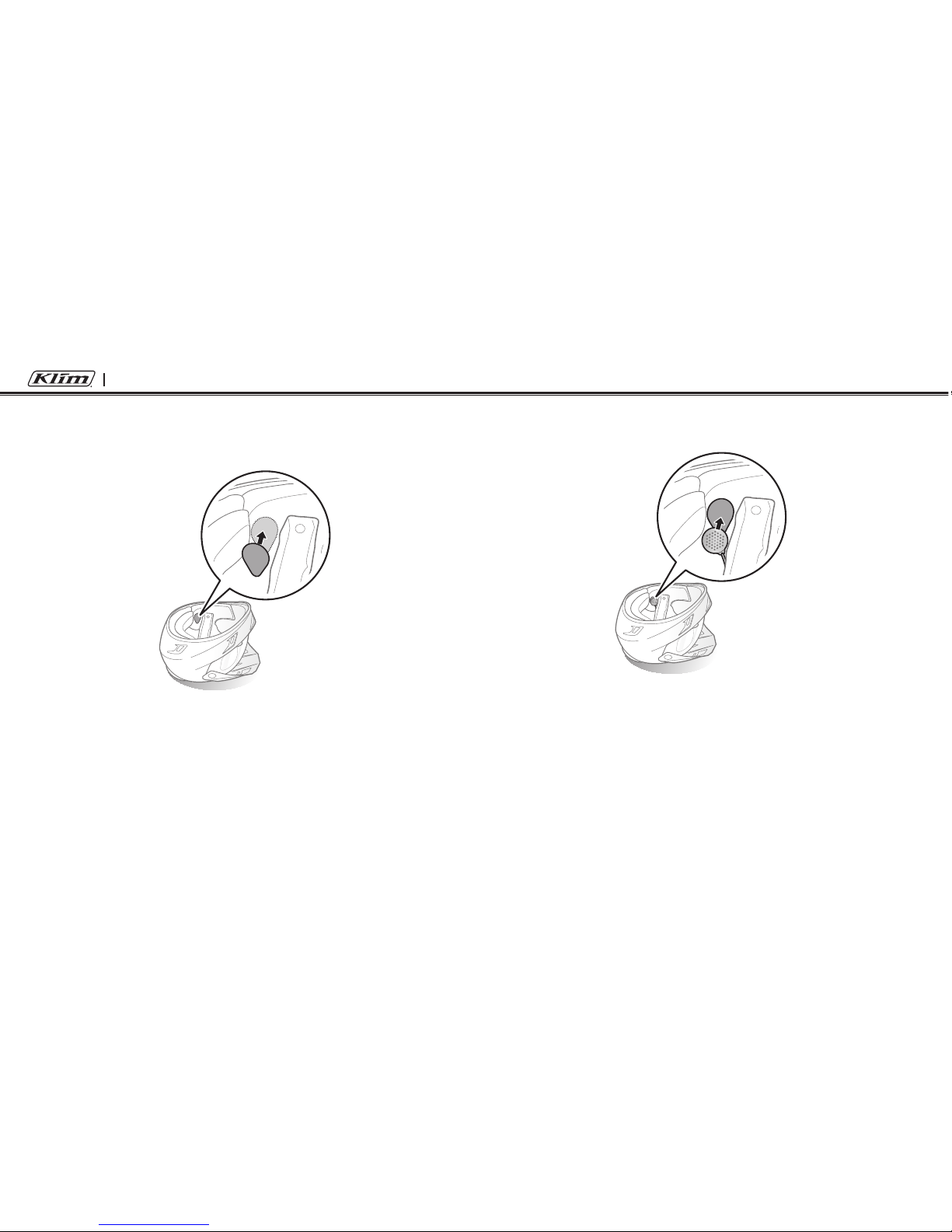
6. Peel off each cover of the hook and loop fasteners for speakers
to expose the adhesive surface. Then, attach the fasteners inside
the helmet where your ears will be located at.
7. Attach the speakers to the hook and loop fasteners for speakers
inside the helmet.
Indice
Altri manuali KLIM Cuffia


