
Klip Xtreme JogBudz II Manuale utente

KSM-150JogBudz II
Thank you for purchasing the KSM-150
sports earphones with wireless technology.
We encourage you to read this quick
installation guide thoroughly to get the most
of this innovative wireless audio accessory.
• Features Bluetooth®V5.0 compatible
technology designed to deliver a stronger
signal at high wireless ranges2
• Provides up to 12 hours of playback time3
• Engineered to deliver deep bass and
crystal-clear treble with optimized acoustics
• IPX4 water-resistant and sweatproof design
for intense workouts1
• Voice assistance supported with Siri and
Google Voice to get info or directions
• Secure ear hooks allow you to move freely
and workout with confidence
• Includes three interchangeable ear tips for
the perfect fit
• Built-in multifunction button for power,
music, and phone call management
• On-board microphone for hands-free
conversations
• Ultra-light design
• Wireless earphones 1
• Sets of silicon ear tips (L, M, S) 3
• Micro USB charging cable 1
• Quick installation guide 1
I. Introduction
III. Product components
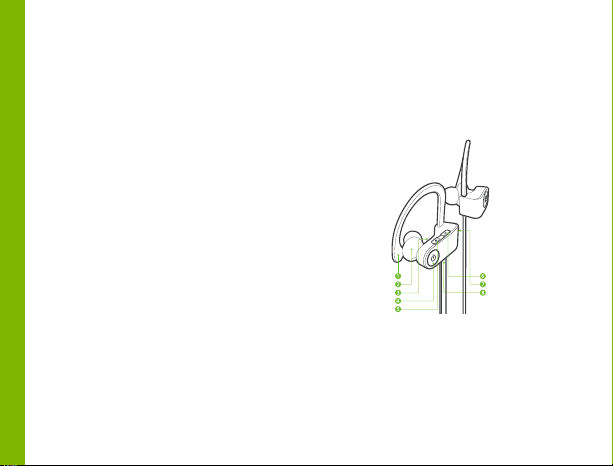
1. Ear hook
2. Earbud
3. Built-in microphone
4. Power/multifunction button (power
on/power off/play/pause/answer-end call/reject
call/activate voice assistant)
5. Volume+/ Next track
Main features
II. Package content
English
Right earbud Left earbud

6. Volume-/ Previous track
7. Status indicator LED light (for power/battery
charging/Bluetooth®status)
8. Micro-USB charging port
Button Function
Multifunction
button
Press this button to turn the
earphones on or off. Briefly press
this button to play and pause
media. Briefly press this button
once to answer an incoming call
(music will be paused). Briefly
press this button once to end a
call (music will resume). Double
click this button to activate voice
control (on supported devices).
Press and hold this button for
about 2 seconds to reject an
incoming call.
Volume
up/next track
button
Press this button briefly to
increase the audio level of the
earphones. Press and hold this
button to play the next track.
Volume
down/previous
track button
Press this button briefly to
decrease the audio level of the
earphones. Press and hold this
button to play the previous track.
LED indicator LED indicator turns blue and red
when the earphones are
powered on. LED indicator turns
red and then off when the
earphones are powered off. LED
indicator flashes red when the
battery level is low; red LED
changes to blue when the battery
is fully charged. LED indicator
flashes red and blue when the
earphones are in pairing mode.
Micro USB
charging port
Insert the Micro USB cable here
to recharge the battery.

Note: Before using this product, please make
sure your device has the built-in Bluetooth®
feature available.
• Connect the Micro USB end of the supplied
cable into the charging port of the
earphones and the other end into the USB
port of your computer or to a 3.7V USB
adapter to charge the battery.
• Make sure that your earphones are fully
charged before using them for the first time.
• The earphones battery has to be initially
charged for at least 2 hours. Thereafter, the
battery will take 1.2 hours to recharge.
• While the earphones are being charged, the
LED light glows red. The status LED light
turns blue once it has reached full capacity.
1. Press and hold the multifunction button. The
LED indicator will turn blue and red.
2. To power off the device, press and briefly
hold the multifunction button. The LED
indicator will blink red twice and then off.
The earphones will turn off.
III. Basic operation IV. Advanced operation
Charge your earphones
Pairing the earphones with your
mobile device
Turning your earphones on and off
1. Place the earphones and the mobile device
not more than one meter away from each
other.
2. Set your Bluetooth®phone to “discover” the
wireless earphones.
3. Press and hold the multifunction button for
several seconds to turn the earphones on.
4. The LED indicator will flash alternating
between blue and red, and the device will
automatically enter into the pairing mode.
5. On your mobile phone, tap the newly
discovered audio device (KSM-150)
displayed in the Bluetooth®list.
6. When the mobile phone asks if you want to
pair with the earphones click YES or OK to
accept.
7. If you have a lower Bluetooth®version, you
may be prompted to enter the passkey
0000 (4 zeros).

• When there is an incoming call the LED
indicator will flash blue and an alert tone will
be heard through the earphones. Briefly
press the multifunction button to pick it up.
You may also press the answer button on
your smartphone to take the call (music will
be paused).
V. Using the wireless earphones in
hands-free mode
1. Answering and ending a call using
your mobile phone
2. Music playback
8. If pairing is successful, you will hear the
message “connected” from the device. If
after 60 seconds the pairing process fails,
please turn off the earphones and repeat
steps 1 through 6 described above.
9. The earphones will enter into standby
mode and will eventually turn off
automatically after five minutes if there is no
Bluetooth®device available for pairing.
Note: The earphones will automatically pair to
the last known connected device in 3 seconds
after the earphones are powered on.
•To end a call, simply press the multifunction
button once again. Likewise, you may also
finish the call directly using the end key on
your mobile (music will resume
automatically).
• To reject an incoming call, press the
multifunction button for about 2 seconds.
• To activate Siri or Google Voice* press and
hold the multifunction button for 2 seconds.
* The voice control function activation
depends on each particular device.
• Briefly press the multifunction button to
reproduce music. Press it once to pause the
music, press it again to resume playing.
• Press and hold the + and – buttons for 1
second to go to the next or previous track.
• Briefly press the + and – buttons to increase
or decrease the volume on the earphones.
• When listening to music using your
smartphone, playback will pause to allow the
call to go through.
• As soon as you hang up, music playback will
resume automatically.

Make sure that you increase the volume of the
earphones and the mobile device. Some
smartphones require to setup the Bluetooth®
earphones as an audio output device before
sound is transmitted. Please check the
instruction manual of your mobile device for
details. If you are using a music player or
another Bluetooth®device, make sure that it
supports any of the A2DP, HSP, HFP, or
AVRCP stereo music profiles.
VI. Troubleshooting
a. The earphones are not pairing
Adjust the volume on your mobile device and
earphones. Make sure there is no source of
interference nearby. Stay close to your
smartphone.
b. The caller can’t hear my voice clearly
Technical specifications
Earphone
MPN KSM-150
Type
Driver unit
Maximum
power output
Frequency
Impedance
Sensitivity
Microphone
Type
Directivity
Frequency
Impedance
Sensitivity
Connectivity
Connection
type and version
Supported
profiles
Wireless RF
frequency
Wireless range
Sport in-ear earphones with hooks
φ10mm
25mW*2
20Hz-20kHz
>=92dB
-95±3dB
Built-in
Omnidirectional
20Hz-20kHz
2.2KΩ
-42dB±3dB
Compatible Bluetooth
®
V5.0
HSP, HFP, AVRCP, A2DP
2.402GHz-2.480GHz
65ft
2

Rechargeable via Micro USB,
voltage rating 3.7V, 1A
Li-ion battery
110mAh
1.2 hours
Up to 12 hours at 50% volume
capacity
3
Around 300 hours
Yes, IPX4
1
Yes, Siri and Google Voice
Earpiece: 1.9x1.9x2.3in each
0.6oz
Earpiece to earpiece about 31.4in
Battery
1 Protects from splashing water, no matter the direction.
2 Range estimate is based on an area free and clear of
obstacles and interference, and within the line of sight
between devices.
3 Depending on the volume level and type of audio file
being played.
Type
Battery type
both
earphones
Battery
capacity both
earphones
Charging time
Maximum run
time
Standby time
Water-resistant
and sweatproof
Voice assistance
supported
Dimensions
(LxWxH)
Weight
Cable length
Additional information
Color box, quick instruction guide,
Micro USB charging cable, 3 pairs
of ear tips
One year
Package
contents
Warranty

Precautions FCC statement
• Do NOT drop, hit or shake the device.
• Do NOT disassemble, repair or modify the
earphones yourself.
• Do NOT use cleaning products that contain
benzene, solvents or alcohol.
• Do NOT expose earphones to excessive heat
or to direct sunlight for long periods of time.
• Do NOT store the device in a place with high
humidity or dust.
• Do NOT place heavy objects on top of the
earphones.
• Do NOT use near a microwave oven or
wireless LAN products.
This equipment has been tested and found to
comply with the limits for a Class B digital
device, pursuant to part 15 of the FCC Rules.
These limits are designed to provide
reasonable protection against harmful
interference in a residential installation. This
equipment generates, uses and can radiate
radio frequency energy and, if not installed and
used in accordance with the instructions, may
cause harmful interference to radio
communications. However, there is no
guarantee that interference will not occur in a
particular installation. If this equipment does
cause harmful interference to radio or
television reception, which can be determined
by turning the equipment off and on, the user
is encouraged to try to correct the
interference by one or more of the following
measures:

• Reorient or relocate the receiving antenna.
• Increase the separation between the
equipment and receiver.
• Connect the equipment into an outlet on a
circuit different from that to which the
receiver is connected.
• Consult the dealer or an experienced
radio/TV technician for help.
Español
Gracias por adquirir los audífonos deportivos
KSM-150 con tecnología inalámbrica
Bluetooth®. Te recomendamos leer
detenidamente esta guía de instalación rápida
con el fin de aprovechar al máximo todas las
ventajas de este accesorio de audio
inalámbrico.
• Cuenta con la tecnología Bluetooth®V5.0
diseñada para ofrecer una señal más fuerte a
mayores distancias inalámbricas2
• Brinda hasta 12 horas de reproducción3
• Optimizado para la reproducción de graves
profundos y agudos sumamente nítidos con
excelente acústica
• Clasificación IPX4 resistente al agua y a prueba
de sudor para jornadas de ejercicio intensas1
• Soporta asistente de voz de Siri y Google Voice
para buscar información o direcciones
• Ganchos para las orejas te permiten moverte
libremente y entrenar con confianza
• Incluye tres pares de almohadillas
intercambiables para un ajuste perfecto
• Botón multifunción incorporado para la
conexión del dispositivo, incluyendo la gestión
de música y llamadas
I. Introducción
Principales características
• Audífonos inalámbricos 1
• Pares de puntas de silicona (L, M, S) 3
• Cable Micro USB para carga 1
• Guía del usuario 1
III.Visión general del producto
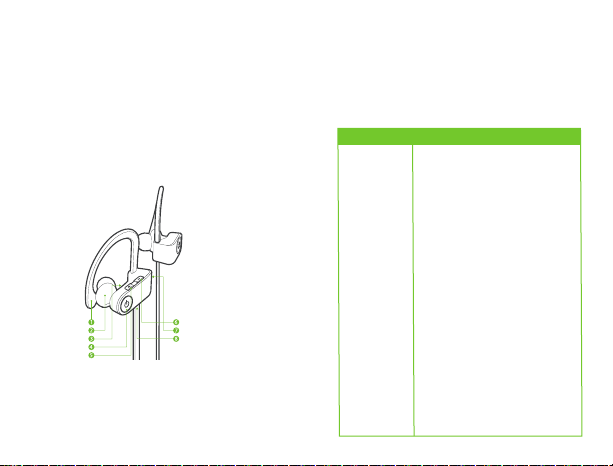
1. Ganchos para los oídos
2. Audífonos
3. Micrófono integrado
4. Botón multifunción (encender/apagar/repro-
ducir/pausar/contestar-colgar/rechazar
II. Contenido del empaque
Audífono derecho Audífono izquierdo
/activar asistente de voz
5. Volumen +/siguiente pista
6. Volumen -/pista anterior
7. Luz LED indicadora de estatus (encendido/-
carga/estatus del Bluetooth®)
8. Puerto de carga Micro USB
• Micrófono incorporado para conversaciones con
manos libres
•Diseño ultraliviano
Botón Función
Botón
multifunción
Presiona este botón para encender
o apagar los audífonos. Oprime este
botón brevemente para reproducir
y pausar la música. Presiona este
botón brevemente una vez para
contestar una llamada (la música
será pausada). Oprime este botón
brevemente una vez para concluir
una llamada (la música se
reanudará). Haz doble click en este
botón para activar el control de voz
(en dispositivos soportados).
Mantén presionado este botón por
cerca de 2 segundos para rechazar
una llamada.
Questo manuale è adatto per i seguenti modelli
1
Indice
Lingue:
Altri manuali Klip Xtreme Cuffia

Klip Xtreme
Klip Xtreme AthletikX Manuale utente

Klip Xtreme
Klip Xtreme LiteBlast KHS-659 Manuale utente

Klip Xtreme
Klip Xtreme TwinTouch Manuale utente

Klip Xtreme
Klip Xtreme VoxCom KCH-750 Manuale utente

Klip Xtreme
Klip Xtreme KHS-629 Manuale utente

Klip Xtreme
Klip Xtreme Pulse Manuale utente

Klip Xtreme
Klip Xtreme BluBeats KHS-630 Manuale utente

Klip Xtreme
Klip Xtreme SportsBuds KTE-100BK Manuale utente

Klip Xtreme
Klip Xtreme Athletik KHS-633 Manuale utente

Klip Xtreme
Klip Xtreme CrystalCom Pro Manuale utente


