Kobol Innovations Helios4 Manuale utente

Test Manual
Version : 0.1
Date : 28 / 08 / 2018
https://kobol.io - [email protected]
© 2018 Kobol Innovations Pte. Ltd. - All Rights Reserved 1/32

Table of Contents
Table of Contents 2
Product overview 3
Hardware Description 4
Board Specifications 4
Block Diagram 5
Helios4 Carrier Board 5
A388 System-On-Chip 5
Interfaces List 6
Schematics 8
Operating Manual 9
Peripheral Kit 9
Software Install 12
Writing an image to a microSD Card 12
System Setup 13
Test Application 15
Network Config and Credentials 15
Connect to Helios4 15
Test Suite Usage 17
Launch Application 17
Run All tests 17
Run SATA test 18
Run MicroSD test 19
Run USB test 19
Display Status 20
Troubleshooting 21
Troubleshooting table 21
Serial Console Access 23
Under Windows 23
Under Linux (via Terminal) 25
Troubleshooting commands 26
Check all drives are detected 26
Check IP address is correct 26
Check correct System Version is running 27
Boot Screen 28
U-Boot 28
Linux 30
https://kobol.io - [email protected]
© 2018 Kobol Innovations Pte. Ltd. - All Rights Reserved 2/32

Product overview
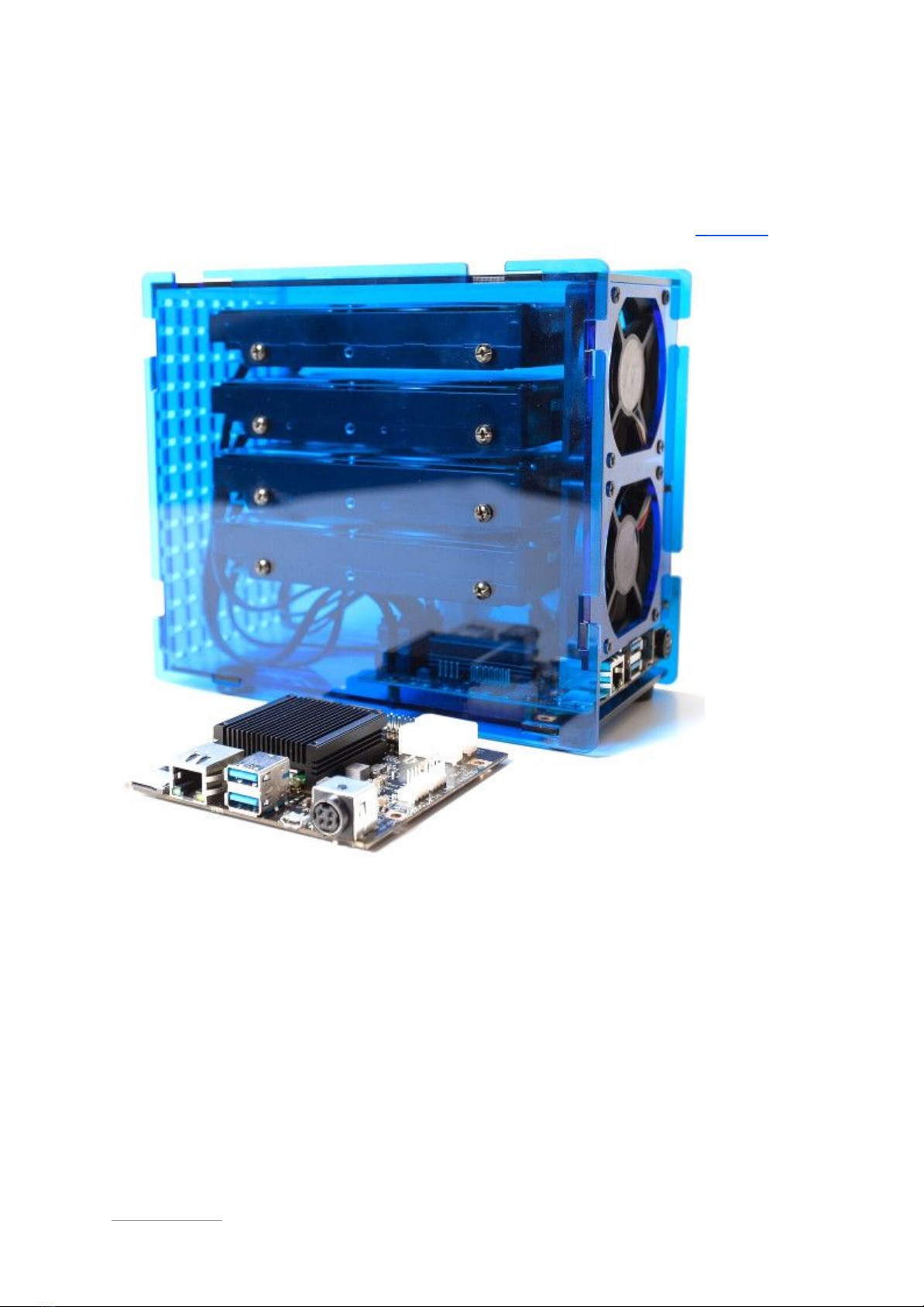
Helios4 is a powerful ARM based board specially designed for Network Attached Storage. It
harnesses its processing capabilities from the ARMADA 38x-MicroSoM from SolidRun.
The Marvell ARMADA® 388 is a robust and energy-efficient System on Chip (SoC) with a
collection of high speed interfaces especially suited for headless data processing,
networking and storage. This Dual-core ARM Cortex A9 CPU clocked at 1.6 Ghz, paired with
2GB of ECC memory, integrates a Cryptographic and XOR DMA engines to provide the best
level of performance and reliability for NAS functionalities.
https://kobol.io - [email protected]
© 2018 Kobol Innovations Pte. Ltd. - All Rights Reserved 3/32

Hardware Description
Board Specifications
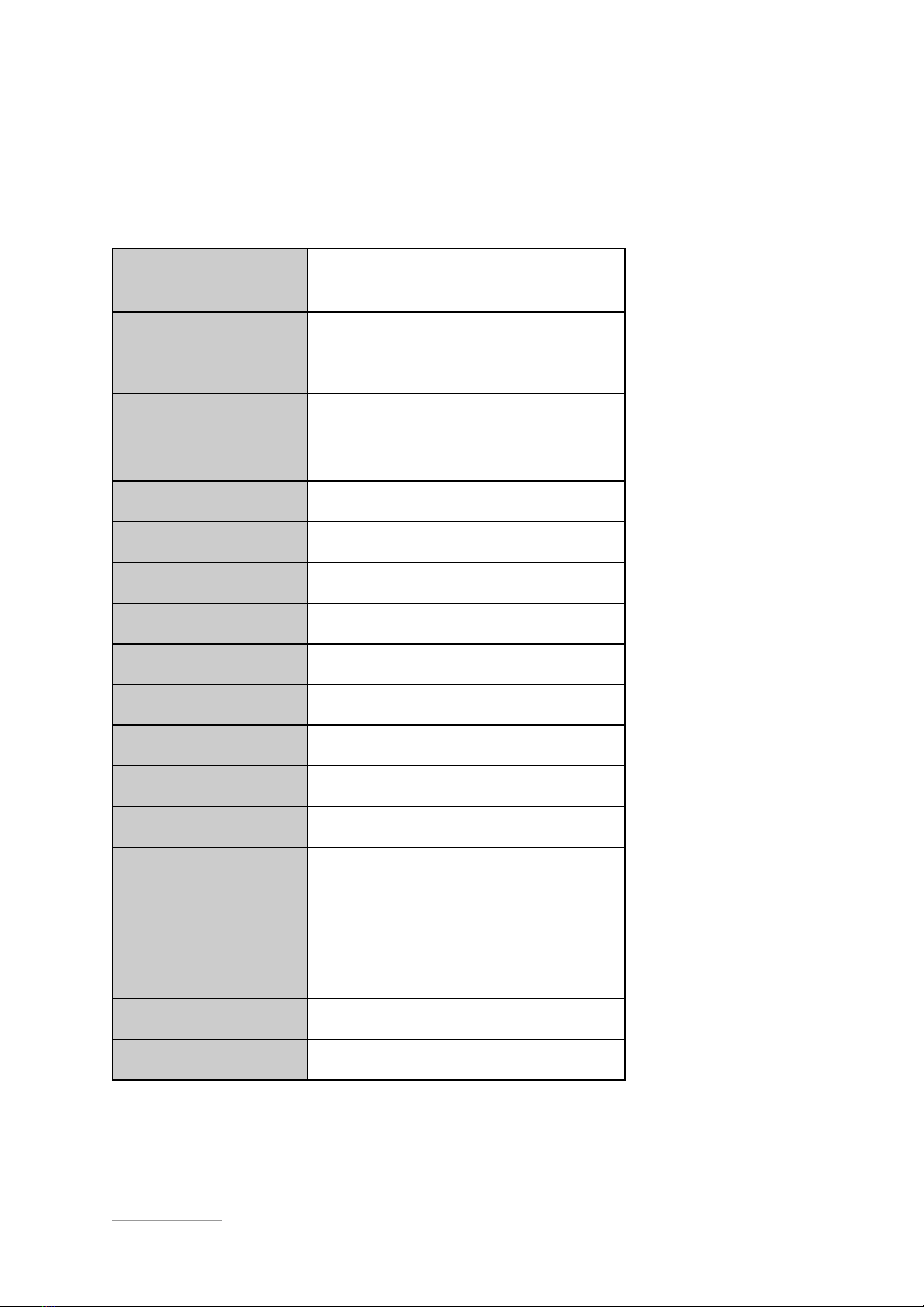
CPU Model
Marvell Armada 388 (88F6828)
ARM Cortex-A9
CPU Architecture
ARMv7 32-bit
CPU Frequency
Dual Core 1.6 Ghz
Additional Features
- RAID Acceleration Engines
- Security Acceleration Engines
- Wake-on-LAN
System Memory
2GB DDR3L ECC
SATA 3.0 Ports
4
Max Raw Capacity
48 TB (12 TB drive x 4)
GbE LAN Port
1
USB 3.0
2
microSD (SDIO 3.0)
1
GPIO
12
I2C
1
UART
1 (via onboard Micro-USB converter)
Boot Mode Selector
- SPI
- SD Card
- UART
- SATA
SPI NOR Flash
32Mbit onboard
PWM FAN
2
DC input
12V / 8A

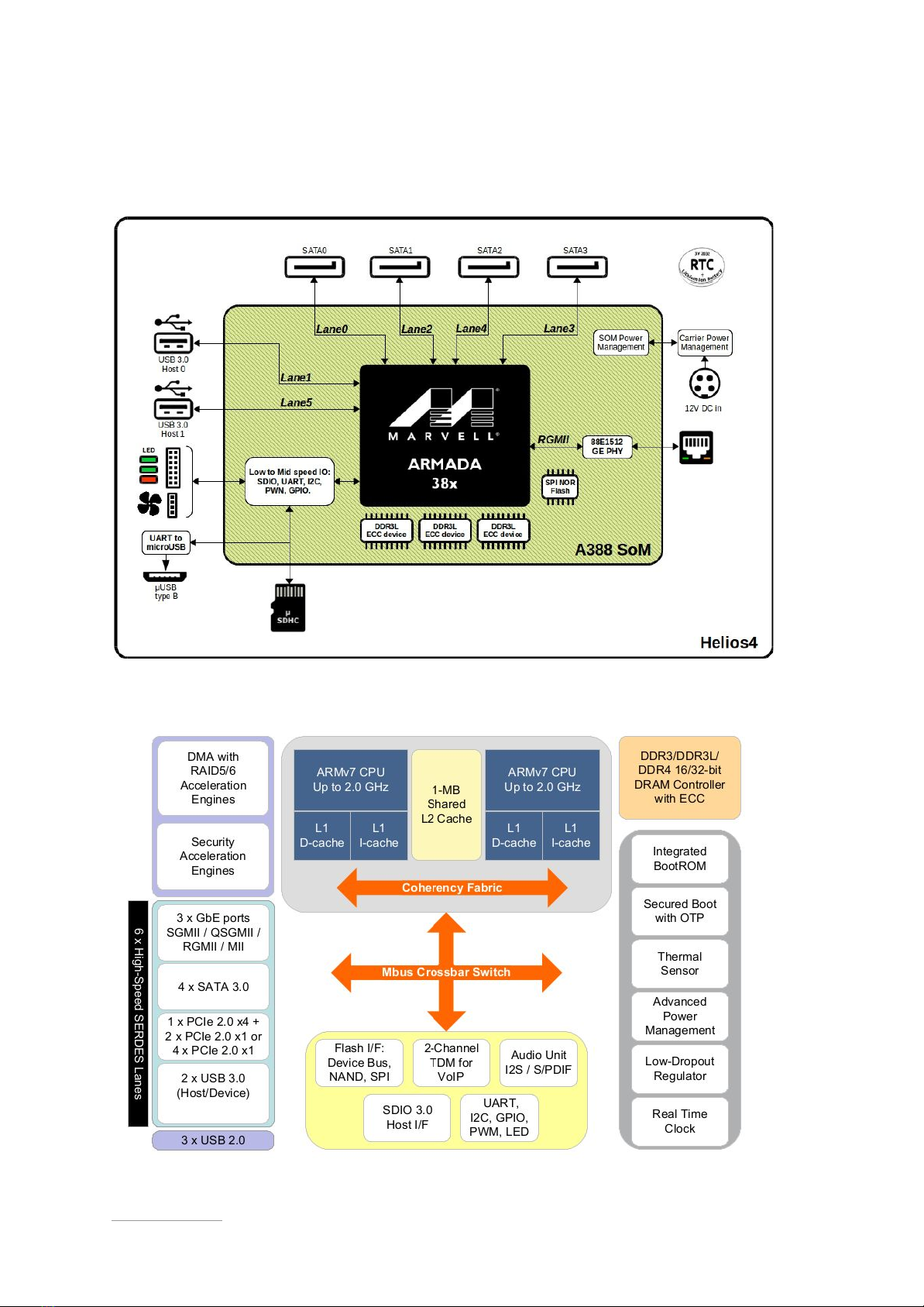
Block Diagram
Helios4 Carrier Board
A388 System-On-Chip
https://kobol.io - [email protected]
© 2018 Kobol Innovations Pte. Ltd. - All Rights Reserved 5/32

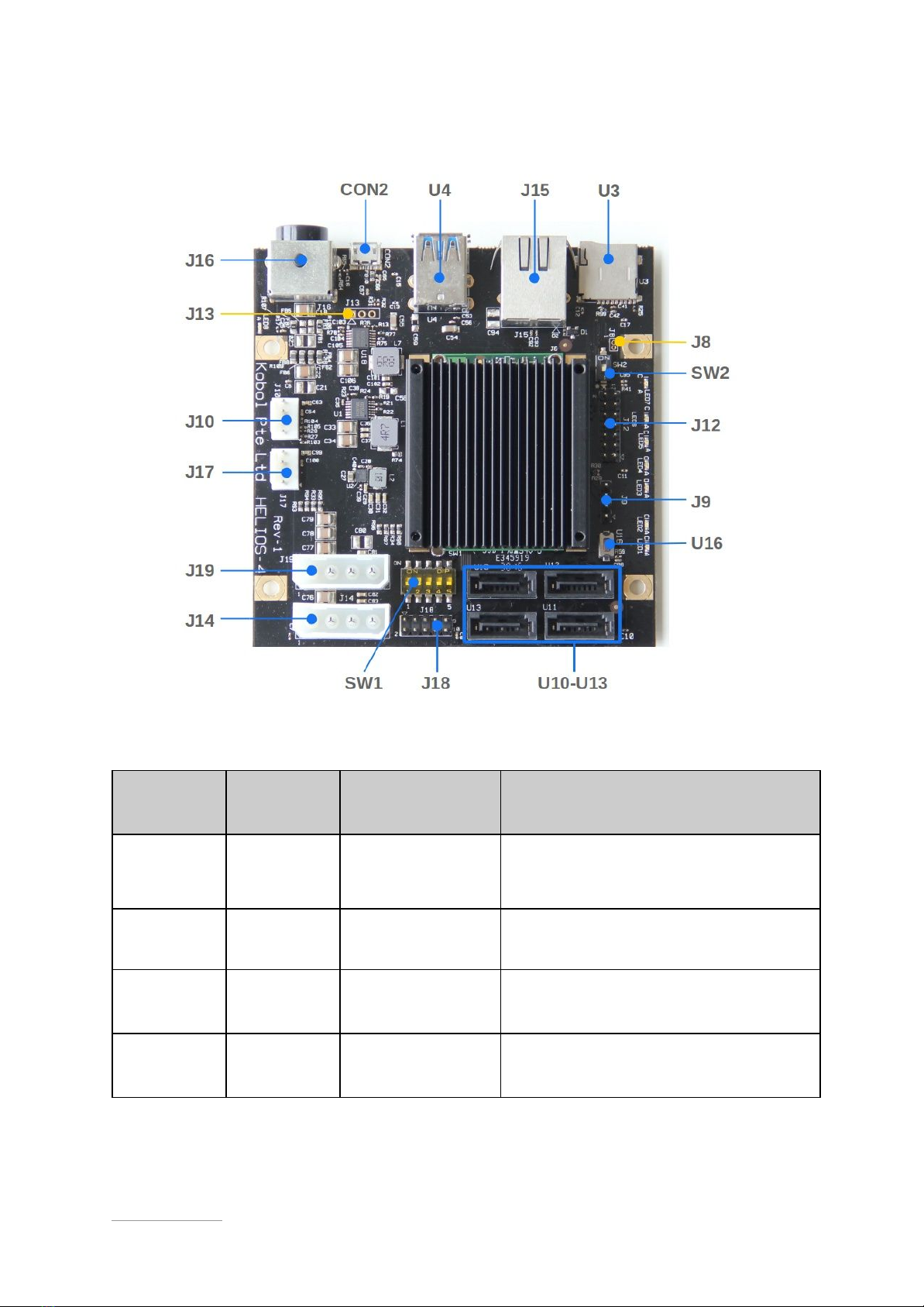
Interfaces List
Name
Peripheral
Type
Connector Type
Details
CON2
Serial port
Micro-USB
Connector
Via onboard FTDI USB-to-UART0
bridge
J8
RC Battery
Not populated
External battery source for RTC clock
J9
I2C
4x1 Pin Male
Header
I2C Channel 1
J10
Fan
4x1 Pin Male
Header
PWM and RPM support
https://kobol.io - [email protected]
© 2018 Kobol Innovations Pte. Ltd. - All Rights Reserved 6/32

J12
GPIO
7x2 Pin Male
Header
GPIO configurable as input or output
Via IO Expander on I2C Channel 0
J13
Serial port
Not populated
SoM UART0 interface
J14
HDD Power
Molex 4-Pin
Female
Rated for 2x HDD
J15
LAN
RJ45
Gigabit Ethernet
J16
DC
connector
Kycon 4-Pin
Mini-DIN
DC input 12V / 8A
J17
Fan
4x1 Pin Male
Header
PWM and RPM support
J18
LED Panel
5x2 Pin Male
Header
Expansion port of on-board LED
J19
HDD Power
Molex 4-Pin
Female
Rated for 2x HDD
SW1
Boot Mode
Dip Switch
Boot mode selector :
SPI,MMC,UART,SATA
SW2
LED Mode
Dip Switch
LED mode selection :
board or expansion panel
U3
microSD
Push-Push card
connector
Support SDHC and SDXC
U4
USB 3.0
Dual Port USB3.0
Type A
U16
Reset
Push Button
CPU Reset
U10
SATA
SATA 3.0
Port 0 (SATA1)
U11
SATA
SATA 3.0
Port 1 (SATA2)
U12
SATA
SATA 3.0
Port 2 (SATA3)
U13
SATA
SATA 3.0
Port 3 (SATA4)
https://kobol.io - [email protected]
© 2018 Kobol Innovations Pte. Ltd. - All Rights Reserved 7/32

Schematics
● Carrier Board Schematics :
https://wiki.kobol.io/files/carrier/Helios4_Schematics_R1-1.pdf
● System-On-Module Schematics :
https://wiki.kobol.io/files/som/a38x-microsom-schematics-simplified-rev2.00.pdf
https://kobol.io - [email protected]
© 2018 Kobol Innovations Pte. Ltd. - All Rights Reserved 8/32

Operating Manual
This section explains how to setup and operate Helios4 in order to exercise all its high speed
interfaces.
Helios4 exposes the following high speed interfaces :
- SATA 3.0 (4x)
- USB 3.0 (2x)
- Ethernet
- SDIO
Peripheral Kit
The following peripheral kit is required to exercise all the interfaces listed above.
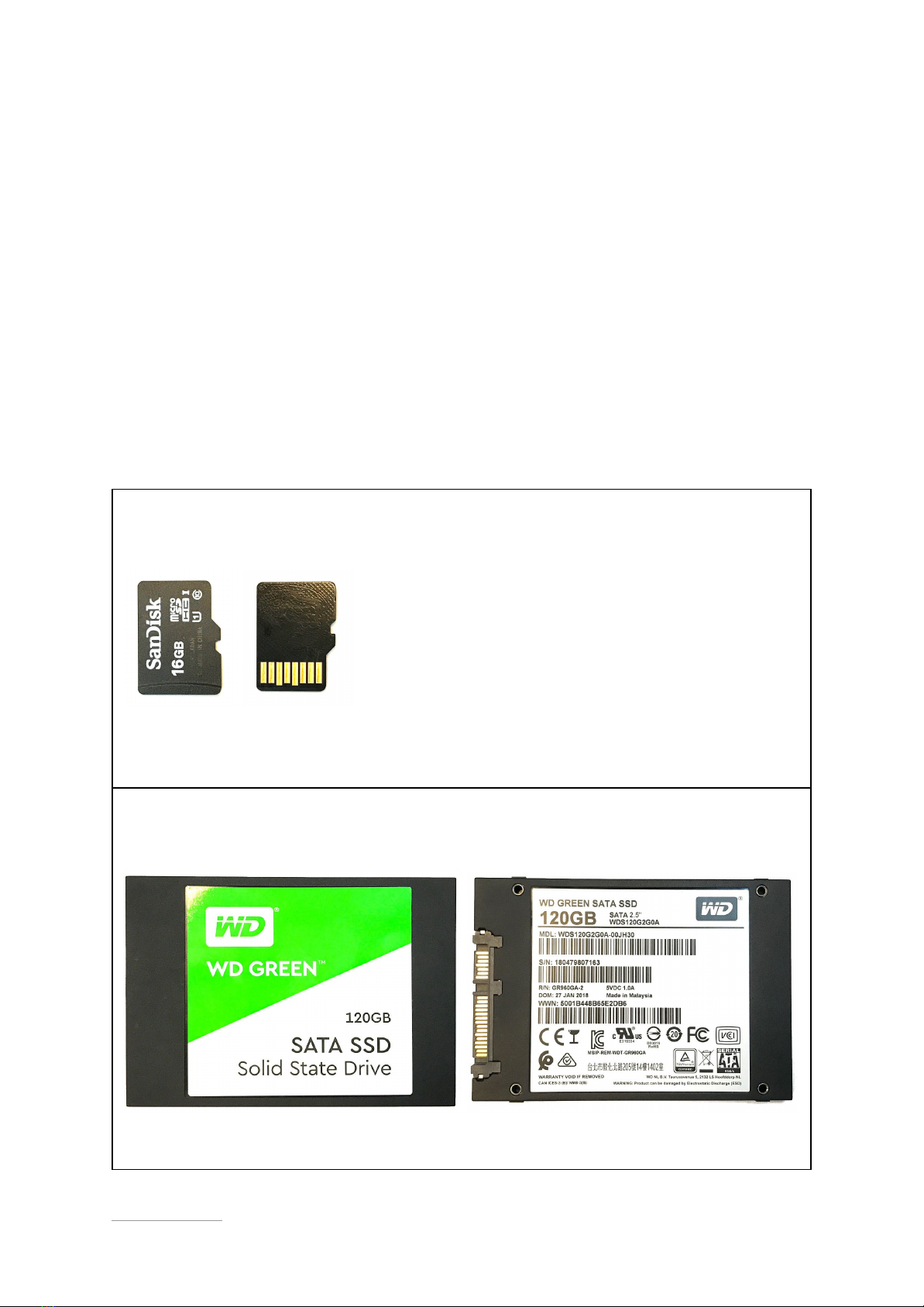
MicroSD Card
SanDisk microSD card UHS Class 10 - 16GB
Model : SDSDQAD-016G
Quantity : 1
SATA 3.0 SSD Drive
WD GREEN SATA SSD - 120GB
Model : WDS120G2G0A-00JH30
Quantity : 4
https://kobol.io - [email protected]
© 2018 Kobol Innovations Pte. Ltd. - All Rights Reserved 9/32

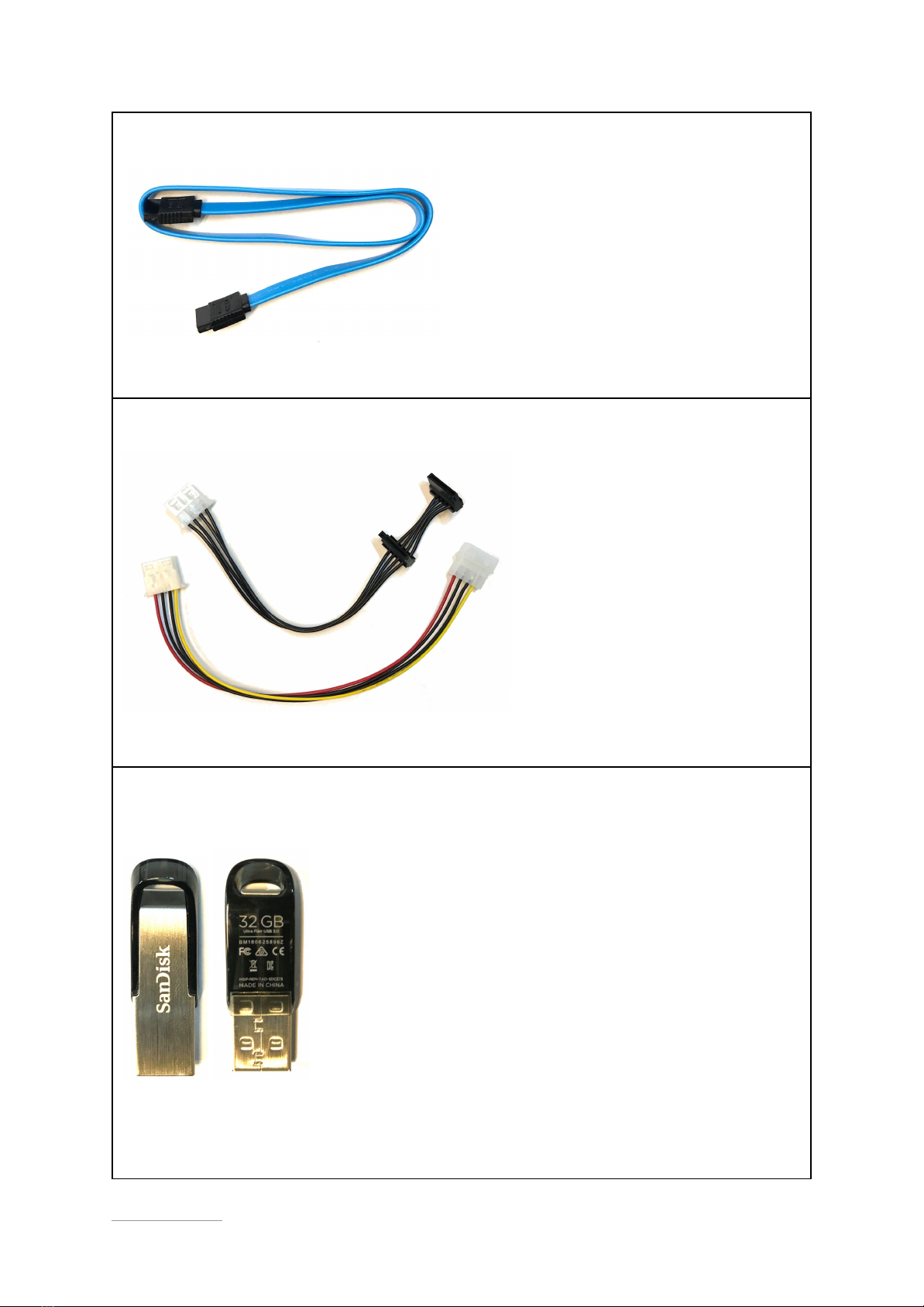
SATA 3.0 Data Cable (Shielded)
Length : 50 cm
Quantity : 4
SATA Power Cable + Extension
Length : total 50 cm
Quantity : 2
USB 3.0 Flash Drive
SanDisk Ultra Flair - 32GB
Model : SDCZ73-032G
Quantity : 2
https://kobol.io - [email protected]
© 2018 Kobol Innovations Pte. Ltd. - All Rights Reserved 10/32
Indice