
Kodak Dock II Manuale utente

Kodak EasyShare
HDTV dock
User’s guide
www.kodak.com
For help with your HDTV dock, www.kodak.com/go/hdtvdocksupport.

Eastman Kodak ompany
Rochester, New York 14650
© Eastman Kodak ompany, 2007
All screen images are simulated.
Kodak, EasyShare, and Perfect Touch are trademarks of Eastman Kodak ompany.
Eastman Kodak ompany is an authorized licensee of the ompactFlash trademark.
P/N 2F6570_en
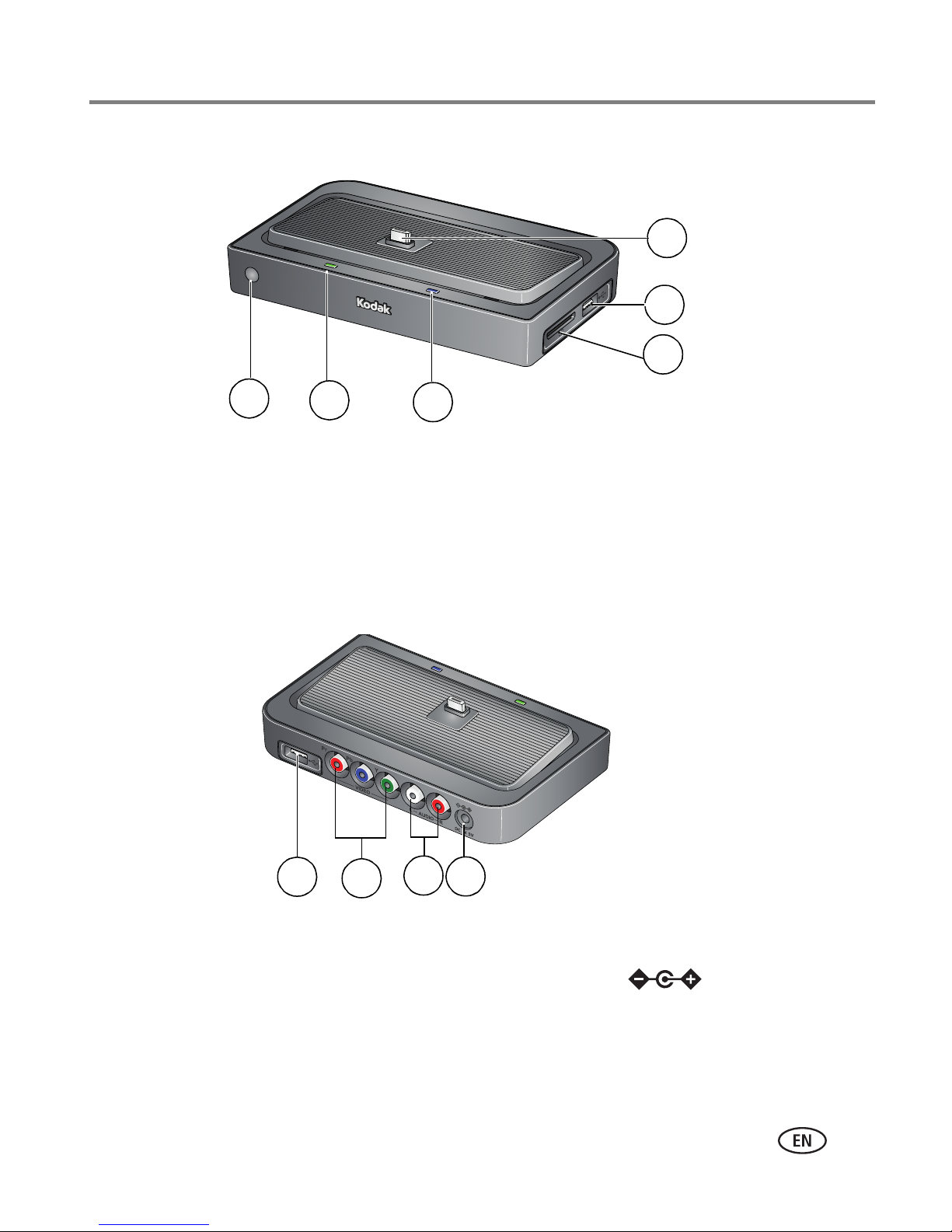
Product features
www.kodak.com/go/support i
Front/Side View
Back View
1 Remote control sensor 4 Memory card slot - SD, MM
2 harging light 5 USB connector
3 Power light 6 Dock connector
1 USB connector 3 Audio out connectors
2 Video out connectors 4 D -In (5 V)
3
2
1
4
5
6
4
123

ii www.kodak.com/go/support
Table o contents 1
1 Getting started ......................................................................................1
Using the remote control...............................................................................1
Activating the remote control ................................................................... 1
Understanding the remote control buttons................................................ 2
Using the Menu button ............................................................................3
Setting up your HDTV dock............................................................................5
onnecting the dock to your high definition TV......................................... 5
Attaching the camera insert......................................................................6
Docking your camera; turning on the dock................................................6
Setting your language ..............................................................................7
Inserting a card or USB device ..................................................................7
harging the camera battery ....................................................................8
2 Working with pictures/videos ................................................................9
Viewing pictures and videos .......................................................................... 9
Accessing the Home screen ....................................................................10
Home screen features............................................................................. 11
Viewing a single picture/information.......................................................11
Playing sound tags .................................................................................12
Magnifying pictures................................................................................12
ropping pictures...................................................................................12
Rotating pictures....................................................................................13
Using Kodak Perfect Touch technology ........................................................13
Playing a video............................................................................................14
Making a picture from a video................................................................14
3 Doing more with your dock .................................................................15
Selecting pictures/videos .............................................................................15
Selecting one at a time...........................................................................15
Selecting all ...........................................................................................15
opying with your dock...............................................................................16

Table of contents
www.kodak.com/go/support iii
Deleting pictures/videos .............................................................................. 17
Protecting pictures/videos from deletion ................................................. 17
Printing pictures..........................................................................................18
onnecting the HDTV dock to a printer...................................................18
Selecting pictures for printing ................................................................. 19
Running a slide show ..................................................................................19
hanging the slide show display interval.................................................19
Running a multimedia slide show ...........................................................20
4 roubleshooting and support ..............................................................21
HDTV dock problems...................................................................................21
Screen messages.........................................................................................22
5 Appendix .............................................................................................23
Dock specifications......................................................................................23
Important safety instructions .......................................................................24
Additional care and maintenance ................................................................ 25
Limited warranty .........................................................................................25
Limited warranty coverage...................................................................... 26
Limitations ............................................................................................. 26
Your rights............................................................................................. 27
Outside the United States and anada.................................................... 27
F compliance and advisory ...................................................................... 27
F and Industry anada .......................................................................28
anadian DO statement.......................................................................28
Russian GOST-R ..................................................................................... 28
Waste Electrical and Electronic Equipment labeling .................................29
Australian -Tick....................................................................................29
MPEG-4 .................................................................................................29

1www.kodak.com/go/support
1Getting started
Welcome to your Kodak EasyShare HDTV dock. Viewing your pictures and videos on a
high definition TV couldn’t be simpler!
Using the remote control
Activating the remote control
An activation tab protects the remote control battery during shipment.
■Remove the tab to start using the remote.
There is no need to open the battery compartment
or to remove the battery.

Getting started
www.kodak.com/go/support 2
Understanding the remote control buttons
Button Press to:
ON/OFF turn on/off the HDTV dock.
DISPLAY turn on/off picture/video status
information bar.
Home return to the home screen.
BA K return to the previous screen.
stop a slide show, display thumbnails.
MENU display the menu choices.
OK accept the current selection.
4-way navigate through pictures or menus.
ZOOM + increase picture magnification.
ZOOM - decrease picture magnification.
select mark pictures for an operation.
SLIDE play a slide show.
play/pause play or pause a video or slide show.
rewind fast rewind a video.
fast forward fast forward a video.
stop stop a video, display the first frame.
stop a slide show, display thumbnails.
PAGE UP display the previous page of images.
PAGE
DOWN
display the next page of images.

3www.kodak.com/go/support
Getting started
Using the Menu button
Use the Menu button to work with your pictures/videos and change your dock
settings.
NOTE: The menu information appears on your television (see page 9).
1Press the Menu button. (Press again to exit.)
2Press to highlight an option/setting, then press OK.
3If necessary, choose a sub-menu option, then press OK.
Picture/video menu options
Rotate
Available for pictures only.
See page 13.
KPT
(Kodak Perfect Touch)
See page 13.
Crop See page 12.
Print
Available when a printer is
connected to your dock.
See page 18.
Make Picture
Available for videos only
See page 14.
Copy See page 16.
Protect/Unprotect See page 17.
Delete See page 17.

Getting started
www.kodak.com/go/support 4
Dock settings Options
Slide show duration
Available during slide shows
only.
See page 19.
Language See page 7.
Video Out resolution 720p
1080i
About heck your dock model number and firmware version.

5www.kodak.com/go/support
Getting started
Setting up your HDTV dock
Connecting the dock to your high de inition TV
1Plug in the power cable.
NOTE:
Your power cable (included with the dock) may be different from the one
pictured. Use the plug that accommodates your type of power outlet.
2Plug in the audio cable, matching the 2 color-coded connectors on the dock and
the television.
3Plug in the video cable, matching the 3 color-coded connectors on the dock and
the television.
1
2
3
video
audio
power
Altri manuali per Dock II
1
Questo manuale è adatto per i seguenti modelli
5
Indice
Altri manuali Kodak Stazione di attracco

Kodak
Kodak EasyShare Printer Dock 6000 Manuale di istruzioni

Kodak
Kodak EasyShare Camera Dock Series 3 Manuale utente

Kodak
Kodak 2F6571 Manuale utente

Kodak
Kodak PD-450 Manuale utente

Kodak
Kodak PD-450 Manuale utente

Kodak
Kodak EasyShare printer dock Manuale utente

Kodak
Kodak Dock II Manuale utente

Kodak
Kodak 6000 - EasyShare Camera Dock Manuale utente

Kodak
Kodak EasyShare printer dock Manuale utente

Kodak
Kodak EasyShare Series 3 Manuale utente


