Korg 700s Manuale utente

KORG Collection
Owner's Manual E 1
miniKORG700s

2
Table of contents
Introduction .......................................................4
Main Features...............................................................4
Part Names and functions................................ 5
Header..............................................................................6
Synthesizer ................................................................................................6
Effect...........................................................................................................6
Basic operations................................................8
Keyboard ....................................................................................................8
Joystick ......................................................................................................8
Rotary Switch............................................................................................8
Value slider ................................................................................................8
Check box...................................................................................................9
Toggle Switch............................................................................................9
Menu button...............................................................................................9
Knob ............................................................................................................9
Graphical envelope...................................................................................9
Browser functions.........................................10
Banks...........................................................................................................11
Categories..................................................................................................11
Programs....................................................................................................11
Search .........................................................................................................11
Previews .....................................................................................................11
Quick Start........................................................12
Playing the synthesizer ..........................................................................12
Edit the Tone of the Synthesizer..........................................................13
Using the arpeggiator.............................................................................13
Saving a sound .........................................................................................14
Parameter Guide...............................................15
MAIN ..............................................................15
Front panel...................................................................15
Top panel......................................................................18
VCO2 .............................................................................. 18
V.PATCH .................................................................... 20
Virtual Patch ................................................................. 21
LFO .............................................................................................................21
EG................................................................................................................21
EFFECT ...................................................................... 22
DISTORTION.............................................................................................23
EQ.............................................................................................................. 24
CHORUS/FLANGER/ENSEMBLE..........................................................25
PHASER ....................................................................................................26
DELAY.......................................................................................................27
REVERB ................................................................................................... 28

3
3D↔2D........................................................................29
Tools ............................................................................30
SAVE button, SAVE AS... button ........................................................ 30
... (Hamburger) menu............................................................................ 30
⚙
(Global) Button....................................................................................31
Modulation Source List..........................................................................34
Appendices.......................................................35
Troubleshooting..........................................................35
No sound...................................................................................................35
The sound has clicks, pops, or noise...................................................35
Sound is delayed.....................................................................................35
Can’t control the software synthesizer from a MIDI device
connected to the computer..................................................................36
Specifications...............................................37
Operating requirements..............................................37
for Mac .....................................................................................................37
for Windows ...........................................................................................37
Support and service ........................................38
Information to provide when contacting us..................................... 38
Before you contact us .......................................................................... 38
• All product names and company names are the trademarks or
registered trademarks of their respective owners.

4
Introduction
Thank you for purchasing the KORG Collection - miniKORG 700s software synthesizer. To help you get the most out of your new instrument, please
read this manual carefully.
Main Features
The miniKORG 700 was KORG’s first mass-produced monophonic synthe-
sizer, which was released in 1973. An improved version, the miniKORG
700S, was released the following year. Using our CMT modeling technol-
ogy, we have recreated the sound of the miniKORG 700S as a software
synthesizer. The engineers that developed this software have made
every effort to adjust the sound in painstaking detail.
This softsynth recreates the thick and penetrating sounds along with the
extreme tonal changes that were characteristic of the miniKORG 700S,
while making many improvements necessary for the softsynth to be
useful in the production of today’s modern music. This softsynth in-
cludes features that were unheard of in the original synth, including
polyphonic sound, the V.Patch (virtual patch), three EGs and LFOs, and
high-quality effects. As this is software-based, this softsynth makes it
possible to create sounds that exceed the limits of what hardware alone
can do. We’ve also given special attention to the user interface on this
softsynth, with a 3D mode that faithfully recreates the original 700S,
and a 2D mode for users who place emphasis on easy editing of sounds
and similar features. In addition to the beautiful lead sounds and fat bass
sounds you expect from the 700S, we hope you enjoy the new sounds
available on this softsynth, all made possible by the new functions that
give you a massive amount of freedom.

5
Part Names and functions
1 2 3 4 5 6 7 8 9
10
11

6
Header
1.
Save button
Overwrites the currently selected program.
2.
Save as... button
Saves the currently selected program with a different name.
3.
Display
Shows the name of the currently selected sound. Tap the display to
show the program browser. You can also specify a category to
quickly select programs.
4.
PAGE SELECT switch
Selects the page to display.
MAIN: Shows the MAIN page.
V.PATCH: Shows the V.PATCH page.
EFFECT: Shows the EFFECT page.
5.
PAN knob
Adjusts the panning of the output.
6.
VOLUME knob
Adjusts the overall volume.
7.
Level meter
8.
... (Hamburger) menu
Use this to initialize a program, recall or save the controller settings
and perform other operations.(→page 30 “... (Hamburger)
menu”)
9.
⚙
(Global) button
This button lets you access settings for controller assignments,
scale, the keyboard and more.(→page 31 “
⚙
(Global) Button”)
Synthesizer
10.
miniKORG
a.
Top panel
(→page 18 “Top panel”)
b.
Keyboard, Joystick
These are the on-screen controllers used when playing (keyboard,
joystick). When operating these controllers from an external MIDI
device, it is convenient to set the MIDI control numbers in Global
mode.
c.
Front panel
(→page 15 “Front panel”)
Effect
11.
Effect
This softsynth features effects including three selectable types of
distortion; an equalizer for adjusting the low, mid, and high-end
sound; a chorus/flanger/ensemble effect that can be mixed with the
original sound to create swelling effects, expansive sounds and
vibrato; a phaser effect that lets you creates swelling effects by


8
Basic operations
Use the mouse to edit the values of various controllers and parameters.
Keyboard
• Click on the keyboard to play notes.
Joystick
• Drag the joystick up, down, left and right to control it.
Rotary Switch
• Drag the knob to adjust its value.
• If you hold down the ALT (mac: Option) key while clicking, the param-
eter returns to its default value.
Value slider
• Drag the value of the slider up and down to adjust a value.
• Double-click the value to input manually using a keyboard.
• If you hold down the ALT (mac: Option) key while clicking, the param-
eter returns to its default value.

9
Checkbox
• Click a checkbox to toggle the setting ON or OFF.
Toggle Switch
• Click to toggle the setting ON or OFF.
Menu button
• Click to select a command from the pop-up menu that appears.
Knob
• Drag the knob to adjust its value.
• If you hold down the ALT (mac: Option) key while clicking, the param-
eter returns to its default value.
Graphical envelope
• Drag each point to adjust its value (level or time).
10
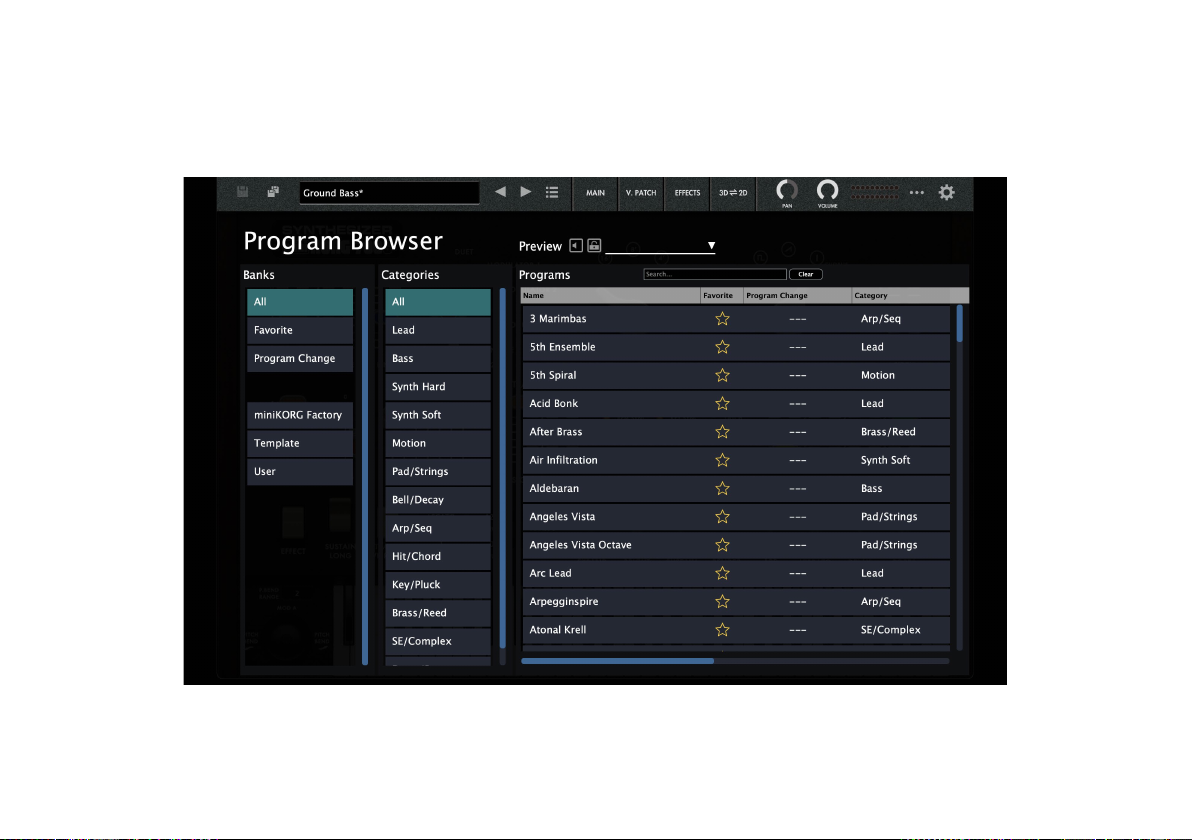
Browser functions
The miniKORG700s Software synthesizer features a browser search function that lets you quickly find and choose the sounds you want out of the
wide range of options, filtering by category.
Indice
Altri manuali Korg Sintetizzatore

Korg
Korg volca keys Manuale utente

Korg
Korg PA1X Manuale utente

Korg
Korg M1 Manuale utente

Korg
Korg Elec Tribe EA-1 Manuale utente

Korg
Korg MICROX X50 Manuale utente

Korg
Korg Mono/Poly Manuale utente

Korg
Korg ER-1mkII Manuale utente
Korg
Korg MONOPOLY POLYSIX MS-20 Manuale utente

Korg
Korg MMT microKORG XL+ Manuale utente

Korg
Korg N1 Manuale utente

Korg
Korg DSS-1 Manuale utente

Korg
Korg Wavedrum Manuale utente

Korg
Korg iPOLYSIX Manuale utente

Korg
Korg 770 Manuale utente

Korg
Korg Kaossilator Pro Manuale utente

Korg
Korg VOLCA FM Manuale tecnico

Korg
Korg N5 Manuale utente

Korg
Korg VOLCA FM Manuale utente

Korg
Korg microKORG Scheda informativa del prodotto

Korg
Korg X3 Manuale utente