
Kovan Room temperature controllerwith weekly... Manuale utente

USER MANUAL
www.kovan.ba
Room temperature controller
with weekly programme
USER MANUAL

USER MANUAL
www.kovan.ba
2
3 1. Introduction
4 2. Intended use
4 3. Explanation of Symbols
5 4. Safety information
6 5. Installation
9 6. Factory settings
9 7. Markings on the display
10 8. Setting the time
10 9. Selecting Heating and Cooling Modes
11 10. Programming setup
11 10.1. Daily program
14 10.2. Program 5/2
16 10.3. Weekly program
16 11. Manual temperature setting
16 11.1. Manual temperature setting
17 11.2. Retain manual temperature
17 12. Temperature settings
18 13. Selecting mode of operation
19 14. Alarm/Wake up function
20 15. Key lock
21 16. Notes on batteries
21 17. Maintenance and cleaning
22 18. Disposal of batteries and rechargeable batteries
23 19. Technical data

USER MANUAL
www.kovan.ba
3
1. Introduction
Dear Customer,
Thank you for purchasing this product.
This product meets the requirements of current statutory, European
and national guidelines. To maintain this status and to ensure safe
operation, you as the user must observe these operating instructions!
In case of any technical questions, contact or consult:
Tel.: 00387 62 255 398
E-mail: servis@kovan.ba
Mon.-Sat.: 7:00 16:00
These operating instructions are part of this product. They
contain important information concerning operation and
handling. Please bear this in mind in case you pass on the
product to any third party. Therefore, retain these operating
instructions for reference!

USER MANUAL
www.kovan.ba
4
2. Intended use
The product measures the current room temperature via an internal
temperature sensor. Depending on an intended set temperature, the
integrated switching output is activated. The heating and cooling
devices can be controlled by it.
A contact-sensitive LC display is used to operate all functions.
The product is supplied with power by two AA/mignon type batteries.
Observe the safety notes and all other information in these
instructions.
This product complies with the applicable statutory, national and
European specifications. All company names and product names are
trademarks of their respective owners. All rights reserved.
3. Explanation of Symbols
This lightning symbol is used when your health is
at risk, e.g. from electric shock.
An exclamation mark in a triangle indicates
important instructions in this operating manual
which must be observed.
USER MANUAL
www.kovan.ba
5
4. Safety information
The device is not a toy. Devices operated using the mains
voltage must be kept out of the reach of children. Particular
care must therefore be exercised if children are around.
The product should only be used in closed, dry indoor areas, it
must not become damp or wet. There is the risk of a fatal
electric shock!
Do not leave packaging material unattended. It may become a
dangerous toy for children
Do not use the product inside of rooms or in bad ambient
conditions where flammable gases, vapours or explosive dust
may be or are present! There is a danger of explosion!
and advice on operation of the device.
In case of damage caused by non-compliance with
these safety instructions, the warranty/guarantee
will become void. We do not assume any
responsibility for consequential damage!
We do not assume any liability for damage to
property of personal injury caused by improper
use or the failure to observe the safety
instructions! In such cases the
warranty/guarantee is void.
USER MANUAL
www.kovan.ba
6
In commercial and industrial facilities, the regulations for the
prevention of accidents as laid down by the proffessional trade
association for electrical equipment and devices need to be
observed
5. Installation
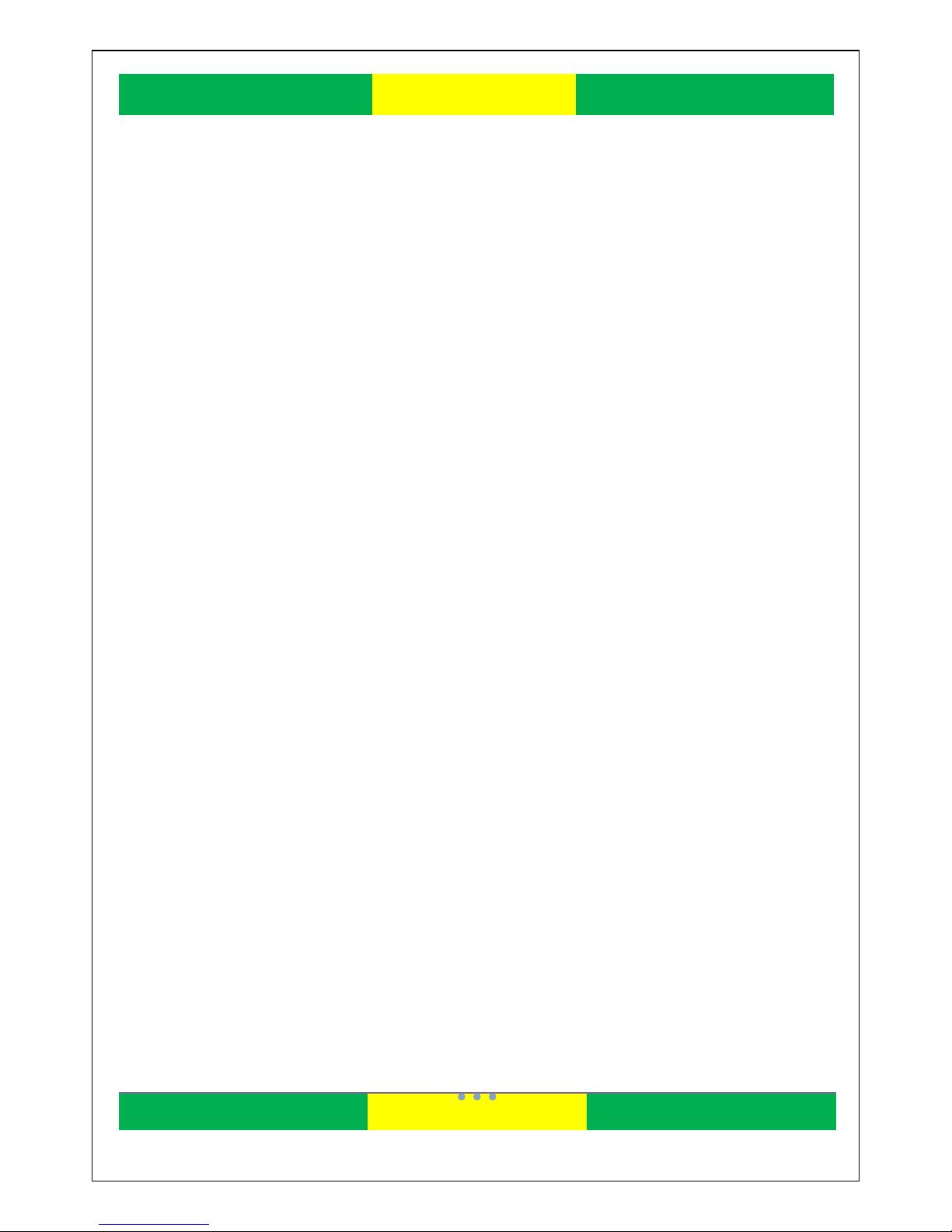
1. Screw for casing closure
2. Screw for protective cover
3. Protective cover
4. Apertures for wall-mounting
Mount the room thermostat on stable surfaces
only. Use the screws or dowels appropriate for
the surface: The product must be operated
stationarily installed. The room thermostat must
be voltage-free during installation.
To ensure that the room thermostat works
properly, do not mount it close to radiators,
electrical devices or windows. Also avoid direct
sunlight.

USER MANUAL
www.kovan.ba
7
5. Opening for
connection cable
6. Screw terminal
(NC/COM/NO)
7. Battery compartment
8. Catches in the upper
part of the
casing
9. button
For installation do the following steps:
Unscrew the screw (1) on the right side
Remove the upper casing
Insert two type AA/mignon batteries in the battery
compartment (7) with the correct polarity. IN CASE OF
DAMAGE CAUSED BY NON-COMPLIANCE WITH THESE SAFETY
USER MANUAL
www.kovan.ba
8
INSTRUCTIONS, THE WARRANTY/GUARANTEE WILL BECOME
VOID.
Remove the screw (2) only wire-thermostat
Remove the protective cover (3) only wire-thermostat
Connect the power supply to the screw terminals (6) only
wire-thermostat
oConnect contact No.19 of the boiler-electronics to
COM on the room-thermostat
oConnect contact No.18 of the boiler-electronics to NO
on the room-thermostat
Connecting the reciever of the wireless room-thermostat:
oConnect the brown wire to contact No.19 of the boiler-
electronics
oConnect the blue wire to contact No.21 of the boiler-
electronics
oConnect the green-yellow wire to contact No.18 of the
boiler-electronics
Replace the protective cover (3) again only wire-thermostat
Secure the protective cover with the screw (2) only wire-
thermostat
Use the fastening apertures (4) to srew the room thermostat to
the wall
Close the casing and retighten the screw (1) turned out in the
beginning.
USER MANUAL
www.kovan.ba
9
6. Factory settings
The room thermostat is set up with the following factory settings:
Monday - Sunday
Duration of daily regimen___________________________6:00 –23:00
Duration of night regimen___________________________23:00 –6:00
Daily temperature_______________________________________23⁰C
Night temperature_______________________________________18⁰C
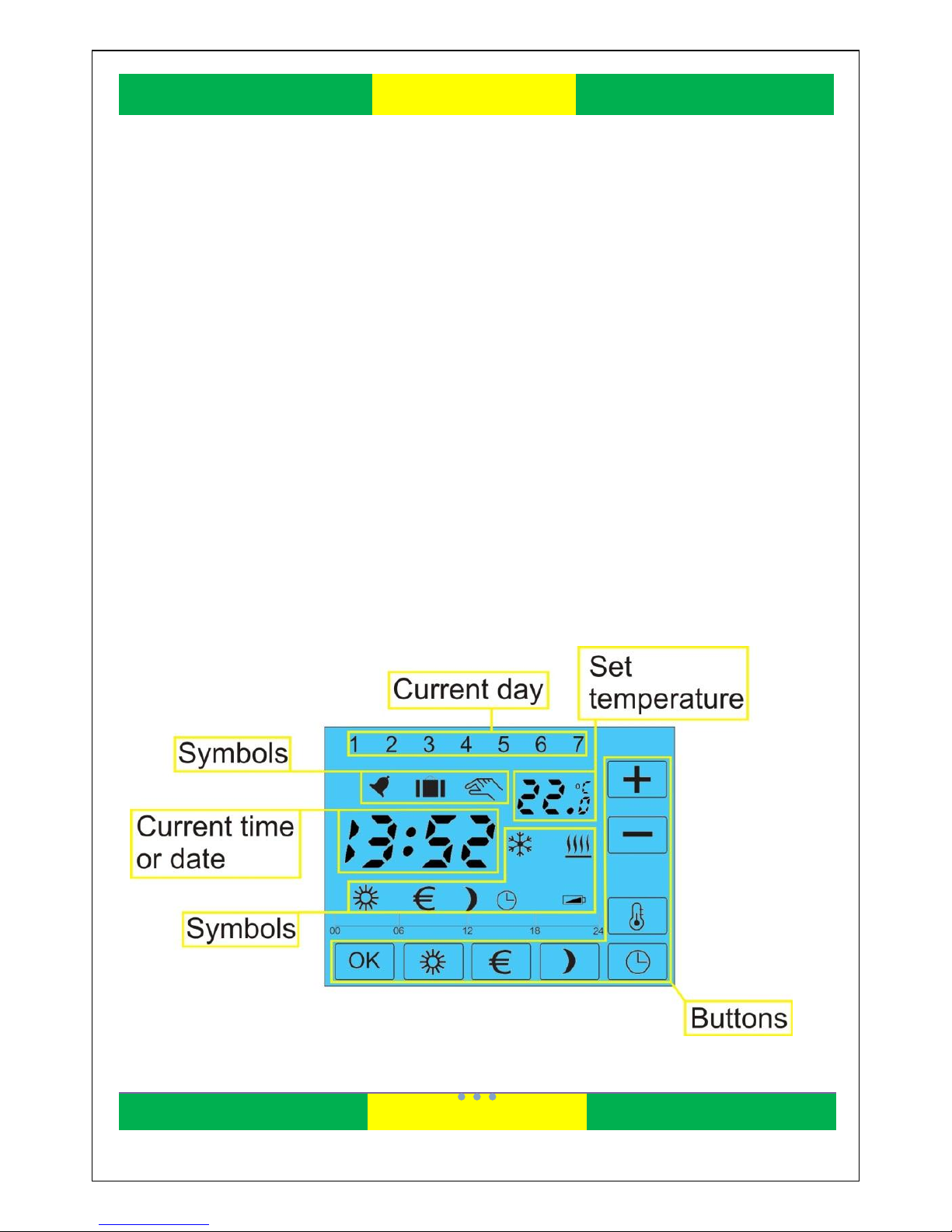
7. Markings on the display

USER MANUAL
www.kovan.ba
10
8. Setting the time
Press the button. The year flashes.
Set it with the buttons and
Press the button. The month flashes.
Set the month with the and buttons
Press the button. The date flashes.
Set the date with the and buttons
Press the button. The hours of the current time flash.
Set the hours with the and buttons
Press the button. The minutes of the current time flash.
Set the minutes with the and buttons
Press to store the settings. The device leaves the setting
mode.
9. Selecting Heating and Cooling Modes
Press the button. The year flashes
Press repeatedly to switch between heating mode
d cooling mode (display
Briefly press to confirm the settings. The device leaves
the setting mode.
Questo manuale è adatto per i seguenti modelli
1
Indice


