
Kyocera TASKalfa 250ci Manuale utente

DF-780
Operation Guide
Manuel d'utilisation
Guía de uso
Einführung
Guida alle funzioni
᪡ݠ
ঀဥ୰ྶ

Please read the Operation Guide before using this product. After reading, keep it close to the copier/printer for
easy reference.
This Operation Guide contains explanations in 7 different languages: English, French, Spanish, German,
Italian, Chinese and Japanese. Refer to the corresponding pages as indicated below for the language of your
choice.
Prendre connaissance de ce Manuel d'utilisation avant d'utiliser ce produit. Le conserver à proximité de la
copieuse/imprimante afin de pouvoir le consulter facilement.
Ce manuel d’utilisation contient des explications en 7 langues différentes: anglais, français, espagnol,
allemand, italien, chinois et japonais. Veuillez consulter les pages correspondant à votre langue comme indiqué
ci-dessous.
Lea esta Guía de uso antes de utilizar este producto. Después de leerla, guárdela cerca de la copiadora/
impresora para facilitar las consultas.
Este manual de instrucciones describe el funcionamiento en 7 idiomas: inglés, francés, español, alemán,
italiano, chino y japonés. Consulte las correspondientes páginas tal como se indica a continuación para el
idioma de su elección.
Bitte lesen Sie vor dem Einsatz dieses Geräts das vorliegende Handbuch sorgfältig durch. Auch nach dem
Lesen ist das Handbuch beim Kopierer/Drucker aufzubewahren, so dass es immer zur Hand ist.
Diese Bedienungsanleitung enthält Erklärungen in 7 verschiedenen Sprachen: Englisch, Französisch,
Spanisch, Deutsch, Italienisch, Chinesisch und Japanisch. Gehen Sie für die Sprache Ihrer Wahl zu den Seiten,
die unten angeführt sind.
Si raccomanda di leggere la Guida alle funzioni prima di utilizzare questo prodotto. Una volta letta,
conservarla vicino alla copiatrice o stampante per una rapida consultazione.
Questa guida operativa contiene spiegazioni in 7 lingue diverse: Inglese, Francese, Spagnolo, Tedesco, Italiano,
Cinese e Giapponese. Fare riferimento alle pagine corrispondenti come indicato sotto per la lingua prescelta.
使用本机前请阅读操作手册。然后将其保管在复印机/打印机附近,以便查阅。
本手册以英文、法文、西班牙文、德文、意大利文、中文、日文等 7 国语言进行说明。每种语言的说明,请参阅下列页
码。
ご使用前に必ずこの使用説明書をお読みください。お読みになった後は、複写機/プリンタ本体の使用説明書といっ
しょに大切に保管してください。
本書は、英語・フランス語・スペイン語・ドイツ語・イタリア語・中国語・日本語の7言語で説明しています。
各言語での説明は下記のページをご覧ください。
English ............................................................................... Pages 1 to 10
Français .......................................................................... Pages 11 à 20
Español ........................................................................ Páginas 21 a 30
Deutsch ......................................................................... Seite 31 bis 40
Italiano ...................................................... Da pagina 41 a pagina 50
简体中文 ...................................................................... 第51页至第60页
日本語 ................................................................................ 61 ~70 ページ

1
English
2
Please read the Operation Guide before using this
product. After reading, keep it close to the copier/
printer for easy reference.
Refer to the Operation Guide for the copier/printer for
information on the service representative for your
product.
The sections of this Operation Guide and parts of this
product marked with symbols are safety warnings
meant to protect the user, other individuals and
surrounding objects, and ensure correct and safe
usage of the product.
The symbols and their meanings are indicated below.
WARNING: Indicates that serious injury or
even death may result from insufficient
attention to or incorrect compliance with the
related points.
CAUTION: Indicates that personal injury or
mechanical damage may result from insufficient
attention to or incorrect compliance with the
related points.
Symbols
The symbol indicates that the related section
includes safety warnings. Specific points of attention
are indicated inside the symbol.
....... [General warning]
The symbol indicates that the related section
includes information on prohibited actions. Specifics
of the prohibited action are indicated inside the
symbol.
....... [Warning of prohibited action]
....... [Disassembly prohibited]
The zsymbol indicates that the related section
includes information on actions which must be
performed. Specifics of the required action are
indicated inside the symbol.
....... [Alert of required action]
....... [Remove the power plug from the outlet]
....... [Always connect the product to an outlet
with a ground connection]
Please contact your service representative to order a
replacement if the safety warnings in the Operation
Guide are illegible or if the Operation Guide itself is
missing. (fee required)
CONTENTS
INSTALLATION PRECAUTIONS ........................... 3
PRECAUTIONS FOR USE ....................................... 4
Names of parts........................................................... 5
Cautions ..................................................................... 6
Types of modes [copier].............................................. 6
Sort: ON ........................................................... 6
Sort: OFF ......................................................... 6
Stapling ............................................................ 6
Types of modes [printer]............................................ 7
Offset ejection .................................................. 7
Stapling ............................................................ 7
Troubleshooting ......................................................... 7
Handling a paper jam...................................... 7
Replenishing staples........................................ 8
Handling a staple jam ..................................... 9
Specifications ........................................................... 10
3
INSTALLATION PRECAUTIONS
Environment
CAUTION
Avoid placing this product on or in locations
which are unstable or not level. Such locations
may cause the product to fall down or fall
over. This type of situation presents a danger
of personal injury or damage to the product.
Avoid locations near radiators, heaters, or
other heat sources, or locations near
flammable items, to avoid the danger of fire.
Other precautions
The requirements for the operating environment are
as follows:
• Temperature: 0°C to 35°C (35°F to 95°F)
• Humidity: 10% to 85%
Note that ambient environmental conditions, such as
ventilation, may affect performance.
The following locations should be avoided:
• Avoid locations near a window or with exposure to
direct sunlight.
• Avoid locations with vibrations.
• Avoid locations with drastic temperature
fluctuations.
• Avoid locations with direct exposure to hot or cold
air.
Handling of plastic bags
WARNING
Keep the plastic bags that are used with this
product away from children. The plastic may
cling to their nose and mouth causing
suffocation......................................................
4
PRECAUTIONS FOR USE
Cautions when using this product
WARNING
DO NOT place metallic objects or containers
with water (flower vases, flower pots, cups,
etc.) on or near this product. This type of
situation presents a danger of fire or
electrical shock should any water fall inside.
DO NOT damage, break or attempt to repair
the power cable. DO NOT place heavy objects
on the power cable, pull it, bend it
unnecessarily or cause any other type of
damage. These types of situations present a
danger of fire or electrical shock. ................
NEVER attempt to repair or disassemble
this product or its parts as there is a danger
of injury or fire or electrical shock. ..............
If this product becomes excessively hot,
smoke appears, there is an odd smell, or any
other abnormal situation arises, there is a
danger of fire or electrical shock. Immediately
turn the copier/printer OFF (O) at the main
power switch and remove the copier/printer
power plug from its outlet. Then contact your
service representative. ..................................
If anything harmful (paper clips, water, other
fluids, etc.) falls into this product,
immediately turn the copier/printer OFF (O)
at the main power switch, remove the copier/
printer power plug from its outlet and then
contact your service representative. If you
continue to use this product without taking
these steps, there is a danger of fire or
electrical shock..............................................
ALWAYS contact your service representative
for maintenance or repair of internal parts.
CAUTION
For safety purposes, ALWAYS turn the
copier/printer OFF (O) at the main power
switch and remove the copier/printer power
plug from its outlet when cleaning this
product. ..........................................................
DO NOT touch the ejection tray when the
product is in operation as there is a danger of
injury. ............................................................
If dust accumulates within this product,
there is a danger of fire or other trouble.
It is therefore recommended that you consult
with your service representative in regard to
cleaning of internal parts. This is
particularly effective if accomplished prior to
seasons of high humidity.
Consult with your service representative in
regard to the cost of cleaning the internal
parts of the product as well. ........................
Other precautions
DO NOT place heavy objects on this product
or cause other damage to the product.
When lifting or moving the product, contact
your service representative.
Do not touch electrical parts, such as
connectors or printed circuit boards. They
could be damaged by static electricity.
DO NOT attempt to perform any operations
not explained in this Operation Guide.
5
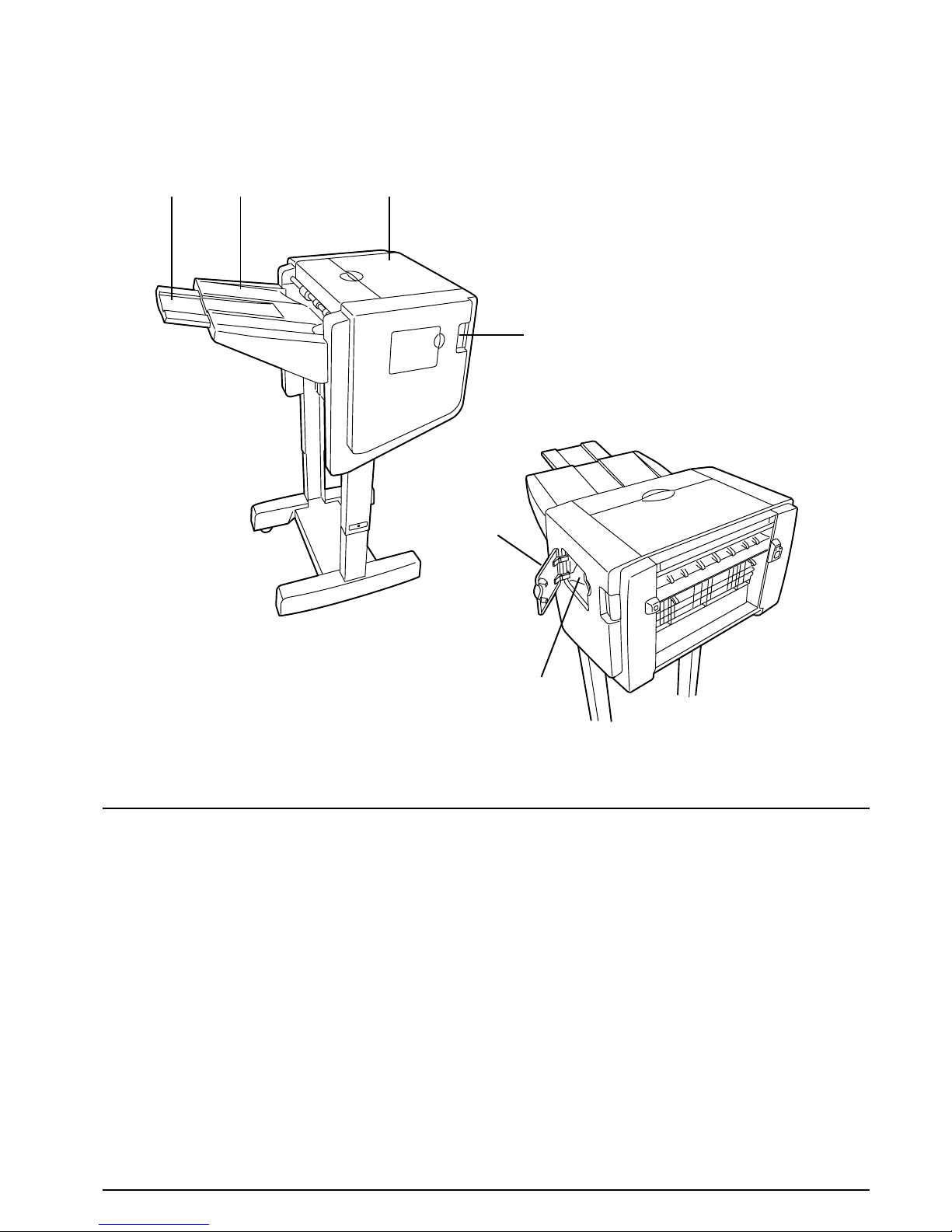
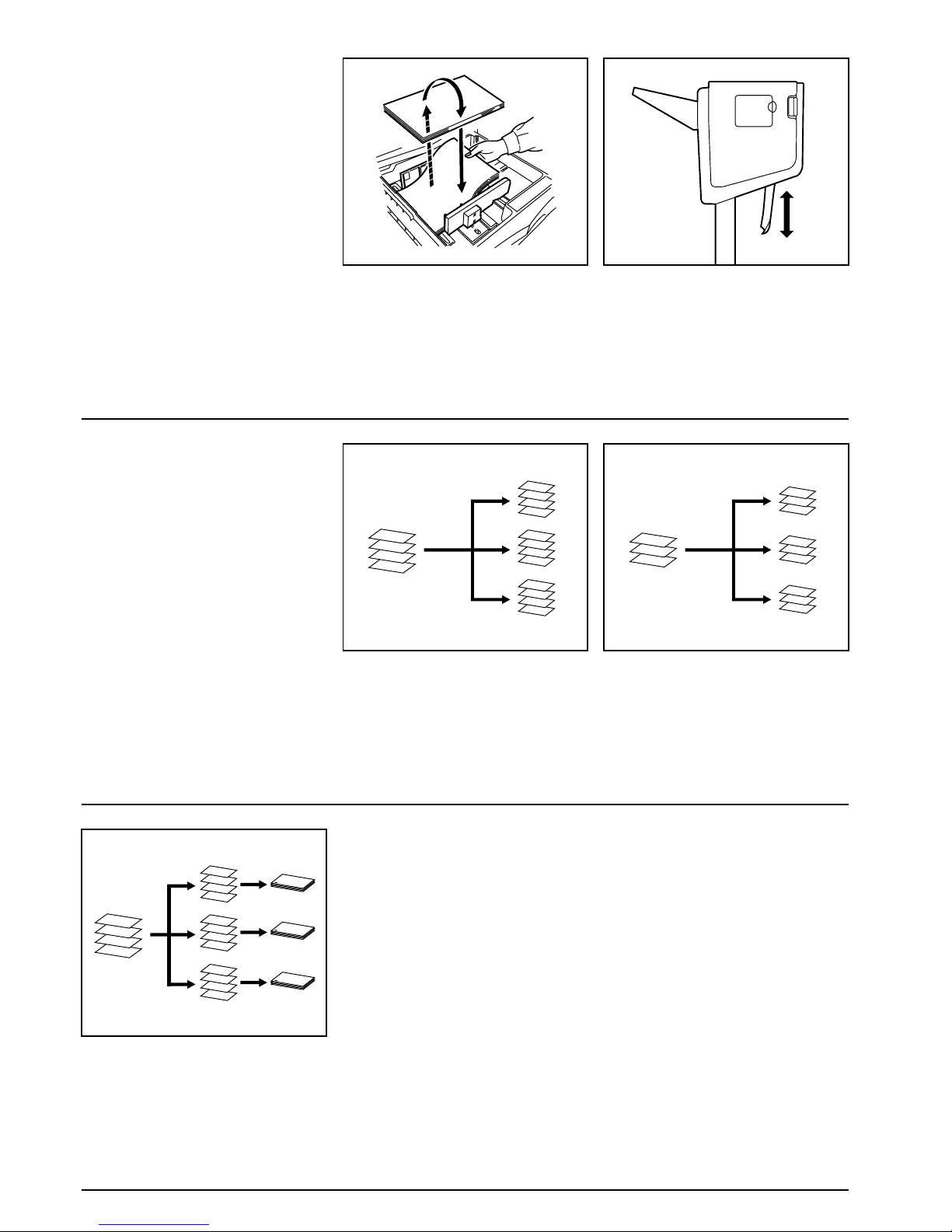
(1) Ejection tray
Copies and printouts will be ejected onto this tray.
(2) Ejection tray extension
Pull this extension out when you want to copy or
print onto 11" × 17", 8 1/2" × 14", B4 or A3 size
paper.
(3) Finisher release button
Push this button when you want to separate the
Document Finisher from the copier (or printer).
(4) Top Cover
Open this cover if a paper jam occurs inside of the
Document Finisher.
(5) Staple cover
Open this cover when you want to replenish
staples.
(6) Staple cartridge holder
The staple cartridge is installed here. Pull out this
holder when you want to replenish staples.
Names of parts
(2) (1) (4)
(3)
(5)
(6)
6
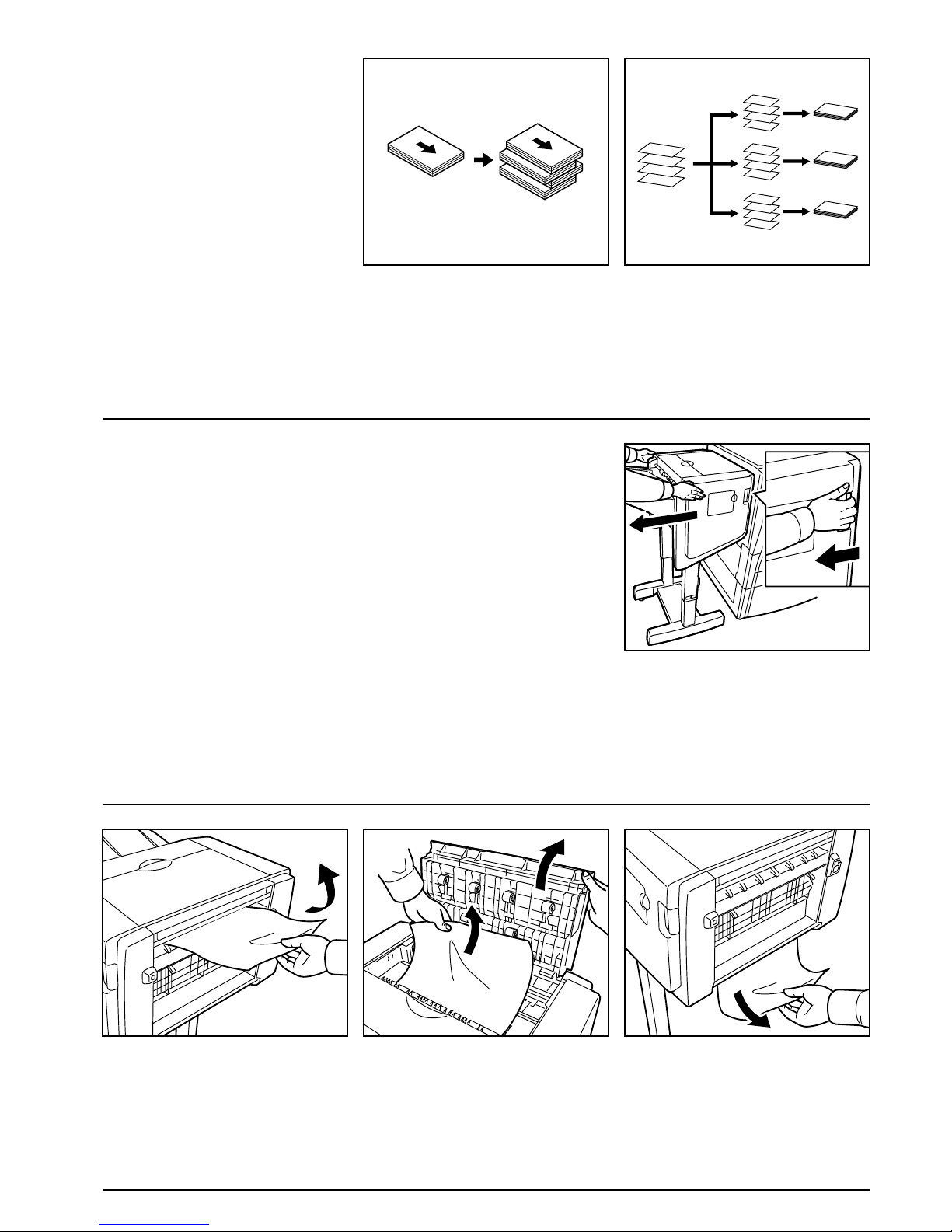
Cautions • If finished copies or printouts come
out curled or are stacked unevenly,
turn the paper in the drawer
[cassette] over and reload it.
• While the Document Finisher is
turning the copy or printout over, that
paper will be visible (as shown in (1)
in the illustration). NEVER attempt
to grab the paper at this point.
Types of modes
[copier]
Sort: ON
This mode automatically sorts copies made
from multiple originals into identical sets.
Sort: OFF
This mode automatically groups copies made
from multiple originals, with all the copies
produced from an individual original grouped
together in one set.
Stapling
This mode automatically sorts and then
staples each copy set.
D
C
B
A
D
C
B
A
D
C
B
A
D
C
B
A
D
C
B
A
D
C
B
A
D
C
B
A
D
C
B
A
C
B
A
C
C
C
B
B
B
A
A
A
(1)
7
Types of modes
[printer]
Offset ejection
This mode automatically shifts each set of
printouts to the right and left in order to
separate each individual set in a staggered
fashion.
Stapling
This mode automatically staples each set of
printouts.
Troubleshooting
(Paper jam, replenishing staples and
staple jam)
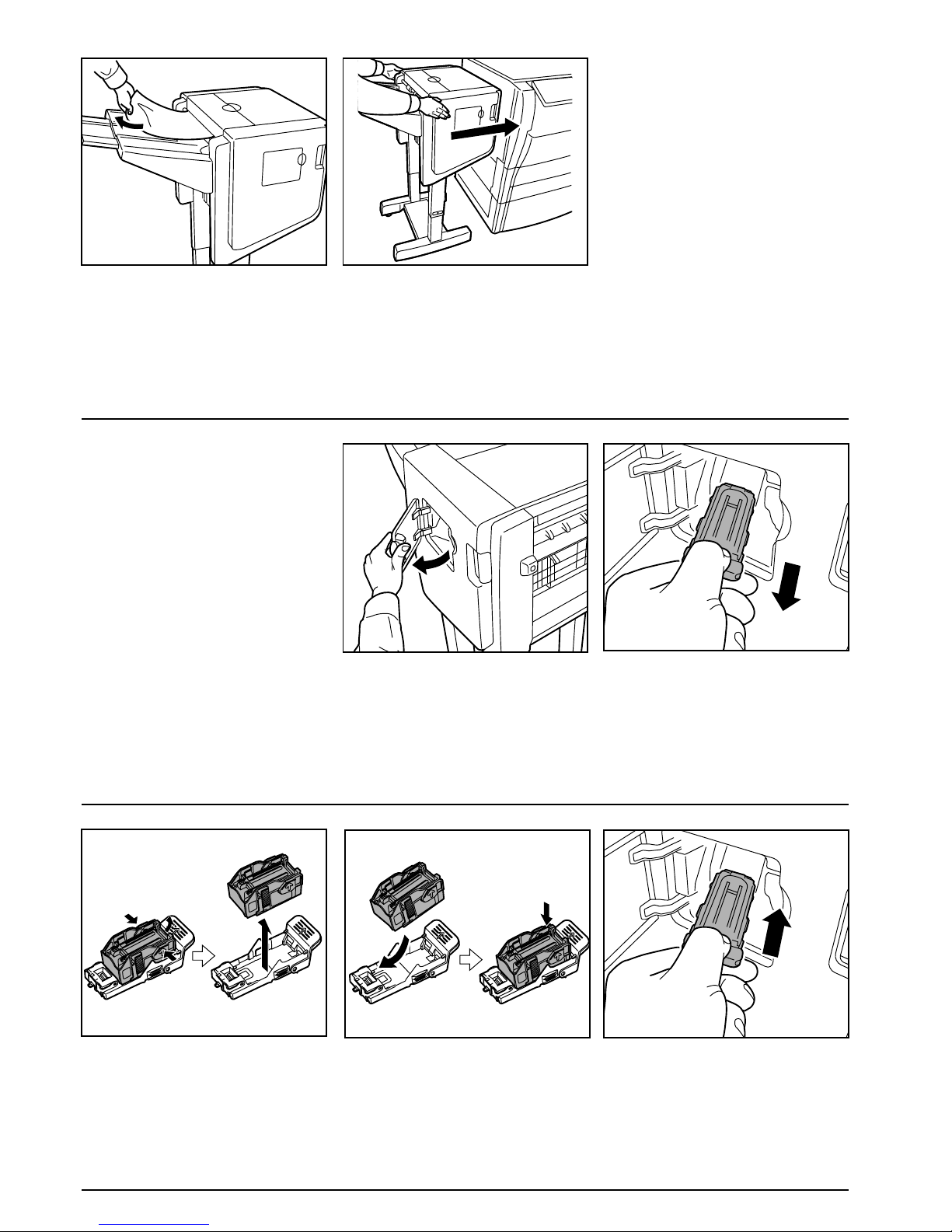
Handling a paper jam
If a paper jam happens to occur, the
operation will stop, and an indication of the
cause of the jam will appear on the operation
panel of the copier (or the message display of
the printer).
1. Push the finisher release button to
separate the Document Finisher from the
copier (or printer).
2. Remove any jammed paper there. 3. Open the top cover and remove any
jammed paper inside that cover. 4. Check the lower portion of the Document
Finisher (A) and remove any jammed
paper from that area.
D
C
B
A
D
C
B
A
D
C
B
A
D
C
B
A
(A)
8
5. Remove the jammed paper. 6. Close the top cover and reattach the
Document Finisher to the copier (or
printer).
Replenishing staples
If an indication that staples have run out
appears on the operation panel of the copier
(or the message display of the printer),
perform the following procedure.
1. Open the staple cover. 2. Remove the staple cartridge holder.
3. Remove the empty staple cartridge from
the staple cartridge holder.
* The staple cartridge can only be
removed when it contains no more
staples.
4. Insert the new staple cartridge into the
staple cartridge holder. 5. Re-install the staple cartridge holder.
The staple cartridge holder will click into
place when it has been inserted correctly.
Altri manuali per TASKalfa 250ci
13
Questo manuale è adatto per i seguenti modelli
4
Indice
Lingue:
Altri manuali Kyocera Finisher

Kyocera
Kyocera AK-730 Manuale utente

Kyocera
Kyocera FS-9530DN Manuale utente

Kyocera
Kyocera DF-730 Manuale utente

Kyocera
Kyocera FS-9500DN Manuale utente

Kyocera
Kyocera KM-4530 Manuale utente

Kyocera
Kyocera DF-780(B) Manuale utente

Kyocera
Kyocera DF-710 Manuale utente

Kyocera
Kyocera DF-650 Manuale utente

Kyocera
Kyocera KM-2530 Manuale utente

Kyocera
Kyocera KM-3530 Manuale utente


