Laice IPB-222S Manuale utente

Megapixel HD IP Camera
Instruction Manual
- Thank you for purchasing this Megapixel HD Hybrid Camera.
- Before using the Hybrid HD Camera, please ensure that you read and understand the User Guide.
- Please store the CD-ROM including this User Guide at an easily accessible location.
- Before connecting and installing any third party monitors, computers and alarms, please refer to
the appropriate instruction manual for proper operation.
MS12052P0100A

2
Model Line
Indoor Dome Camera
Vandalproof Dome Camera
Bullet Camera

Contents
Disclaimer ...............................................................................................................................................
Warning ...................................................................................................................................................
Caution ....................................................................................................................................................
Preventing Malfunction .....................................................................................................................
1. Introduction
1.1 Key Features ..............................................................................................................................
1.2 Features of Network ...............................................................................................................
1.3 System Requirement ..............................................................................................................
1.4 Package Contents ....................................................................................................................
2. Product Views
2.1 Indoor Dome Camera Dimensions ....................................................................................
2.1.1 Parts Conguration .............................................................................................................
2.2 Vandalproof Dome Camera Dimensions .........................................................................
2.2.1 Parts Conguration ..............................................................................................................
2.3 Bullet Camera Dimensions ...................................................................................................
2.3.1 Parts Conguration ..............................................................................................................
3. IP Discovery .................................................................................................................................
4. Web Browser Connecting & Live View
4.1 Accessing Internet Explorer & Web Browser ..................................................................
4.2 Live Web View ...........................................................................................................................
5. Setup .................................................................................................................................................
5.1 Record ...........................................................................................................................................
5.2 Live .................................................................................................................................................
5.3 Camera ..........................................................................................................................................
5.4 Disk .................................................................................................................................................
5.5 Network ........................................................................................................................................
5.6 Device ...........................................................................................................................................
5.7 System ...........................................................................................................................................
5.8 Log ..................................................................................................................................................
6. Specication ................................................................................................................................
7. Appendix ........................................................................................................................................
(4)
(4)
(5)
(6)
(7)
(7)
(7) ~ (8)
(8) ~ (9)
(10)
(11)
(12)
(13)
(14)
(15)
(16) ~ (17)
(17) ~ (19)
(20)
(21)
(22) ~ (24)
(25) ~ (27)
(28) ~ (31)
(32) ~ (33)
(34) ~ (40)
(41) ~ (42)
(43) ~ (46)
(47)
(48) ~ (49)
(50)
3

Disclaimer
The information in this manual is believed to be accurate and reliable as of the date of publication.
The information contained herein is subject to change without notice. Revisions or New editions to
this publication may be issued to incorporate such change.
We makes no warranties for damages resulting from corrupted or lost data due to a mistaken
operation or malfunction of the IP Camera, the software, PC Hardware, peripheral devices, or
unapproved/unsupported devices.
Warning
Do not expose this product to rain or moisture to reduce a risk of re or electric shock.
In the event that the water or other foreign substances enter the interior, immediately turn the
Camera Power o or unplug the power cord from the power outlet. Continued use of the equipment
may result in re or electrical shock. Please consult your Camera distributor.
Do not attempt to disassemble or alter any part of the equipment that is not expressly described in
this guide. Disassembly or alteration may result in high voltage electrical shock.
The installation should be made by a qualied service person authorized by your equipment
distributor. They should conduct internal inspections,
alterations and repairs.
Stop operating the equipment immediately if it emits smoke or noxious fumes. Failure to do so may
result in re or electrical shock.
Immediately turn the Camera power o, remove the power cable from the power outlet. Conrm
that smoke and fume emissions have ceased. Please consult your Camera distributor.
Stop operating the equipment if the camera is dropped or the casing is damaged. Do not strike or
shake. Failure to do so may result in re or electrical shock. Immediately turn the Camera power o
or unplug the power cord from the power outlet. Please consult your Camera distributor.
For Installers Only – Instructions for installing the equipment on the ceiling or the wall.
4

Caution
Do not operate the appliance beyond its specied temperature, humidity or power source ratings.
Do not use the appliance in an extreme environment where there is high temperature or high
humidity. Use the device at temperatures within -10°C to +50°C and humidity below 90 %.
The normal operating power source for this device is DC 12V / PoE. For Power Supply – it operates on
DC 12V or PoE.
To prevent heat buildup, do not block air circulation around the camera.
When transporting the camera, repack it as originally packed at the factory or in materials of equal
quality.
Do not proceed beyond any of the above notices until you have fully understood the implications.
For LAN port – For safety reason, do not connect the LAN port to any network devices that might
have excessive voltage.
FCC Compliance
Information to the User: This equipment has been tested and found to comply with the limits for a
Class A digital device. Pursuant to Part 15 of the FCC Rules, these limits are designed to provide
reasonable protection against harmful interference in a residential installation. This equipment
generates, uses, and can radiate radio frequency energy and, if not installed and used in accordance
with the instruction manual, may cause harmful interference to radio communications. However,
there is no guarantee that interference will not occur in a particular installation.
If this equipment does cause harmful interference to radio or television reception, which can be
determined by turning the equipment o and on, the user is encouraged to try to correct the
interference. For example, try reorienting or relocating the receiving antenna, increasing the
separation between the equipment and receiver, or connecting the equipment to an outlet on a
dierent circuit.
CE Compliance
5

Preventing Malfunction
To avoid operating or storing the camera in the following locations, as these can be a cause of a
malfunction.
Extremely hot or cold places.
Close to heating equipment (e.g., near heaters)
Close to sources of strong magnetism.
Close to sources of powerful electromagnetic radiation, such as radios or TV transmitters.
Locations subject to strong vibration or shock.
Humid or dusty locations.
Locations under inuence of uorescent light or reection of a window.
Under an unsteady light. ( the image will icker)
6

7
1. Introduction
This section introduces our new IP camera with its key features, and basic information about the
product. Refer to later chapters for information on setting up and conguring the product in more
detail.
1.1 Key Features
- 45 FPS @ 1080p
- 3D- DNR (Digital Noise Reduction)
- WDR ( Wide Dynamic Range)
- TDN (True Day and Night /IR Cut lter)
- Mirror Image Control (Horizontal control & Vertical Control)
- 4 Zone Motion Detection
- 3-Axis Gimbal (For Dome Camera only)
- DSS Max. x30
- PoE Supported
1.2 Features of Network
- H.264 Embedded Linux
- Up to 45 fps at 2M
- Multi-Codec : H.264 High Prole, MPEG4, MJPEG
- Easy Setup Program From Web Browser
- Multi-Streaming – Triple: Recording, HD and SD.
- Built in Web server (IE), Free DDNS
- Static and Dynamic IP
- Smart & Multi Steaming - Automatic control in Codec and frames
- Web Setup by IE, Safari, Chrome, Firefox
- Audio 8Khz, MONO, PCM (Input,Output) (Audio G.711)
- The IP-based Security Standard (ONVIF)
- IP Discovery : Auto IP Scan and Settting
1.3 System Requirement
To view the IP Camera images, your computer must have the following technical specications.
Powerful System
Operating System Microsoft Windows 7 32bit or Windows 7 64bit (Recommended)
Web Browser Microsoft Internet Explorer 8.0 or higher
CPU Intel Core i7 Core / VGA Internal CPU Graphic Core
Memory (RAM OVER 4G), NIC 1 Gbps network card installed
HDD (2T * over 8) and HDD RAID SYSTEM for Powerful Record Storage

8
Recommended System
Operating System Microsoft Windows Vista or higher
Web Browser Microsoft Internet Explorer 8.0 or higher
CPU Over Quad Core 1.8 GHz / VGA Microsoft DirectX 9.0
Memory (RAM 4G), NIC 1 Gbps 100 Mbps network card installed
HDD over 2T
Minimum System
Operating System Microsoft Windows XP or higher
Web Browser Microsoft Internet Explorer 7.0 or higher
(Safari, Firefox, Chrome: Setting only)
CPU Dual Core 2.8 GHz VGA Microsoft DirectX 9.0
Memory (RAM 2G), NIC 100 Mbps network card installed
HDD 500G
The system requirements for installing and running EMS must be adjusted depend on your PC
performance, number of accesses and the number of simultaneous monitoring video as follows.
Powerful(Maximum) System
It is possible to operate EMS at any condition with the Maximum System.
Recommended System
Set the individual camera when 6 channel of 2 megapixel camera simultaneously.
Please set the Performance on the EMS Setup Menu which is Default.
Minimum System
Set the individual camera when 2 channel of 2 megapixel camera simultaneously.
It might not perform well with record or other operation under the Minimum
System.
Warning
It might not perform well with some Hardware such as graphic card or others.
To use EMS, it is not recommended to use a web browser or other program such as MS OFFICE, Game
or etc. to prevent any malfunction of record.
1.4 Package Contents
The package should contain all the following. If anything is missing or appears damaged, contact
your dealer immediately.
INDOOR DOME TYPE
Megapixel HD IP Camera
CD with user’s manual and software (EMS)
Quick Start Guide, Mounting Template, Dowel (4pcs), ST4x38 (pcs)

VANDALPROOF DOME TYPE
Megapixel HD IP Camera
CD with user’s manual and software (EMS)
Quick Start Guide, Mounting Template, Torx Wrench
Dowel (4pcs), ST4x38 (pcs), M3x12
BULLET TYPE
Megapixel HD IP Camera
CD with user’s manual and software (EMS)
Quick Start Guide, PH T1 5x25 (4pcs)
9

2. Product Views
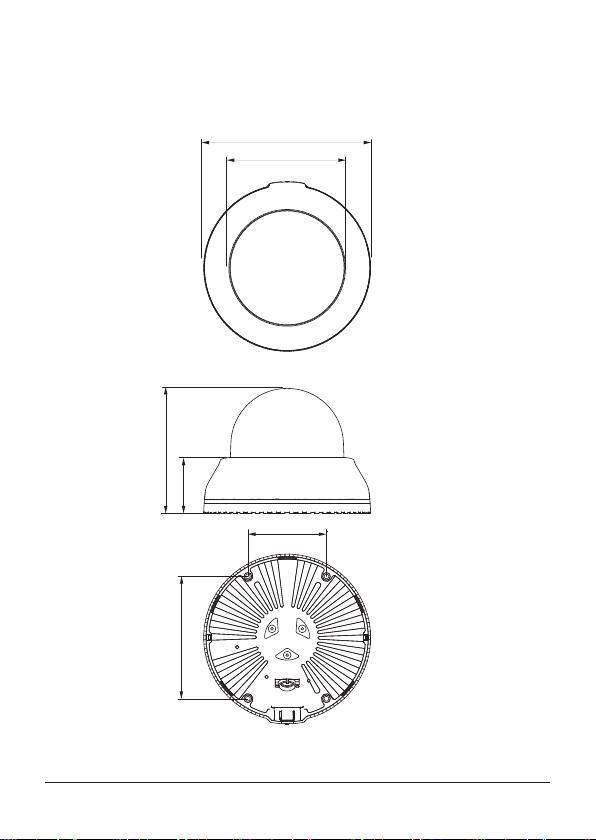
2.1 Indoor Dome Camera Dimensions
48
110
70
109
Ø150
Ø100
10
Questo manuale è adatto per i seguenti modelli
1
Indice
Altri manuali Laice Telecamera di sicurezza