Laney Lionheart L5-Studio Manuale utente


L5-STUDIO USER MANUAL - EN
www.laney.co.uk
2
Introduction
Designed, engineered and built with pride in Great Britain.
The Lionheart range brings boutique Single-Ended & Parallel Single-Ended Class ‘A’ tube
tone to the discerning player who is looking for uniquely responsive BRITISH tube tone.
The L5-STUDIO’s 5W Class A Single Ended output stage oozes classic, warm tube tones.
The harder you drive it, the better it sounds. Plus with enough gain for contemporary tones,
it also has a mean, spiteful side to it as well – making it ideal for any style of playing.
Perfect for studio and practice use (using the 5W or 0.5W output), but equally at home on
stage plugged into a Laney LT112, LT212 or L412 cabinet. The sound will blow you away.
Utilising the T-USB technology rst released in the IRT-Studio, the L5-STUDIO lets you
combine the worlds of VALVE tone and digital exibility in a way not previously available to
players who were looking for vintage aesthetics, great valve tone all combined with modern
features.
Every Lionheart product is extensively play tested by experienced guitarists before being
shipped to our customers. Only when the unit is nished to our complete satisfaction is it
assigned its own unique build number which is then hand stamped onto the rear mounted
plaque.
Your L5-STUDIO should give you years of trouble-free amplication, however please take
time to read this manual and familiarise yourself with the controls as it will allow you to get
the best from your amplier. We hope you enjoy using your L5-STUDIO as much as we
enjoyed designing and making it.
Best wishes from all at Laney.

www.laney.co.uk
3
www.laney.co.uk
L5-STUDIO USER MANUAL - EN
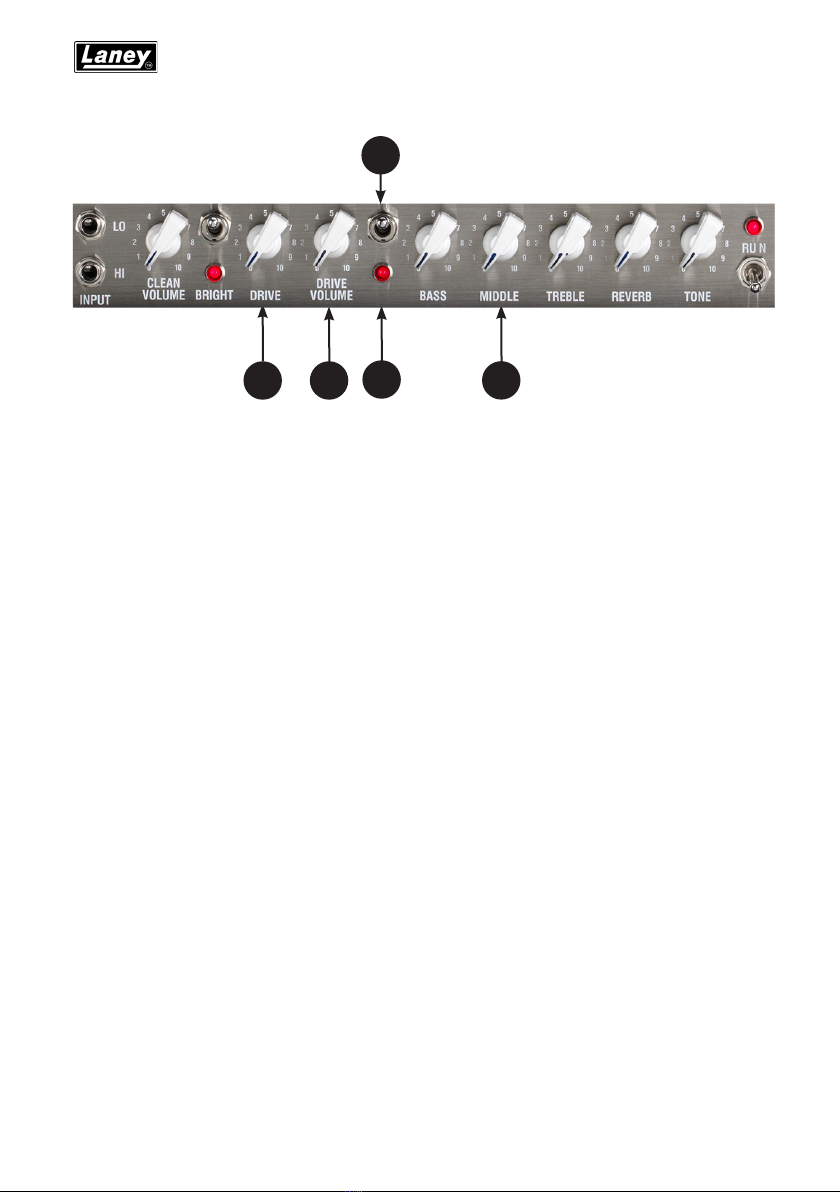
HI INPUT: ‘Hi’ stands for high gain. This input is designed for the connection of low
output level guitars making it well suited for guitars with single coiled or low gain hum
bucker type pickups. Use of high gain pickups in this input may drive the preamp too
hard causing a “mushy” sound. Only use good quality guitar cable.
LO INPUT: ‘Lo’ stands for low gain. This input is attenuated down approximately 50%
from the Hi input and is designed for high output level guitars. It is useful in obtaining
output that is “tight” not “mushy” from high gain humbucker type pickups. Also use this
input for the cleanest full range sound with extended low end response. Only use good
quality guitar cable.
CLEAN VOL: Sets how loud the clean channel is. Try cranking it up a little to drive the
power tubes harder for that real retro sound and feel that only a quality tube amplier can
deliver. Now use your guitar volume to control the amount of distortion. (Wind it up for
distortion back it off a little for clean)
BRIGHT: Adds brightness and life to the treble frequencies of your guitar when on the clean
channel. Adds edge and picking emphasis when on the drive channel. The switch has
more effect at low Clean Volume/Drive control settings. Use in conjunction with the Treble
and Tone controls for optimum performance. Switch up to enable.
1 3
2
4
L5-STUDIO FEATURES
1 -
2 -
3 -
4 -

L5-STUDIO USER MANUAL - EN
www.laney.co.uk
4
L5-STUDIO FEATURES
DRIVE: Sets the level of tube preamplier drive or how dirty your sound is. This control
should be used in conjunction with the Drive Volume (6) Setting low levels of gain with high
levels of volume will give a clean preamplier sound with tube output stage overdrive.
Setting a medium drive level and medium Drive Volume will give a nice crisp bluesy lead
tone, again with the ability to drive the output stage at higher Drive Volume settings.
Setting a high level on the Drive control and a low setting on the Drive Volume will give you
a punchy hard rock lead tone, with the ability to again drive the output tubes at higher Drive
volume settings. Having set the Drive and Drive Volume controls to your desired sound try
backing off your guitar volume and tone controls for lots of other cool sounds. Good tube
ampliers have the unique ability to produce a wide range of sounds by using only your
guitar controls, playing weight and style.
DRIVE VOL: Sets how loud the ‘Drive’ channel is. It is useful to experiment with drive
levels and drive volumes. If you want a very open, warm and semi overdriven sound try
reducing the amount of drive and increasing the drive volume. This reduces pre-amp gain
but pushes the power amp section and makes it work harder giving you a very desirable
level of power amp distortion which is a very pleasing “retro” style sound.
DRIVE SWITCH: Switch up to enable the ‘Drive’ channel. (This switch must be in the down
(OFF) position in order for the drive to be switched remotely via a foot switch.)
DRIVE LED: This led will illuminate when the Drive channel is activated with the Drive
switch (8) or the included Laney FS2-mini remote footswitch.
BASS, MIDDLE, TREBLE: These are a traditional set of passive tone controls. Passive
controls have the advantage of always sounding musical at any of their settings mainly due
to their unique interactive nature. This gives players a more natural set of tools to create
their ideal sound. (Try them all set at midway (5) as a good starting point)
7
5689
5 -
6 -
7 -
8 -
9 -

www.laney.co.uk
5
www.laney.co.uk
L5-STUDIO USER MANUAL - EN
L5-STUDIO FEATURES
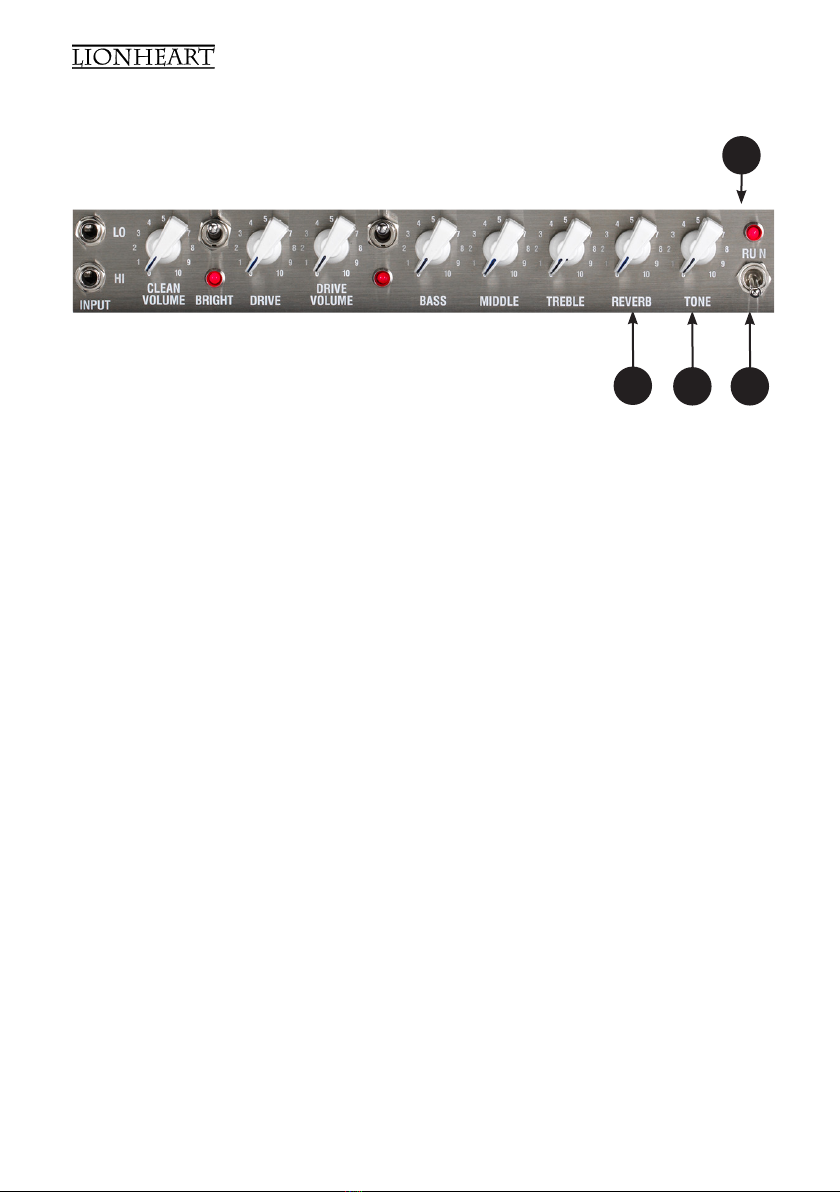
REVERB: Controls how loud the built in reverb sounds.
TONE: The tone control works in a similar fashion to the Tone control you probably have
on your guitar except that it uniquely works at the other end of the amplication chain. This
has the ability to not only control the overall top end response but also reduce upper end
harmonics on the output stage and preamplier overdrive sounds. This will give you bright
cutting sounds at high settings and smooth rounded sounds at lower settings. (Midway (5)
is a good starting point)
STANDBY SWITCH: Disconnects the main HT voltage from the tubes but keeps the tubes
warm so that they are ready to go instantly. Switch to standby for short breaks when you
don’t want to wait for the tubes to warm up again.
POWER LED: This led will be lit when the amplier is switched on. (Always switch off and
disconnect the power cord when not in use)
13
10 11 12
10 -
11 -
12 -
13 -

L5-STUDIO USER MANUAL - EN
www.laney.co.uk
6
15 16 17 18 19 20 21 22 23 26
L5-STUDIO FEATURES
14 24 25
POWER INLET SOCKET: POWER INLET SOCKET: Connect to your power source. Make
sure the specied voltage is correct for your country!
POWER FUSE: This drawer contains the main safety fuse for the unit. USE ONLY THE
CORRECT SIZE AND RATING OF FUSE AS SPECIFIED ON THE PANEL. If a fuse blows or
fails and a replacement of the same size and rating is installed and it in-turn blows, the
amplier has suffered a malfunction internally and needs immediate service from a qualied
technician. DO NOT TRY USING A FUSE OF HIGHER RATING. This may cause serious,
irreparable damage to the amplier and presents a serious re hazard. The mains fuse
ratings are detailed in the specication section at the rear of this manual.
POWER: Main power switch for unit.
SERIAL NO: Displays the model and serial number of the unit.
HT FUSE: This fuse protects the DC power to the tubes within the amplier. USE ONLY
THE CORRECT SIZE AND RATING FUSE AS SPECIFIED ON THE PANEL. If the HT fuse
blows or fails, and a replacement of the same size and rating is installed and it in turn
blows, the amplier has suffered a malfunction. Firstly check the output tubes and replace
faulty ones if required. If the tubes aren’t the cause of the problem, the amplier should be
checked out by a qualied technician. DO NOT TRY USING A FUSE OF HIGHER RATING.
Again, this may cause serious, irreparable damage to the amplier. Fuses are designed to
protect, do not take chances.
DI: This connector provides balanced direct feed primarily go to a PA sound desk. It carries
an adjacent ground lift switch to remove any hum loop problems. It is sourced from post
output section and can be used with or without a speaker load. The socket has a fully bal-
anced output, (switchable +4dB/-30dB & Ground Lift) for maximum noise reduction. You
may use this socket to record without a loudspeaker connected for silent recording as there
is a protective load applied when the speaker socket (25) is not used
14-
15 -
16 -
17 -
18 -
19 -

www.laney.co.uk
7
www.laney.co.uk
L5-STUDIO USER MANUAL - EN
20 21 22 23 26
L5-STUDIO FEATURES
24 25
EMULATION: This provides continuous 4x12 cabinet emulation to the Phones and
switchable emulation for USB and the D.I. output.
USB: A standard USB 2.0 audio in/out connector is provided for recording purposes. For
further explanation of USB and associated controls, see page 9.
PHONES: A stereo jack is provided which can be used for headphones or a stereo feed to
a PA system. A Source switch allows you to listen to whatever is on the speaker outputs
or the stereo return from the USB. A level control is included for comfortable listening. In
‘amp’ mode, the level arriving at the phones is dependant on the pre-amplier controls as
well as the phones level; make sure you set the pre-amplier before setting the phones
level.
AUXILIARY INPUT: This input allows the connection of backing tracks (or any line level
audio signal) to be mixed in post FX loop.
FOOTSWITCH SOCKET: Provided for connection of the included Laney FS2-MINI
footswitch. This allows you to remotely switch between the clean/drive channel and switch
the built in reverb On/Off.
SPEAKER CONNECTORS: An 8-16 ohm cabinet can be connected directly to these
sockets. Please note mismatched impedance will reduce the ampliers performance and in
some cases may cause damage to your amplier. The 0.5W attenuated socket provides the
same sound and feel as the 5W output, but with the maximum output set to around 0.5W.
Unlike many valve ampliers, the L5-Studio is designed to run either with or without speak-
ers connected.
20-
21 -
22 -
23 -
24 -
25 -

L5-STUDIO USER MANUAL - EN
www.laney.co.uk
8
26
FX LOOP:
RETURN: A mono jack socket to connect to the output of an external FX unit. This can also
be used as a slave in for the power amp. As the FX Loop is an insert type, a connector in
the Return socket will mute the pre-amp signal.
ATTENUATION SWITCH: Selects the FX Loop mode of operation:
-10dBu - For connection of FX units with a -10dBu nominal output level. As this
is intended for devices with a lower output level, this switch increases the gain of
the FX Loop by 10dB.
0dBu - For connection of FX units with a 0dBu nominal output level.
Bypass - Removes the FX Loop from the signal path.
FX SEND: Mono jack socket for connection to the input of an external FX unit.
26-
L5-STUDIO FEATURES

www.laney.co.uk
9
www.laney.co.uk
L5-STUDIO USER MANUAL - EN
USB: The USB 2.0 audio I/O connector
supporting the following:
1. Ability to simultaneously record the
RAW untreated sound to channel 1 (left)
and the full amplier sound to the
channel 2 (right).
2. Ability to play back USB stereo
information to headphones for
monitoring.
Tip: Link from the Headphone output
back into the Auxiliary input with a
3.5mm to 6.5mm stereo jack lead
allowing simultaneous USB play back.
Tip: This feature will also allow external DSP effects on your DAW to use the RAW signal
as a left input then the effected signal sent directly back to the Aux input for mixing with the
amp “through” signal all via USB and without affecting your direct sound.
3. Re-Amp Send socket allows for the recorded RAW channel to be sent back to the
amplier input for re-processing via a standard mono instrument jack lead. For the best
level match, use the HI input on the amplier front panel. To ne tune the level, use the Dry
Recording Gain control. A good starting position for unity gain is the12 o’clock position.
High output pickups or lots of gain produced by FX pedals before the amp may require a
slight reduction in level via the Dry Recording Gain Level control to prevent overloading of
the input stage in your DAW.
Record out via USB: To run into iPad or iPad mini connect via a Camera USB adaptor,
PC/MAC connects via standard A-B USB cable, for use with the likes of Garage Band ®,
Audacity ®, MixPad Audio Mixer ®, Pro Tools and similar. It should be noted that the audio
output of an iPad or iPad mini is disengaged and returned via the USB. This can be picked
up via a rear panel monitor switch on the amplier headphones in stereo, or if required,
routed into a PA system/powered cabinets.

L5-STUDIO USER MANUAL - EN
www.laney.co.uk
10
Re-Amp Facility: During recording the amplier processed signal is sent to the right hand
channel. The left hand channel carries the guitar signal totally unprocessed. On an iPad
using Garage Band if the track is recorded in stereo then copied with one track panned
left and the other track panned right, then both raw and processed signals are available
independently.
This allows for the re-amplifying of a sound that may have been over processed initially. To
re-amp via Garage Band on the iPad, solo the original channel and record a new one with
the link in place from the rear re-amp socket and the guitar input. The newly processed
signal will now appear on the right channel with the guitar direct signal again on the left.
Other effects may be added into the link cable but the guitar original sound will not be
recorded. It will instead record to the left channel the sound directly after the effects with no
amplier and the fully processed signal after the amplier and effects on the right.
Altri manuali per Lionheart L5-Studio
1
Indice
Altri manuali Laney Allineare