
Lanzar STS65BT Manuale utente

OWNER’S MANUAL
Mobile Video System
• 6.5 Inch Touch Screen Monitor
• DVD Player with Stereo Radio
• Multi-subtitle/audio Languages Function
• Multi-angle Function
• Parental Control
• Bluetooth Function
• USB Interface
• IPOD Ready
• Remote Control
VOL
AV IN
STS65BT
www.lanzar.com

2
Compatible with PAL DVD (Video CD)
and NTSC DVD (Video CD)
This player can play discs recorded in
either PAL or NTSC format.
• A single chip now integrates all
major DVD playback circuit functions
including MPEG2 decoder, video D/A
converter, and audio decoders.
• L/R stereo analog audio outputs for
connection to existing head unit aux
inputs. Video output is composite
video.
• Supplied remote handles multi-
function software (multi-language
audio-track/subtitle, multi-angle,multi-
story, etc.), plus all basic functions.
USE THIS PRODUCT SAFELY
This set has been designed and
manufactured to assure personal safety.
Improper use can result in electric shock
or fire hazard. The safeguards
incorporated in this unit protect you if you
observe the following procedures for
installation, use and servicing. This unit
doesn’t contain any parts that can be
repaired by the user.
When Driving
Keep the volume level low enough to be
aware of road and traffic conditions.
When Car Washing
Do not expose the product to water or
excessive moisture. This could cause
electrical shorts, fire or other damage.
When Parked
Parking in direct sunlight can produce
very high temperatures inside your vehicle.
Give the interior a chance to cool down
before starting playback.
Use the Proper Power Supply
This product is designed to operate with
a 12 volt DC, negative ground battery
system the regular system in a North
American car).
Protect the Disc Mechanism
Avoid inserting any foreign objects into
the slot of this player.
Failure to observe this may cause
malfunction due to the precise mechanism
of this unit.
FEATURES
Use Authorized Service Centers
Do not attempt to disassemble or adjust
this precision product. Please refer to the
Service Center list included with this
product for service assistance.
For Installation
The unit should be installed in a horizontal
position with the front end up at a
convenient angle, but not more than 30˚.
Protect the Monitor Mechanism
• The monitor is operated automatically.
Do not draw the monitor out or turn it
upward or downward manually.
Otherwise, the mechanism construction
may be harmed to some degree.
• When you operate the monitor with the
remote handset, do not touch the
monitor by your hands. It may harm
your fingers.

3
CONTENTS
FEATURES ....................................................................................................2
SAFETY INFORMATION...............................................................................4
DISC NOTES.................................................................................................5
INSTALLATION .............................................................................................6
THE PLAYER.................................................................................................9
ELECTRICAL CONNECTION.....................................................................10
REMOTE CONTROL...................................................................................11
BASIC OPERATION....................................................................................14
DISC (DVD/VCD/CD/MP3) OPERATION...................................................17
AV OPERATION ..........................................................................................21
RADIO OPERATION ...................................................................................22
USB PLAY OPERATION .............................................................................22
BLUETOOTH OPERATION.........................................................................23
TROUBLE SHOOTING ...............................................................................25
SPECIFICATION .........................................................................................26

4
CAUTION:
MOBILE DVD PLAYER IS A CLASS I
LASER PRODUCT. HOWEVER THIS
MOBILE DVD PLAYER USES A
VISIBLE/INVISIBLE LASER BEAM
WHICH COULD CAUSE HAZARDOUS
RADIATION EXPOSURE IF DIRECTED.
BE SURE TO OPERATE THE MOBILE
DVD PLAYER CORRECTLY AS
INSTRUCTED.
USE OF CONTROLS OR
ADJUSTMENTS OR PERFORMANCE
OF PROCEDURES OTHER THAN
THOSE SPECIFIED HEREIN MAY
RESULT IN HAZARDOUS RADIATION
EXPOSURE.
DO NOT OPEN COVERS AND - DO NOT
REPAIR YOURSELF. REFER SERVICING
TO QUALIFIED PERSONNEL.
WARNING:
• TO REDUCE THE RISK OF FIRE OR
ELECTRIC SHOCK, DO NOT EXPOSE
THIS EQUIPMENT TO RAIN OR
MOISTURE.
• TO REDUCE THE RISK OF FIRE OR
ELECTRIC SHOCK, AND ANNOYING
INTERFERENCE, USE ONLY THE
RECOMMENDED ACCESSORIES.
• THIS DEVICE IS INTENDED FOR
CONTINUOUS OPERATION.
This product incorporates copyright
protection technology that is protected
by method claims of certain U.S. patents
and other intellectual property rights
owned by Macrovision Corporation and
other rights owners. Use of this
copyright protection technology must be
authorized by Macrovision Corporation,
and is intended for home and other
limited viewing uses only unless
otherwise authorized by Macrovision
Corporation. Reverse engineering or
disassembly is prohibited.
SAFETY INFORMATION
Region Management Information
Region Management Information:
This Mobile DVD Player is designed and
manufactured to respond to the Region
Management Information that is recorded
on a DVD disc. If the Region number
described on the DVD disc does not
correspond to the Region number of this
Mobile DVD Player, this Mobile DVD
Player cannot play this disc.
DISC NOTES
5
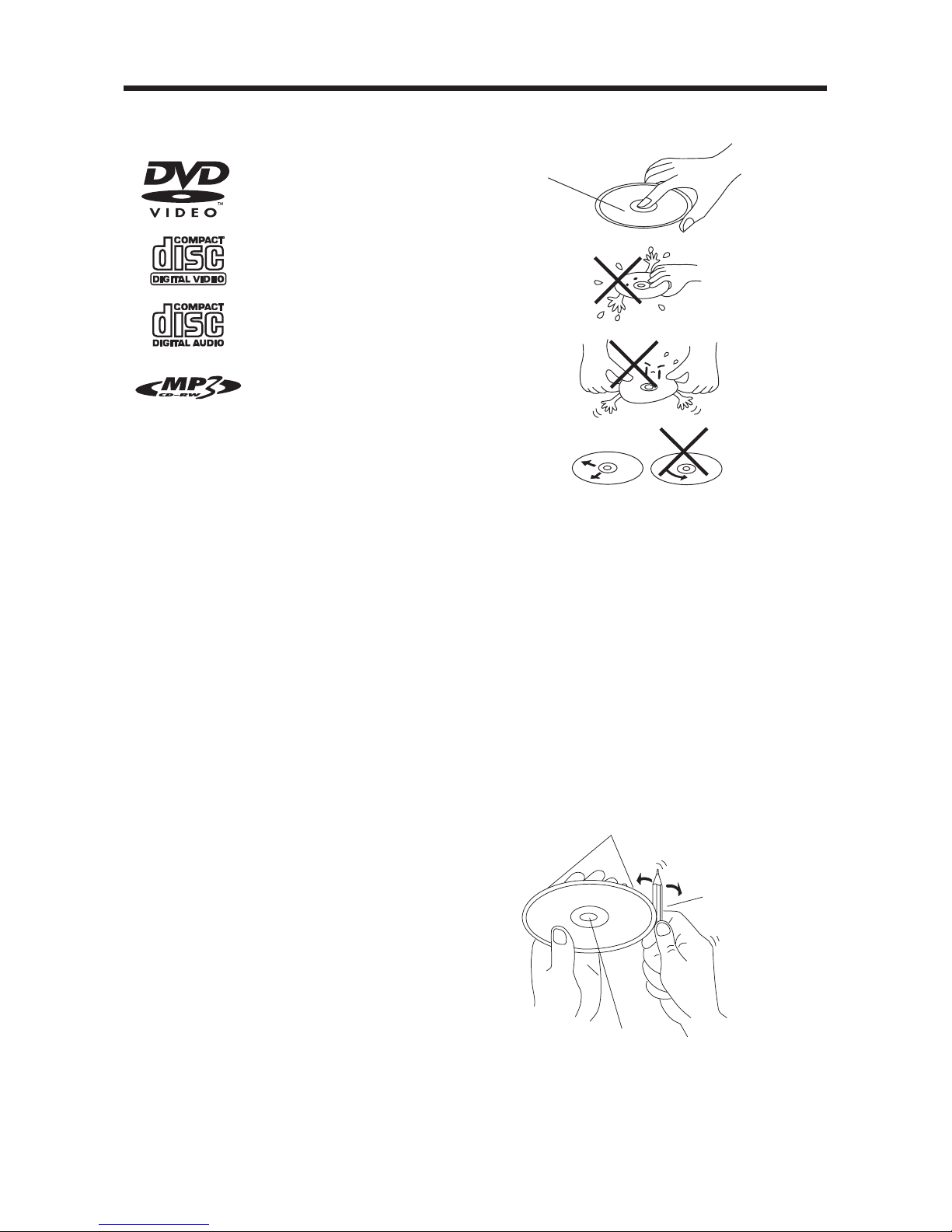
Disc formats supported by this player
DVD
12 cm disc
(Single-sided disc only)
Video CD
12 cm disc
CD
12 cm disc
MP3
12 cm disc
Handling and Cleaning
• Dirt, dust, scratches and warping disc
will cause misoperation.
• Do not place stickers or make
scratches on discs.
• Do not warp discs.
• A disc should always be kept in its
case when not in use to prevent from
damage.
• Do not place discs in the following
places:
1. Direct sunlight
2. Dirty, dusty and damp areas
3. Near car heaters
4. On the seats or dashboard
Disc Cleaning
Use a dry soft cloth to wipe the surface.
If the disc is quite dirty, use a soft cloth
slightly moistured with isopropyl (rubbing)
alcohol. Never use solvents such as
benzine, thinner or conventional record
cleaners as they may mar the surface of
the disc.
Note:
A disc may become somewhat scratched
(although not enough to make it
unusable) depending on the way it is
handle and conditions in the usage
environment.
Note these scratches are not an
indication of any problem with the player.
Label side up
Do not touch
the underside
of the disc
Do not bend
Wipe the disc from center
toward the outside edge
Preparing New Discs with Rough
Spots
A new disc may have rough edges on its
inside and outside edges. If a disc with
rough edges is used, the proper setting
will not be performed and the player will
not play the disc. Therefore, remove the
rough edges in advance by using a ball
point pen or pencil as shown on the right.
To remove the rough edges, press the
side of the pen or pencil against the
inside and outside edges of the disc.
Rough spots
on inside edge
Ball point pen
or pencil
Rough spots on
outside edge

6
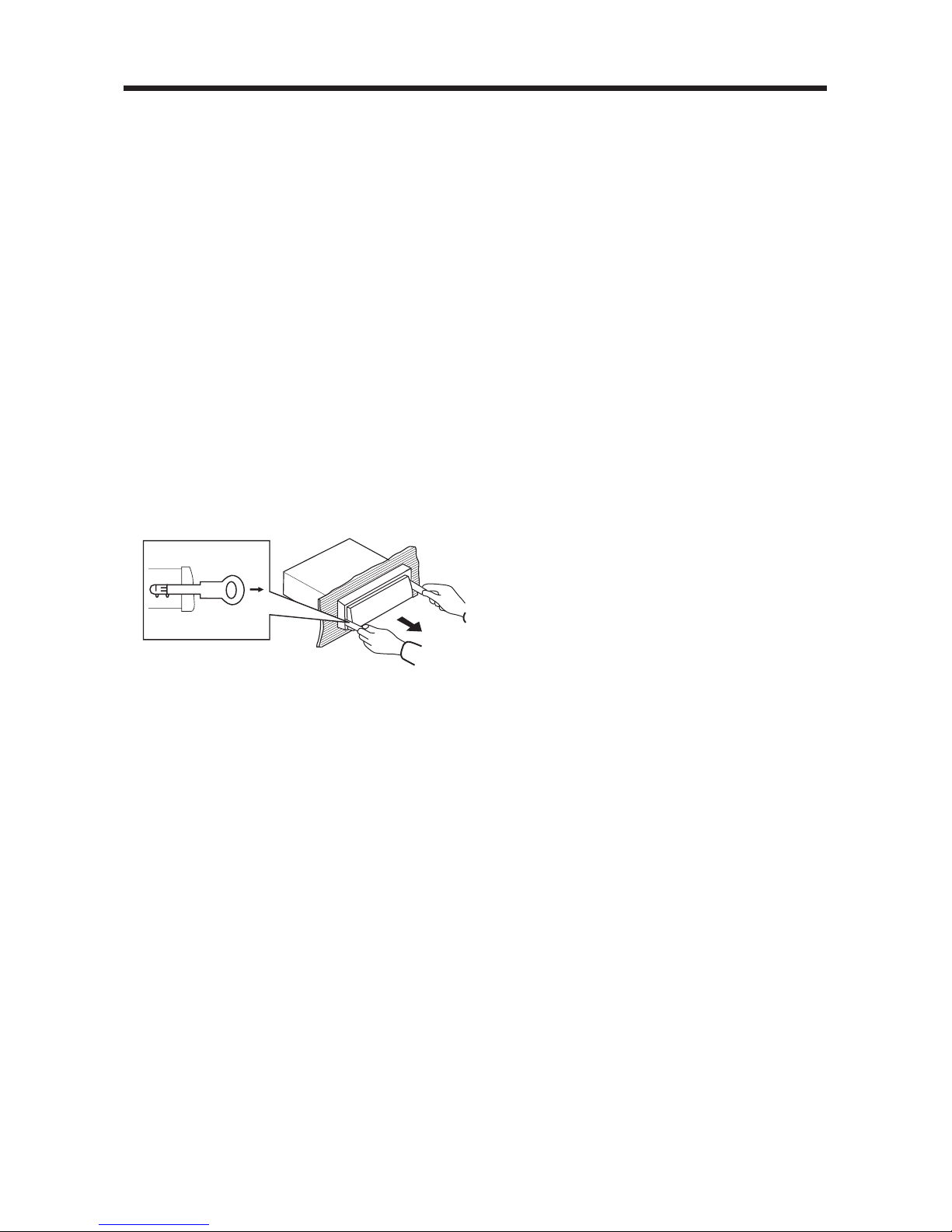
Method A:
TAKE OUT SCREW BEFORE
INSTALLATION
Before install the unit, please remove the
two screws.
Installing the unit
Be sure you test all connections first, and
then follow these steps to install the unit.
1. Make sure the ignition is turned off,
and then disconnect the cable from
the vehicle battery's negative (-)
terminal.
2. Disconnect the wire harness and the
antenna.
3. The two supplied keys release tabs
inside the unit's sleeve so you can
remove it. Insert the keys as far as they
will go into the appropriate slots at the
middle left and right sides of the unit.
Then slide the sleeve off the back of
the unit.
4. Mount the sleeve by inserting the sleeve
into the opening of the dashboard and
bend open the tabs located around the
sleeve with a screwdriver. Not all tabs
will be able to make contact, so
examine which ones will be most
INSTALLATION
effective. Bending open the appropriate
tabs behind the dashboard to secure
the sleeve in place.
5. Reconnect the wire harness and the
antenna and be careful not to pinch
any wires or cables.
6. Slide the unit into the sleeve until it
locks into place.
7. To further secure the unit, use the
supplied metal strap to secure the back
of the unit in place. Use the supplied
hardware (Hex Nut (M5mm) and Spring
Washer) to attach one end of the strap
to the mounting bolt on the back of
the unit. If necessary, bend the metal
strap to fit your vehicle's mounting
area. Then use the supplied hardware
(Tapping Screw (5x25mm) and Plain
Washer) to attach the other end of
metal strap to a solid metal part of the
vehicle under the dashboard. This strap
also helps ensure proper electrical
grounding of the unit.
Note to install the short threading
terminal of the mounting bolt to the
back of the unit and the other long
threading terminal to the dashboard.
Take out screw before installation
Sleeve
Dashboard
Screwdriver
Tabs
Spring Washer
Tapping Screw
Plain Washer
Hex Nut
Metal Strap
Mounting Bolt
7
8. Reconnect the cable to the vehicle
battery's negative (-) terminal. Then
replace the outer trim ring and install
the unit's front panel. (see the steps
of “using the detachable front panel”).
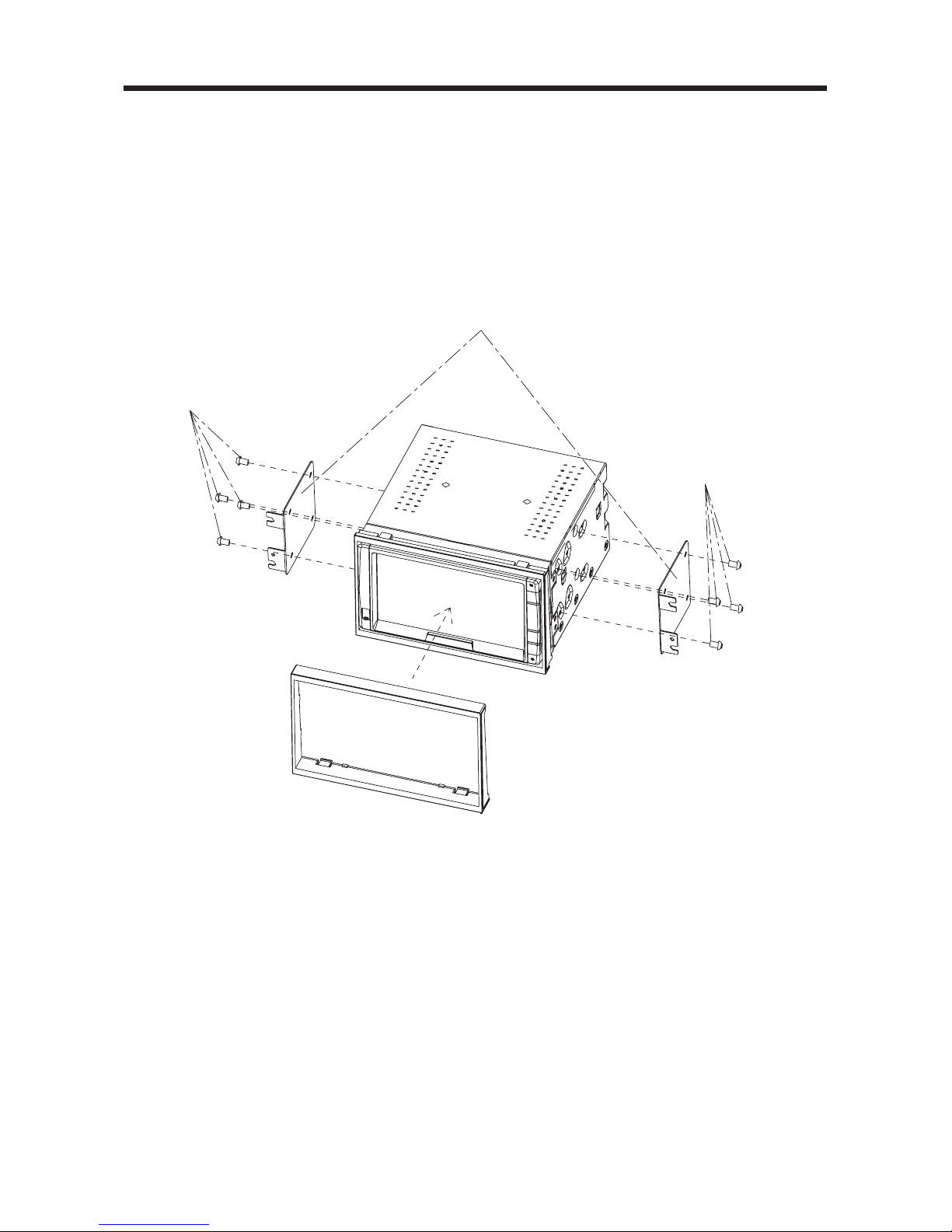
Removing the unit
1. Make sure the ignition is turned off,
and then disconnect the cable from
the vehicle battery's negative (-)
terminal.
2. Remove the metal strap attached the
back of the unit (if attached).
3. Lift the top of the outer trim ring then
pull it out to remove it.
4. Insert both of the supplied keys into
the slots at the middle left and right
sides of the unit, then pull the unit out
of the dashboard.
INSTALLATION
8
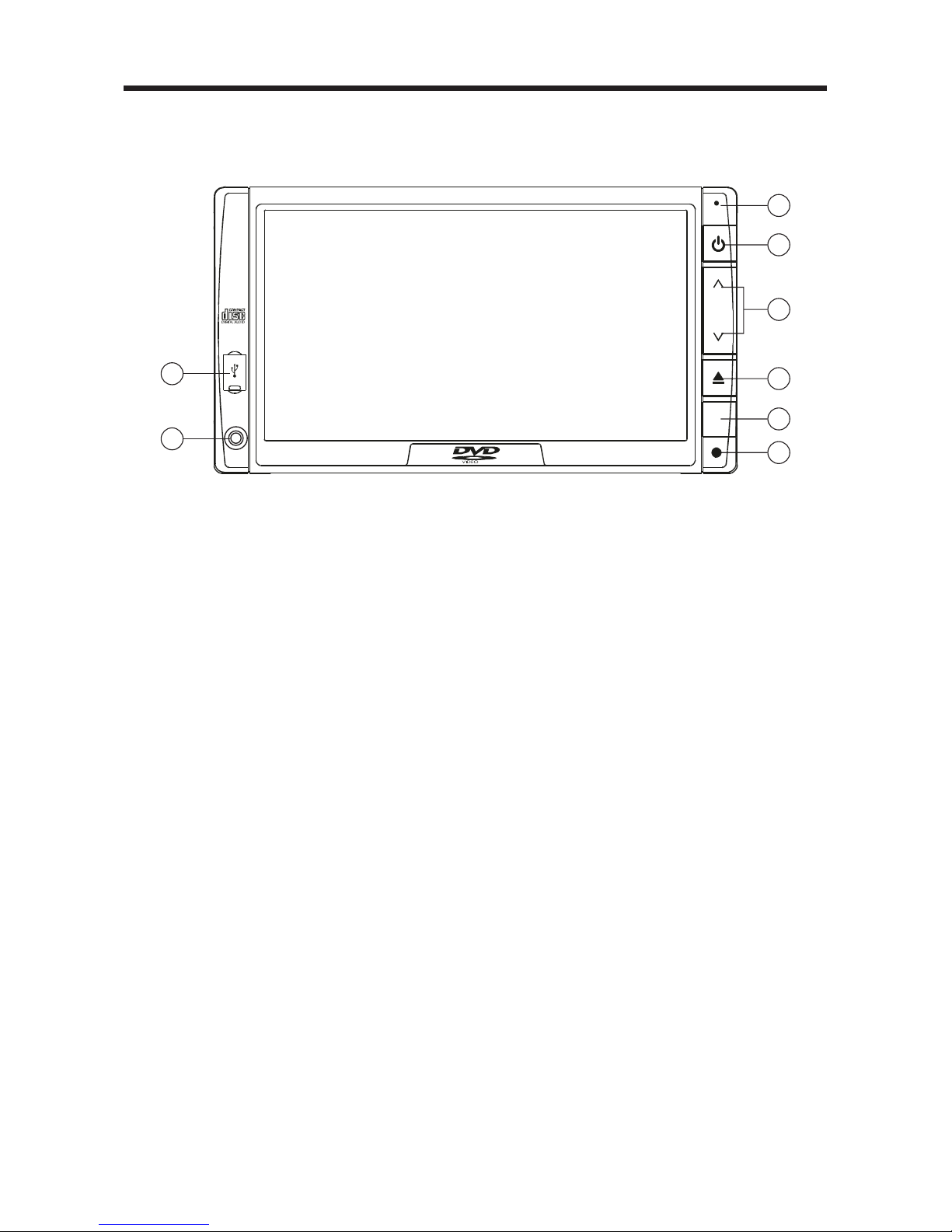
Method B:
Install the unit onto the car bracket using
the supplied screws (M5X8mm). The holes
of the car bracket to use will differ
depending on the car model.
INSTALLATION
Screws (M5x8mm)
Screws (M5x8mm)
Car Bracket
9
THE PLAYER
LOCATION OF THE KEYS
1. Microphone
2. POWER Button
3. VOL^/v
4. Eject Button/MENU
5. Remote Sensor
6. Reset Button
7. AV IN
8. USB Interface
8
1
2
3
4
5
6
VOL
AV IN
7

10
ELECTRICAL CONNECTION
NOTE : WHEN CONNECT / DISCONNECT THE GPS BOX WITH THE
MAIN UNIT, YOU SHOULD TURN THE POWER OFF.
+
-
-
+
FRONT RCA
CABLE(BROWN)
PINK
(GREY)
(BLACK)
(YELLOW)
(GREEN)
RGB Input
FUSE
SUBWOOFER (GREEN)
COAXIAL (ORANGE)
L IN (WHITE)
R IN (RED)
VIDEO IN (YELLOW)
R OUT (RED)
L OUT (WHITE)
VIDEO OUT (YELLOW)
(RED)Rch
(WHITE)Lch
(RED)Rch
(WHITE)Lch
REAR RCA
CABLE(GREY)
(FOR RCA LINE OUT
VERSION ONLY)
FRONT Lch
SPEAKER
REAR Lch
SPEAKER
WHITE
WHITE/BLACK
GREEN
GREEN/BLACK
BLUE
RED
1A
YELLOW
BLACK
GREY
GREY/BLACK
VIOLET
VIOLET/BLACK
FRONT Rch
SPEAKER
REAR Rch
SPEAKER
NEXT TO IT (PARKING SWITCH)
POWER ANTENNA
IGNITION SWITCH (ACC+)
MEMORY BACK UP (B+)
GROUND (B-)
Indice
Altri manuali Lanzar Sistema video per auto

Lanzar
Lanzar SDN71BT Manuale utente

Lanzar
Lanzar SNV695N Manuale utente

Lanzar
Lanzar SVDVD3 Manuale utente

Lanzar
Lanzar SVHR56 Manuale utente

Lanzar
Lanzar SNV65i3D Manuale utente

Lanzar
Lanzar SNV65i3D Manuale utente

Lanzar
Lanzar STVD7IN Manuale utente

Lanzar
Lanzar SVDVD5 Manuale utente

Lanzar
Lanzar SDBT75NU Manuale utente

Lanzar
Lanzar SNV695B Manuale utente


