LAUER LCA 042 Manuale utente

TEXT DISPLAY
LCA 042
© 1989 by SYSTEME LAUER GMBH • D 72669 Unterensingen • Kelterstr. 59 • TEL 07022/96600 • FAX 07022/9660103
The attractively designed LCA 042, incor-
porates many interesting features. One
of the successful LCA series of text dis-
plays.
Text displays are not exotic addons, but tools, with
which you can considerably improve the service
quality of machines and systems. Text displays
■avoid malfunctions,
■indicate how faults can be eliminated,
■provide operator guidance,
■give important set-up information,
■show what the machine is currently doing,
■support maintenance and servicing,
■issue instructions for carrying out adjustments,
■combine variable values with fixed texts
LCA text displays save time and money. Neither
designers nor production personnel can do without
textdisplays.Thereforetheyarepartofthestandard
equipment of every machine.
With the LCA 042 text display you can invoke up to
200messages.Itcanbedrivenbyanyprogrammable
con-troller or by individual contacts or proximity
switches.
Alltextdisplaysareunobtrusiveandhaveanunmi-
stakableappearance.LCAtextdisplaysarefunctional,
well-designedunits thatcanbeintegrated harmoni-
ously into your machines.
MANUAL FOR THE LCA 042
042 PRINT 01/11.89

TEXT DISPLAY
LCA 042
© 1989 by SYSTEME LAUER GMBH • D 72669 Unterensingen • Kelterstr. 59 • TEL 07022/96600 • FAX 07022/9660103
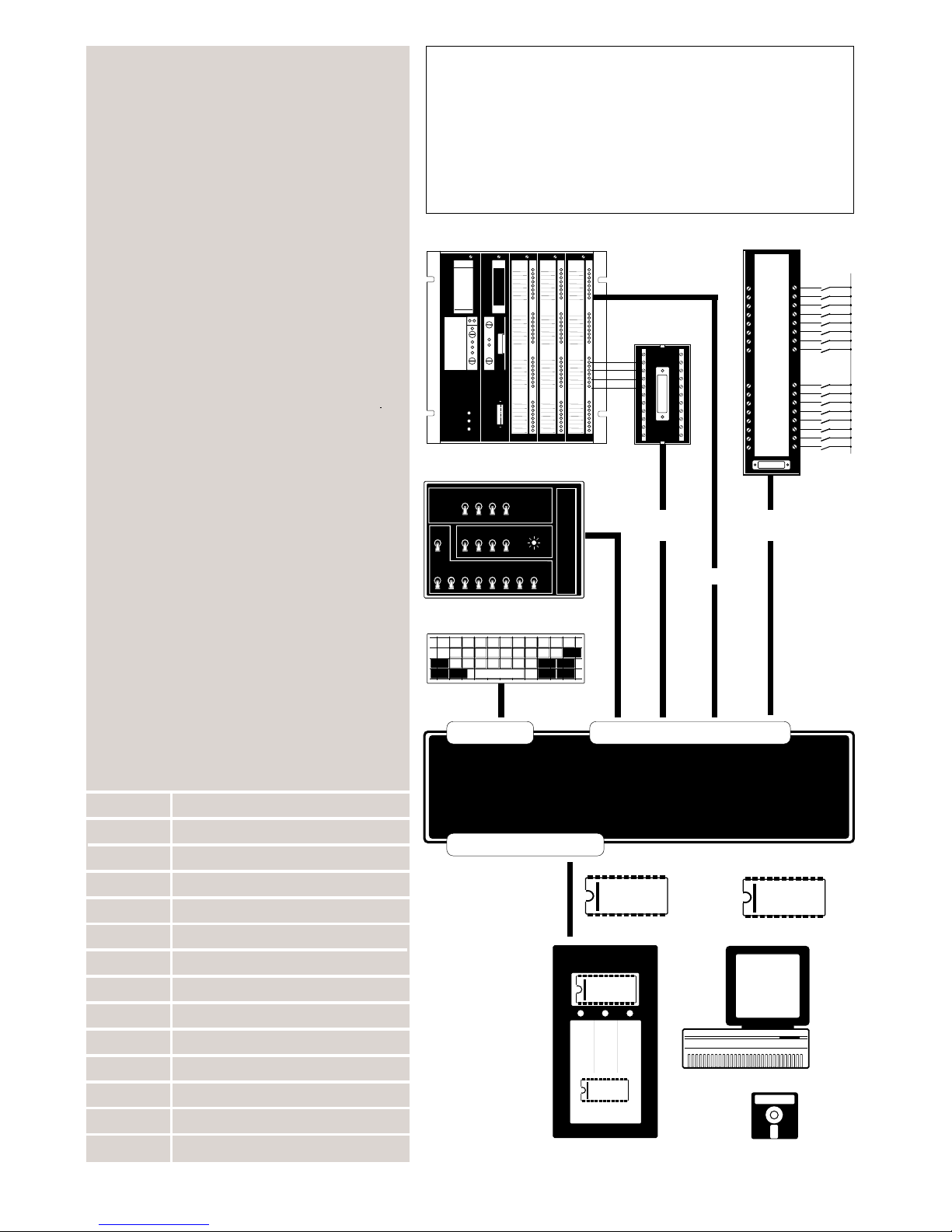
CPU INPUT INPUT OUTPUT OUTPUT
SIMATIC
S5-115U
+ 24 V
UNIVERSAL-ADAPTER LCA 024
SPS/PLC
SPS/PLC
▲
▼
▼ ▼
▼
▼
▼
ENTER
SHIFT SHIFT
KEYBOARD
EPROM PROGRAMMER
-TEXT DISPLAY LCA 042 WITH ACCESSORIES
▲
▲
▲
EPROM
2764/2764 A
LCA 014
EPROM-PROGRAMMER
EPROM
SCHREIBEN/WRITE
EPROM
LESEN/READ
POWER ON
▲
▲
TESTKONSOLE LCA 015
LETZT ERST RES DIREKT
MELD MELD LÖSCH
BIN TAKT VAR MELD TAKT QUIT
256 GEHT LÖSCH
BIN BIN BIN BIN BIN BIN BIN BIN
128 64 32 16 8 4 2 1
SPS
LCA 020
LCA 015
LCA 010
LCA 014
LCA 293
PC
▼▼▼▼▼
▲
▼
EPROM
2764/2764 A
EPROM
2764/2764 A
LCA 048
LCA 030
LCA 031 LCA 030
LCA 031
LCA 038
LCA 024
LCA 010 POCKET KEYBOARD
LCA 014 EPROM-PROGRAMMER
LCA 048 EPROM 2764
LCA 015 TEST CONSOLE
LCA 020 INDUSTRIAL ADAPTER
LCA 024 UNIVERSAL ADAPTER
LCA 025 ADAPTER EXPANDER
LCA 293 P-SOFTWARE FOR LCA 042
LCA 030 FLAT CABLE 200 cm
LCA 031 FLAT CABLE 30 cm
LCA 038.2 ROUND CABLE 200 cm
LCA 038.4 ROUND CABLE 400 cm
LCA 038.6 ROUND CABLE 600 cm
LCA 038.8 ROUND CABLE 800 cm
Text display LCA 042 can ...
■display 200 messages with 40 characters
each - the message texts can be transfered
eitherintotheRAMbymeansofakeyboardor
into the EPROM using the LCA 014 (or a PC)
■displaytextsdirectly-thetextofamessage
is displayed for as long as the coded message
number is present on the inputs of the LCA
042
■store 19 messages and display them cyc-
lically - the number of messages invoked is
dis-playedinthelasttwocolumnsofatextline
■display the first message and store the
others - the other messages are requested
and displayed via the clock input
■display messages on several lines - the
first line contains the main information, the
other two lines additional information
■combine external variables and fixed
textsinoneline-allASCIIandBCDcharacters
are permissible as variables
■be driven by any programmable controller
using BCD/BIN-code or by universal
adapter LCA 024 (using contacts, proximity
switches etc.)
ACCESSORIES
PROG. CONT. CONNECTION
INTERFACING
PROGRAMMING
ACCESSORIES

TEXT DISPLAY
LCA 042
© 1989 by SYSTEME LAUER GMBH • D 72669 Unterensingen • Kelterstr. 59 • TEL 07022/96600 • FAX 07022/9660103
1 Connections to the LCA 042
1.0 Connections to the LCA 042
1.1 Connection of the Prog. Cont.
1.1.1 Prog. Cont. connection via industrial adapter LCA
020
1.1.2 Prog. Cont. connection via round cable LCA 038
1.2 Connection of the pocket keyboard LCA 010
1.3 Connection of the EPROM programmer LCA 014
2 Specifications of the LCA 042
2.1 Power supply
2.2 Installation instructions
2.3 Specifications
3 Programming the LCA 042
3.1 Entry of message texts with keyboard LCA 010
3.2 Copying message texts into EPROM
3.3 ASCII character chard
4 Operation of the LCA 042
4.1 Invocation of messages by the Prog. Cont.
4.2 The message number
4.3 The message variants
4.3.1 Direct message
4.3.2 Multi-line message
4.3.3 First message
4.3.4 Cyclic display
4.4 External variables
5 Text display without Prog. Cont.
5.1 Universal Adapter LCA 024/025
Operating instructions, manuals and software are pro-
tected by copyright. All rights are reserved. Copying,
reproduction,translationor transfer, inwholeor inpart,
is forbidden. The only exception a back-up copy of the
software for the customer's own use.
TABLE OF CONTENTS

TEXT DISPLAY
LCA 042
© 1989 by SYSTEME LAUER GMBH • D 72669 Unterensingen • Kelterstr. 59 • TEL 07022/96600 • FAX 07022/9660103
1TEXT DISPLAY LCA 044
2TEXT DISPLAY LCA 045
3TEXT DISPLAY LCA 143
4TEXT DISPLAY LCA 145
5TEXT DISPLAY LCA 245
6TEXT DISPLAY LCA 265
7DIAGNOSTIC SYSTEM LCA 285
8INDUSTRIAL PRINTER LCA 710
FURTHER PRODUCTS FROM
OUR RANGE

© 1989 by SYSTEME LAUER GMBH • D 72669 Unterensingen • Kelterstr. 59 • TEL 07022/ 96600 • FAX 07022/9660103
TEXT DISPLAY LCA 042
1
Prog. Cont. interface Pocket keyboard
LCA 010
EPROM programmer
LCA 014
CPU INPUT INPUT OUTPUT OUTPUT
SIMATIC
S5-115U
EBERLE
PLS 508
EPROM
2764/2764 A
LCA 014
EPROM-PROGRAMMER
EPROM
SCHREIBEN/WRITE
EPROM
LESEN/READ
POWER ON
ENTER
SHIFT SHIFT
-CONNECTIONS TO THE LCA 042
1.0 CONNECTIONS TO THE LCA 042
There are three plug-type connectors on the rear of the
LCA 042:
- Connector for programmable controller
25-pin DIN plug
- Connector for pocket keyboard LCA 010
20-pin plug
- Connector for EPROM programmer LCA 014
10-pin plug
WerecommendouttextdisplayLCA 042forusewithpro-
grammable controllers made by the following manufac-
turers:
AEG Kunke
April Mitsubishi
ABB Texas Instruments
B & R Selectron
Eberle Schiele
Festo Siemens
IFM Omron
Inter Control Philips
Klaschka
Klöckner-Moeller
and many others

© 1989 by SYSTEME LAUER GMBH • D 72669 Unterensingen • Kelterstr. 59 • TEL 07022/ 96600 • FAX 07022/9660103
TEXT DISPLAY LCA 042
15
-CONNECTION OF THE PROGRAMMABLE CONTROLLER
CPU INPUT INPUT OUTPUT OUTPUT
SIMATIC
S5-115U
EBERLE
PLS 508
1) For increased protection against
interference you should wire the
connection “0V Signal”.
MESSAGE or TEXTNUMBER FUNCTION POWER
5 17 4 16 3 15 2 14 1 8 20 7 22 10 11 24 25
BCD 001/BIN 001
BCD 002/BIN 002
BCD 004/BIN 004
BCD 008/BIN 008
BCD 010/BIN 016
0V, GND
0V Signal 1)
+24 V=
BCD 020/BIN 032
BCD 040/BIN 064
CLOCK
TEXT/VARIABLE
DIRECT/SEQUENTIAL
BCD 080/BIN 128
BCD 100
1.1 CONNECTION OF THE PROG. CONT.
The parallel interface is the most important connection
be-tween the machine (controller) and the text display
LCA 042. All significant functions of the LCA 042 are
performed via this interface. These functions are:
- invoking the message texts (max. 200)
- invoking the message variants (functions)
- entering external variables
All inputs are high-active (Ri = 2.6kΩ)
BIN 0... 199
BCD 0... 199 = coded message number
CLOCK = 1. invoke additional messages
2.display external variables on text display
3. invoke further messages
(at first message)
TEXT/VARIABLE = switch between message text and
external variable
DIRECT/SEQUENTIAL = switch between direct message and first
message (sequential display)
The connection to the programmable controller is made
via industrial adapter LCA 020 or round cable LCA 038.
Text display LCA 042 distinguishes between PROGRAM-
MINGand OPERATION.During programmingoperation of
the LCA 042 is not possible.
Before the LCA 042 is put into operation the following
preparations must be made:
1. initialize
2. store message texts
3. determine positions of variables by means of place
holders

© 1989 by SYSTEME LAUER GMBH • D 72669 Unterensingen • Kelterstr. 59 • TEL 07022/ 96600 • FAX 07022/9660103
TEXT DISPLAY LCA 042
16
-PROG. CONT. CONNECTION VIA INDUSTRIAL ADAPTER
1.1.1 INDUSTRIAL ADAPTER LCA 020
When using control cabinet techniques, connections are
normally made by means of screw terminals. To enable
theuseofthistypeofinstallationwiththetextdisplayLCA
042 we supply the industrial adapter LCA 020.
Theelectricalconnectionsbetweentheprogrammable
controller and the LCA 020 are made using the well-tried
wiring method via terminals and the connections
between the LCA 020 and the text display LCA 042 are by
means of ready-made flat cables (LCA 030 or LCA 031).
Flat cable LCA 030, LCA 031
INDUSTRIAL ADAPTER LCA020
Programmable Controller
Programmable Controller outputs
Programmable Controller connection

© 1989 by SYSTEME LAUER GMBH • D 72669 Unterensingen • Kelterstr. 59 • TEL 07022/ 96600 • FAX 07022/9660103
TEXT DISPLAY LCA 042
17
-PROG. CONT. CONNECTION VIA ROUND CABLE
Programmable Controller
Programmable Controller outputs
Round cabel LCA 038.2 ... 038.8
Programmable Controller connection
1.1.2 ROUND CABLE LCA 038
Thesimplest andmost economical wayof connectingthe
textdisplaytotheprogrammablecontrollerisbymeansof
ready-made round cables.
We supply round cable LCA 038 in 4 standard lengths
(from 200 to 800 cm) and a suitable plug for the text
display.
Further details can be found in the description of the
round cable.

© 1989 by SYSTEME LAUER GMBH • D 72669 Unterensingen • Kelterstr. 59 • TEL 07022/ 96600 • FAX 07022/9660103
TEXT DISPLAY LCA 042
2
-CONNECTION OF THE LCA 010
ENTER
SHIFT SHIFT
Pocket keyboard
LCA 010
1.2 CONNECTION OF THE LCA 010
The simplest way of entering and correcting message
textsisbymeansofthepocketkeyboardLCA010.TheLCA
010 is connected to the LCA 042 via a cable. As long as the
two units are connected together, no messages can be
invoked.
The pocket keyboard has 27 brown keys for alphanu-
meric characters and 8 red function keys. Following is a
description of the function keys:
Backwards in program
Forwards in program or invoke program
Cursor forwards; together with SHIFT key, backwards
Program selection
Shift key
Flash/delete
See also Section 3.1 of this manual.
ENTER
SHIFT

© 1989 by SYSTEME LAUER GMBH • D 72669 Unterensingen • Kelterstr. 59 • TEL 07022/ 96600 • FAX 07022/9660103
TEXT DISPLAY LCA 042
3
EPROM
2764/2764 A
LCA 014
EPROM-PROGRAMMER
EPROM
SCHREIBEN/WRITE
EPROM
LESEN/READ
POWER ON
-CONNECTION OF THE LCA 014
EPROM programmer
LCA 014
1.3 CONNECTION OF THE LCA 014
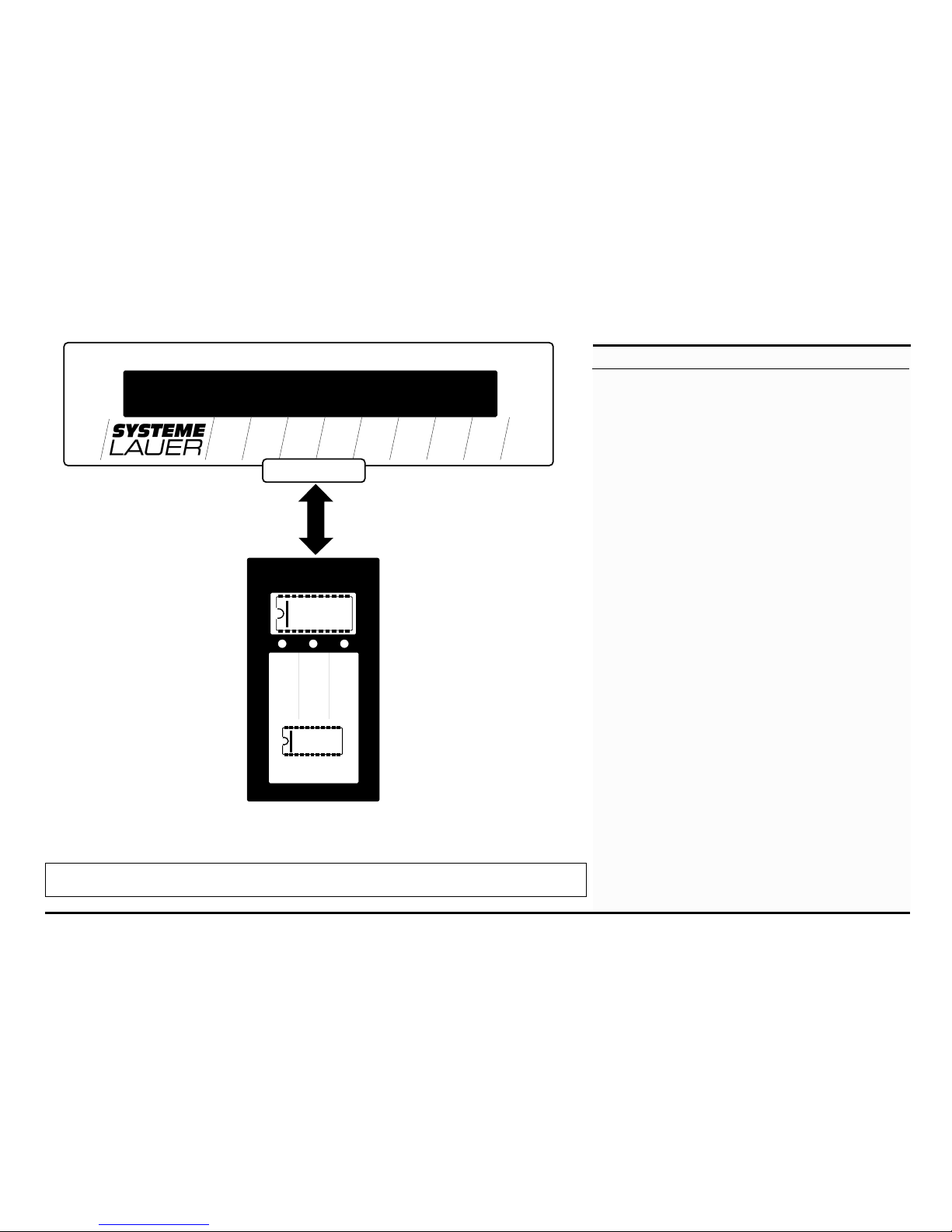
Using EPROM programmer LCA 014 the message text
stored in the RAM can be copied into a suitable EPROM.
TheLCA014doesnotrequireanadditionalvoltagesupply,
itis simply connectedto textdisplayLCA 042with a cable.
As long as the two units are connected together, no
message can be invoked.
TheEPROMisprogrammed,writtento, compared with
or read out in dialog with the LCA 042. The Pocket
keyboard LCA 010 is therefore required.
See also Section 3.2 of this manual.
Indice