
LENCO DVP-70 Manuale utente
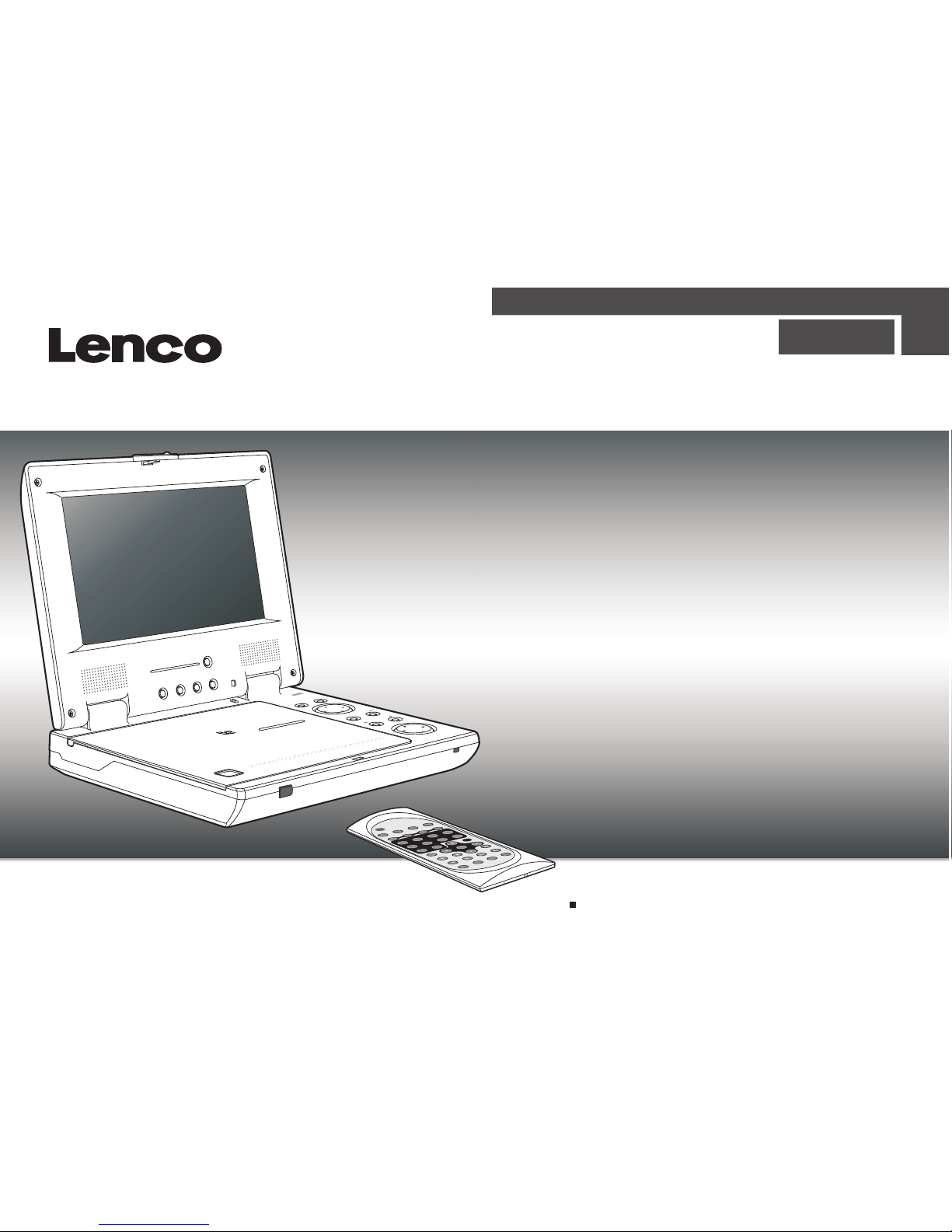
Please read this manual before operating
P/N
TITLE
DISPLAY
ANGLE LANGUAGE SUBTITLE
MUTE
L/R
1234
5678
SETUP
ENTER
SLOW
ZOOM
REPEAT
MARK
GOTO
MENU/PBC
REMOTE CONTROL
MODELNo.:RMC-220
90
ENGLISH
PORTABLE DVD PLAYER
OWNER`S MANUAL
MODEL NO :DVP-70
REVERSE
16:9 / 4:3MODE DOWN UP
PORTABLEDVDPLAYER
-
MODELDV 9820
OPEN
OPEN
MENU/PBC
PAUSE/STEP
ENTER
DISPLAY
FR
FF

Table of Contents.........................................................................................................................................................................1
Safety Information.......................................................................................................................................................................2
Remote Control............................................................................................................................................................................3
..................................................................................................................................................................................4
............................................................................................................................................................5
Playing Picture CD.....................................................................................................................................................................17
............................................................................................................................................18
.......................................................................................................................19
...........................................................................................................................................................20
....................................................................................................................21
................................................................................................................................................................22
...................................................................................................................................................................23-24
Description
Using the Remote Control
Cautions in Using Battery Pack
Playing a Disc.......................................................................................................................................................................12-16
Playing MP3 and Regular Audio CD
Setting Language for OSD, Menu, Voice, Subtitle
Setting Screen and Audio
Setting Parental Control, Password, Camera Angle
Adjusting LCD Screen
Troubleshooting
Connecting Earphones to the DVD Player.....................................................................................................................................6
Connecting to an External Component ........................................................................................................................................7
Connecting to a TV.......................................................................................................................................................................8
Using the AC Adaptor...................................................................................................................................................................9
Using the Battery Pack...............................................................................................................................................................10
Specifications...........................................................................................................................................................................25
..................................................................................................................................................11
5
1
Table of Contents

Safety Information
CLASS 1 LASERPRODUCT / KLASSE 1 LASERPRODUKT / LUOKAN 1 LASERLAITE / KLASS1 LASERAPPARAT / PRODUCTO
LASER CLASE.
INVISIBLE LASER RADIATION WHEN OPENAND INTERLOCKS DEFEATED. AVOID EXPOSURE TO BEAM.
1.Toprevent fire or electrical shock, donot expose this Player to rainor moisture.
2.Toavoid electrical shock, do not openthe cabinet, no user-serviceable parts inside,refer servicing toqualified personnel only.
3.Certain countries mayregulate the disposal of the batteryused to powerthis product. Please consult with yourlocal authority.
4.Listening with earphones for many hours at maximum volumemay damage your hearing.
5.The Player shouldbe connected to a power supplyonly of the type described inthe operating instructionsor as marked on the Player.
Please read allof the safety and operating instructionsbefore operating thisPlayer, follow all warnings placedon the Player
and in theuser's manual. These safety and operatinginstructions should beretained for future reference.
WARNING
SAFETY WARNING
Safety Information
Do not exposethe system to excessive moisture, rain,sand, or heat sources.
Place the DVDPlayer on a firm, flat surface.
Keep the DVDPlayer away from domestic heating equipmentand direct sunlight.
When placing theDVD Player in a cabinet, allowabout one inch of space allaround the DVD Player for ventilation.
5
2
P/N
TITLE
DISPLAY
ANGLE LANGUAGE SUBTITLE
MUTE
L/R
1234
5678
SETUP
ENTER
SLOW
ZOOMREPEAT MARK GOTO
MENU/PBC
REMOTE CONTROL
MODEL No.:RMC-220
90
Remote Control
Remote Control
1
2
3
4
5
6
7
8
9
10
11
13
14
15
16
17
18
19
20
21
22
12
24
23
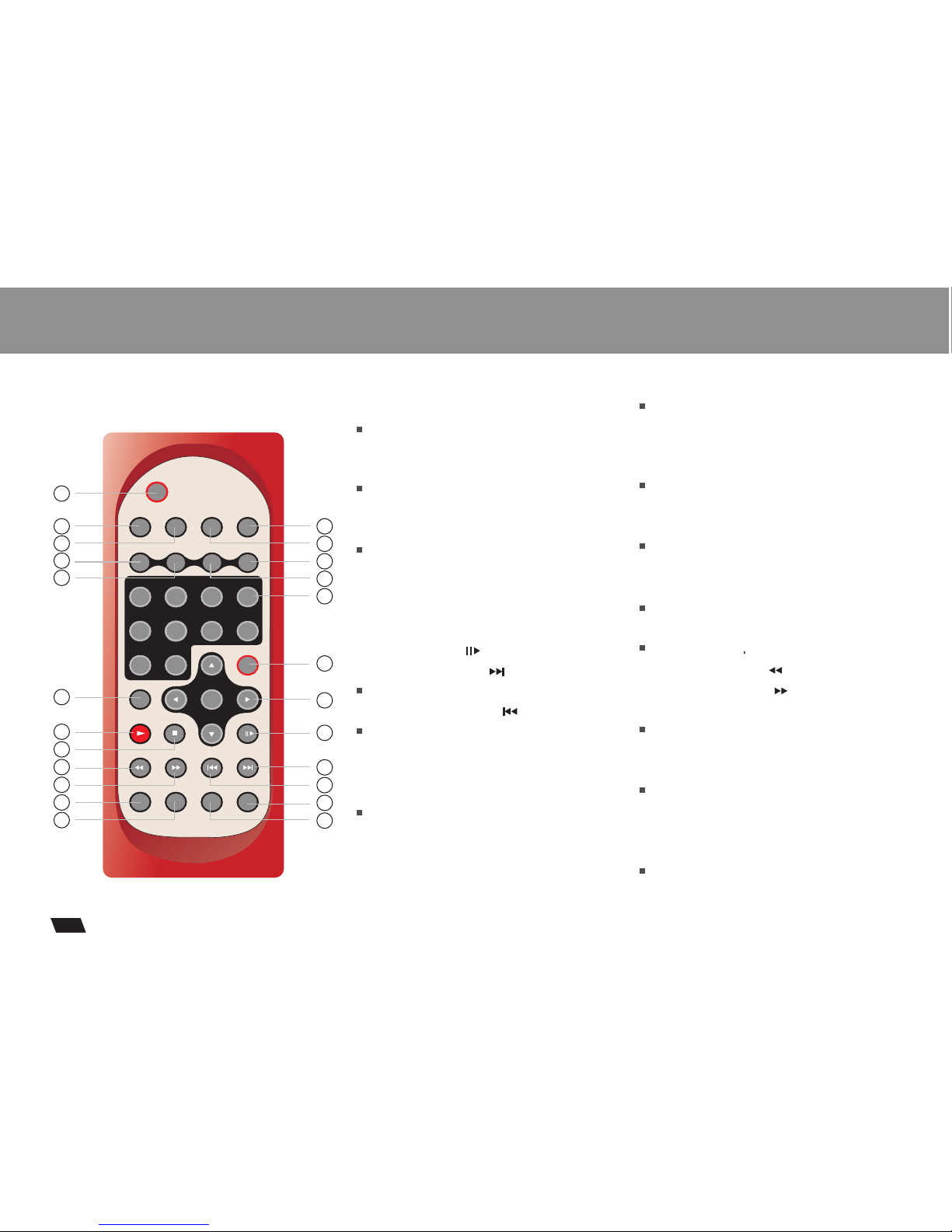
13.DISPLAYButton
14.MUTE Button
15.ANGLE Button
16.LANGUAGE Button
17.SLOW Button
18.PLAYButton
19.STOP Button
20.FAST REVERSE( ) Button
21.FAST FORWARD ( ) Button
22.REPEAT Button
23.MARK Button
24.GOTO Button
Displays the currentdisc playback
information.
Selects the voicelanguage in a DVD.
Stops disc play
Use to marka point where the playback
starts each timewhen the MARK button
is pressed lateron.
Use to enterthe specific time to playback.
Use to accessvarious
camera angles ona DVD.
Starts disc play.
Allows you torepeat play
a title, chapter, track, ordisc.
5
3
1.L/R Button
2.P/N Button
3.TITLE Button
4.SUBTITLE Button
5.Number Buttons (0,1,...,9)
6.SETUP Button
7.
8.PAUSE/STEP ( )Button
9.SKIP FORWARD ( )Button
10.SKIP BACKWARD ( ) Button
11.ZOOM Button
12.MENU/PBC Button
Selects PAL/NTSC TV systems.
Selects the subtitle'slanguage.
Brings up thesetup MENU
to set upthe system's
language, audio, display,
password etc.
Brings up thedisc menu.
ENTER/DIRECTION Buttons
Use to skipto next title, chapter or track.
Use to skipto previous title,
chapter or track.
Description
5
4
OPEN
OPEN
VIDEO
VOLUME
POWER
ON OFF
DCIN 12V
SPDIF AUDIOIN AUDIOOUT INPUT O UTPUT
Front View
Right View
Bottom View
Left View
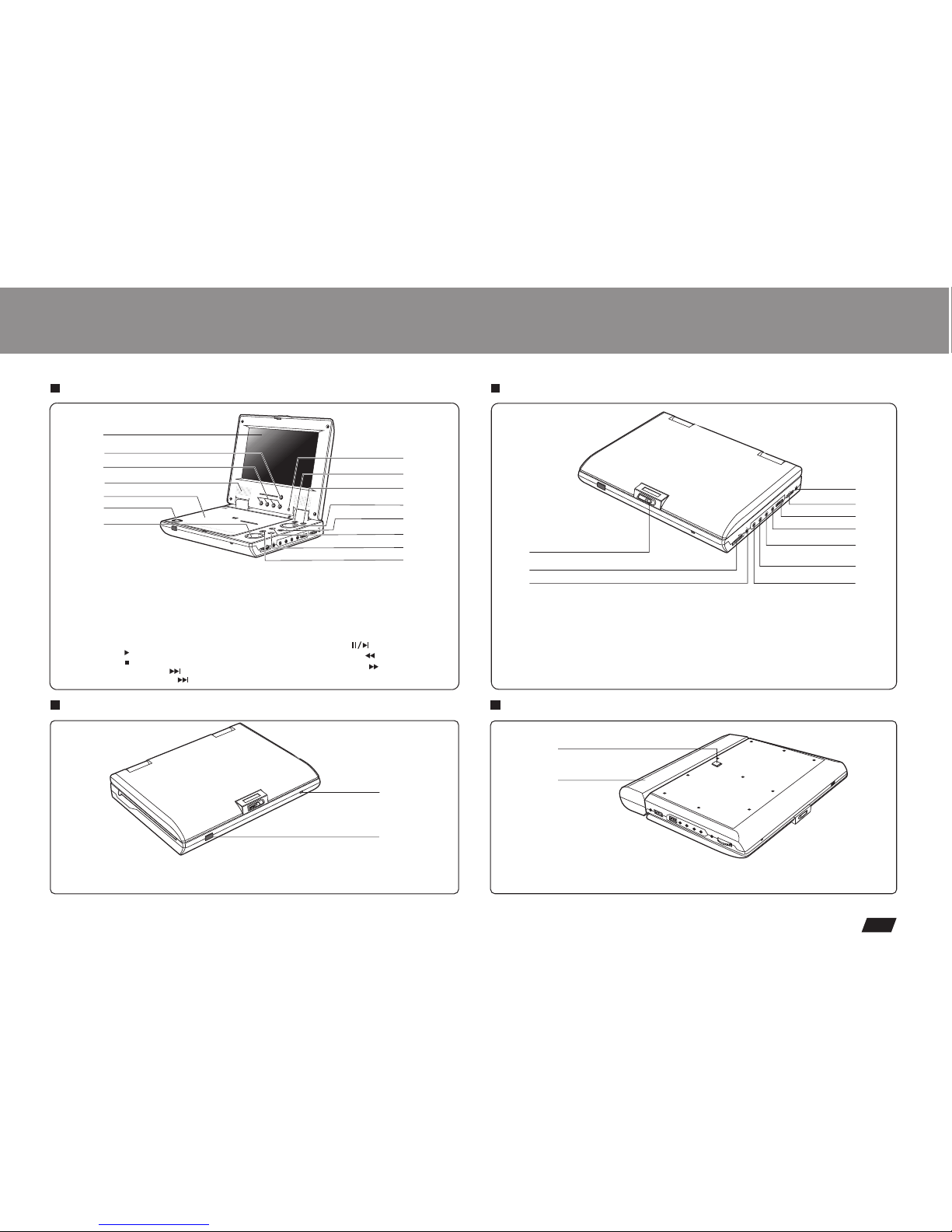
1.OPEN
2.EARPHONE / SPEAKER VOLUME
3.EARPHONE JACK
5.POWER ON/OFF
6.INPUT / OUTPUT
7.VIDEO
8.AUDIO OUT
9.AUDIO IN
1.RELEASE LATCH(Battery pack
separation switch)
1.BATTERYPACK
1
2
2.REMOTE CONTROL SENSOR
1.LED LIGHT
1.LCD
2. REVERSE DISPLAY
3.(16:9/4:3)/MODE/DOWN/UP
4.SPEAKER
5.DISC COVER
6.OPEN
7.PLAYBACK Buttons
PLAY( )
STOP( )
SKIP-FORWARD( )
SKIP-BACKWARD( )
4.DC IN 12V
10.SPDIF
2
3
4
11
12
14
8
4
5
6
93
2
1
2
OPEN
OPEN
PORTABLEDVDPLAYER
-
MODELDV9820
REVERSE
16:9/ 4:3MODEDOWN UP
MENU/PBC
PAUSE/STEP
ENTER
DISPLAY
FRFF
VOLUME SPDIF AUDIOINAUDIO OUT VIDEOINPUT OUTPUT POWER
ON OFF
DCIN 12V
5
6
7
1
9
10
13
15
8. LCD on/offswitch
9.MENU/PBC Button
10.ENTER Button
11.DIRECTION Button(UP/DOWN/
LEFT/RIGHT)
12.DISPLAY Button
13.PAUSE/STEP( ) Button
14.FAST REVERSE( ) Button
15.FAST FORWARD( ) Button
6
6
6
1
55
Using the Remote Control
Installing the battery
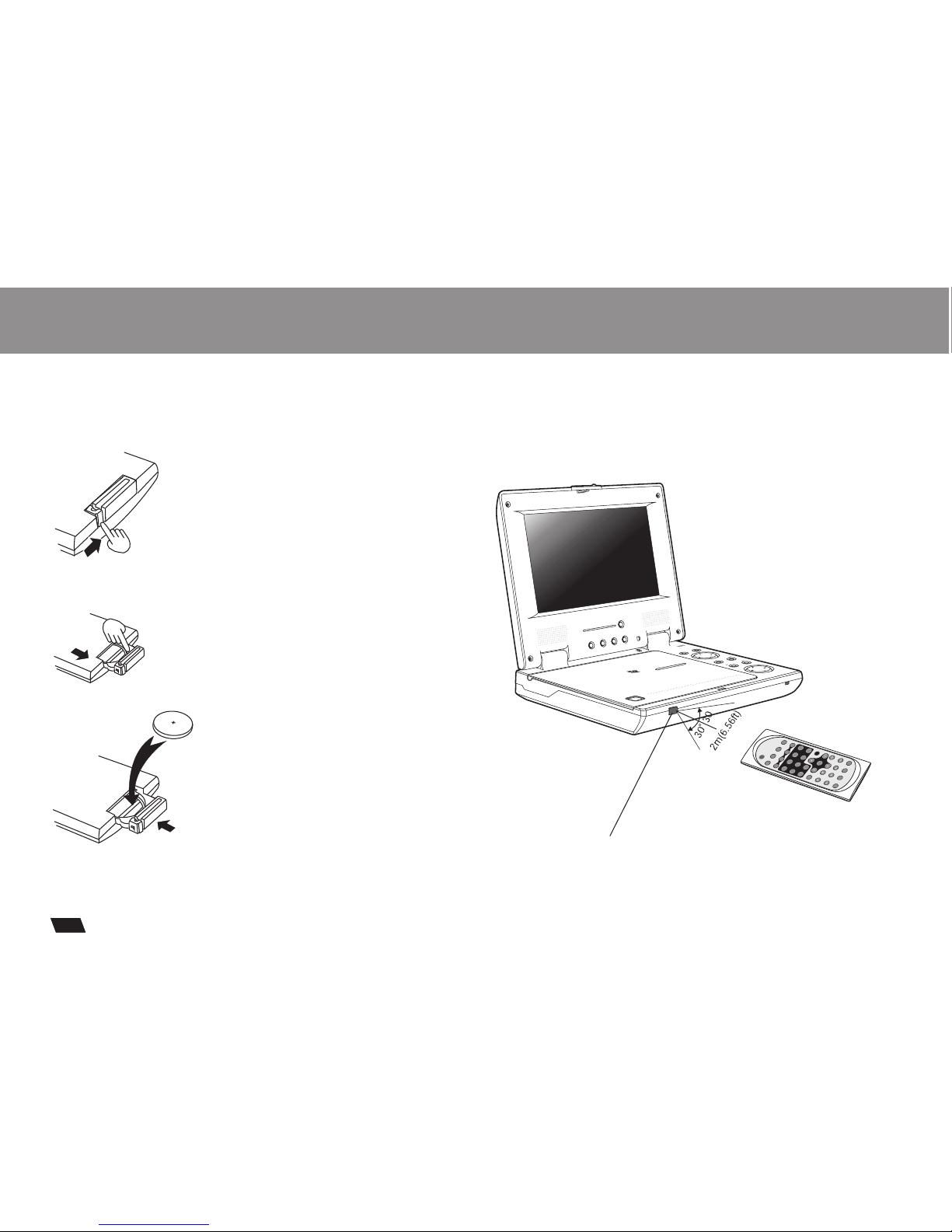
1. Press thelocking tab in the arrow direction.
Using the remote control
(1)
(2)
(3)
(4)
Point the remotecontrol directly at the remote sensor
on the frontof the DVD Player.
2. Pull outthe battery tray.
3. Insert a3V lithium battery into the
tray with thepolarity ( + ) facing up
as marked.
4. Replace thebattery tray by pushing it
until it clicksinto place.
Remote Control Sensor
P/N
TITLE
DISPLAY
ANGLE LANGUAGESUBTITLE
MUTE
L/R
1234
5678
SETUP
ENTER
SLOW
ZOOM
REPEAT
MARK
GOTO
MENU/PBC
REMOTECONTROL
MODELNo.:RMC-220
90
REVERSE
16:9 / 4:3 MODE DOWN UP
PORTABLEDVDPLAYER
-
MODELDV9820
OPEN
OPEN
MENU/PBC
PAUSE/STEP
ENTER
DISPLAY
FR
FF
5
6
Connecting Earphones to the DVD Player
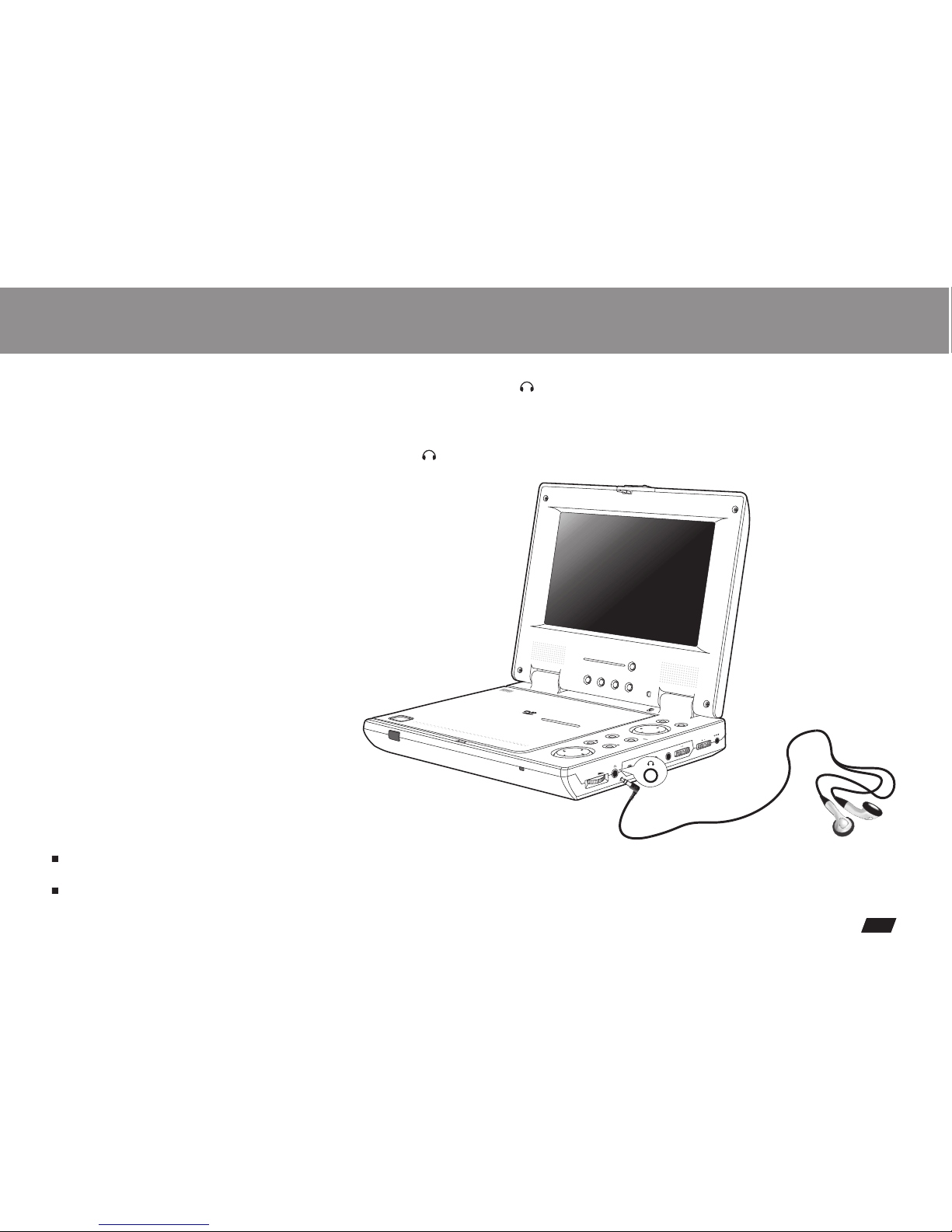
You can attach anearphone with a stereo mini-jack plugto the phone jack ( )for private listening. Its volume isadjustable
using the VOLUME control dial. You can also connecta second earphone to the AUDIO OUT jack, but its volume cannot be
adjusted.
Note: When theearphone is connected to the PhoneJack ( ),the speaker will be disconnected.
Notes on DSP
The DSP decodes the digital audio signal intostereo dts or Dolby digital audiosignal for speaker and earphone playbackafter
converting the signalto analog and amplifying it.
The 5.1 digitalsignal passes through without decoding andcan be accessed by the SPDIFjack on thePlayer.
OPEN
OPEN
PORTABLEDVDPLAYER
-
MODELDV9820
REVERSE
16:9 / 4:3 MODE DOWN UP
MENU/PBC
PAUSE/STEP
ENTER
DISPLAY
FRFF
VOLUME SPDIF AUDIO IN AUDIO OUT VIDEO INPUT OUTPUT POWER
ON OFF
DC IN 12V
Connecting to an External Component
5
7
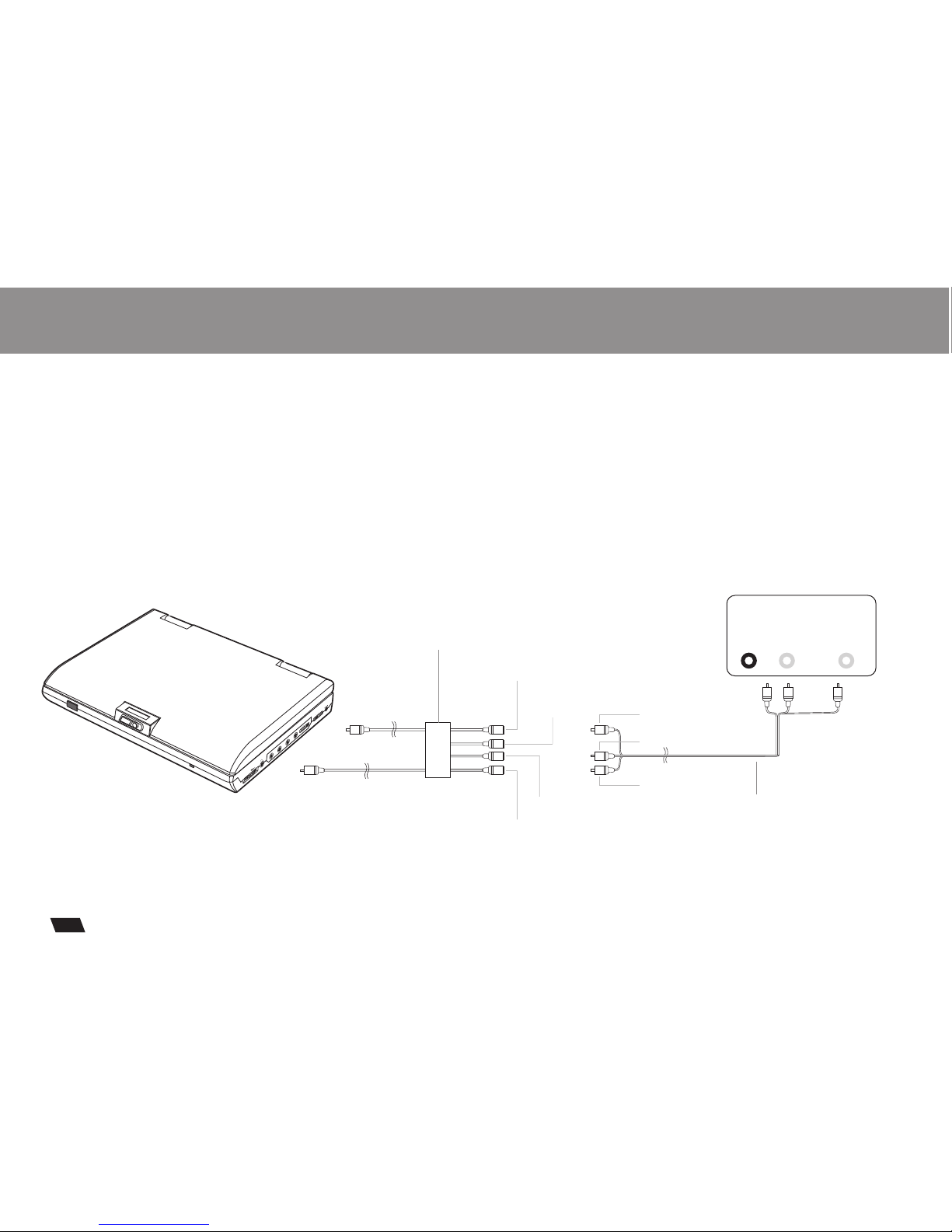
You can enjoy video from VCR or camcorder on your DVD player.
1. Turnoff DVD player, VCRand other components.
2. Connect theaudio and video cables as illustratedbelow.
3. Slide INPUT/OUTPUT to INPUT.
4. Turnon power.
AUDIO
OUT
VIDEO
OUT
LR
VCR or othercomponent equipped with external output connectors
Video out: Green
Video in: Yellow
Audio(left):White
Audio(right):Red
Audio (black)
Video(yellow)
AV CABLE(Not provided)
Audio(left):White
Audio(right):Red
Video out: Yellow
AV adaptorcable (provided)
(Mini-jack to RCA)
OPEN
OPEN
VIDEO
VOLUME
POWER
ON OFF
DCIN 12 V
SPDIF AUDIO IN AUDIO OUT INPUT OUTPUT
Connecting to a TV
5
8
TIPS
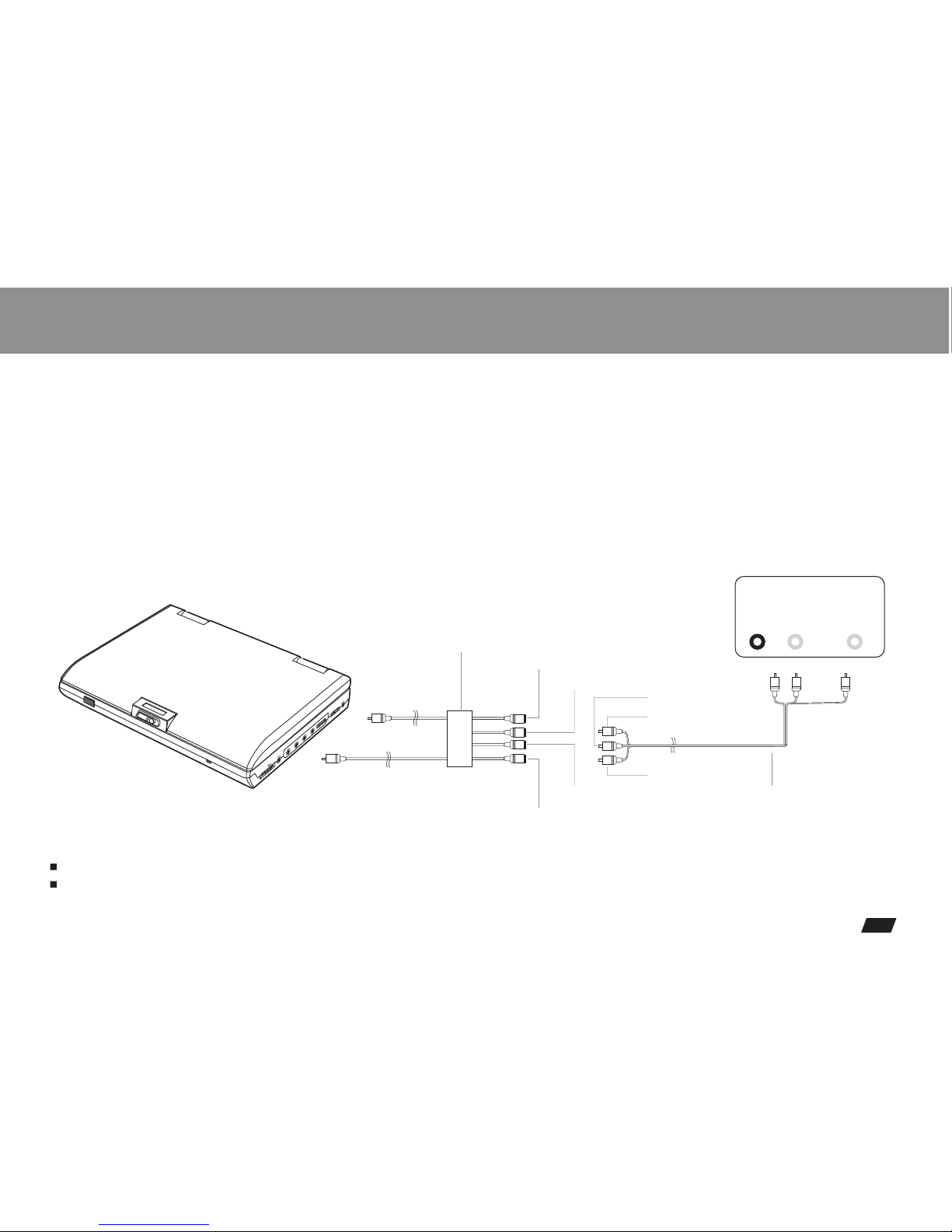
If you wishto view video on your TV only, close thedisplay panel ofyour DVD player.
With the displaypanel shut, use the remote tocontrol DVD player.
1. Turnoff DVD player and TV.
2. Connect theaudio and video cables as illustrated below.
3. Slide INPUT/OUTPUT to OUTPUT.
4.Turn on DVD player andTV.
5. Select correspondingVideo input which is connectedto DVD player.
6. Press PLAY on DVD player.
You can enjoy DVD quality video on TV screen.
AUDIO
IN
VIDEO
IN
LR
Connect to aTV equipped with external connectionjacks
AV CABLE(Not provided)
Audio (black)
Video(yellow)
Video out: Green
Video in: Yellow
Audio(left):White
Audio(right):Red
Audio(left):White
Audio(right):Red
Video in: Yellow
AV adaptorcable (provided)
(Mini-jack to RCA)
OPEN
OPEN
VIDEO
VOLUME
POWER
ON OFF
DCIN 12 V
SPDIF AUDIO IN AUDIO OUT INPUT OUTPUT
Using the AC Adaptor
Important !
Always turn off the DVD Player before connectingor disconnecting the AC cord.
. Using adifferent type of adaptor maycause malfunction or damage to theproduct.Only use theAC adaptor supplied with thisplayer
When theAC adaptor is used for prolongedperiod of time, the adaptor mayheat up,
This is normal and is not a causefor concern.
When not usingthe adaptor, unplug it fromthe outlet.
9
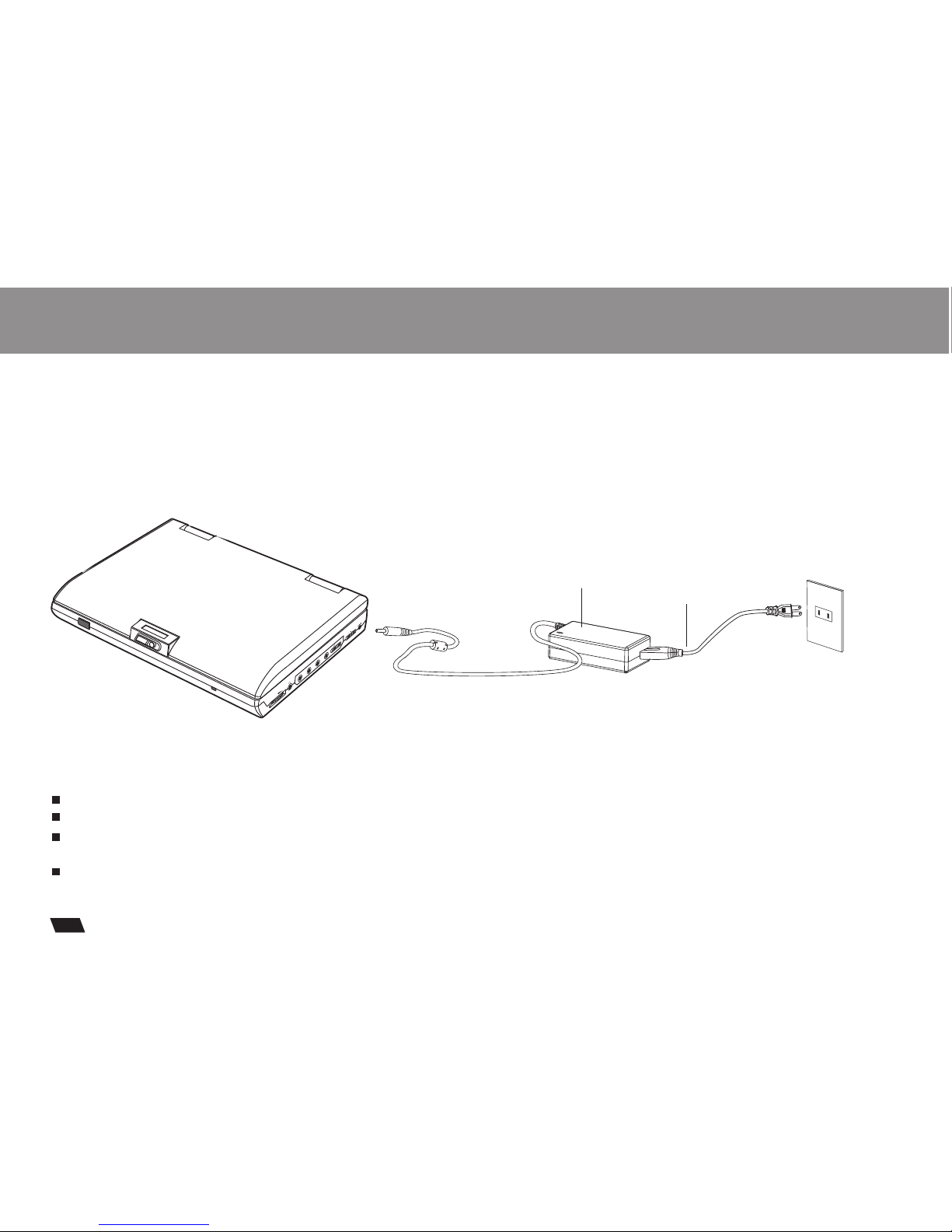
This portable DVDplayer can be powered byAC through the supplied switching powerAC adaptor. It canalso use the
supplied battery packto power.
When theAC adaptor is connected to theunit and powered, the unit willbe automatically and electrically disconnected fromthe
battery pack andpowered by the AC power.
AC adaptor
To home power outlet
To DC12V IN on the DVD player
OPEN
OPEN
VIDEO
VOLUME
POWER
ON OFF
DCIN 12V
SPDIF AUDIO IN AUDIO OUT INPUT OUTPUT
Power cord
Indice
Altri manuali LENCO Lettore DVD portatile

LENCO
LENCO DVR-70 Manuale utente

LENCO
LENCO DVP-705 Manuale utente

LENCO
LENCO DVP-931 Manuale utente

LENCO
LENCO DVP-1027 Manuale utente

LENCO
LENCO TFT-726 Manuale utente

LENCO
LENCO MES-221 Manuale utente

LENCO
LENCO DVP-936 Manuale utente

LENCO
LENCO DVP-9413 Manuale utente

LENCO
LENCO DVP-1027 Manuale utente

LENCO
LENCO DVP-911 BK Manuale utente

LENCO
LENCO MES-249 Manuale utente

LENCO
LENCO MES-230 - MANUEL 2 Manuale utente

LENCO
LENCO DVR-70 Manuale utente

LENCO
LENCO DVP-840 Manuale utente

LENCO
LENCO DVP-751 Manuale utente

LENCO
LENCO DVP-1022 Manuale utente

LENCO
LENCO DVP-735 Manuale utente

LENCO
LENCO MES-211 Manuale utente

LENCO
LENCO DVP-852 Manuale utente

LENCO
LENCO DVP-854 Manuale utente


