Lenovo Z1221 Manuale utente

Market Name: Z1 Model: Z1221
Beijing SHENQI Technology Co.,Ltd (“SHENQI”)
Quick Start Guide
A Company

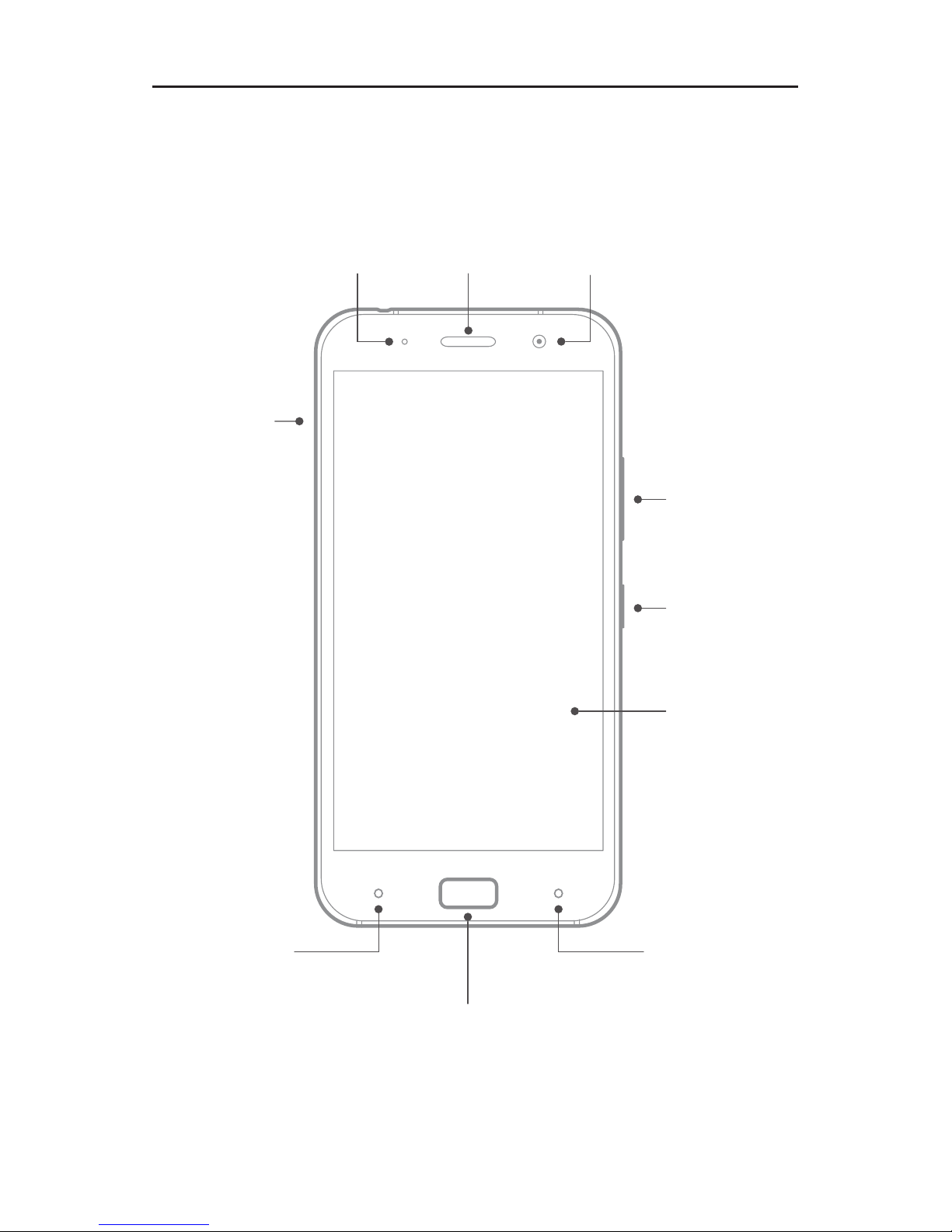
Front view
Note: Your phone may look a little bit different from the images in this guide.
The images are for your reference only.
Volume
buttons
Receiver
Power
button
Touch
screen
Front camera
Nano-SIM
card tray
Fingerprint & Home button
Indicator
Recent button Back button

Back view
USB 3.0 Type-C port
Headset jack
Anti-noise
Microphone
Speaker Microphone
Rear
camera
Flashlight

Turning on or turning off your phone
Turn on Press and hold the Power button until the
screen lights up.
Turn off
Restart
Press and hold the Power button for a few
seconds, then tap Power off.
Press and hold the Power button for a few
seconds, then tap Reboot.
To force restart your phone, press and hold
the Power button for about 10 seconds.
Getting started
Installing the Nano-SIM card
A Nano-SIM card provided by your carrier is required in order to
use celluar services.
CAUTION: Use standard Nano-SIM cards only. Inserting a modified card
may cause the card to damage the card slot.
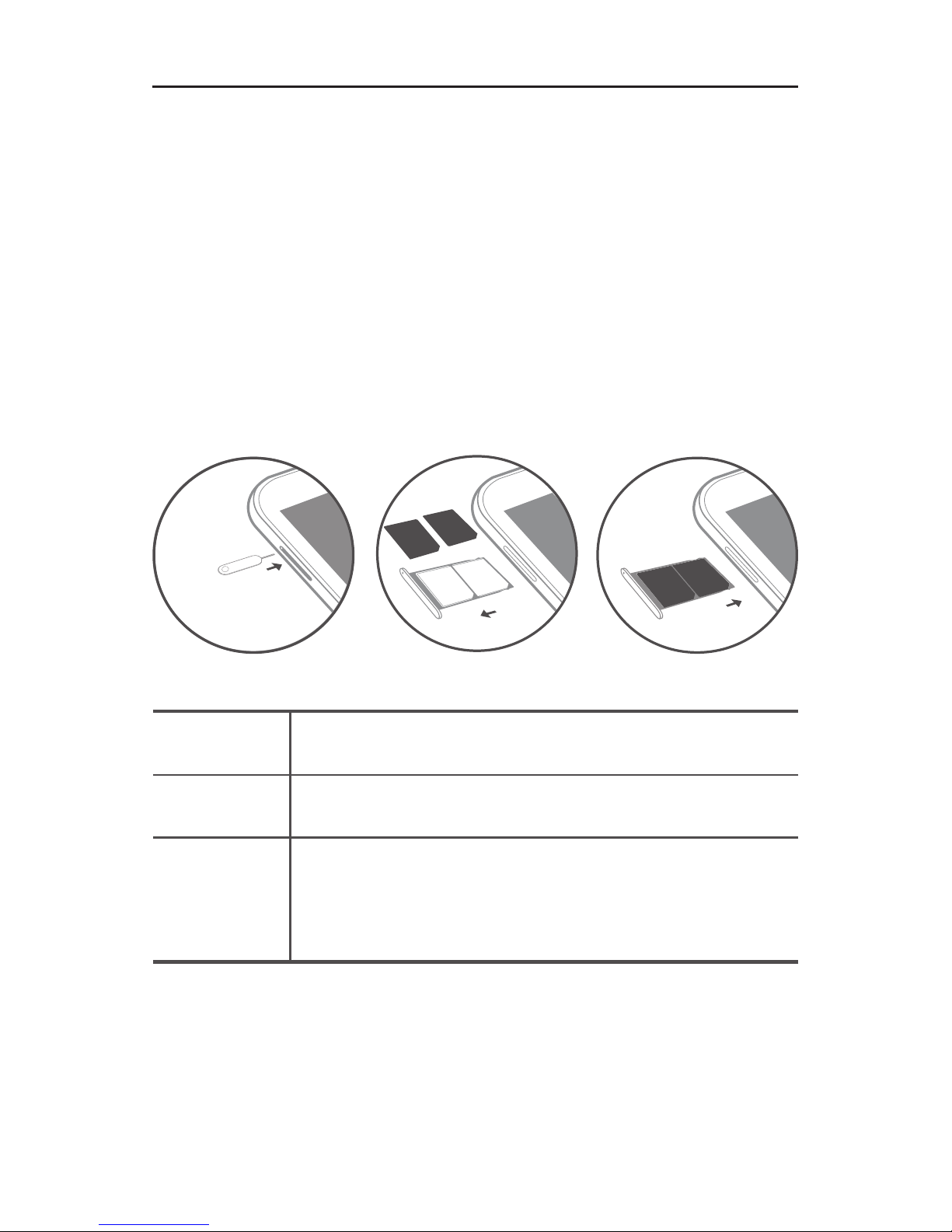
1. Insert the SIM eject tool that comes with your phone into the
hole in the Nano-SIM card tray.
2. Pull out the card tray and position one or two Nano-SIM
cards with the gold contacts facing down into the tray.
3. Insert the card tray back into the slot.
SIM1
SIM2
SIM1
SIM2

Low battery power Fully chargedCharging
Charging the battery
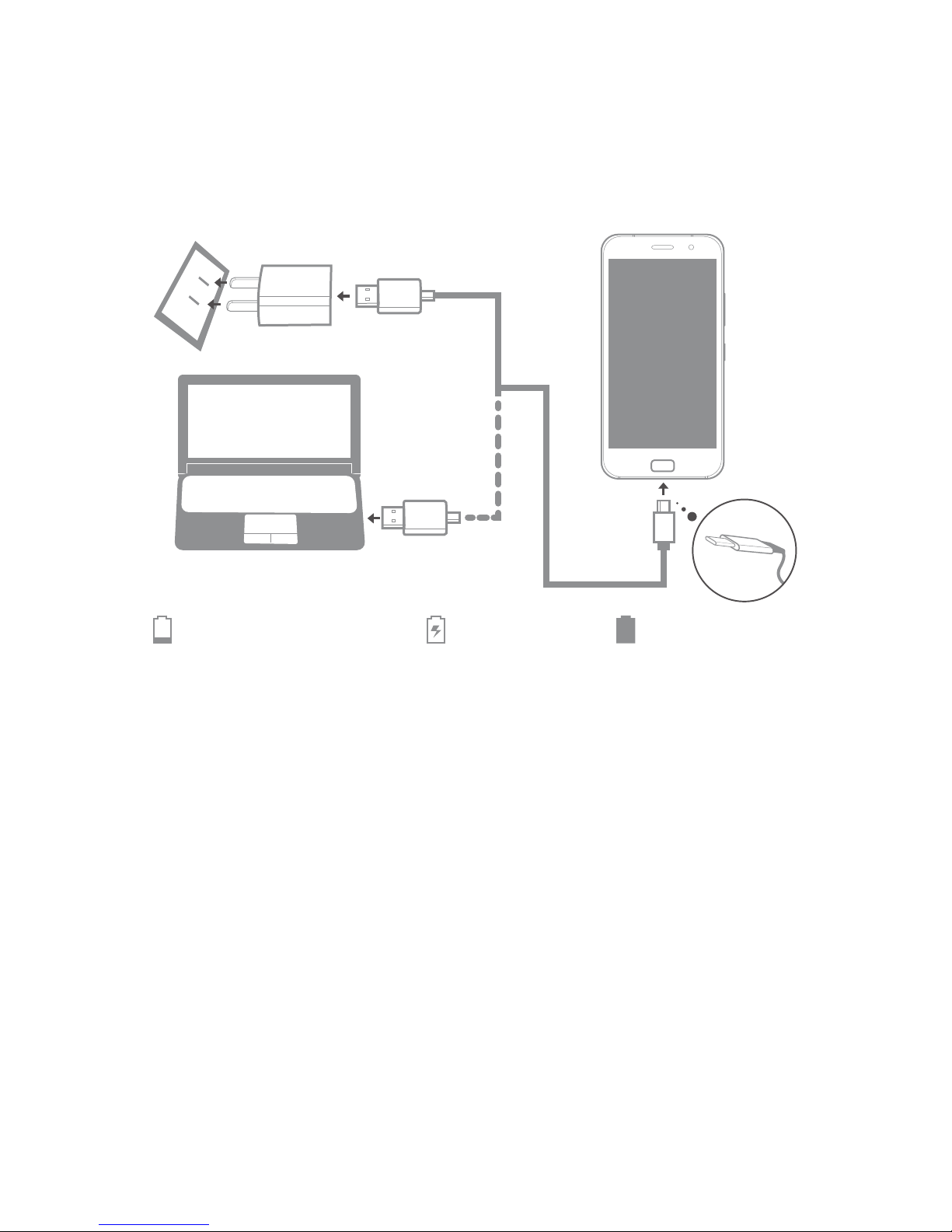
Charge the battery by one of the following methods:
Connect your phone to a power outlet using the cable and
USB power adapter that come with your phone.
Connect your phone to a computer using the cable that
comes with your phone.
Taking screenshots
Press and hold the Power button and the volume down button
at the same time to take a screenshot.
To view the screenshots, open the Gallery app and find the
Screenshots album.
Downloading publications
To obtain the latest publications for your phone, go to
http://support.lenovo.com and follow the instructions on the
screen.

Service and support information
The following information describes the technical support that
is available for your product, during the warranty period or
throughout the life of your product. Refer to the Lenovo Limited
Warranty for a full explanation of Lenovo warranty terms. See
“Lenovo Limited Warranty notice” later in this document for
details on accessing the full warranty.
Online technical support
Online technical support is available during the lifetime of a
product at http://www.lenovo.com/support.
Telephone technical support
Where applicable, you can get help and information from the
Customer Support Center by telephone. Before contacting
a Lenovo technical support representative, please have the
following information available: model and serial number, the
exact wording of any error message, and a description of the
problem.
Your technical support representative might want to walk you
through the problem while you are at your phone during the
call.
Worldwide Lenovo Support telephone list
IMPORTANT: Telephone numbers are subject to change without notice.
The most up-to-date telephone list for the Customer Support Center is
always available at http://support.lenovo.com/supportphonelist.
The Customer Support Center phone number is subjected
to change. For the latest phone number, go to the e-support
website. If the telephone number for your country or region is
not listed, contact your Lenovo reseller or Lenovo marketing
representative.

Type of
Warranty
Service
4
Country or
Region of
Purchase
Warranty Period
India Handset - 1 year
Charger - 6 months
Earphone - 6 months
Embedded Battery (within the handset) –
1 year
or Removable Battery - 6 months
Warranty information
Lenovo Limited Warranty notice
Read the full Lenovo Limited Warranty at
http://support.lenovo.com/smartphone-llw. You can view the
full warranty in a number of languages from this Web site. If
you cannot view the full warranty either from the Web site or
from your phone, contact your local Lenovo office or reseller
to obtain a printed version of the full warranty.
IMPORTANT: Lenovo phone products do not have International Warranty
Services.
Warranty period and type of warranty service
Types of warranty service
1. Customer Replaceable Unit (“CRU”) Service
2. On-site Service
3. Courier or Depot Service
4. Customer Carry-In Service
5. Mail-in Service
6. Customer Two-Way Mail-in Service
7. Product Exchange Service
For a full explanation of the types of warranty service, refer to
the full warranty.

Safety, regulatory & handling information
This section contains important safety, regulatory and handling
information for your phone. Complete information, including
recycling and environmental information, is provided in the
Regulatory Notice.
Reading first — regulatory information
Be sure to read the Regulatory Notice for your country or
region before using the wireless devices contained in your
Mobile Phone. To obtain a PDF version of the Regulatory
Notice, see the “Downloading publications” section.
Operating temperature
Use your phone only in the temperature range of -10°C (14 °F)
— 40°C (104°F) to avoid damage.
General battery notice
Batteries supplied by Lenovo for use with your phone have
been tested for compatibility and should only be replaced with
approved parts. Dispose of used batteries according to the
instructions.
CAUTION:
Risk of explosion if the battery is replaced with an incorrect type.
Do not attempt to replace the internal rechargeable lithium ion
battery. Contact Lenovo Support for factory replacement.
Charging
Lenovo is not responsible for the performance or safety of
products not manufactured or approved by Lenovo. Use only
Lenovo-approved ac adapters and batteries. Adapters shall be
installed near the equipment and shall be easily accessible.
Preventing hearing damage
CAUTION: Excessive sound pressure from earphones and headphones
can cause hearing loss.
Disposing according to local laws and regulations
When your phone reaches the end of its useful life, do not
crush, incinerate, immerse in water, or dispose of the phone
in any manner contrary to local laws and regulations. Some
internal parts contain substances that can explode, leak, or
have an adverse environmental effect if disposed of incorrectly.
Radio and Telecommunications Terminal Equipment
Directive
Lenovo declares that this product is in compliance with:
The essential requirements and other relevant provisions
of the Radio and Telecommunications Terminal Equipment
Directive, 1999/5/EC
All other relevant EU directives
Your phone is restricted to indoor use when operating in the
5.15 to 5.35 GHz frequency band.
The Declaration of Conformity information is located in the
Regulatory Notice. To obtain a PDF version of the Regulatory
Notice, see the “Downloading publications” section.
Important WEEE information

Safety, regulatory & handling information
This section contains important safety, regulatory and handling
information for your phone. Complete information, including
recycling and environmental information, is provided in the
Regulatory Notice.
Reading first — regulatory information
Be sure to read the Regulatory Notice for your country or
region before using the wireless devices contained in your
Mobile Phone. To obtain a PDF version of the Regulatory
Notice, see the “Downloading publications” section.
Operating temperature
Use your phone only in the temperature range of -10°C (14 °F)
— 40°C (104°F) to avoid damage.
General battery notice
Batteries supplied by Lenovo for use with your phone have
been tested for compatibility and should only be replaced with
approved parts. Dispose of used batteries according to the
instructions.
CAUTION:
Risk of explosion if the battery is replaced with an incorrect type.
Do not attempt to replace the internal rechargeable lithium ion
battery. Contact Lenovo Support for factory replacement.
Charging
Lenovo is not responsible for the performance or safety of
products not manufactured or approved by Lenovo. Use only
Lenovo-approved ac adapters and batteries. Adapters shall be
installed near the equipment and shall be easily accessible.
Preventing hearing damage
CAUTION: Excessive sound pressure from earphones and headphones
can cause hearing loss.
Disposing according to local laws and regulations
When your phone reaches the end of its useful life, do not
crush, incinerate, immerse in water, or dispose of the phone
in any manner contrary to local laws and regulations. Some
internal parts contain substances that can explode, leak, or
have an adverse environmental effect if disposed of incorrectly.
Radio and Telecommunications Terminal Equipment
Directive
Lenovo declares that this product is in compliance with:
The essential requirements and other relevant provisions
of the Radio and Telecommunications Terminal Equipment
Directive, 1999/5/EC
All other relevant EU directives
Your phone is restricted to indoor use when operating in the
5.15 to 5.35 GHz frequency band.
The Declaration of Conformity information is located in the
Regulatory Notice. To obtain a PDF version of the Regulatory
Notice, see the “Downloading publications” section.
Important WEEE information
0560

Position RegulationThe highest SAR value
Body-worn
Head 0.460 W/kg
0.733 W/kg
India 1g SAR Limit
(1.6 W/kg)
Specific Absorption Rate information
Your mobile phone is a radio transmitter and receiver. It meets
the government’s requirements for exposure to radio waves.
The exposure standard for mobile phones employs a unit of
measurement known as the Specific Absorption Rate, or SAR.
The India SAR limit for mobile phones is 1.6 W/kg averaged
over 1 gram of tissue. Tests for SAR are conducted using
standard operating positions with the phone transmitting at its
highest certified power level in all tested frequency bands.
The highest SAR value for your phone when tested for use at
the head and body is outlined as follows:
During use, the actual SAR values for this phone are usually
well below the values stated above. This is because, for
purposes of system efficiency and to minimize interference
on the network, the operating power of your mobile phone is
automatically decreased when full power is not needed for the
call. The lower the power output of the phone, the lower its
SAR value.
To meet RF exposure guidelines during body-worn operation,
the phone must be positioned at least 1.5 cm away from your
body.
Indice
Altri manuali Lenovo Telefono cellulare

Lenovo
Lenovo moto m Foglio di istruzioni

Lenovo
Lenovo PHAB2 Come usare

Lenovo
Lenovo PHAB2 Come usare

Lenovo
Lenovo K910L Manuale utente

Lenovo
Lenovo X3c70 Manuale utente

Lenovo
Lenovo VIBE C2 Manuale utente

Lenovo
Lenovo PHAB2 Pro Come usare

Lenovo
Lenovo A600e Manuale utente

Lenovo
Lenovo S60-a Manuale utente

Lenovo
Lenovo K6 Manuale utente

Lenovo
Lenovo K10 Manuale utente

Lenovo
Lenovo A328 Manuale utente

Lenovo
Lenovo P70 Manuale utente

Lenovo
Lenovo K15 Plus Manuale utente

Lenovo
Lenovo VIBE P1m SERIES Manuale utente

Lenovo
Lenovo A319 Manuale utente

Lenovo
Lenovo A706 Manuale utente

Lenovo
Lenovo TB-8504F Come usare

Lenovo
Lenovo IDEAPHONE P770 Manuale utente
Lenovo
Lenovo K320t Manuale utente