
Lenovo E1 Manuale utente

SMART WATCH
OROLOGIO INTELLIGENTE
E1
User guide
Manuale operativo

EN 2
DOWNLOADING THE SCAN THE FOLLOWING QR CODE,
DOWNLOAD AND INSTALL THE APP.
Scan OR Code and Download

EN 3
CHARGING AND ACTIV
Charging the device to active before the rst time using;
To charge your device, plug the charging cable into the adapter
or USB port on your computer.
PAIRING
Open the App and set up your prole,
Go to the “Device” , Click “Add a Device”
EN 4
Choose your device on the scanning list
Finish
Long press the rtime pageJ on your device, go to the detail page.
The MAC address on the detail page could help you identify your
device on the scanning list.
SMART WATCH FEATURES
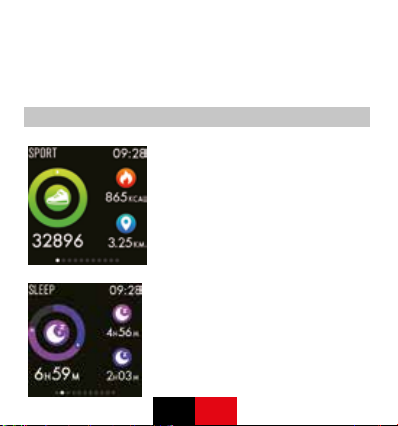
SPORTS
Sma1 Watch automatically tracks
Steps taken, Calories burned, Distance
traveled and displays on the screen.
NOTE: Your movement stats reset to
zero at midnight.
SLEEP
If you keep wearing Smart Watch in
your sleep , it can provide the hours
slept and quality of sleep stats on both
the screen and the APP. NOTE: Sleep
stats reset to zero at 8:00 pm
EN 5
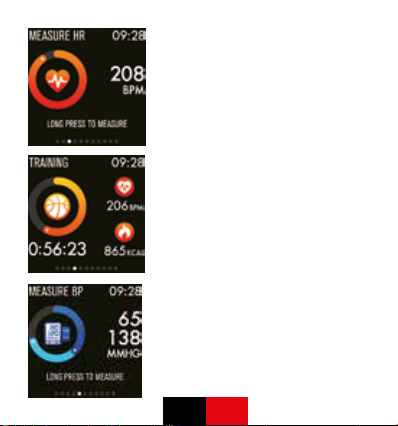
HEART RATE TEST
Long press the heart rate page to start
measuring your heart rate.
On the heart rate page, It can show
the heart rate measured data of the
last-7-times.
TRAINING
Long press on the training page to start
a new train ing measure recording,
there are 8 sport modes to be chosen.
The last training recording will be
shown on the training page.
BLOOD PRESSURE TEST
Long press on the blood pressure page
to start measuring your blood pressure.
On the blood pressure page, It can
show the blood pressure measured
data of the last-7-times.

EN 6
SPO2 TEST
Long press the SpO2 page to start
measuring your SpO2.
On the SpO2 page, It can show the
SpO2 measured data of the last-7-
times.
WEATHER
It could show the weather info of
current and tomorrow on the weather
page.
Weather info is synced after connecting
with the APP, it will not be updated after
a long disconneted.
MESSAGES REMINDER
The device can sync incoming
notications from Twitter, Facebook,
Whatsapp, Instagram etc.
Recently 3 messages can be stored.
Note: You can switch of/o the incom-
ing notication in the APP.
EN 7
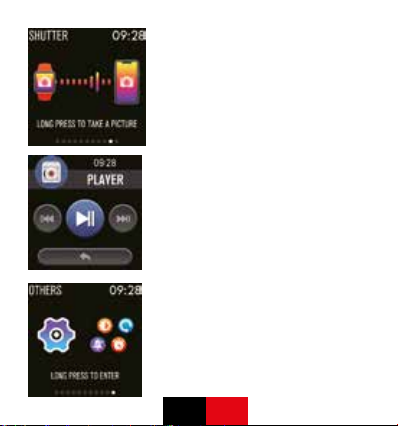
REMOTE SHUTTER
After connecting the device can remote
contral the camera on your phone
MUSIC PLAY CONTRALLER
After connecting the device can remote
contral the music player on your phone.
OTHER FEATURES
Other features include stopwatch,
brightness adjustment, mute mode,
factory reset, and power on.

EN 8
STOP WATCH
Long press on the stopwatch page to
start timing, and long press again to
stop timing.
SILENT ALARMS
Set up the alarm on the APP, the
device will vibrate to remind on time.
REMIND TO MOVE
The device will vibrate to remind you
to make a relax after 1 hour sittiing.
Note: You can switch on/o the feature
in the APP.

EN 9
GETTING TO KNOW YOUR DEVICE
1. Using in Wet Conditions
Your device is water-resistant, which means it is rain-proof and splash-
proof and can stand up to even the sweatiest workout. NOTE: Do not
swim with your Smart Watch. We also don’t recommend showering with
your wristband; though the water won’t hurt the device, wearing it 24/7
does not give your skin a chance to breathe. Whenever you get your
bracelet wet, dry it thoroughly before putting it back on.
2. Using the Touch Bubon
Single tap the Touching Area under the main screen to wake up the de-
vice and switch to other functional pages.
Long press the Touching Area to enter for more functions which is need-
ed.
3. Using Ouick View
With Quick View you can check the time or the message form your phone
on your Smart Watch without taping. Just turn your wrist towards you and
the time screen will appear for a few seconds.
GETTING TO KNOW YOUR DEVICE
1. Using in Wet Conditions
Your device is water-resistant, which means it is rain-proof and splash-
proof and can stand up to even the sweatiest workout. NOTE: Do not
swim with your Smart Watch. We also don’t recommend showering with
your wristband; though the water won’t hurt the device, wearing it 24/7
does not give your skin a chance to breathe. Whenever you get your
bracelet wet, dry it thoroughly before putting it back on.

EN 10
2. Using the Touch Bubon
Single tap the Touching Area under the main screen to wake up the de-
vice and switch to other functional pages.
Long press the Touching Area to enter for more functions which is need-
ed.
3. Using Ouick View
With Quick View you can check the time or the message form your phone
on your Smart Watch without taping. Just turn your wrist towards you and
the time screen will appear for a few seconds.
GENERAL INFO SPECIFICATIONS
1.EnvironmenDl Conditions
Operating temperature: 14°F to 122°F (-10°C to 50°C) Non-operating
temperature: -4°F to 140°F (-20°C to 60°C)
2.Size
Fits a wrist between 5.5 and 7.7 inches in circumference.
3.Disposal and Recycling
Please kindly be aware that it is the consumer’s responsibility to properly
dispose and recycle Sma1 Watch and accompanying components. Do
not dispose of Smart Watch with common household waste, the Smart
Watch unit is considered electronic waste and should be disposed of at
your local electronic equipment collection facility.
For more information, please contact your local electronic equipment
waste management authority or the retailer where you bought the prod-
uct.
Indice
Altri manuali Lenovo Orologio


