
Lenovo L215P Manuale utente

Lenovo L215p Wide
Flat Panel Monitor Webcam User’s Guide


i
Content
Declaration ……………………………………………………………………ii
Chapter 1. Introduction……………………………………………………………1-1
1-1. System Requirement………………………………………………… 1-1
1-2. Features and Application……………………………………………1-1
Chapter 2. Installation Instruction…………………………………………………2-1
2-1. Driver Installation…………………………………………………………2-1
2-2. Driver Uninstallation………………………………………………………2-5
Chapter 3. Application software guide……………………………………………3-1
Chapter 4. Q & A …………………………………………………………………4-1

ii Lenovo L215p Wide Flat Panel Monitor Webcam user’s Guide
Declaration
Welcome for using Lenovo’s product.
Please read the information which comes with the product carefully when first time installing
and using this product. It can be helpful for the understanding and using of this product. If the
manual and user guide is not followed or there is misconduct on operation, Lenovo (Beijing)
does not hold any responsibility for any lost caused by damage. However, if the damage was
conducted by Lenovo engineer during the operation or installation is exempt.
Lenovo (Beijing) Ltd. has already conducted a strict inspection and verification to this user
manual. However, we do not guarantee that there is no mistake or negligence. In order to
provide better service, Lenovo (Beijing) Ltd. preserve the right of improving / modification of
product, software and the content of manual.
The purpose for the manual of this product is to assist customer for using Lenovo’s product
correctly. This manual does not provide any information for the software and hardware
configuration of this product. For the configuration, please refer to the correlated contract (if
there is), product-packing list or consultation from your retailer.
The content of manual from this product is protected and regulated by the law of copyright and
intellectual property. Without the authorization in written form from Lenovo (Beijing) in
advance, no copy, transcription or any form of transferring the content via wired / wireless
network shall be granted. Any translation of the content of this manual is restricted. Copyright©
2007, Lenovo (Beijing) Ltd. preserve any correlated right.
All the software interface, function, and hardware configuration is depending on the actual
configuration of customer’s hardware.
If there is any inconsistency between the actual product and manual, inquiry of latest
information or any question or thought, please log on Lenovo website: http://www.lenovo.com
“lenovo” is registered trademark or logo from Lenovo (Beijing). The other
product or brand name contain in the content of this manual maybe trademark
or logo from other company.
© 2008 Lenovo (Beijing) Ltd.

Chapter 1 1-1
Chapter 1. Introduction
1-1 System Requirement
* Pentium 4 1.8Gor above CPU
* 512M or above memory
* USB2.0 Interface (Compatible with USB1.1)
* Windows XP SP1 above or Windows VISTA
* If required for sound effect please equip the sound card
* If required for video conference or telephone, please equip MODEM or network card
1-2 Features and Application
* CMOS sensor chipset, 0.3 mega pixel, software can interpolation to 2 mega pixel.
* Auto white balance
* Maximum resolution capture per image is 1920*1080 (Full HD)
* Analogue microphone
* 30 frame/second, providing real-time image
* Provides motion AVI image capturing
* Size of image windows can be adjusted. Providing full screen and real-time image
* Auto detect the lighting of environment.
Chapter 2 2-1
Chapter 2. Installation instruction
Please confirm that your operation system is upgraded or change to Windows XP SP1 or Windows
VISTA. Please also uninstall other webcam software. If the other software has caused the equipment,
Lenovo does not hold any responsibility.
Lenovo L215P Webcam software support Windows XP SP1 above or Windows VISTA English version.
2-1 Driver Installation
Lenovo L215P Webcam software support Windows XP SP1 above or Windows VISTA English
version.
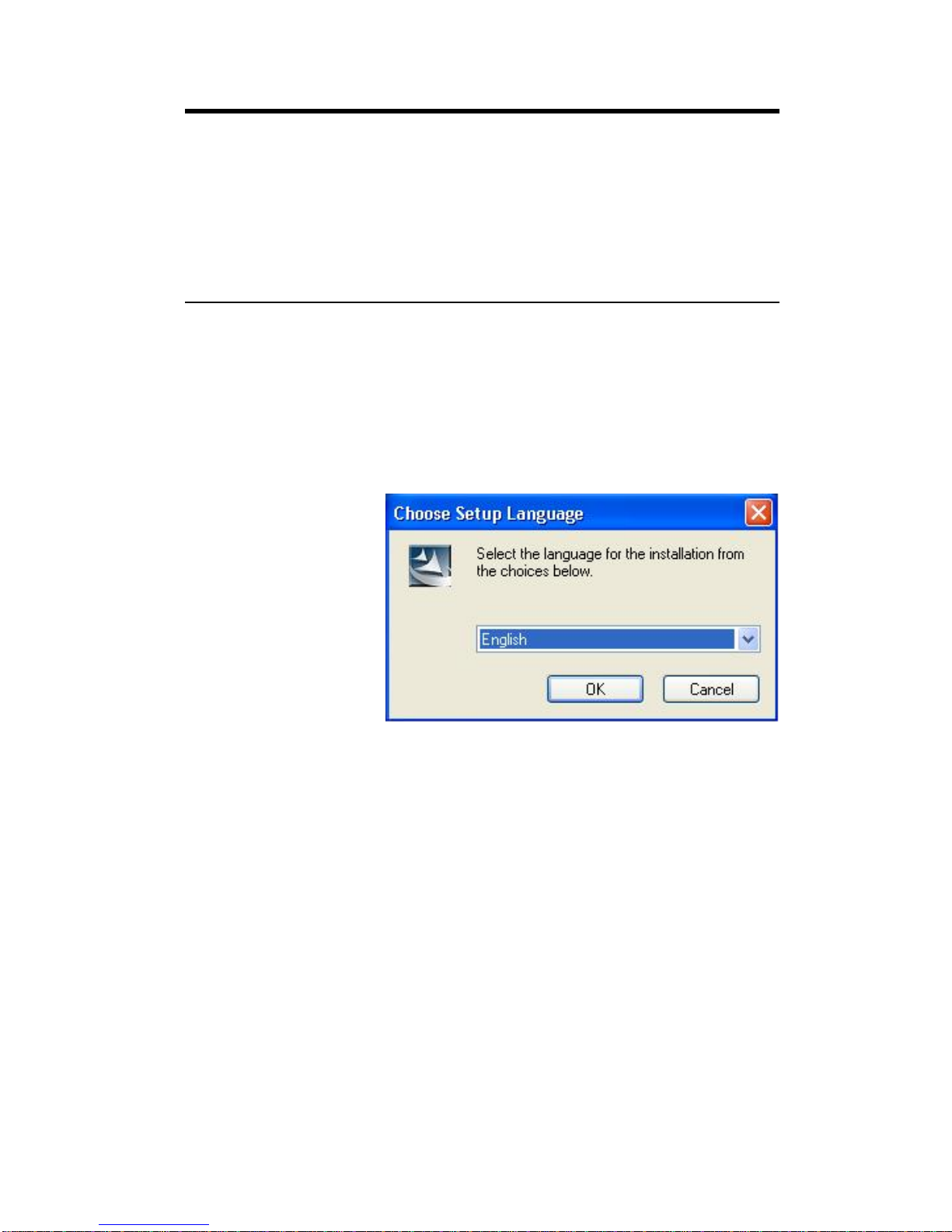
1) Place the product disc into disc player. A guiding window will pop up. After choosing
the desired installation language, click “OK”. Windows will start Lenovo camera driver.
2) If the installation window does not pop up after the disc is insert, please execute
X:\setup.exe, manually. (X is disc drive symbol)
2-2 Lenovo L215p Wide Flat Panel Monitor Webcam user’s Guide
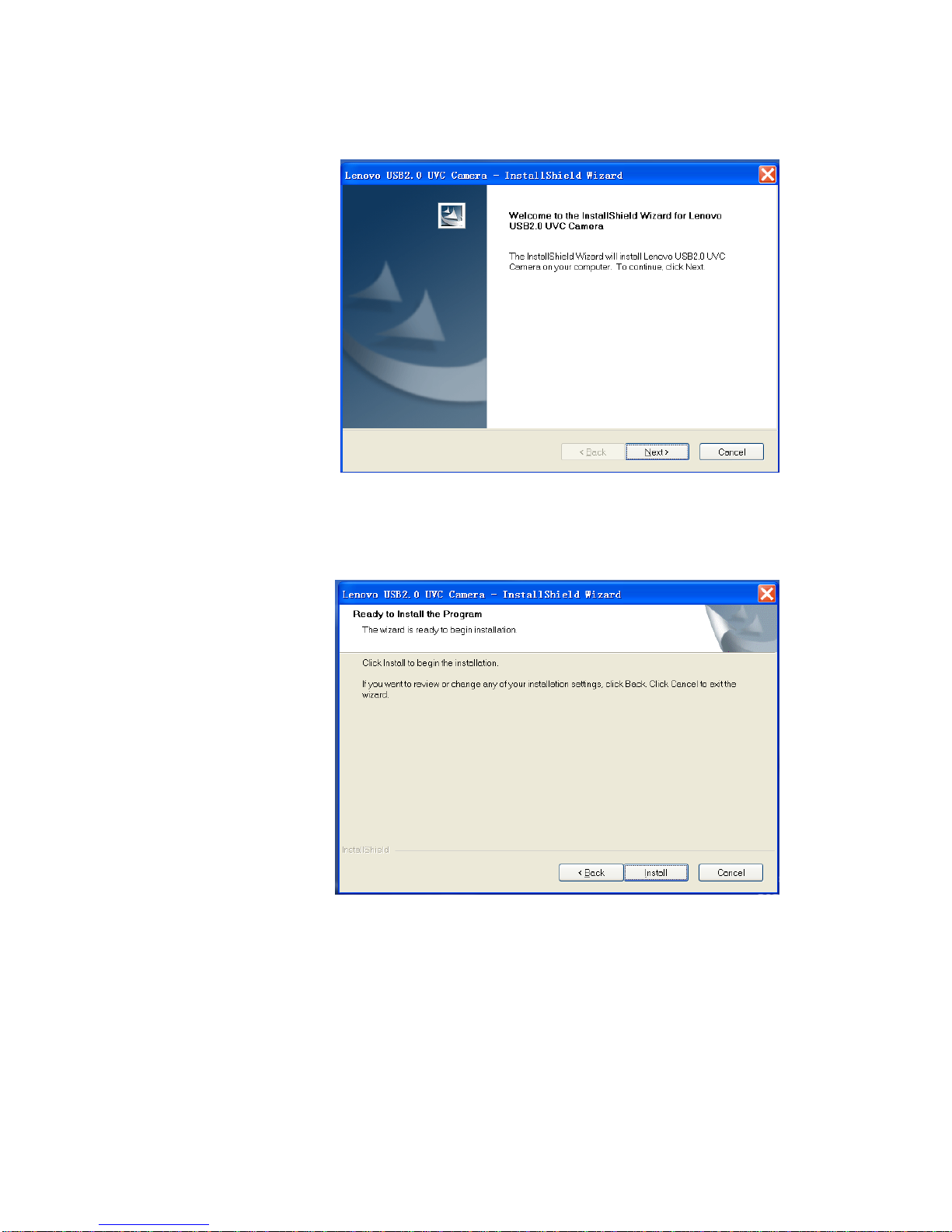
3) Click “Next”, start the installation.
4) Click “Install”, installation software will start copying the file.
Chapter 2 2-3
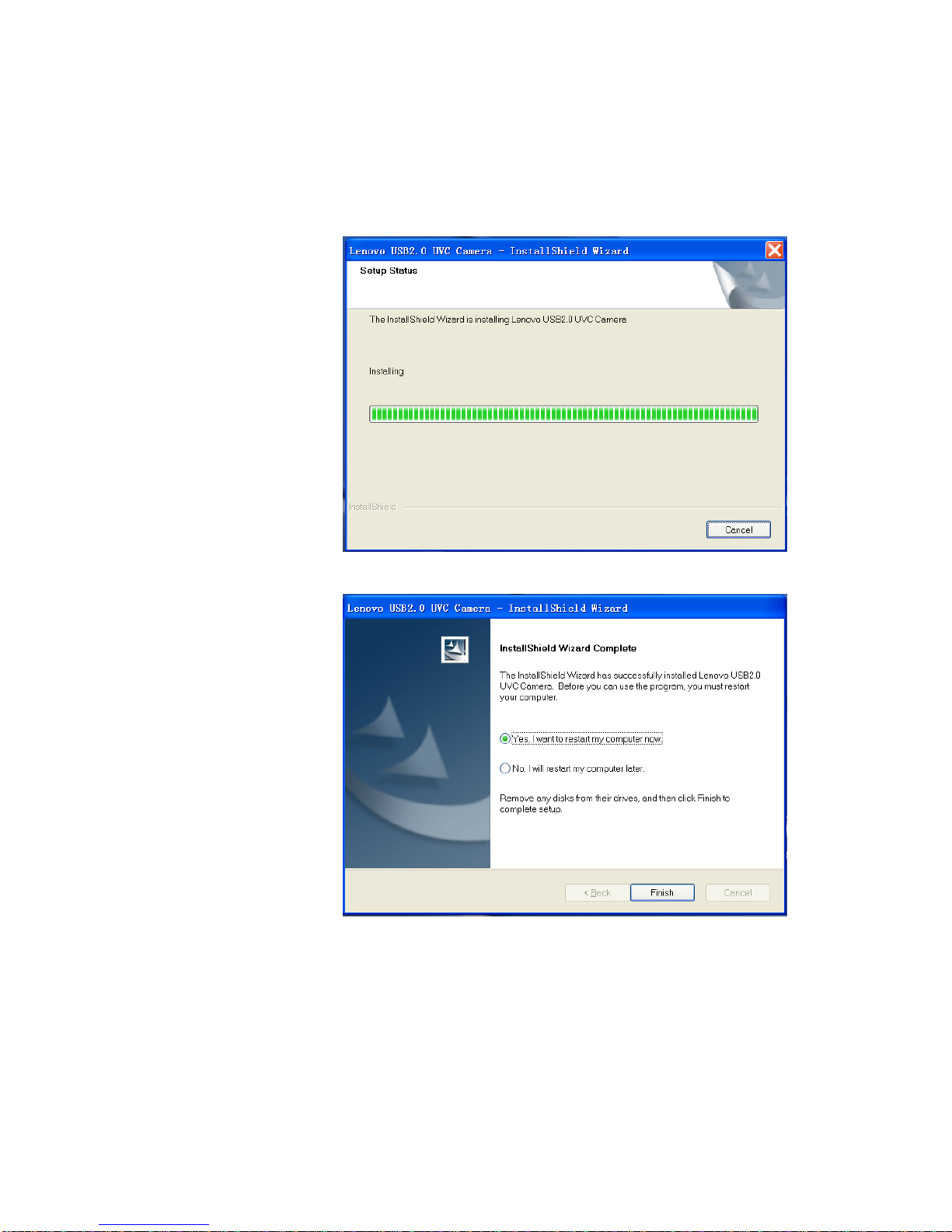
5) When the installation is completed, the following window will pop up. Click
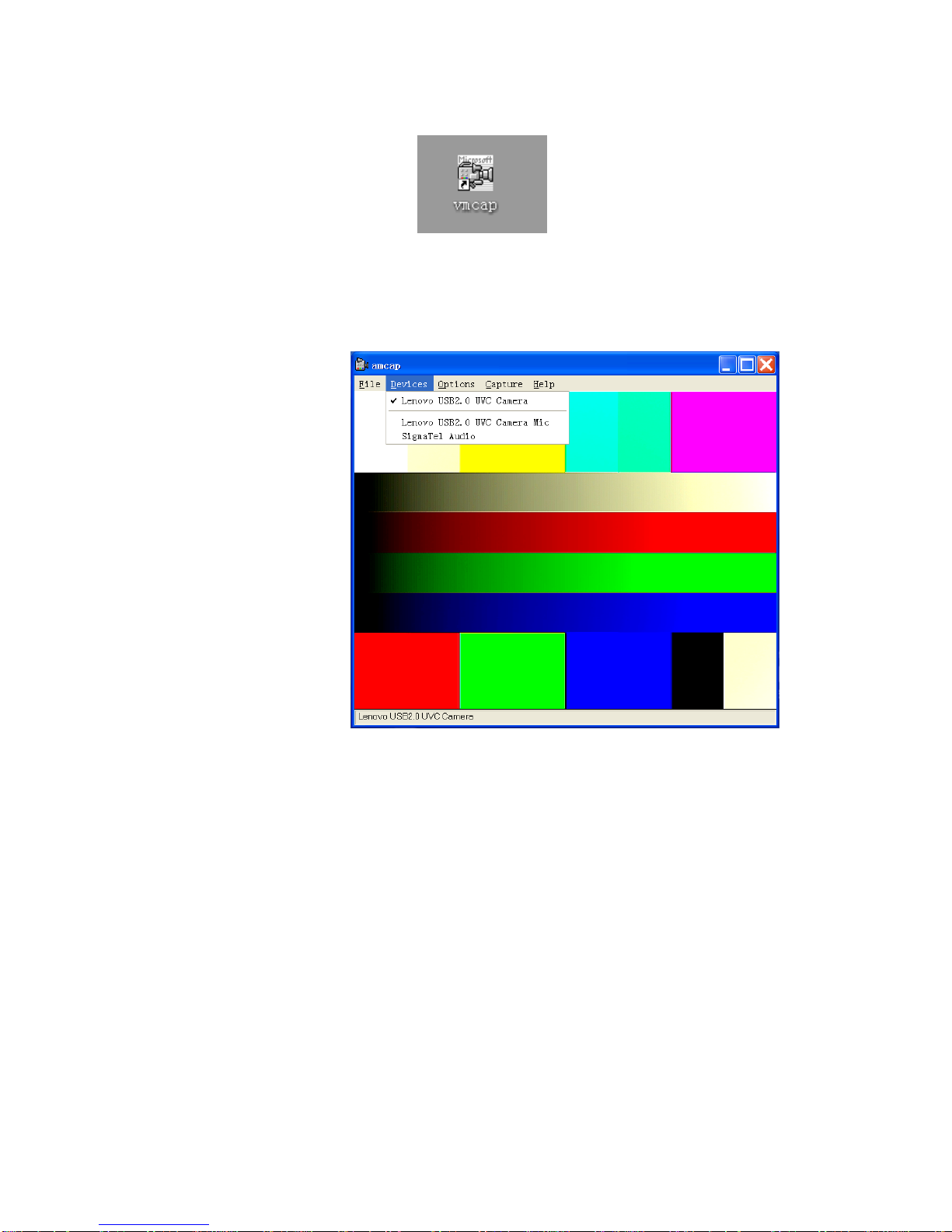
“Complete”, it will generate vmcap shortcut on desktop. The shortcut can execute the
camera module. In order to function completely, it is recommend to restart after the
installation of driver.
2-4 Lenovo L215p Wide Flat Panel Monitor Webcam user’s Guide
As the figure indicated, vmcap can execute the image browsing and configuration.
Chapter 2 2-5
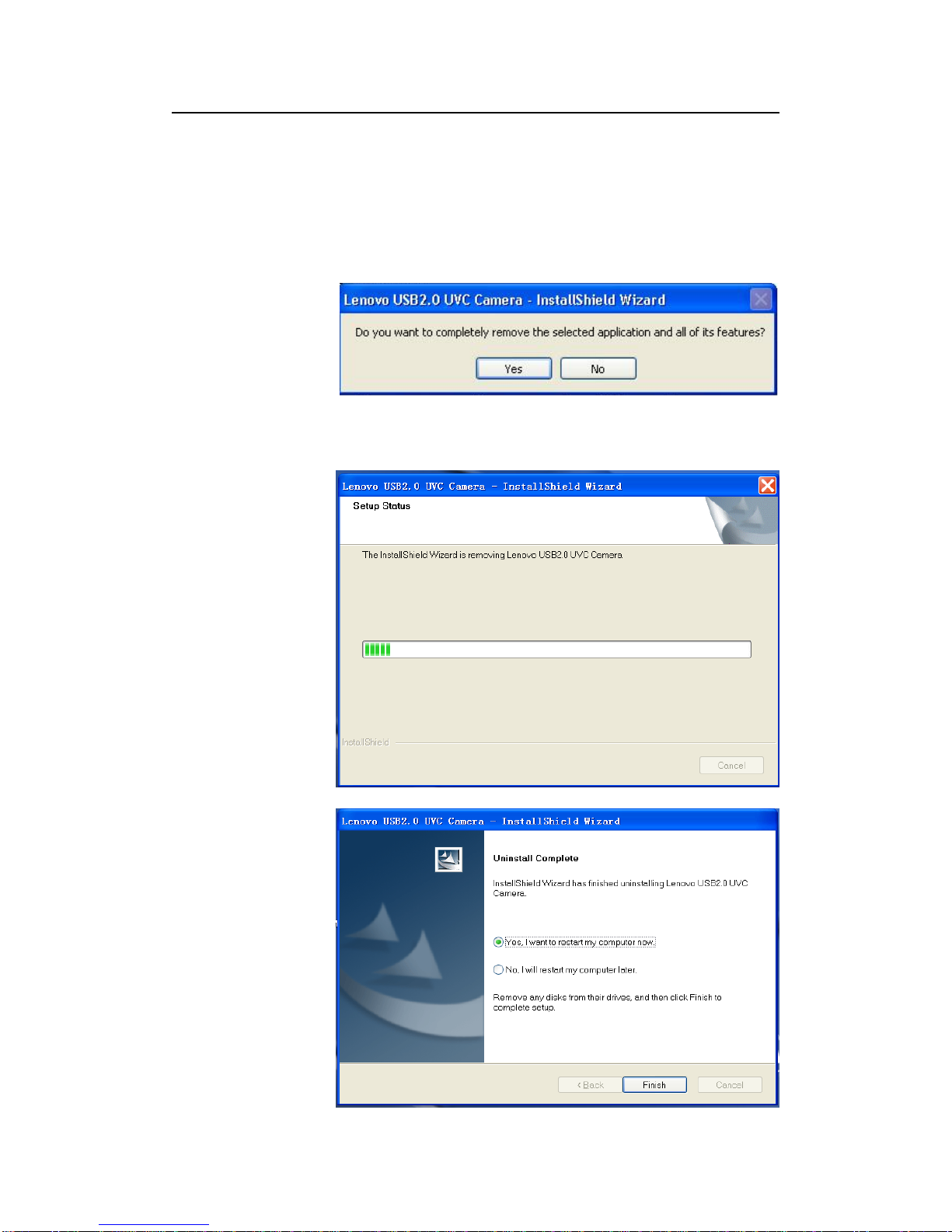
2-2 Driver uninstallation
1)Click “Start” -> “Program” -> Lenovo USB2.0 UVC Camera -> Uninstall Lenovo
USB2.0 Camera.
Pop up the following window:
2)Click “Yes” to proceed with uninstallation. In order to remove driver completely, it is
recommended to restart after uninstalling the driver.
Altri manuali per L215P
3
Indice
Altri manuali Lenovo Webcam


