LG LP6000ER Manuale utente

LG
Window-Type Air Conditioner
OWNER'S MANUAL
LG
MODELS: LP6000ER
LP7000R
IMPORTANT
Please read through this manual. It contains valuable
information about your air conditioner. This manual may help
save time and money by explaining proper air conditioner
maintenance and preventing improper use.
PRECAUTIONS
Pay close attention to precautions in order to prevent
potential hazards and damage from misuse or improper
installation. LG is not responsible for any damages caused by
misuse of the air conditioner.
ESPAÑOLENGLISH
website http://www.lgservice.com
e-mail http://www.lgeservice.com/techsup.html

F or Your Records
R ead This Manual
CAUTION
2
Window-Type Air Conditioner Owner’s Manual
TABLE OF CONTENTS
1. Safety Precautions
2. Operating Instructions
3. Care and Maintenance
4. Hardware Installation
5. Common Issues
Write the model and serial numbers here:
Model #
Serial #
You can find them on a label on the side of each unit.
Dealer's Name
Date Purchased
Inside you will find many helpful hints on how to use
and maintain your air conditioner properly. Just a little
preventive care on your part can save you a great
deal of time and money over the life of your air
conditioner.
You'll find many answers to common problems in the
chart of troubleshooting tips. If you review our chart of
Troubleshooting Tips first,youmaynotneedtocall
for service at all.
• Contact the authorized service technician for repair
or maintenance of this unit.
• Contact the installer for installation of this unit.
• The air conditioner is not intended for use by young
children or invalids without supervision.
• Young children should be supervised to ensure that
they do not play with the air conditioner.

WARNING
WARNING
WARNING
CAUTION
Never Do This
Always Do This
Precautions
Safety
Precautions
3
ENGLISH
To prevent injury and property damage, follow these instructions.
Incorrect operation due to ignoring instructions might cause harm or damage, the seriousness of which is
indicated by the following symbols.
■The following items are classified by these symbols.
Plug in the power plug
properly. Do not operate or stop the
unit by inserting or pulling
out the power plug.
Do not damage or use an
unspecified power cord.
• Doing so may cause electric
shock or fire due to heat
generation or electric shock.
• Doing so may cause electric
shock or fire due to heat
generation.
• Doing so may cause electric shock or fire.
•
If the supply cord is damaged, it must be replaced
by the manufacturer, the manufacturer's service
agent, or a similarly qualified person in order to
avoid a hazard. (Y attachment)
Do not modify power cord
length or share the outlet
with other appliances.
Do not operate with wet
hands or in damp
environment.
Do not direct airflow at
room occupants only.
• Doing so may cause electric shock or
fire due to heat generation.
• Doing so may cause electric
shock. • This could damage your health.
Always plug into a
grounded outlet. Do not allow water to run
into electric parts. Always install air leakage
breaker and a dedicated
switching board.
• No grounding may cause electric
shock (See Installation Manual).
• Doing so may cause failure of
machine or electric shock. • Failure to install these may cause
fire or electric shock accident.
Unplug the unit if strange
sounds, odors, or smoke
comes from it.
Do not use the socket if it is
loose or damaged. Do not open the entrance
during operation.
• Such a unit may pose a risk of
fire or electric shock accident. • Doing so may cause fire or
electric shock. • It may cause electric shock.
Keep firearms away. Do not use the power cord
close to heating tools.
Do not use the power cord near
flammable gas or combustibles such
as gasoline, benzene, thinner, etc.
• Doing so may cause fire or
electric shock. •Doingsomayleadtoan
explosion or fire.
This symbol shows the possibility of death or serious injury.
This symbol indicates the possibility of injury or damage to property.

CAUTION
CAUTION
WARNING
WARNING
4
Never touch the metal parts
of the unit when removing
the filter.
Do not clean the air
conditioner with water.
Operate only in a well
ventilated area when using in
the presence of a stove, etc.
• They are sharp and may cause
injury. • Water may enter the unit and
degrade the insulation. It also
may cause an electric shock.
• An oxygen shortage may
otherwise occur.
When cleaning the unit, first
make sure the power is off
and the cord is unplugged.
Do not put a pet or house
plant where it will be exposed
to direct air flow.
Do not use appliance for special
purpose such as climate control for
animals or vegetables, precision
machine, or conservation of art
articles.
•
Since the fan rotates at high speed
during operation, it may cause
injury if activated while cleaning.
• This could injure the pet or plant. • It may cause damage of animals
or vegetables or loss of property.
Stop operation in storm or
hurricanes. Hold the plug by the head
when taking it out. Turn off the main power
switch when not using it for
alongtime.
• Operation with windows opened
may cause wetting of indoor and
soaking of household furniture.
• Improper handling may cause
electric shock or damage. • Doing so can prolong the life of
the product.
Do not place obstacles
around the absorption inlet
or output.
Ensure that an installation console of
the outdoor appliance is not damaged
due to extened use.
Always insert filters
securely. Clean them every
two weeks.
• Doing so may cause failure of
appliance or accident. • If the previous air conditioner
damaged the console, there is a
risk of the new unit falling.
• Operation without filters will
cause failure.
Do not use abrasives or strong
detergent such as wax or
thinner. Always use a soft cloth.
Do not place heavy object on the
power cord and take care so that
the cord is not pinched.
Do not drink water drained
from air conditioner.
• Otherwise, the products appearance may
be damaged due to change of product
color or scratching of its surface.
• Treating the power cord
carelessly poses a danger of fire
or electric shock.
• It contains contaminants that
would make you sick.
Ventilate before operating air conditioner
when gas goes out. Do not disassemble or modify products
randomly.
• Operating the air conditioner in the presence of gas
vapors can lead to explosions and fire. • Doing so may cause failure or electric shock.
If water enters the product, turn off the the
power switch of the main body of appliance.
Contact service center after taking the
power-plug out from the socket.

Prior to Operation
Safety
Precautions
5
ENGLISH
Preparing for operation
Contact an installation specialist for installation.
Plug in the power plug properly.
Do not share the same outlet with other appliances
Do not use an extension cord.
Do not start/stop operation by plugging/unplugging the power cord.
If cord/plug is damaged, replace only with an authorized part.
6
5
4
3
2
1
Usage
Being exposed to direct airflow for an extended period of time could be hazardous to your health. Do not
expose occupants, pets, or plants to direct airflow for extended periods of time.
Due to the possibility of oxygen deficiency, ventilate the room when using together with stoves or other
heating devices.
Do not use this air conditioner for non-specified special purposes (e.g. preserving precision devices,
food, pets, plants, and art objects). Usage in such a manner could harm such property.
3
2
1
Cleaning and maintenance
Do not touch the metal parts of the unit when removing the filter. Injuries can occur when handling sharp
metal edges.
Do not use water to clean inside the air conditioner. Exposure to water can destroy the insulation, leading
to possible electric shock.
When cleaning the unit, first make sure that the power and breaker are turned off. The fan rotates at a
very high speed during operation. There is a possibility of injury if the unit’s power is accidentally
triggered on while cleaning inner parts of the unit.
3
2
1
Service
For repair and maintenance, contact your authorized service dealer.

Timer
Air
Purifier
AIR
PURIFIER
Power
Temp
Timer Mode
Auto
Swing
Fan Speed
1
5
2
4
3
524
31 6
6
Remote Control Operations
Operating
Instructions
The remote control and control panel will look like those represented in the following pictures.
Remote Control Operations
AUTO RESTART
When power is restored after an electrical power failure, the unit will begin to run at its last setting.
POWER
•To turn the air conditioner ON, push this button.
To turn the air conditioner OFF, push the button
again.
•This button takes priority over any other button.
•When you first turn it on, the unit is in cool mode,
high fan speed, temperature setting at 72˚F.
TEMPERATURE SETTING
•Use this button to automatically control the
temperature of the room.
The temperature can be set within a range of
60°Fto86°F by increments of 1°F.
MODE
- Every time you push this button, it will cycle
through the following modes: COOL, ENERGY
SAVER, FAN and DRY.
- ENERGY SAVER
•The fan stops when the compressor stops
cooling. Approximately every 3 minutes the fan
will turn on and the unit will check the room air to
determine if cooling is needed.
FAN SPEED
•Every time you push this button, it advances the
setting as follows: {High(F3) →Low(F1) →
Med(F2) →High(F3)}
TIMER
- SHUT-OFF TIME
•You will usually use shut-off time while you
sleep.
•With unit running, use Timer to set number of
hours until shut-off.
•For your sleeping comfort, once Time is set, the
Temperature setting will raise 2°F after 30 min,
and 2°F after another 30 min.
•Every time you push Timer button, it advances
the Timer setting as follows: 1 Hour →2 Hours →
etc. →12 Hours maximum.
- START TIME
•With unit not running, use timer to set number of
hours before unit starts.
•Every time you push Timer button, it advances
the Timer setting as follows: 1 Hour →2 Hours →
etc. →12 Hours maximum.
REMOTE CONTROL SENSOR
6
5
4
3
2
1

ENGLISH
7
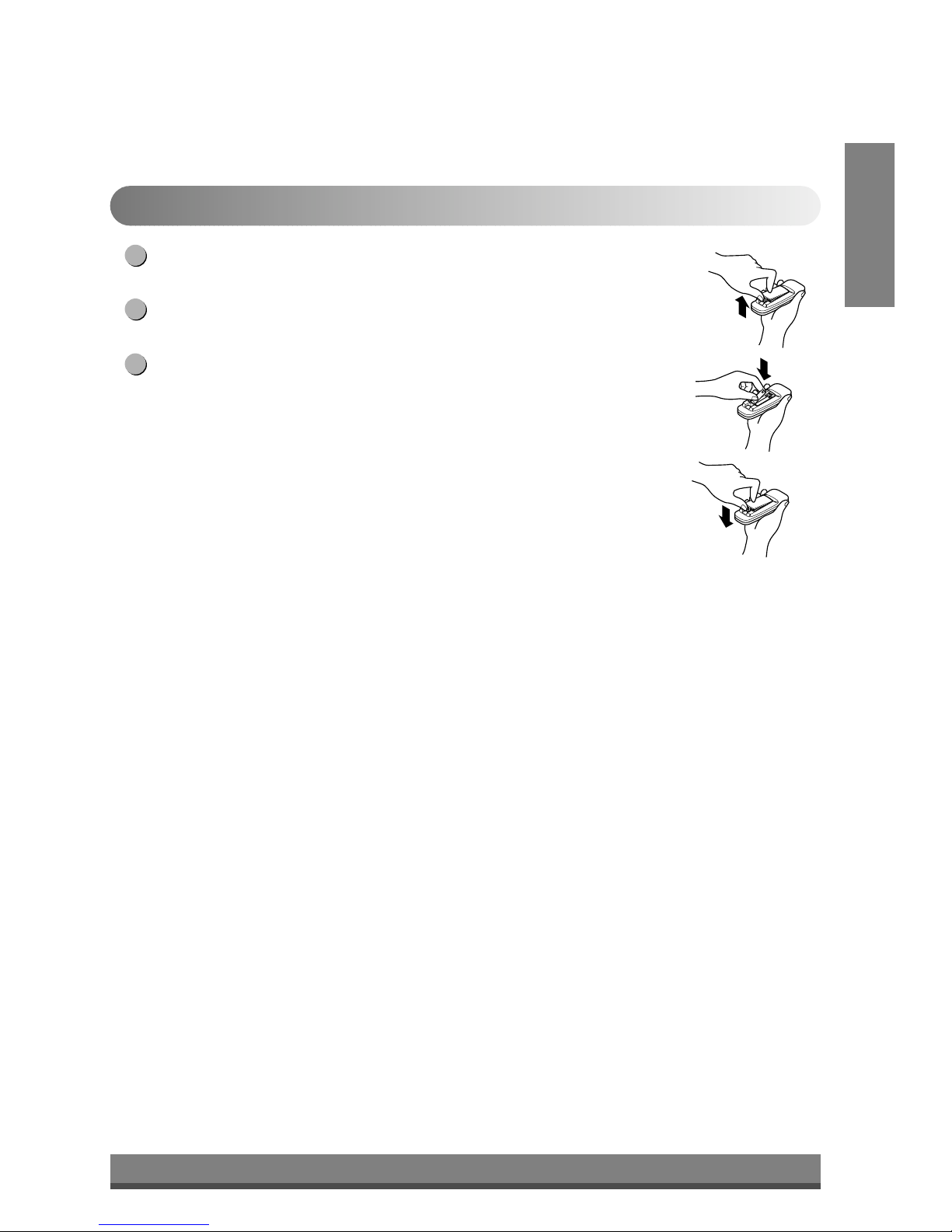
Push out the cover on the back of the remote control with your thumb.
Pay attention to polarity and insert two new AAA 1.5V batteries.
Reattach the cover.
NOTE: Do not use rechargeable batteries. Make sure that both batteries are new.
•In order to prevent discharge, remove the batteries from the remote control if the
air conditioner is not going to be used for an extended period of time
Keep the remote control away from extremely hot or humid places.
To maintain optimal operation of the remote control, the remote sensor should not
be exposed to direct sunlight.
•The remote control can be mounted on a wall using the mountable holder.
3
2
1
Inserting the Remote Control Batteries

8
Adjusting the Air Flow Direction
Operating
Instructions
Adjusting the Air Flow Direction
• Recommended orientation of louvers
Adjust louvers to face upwards when cooling to maximize cooling efficiency.
Airflow can be adjusted by changing the direction of the air conditioner's louvers. This can also increase the
cooling efficiency of the air conditioner.
• Adjusting Horizontal Air Flow Direction
Adjusting the vertical louvers left and right will
change horizontal airflow.
• Adjusting Vertical Air Flow Direction
Adjusting the horizontal vane up and down will
change vertical airflow. The vane can be adjusted
by nudging the vane backward or forward.
Adjusting horizontal air flow Adjusting vertical air flow

F1LOW
F2MED
F3HIGH
9
ENGLISH
Turn the power off and unplug the power plug before cleaning the air conditioner.
Air Filter
The Air Filter will become dirty as it removes dust from the inside air. It should be washed at least every 2 weeks.
If the Air Filter remains full of dust, the air flow will decrease and the cooling capacity will be reduced, possibly
damaging the unit.
How to remove the air filter
Pull the inlet grille forward, grasping both tabs, then
pull out the air filter.
Wash the Air Filter under the faucet with warm water.
Be sure to shake off all the water before replacing the
filter.
2
1
NOTE : In humid weather, excess water may cause the
BASE PAN to overflow and be splashed on the louver.
Care and Maintenance
Care and
Maintenance

Power
Temp
SleepMode
FanSpeed
132
151012
9
11813
5 6 47
14
10
Hardware Installation
Hardware
Installation
Product Features
CAUTION
This appliance should be installed in accordance with national wiring regulations. The following
information serves acts as a guide to help to explain product features.
1. CABINET
2. VERTICAL AIR DEFLECTOR
(HORIZONTAL LOUVER)
3. HORIZONTAL AIR DEFLECTOR
(VERTICAL LOUVER)
4. FRONT GRILLE
5. AIR INTAKE (INLET GRILLE)
6. AIR FILTER
7. CONTROL PANEL
8. TOP COVER
9. EVAPORATOR
10. CONDENSER
11. COMPRESSOR
12. BASE PAN
13. POWER CORD
14. BRACE
15. REMOTE CONTROLLER
Remote Control Operations
Product Features
Altri manuali per LP6000ER
3
Questo manuale è adatto per i seguenti modelli
2
Indice
Altri manuali LG Condizionatore d'aria

LG
LG SQ Manuale utente

LG
LG LW8012ERJ Manuale utente

LG
LG ARTCOOL AC12BQ Manuale utente

LG
LG MFL67088408 Manuale utente

LG
LG ABNW85GB9A0 Manuale utente

LG
LG LTUH368DLE1 Manuale utente

LG
LG LS120HSV4 Manuale utente

LG
LG ATNH243PLAE Manuale utente

LG
LG VR122CL NB2 Manuale utente

LG
LG LW1013CR Istruzioni per il montaggio