
LG M8003L Manuale utente

website http://www.LGEservice.com
e-mail http://www.LGEservice.com/techsup.html
ROOM AIR CONDITIONER
OWNER'S MANUAL
Please read the operating instructions and safety precau-
tions carefully and thoroughly before installing and oper-
ating your room air conditioner.
MANUEL D'UTILISATION
CLIMATISEUR DE FENÊTRE
Veuillez lire attentivement et en entier ce guide d’utilisa-
tion et les mesures de sécurité ci-incluses avant de
procéder à l’installation et au fonctionnement de votre cli-
matiseur.
ACONDICIONADOR DE AIRE
DE VENTANA
MANUAL DEL PROPIETARIO
Por favor lea las instrucciones de operación y las precau-
ciones de seguridad cuidadosa y totalmente antes de
instalar y operar su acondicionador de aire de ventana.
MODEL, MODELE, MODELO: M8003L
2
Safety Precautions
About the Controls on the Air Conditioner
Features and Installation
Before you call for service...
FOR YOUR RECORDS
Staple your receipt to this page in case you need it later.
Write down the model and serial numbers here:
Model #
Serial #
You can find them on a label on the side of each unit.
Dealer's Name
Date Purchased
Inside you will find many helpful hints on how to use and
maintain your air conditioner properly. Just a little preventive
care on your part can save you a great deal of time and
money over the life of your air conditioner.
You'll find many answers to common problems in the chart
of troubleshooting tips. If you review our chart of
Troubleshooting Tips first, you may not need to call for
service at all.
READ THIS MANUAL
CAUTION
• Contact the authorized Service technician for repair or
maintenance of this unit.
• The air conditioner is not intended for use by young
children or infirm persons without supervision.
• Young children should be supervised to ensure that they
do not play with the air conditioner.
Safety Precautions
Safety Precautions.............3
About the Controls on
the Air Conditioner
Controls..............................5
Remote Controller..............7
Ventilation ..........................8
Air Direction........................8
How to Secure Drain Pan...8
Care and Maintenance
Air filter Cleaning................9
How to insert Batteries.......9
Features
Features...........................10
Installation
How to install the unit.......11
Window Requirements.....11
Installation Kits Contents..12
Suggested Tool
Requirements...................12
Cabinet Installation...........13
How to use the Reversible
Inlet Grille.........................15
Electrical Data..................15
Electrical Safety ...............16
Before you call for
service...
Normal Operation.............17
Abnormal Operation.........17
WARNING
3
Safety Precautions
Safety Precautions
To prevent injury to the user or other people and property damage, the following instructions must be
followed.
■Incorrect operation due to ignoring of instruction will cause harm or damage. The seriousness is classified
by the following indications.
WARNING : This symbol indicates the possibility of death or serious injury.
CAUTION :This symbol indicates the possibility of injury or damage to
properties only.
■Meanings of symbols used in this manual are as shown below.
Be sure not to do.
Be sure to follow the instruction.
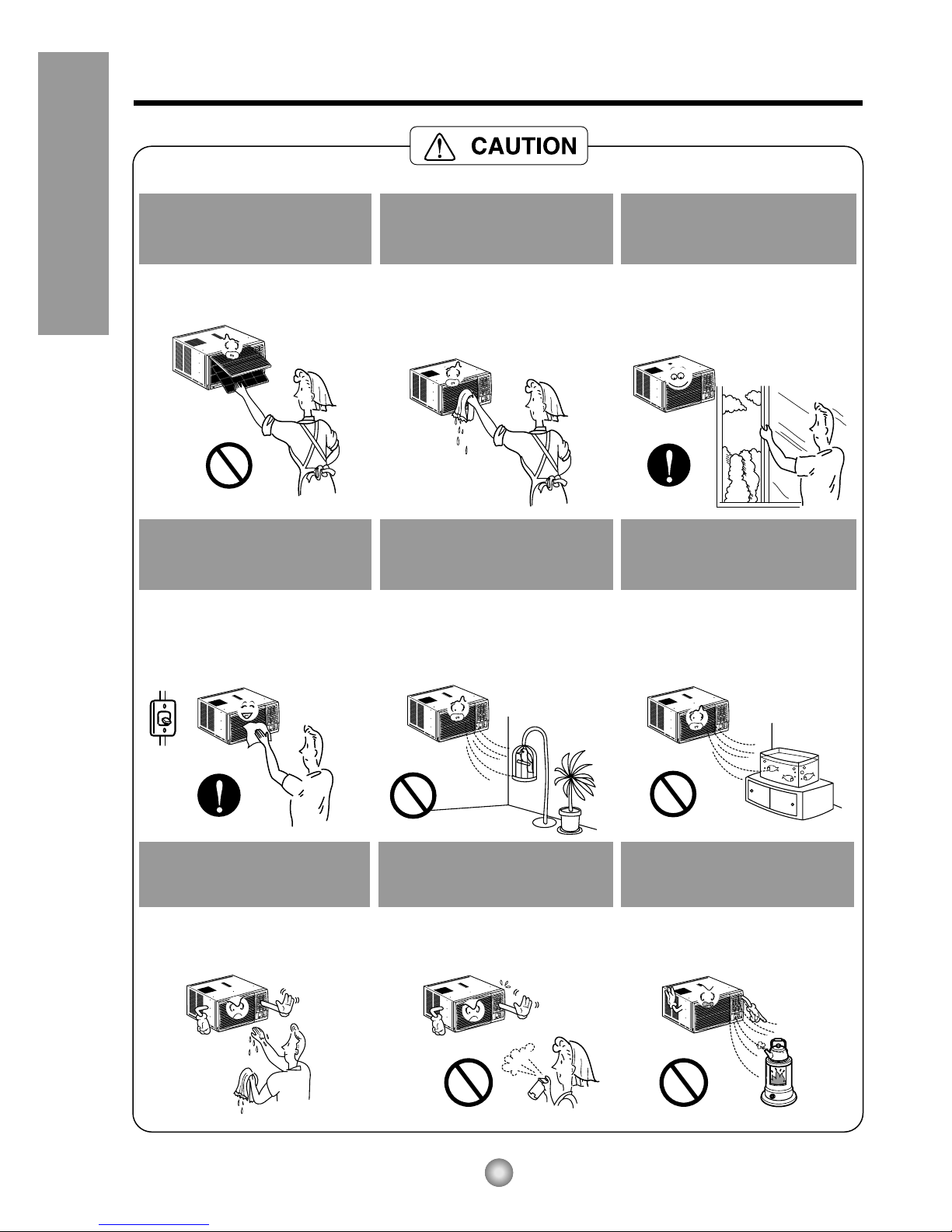
Plug in the power plug
properly.
• Otherwise, it will cause electric
shock or fire due to heat
generation.
Do not operate or stop the
unit by inserting or pulling
out the power plug.
• It will cause electric shock or fire
due to heat generation.
Do not damage or use an
unspecified power cord.
• It will cause electric shock or fire.
•
If the power cord is damaged, it must
be replaced by the manufacturer or
an authorized service center or a
similarly qualified person in order to
avoid a hazard.
Do not modify power cord
length or share the outlet
with other appliances.
• It will cause electric shock or fire
due to heat generation.
Do not operate with wet
hand or in damp
environment.
• It will cause electric shock.
Do not direct airflow at room
occupants only.
• This could damage your health.
4
Safety Precautions
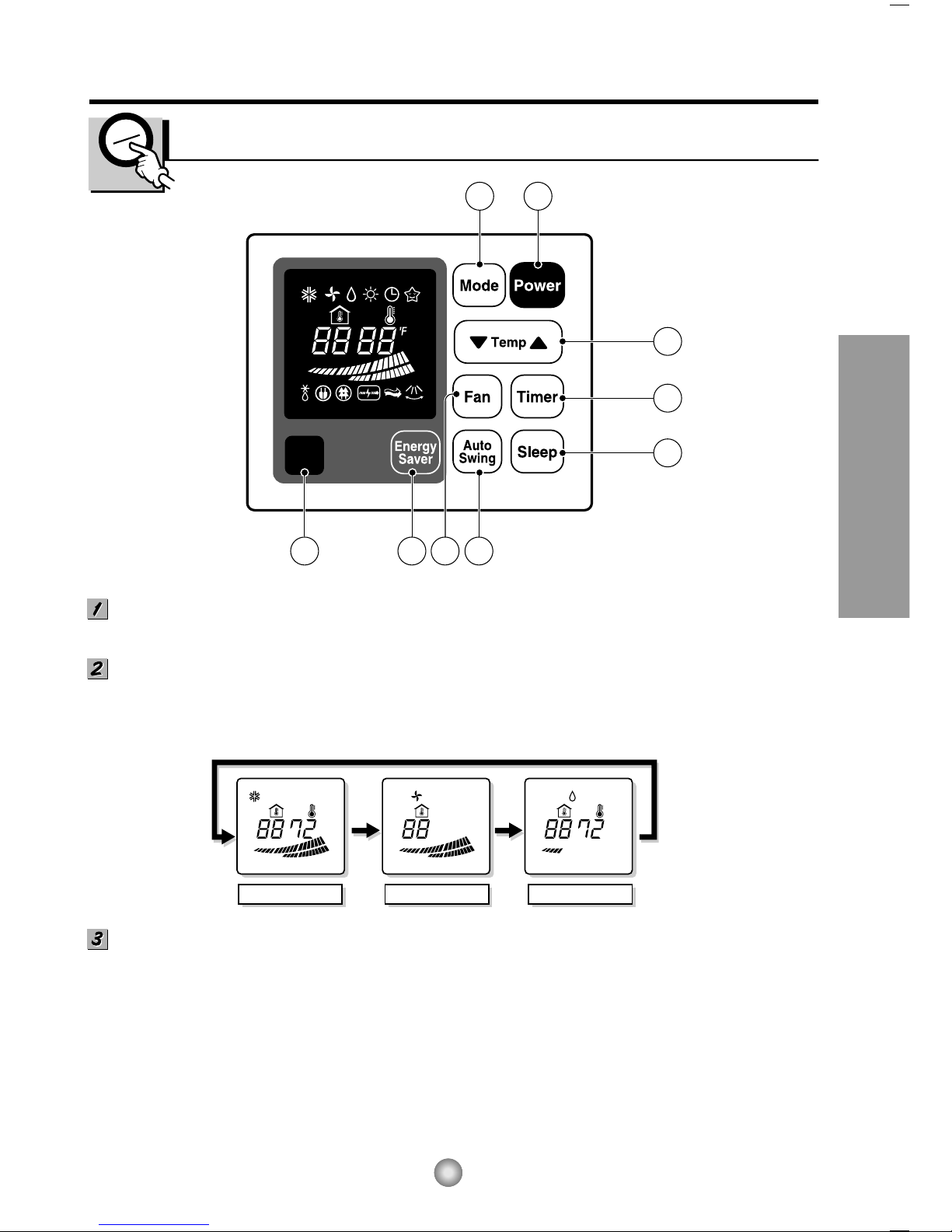
When the air filter is to be
removed, do not touch the
metal parts of the unit.
• It may cause an injury.
Do not clean the air
conditioner with water.
•Water may enter the unit and
degrade the insulation. It may
cause an electric shock.
Ventilate well when used
together with a stove, etc.
• An oxygen shortage may occur.
When the unit is to be
cleaned, switch off, and turn
off the breaker.
•Since the fan rotates at high
speed during operation, it may
cause an injury.
Do not put a pet or house
plant where it will be exposed
to direct air flow.
• This could injure the pets or
plants.
Do not use for special
purposes.
• Do not use this air conditioner to
preserve precision devices, food,
pets, plants, and art objects.
It may cause deterioration of
quality, etc.
Do not operate switches
with wet hands
.
• It may cause an electric shock.
Do not apply an insecticide
or flammable spray.
• It may cause a fire or deformation
of the cabinet.
Do not put a heater, etc.
where it is exposed to direct
air flow.
•
It may cause imperfect
combustion.
5
About the Controls on the Air Conditioner
About the Controls on the Air Conditioner
Controls
2 1
3
5
7
4 689
COOL FAN DRY
POWER BUTTON
To turn the air conditioner ON, push the button. To turn the air conditioner OFF, push the button again.
This button takes priority over any other buttons.
OPERATION MODE SELECTION BUTTON
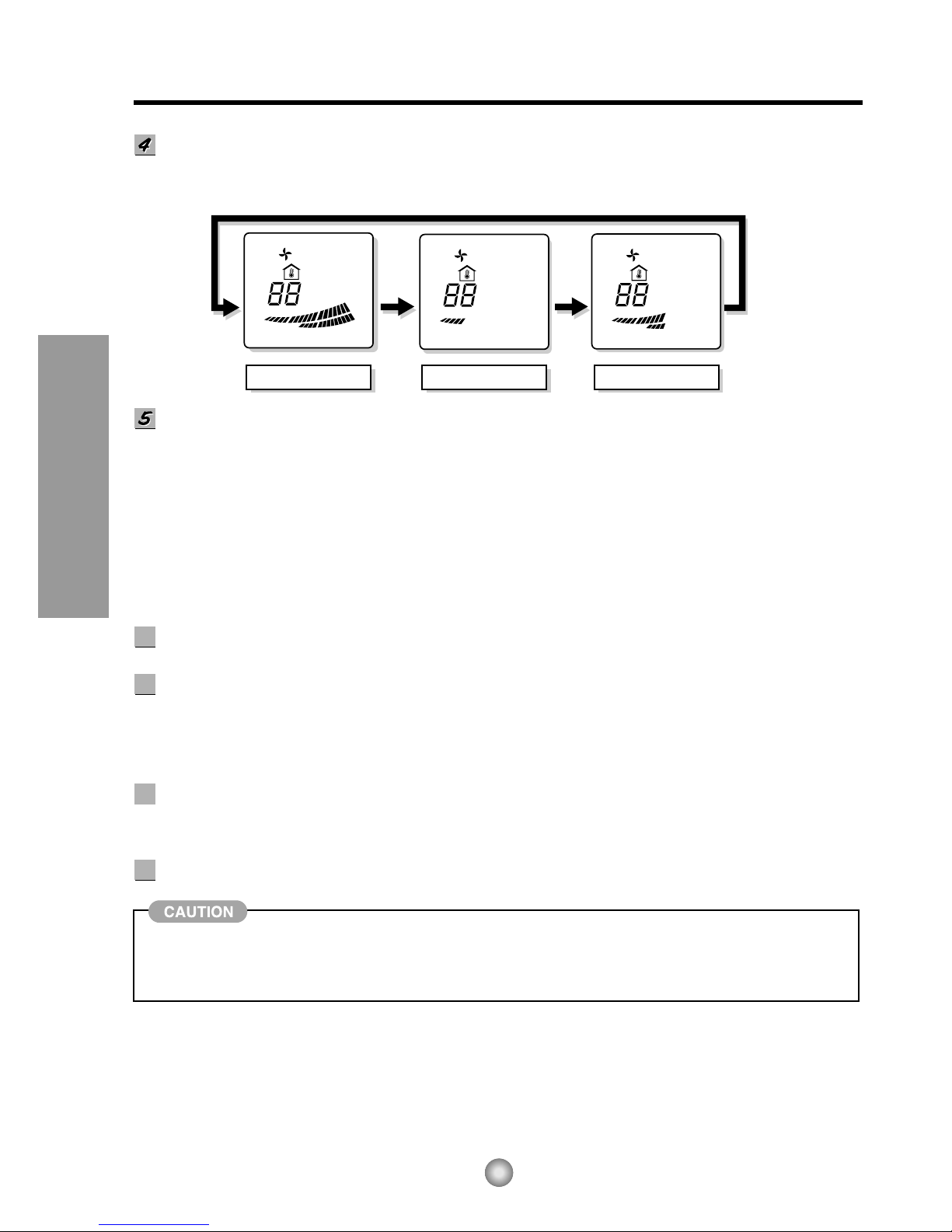
Every time you push this button, it will toggle between COOL, FAN and DRY as follows.
ROOM TEMPERATURE SETTING BUTTON
This button can automatically control the temperature of the room. The temperature can be set within a
range of 60°F to 86°F by 1°F. (16°C to 30°C by 1°C)
Select the lower number for lower temperature of the room.
6
About the Controls on the Air Conditioner
HIGH LOW MID
FAN SPEED SELECTOR
Every time you push this button, it is set as follows.
(Hi ➔ Low ➔ Mid ➔ Hi ➔ Low ➔...)
ON/OFF TIMER BUTTON
You can set the time when the unit will turn on or turn off automatically by pressing the timer button. If
the unit is operating, this button controls the time it will be turned off. If the unit is off state, this button
controls the time it will start. Every time you push this button, the remaining time will be set as follows.
- Stopping operation
(1Hour ➔ 2Hours ➔3Hours ➔4Hours ➔ 5Hours ➔6Hours ➔7Hours ➔8Hours ➔9Hours ➔10Hours
➔11Hours ➔12Hours ➔0Hour ➔ 1Hour ➔ 2Hours ➔... )
- Starting operation
(1Hour ➔ 2Hours ➔3Hours ➔4Hours ➔ 5Hours ➔6Hours ➔7Hours ➔8Hours ➔9Hours ➔10Hours
➔11Hours ➔12Hours ➔off ➔ 1Hour ➔ 2Hours ➔ ... )
AUTO SWING
This button can automatically control the air flow direction.
SLEEP MODE BUTTON
Press the sleep mode button to set the time you want the unit to turn off automatically. The timer is
programmed in one hour increment by pressing the button. Every time you push this button, the
remaining time will be set as follows.(1Hour ➔ 2Hours ➔3Hours ➔4Hours ➔ 5Hours ➔6Hours ➔
7Hours ➔0Hour ➔1Hour➔ 2Hours➔... )
ENERGY SAVER
If you push this button, the fan stops when the compressor stops cooling. Approximately every 3 minutes
the fan will turn on and check the room air temperature to determine if cooling is necessary.
REMOCON SIGNAL RECEIVER
When the air conditioner has been performed its cooling operation and is turned off or set to the fan
position, wait at least 3 minutes before resetting to the cooling operation again.
6
6
7
7
8
8
9
9
7
About the Controls on the Air Conditioner
Power
Temp
Fan Speed
Sleep Mode
Energy
Saver Auto
Swing
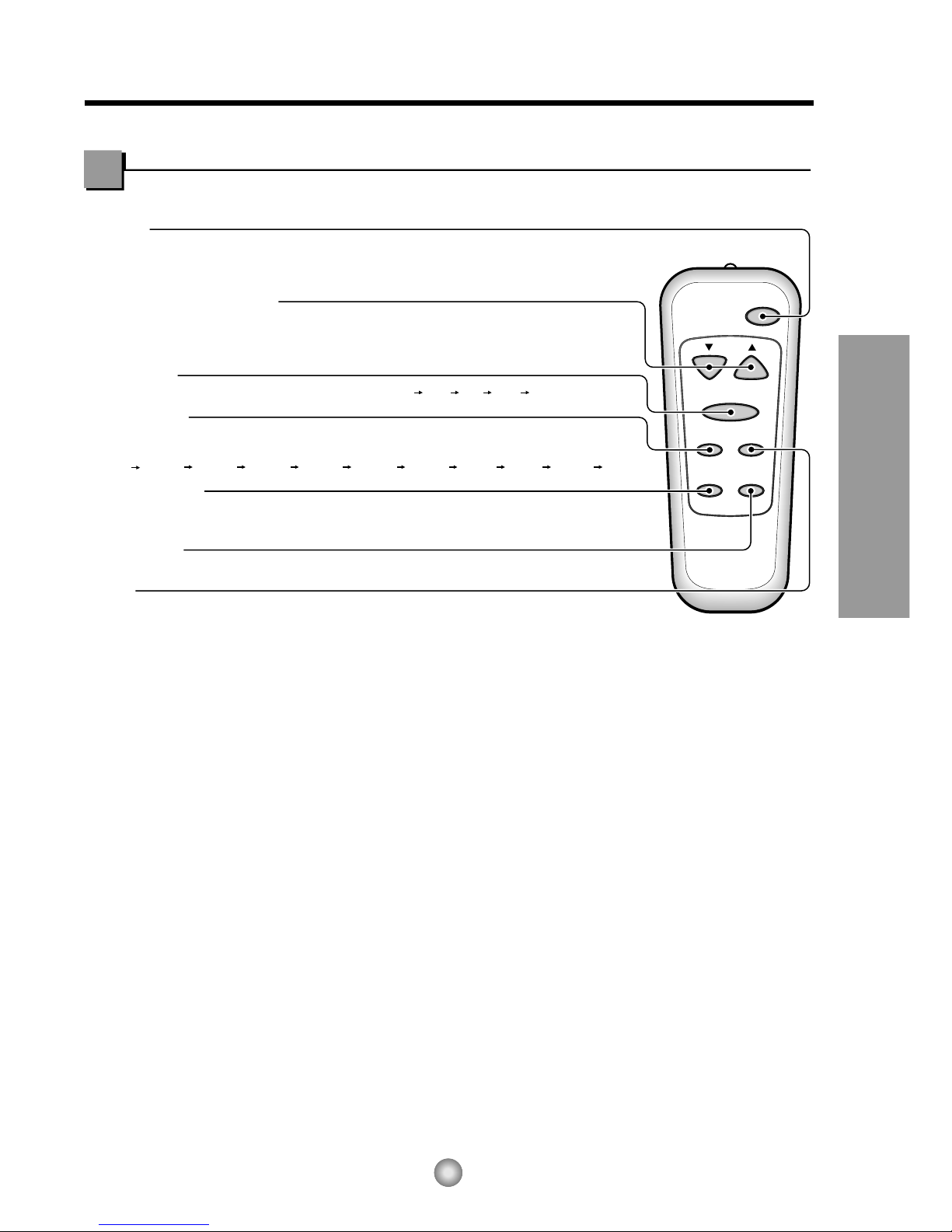
TEMPERATURE SETTING
•This button can automatically control the temperature of the room.
The temperature can be set within a range of 60°F to 86°F by 1°F.(16˚C to 30˚C by 1˚C)
Select the lower number for lower temperature of the room.
FAN SPEED
•Every time you push this button it is set as follows. (High Low Mid High ...).
POWER
•To turn the air conditioner ON, push the button. To turn the air conditioner OFF, push the button again.
•This button takes priority over any other buttons.
•When you first turn it on, the air conditioner is on the High cool mode and the temp. at 72°F(22˚C).
MODE
•Every time you push this button, it will toggle between COOL, FAN and DRY.
ENERGY SAVER
•If the switch is set to "On", the fan stops when the compressor stops cooling.
Approximately every 3 minutes the fan will turn on and check the room air to determine if cooling is needed.
AUTO SWING
•This button can automatically control the air flow direction.
SLEEP MODE
•Press the sleep mode button to set the time you want the unit to turn off automatically.
•Every time you push this button, the remaining time will be set as follows.
(1Hour 2Hours 3Hours 4Hours 5Hours 6Hours 7Hours 0Hour 1Hour 2Hours ... )
Remote Controller
VENTCLOSE OPEN
Part
A
Part
B
Drain pipe
Drain cap
8
About the Controls on the Air Conditioner
Additional controls and important information.
Ventilation
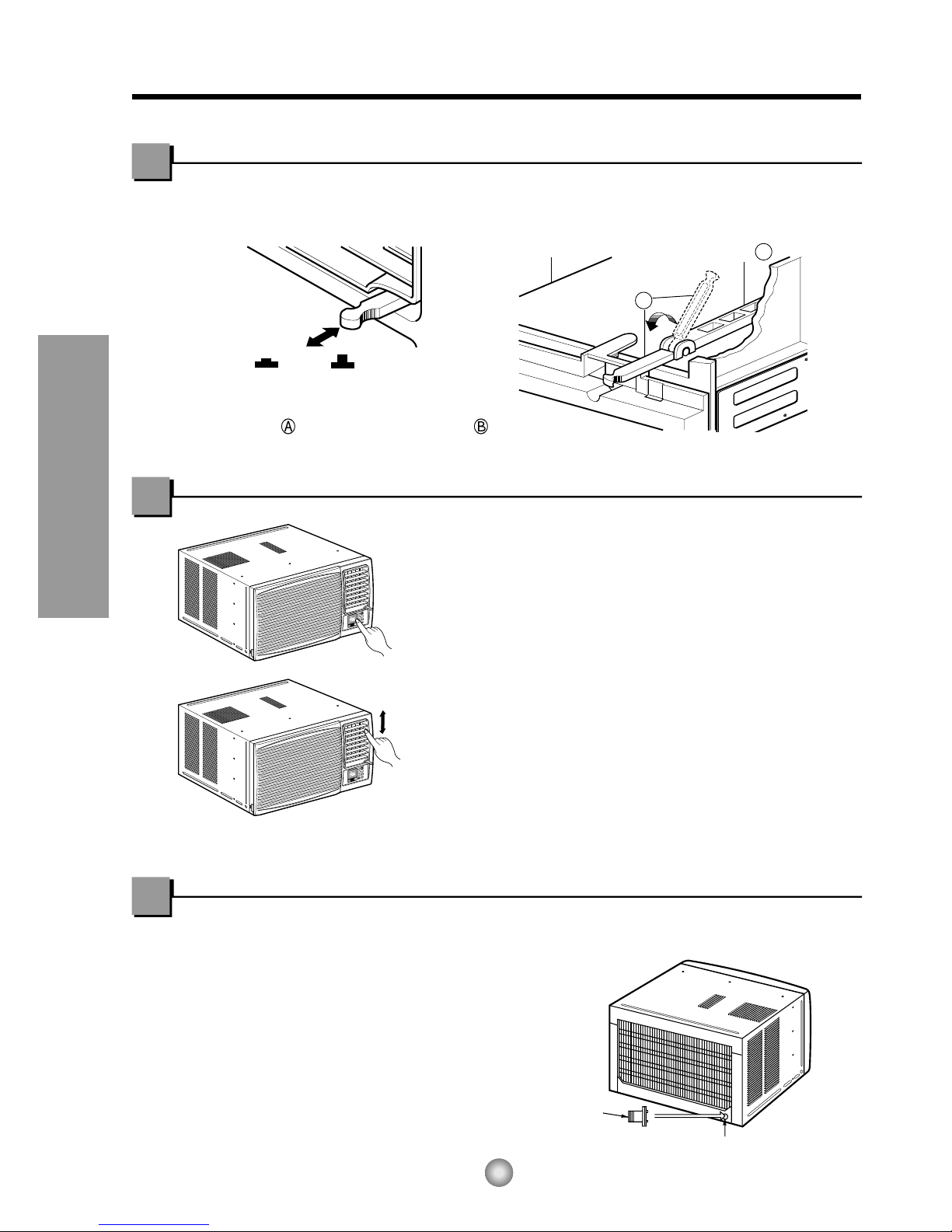
The ventilation lever must be in the CLOSE position in order to maintain the best cooling conditions.
When fresh air is necessary in the room, set the ventilation lever to the OPEN position.
The damper is opened and room air is drawn out.
NOTE: Before using the ventilation feature,
make a ventilation kit. First, pull down
part to horizontal line with part .
Air Direction
The direction of air can be controlled wherever you
want to cool by adjusting the horizontal louver and
the vertical louver.
• HORIZONTAL AIR-DIRECTION CONTROL
Control the horizontal air direction by air swing
system.
• VERTICAL AIR-DIRECTION CONTROL
The vertical air direction is adjusted by rotating the
horizontal louver.
How to Secure the Drain Pipe
In humid weather, excess water may cause the BASE
PAN to overflow. To drain the water, remove the DRAIN
CAP and secure the DRAIN PIPE to the rear hole of the
BASE PAN.
9
About the Controls on the Air Conditioner
Air Filter Cleaning
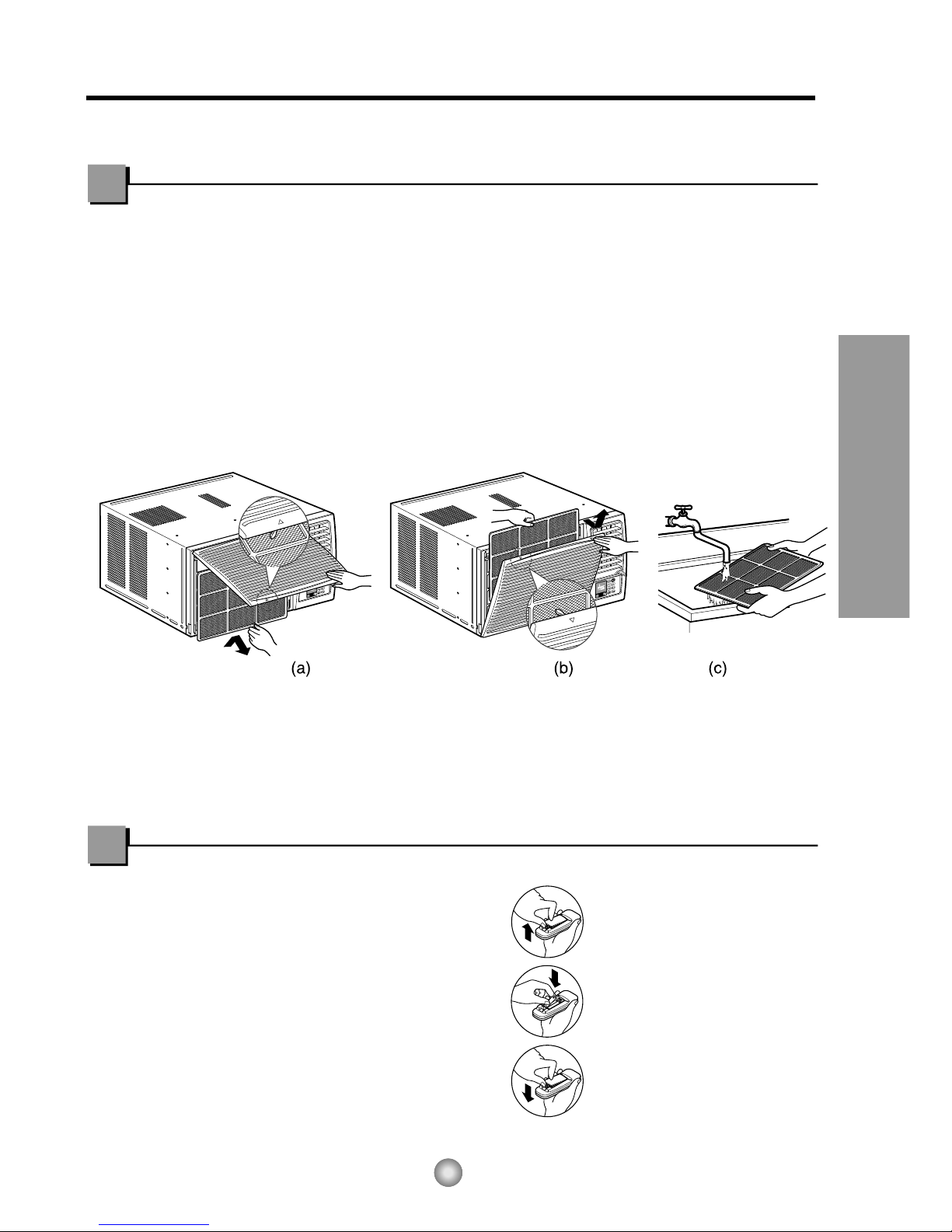
The air filter behind the front grille should be checked and cleaned at least once every 2
weeks or more often if necessary.
The grille is designed to clean the filter both upward and downward.
TO REMOVE:
1. Open the inlet grille upward by pulling out the bottom of the inlet grille or downward by
pulling out the top of the inlet grille.
2. Using the tab, pull up slightly on the filter to release it and pull it down or up.
3. Clean the filter with warm, soapy water below 40°C (104°F).
4. Rinse and gently shake the water from the filter and let it dry before replacing it.
CAUTION: DO NOT operate the air conditioner without a filter because dirt and lint will
clog it and reduce performance.
Care and Maintenance
TURN THE AIR CONDITIONER OFF AND REMOVE THE PLUG FROM THE POWER OUTLET.
1. Remove the cover from the back of the remote
controller.
2. Insert two batteries.
•Be sure that the (+) and (-) directions are correct.
•Be sure that both batteries are new.
3. Re-attach the cover.
•Do not use rechargeable
batteries. Such batteries
differ from standard dry
cells in shape, dimensions,
and performance.
•Remove the batteries from
the remote controller if the
air conditioner is not going
to be used for an extended
length of time.
HOW TO INSERT BATTERIES
10
Features and Installation
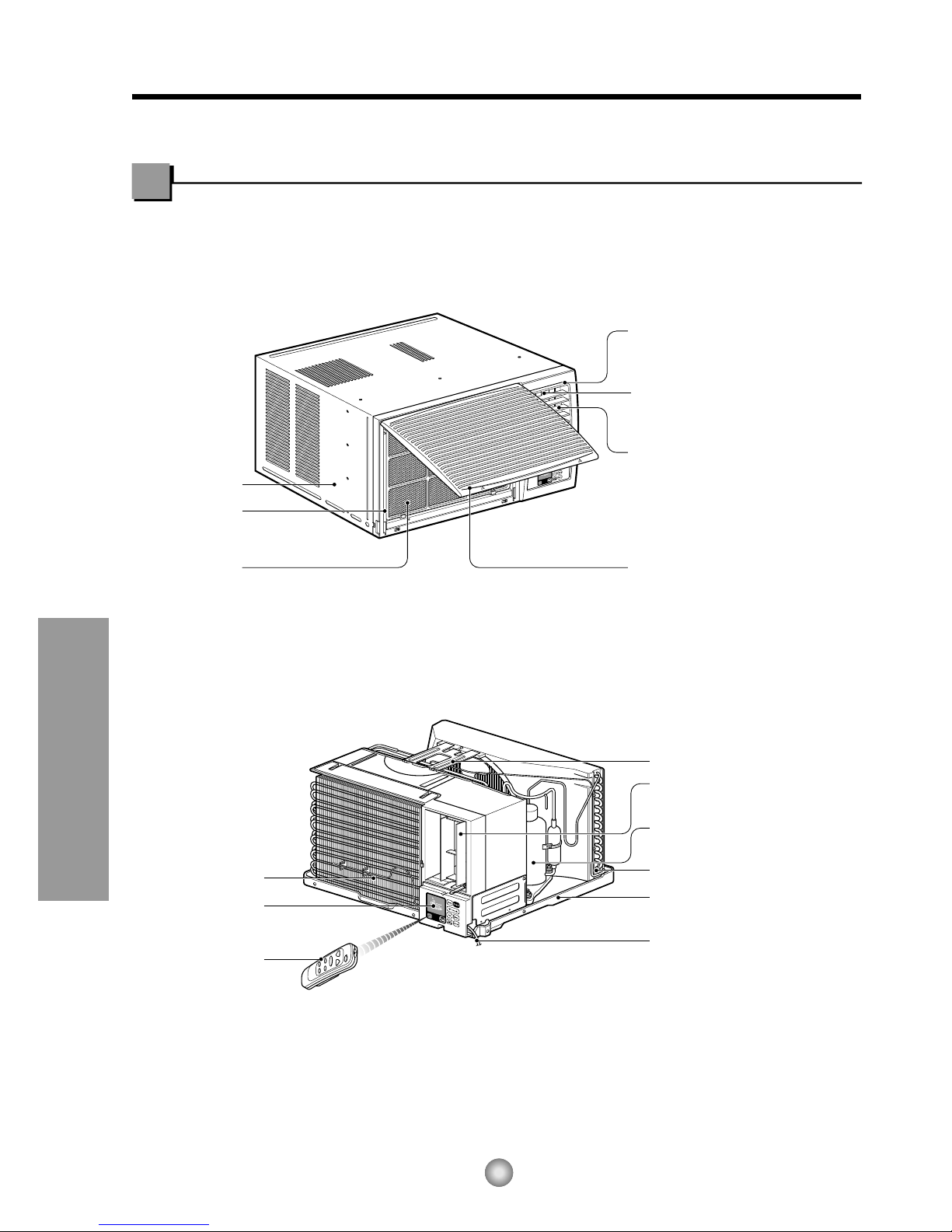
Learning parts name prior to installation will help you understand the installation procedure.
Features
Features
CABINET
FRONT GRILLE
AIR FILTER
EVAPORATOR
CONTROL BOARD
REMOTE
CONTROLLER
AIR INTAKE
(INLET GRILLE)
AIR DISCHARGE
POWER CORD
BASE PAN
CONDENSER
COMPRESSOR
BRACE
HORIZONTAL AIR DEFLECTOR
(VERTICAL LOUVER)
VERTICAL AIR DEFLECTOR
(HORIZONTAL LOUVER)
HORIZONTAL AIR DEFLECTOR
(VERTICAL LOUVER)
Indice
Altri manuali LG Condizionatore d'aria


LG
LG MFL68686515 Manuale utente

LG
LG LW1517IVSM Manuale utente

LG
LG Art Cool LMAN127HVT Manuale del proprietario

LG
LG PACM4B000 Manuale utente

LG
LG TM-1830C2L Manuale utente

LG
LG LC8000 Manuale utente

LG
LG LM50 Manuale operativo

LG
LG A8UW54GFA0 Manuale utente

LG
LG Multi-Inverter Type Manuale utente

LG
LG LW-C1211CL Manuale utente


