LG A340 Manuale utente

LG A340
User Guide
All screen shots in this guide are simulated.
Actual displays and the color of the phone may vary.
Some of the contents in this manual may differ from your phone
depending on the software of the phone or your service provider.
www.lg.comP/NO: MFL67476401(1.0)

LIMITED WARRANTY STATEMENT
1. WHAT THIS WARRANTY COVERS :
LG offers you a limited warranty that the enclosed
subscriber unit and its enclosed accessories
will be free from defects in material and
workmanship, according to the following terms
and conditions:
1. The limited warranty for the product extends
for TWELVE (12) MONTHS beginning on the
date of purchase of the product with valid
proof of purchase, or absent valid proof of
purchase, FIFTEEN (15) MONTHS from date
of manufacture as determined by the unit’s
manufacture date code.
2. The limited warranty extends only to the
original purchaser of the product and is not
assignable or transferable to any subsequent
purchaser/end user.
3. This warranty is good only to the original
purchaser of the product during the warranty
period as long as it is in the U.S, including
Alaska, Hawaii, U.S. Territories and Canada.
4. The external housing and cosmetic parts shall
be free of defects at the time of shipment and,
therefore, shall not be covered under these
limited warranty terms.
5. Upon request from LG, the consumer must
provide information to reasonably prove the
date of purchase.
6. The customer shall bear the cost of shipping
the product to the Customer Service
Department of LG. LG shall bear the cost of
shipping the product back to the consumer
after the completion of service under this
limited warranty.
2. WHAT THIS WARRANTY DOES NOT
COVER :
1. Defects or damages resulting from use of the
product in other than its normal and customary
manner.
2. Defects or damages from abnormal use,
abnormal conditions, improper storage, exposure
to moisture or dampness, unauthorized
modifications, unauthorized connections,
unauthorized repair, misuse, neglect, abuse,
accident, alteration, improper installation, or
other acts which are not the fault of LG, including
damage caused by shipping, blown fuses, spills
of food or liquid.
3. Breakage or damage to antennas unless caused
directly by defects in material or workmanship.
4. That the Customer Service Department at LG was
not notified by consumer of the alleged defect or
malfunction of the product during the applicable
limited warranty period.
5. Products which have had the serial number
removed or made illegible.
6. This limited warranty is in lieu of all other
warranties, express or implied either in fact or
by operations of law, statutory or otherwise,
including, but not limited to any implied warranty
of marketability or fitness for a particular use.
7. Damage resulting from use of non-LG approved
accessories.
8. All plastic surfaces and all other externally
exposed parts that are scratched or damaged due
to normal customer use.

9. Products operated outside published maximum
ratings.
10. Products used or obtained in a rental program.
11. Consumables (such as fuses).
3. WHAT LG WILL DO:
LG will, at its sole option, either repair, replace or
refund the purchase price of any unit that does
not conform to this limited warranty. LG may
choose at its option to use functionally equivalent
reconditioned, refurbished or new units or parts
or any units. In addition, LG will not re-install or
back-up any data, applications or software that
you have added to your phone. It is therefore
recommended that you back-up any such data
or information prior to sending the unit to LG to
avoid the permanent loss of such information.
4. STATE LAW RIGHTS :
No other express warranty is applicable to
this product. THE DURATION OF ANY IMPLIED
WARRANTIES, INCLUDING THE IMPLIED
WARRANTY OF MARKETABILITY, IS LIMITED TO
THE DURATION OF THE EXPRESS WARRANTY
HEREIN. LG INFOCOMM INC. SHALL NOT BE
LIABLE FOR THE LOSS OF THE USE OF THE
PRODUCT, INCONVENIENCE, LOSS OR ANY
OTHER DAMAGES, DIRECT OR CONSEQUENTIAL,
ARISING OUT OF THE USE OF, OR INABILITY
TO USE, THIS PRODUCT OR FOR ANY BREACH
OF ANY EXPRESS OR IMPLIED WARRANTY,
INCLUDING THE IMPLIED WARRANTY OF
MARKETABILITY APPLICABLE TO THIS PRODUCT.
Some states do not allow the exclusive of
limitation of incidental or consequential damages
or limitations on how long an implied warranty
lasts; so these limitations or exclusions may not
apply to you. This warranty gives you specific legal
rights and you may also have other rights which
vary from state to state.
5. HOW TO GET WARRANTY SERVICE :
To obtain warranty service, please call or fax to
the following telephone numbers from anywhere
in the continental United States:
Tel. 1-800-793-8896 or Fax. 1-800-448-4026
Or visit www.lg.com.
Correspondence may also be mailed to:
LG Electronics MobileComm U.S.A., Inc.
201 James Record Road Huntsville, AL 35824
DO NOT RETURN YOUR PRODUCT TO THE ABOVE
ADDRESS.
Please call or write for the location of the LG
authorized service center nearest you and for the
procedures for obtaining warranty claims.

4
Table of Contents
YourPhone......................8
Phone Components . . . . . . . . . . . . . . . . . . . 8
Rearview .......................... 10
Getting Started . . . . . . . . . . . . . . . . . .11
Installing the SIM card and battery . . . . . 11
Charging your phone . . . . . . . . . . . . . . . . . 13
Installing a memory card. . . . . . . . . . . . . . 13
General Functions . . . . . . . . . . . . . . .15
MakingaCall....................... 15
Answering a Call . . . . . . . . . . . . . . . . . . . . 16
Adjusting the Volume. . . . . . . . . . . . . . . . . 17
EnteringText........................ 17
In-CallMenu....................22
DuringaCall........................ 22
Making a Second Call . . . . . . . . . . . . . . . . . . 22
Swapping Between Two Calls. . . . . . . . . . . . . 22
Answering an Incoming Call . . . . . . . . . . . . . . 22
Rejecting an Incoming Call. . . . . . . . . . . . . . . 22
Muting the Microphone . . . . . . . . . . . . . . . . . 23
Using the Speakerphone . . . . . . . . . . . . . . . . 23
Conference Calls . . . . . . . . . . . . . . . . . . . . 23
Making a Second Call . . . . . . . . . . . . . . . . . . 24
Setting Up a Conference Call . . . . . . . . . . . . . 24
Place the Conference Call on Hold . . . . . . . . . 24
Adding Calls to the Conference Call . . . . . . . . 24
Private Call in a Conference Call. . . . . . . . . . . 24
Ending a Conference Call. . . . . . . . . . . . . . . . 24
MenuTree......................25
AddressBook...................28
Contact List. . . . . . . . . . . . . . . . . . . . . . . . . 28
ICE - Emergency Contacts. . . . . . . . . . . . . 28
NewContact........................ 29
CallerGroups ....................... 29
SpeedDial.......................... 29
SIMManagement.................... 29
ServiceNumber..................... 30
Mycontactinfo ..................... 30
About.............................. 30
Messaging .....................31
CreateMessage..................... 31
Inbox.............................. 34
Drafts ............................. 34

5
Outbox............................. 35
Voicemail .......................... 35
Message Settings.................... 36
Message Alert ........................ 36
SaveTo............................. 36
Signature ........................... 36
Text Message ........................ 36
Multimedia Message ................... 37
Voicemail Number ..................... 38
Service Message ...................... 38
YPmobile.......................39
Mobile Web .....................40
AppCenter ......................42
AT&T Navigator..................43
AT&T FamilyMap.................45
Social Net ......................46
AT&T Radio .....................47
My Stuff .......................48
Audio.............................. 48
Pictures............................ 48
Video .............................. 48
AT&T GPS .......................... 48
AT&T Music......................... 49
Tools .............................. 54
Voice Command ...................... 54
Recent Calls ......................... 56
Alarm Clock.......................... 56
Calendar ............................ 57
Notepad ............................ 58
Calculator ........................... 58
World Clock.......................... 58
Tasks .............................. 59
Stopwatch........................... 59
Tip Calculator ........................ 60
Unit Converter ........................ 60
Applications & Games ................ 60
Camera & Recordings ................ 61
Take Photo .......................... 61
Record Video......................... 62
Camera Album ....................... 63
Record Voice ......................... 64

6
Other Files.......................... 64
File Manager........................ 65
Settings........................66
Audio & Ringtones ................... 66
Shop Tones .......................... 66
Ringtone ............................ 66
Message Tone ........................ 66
Alert Tone ........................... 66
Keypad Tone ......................... 67
Multimedia .......................... 67
Call ................................ 67
Phone Settings ...................... 67
Date&Time ......................... 67
Languages .......................... 68
Set Hotkeys.......................... 68
Flight Mode .......................... 68
Security............................. 68
Reset Settings ........................ 69
Display ............................ 70
Shop Wallpapers ...................... 70
Wallpapers .......................... 70
Fonts .............................. 70
Clocks & Calendar ..................... 70
Brightness........................... 70
Backlight Timer ....................... 70
Color Schemes ....................... 70
Menu Styles ......................... 70
Call ............................... 70
Call Forwarding ....................... 71
Send My Number. . . . . . . . . . . . . . . . . . . . . . 71
Auto Redial .......................... 71
Answer Mode ........................ 71
Senior Mode ......................... 71
Minute Minder........................ 71
Call Waiting .......................... 72
Call Reject........................... 72
Send DTMF Tones ..................... 72
Accessability ......................... 72
Time & Cost ......................... 72
Noise Cancelation ..................... 72
Connection ......................... 72
Bluetooth............................ 73
USB Connection....................... 74
Internet Profiles ....................... 74
Access Points ........................ 75
Memory............................ 75
Used Space.......................... 75
Set Default Storage .................... 75
Applications ........................ 75

7
Messaging .......................... 76
Browser ............................ 76
VoiceCommand ...................... 78
TTS (Text-to Speech) . . . . . . . . . . . . . . . . . . . 78
SoftwareUpdate..................... 78
PhoneInfo.......................... 78
myAT&T........................79
Q&A...........................80
Accessories ....................81
For Your Safety . . . . . . . . . . . . . . . . . .82
Safety Guidelines . . . . . . . . . . . . . . . .87
Glossary ......................108
Index.........................110

8
Your Phone
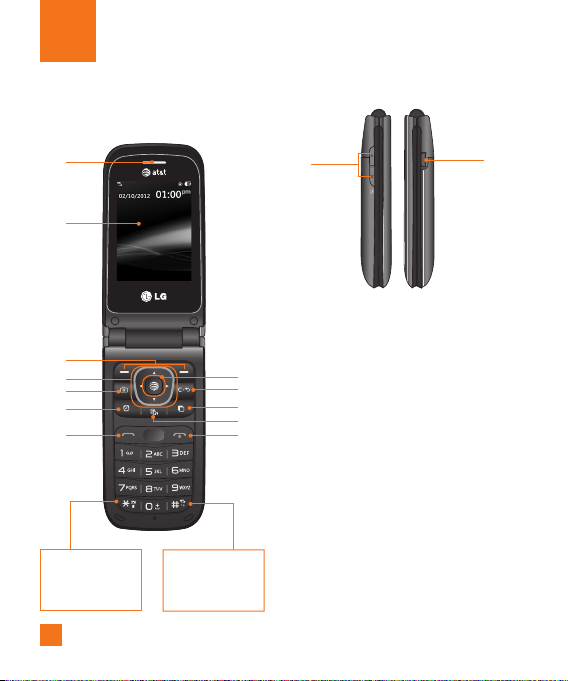
Phone Components
12
3
4
711
Press and hold
to acess Voice
Recorder.
Press and hold to
activate/deactivate
Vibrating Mode.
5
6
9
10
8
1
2
14
13

9
1. Earpiece: Lets you hear the caller during a
call.
2. Main LCD: Displays phone status icons,
menu items, web items, web information,
pictures and more, in full color.
3. Left Soft Key/Right Soft Key: Each of
these keys perform the functions indicated
by the text on the display immediately above
them.
4. Navigation Keys
Standby Mode Shortcut Keys:
Address Book
New Message
Calendar
My Stuff
In a menu: Navigates between menus.
5. Camera Key: Lets you activate the Camera
and take pictures.
6. Alarm Clock Key: Allows you to set an
alarm.
7. Send Key: Press this key in standby mode
to quickly access the most recent missed,
dialed, and received calls.
8. Browser/OK Key: Lets you access the
Mobile Web in standby mode. When
navigating through a menu, selects a
highlighted choice.
9. Clear/Back Key: Allows you to return to the
previous screen. Press and hold to activate
the Voice Command function.
10. Multi-tasking Key: Opens the multi-
tasking menu.
11. TTS Mode Key: Lets you turn the TTS
mode on/off.
12. End/Power Key: Allows you to power
the phone on or off, end calls, or return to
standby mode.
13. Volume Keys: Allows you to control the
Master Volume while in standby mode and
the earpiece volume during a call.
14. Charger/USB Port: Allows you to connect
a charger or other compatible accessories.
Your Phone

10
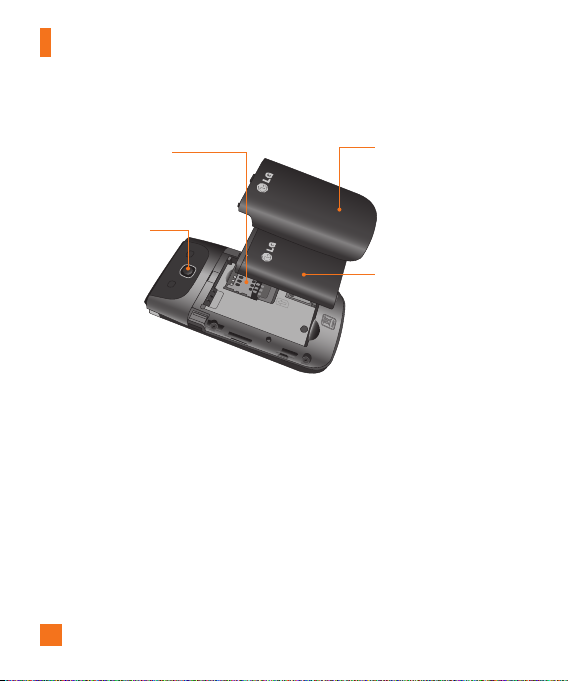
Rear view
Back Cover
Camera Lens
SIM Card Slot
Battery
Your Phone
Altri manuali per A340
3
Indice
Altri manuali LG Telefono cellulare
Manuali Telefono cellulare popolari di altre marche

Blackbe;rry
Blackbe;rry Q10 Manuale utente

Blackbe;rry
Blackbe;rry Bold 9900 Manuale utente

Blackbe;rry
Blackbe;rry STORM 9500 - VERSION 5.0 Manuale utente

ISAFE MOBILE
ISAFE MOBILE IS655.2 Manuale utente

Blackbe;rry
Blackbe;rry CURVE 8300 - SMARTPHONE Manuale utente

Blackbe;rry
Blackbe;rry 8707 - VERSION 4.1 Manuale utente