
LG G7030 Manuale utente

P/N : MMBB0000000
ISSUE 1.0
PRINTED IN KOREA
USER’S MANUAL
MODEL : G7030
G•P•R•S•P•H•O•N•E
ENGLISH
GPRS Phone
USER’S MANUAL
MODEL : G7030
Please read this manual carefully
before operating your set.
Retain it for future reference.

ENGLISH
GPRS Phone
USER’S MANUAL
MODEL: G7030
Please read this manual carefully
before operating your set.
Retain it for future reference.


3
For Your Safety
All radio transmitters carry risks of interference with electronics in
close proximity.
Mobile Phones must be switched off at all times in an
aircraft.
Avoid pointing active infrared port at eyes.
Do not use your phone near petrol stations, fuel
depots, chemical plants or blasting operations.
Switch off the phone in any area where required by
special regulations. For example, do not use your
phone in hospitals as it may affect sensitive medical
equipment.
Minor interference may affect TVs, radios, PCs, etc.
Do not hold the phone in your hand while driving.
Do not dismantle the phone or battery.
Keep the phone in a safe place out of children’s reach.
It includes small parts which if detached may cause a
choking hazard.

For Your Safety
4
Do not touch the charger or phone with wet hands.
Please note:
Batteries should be disposed of in accordance with
relevant legislation.
Only use ORIGINAL accessories to avoid damage to
your phone.
Emergency call may not be available under all cellular
networks. Therefore, you should never depend solely
on the phone for emergency calls.
Important Information
This user’s guide contains important information on the use
and operation of this phone. Please read all the information
carefully for optimal performance and to prevent any damage
to or misuse of the phone. Any changes or modifications not
expressly approved in this user’s guide could void your
warranty for this equipment.
For your safety, use ONLY specified ORIGINAL
batteries and chargers.

5
Contents
Overview
Package contents ..................................................................... 9
Part of the Phone .................................................................... 10
• the front.................................................................................. 10
• the back ................................................................................. 11
• Sub LCD of the phone .......................................................... 12
Key Description ....................................................................... 13
• Side Keys .............................................................................. 14
• Alphanumeric Keys ............................................................... 15
Display Information
Display Information ................................................................ 16
• On-Screen Icons.................................................................... 16
• Top Menu Icons ..................................................................... 17
Getting Started
Installation ............................................................................... 18
• Inserting the SIM Card .......................................................... 18
• Installing the Battery .............................................................. 18
• Charging the Battery.............................................................. 19
• Disconnecting the charger .................................................... 20
Powering On Sequence .......................................................... 21
• To get started with the phone ............................................... 21
• To turn off the phone ............................................................. 21
Access Codes .......................................................................... 22
• PIN code (4 to 8 digits) ......................................................... 22
• PIN2 code (4 to 8 digits) ........................................................ 22
• PUK code (4 to 8 digits)......................................................... 22
• PUK2 code (4 to 8 digits)....................................................... 22
• Security code (4 to 8 digits) ................................................... 23

Contents
6
Making and Answering calls................................................... 24
• Making a call.......................................................................... 24
• Making a call by S[Send key] ........................................... 24
• International Calls ................................................................. 24
• Making a call using the Phonebook ...................................... 24
• Making call by Speed dials ................................................... 24
Menu Description
Phonebook ............................................................................... 25
Menu Tree ................................................................................ 26
Messages [Menu 1] ................................................................. 28
• Write message [Menu 1-1] .................................................... 28
• Inbox [Menu 1-2].................................................................... 33
• Outbox [Menu 1-3] ................................................................. 34
• Info service [Menu 1-4] .......................................................... 35
• Voice messages [Menu 1-5] .................................................. 36
• Delivery reports [Menu 1-6].................................................... 37
• Templates [Menu 1-7]............................................................ 37
• Settings [Menu 1-8]................................................................ 38
Call register [Menu 2] ............................................................. 39
• Missed calls [Menu 2-1] ......................................................... 39
• Received calls [Menu 2-2]...................................................... 39
• Dialled calls [Menu 2-3].......................................................... 39
• Clear recent calls [Menu 2-4]................................................. 40
• Call durations [Menu 2-5]....................................................... 40
• Call costs [Menu 2-6] ............................................................. 41
• Cost settings [Menu 2-7]........................................................ 41
• GPRS information [Menu 2-8]................................................ 42

7
Profiles [Menu 3] ...................................................................... 43
• Vibrate only [Menu 3-1] ......................................................... 43
• Quiet [Menu 3-2] .................................................................... 43
• General [Menu 3-3]................................................................ 43
• Loud [Menu 3-4]..................................................................... 44
• Headset [Menu 3-5] ............................................................... 44
• Car [Menu 3-6] ...................................................................... 44
Settings [Menu 4] .................................................................... 46
• Alarm clock [Menu 4-1] ......................................................... 46
• Date & Time [Menu 4-2] ........................................................ 46
• Phone settings [Menu 4-3]..................................................... 48
• Call settings [Menu 4-4] ......................................................... 49
• Security settings [Menu 4-5] .................................................. 52
• Network settings [Menu 4-6] .................................................. 55
• GPRS settings [Menu 4-7] ..................................................... 55
• Restore factory settings [Menu 4-8]....................................... 56
Call divert [Menu 5] ................................................................. 57
• All voice calls [Menu 5-1] ...................................................... 57
• If busy [Menu 5-2] ................................................................. 57
• If not answered [Menu 5-3] .................................................... 57
• If out of reach [Menu 5-4]....................................................... 57
• All data calls [Menu 5-5]......................................................... 57
• All fax calls [Menu 5-6]........................................................... 57
• Cancel all diverts [Menu 5-7] ................................................. 58
Organiser [Menu 6] ...................................................................59
• Schedule [Menu 6-1].............................................................. 59
• Memo [Menu 6-2]................................................................... 60
• Phonebook [Menu 6-3] .......................................................... 61

8
Fun & Tools [Menu 7] ............................................................. 67
• Game [Menu 7-1] .................................................................. 67
• Calculator [Menu 7-2] ............................................................ 67
• My folder [Menu 7-3] ............................................................. 67
• Unit converter [Menu 7-4] ..................................................... 68
• World time [Menu 7-5] ........................................................... 68
• Voice recorder [Menu 7-6] .................................................... 69
• Infrared [Menu 7-7] ............................................................... 69
Internet [Menu 8] ..................................................................... 70
• Home [Menu 8-1] .................................................................. 70
• Bookmarks [Menu 8-2] .......................................................... 70
• Push messages [Menu 8-3] .................................................. 70
• Profiles [Menu 8-4] ................................................................ 71
• Go to URL [Menu 8-5] ........................................................... 73
• Cache settings [Menu 8-6] .................................................... 74
• WAP information [Menu 8-7] ................................................. 74
• Reset profiles [Menu 8-8] ...................................................... 74
Internet On-line menu ............................................................. 75
SIM service [Menu 9] .............................................................. 76
Care and Maintenance ............................................................ 77
Technical data ......................................................................... 79
Contents
Overview
9
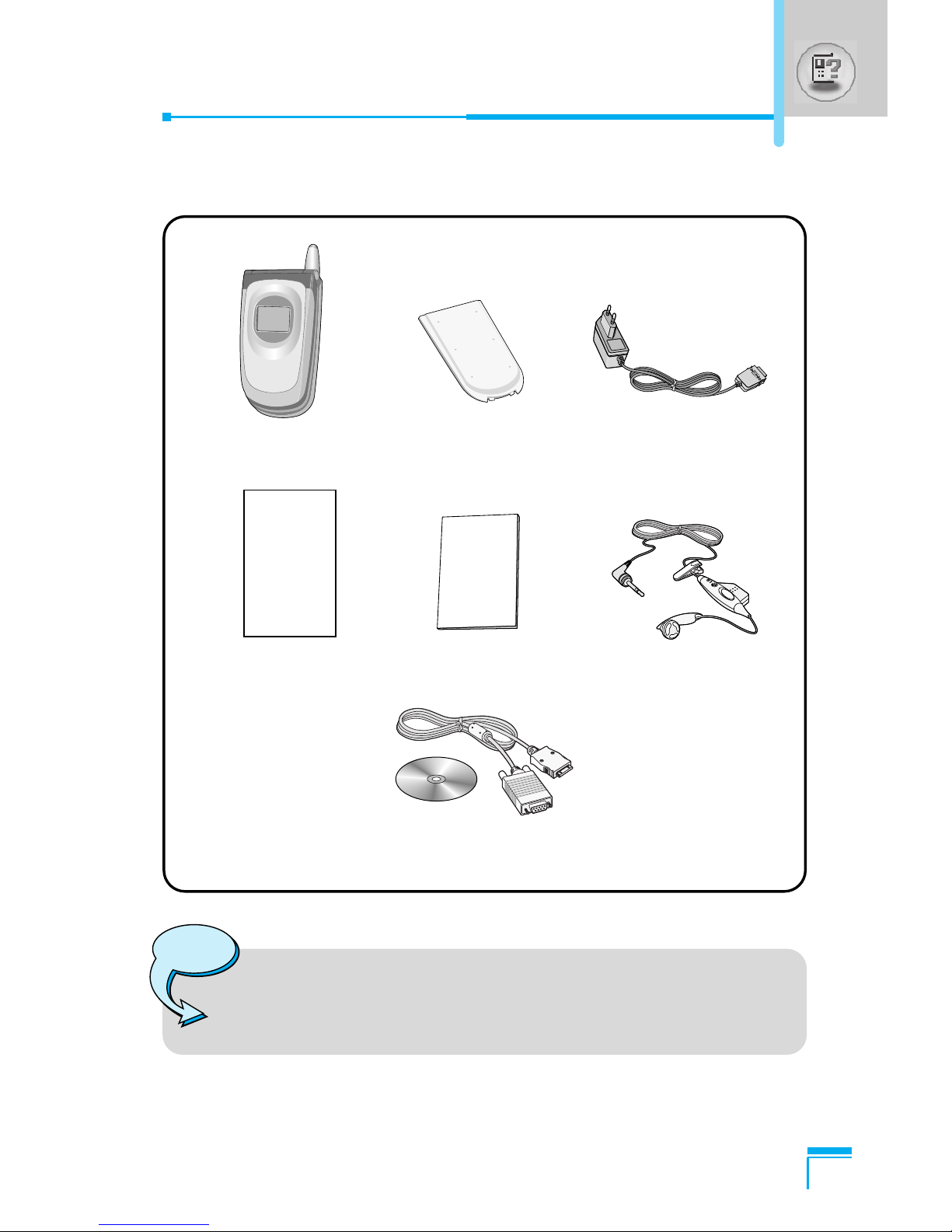
Package contents
Check to make sure that you have all the parts shown below.
Handset Travel Adapter
Warranty Card User’s manual Portable handsfree
Standard Battery
Note
• The package contents may vary in different regions.
Please check with LG service agent in your region for
enquiry.
CD/Data Kit
Altri manuali per G7030
1
Indice
Altri manuali LG Telefono cellulare


Manuali Telefono cellulare popolari di altre marche


Blackbe;rry
Blackbe;rry Q10 Manuale utente

Blackbe;rry
Blackbe;rry Bold 9900 Manuale utente

Blackbe;rry
Blackbe;rry STORM 9500 - VERSION 5.0 Manuale utente

ISAFE MOBILE
ISAFE MOBILE IS655.2 Manuale utente

Blackbe;rry
Blackbe;rry CURVE 8300 - SMARTPHONE Manuale utente

Blackbe;rry
Blackbe;rry 8707 - VERSION 4.1 Manuale utente