LG KF510 Manuale utente

KF510 User Guide
Some of the contents in this manual may
differ from your phone depending on the
software of the phone or your service
provider.

Congratulations on your purchase of the
advanced and compact KF510 phone by LG,
designed to operate with the latest digital
mobile communication technology.
Disposal of your old appliance
1When this crossed-out wheeled bin symbol is attached to a product it
means the product is covered by the European Directive 2002/96/EC.
2All electrical and electronic products should be disposed of separately
from the municipal waste stream via designated collection facilities
appointed by the government or the local authorities.
3The correct disposal of your old appliance will help prevent potential
negative consequences for the environment and human health.
4For more detailed information about disposal of your old appliance,
please contact your city office, waste disposal service or the shop
where you purchased the product.

SET UP
YOUR STANDBY SCREEN
THE BASICS
GET CREATIVE
GET ORGANISED
BROWSER
SETTINGS
ACCESSORIES
01
02
03
04
05
06
07
08

LG KF510 | User Guide
4
01 SET UP
Getting to know your phone .......................8
Open view ................................................. 9
Installing the SIM and battery ..................10
Memory card ........................................... 13
Installing a memory card........................13
Removing the memory card....................13
Formatting the memory card .................. 13
Menu map ...............................................14
02 YOUR STANDBY SCREEN
Your standby screen ................................15
Touchpad tips........................................15
The quick keys ...................................... 16
The main menu .....................................16
The status bar ....................................... 17
Selecting functions and options ...............18
03 THE BASICS
Calls ........................................................19
Making a call......................................... 19
Making a call from your contacts ............ 19
Answering and rejecting a call................19
In-call options........................................20
Adjusting the call volume ......................20
Speed dialling........................................20
Viewing your call logs ............................ 21
Using call divert..................................... 21
Contents
Using call barring................................... 22
Changing the call settings ......................22
Contacts ..................................................23
Searching for a contact..........................23
Adding a new contact ............................23
Contact options ..................................... 23
Adding a contact to a group ................... 24
Renaming a group .................................24
Adding a picture to a contact.................. 24
Copying your contacts to your SIM.......... 25
Deleting all your contacts .......................25
Viewing information ............................... 25
Messaging............................................... 26
Messaging ............................................ 26
Sending a message ............................... 26
Entering text..........................................27
Setting up your email.............................28
Sending an email using your new
account.................................................29
Message folders....................................29
Managing your messages ......................30
Using templates..................................... 30
Changing your text message settings...... 31
Changing your multimedia message
settings................................................. 31
Changing your email settings ................. 32
Changing your other settings..................32

5
04 GET CREATIVE
Camera.................................................... 33
Taking a quick photo..............................33
After you’ve taken your photo.................33
Getting to know the viewfinder................34
Using the quick settings ......................... 34
Using the advanced settings................... 35
Using the flash ......................................35
Changing the image size........................36
Viewing your saved photos.....................36
Using zoom when viewing a photo .......... 36
Setting a photo as Wallpaper
or Picture ID..........................................36
Video camera........................................... 37
Shooting a quick video...........................37
After you’ve shot your video ...................37
Getting to know the viewfinder................38
Using the quick settings ......................... 38
Using the advanced settings................... 39
Watching your saved videos ...................39
Adjusting the volume when
viewing a video...................................... 39
MP3 player .............................................. 40
MP3 player ........................................... 40
Transferring music onto your phone ........40
Playing a song.......................................40
Using options while playing music...........40
Creating a playlist..................................41
Playing a playlist....................................41
Editing a playlist ....................................41
Deleting a playlist .................................. 42
FM radio .................................................. 43
Using the FM radio ................................ 43
Searching for stations ............................ 43
Resetting channels ................................ 43
Listening to the radio ............................. 43
Voice recorder ......................................... 44
Using the voice recorder ........................44
Recording your voice memo ...................44
Sending a voice recording ...................... 44
My stuff ................................................... 45
Images..................................................45
Images options menu.............................45
Sending a photo .................................... 46
Organising your images .........................46
Deleting an image .................................46
Deleting multiple images........................46
Creating a slide show.............................47
Sounds .................................................47
Using a sound ....................................... 47
Videos ..................................................47
Watching a video...................................47
Using options while video is paused .......48
Sending a video clip............................... 48
Video options menu ............................... 48
Documents............................................49

Viewing a document ..............................49
Others ..................................................49
External memory ................................... 49
Using your phone as a Mass
storage device....................................... 49
Transferring a file to your phone .............50
Sending and receiving your files using
Bluetooth ..............................................51
Games and Apps...................................... 52
Games and Apps ................................... 52
Playing a game...................................... 52
Viewing applications .............................. 52
Changing the network profile.................. 52
05 GET ORGANISED
Organiser................................................. 53
Adding an event to your calendar ........... 53
Editing a calendar event.........................53
Sharing a calendar event........................54
Adding a memo..................................... 54
Tools .......................................................55
Setting your alarm .................................55
Using your calculator ............................55
Using the stopwatch ..............................55
Converting a unit ................................... 56
Adding a city to your world clock ............56
SIM services..........................................56
Contents
06 BROWSER
Browser .................................................. 57
Accessing the web.................................57
Yahoo! ..................................................57
Adding and accessing your
bookmarks............................................57
Saving a page .......................................58
Accessing a saved page.........................58
Viewing your browser history .................58
Changing the web browser settings ........ 58
07 SETTINGS
Settings ..................................................59
Changing your profiles ........................... 59
Personalising your profiles......................59
Changing your date & time.....................59
Changing the language .......................... 59
Changing your display settings ...............59
Changing your security settings..............60
Using flight mode...................................61
Resetting your phone.............................61
Power save ..........................................61
Viewing memory status..........................61
Changing your Bluetooth settings............61
Changing your connectivity settings ........ 61
Pairing with another Bluetooth device ..... 62
Using a Bluetooth headset...................... 62
6LG KF510 | User Guide

08 ACCESSORIES
Accessories .............................................63
Network service.......................................64
Technical data .........................................64
General ...............................................64
Ambient Temperatures .......................... 64
Guidelines for safe and efficient use .......66
7

LG KF510 | User Guide
8
SET UP
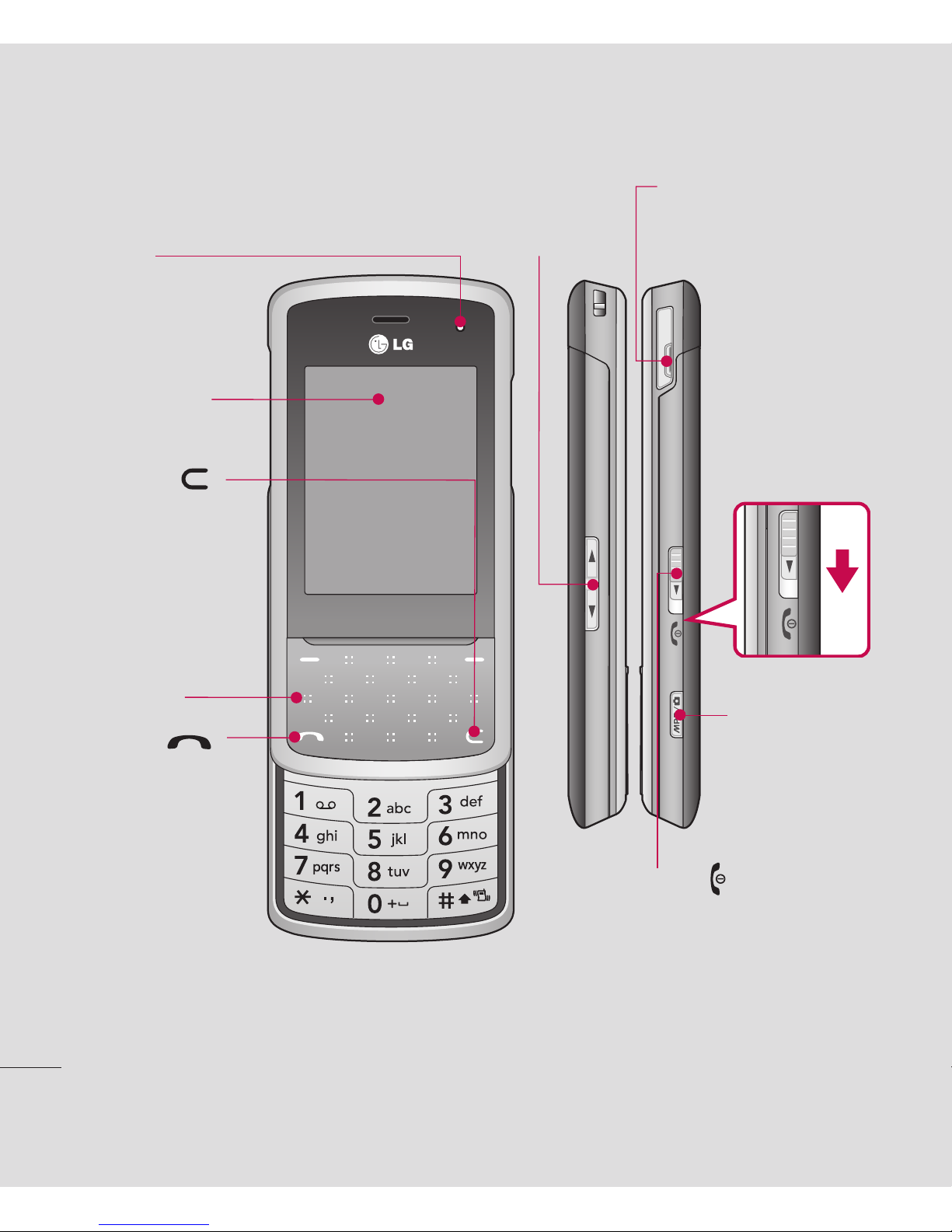
Camera/
MP3 player key
Getting to know your phone
Charger, Cable,
Handsfree connector
ALC (Auto Luminance Control)
sensor
Call key
Dials a phone
number and answers
incoming calls.
Clear key
Deletes a character
with each press.
Use this key to
go back to the
previous screen.
End/Power key
Slide the End/Power key towards
bottom of the phone.
Ends or rejects a call.
Turns the phone on/off.
Returns to the standby screen when
you use the menu.
Volume key
Main screen
Touchpad

9
SET UP
01
02
03
04
05
06
07
08
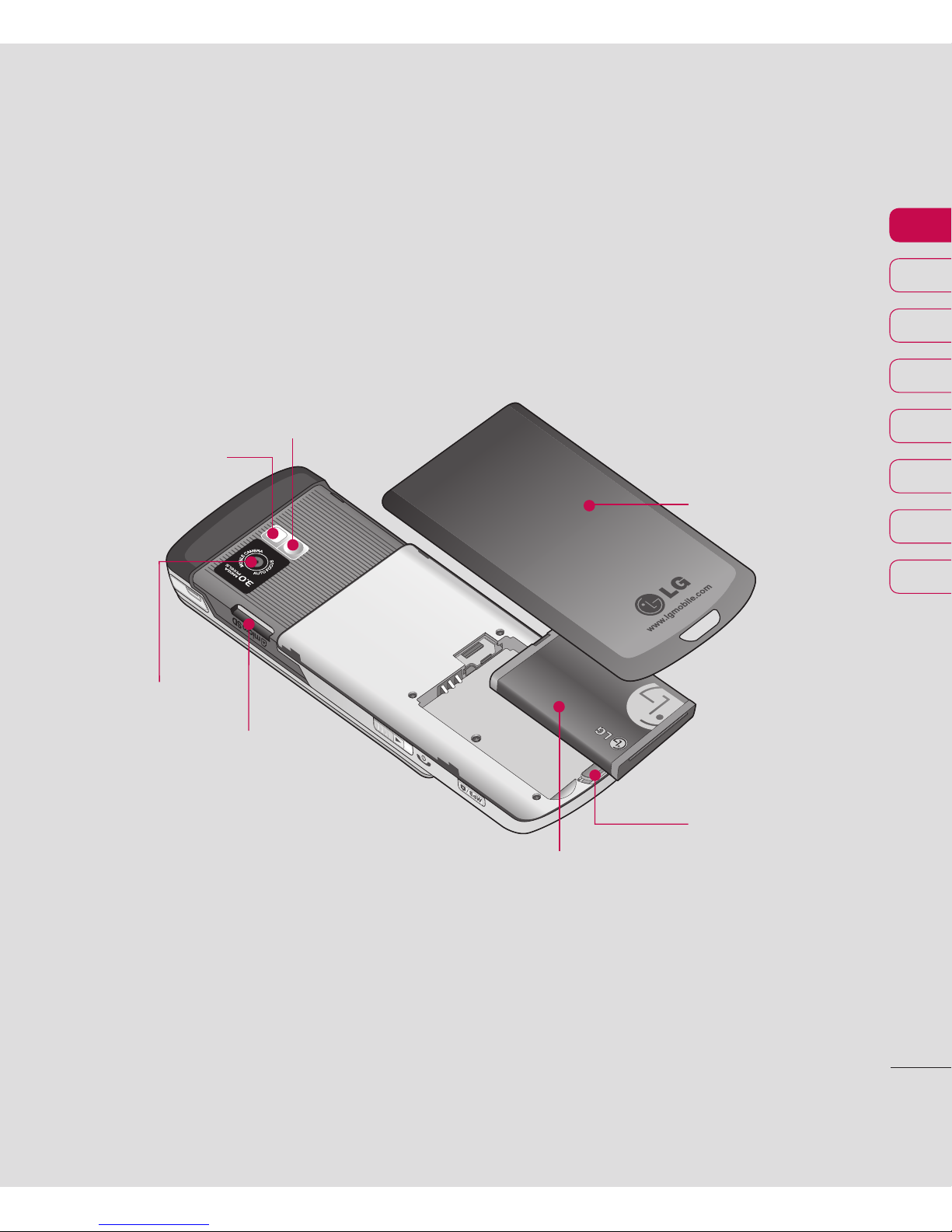
Open view
Battery cover
Battery
Camera lens
Memory card slot
Battery cover
release latch
Mirror
Flash

LG KF510 | User Guide
10
SET UP
Installing the SIM and battery
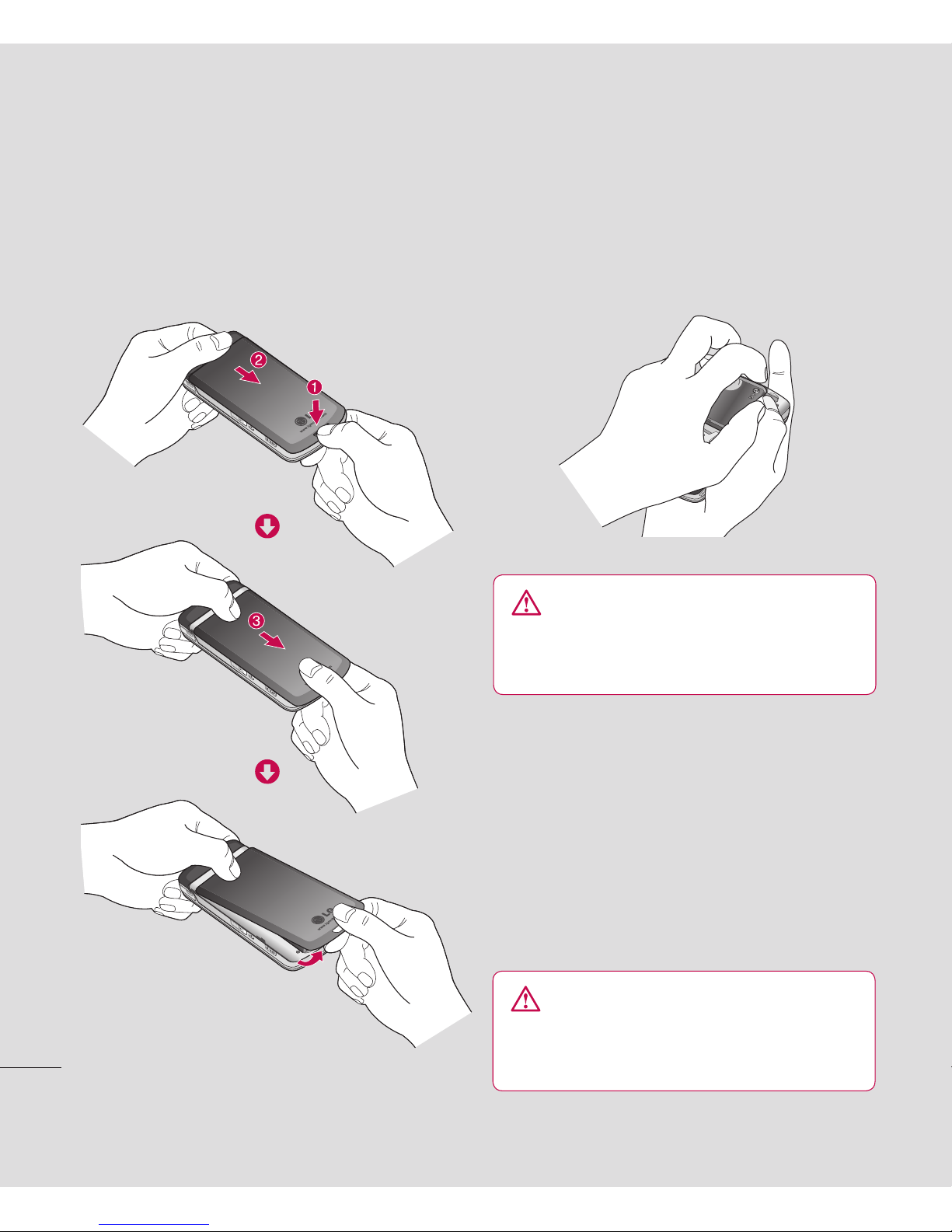
1 Remove the battery cover
Press the battery cover release latch. Slide
the battery cover towards the bottom of the
phone and away from it.
WARNING: Do not remove the battery
when the phone is switched on, as this may
damage the phone.
2 Remove the battery
Lever the bottom edge of the battery
and remove it carefully from the battery
compartment.
3 Install the SIM card
Pull the SIM card holder open. Slide the
SIM card into the SIM card holder and slide
the card holder backward. Make sure that
the gold contact area on the card is facing
downwards. To remove the SIM card, pull it
gently in the reverse direction.
WARNING: Do not insert the SIM card
when the slide is open, as this may damage
your phone and SIM card.
Altri manuali per KF510
4
Indice
Altri manuali LG Telefono cellulare
Manuali Telefono cellulare popolari di altre marche

Blackbe;rry
Blackbe;rry Q10 Manuale utente

Blackbe;rry
Blackbe;rry Bold 9900 Manuale utente

Blackbe;rry
Blackbe;rry STORM 9500 - VERSION 5.0 Manuale utente

ISAFE MOBILE
ISAFE MOBILE IS655.2 Manuale utente

Blackbe;rry
Blackbe;rry CURVE 8300 - SMARTPHONE Manuale utente

Blackbe;rry
Blackbe;rry 8707 - VERSION 4.1 Manuale utente