LG L1400 Manuale utente

L1400
User Guide

Unpacking
ŊŊŊŊŊŊŊŊŊ
8
For Your Safety
ŊŊŊŊŊŊ
9
Your Phone
ŊŊŊŊŊŊŊŊ
14
Phone Components
ŊŊŊŊŊ
14
Your Phone’s Features
ŊŊŊŊ
15
Display Information
ŊŊŊŊŊ
17
Getting Started
ŊŊŊŊŊŊ
19
Installing the SIM Card
ŊŊŊ
19
Charging the Battery
ŊŊŊŊ
22
Turning Your
Phone On and Off
ŊŊŊŊŊ
24
Access Codes
ŊŊŊŊŊŊŊŊ
25
Barring Password
ŊŊŊŊŊŊ
25
General Functions
ŊŊŊŊŊ
26
Making a Call
ŊŊŊŊŊŊŊŊ
26
Making a Call by Send Key
ŊŊ
26
Making International Calls
ŊŊŊ
26
Ending a Call
ŊŊŊŊŊŊŊŊ
26
Making a Call
From the Contact List
ŊŊŊŊ
27
Adjusting the Volume
ŊŊŊŊ
27
Answering a Call
ŊŊŊŊŊŊ
27
Vibrate Mode (Quick)
ŊŊŊŊŊ
28
Signal Strength
ŊŊŊŊŊŊŊŊ
28
Entering Text
ŊŊŊŊŊŊŊŊ
28
Selecting Functions
and Options
ŊŊŊŊŊŊŊŊ
33
Address Book
ŊŊŊŊŊŊŊ
34
In-Call Menu
ŊŊŊŊŊŊŊ
35
During a Call
ŊŊŊŊŊŊŊŊ
35
Making a Second Call
ŊŊŊŊŊ
35
Swapping
Between Two Calls
ŊŊŊŊŊ
35
Answering an Incoming Call
ŊŊ
35
Rejecting an Incoming Call
ŊŊ
36
Muting the Microphone
ŊŊŊŊ
36
Multiparty or
Conference Calls
ŊŊŊŊŊŊŊŊŊŊ
37
Making a Second Call
ŊŊŊŊŊ
37
Setting Up a
Conference Call
ŊŊŊŊŊŊ
37
Activate the
Conference Call on Hold
ŊŊ
37
Adding Calls to the
Conference Call
ŊŊŊŊŊŊ
37
Private Call in a
Conference Call
ŊŊŊŊŊŊ
38
Ending a Conference Call
ŊŊŊ
38
Menu Tree
ŊŊŊŊŊŊŊŊ
39
Recent Calls
ŊŊŊŊŊŊŊŊ
42
Missed Calls
ŊŊŊŊŊŊŊŊ
42
Dialed Calls
ŊŊŊŊŊŊŊŊŊ
42
Received Calls
ŊŊŊŊŊŊŊŊ
43
4
Table of Contents

5
Delete Recent Calls
⋯⋯⋯⋯⋯
43
Call Durations
⋯⋯⋯⋯⋯⋯⋯
43
Last Call
⋯⋯⋯⋯⋯⋯⋯⋯⋯⋯
43
Received Calls
⋯⋯⋯⋯⋯⋯⋯⋯
43
Dialed Calls
⋯⋯⋯⋯⋯⋯⋯⋯⋯
43
All Calls
⋯⋯⋯⋯⋯⋯⋯⋯⋯⋯
43
Call Costs
⋯⋯⋯⋯⋯⋯⋯⋯⋯⋯
44
Last Call’s Cost
⋯⋯⋯⋯⋯⋯⋯
44
All Calls’ Cost
⋯⋯⋯⋯⋯⋯⋯⋯
44
Cost Settings
⋯⋯⋯⋯⋯⋯⋯⋯
44
Call Cost’s Limit
⋯⋯⋯⋯⋯⋯⋯
44
Set Tariff
⋯⋯⋯⋯⋯⋯⋯⋯⋯⋯
45
Auto Display
⋯⋯⋯⋯⋯⋯⋯⋯
45
Data Information
⋯⋯⋯⋯⋯⋯
45
WAP I formatio
⋯⋯⋯⋯⋯⋯
45
Exter al Device
⋯⋯⋯⋯⋯⋯⋯
45
Total Data
⋯⋯⋯⋯⋯⋯⋯⋯⋯⋯
45
Messaging
⋯⋯⋯⋯⋯⋯⋯⋯⋯
46
Text Messages
⋯⋯⋯⋯⋯⋯⋯⋯
46
Write Message
⋯⋯⋯⋯⋯⋯⋯⋯
46
I box
⋯⋯⋯⋯⋯⋯⋯⋯⋯⋯⋯⋯
47
Outbox
⋯⋯⋯⋯⋯⋯⋯⋯⋯⋯⋯
48
Drafts
⋯⋯⋯⋯⋯⋯⋯⋯⋯⋯⋯⋯
48
Setti gs
⋯⋯⋯⋯⋯⋯⋯⋯⋯⋯⋯
48
Delete All
⋯⋯⋯⋯⋯⋯⋯⋯⋯⋯
49
Instant Messaging
⋯⋯⋯⋯⋯⋯
50
Logi (Sig O /Co ect)
⋯⋯⋯
50
Saved Co versatio s
⋯⋯⋯⋯⋯
50
Setti gs
⋯⋯⋯⋯⋯⋯⋯⋯⋯⋯⋯
51
IM Provider
⋯⋯⋯⋯⋯⋯⋯⋯⋯
51
Multimedia Messages
⋯⋯⋯⋯
57
Write Message
⋯⋯⋯⋯⋯⋯⋯⋯
57
I box
⋯⋯⋯⋯⋯⋯⋯⋯⋯⋯⋯⋯
58
Outbox
⋯⋯⋯⋯⋯⋯⋯⋯⋯⋯⋯
59
Se t
⋯⋯⋯⋯⋯⋯⋯⋯⋯⋯⋯⋯
60
Drafts
⋯⋯⋯⋯⋯⋯⋯⋯⋯⋯⋯⋯
61
Setti gs
⋯⋯⋯⋯⋯⋯⋯⋯⋯⋯⋯
62
Voice Mail
⋯⋯⋯⋯⋯⋯⋯⋯⋯
63
Liste to Voice Mail
⋯⋯⋯⋯⋯
63
Voice Mailbox Number
⋯⋯⋯⋯
63
Do nload Messages
⋯⋯⋯⋯⋯
64
I box
⋯⋯⋯⋯⋯⋯⋯⋯⋯⋯⋯⋯
64
Receive
⋯⋯⋯⋯⋯⋯⋯⋯⋯⋯⋯
64
Info Service
⋯⋯⋯⋯⋯⋯⋯⋯⋯
65
Receive
⋯⋯⋯⋯⋯⋯⋯⋯⋯⋯⋯
65
I box
⋯⋯⋯⋯⋯⋯⋯⋯⋯⋯⋯⋯
65
Topics
⋯⋯⋯⋯⋯⋯⋯⋯⋯⋯⋯
65
Alert
⋯⋯⋯⋯⋯⋯⋯⋯⋯⋯⋯⋯
65
Auto Display
⋯⋯⋯⋯⋯⋯⋯⋯
65
La guages
⋯⋯⋯⋯⋯⋯⋯⋯⋯⋯
66
Templates
⋯⋯⋯⋯⋯⋯⋯⋯⋯
66
Text
⋯⋯⋯⋯⋯⋯⋯⋯⋯⋯⋯⋯
66

6
Multimedia
ŊŊŊŊŊŊŊŊŊ
66
Business Card
ŊŊŊŊŊŊŊŊ
66
Memory Status
ŊŊŊŊŊŊŊ
67
Games & Apps
ŊŊŊŊŊŊ
68
Shop Games
ŊŊŊŊŊŊŊŊ
68
Games & Apps
ŊŊŊŊŊŊŊ
68
Bookmarks
ŊŊŊŊŊŊŊŊŊ
69
View Information
ŊŊŊŊŊŊ
70
Memory Status
ŊŊŊŊŊŊŊŊ
70
Java Version
ŊŊŊŊŊŊŊŊŊ
70
MEdia Mall
ŊŊŊŊŊŊŊŊ
71
Shop Ringtones
ŊŊŊŊŊŊŊ
71
Shop Games
ŊŊŊŊŊŊŊŊ
7
1
Shop Graphics
ŊŊŊŊŊŊŊ
7
1
Shop MMS
ŊŊŊŊŊŊŊŊŊ
7
1
Shop Applications
ŊŊŊŊŊŊ
7
1
MEdia Home
ŊŊŊŊŊŊŊŊ
7
1
MEdia Net
ŊŊŊŊŊŊŊŊ
72
MEdia Home
ŊŊŊŊŊŊŊŊ
73
Bookmarks
ŊŊŊŊŊŊŊŊŊ
73
Go To URL
ŊŊŊŊŊŊŊŊŊ
74
Access Point
ŊŊŊŊŊŊŊŊ
75
Cache Settings
ŊŊŊŊŊŊŊ
76
Clear Cache
ŊŊŊŊŊŊŊŊŊ
76
Cache Check
ŊŊŊŊŊŊŊŊŊ
76
Security Certificates
ŊŊŊŊŊ
76
WAP Information
ŊŊŊŊŊŊ
76
My Account
ŊŊŊŊŊŊŊŊ
77
Pay My Bill
ŊŊŊŊŊŊŊŊŊ
77
Check Bill Balance
ŊŊŊŊŊ
77
View My Minutes
ŊŊŊŊŊŊ
77
Reset Voicemail Passcode
ŊŊ
77
My MEdia
ŊŊŊŊŊŊŊŊŊ
78
Bookmarks
ŊŊŊŊŊŊŊŊŊ
78
Games & Apps
ŊŊŊŊŊŊŊ
78
Ringtone/Audio
ŊŊŊŊŊŊŊ
78
Graphics
ŊŊŊŊŊŊŊŊŊŊ
79
Multimedia Contents
ŊŊŊŊ
79
Tools
ŊŊŊŊŊŊŊŊŊŊŊŊ
80
Camera
ŊŊŊŊŊŊŊŊŊŊŊ
80
Take Picture
ŊŊŊŊŊŊŊŊŊ
80
Gallery
ŊŊŊŊŊŊŊŊŊŊŊ
81
All Pictures
ŊŊŊŊŊŊŊŊŊ
81
General Pictures
ŊŊŊŊŊŊŊ
81
Photo ID Pictures
ŊŊŊŊŊŊŊ
81
Memory Status
ŊŊŊŊŊŊŊŊ
82
Alarm Clock
ŊŊŊŊŊŊŊŊŊ
83
Calendar
ŊŊŊŊŊŊŊŊŊŊ
84
Voice Recording
ŊŊŊŊŊŊŊ
86
Calculator
ŊŊŊŊŊŊŊŊŊŊ
87
Memo
ŊŊŊŊŊŊŊŊŊŊŊŊ
87
World Time
ŊŊŊŊŊŊŊŊŊ
88
Unit Converter
ŊŊŊŊŊŊŊŊ
89
Infrared
ŊŊŊŊŊŊŊŊŊŊŊ
89

7
Address Book
ŊŊŊŊŊŊŊ
91
Contact List
ŊŊŊŊŊŊŊŊŊ
91
New Contact
ŊŊŊŊŊŊŊŊ
92
Speed Dials
ŊŊŊŊŊŊŊŊŊ
92
Voice Tag List
ŊŊŊŊŊŊŊŊ
93
Caller Groups
ŊŊŊŊŊŊŊŊ
94
Copy All
ŊŊŊŊŊŊŊŊŊŊ
95
Delete All
ŊŊŊŊŊŊŊŊŊŊ
95
Settings
ŊŊŊŊŊŊŊŊŊŊŊ
95
Information
ŊŊŊŊŊŊŊŊŊ
96
Settings
ŊŊŊŊŊŊŊŊŊŊ
97
Sounds
ŊŊŊŊŊŊŊŊŊŊŊ
97
Shop Ringtones
ŊŊŊŊŊŊŊ
97
Ringtones
ŊŊŊŊŊŊŊŊŊŊ
97
Volume
ŊŊŊŊŊŊŊŊŊŊŊ
97
Ring Alert Type
ŊŊŊŊŊŊŊ
97
Message Alert Tones
ŊŊŊŊŊ
98
Key Tones
ŊŊŊŊŊŊŊŊŊŊ
98
Voice Recording
ŊŊŊŊŊŊŊ
98
Display
ŊŊŊŊŊŊŊŊŊŊŊ
98
My Wallpaper
ŊŊŊŊŊŊŊŊ
98
Backlight
ŊŊŊŊŊŊŊŊŊŊ
99
Languages
ŊŊŊŊŊŊŊŊŊŊ
99
Menu Style
ŊŊŊŊŊŊŊŊŊ
99
Date & Time
ŊŊŊŊŊŊŊ
100
Set Date
ŊŊŊŊŊŊŊŊŊŊ
100
Date Format
ŊŊŊŊŊŊŊŊ
100
Set Time
ŊŊŊŊŊŊŊŊŊŊ
100
Time Format
ŊŊŊŊŊŊŊŊ
100
Auto Update
ŊŊŊŊŊŊŊŊ
100
Call Settings
ŊŊŊŊŊŊŊŊ
101
Call Forwarding
ŊŊŊŊŊŊŊ
101
Answer Mode
ŊŊŊŊŊŊŊŊ
102
Send My Number
ŊŊŊŊŊŊ
102
Call Waiting
ŊŊŊŊŊŊŊŊ
102
Minute Minder
ŊŊŊŊŊŊŊ
103
Voice Dial
ŊŊŊŊŊŊŊŊŊ
103
Auto Redial
ŊŊŊŊŊŊŊŊ
104
Closed User Group
ŊŊŊŊŊ
104
Send DTMF
ŊŊŊŊŊŊŊŊ
104
Security
ŊŊŊŊŊŊŊŊŊŊ
105
PIN Code Request
ŊŊŊŊŊŊ
105
Call Barring Service
ŊŊŊŊŊ
105
Fixed Dial Number (FDN)
ŊŊ
106
Change Codes
ŊŊŊŊŊŊŊ
106
Connection
ŊŊŊŊŊŊŊŊ
107
Network Selection
ŊŊŊŊŊŊ
107
World Phone
ŊŊŊŊŊŊŊŊ
108
GPRS Attach
ŊŊŊŊŊŊŊŊ
108
Access Point
ŊŊŊŊŊŊŊŊ
109
Reset Access Point
ŊŊŊŊŊ
109
Reset Setting
ŊŊŊŊŊŊŊŊ
109
Q & A
ŊŊŊŊŊŊŊŊŊŊ
110
Accessories
ŊŊŊŊŊŊŊŊ
113

8
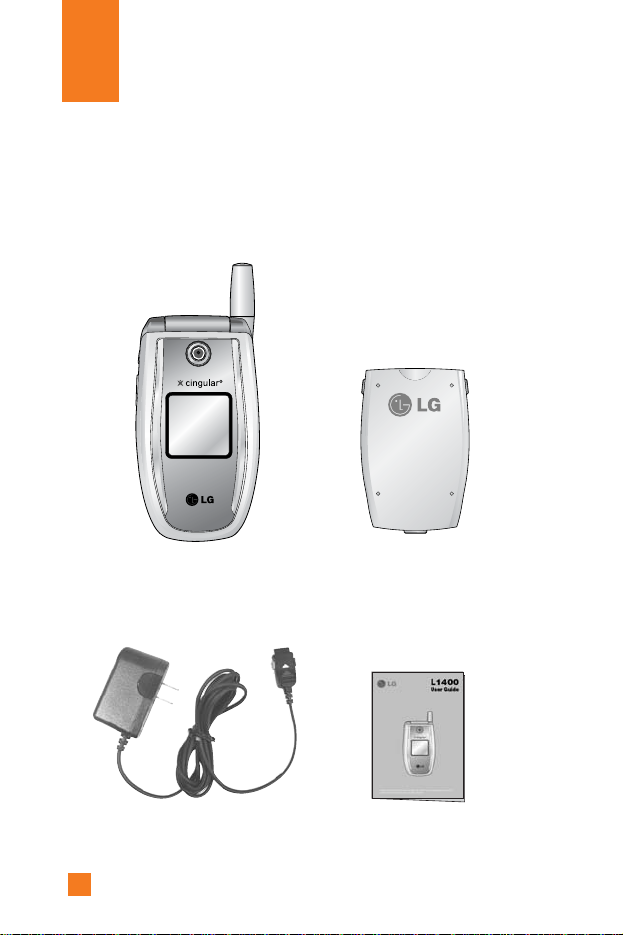
Check to make sure that you have all the parts shown below.
Unpacking
Handset Standard
Battery
User GuideTravel Adapter

9
Important Information
This user guide contains important information on the use and operation of
this phone. Please read all the information carefully for optimal
performance and to prevent any damage to, or misuse of, the phone. Any
changes or modifications not expressly approved in this user guide could
void your warranty for this equipment.
Before You Start
Safety Instructions
WARNING! To reduce the possibility of electric shock, do not expose
your phone to high humidity areas, such as the bathroom, swimming pool,
etc.
Always store your phone away from heat. Never store your phone in
settings that may expose it to temperatures less than 32°F or greater than
104°F, such as outside during a snowstorm or in your car on a hot day.
Exposure to excessive cold or heat will result in malfunction, damage
and/or catastrophic failure.
Be careful when using your phone near other electronic devices. RF
emissions from your mobile phone may affect nearby inadequately
shielded electronic equipment. You should consult with manufacturers of
any personal medical devices such as pacemakers and hearing aides to
determine if they are susceptible to interference from your mobile phone.
Turn off your phone in a medical facility or at a gas station.
Never place your phone in a microwave oven as this will cause the battery
to explode.
IMPORTANT! Please read the TIA SAFETY INFORMATION on page
113 before using your phone.
For Your Safety

10
Safety Information
Please read and observe the following information for the safe and proper
use of your phone and to prevent any unanticipated damage. Also, keep the
user’s manual in an accessible place at all times after reading it.
]
Unplug the power cord and charger during a lightning storm to avoid
electric shock or fire.
]
Do not use your phone in high explosive areas as the phone may
generate sparks.
]
Do not put your phone in a place subject to excessive dust, and keep the
minimum required distance between the power cord and heat sources.
]
Do not damage the power cord by bending, twisting, pulling, or
subjecting it to heat. Do not use the plug if it is loose as it may cause
fire or electric shock.
]
Hold the power cord plug firmly to plug and unplug the power cord.
Ensure the plug is firmly connected. If it is not firmly connected, it may
cause excessive heat or fire.
]
Do not place a heavy item on the power cord. Do not allow the power
cord to be crimped as it may cause fire or electric shock.
]
Be careful not to let the battery contact metal conductors such as a
necklace or coins. When shorted, it may cause an explosion.
]
Do not disassemble or impact the battery as it may cause electric shock,
short-circuit, and fire. Store the battery in a place out of reach of
children.
]
Using a damaged battery or placing a battery in your mouth may cause
serious injury.
For Your Safety

11
]
Do not place items containing magnetic components such as a credit
card, phone card, bank book or a subway ticket, near your phone. The
magnetic strip can be damaged by the phone.
]
Do not hold or let the antenna come in contact with your body during a
call.
]
Talking on your phone for a long period of time may reduce the call
quality due to heat generated during the use of the phone.
]
Do not allow excessive vibration or impact to the phone.
]
When you do not plan to use the phone for a long period of time, store it
in a safe area with the power cord unplugged.
FCC RF Exposure Information
WARNING! Read this information before operating the phone.
In August 1996, the Federal Communications (FCC) of the United States,
with its action in Report and Order FCC 96-326, adopted an updated safety
standard for human exposure to radio frequency (RF) electromagnetic
energy emitted by FCC regulated transmitters. Those guidelines are
consistent with the safety standard previously set by both U.S. and
international standards bodies.
The design of this phone complies with the FCC guidelines and these
international standards.
For Your Safety

12
CAUTION
Use only the supplied and approved antenna. Use of unauthorized antennas
or modifications could impair call quality, damage the phone, void your
warranty and/or result in violation of FCC regulations.
Do not use the phone with a damaged antenna. If a damaged antenna
comes into contact with skin, a minor burn may result. Contact your local
dealer for a replacement antenna.
Body-worn Operation
This device was tested for typical body-worn operations with the back of
the phone kept 10mm between the use's body and the back of the phone.
To comply with FCC RF exposure requirements, a minimum separation
distance of 10mm must be maintained between the user’s body and the
back of the phone. Third-party belt-clips, holsters, and similar accessories
containing metallic components should not be used. Body-worn
accessories that cannot maintain 3/4 inch (2 cm) separation distance
between the user’s body and the back of the phone, and have not been
tested for typical body-worn operations may not comply with FCC RF
exposure limits and should be avoided.
Vehicle Mounted External Antenna (optional,
if available)
A minimum separation distance of 8 inches (20 cm) must be maintained
between the user/bystander and the vehicle mounted external antenna to
satisfy FCC RF exposure requirements.
For more information about RF exposure, visit the FCC website at
www.fcc.gov
For Your Safety
Altri manuali per L1400
4
Questo manuale è adatto per i seguenti modelli
1
Indice
Altri manuali LG Telefono cellulare
Manuali Telefono cellulare popolari di altre marche

Blackbe;rry
Blackbe;rry Q10 Manuale utente

Blackbe;rry
Blackbe;rry Bold 9900 Manuale utente

Blackbe;rry
Blackbe;rry STORM 9500 - VERSION 5.0 Manuale utente

ISAFE MOBILE
ISAFE MOBILE IS655.2 Manuale utente

Blackbe;rry
Blackbe;rry CURVE 8300 - SMARTPHONE Manuale utente

Blackbe;rry
Blackbe;rry 8707 - VERSION 4.1 Manuale utente