
LG LGVX1000 Manuale utente

Stay
Connected!
MIGO
PARENTS’ USER GUIDE
Mantente
Conectado!
MIGO
GUÍA DEL USUARIO PARA LOS PADRES
!
H
MMBB0172001(1.1)
VX1000 cover (H)-parent.qxd 11/23/05 9:18 AM Page 1

Copyright 2005 LG Electronics, Inc. All rights reserved. LG and the LG logo are registered trademarks of
LG Group and its related entities. All other trademarks are the property of their respective owners.
VX1000 cover (H)-parent.qxd 11/23/05 9:18 AM Page 2
Your new Migo phone should only be used by children of an
appropriate age who are capable of using the device
responsibly. Carefully and thoroughly review the Quick Start
Guide for Kids with your child. Your Migo phone is capable of
placing emergency calls to 911. It is your responsibility to
teach users how to use the Migo phone and the emergency
calling capability. Any complaints, penalties or fines assessed
due to excessive or erroneous calls are your sole
responsibility. The Migo Phone is not a child management tool
and is not a substitute for adult supervision.
VX1000-(E)Parents-final.qxd 11/23/05 9:33 AM Page 1

Migo 1
Important Safety Precautions
Read these simple guidelines. Breaking the rules may be dangerous or illegal. Further detailed information is given in this
user guide.
Violation of the instructions may cause serious injury or death.
Never use an unapproved battery since this could damage the phone and/or battery and could cause
the battery to explode.
Never place your phone in a microwave oven as it will cause the battery to explode.
Do not dispose of your battery by fire or with hazardous or flammable materials.
Make sure that no sharp-edged items such as animal’s teeth or nails, come into contact with the
battery. This could cause a fire.
Give instructions for children to use the battery carefully.
Be careful that children do not swallow any parts (such as rubber plugs, earphone, connection parts
or the phone, etc.) This could cause asphxiation or suffocation resulting in serious injury or death.
Warning
VX1000-(E)Parents-final.qxd 11/23/05 9:33 AM Page 1
2Migo
Important Safety Precautions
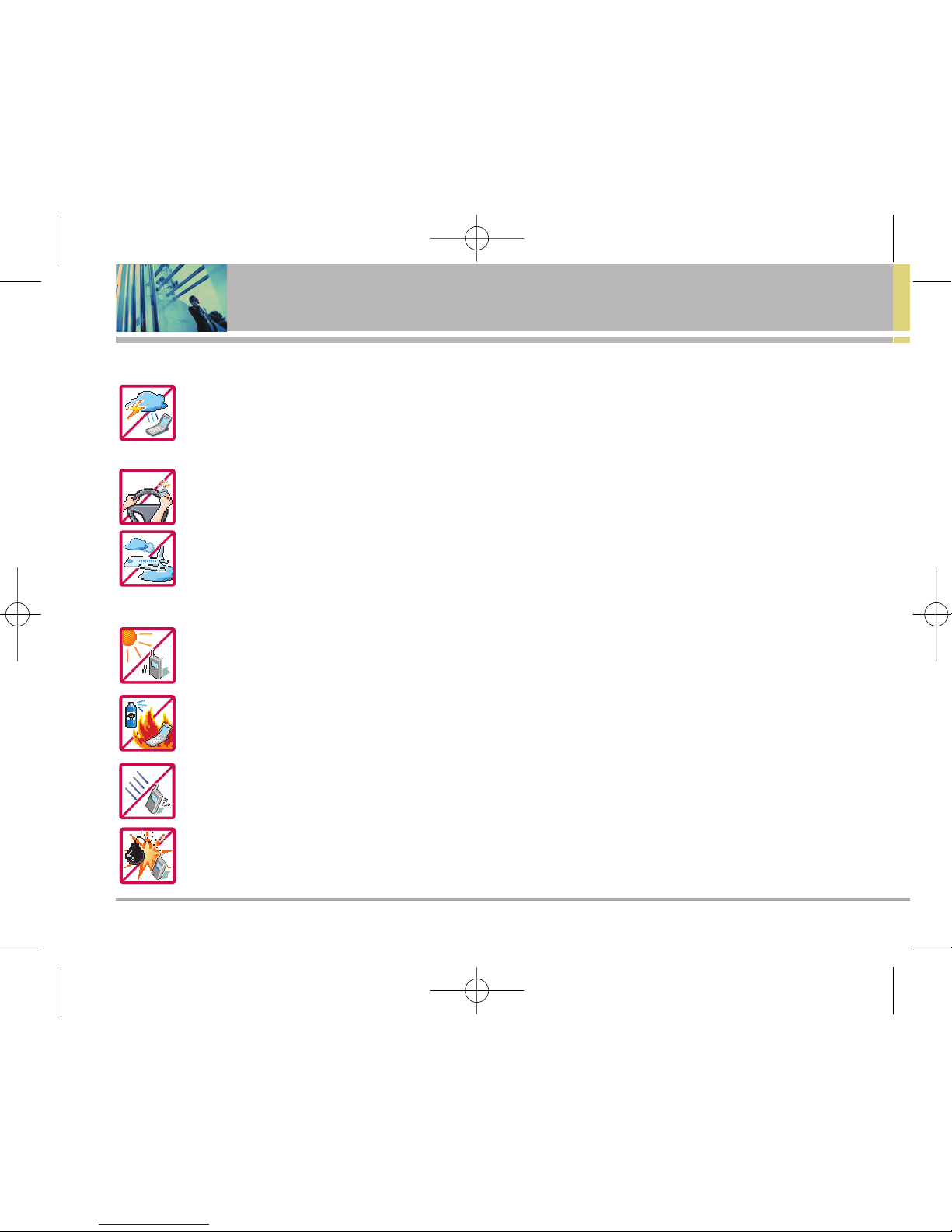
Unplug the power cord and charger during lightning storms to avoid electric shock or fire.
When riding in a car, do not leave your phone or set up the hands-free kit near to the air bag. If
wireless equipment is improperly installed and the air bag is deployed, you may be seriously injured.
Do not use a hand-held phone while driving.
Do not use the phone in areas where its use is prohibited. (For example: aircraft)
Do not expose the battery charger or adapter to direct sunlight or use it in places with high humidity,
such as a bathroom.
Never store your phone in temperatures less than -4°F or greater than 122°F.
Do not use harsh chemicals (such as alcohol, benzene, thinners, etc.) or detergents to clean your
phone. This could cause a fire.
Do not drop, strike, or shake your phone severely. It may harm the internal circuit boards of the
phone.
Do not use your phone in high explosive areas as the phone may generate sparks.
VX1000-(E)Parents-final.qxd 11/23/05 9:33 AM Page 2

Migo 3
Do not damage the power cord by bending, twisting, pulling, or heating. Do not use the plug if it is
loose as it may cause a fire or electric shock.
Do not place any heavy items on the power cord. Do not allow the power cord to be crimped as it may
cause electric shock or fire.
Do not handle the phone with wet hands while it is being charged. It may cause an electric shock or
seriously damage your phone.
Do not disassemble the phone.
Do not place or answer calls while charging the phone as it may short-circuit the phone and/or cause
electric shock or fire.
Only use the batteries and chargers provided by LG. The warranty will not be applied to products
provided by other suppliers.
Only authorized personnel should service the phone and its accessories. Faulty installation or
service may result in accidents and consequently invalidate the warranty.
Do not hold or let the antenna come in contact with your body during a call.
An emergency call can be made only within a service area. For an emergency call, make sure that you
are within a service area and that the phone is turned on.
VX1000-(E)Parents-final.qxd 11/23/05 9:33 AM Page 3
4Migo
Table of Contents
Important Safety Precautions . . . . . 1
Table of Contents . . . . . . . . . . . . . . . . . 4
Welcome . . . . . . . . . . . . . . . . . . . . . . . . 5
Other Information . . . . . . . . . . . . . . . . .6
FCC RF Exposure Information . . . . . . 7
Phone Overview . . . . . . . . . . . . . . . . . .9
Getting Started with Your Phone . . 10
The Battery . . . . . . . . . . . . . . . . . . . . . 10
Turning the Phone On and Off . . . . 11
Screen Icons . . . . . . . . . . . . . . . . . . . .11
Using Phone Menus . . . . . . . . . . . . .12
Entering Menu . . . . . . . . . . . . . . . . . . 12
Making Calls . . . . . . . . . . . . . . . . . . . . 14
Emergency Calls . . . . . . . . . . . . . . . . 14
To Change Emergency Number . . 14
Receiving Calls . . . . . . . . . . . . . . . . . 15
Using Speakerphone . . . . . . . . . . . . 15
Menus for Parents . . . . . . . . . . . . . . 15
Cleaning Migo . . . . . . . . . . . . . . . . . . 15
Safety . . . . . . . . . . . . . . . . . . . . . . . . . . .16
TIA Safety Information . . . . . . . . . . .16
Safety Information . . . . . . . . . . . . . . . 18
FDA Consumer Update . . . . . . . . . . . 20
Consumer Information on SAR . . . 26
FCC Hearing-Aid Compatibility (HAC)
Regulations for Wireless Devices
. 28
Accessories . . . . . . . . . . . . . . . . . . . . .30
LIMITED WARRANTY STATEMENT
. . .31
VX1000-(E)Parents-final.qxd 11/23/05 9:33 AM Page 4
Migo 5
Welcome
Thank you for choosing Migo specially designed for kids.
Migo has the following features:
Kid-Friendly Design.
Simplified Keypad and Interface.
4 Programmable Speed Dial Keys.
Dedicated Emergency Button.
Cute, Compact Design to Fit Small Hands.
Unique, Bright Green Color.
Ultra Lightweight.
Simplified Keypad with Large Keys.
Easy-to-Use User Interface.
Blue Backlit LCD for Caller ID and Missed Calls.
2 Small Antennas.
Side Volume Control Keys.
Headset Jack.
VX1000-(E)Parents-final.qxd 11/23/05 9:33 AM Page 5

6Migo
Welcome
Other Information
This user’s guide provides important information on the
use and operation of your phone. Please read all the
information carefully prior to using the phone for the best
performance and to prevent any damage to or misuse of
the phone. Any unapproved changes or modifications will
void your warranty.
FCC Part 15 Class B Compliance
This device and its accessories comply with part 15 of
FCC rules. Operation is subject to the following two
conditions: (1) This device and its accessories can not
cause harmful interference, and (2) this device and its
accessories must accept any interference received,
including interference that causes undesired operation.
Technical Details
The Migo is an all digital phone that operates on both
Code Division Multiple Access (CDMA) frequencies:
cellular services at 800 MHz and Personal
Communication Services (PCS) at 1.9 GHz. Also, the Migo
works on Digital-Dual Mode.
CDMA technology uses a feature called DSSS (Direct
Sequence Spread Spectrum) that enables the phone to
keep communication from being crossed and to use one
frequency channel by multiple users in the same specific
area. This results in a 10-fold capacity increase when
compared with analog mode. In addition, features such
as soft / softer handoff, hard Handoff, and dynamic RF
power control technologies combine to reduce call
interruptions.
The Cellular and PCS CDMA networks consist of MSO
(Mobile Switching Office), BSC (Base Station Controller),
BTS (Base Station Transmission System) and MS (Mobile
Station). The following table lists some major CDMA
standards.
*TSB-74: Protocol between an IS-95A system and ANSI J-
STD-008
1xRTT system receives twice as many subscribers in the
wireless section as IS-95. Its battery life is twice as long as
IS-95. High-speed data transmission is also possible.
VX1000-(E)Parents-final.qxd 11/23/05 9:33 AM Page 6

Migo 7
FCC RF Exposure Information
WARNING! Read this information before operating the
phone.
In August 1996, the Federal Communications Commission
(FCC) of the United States, with its action in Report and
Order FCC 96-326, adopted an updated safety standard for
human exposure to Radio Frequency (RF) electromagnetic
energy emitted by FCC regulated transmitters. Those
guidelines are consistent with the safety standard previously
set by both U.S. and international standards bodies. The
design of this phone complies with the FCC guidelines and
these international standards.
Bodily Contact During Operation
This device was tested for typical use with the back of the
phone kept 3/4 inches (2 cm) from the body. To comply with
FCC RF exposure requirements, a minimum separation
distance of 3/4 inches (2 cm) must be maintained between
the user’s body and the back of the phone, including the
antenna, whether extended or retracted. Third-party belt-
clips, holsters, and similar accessories containing metallic
components should not be used. Avoid the use of
accessories that cannot maintain 3/4 inches (2 cm) distance
between the user’s body and the back of the phone and have
not been tested for compliance with FCC RF exposure limits.
CDMA
Standard
Basic Air
Interface
TIA/EIA-95A
TSB-74
ANSI J-STD-008
TIA/EIA-IS2000
CDMA Tri-Mode Air Interface
14.4kbps radio link protocol and
inter-band operations
IS-95 adapted for PCS frequency
band
cdma2000 1xRTT Air Interface
MAS-BS
PCSC-RS
Intersystem operations
Non-signaling data comm
Cellular base station
Cellular mobile station
PCS personal station
PCS base station
Speech CODEC
TIA/EIA/IS-634
TIA/EIA/IS/651
TIA/EIA/IS-41-C
TIA/EIA/IS-124
TIA/EIA/IS-97
TIA/EIA/IS-98
ANSI J-STD-018
ANSI J-STD-019
TIA/EIA/IS-125
TIA/EIA/IS-96-B
TIA/EIA/IS-637
TIA/EIA/IS-657
IS-801
TIA/EIA/IS-707-A
Speech CODEC
Short message service
Packet Data
Position Determination
Service (gpsOne)
High Speed Packet Data
Network
Service
Performance
Designator Description
VX1000-(E)Parents-final.qxd 11/23/05 9:33 AM Page 7
Questo manuale è adatto per i seguenti modelli
1
Indice
Lingue:
Altri manuali LG Telefono cellulare


LG
LG VX3300 Manuale utente

LG
LG LM-X120EMW Manuale utente

LG
LG LM-X320EMW Manuale utente

LG
LG LGVX9800 Manuale utente

LG
LG LGD170.ATCIWH Manuale utente

LG
LG KE770SHINE - KE770 Cell Phone 65 MB Manuale utente

LG
LG VX8600 Manuale utente

LG
LG C570G Manuale utente

LG
LG LG-X210ds Manuale utente

LG
LG KS360 - Cell Phone 15 MB Manuale utente


Manuali Telefono cellulare popolari di altre marche


Blackbe;rry
Blackbe;rry Q10 Manuale utente

Blackbe;rry
Blackbe;rry Bold 9900 Manuale utente

Blackbe;rry
Blackbe;rry STORM 9500 - VERSION 5.0 Manuale utente

ISAFE MOBILE
ISAFE MOBILE IS655.2 Manuale utente

Blackbe;rry
Blackbe;rry CURVE 8300 - SMARTPHONE Manuale utente

Blackbe;rry
Blackbe;rry 8707 - VERSION 4.1 Manuale utente