LG VX5300 Manuale utente

©2007 Verizon Wireless. All Rights Reserved.
WELCOME TO VERIZON WIRELESS
QUICK REFERENCE GUIDE
GET IT NOW®
VX5300
www.verizonwireless.com
©2007 Verizon Wireless. Todos los Derechos Reservados.
BIENVENIDO A VERIZON WIRELESS
GUÍA DE REFERENCIA RÁPIDA
GET IT NOW®
P/N : MCDD0007501(1.2)
G
www.verizonwireless.com/espanol
VX5300_QRG_Cover 1.2 1/15/07 6:03 PM Page 1

WELCOME AND THANK YOU FOR CHOOSING VERIZON
WIRELESS . . . . . . . . . . . . . . . . . . . . . . . . . . . . . . . . . . . . . . . 2
OUR WORRY FREE GUARANTEE®TO YOU . . . . . . . . . . . . 2
HOW TO SIGN UP FOR NEW EVERY TWO . . . . . . . . . . . . . 3
GETTING STARTED . . . . . . . . . . . . . . . . . . . . . . . . . . . . . . . . 5
Installing the Battery
Removing the Battery
Charging the Battery
POWERING THE PHONE ON AND OFF . . . . . . . . . . . . . . . . 7
Powering the Phone On
Powering the Phone Off
PLACING AND RECEIVING CALLS . . . . . . . . . . . . . . . . . . . 8
Placing Calls
Receiving Calls
PROGRAMMING AND USING SPEED DIAL NUMBERS . . . 9
Programming Speed Dialing Numbers
Using Speed Dialing
CHANGING RINGERS AND TONES . . . . . . . . . . . . . . . . . . 10
Selecting a Ringer
Reference GET IT NOW®
Downloading Applications
Incoming Calls
ACCESSING YOUR VOICEMAIL . . . . . . . . . . . . . . . . . . . . . 12
New Customer
Existing Customer
OVERVIEW OF GET IT NOW . . . . . . . . . . . . . . . . . . . . . . . 13
MESSAGING & CHAT . . . . . . . . . . . . . . . . . . . . . . . . . . . . . 14
TONES & FUN . . . . . . . . . . . . . . . . . . . . . . . . . . . . . . . . . . 16
NEWS & INFO . . . . . . . . . . . . . . . . . . . . . . . . . . . . . . . . . . 18
PICTURE MESSAGING . . . . . . . . . . . . . . . . . . . . . . . . . . . . 20
Snapping and Sending a Picture
Receiving a New Picture Message
Replying to a Picture Message
Adding Sound to a Message
Creating Picture Caller ID’s
Storing a Picture on Your Phone
Sending a Message Using a Picture Stored in the Phone’s Gallery
Storing a Photo to the Online Album, PIX Place
TXT MESSAGING . . . . . . . . . . . . . . . . . . . . . . . . . . . . . . . . 25
Sending a New TXT Message
Predictive TXT Input
USING GET IT NOW®. . . . . . . . . . . . . . . . . . . . . . . . . . . . . 26
Accessing GET IT NOW
Downloading an Application
Removing an Application
USING MOBILE WEB . . . . . . . . . . . . . . . . . . . . . . . . . . . . . 28
Mobile Web by Verizon Wireless with MSN®or Mobile Web 2.0
Launching Mobile Web
Using the Service
Ending a Mobile Web Session
USING BLUETOOTH®. . . . . . . . . . . . . . . . . . . . . . . . . . . . . 30
ACCESSORIES . . . . . . . . . . . . . . . . . . . . . . . . . . . . . . . . . . 34
THREE WAYS TO ACCESSORIZE . . . . . . . . . . . . . . . . . . . . 35
MAY WE HELP YOU? . . . . . . . . . . . . . . . . . . . . . . . . . . . . . 36
1
VX5300 QRG_Eng_1.2 1/15/07 6:01 PM Page 1

WELCOME AND THANK YOU FOR CHOOSING VERIZON WIRELESS
You’re now connected to the power of America’s best, most reliable wireless network.*
This guide will help you understand your new wireless phone and all the things
you can do with it.
For more details, please refer to the User Guide. If you ever have any questions and
would like to access an online Q&A, please visit us online at www.verizonwireless.com
and check out How to Use Your Phone.
OUR WORRY FREE GUARANTEE®TO YOU
You’ll enjoy America’s best, most reliable wireless network.
You have the option to change to any qualifying calling plan or airtime promotion at
any time.
You won’t pay any additional fees to change to any qualifying calling plan or airtime
promotion. Some calling plans require specific equipment. Calling plan changes and
promotional offers will require a new 1- or 2-year customer agreement.
If you ever have a problem, it becomes our problem the first time you call.
No runarounds, no hassles. If your issue can’t be resolved during the course of your first
call, we will take the responsibility to get back to you with an answer.
Y
W
o
Y
S
q
p
e
C
H
Y
p
p
d
m
u
a
c
t
*Network details at www.verizonwireless.com.
2
VX5300 QRG_Eng_1.2 1/15/07 6:01 PM Page 2

m
rst
Your satisfaction is guaranteed on any equipment you purchase from us.
We provide a 15-day satisfaction guarantee on any product you buy from us. You pay
only for the service you’ve used. See Return Policy brochure for details.
You can get a free phone every two years with New Every Two®.
Sign up for and maintain two years of service on a digital plan of $34.99 or higher to
qualify for a free phone up to $50 or $100, depending on the monthly access of your
plan. Or you can apply your New Every Two credit toward the purchase of a more
expensive phone. A two-year renewal is required.
Certain conditions and restrictions apply.
HOW TO SIGN UP FOR NEW EVERY TWO
You are automatically enrolled when you sign up for a 2-year agreement on a calling
plan with a monthly access of $34.99 or higher. If you maintain service on a calling
plan of $34.99 or higher and fulfill your 2-year term, you will qualify for a free wireless
device. If your calling plan monthly access is $79.99 or higher for the entire three
months prior to completing your New Every Two wireless device upgrade, you will get
up to $100 toward the purchase of that wireless device. If your calling plan monthly
access was between $34.99 and $79.98 at any time during the three months prior to
completing your New Every Two wireless device upgrade, you will get up to $50 toward
the purchase of that wireless device. When completing your New Every Two upgrade,
WIRELESS BASICS
3
VX5300 QRG_Eng_1.2 1/15/07 6:01 PM Page 3

G
T
you will need to renew your agreement for another two years on a calling plan with
a monthly access of $34.99 or higher. If you are not currently in the program, you
can enroll by agreeing to a new 2-year term on a calling plan with a monthly access
of $34.99 or higher. You will be eligible to take advantage of the wireless device
offer at the end of the 2-year term.
Subject to the Customer Agreement and calling plan.
You must retain the same wireless device for 24 months in order to receive the advantages of this program.
If you choose to replace your wireless device at a discounted price, you will forfeit your benefits and be
automatically
re-enrolled if you meet the requirements of the program. If you enrolled in the program on or after
11/25/02, you must take advantage of the New Every Two offer within six months after becoming eligible;
otherwise, you may be charged full retail price to upgrade your current wireless device. Discount amount
will be applied toward the 2-year Customer Agreement retail price. Secondary Family SharePlan®lines are
not eligible to participate in the program.
The New Every Two discount cannot exceed the price of the wireless device after mail-in rebates. If your 2-
year Customer Agreement with a digital calling plan of $34.99 or higher began on or after 6/2/03, you were
automatically enrolled in the program. Customers who began their 2-year agreements on or after 4/1/00 on
a digital calling plan of $35 or higher were also automatically enrolled in the program. If you enrolled in the
program prior to 2/5/06 and continued to meet the requirements of the program, you will be eligible for a
free wireless device up to $100, or a credit of up to $100 toward a more expensive wireless device, when
you become eligible for your next New Every Two upgrade (after which time you will be enrolled in the
$50/$100 New Every Two program described in the New Every Two brochure). New Every Two discount
amounts and calling plan tiers subject to change at Verizon Wireless’ sole discretion.
4
VX5300 QRG_Eng_1.2 1/15/07 6:01 PM Page 4

GETTING STARTED
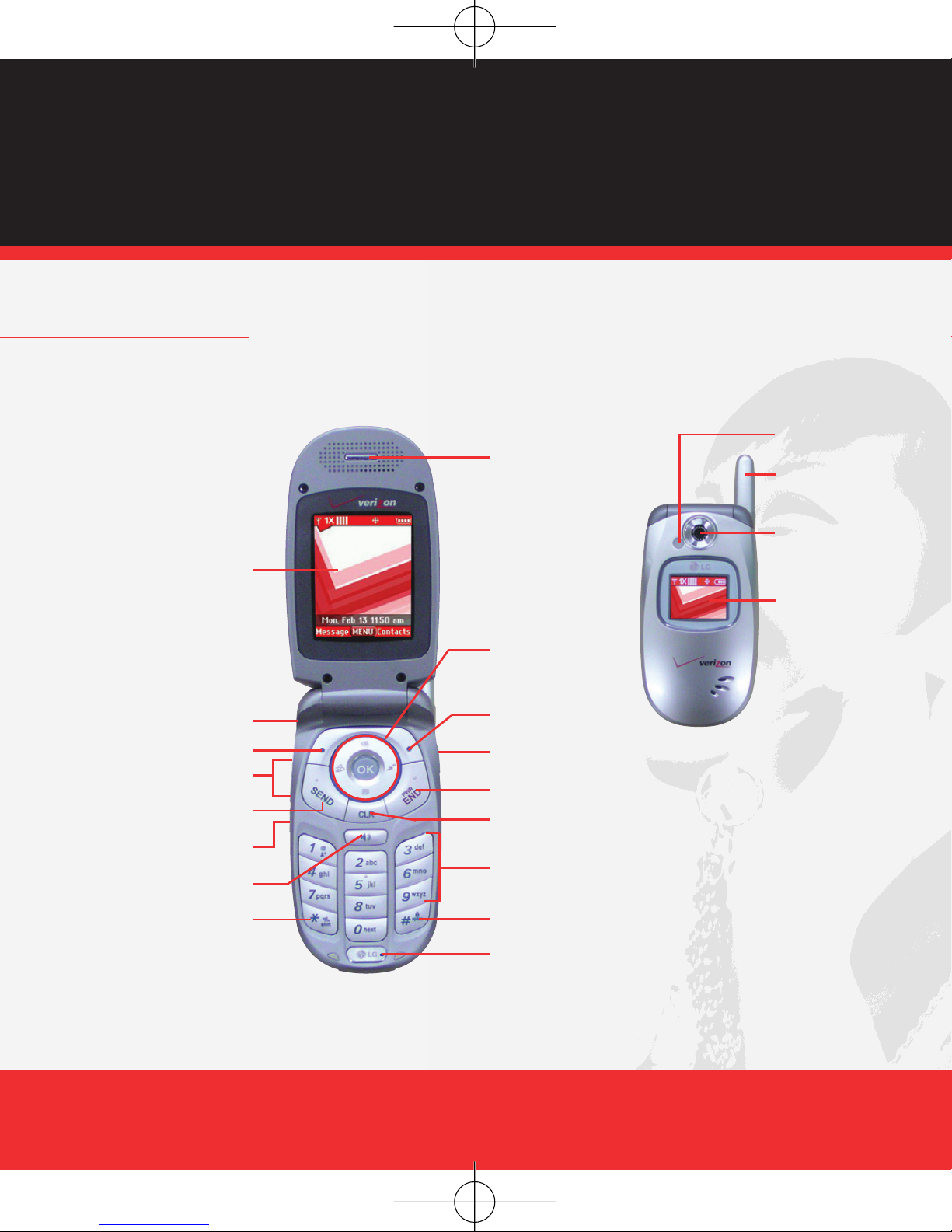
The following shows key components of your wireless phone.
WIRELESS BASICS
5
Right Soft Key
Camera Key
Navigation Key
END/POWER
Alphanumeric
Keypad
Lock Mode Key
Microphone
Earpiece
Headset Jack
SEND
Speakerphone Key
Voice Dial Key
Side Key
Manner Mode Key
CLR Key
LCD screen
Left Soft Key
VX5300
Camera Lens
Sub LCD
Flash
Antenna
VX5300 QRG_Eng_1.2 1/15/07 6:01 PM Page 5

P
T
P
1
2
P
1
Keep the power flowing. Here’s everything you need to know about your battery:
Installing the Battery
Insert the bottom of the battery into the opening on the back of the phone, then push
the battery down until the latch clicks. Align the battery cover over the battery then slide
it slightly upward until it clicks into place.
Removing the Battery
Turn the phone off. Slide the battery cover downward and remove it. Use the opening
near the top of the battery to lift the battery out.
Charging the Battery
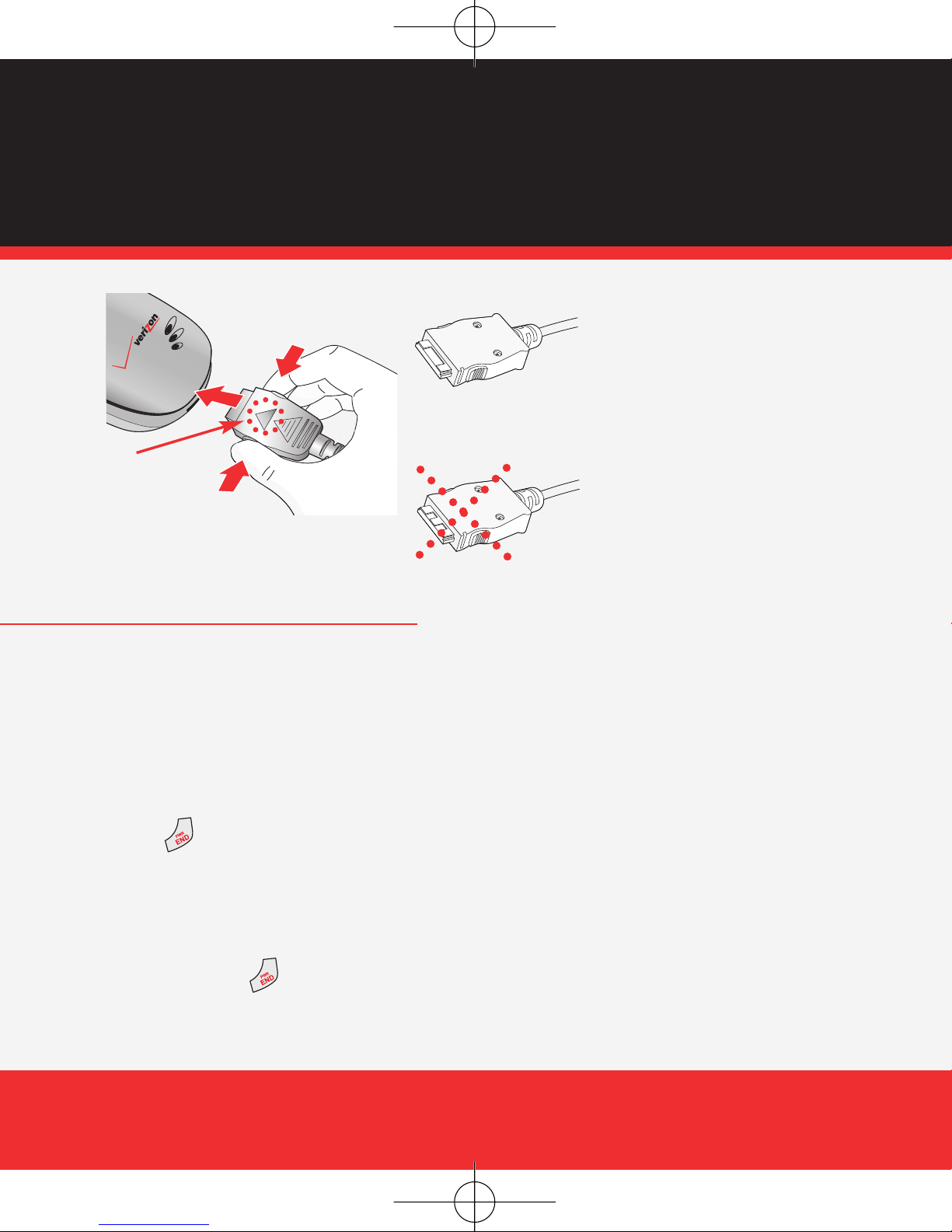
To use the charger provided with your phone:
1.) Plug the end of the adapter into the phone’s charger port and the other end into an
electrical outlet.
2.) The charge time varies depending upon the battery level.
NOTICE
Please use only an approved charging accessory to charge your LG phone.
Improper handling of the charging port, as well as the use of an incompatible charger, may cause damage to your
phone and void the warranty.
6
VX5300 QRG_Eng_1.2 1/15/07 6:01 PM Page 6

POWERING THE PHONE ON AND OFF
Turn your phone on and get ready to start calling.
Powering the Phone On
1.) Install a charged battery or connect the phone to an external power source such as
the Vehicle Power Charger or car kit.
2.) Press for a few seconds until the LCD screen lights up.
Powering the Phone Off
1.) Press and hold until display screen turns off, then release the key.
WIRELESS BASICS
de
our
7
NOTICE
Triangle symbol
should face up.
Chargers which have two grooves on the
bottom are NOT compatible with this phone
model. Inserting this type of charger into the
phone may damage the charging port. This
charger is compatible with the VX1000,
VX3200, VX3300, VX4650, VX4700,
VX5200, VX6100, VX7000, VX8000,
VX8100 and VX9800.
The correct charger has only one groove on
the bottom. This charger will work with all of
the above listed phones, as well as the
VX3400, VX3450, VX5300 and VX8300.
VX5300 QRG_Eng_1.2 1/15/07 6:01 PM Page 7

P
N
P
1
2
3
4
5
6
U
F
F
d
PLACING AND RECEIVING CALLS
Try out your new phone by making your first call. Here’s how you do it:
Placing Calls
When you make a call, follow these simple steps:
1.) Make sure the phone is turned on. If not, press for about three seconds.
2.) Enter the phone number, with area code if needed.
3.) Press .
4.) Press to end the call.
Receiving Calls
1.) When the phone rings or vibrates open the flip or press .
2.) If you press Left Soft Key Quiet while the phone is ringing, the ringing or
vibration is muted for that call.
3.) Press to end the call.
8
VX5300 QRG_Eng_1.2 1/15/07 6:01 PM Page 8

PROGRAMMING AND USING SPEED DIAL NUMBERS
Need a number fast? Don’t worry; we’ve got you covered with Speed Dialing.
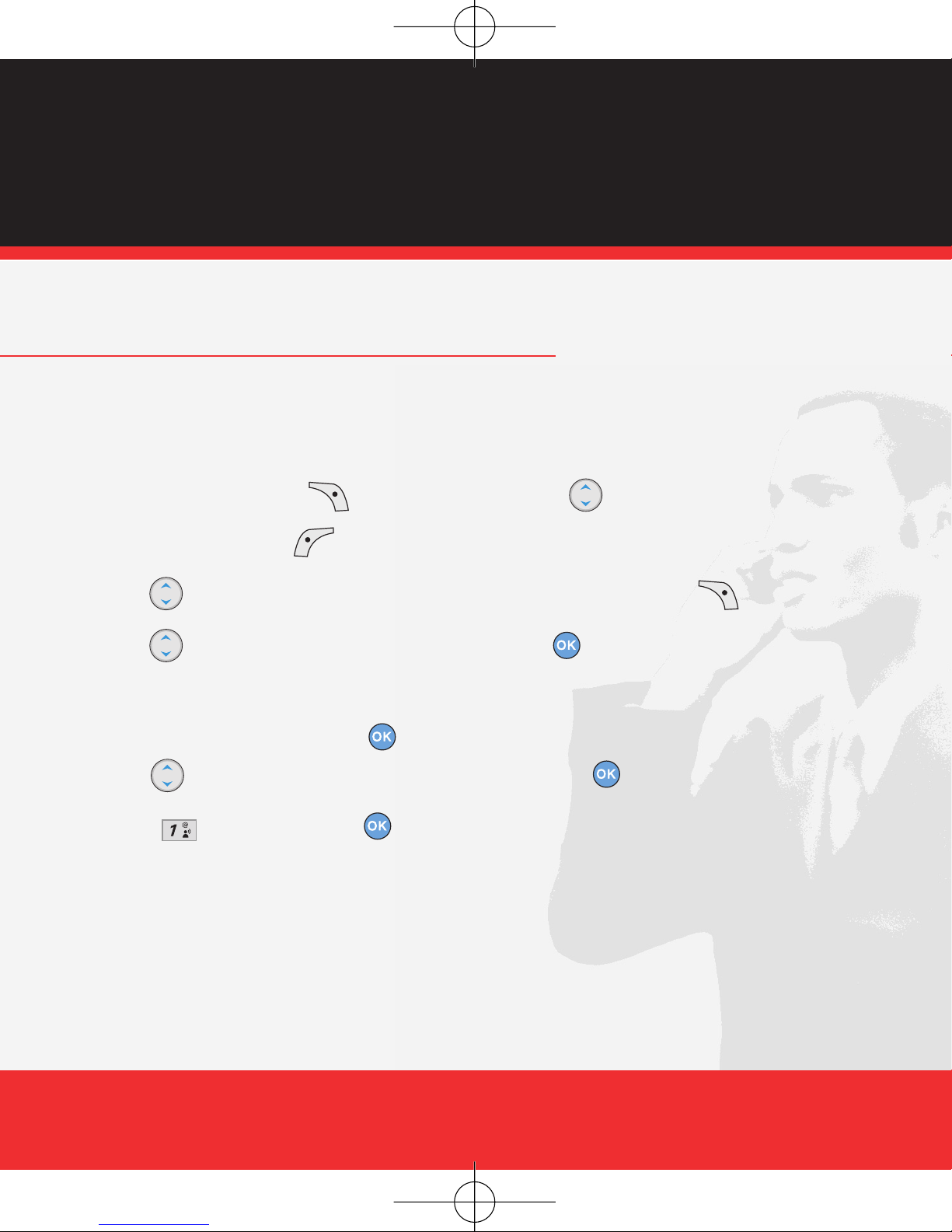
Programming Speed Dialing Numbers
1.) Press Right Soft Key [Contacts], then use to select an entry.
2.) Press Left Soft Key [Edit].
3.) Use to select a phone number, then press Right Soft Key [Options].
4.) Use to select Set Speed Dial, then press .
5.) Enter a Speed Dial digit.
Use the keypad, then press .
Use to select the Speed Dial digit, then press .
6.) Press Yes, then press to save.
Using Speed Dialing
For Speed Dials 1 to 9 press and hold the Speed Dial number.
For Speed Dials 10 to 99 press the first digit, then press and hold the key of the last
digit.
WIRELESS BASICS
9
VX5300 QRG_Eng_1.2 1/15/07 6:01 PM Page 9
Altri manuali per VX5300
4
Indice
Lingue:
Altri manuali LG Telefono cellulare
Manuali Telefono cellulare popolari di altre marche

Blackbe;rry
Blackbe;rry Q10 Manuale utente

Blackbe;rry
Blackbe;rry Bold 9900 Manuale utente

Blackbe;rry
Blackbe;rry STORM 9500 - VERSION 5.0 Manuale utente

ISAFE MOBILE
ISAFE MOBILE IS655.2 Manuale utente

Blackbe;rry
Blackbe;rry CURVE 8300 - SMARTPHONE Manuale utente

Blackbe;rry
Blackbe;rry 8707 - VERSION 4.1 Manuale utente