LG BNU-LW Manuale utente

ENGLISH ITALIANO ESPA OL FRANÇAIS DEUTSCH CHINESE
LG
BNU-LW(Lonworks Gateway)
Installation Manual
LG
IMPORTANT
• Please read this Installation Manual carefully and
thoroughly before installing and operating your room air
conditioner.
• Please retain this Installation Manual for future reference
after reading it thoroughly.

2Lonworks Gateway
BNU-LW (Lonworks Gateway)
TABLE OF CONTENTS
Safety Precautions.................................................................................................3
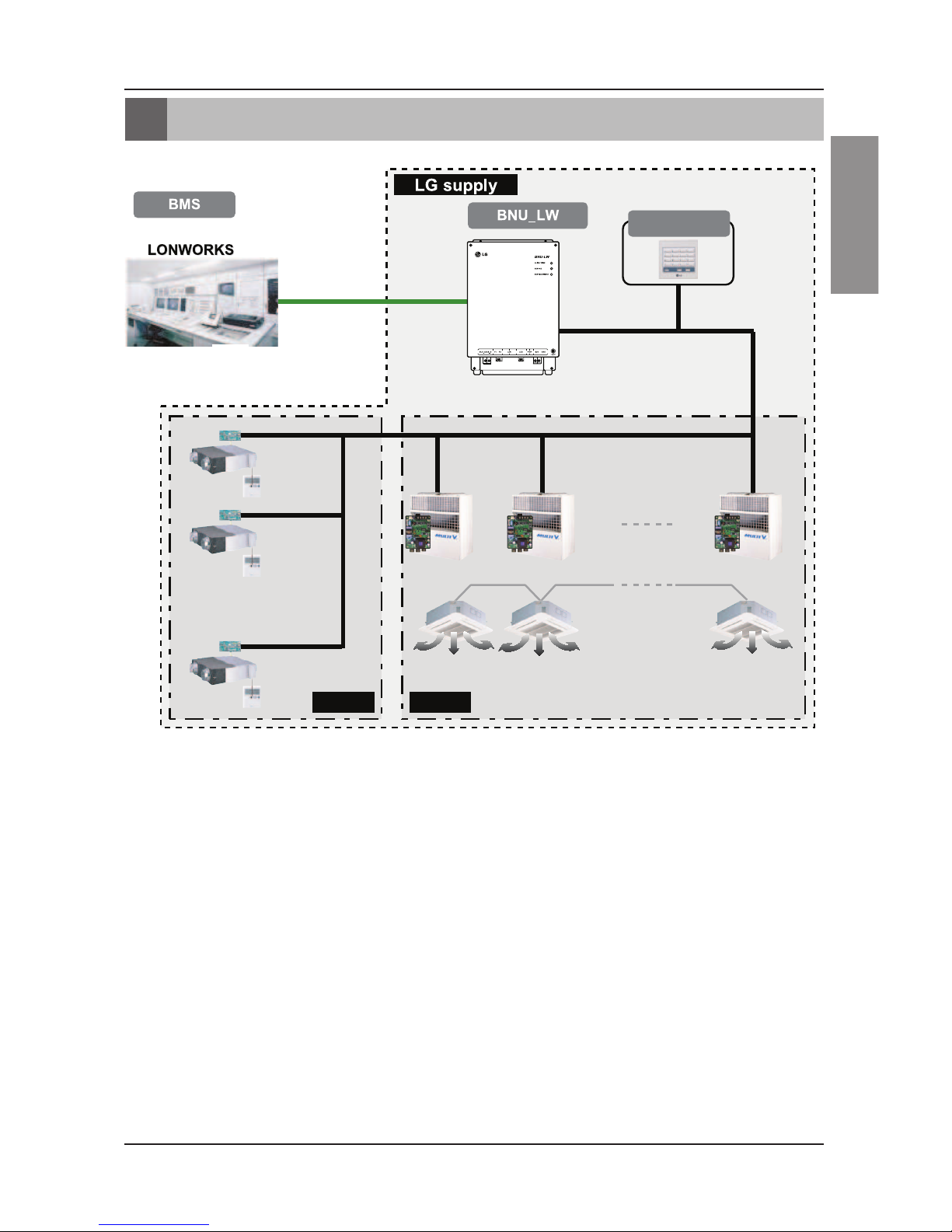
Overall system diagram.........................................................................................7
External wiring diagram ........................................................................................8
How to set the address for the central controller of the indoor unit
connected to BNU-LW (Lonworks Gateway).......................................................8
Communication line specification .......................................................................9
Name of each part................................................................................................10
Installation order ..................................................................................................11
BNU-LW wiring order ...........................................................................................12
Air conditioner/ventilation function table ..........................................................13
Air conditioner indoor unit function ...................................................................13
Ventilation indoor unit function..........................................................................14
BNU-LW remote diagnosis function...................................................................15
Setting method..................................................................................................15
Configuration ....................................................................................................16
Setting the indoor unit address..........................................................................18
Setting the indoor unit address .........................................................................18
Interfacing with simple central controller..........................................................19
Appendix...............................................................................................................20
A/C Objects.......................................................................................................20
Air conditioner control/monitoring point ............................................................21
Ventilation control/monitoring point...................................................................22
Network variables .............................................................................................23

Safety Precautions
Installation Manual 3
ENGLISH
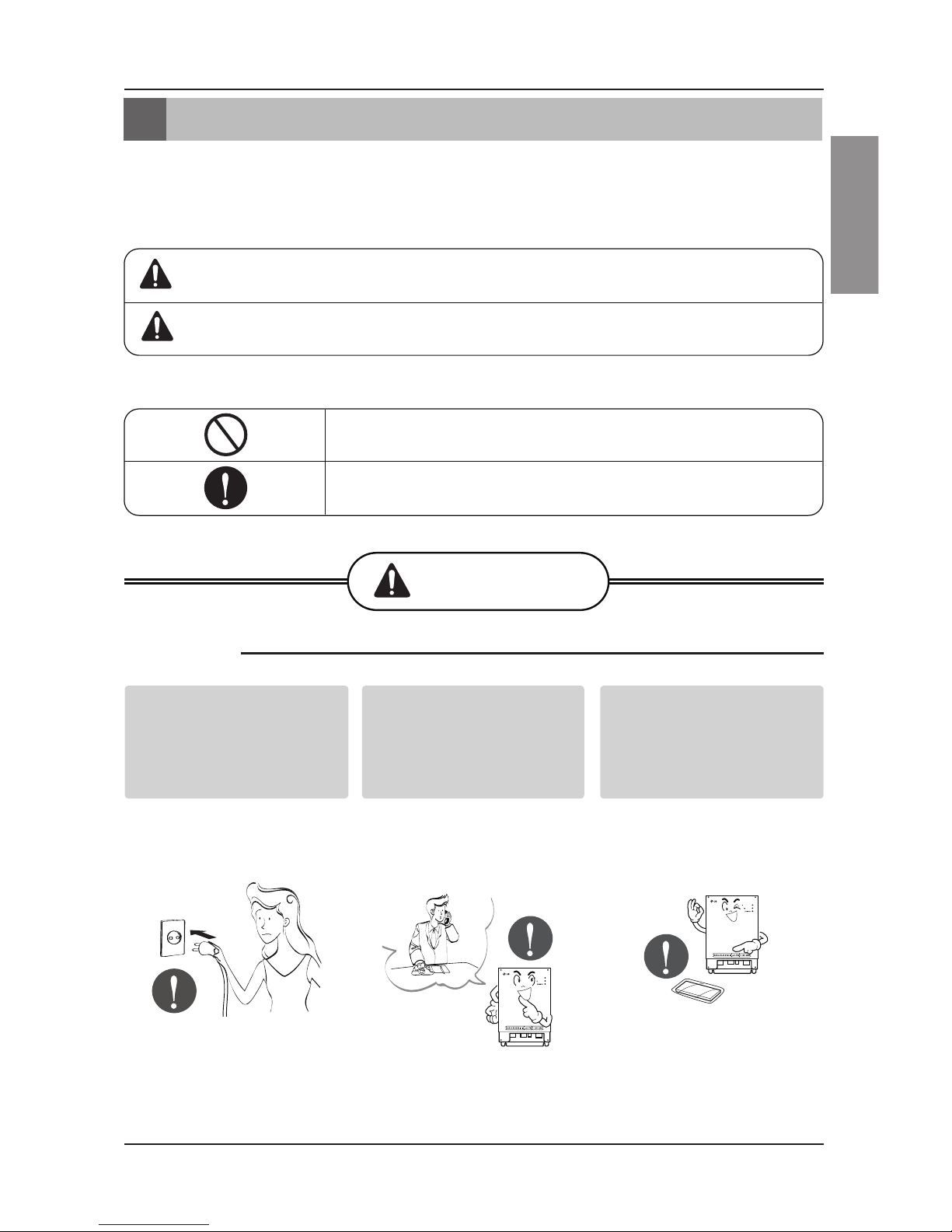
Do not operate or stop
the unit by inserting or
pulling out the power
plug.
• It will cause electric shock
or fire due to heat
generation.
Ask for Product
equipment at the service
center or establishment
certainly at the specialty
store.
• It can cause an accident,
electric shock, explosion
or injury.
Use standard parts.
• Use of non standard parts
can cause electric shock,
explosion, injury,
breakdown.
■Operation
BNU-LW
BNU-LW
Safety Precautions
To prevent injury to the user or other people and property damage, the following instructions
must be followed.
■Incorrect operation due to ignoring instruction will cause harm or damage. The seriousness is
classified by the following indications.
■Meanings of symbols used in this manual are as shown below.
WARNING
CAUTION
This symbol indicates the possibility of death or serious injury.
This symbol indicates the possibility of injury or damage.
Be sure not to do.
Be sure to follow the instruction.
WARNING
Standard Parts

Safety Precautions
4Lonworks Gateway
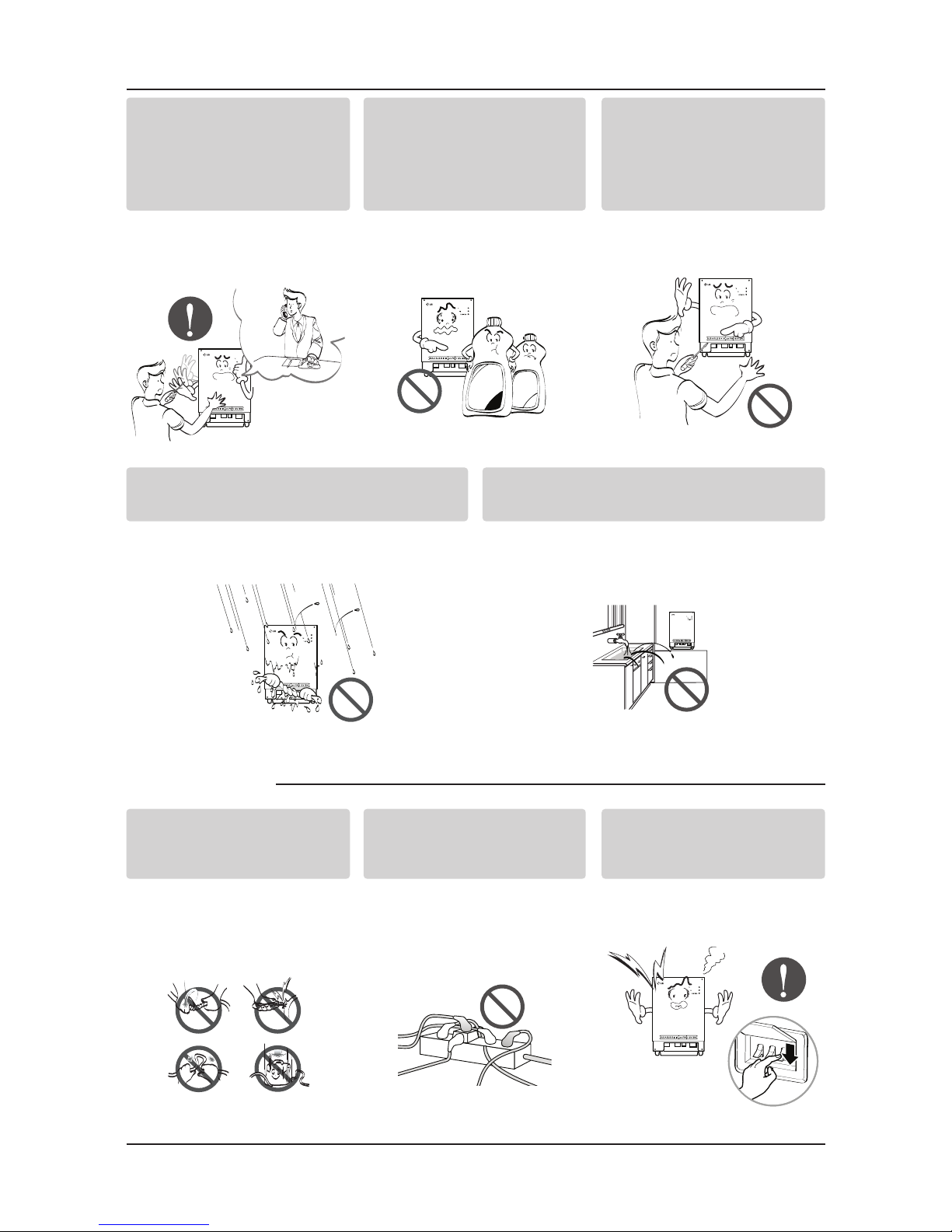
If water enters the product, turn the power
switch of the main body of appliance off.
• After taking the power-plug out from the
socket, contact the service center.
Keep the product away from the places
which can have moisture.
• Water may enter the unit and degrade the
insulation. It may cause an electric shock.
BNU-LW
BNU-LW
■During usage
While re-installing the
established product, notify
the service center or
establishment specialty
store.
• It can cause an accident,
electric shock, explosion,
injury.shock.
Do not use the power cord
near Flammable gas or
combustibles, such as
gasoline, benzene, thinner,
etc.
• It may cause an explosion
or fire
Do not disjoint randomly or
repair and remodel the
product.
• It may cause fire and
electric shock
BNU-LW
BNU-LW
Wax
Thinner
BNU-LW
Do not change or extend the
conductor at random.
• It can cause fire and
electric shock.
Do not use concert with in
the octopus-like legs way.
• It can cause fire and
electric shock
Unplug the unit if strange
sounds, smell, or smoke
comes from it.
• It may cause fire and
electric shock accident.
BNU-LW

Safety Precautions
Installation Manual 5
ENGLISH
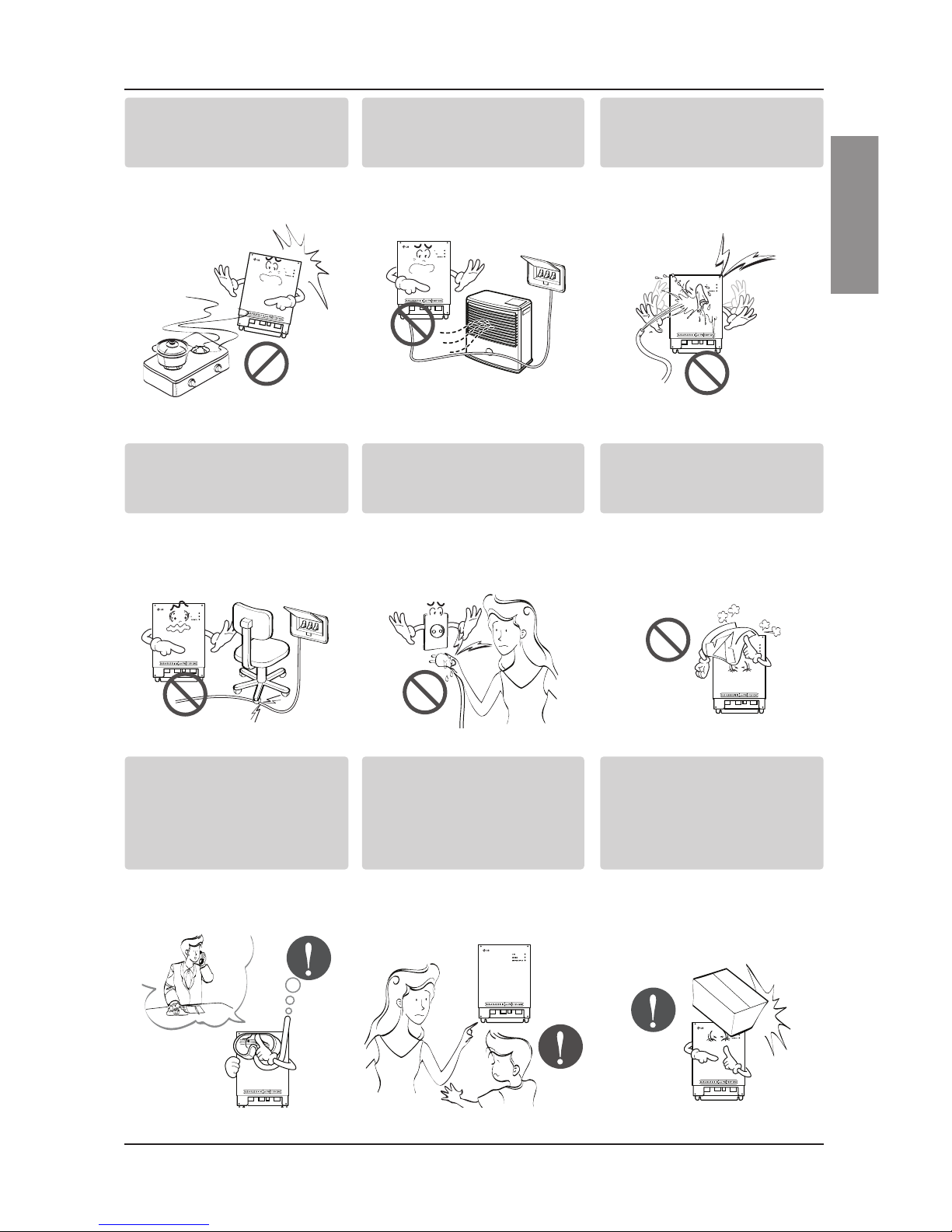
Do not put firearms near
product.
• It can cause fire.
Do not put an electric heater
or conductor near to the
product.
• It can cause fire and
electric shock.
Do not spill water inside
product.
• It can cause electric
shock and breakdown.
BNU-LW
BNU-LW
BNU-LW
Do not place heavy goods
on wire.
• It can cause fire and
electric shock.
Hold the plug by the head of
the power plug when taking
it out.
• It may cause electric
shock and damage.
Do not place heavy goods
on product.
• It can cause product
breakdown.
BNU-LW
BNU-LW
That increase in case of
product was been flood
certainly in the service
center or establishment
specialty store commit .
• I am responsible for fire
and electric shock.
Protect the product from
handling by a children.
• It can cause accident and
product breakdown.
Do not apply shock to
product.
• I am responsible for
breakdown in case of
shock to product.
BNU-LW
BNU-LW
BNU-LW

Safety Precautions
6Lonworks Gateway
■During usage
CAUTION
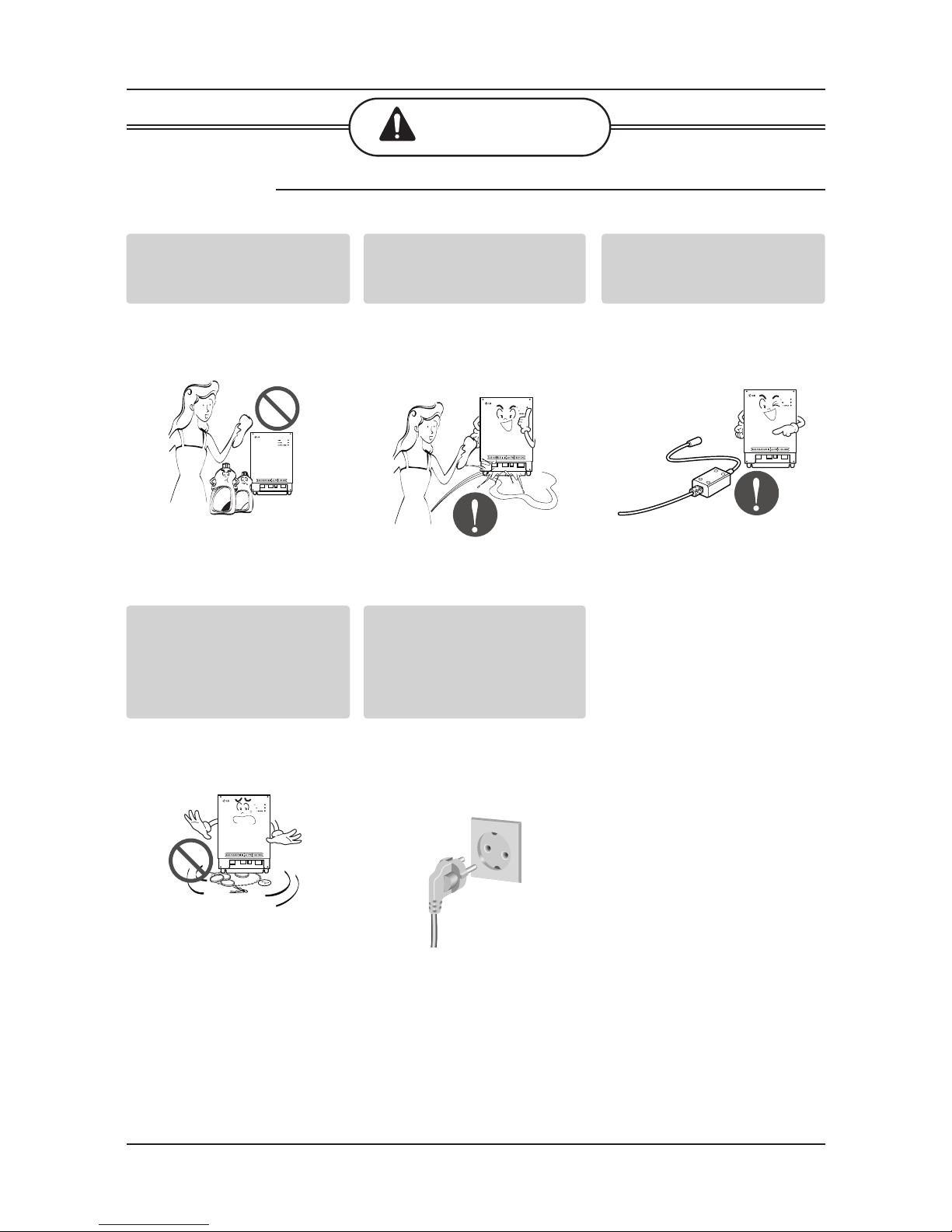
Clean by soft hands using a
cleaning material like a soft
cloth.
• It can result in fire and
product transformation.
Do not place any live part on
the surface having water.
• It can cause product
breakdown.
Use recommended Adapter.
• Otherwise it can result in
product breakdown
BNU-LW
Wax
Thinner
BNU-LW
BNU-LW
Avoid contact to the metallic
goods such as necklace,
coin, key, a watch which
may touch the battery even
for a short-time.
• It may cause product
breakdown and injury.
Hold the plug by the head of
the power plug when taking
it out.
• It may cause electric
shock and damage.
BNU-LW

Overall system diagram
Installation Manual 7
ENGLISH
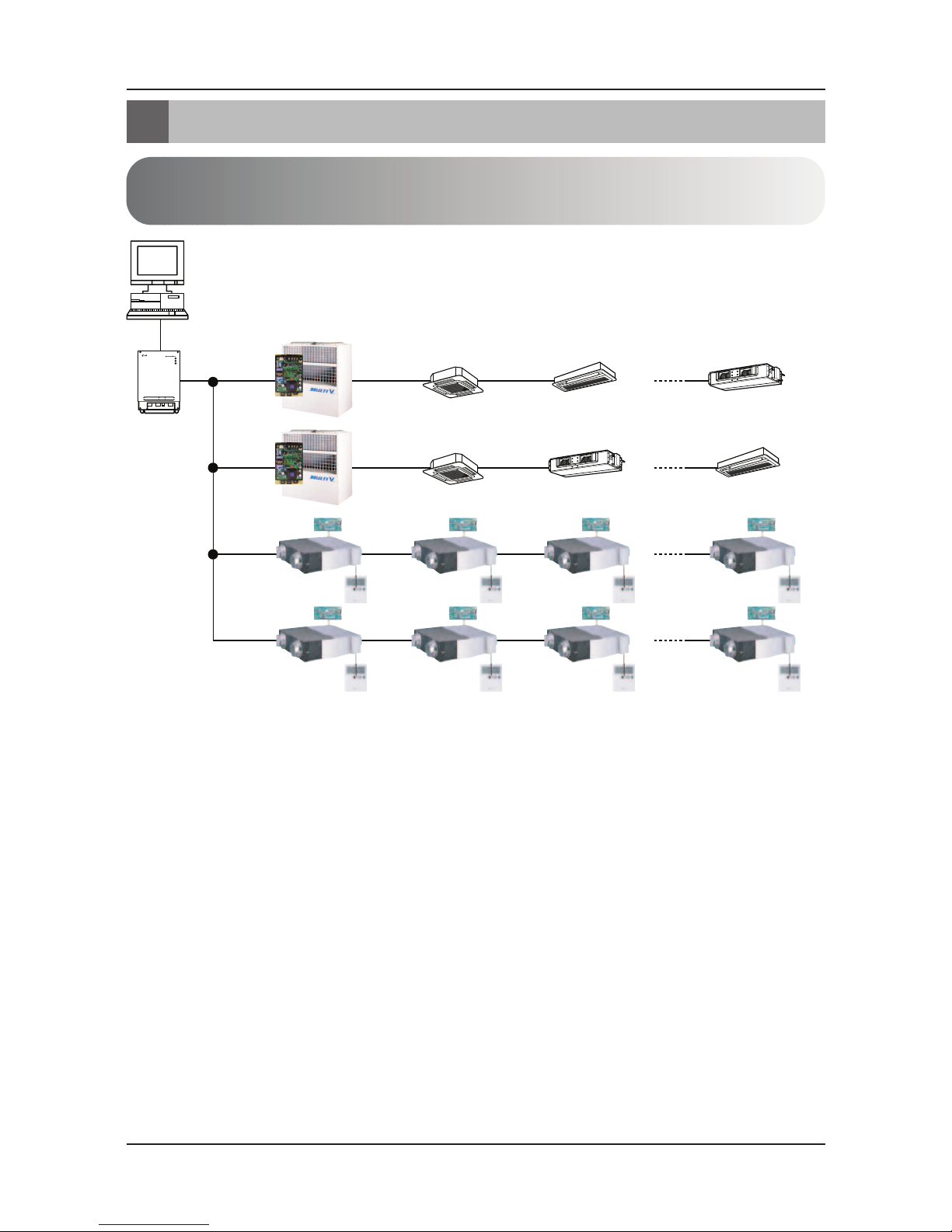
Overall system diagram
Simple central
controller
Ventilation A/C
485 communication
* Can be connected to 64 indoor units (Ventilation+Air conditioner)
* PNF-B16A1 (Lon Gateway) can be used in connection with the simple central
controller.

External wiring diagram
8Lonworks Gateway
LON protocol
BMS system
BNU-LW
RS485
RI485 Central controller address(0.0) (0.1) . . . . . . . . . . . . (0.F)
Central controller address(1.0)
Central controller
address(2.0)
Central controller
address(2.4)
(2.1) (2.2) (2.3)
(2.5) (2.6) (2.7)
(1.1)............(1.F)
Air conditioner
RI485
<Maximum number of connected indoor unit: 64 units>
•When the address of the indoor unit of the air conditioner is duplicated with that of the ventilation
unit, it will not operate normally.
•Maximum of 64 units of the indoor unit (Air conditioner+Ventilation) can be connected to the BNU-
LW.
•It is recommended to connect 16 units of PI485 and maximum of d32 PI485 units to the BNU-LW.
•Ventilation products cannot be interfaced with the simple central controller.
External wiring diagram
How to set the address for the central controller of
the indoor unit connected to BNU-LW (Lonworks Gateway)

External wiring diagram
Installation Manual 9
ENGLISH
1. RS-485 communication line specification: 0.75mm2or above 2C shield, product to product: 200M,
total length: 1km
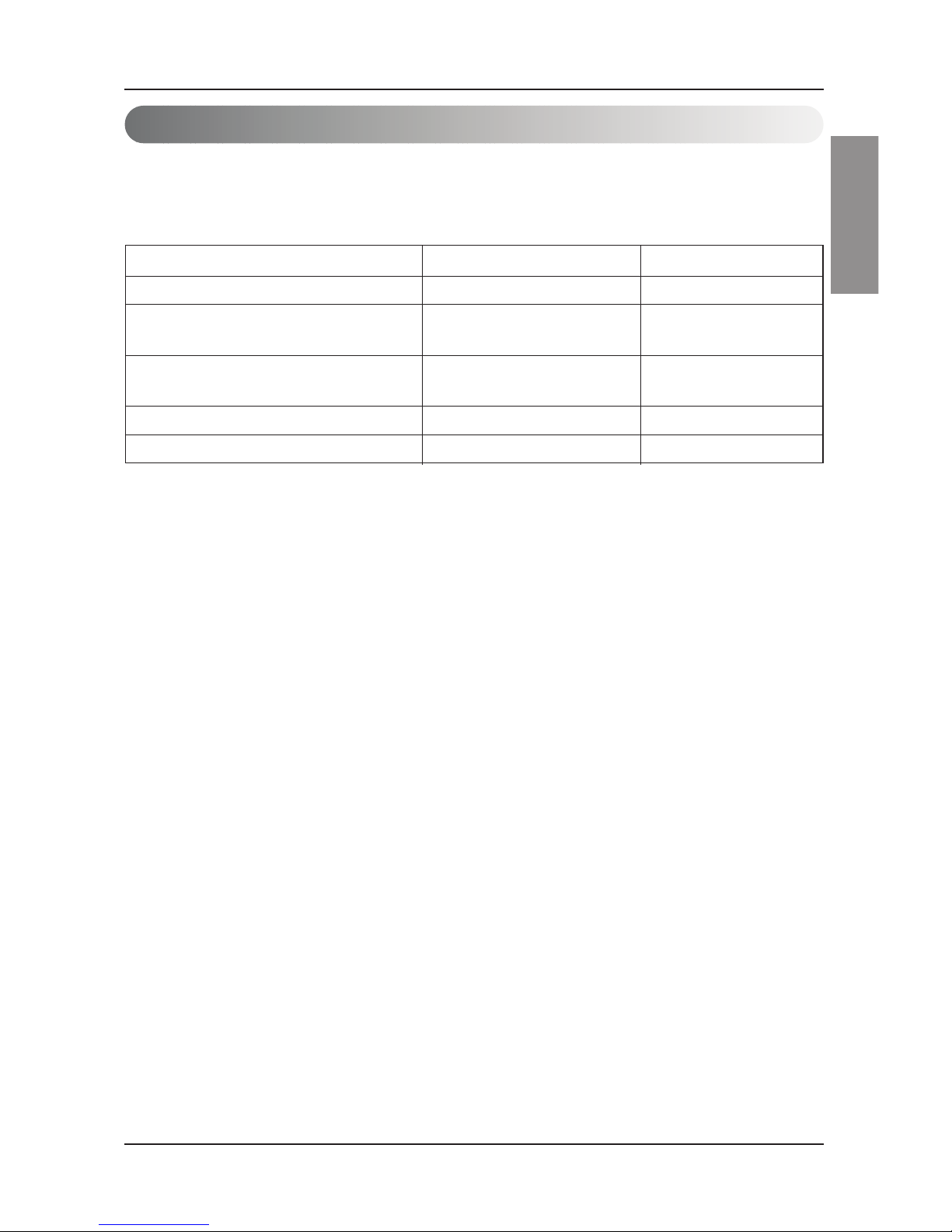
2. FT-10 communication line: Refer to the following table.
* Nod to node distance (max): 250m, maximum distance: 450m
* AWG: American Wire Gauge
Cable Type Line thickness (AWG) Diameter
TIA 568A Category 5 cable 24 0.5mm
Belden 88471 (PVC jacket) or 16 1.3mm
equivalent cable
Belden 85102(Tefzel jacket) or 16 1.3mm
equal cable
Level IV cable 22 0.65mm
JY(st)Y 2x2x0.8 20.4 0.8mm
Communication line specification

Name of each part
10 Lonworks Gateway
Name of each part
1
2
3
4
5
6
7
8
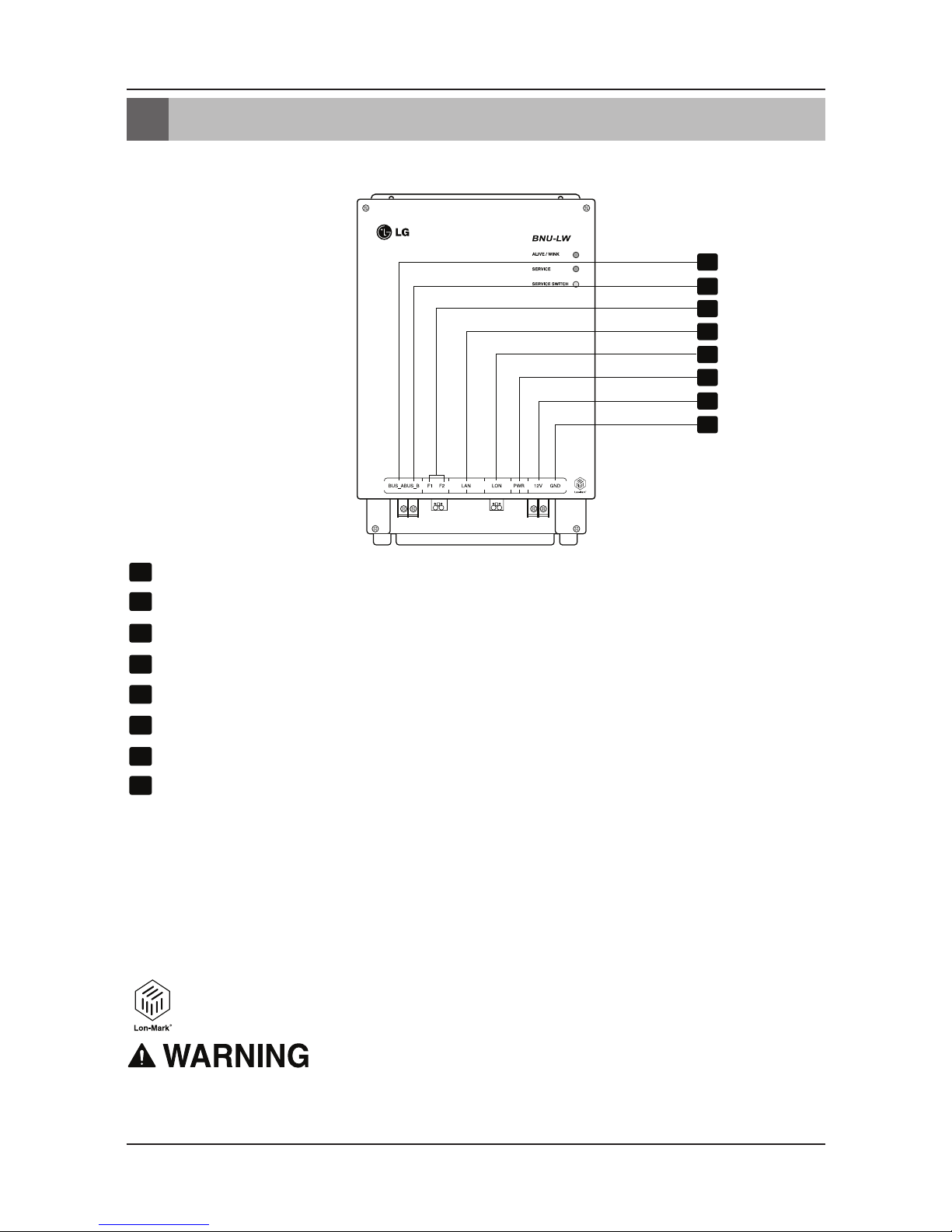
BUS_A: 485 communication line A (+)
BUS_B: 485 communication line B (-)
F1, F2: Fire detection function (external device) contact point connection
LAN: LAN port necessary for web function
LON: TP/FT-10 communication line (Lonworks system communication line) non-polarity
PWR: Connection to DC 12V power adapter
12V: Connection when not using DC 12V power adapter
GND: Connection when not using GNS adapter
ALIVE/WINK: It flashes every 1 second when it is normal
It flashes 5 times when receiving WINK command from Lonworks system
(Green)
SERVICE: It is turned off when it is normal and flashes when it is not connected to the
Lonworks system. It is turned on when the service switch is pressed.
SERVICE SWITCH: When you press the switch the Neuron ID is transmitted to the
Lonworks system, and the service LED is turned on.
BNU-LW (PNF-B16A1) product is a product certified of LON-MARK, an international
standard. (Lon Mark Version 3.3)
1
8
2
3
4
5
6
7
LONWORKS GATEWAY
No. 6 and No. 7,8 are all for power supply. Therefore, only one of two combinations should be used.
When DC 12V is used for the power, Connect No. 6 to the power (not necessary to use No. 7,8.)
When DC 12V is NOT used for the power, Connect No. 7, 8 to the power (not necessary to use No. 6.)
Questo manuale è adatto per i seguenti modelli
1
Indice
Altri manuali LG Portale

LG
LG BECON HVAC BACnet PQNFB17C1 Manuale utente

LG
LG V-NET PLNWKB000 Manuale di istruzioni

LG
LG PWFMDB200 Manuale utente

LG
LG BACnet Touch Istruzioni operative

LG
LG PI 485 Manuale utente

LG
LG PHNFP14A0 Manuale utente

LG
LG BNU-BAC Istruzioni operative

LG
LG REGX-XOXXA Manuale utente

LG
LG EnerBox2 Manuale utente

LG
LG PWFMDB200 Manuale utente
Manuali Portale popolari di altre marche

LST
LST M500RFE-AS Manuale utente

Kinnex
Kinnex Media Gateway Manuale utente

2N Telekomunikace
2N Telekomunikace 2N StarGate Manuale utente

Mitsubishi Heavy Industries
Mitsubishi Heavy Industries Superlink SC-WBGW256 Manuale utente

ZyXEL Communications
ZyXEL Communications ZYWALL2 ET 2WE Manuale utente

Telsey
Telsey CPVA 500 - SIP Manuale utente