LG TONE-FP7C Manuale utente

ENGLISH ESPAÑOL
Please read the Important Safety Information for the proper
use of this product. After reading, store this Owner's Manual
in an easily accessible place for all users.
NOTE: Please read all information carefully prior to using
the headset in order to enjoy the best performance and
prevent damage to the product.
Rev1.0 US
TONE-FP7 / TONE-FP7C
www.lg.com
Copyright © 2022 LG Electronics Inc. All rights reserved.
OWNER'S MANUAL
Bluetooth®LG Stereo Headset

Contents
Safety Precautions................................................................................................................................1
Precautions When Using the Product.......................................................................................3
HD Speaker................................................................................................................................................3
Product Components ..........................................................................................................................4
Overview......................................................................................................................................................5
Pairing and Connecting.......................................................................................................................6
Wearing Earbuds....................................................................................................................................8
Playing Music............................................................................................................................................9
Mobile Calling Functions.................................................................................................................10
Listen to the Ambient Sound (LAS) / Active Noise Cancellation (ANC)..........11
UVnano......................................................................................................................................................12
Charging....................................................................................................................................................13
Plug and Wireless Mode (External Device Connection Mode)...............................14
Checking the Battery Status .......................................................................................................16
Battery Status Indicator.................................................................................................................17
Out of Range..........................................................................................................................................18
LG TONE Free App..............................................................................................................................18
Troubleshooting....................................................................................................................................19
Specications and Features..........................................................................................................20
Declaration of Conrmation.........................................................................................................21
Additional Information.....................................................................................................................23
Important Safety Information.....................................................................................................25
Open Source Software Notice Information.........................................................................26
Symbols.....................................................................................................................................................26
LIMITED WARRANTY- U.S.A. ONLY ........................................................................................27
ENGLISH

1
ENGLISH
The LG TONE Free (TONE-FP7) is a lightweight wireless headset that uses
Bluetooth technology.
This product can be used as an audio accessory for devices supporting
either the A2DP or Hands-Free Bluetooth Prole.
Safety Precautions
The following safety precautions are provided to prevent any unexpected
accident or damage. Please familiarize yourself with the safety precautions.
The safety precautions are classied into “WARNING” and “CAUTION”.
!
WARNING: Failing to comply with the instructions may result in
serious injury or death.
!
CAUTION: Failing to comply with the instructions may result in minor
injury or product damage.
!WARNING
Do not drop the product from a high place.
Make sure there is no water, alcohol, or benzene in contact with the product.
Do not store the product in a wet or dusty place.
Do not place heavy objects on the product.
Earbuds tested under controlled laboratory conditions with an IPX4 rating.
Resistant to splashed water. Dry before using. Do not charge while wet.
Case has not been tested for IPX4.

2
ENGLISH
!
CAUTION
Do not disassemble, adjust, or repair the product.
Do not place the product near excessive heat or ammable material.
The product may be damaged if an incompatible charger is used.
Keep small components of the product away from infants or children.
Make sure that foreign objects do not enter the charger’s connectors
(charging port and power plug). Foreign objects in the charger's connectors
may result in re or electric shock.
If you have a medical device implanted, contact your doctor before using
this device.
For your safety, do not remove the battery incorporated in the product.
This product has a built-in battery, and the battery cannot be removed or
replaced.
If you arbitrarily replace the battery or don’t replace it correctly, it may explode.
The lithium-ion battery is a hazardous component that can cause injury.
Battery replacement by an unqualied professional can cause damage
to your device.
Do not discard the battery arbitrarily. Follow the local procedure for
discarding batteries.
In order to prevent unnecessary energy consumption, disconnect the
device when fully charged. Always use an easily accessible power outlet
for charging your device.
Risk of re or explosion if the battery is replaced by an incorrect type.
Do not store or transport at pressures lower than 0.116 bar (11.6 kPa)
and at above 9.32 miles (15,000 m) altitude.

3
ENGLISH
Replacement of a battery with an incorrect type that can defeat a
safeguard (for example, in the case of some lithium battery types).
Disposal of a battery into re or a hot oven, or mechanically crushing or
cutting of a battery, may result in an explosion.
Leaving a battery in an extremely high temperature surrounding
environment that can result in an explosion or the leakage of ammable
liquid or gas.
A battery subjected to extremely low air pressure may result in an
explosion or the leakage of ammable liquid or gas.
Do not carelessly throw away old batteries. It can cause an explosion or
re. The disposal method may vary by country and region. Dispose of it in
an appropriate manner.
Precautions When Using the Product
If the product is exposed to excessive sweat, Clean the product with dry cloth.
Keep the earbuds clean.
HD Speaker
If the communication network of the device you are connecting to supports
HD Voice Calling, you can enjoy making voice calls and listening to music in
high denition.

4
ENGLISH
Product Components
LG TONE Free®
Earbuds (medium eargels
installed)
UV Charging Case
Extra Ear Gels
(small & large) USB Type-C™ Charging
Cable
USB-C™ to AUX cable Owner's Manual Warranty Card
NOTE: Actual product design may differ from images shown in manual.
Make sure authentic LG Electronics components are used. Using a non-
authentic component may damage the product. The LG limited warranty
does not cover damage caused by the use of non-authentic components.
Use the USB Type-C™ cable/USB-C™ to AUX cable provided with the product.
!
CAUTION

5
ENGLISH
Overview
Charging Case
Earbuds
*Make sure that the charging terminal is not soiled with foreign substance.
*The appearance and specications of the actual product may differ depending
on the model.
Charging port
Charging terminals
UVnano LED
Mood light
(When you open the
charging case, the mood
light turns on and off.)
UVnano LED
Battery Status Indicator (up)
UVnano Indicator (down)
Speaker mesh
(Microphone)
Microphone
Microphone
Touchpad
Touchpad Charging terminals
Charging terminals
Speaker mesh
(Microphone)
Plug and Wireless Mode Switch

6
ENGLISH
Pairing and Connecting
Fast Pair
-(
-(
#MVFUPPUI 0/
1 Turn on the Bluetooth function on the mobile phone or the device to
be
connected.
2 Open the cover of the charging case with the earbuds mounted on
the case. Press and hold the touchpad of the left or right earbud for
3 to 5 seconds until the battery status indicator blinks blue.
-(
-(
-(
-(50/&'1
-(
-(50/&'1
#MVFUPPUI
3 When the Fast Pair connection pop-up appears on the top area of the
mobile phone screen, tap it to connect. (It only supports Android™ 6.0
or higher, and requires conguring Bluetooth and location information
settings of the mobile device.)
4 If the pop-up does not appear, select [LG-TONE-FP7] from the Bluetooth
menu on the mobile phone and connect it (for users of iOS or Android 5.0
or lower versions).
~ 3.28 feet

7
ENGLISH
!
CAUTION: In the list of Bluetooth connected devices, LG-TONE-FP7_LE
is not the correct model name for connection. Check the model name
in use and connect with the model name without “LE”.
If the earbud model name is abnormally displayed on the Android
device, change the model name in the Bluetooth menu of Connected
Device Settings.
NOTE: To connect with another device, perform the above procedure again.
Automatic Reconnection
The earbuds are connected automatically when you open the cover of
the charging case. If you close the cover of the charging case with both
earbuds mounted in the charging case, the earbuds are disconnected.

8
ENGLISH
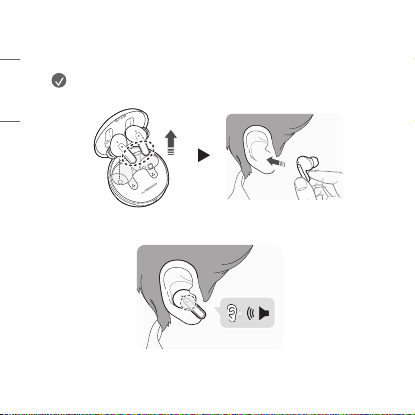
Wearing Earbuds
1 Separate the earbuds from the charging case and adjust them so that
they t comfortably in your ears.
NOTE: Choose the ear gels that best t your ears to
improve Active Noise Canceling (ANC) performance.
2 You will hear an audio conrmation when wearing the earbuds.
Questo manuale è adatto per i seguenti modelli
3
Indice
Lingue:
Altri manuali LG Cuffia

LG
LG TONE FREE Manuale utente

LG
LG Tone Active+ HBS-A100 Manuale utente

LG
LG FORCE HBS-S80 Manuale utente

LG
LG TONE Active HBS-A80 Manuale utente

LG
LG TONE ULTRA HBS-810 Manuale utente

LG
LG TONE Free TONE-UT60Q Manuale utente

LG
LG HBS-800 Manuale utente

LG
LG TONE FREE Manuale utente

LG
LG HBS-760 TonePRO Manuale utente

LG
LG TONE Free TONE-DFP9 Manuale utente

LG
LG TONE Ultra SE Manuale utente

LG
LG HBS-500 Manuale utente

LG
LG TH900 Manuale utente

LG
LG HBS-730 Manuale utente

LG
LG TONE-FP9 Manuale utente

LG
LG HBM-235 Manuale utente

LG
LG TONE PLATINUM HBS-1100 Manuale utente

LG
LG TONE-FP8W Manuale utente

LG
LG HBS-750 Manuale utente

LG
LG Tone Pro BHS-770 Manuale utente