
LG 22MT45D Manuale utente

www.lg.com
MT45*
Please read this manual carefully before operating your TV
and retain it for future reference.
*Disclaimer
LG LED TV applies LCD screen with LED backlights.
OWNER’S MANUAL
LED TV

ENGLISH
2TABLE OF CONTENTS
WARNING
If you ignore the warning message, you
may be seriously injured or there is a
possibility of accident or death.
CAUTION
If you ignore the caution message, you
may be slightly injured or the product may
be damaged.
NOTE
The note helps you understand and use
the product safely. Please read the note
carefully before using the product.
TABLE OF CONTENTS
3 LICENSES
3 OPEN SOURCE SOFTWARE
NOTICE
4 ASSEMBLING AND PREPARING
4 Unpacking
6 Part and buttons
7 - Using the Joystick button
9 Lifting and moving the TV
10 Setting up the TV
10 - Attaching the Stand
11 - Detaching the Stand
13 Mounting on a table
15 Mounting on a wall
17 MAKING CONNECTIONS
17 Antenna Connection
18 Other connections
20 - Connecting to a PC
21 REMOTE CONTROL
22 SETTINGS
27 TO SEE WEB MANUAL
28 MAINTENANCE
28 Cleaning your TV
28 - Screen, frame, cabinet and stand
28 - Power cord
28 Preventing “Image burn or retention” or
“Burn-in” on your TV screen
29 TROUBLESHOOTING
30 SPECIFICATIONS

ENGLISH
3
LICENSES / OPEN SOURCE SOFTWARE NOTICE
LICENSES
Supported licenses may differ by model. For more information about licenses, visit www.lg.com.
Manufactured under license from Dolby Laboratories. “Dolby” and the
double-D symbol are trademarks of Dolby Laboratories.
The terms HDMI and HDMI High-Definition Multimedia Interface, and the
HDMI logo are trademarks or registered trademarks of HDMI Licensing LLC
in the United States and other countries.
ABOUT DIVX VIDEO: DivX® is a digital video format created by DivX, LLC,
a subsidiary of Rovi Corporation. This is an official DivX Certified® device
that has passed rigorous testing to verify that it plays DivX video. Visit divx.
com for more information and software tools to convert your files into DivX
video.
ABOUT DIVX VIDEO-ON-DEMAND: This DivX Certified® device must
be registered in order to play purchased DivX Video-on-Demand (VOD)
movies. To obtain your registration code, locate the DivX VOD section in
your device setup menu. Go to vod.divx.com for more information on how to
complete your registration.
“DivX Certified® to play DivX® video up to HD 1080p, including premium
content.”
“DivX®, DivX Certified® and associated logos are trademarks of Rovi
Corporation or its subsidiaries and are used under license.”
“Covered by one or more of the following U.S. patents :
7,295,673; 7,460,668; 7,515,710; 7,519,274”
OPEN SOURCE SOFTWARE NOTICE
To obtain the source code under GPL, LGPL, MPL and other open source licenses, that is contained in
this product, please visit http://opensource.lge.com.
In addition to the source code, all referred license terms, warranty disclaimers and copyright notices
are available for download.
LG Electronics will also provide open source code to you on CD-ROM for a charge covering the cost of
performing such distribution (such as the cost of media, shipping and handling) upon email request to
[email protected]. This offer is valid for three (3) years from the date on which you purchased the
product.

ENGLISH
4ASSEMBLING AND PREPARING
NOTE
Image shown may differ from your TV.
Your TV’s OSD (On Screen Display) may differ slightly from that shown in this manual.
The available menus and options may differ from the input source or product model that you
are using.
New features may be added to this TV in the future.
The TV can be placed in standby mode in order to reduce the power consumption. And the
TV should be turned off if it will not be watched for some time, as this will reduce energy
consumption.
The energy consumed during use can be significantly reduced if the level of brightness of the
picture is reduced, and this will reduce the overall running cost.
ASSEMBLING AND PREPARING
Unpacking
Check your product box for the following items. If there are any missing accessories, contact the local
dealer where you purchased your product. The illustrations in this manual may differ from the actual
product and item.
CAUTION
Do not use any unapproved items to ensure the safety and product life span.
Any damage or injuries caused by using unapproved items are not covered by the
manufacturer’s warranty.
Some models have a thin film attached on to the screen and this must not be removed.
NOTE
The items supplied with your product may vary depending on the model.
Product specifications or contents of this manual may be changed without prior notice due to
upgrade of product functions.
For an optimal connection, HDMI cables and USB devices should have bezels less than 10 mm
thick and 18 mm width. Use an extension cable that supports USB 2.0 if the USB cable or USB
memory stick does not fit into your TV’s USB port.
A
B
A
B*A
<
=
10 mm
*B
<
=
18 mm

ENGLISH
5
ASSEMBLING AND PREPARING
Remote control /
batteries (AAA)
(See p.21)
CD (Owner’s Manual) /
Cards
Stand Base
(Only 22/24/28MT45*)
(See p.10, 11)
Stand Base
(Only 29MT45*)
(See p.11, 12)
Stand Body
(Only 29MT45*)
(See p.10, 12)
Stand Screws
2EA, M4 X L16
(Only 29MT45*)
(See p.11, 12)
Power Cord
(Depending on model)
(See p.13)
AC-DC Adapter
(Depending on model)
(See p.13)

ENGLISH
6ASSEMBLING AND PREPARING
Part and buttons
NOTE
You can set the power indicator light to on or off by selecting OPTION in the main menus.
(Only 22/24/28MT45*)
Screen
Speakers
Joystick button
(* This button is located below the TV
screen.)
Remote control sensor
Power Indicator
Red : When the power is turned off
Off : When the power is turned on
Amber : When the power is in power saving mode

ENGLISH
7
ASSEMBLING AND PREPARING
Using the Joystick button
You can simply operate the TV functions, by pressing to turn ON/OFF or sliding your finger over
joystick button moving up, down, left or right.
Basic Functions
Power On When the TV is turned off, place your finger on the joystick
button and press it once and release it.
Power Off
When the TV is turned on, place your finger on the joystick
button and press it once for a few seconds and release it.
(However, if the Menu button is on the screen, pressing and
holding the joystick button will let you exit the Menu.)
Volume
Control
If you place your finger over the joystick button and move it left
or right, you can adjust the volume level you want.
Programmes
Control
If you place your finger over the joystick button and move it up
or down, you can scrolls through the saved programmes what
you want.
NOTE
When your finger is over the joystick button and you are sliding finger forward/back ,left or right,
be careful not to press down to hard on joystick. If you press down hard on joystick button first
then the adjustment of Volume level and program scroll action will not operate.
Adjusting the Menu
When the TV is turned on, press the joystick button one time.
You can adjust the Menu items ( ) moving the joystick button up, down, left or right.
TV Off Turns the power off.
Settings Accesses the main menu.
Close Clears on-screen displays and return to TV viewing.
Input List Changes the input source.

ENGLISH
8ASSEMBLING AND PREPARING
Touch buttons Description
Scrolls through the saved programmes.
Adjusts the volume level.
OK Selects the highlighted menu option or confirms an input.
SETTINGS Accesses the main menus, or saves your input and exits the menus.
INPUT Changes the input source.
Turns the power on or off.
(Only 29MT45*)
NOTE
All of the buttons are touch sensitive and can be operated through simple touch with your
finger.
You can set the power indicator light to on or off by selecting OPTION in the main menus.
Remote control sensor
Power Indicator
Red : When the power is turned off
Off : When the power is turned on
Amber : When the power is in power
saving mode
Screen
Touch buttons
Speakers

ENGLISH
9
ASSEMBLING AND PREPARING
Lifting and moving the TV
Please note the following advice to prevent the
TV from being scratched or damaged and for
safe transportation regardless of its type and
size.
CAUTION
Avoid touching the screen at all times, as
this may result in damage to the screen.
It is recommended to move the TV in the
box or packing material that the TV originally
came in.
Before moving or lifting the TV, disconnect
the power cord and all cables.
When holding the TV, the screen should face
away from you to avoid damage.
Hold the top and bottom of the TV frame
rmly. Make sure not to hold the transparent
part, speaker, or speaker grill area.
When transporting the TV, do not expose the
TV to jolts or excessive vibration.
When transporting the TV, keep the TV
upright, never turn the TV on its side or tilt
towards the left or right.
Do not apply excessive pressure to cause
exing /bending of frame chassis as it may
damage screen.
When handling the TV, be careful not to
damage the protruding joystick button.
(Depending on model)
ENGLISH
10 ASSEMBLING AND PREPARING
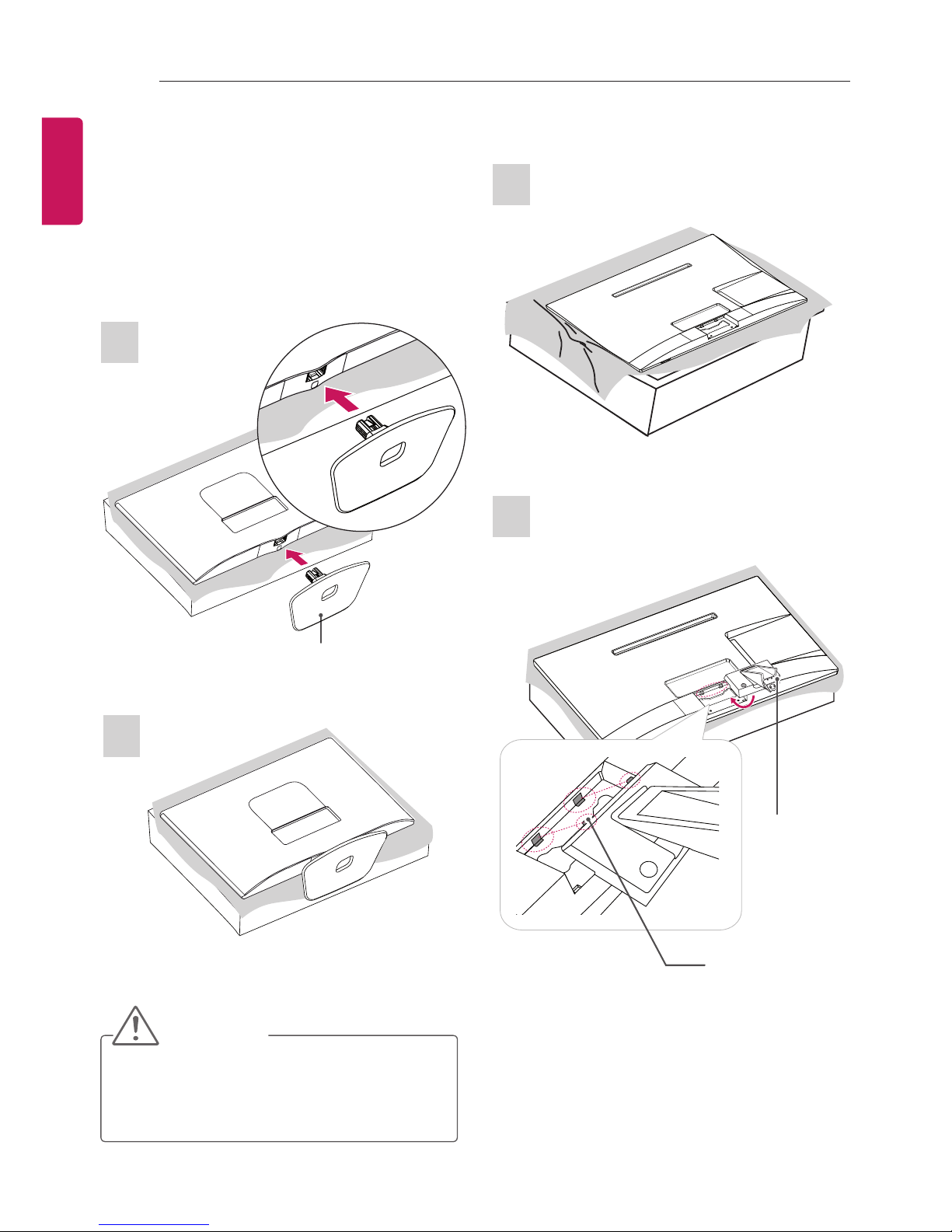
1
2
Locker
29MT45*
Setting up the TV
Image shown may differ from your TV.
Attaching the Stand
1
2
Stand Base
Stand Body
CAUTION
When attaching the stand to the TV
set, place the screen facing down on a
cushioned table or flat surface to protect
the screen from scratches.
22/24/28MT45*
Questo manuale è adatto per i seguenti modelli
3
Indice
Altri manuali LG TV LED

LG
LG 49UU761H-ZA Manuale utente

LG
LG LJ62 Series Manuale utente

LG
LG UF67 Series Manuale utente

LG
LG MN43 Series Manuale utente

LG
LG 60UJ6540 Manuale utente

LG
LG LP63 series Manuale utente

LG
LG 29UT55D Manuale utente

LG
LG Centric 42LY750H Manuale utente

LG
LG 49UT640S0SA Guida rapida

LG
LG 43LX76 Series Manuale utente

LG
LG 75/86UU3 U Series Manuale utente

LG
LG 24MT49S Manuale utente

LG
LG 65NANO96SNA Manuale utente

LG
LG 75SM9000PVA.AMF Manuale utente

LG
LG 32LN5700 Manuale utente

LG
LG LJ61 Series Manuale utente

LG
LG 43UJ631V-ZA Manuale utente

LG
LG 15LU766A Guida rapida

LG
LG 50LA6130 Manuale utente

LG
LG 47GA6450 Manuale utente


