LG MS2346S Manuale utente

OWNER’S MANUAL
MS2346S
MS2346SS
MICROWAVE OVEN
Please read this owner’s manual thoroughly before operating.
www.lg.com
P/No. : MFL40257802

2
You cannot operate your oven with the door open due to the safety interlocks built into the door
mechanism. These safety interlocks automatically switch off any cooking activity when the door is opened;
which in the case of a microwave oven could result in harmful exposure to microwave energy.
It is important not to tamper with the safety interlocks.
Do not place any object between the oven front face and the door or allow food or cleaner residue to
accumulate on sealing surfaces.
Do not operate your oven if it is damaged. It is particularly important that the oven door closes properly and
that there is no damage to the: (1) door(bent), (2) hinges and latches (broken or loosened), (3) door seals
and sealing surfaces.
Your oven should not be adjusted or repaired by anyone except qualified service personnel.
Warning
Precautions to avoid possible exposure to excessive microwave energy.
Please ensure cooking times are correctly set as over cooking may result in the FOOD catching
fire and subsequent damage to your oven.
When heating liquids, e.g. soups, sauces and beverages in your microwave oven, overheating the liquid
beyond boiling point can occur without evidence of bubbling. This could result in a sudden boil over of the
hot liquid. To prevent this possibility the following steps should be taken:
1. Avoid using straight sided containers with narrow necks.
2. Do not overheat.
3. Stir the liquid before placing the container in the oven and again halfway through the heating time.
4. After heating, allow to stand in the oven for a short time, stir or shake them again carefully and check the
temperature of them before consumption to avoid burns (especially, contents of feeding bottles and baby
food jars).
Warning
Always allow food to stand after being cooked by microwaves and check the temperature of
them before consumption. Especially contents of feeding bottles and baby food jars.
How the Microwave Oven Works
Microwaves are a form of energy similar to radio and television waves and ordinary daylight. Normally,
microwaves spread outwards as they travel through the atmosphere and disappear without effect.
Microwave ovens, however, have a magnetron which is designed to make use of the energy in microwaves.
Electricity, supplied to the magnetron tube, is used to created microwave energy.
These microwaves enter the cooking area through openings inside the oven. A turntable or tray is located
at the bottom of the oven. Microwaves cannot pass through metal walls of the oven, but they can penetrate
such materials as glass, porcelain and paper, the materials out of which microwave-safe cooking dishes are
constructed.
Microwaves do not heat cookware, though cooking vessels will eventually get hot from the heat generated
by the food.
A very safe appliance
Your microwave oven is one of the safest of all home appliances. When the door is opened, the
oven automatically stops producing microwaves. Microwave energy is converted completely to
heat when it enters food, leaving no “left over” energy to harm you when you eat your food.
PRECAUTIONS

3
PRECAUTIONS 2
3
4-5
6
6
7
7
7
8
8
8
9
9
10
10
10
11
11
12
12
12
12
13
13
14
15
16
17-18
19-20
21
22
23
CONTENTS
UNPACKING & INSTALLING
FEATURE DIAGRAM
CONTROL PANEL
OPERATING INSTRUCTIONS
TIMED COOKING
CHILD LOCK
CONTENTS
ADD MINUTE
QUICK DEFROST
SETTING CLOCK
ONE TOUCH AUTO MENU
GROUND MEAT
GROUND MEAT COOKING CHART
POULTRY
STEAKS/CHOPS
HEATING OR REHEATING GUIDE
MICROWAVE-SAFE UTENSILS
FOOD CHARACTERISTICS & MICROWAVE COOKING
SAFETY PRECAUTIONS
QUESTION & ANSWERS
PLUG WIRING INFORMATION/TECHNICAL SPECIFICATIONS
MANUFACTURER’S WARRANTY
FRESH VEGETABLE GUIDE
MICROWAVE POWER LEVELS
ONE TOUCH AUTO MENU CHART
AUTO WEIGHT DEFROST
AUTO WEIGHT DEFROST SEQUENCE LIST
POULTRY COOKING CHART
STEAKS/CHOPS COOKING CHART
QUICK DEFROST MENU INSTRUCTIONS
QUICK START

4
UNPACKING & INSTALLING
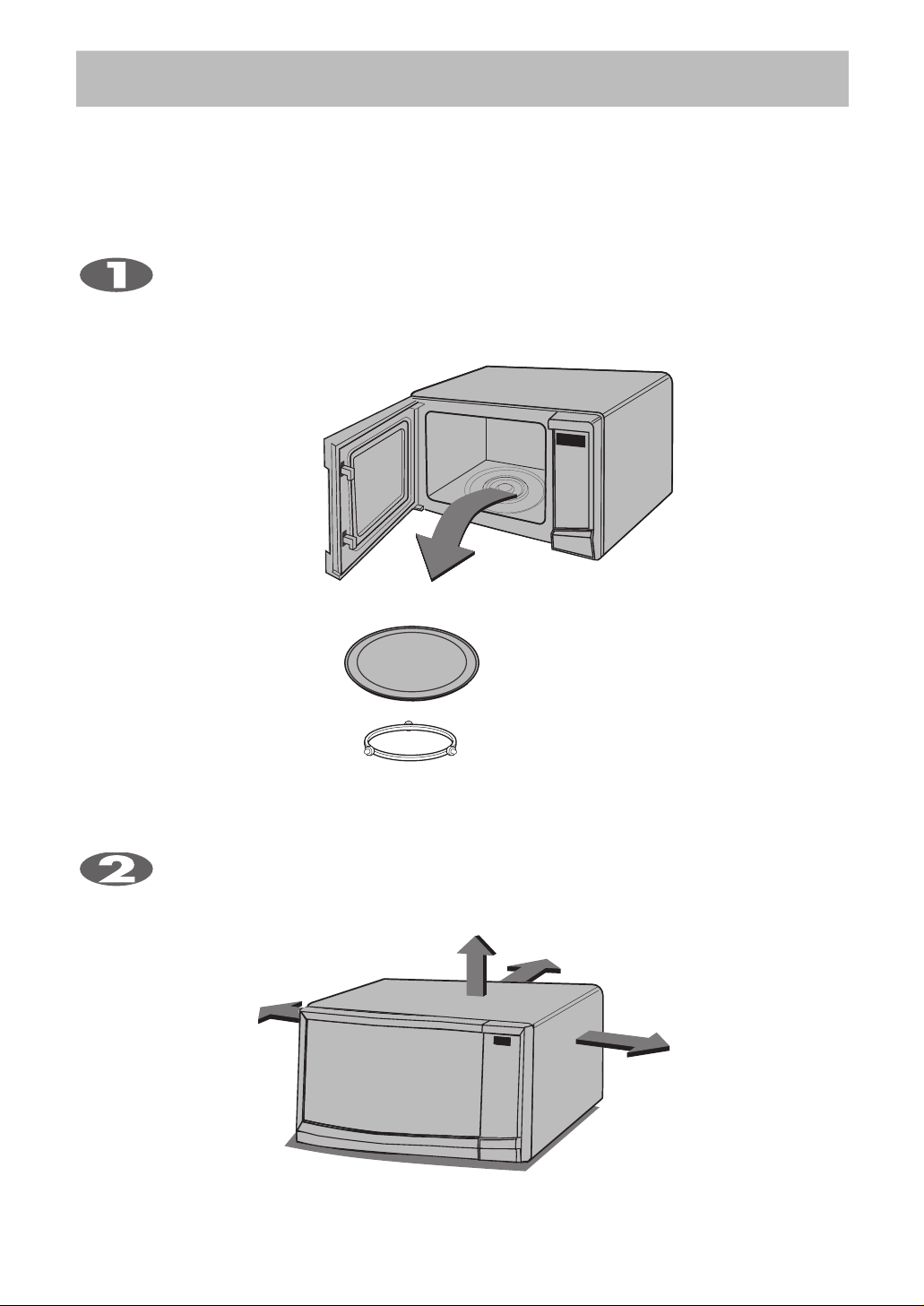
Place your oven on a flat, level surface but make sure there is at least 10 cm of space on the
top, rear and sides so there is air flow for ventilation. Exhaust outlets are located in the back and
side of your oven. Blocking the outlets can damage your oven. The microwave oven shall not be
placed in a cabinet.
Unpack your oven and place it on a flat level surface.
By following the basic steps on these two pages you will be able to quickly check that your oven
is operating correctly. Please pay particular attention to the guidance on where to install your
oven. When unpacking your oven make sure you remove all accessories and packing.
Check to make sure that your oven has not been damaged during delivery.
THIS OVEN SHOULD NOT BE USED FOR COMMERCIAL
CATERING PURPOSES
GLASS TRAY
ROTATING RING

Plug your oven into a standard household socket. Make sure your oven is the only appliance
connected to the socket. If your oven does not operate properly, unplug it from the
electrical socket and then plug it back in.
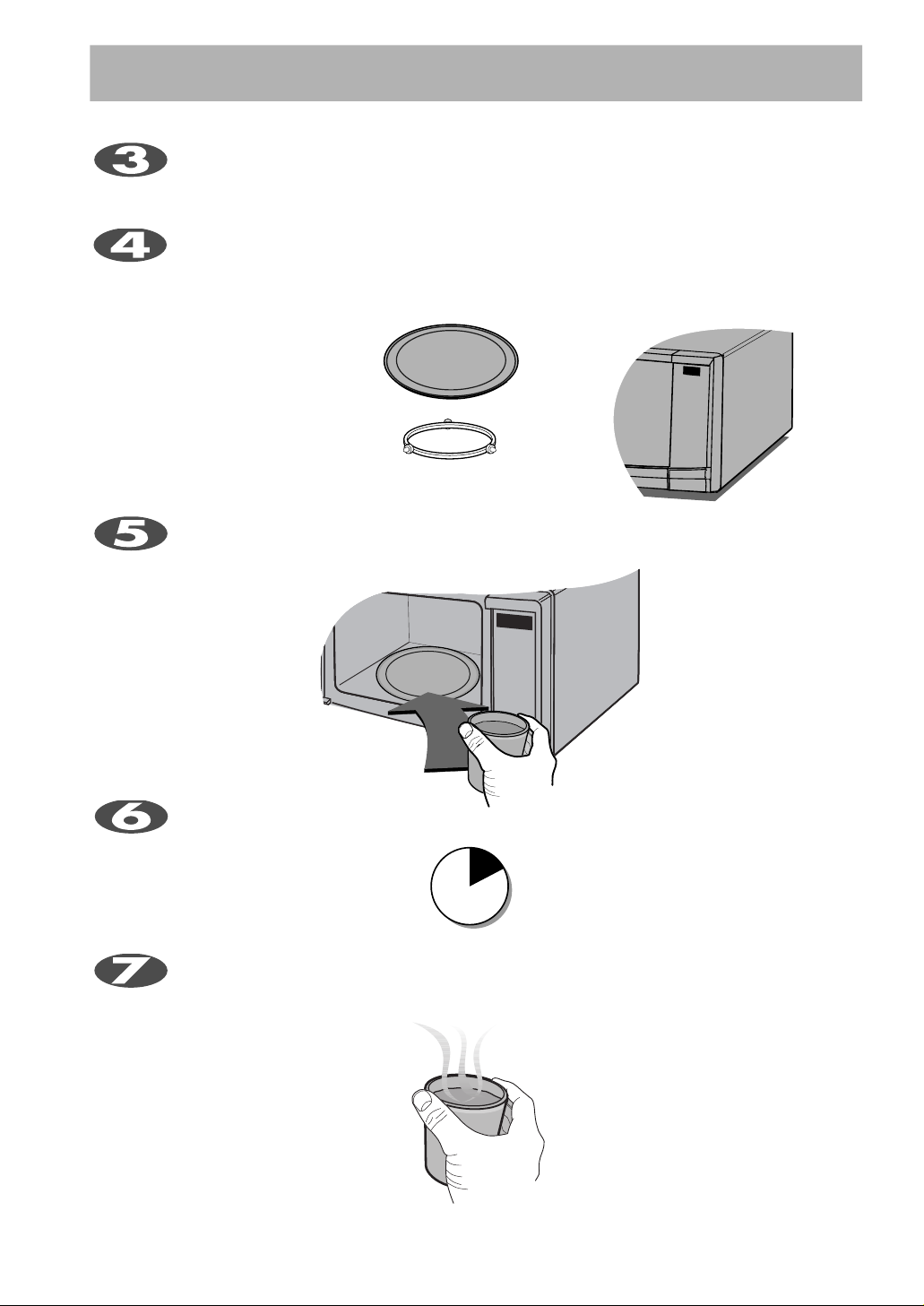
The DISPLAY will count down from 30 seconds. When it reaches 0 it will sound four BEEPS.
Open the oven door and test the temperature of the water. If your oven is operating the water
should be HOT. Be careful when removing the container it may be hot.
YOUR OVEN IS NOW INSTALLED
Fill a microwave safe container with 300 ml (1/2 pint) of water. Place on the GLASS TRAY
and close the oven door. If you have any doubts about what type of container to use please
refer to page 16.
Enter the time by touching [3] and [0].
And touch START.
5
UNPACKING & INSTALLING
Open your oven door by pressing the DOOR OPEN button.
Place the ROTATING RING inside the oven and
place the GLASS TRAY on top.
30
SECONDS

6
NOTE: A beep sounds when a pad on the control panel
is touched to indicate setting has been entered.
FEATURE DIAGRAM
CONTROL PANEL
Remove your Microwave Oven and all
material from the shipping carton.
Your oven will be packed with the
following materials:
Glass Turntable .........................1 each
Owner's Manual ........................1 each
Rotating Ring.............................1 each
This microwave oven is designed
for household use only. It is not
recommended for commercial
purposes.
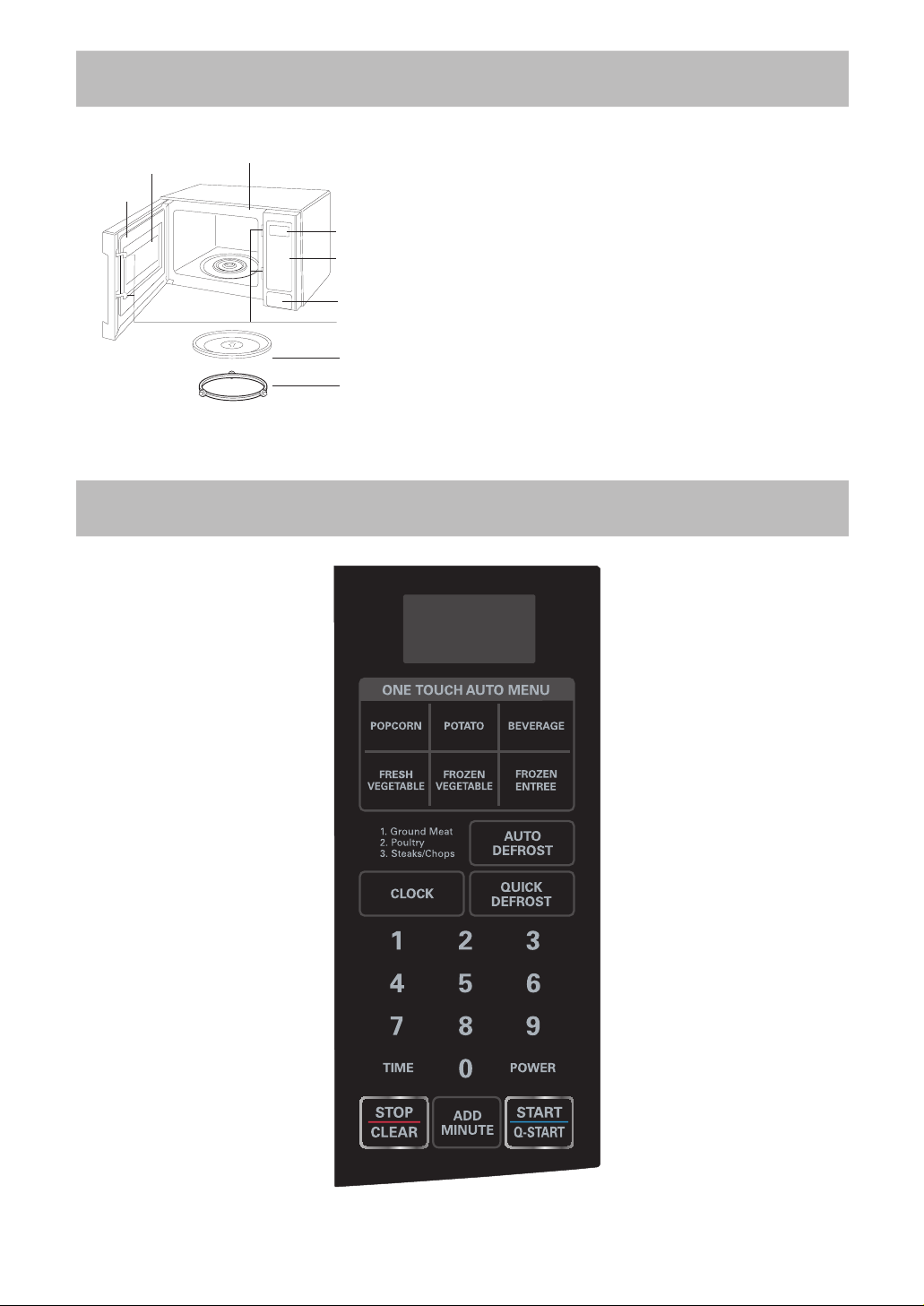
Door Seal
Display Window
Oven Front Plate
Window Door Screen
Control Panel
Door Open Button
Safety Door Lock System
Glass Turntable
Rotating Ring

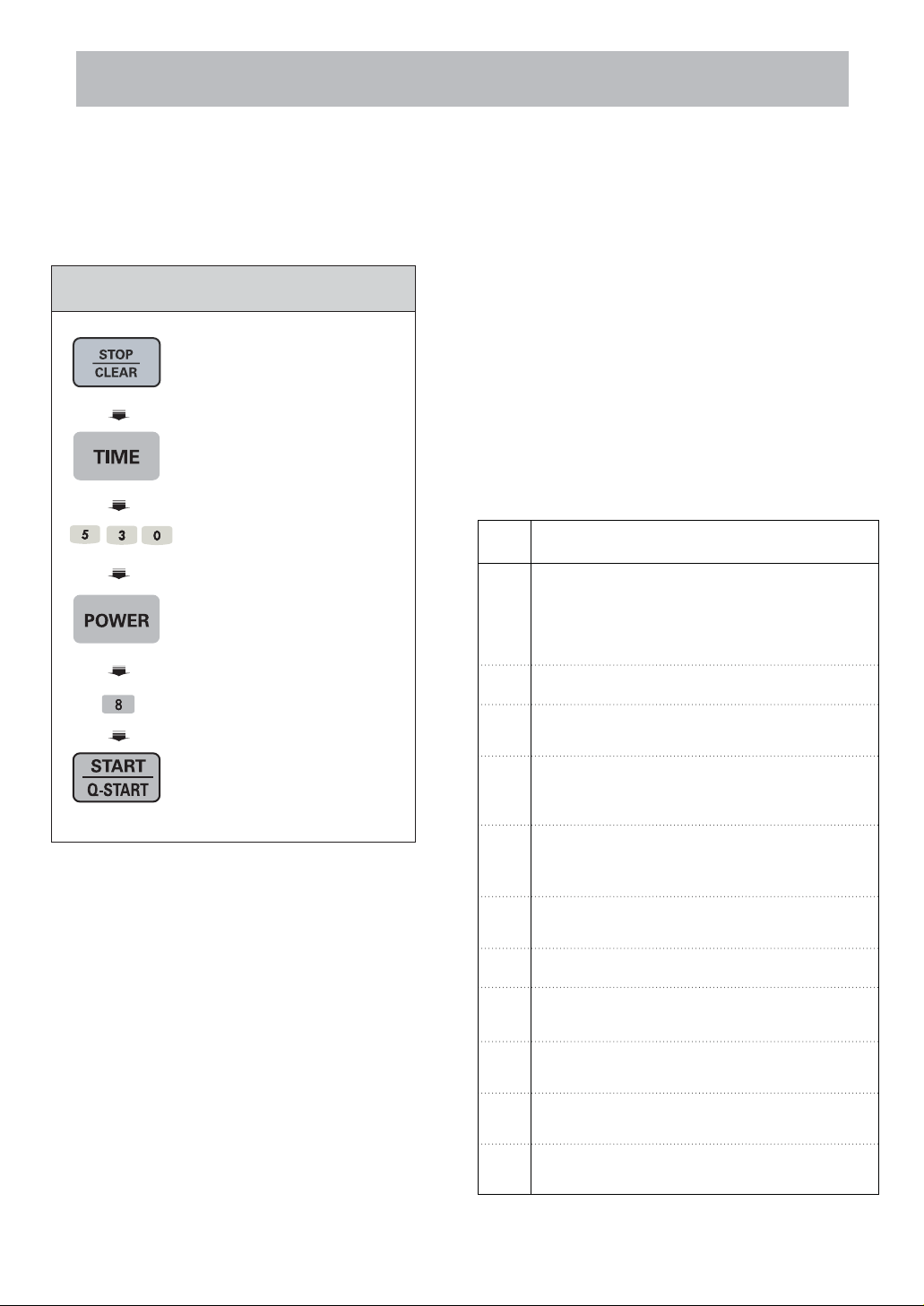
1. Touch STOP/CLEAR.
2. Touch TIME.
3. Enter 5 minutes
30 seconds by touching
[5], [3],and [0].
4. Touch POWER.
P-HI appears in the
display. This is to tell you
that the oven is set on HI
unless a different power
setting is chosen.
5. Touch 8.
To select power level 80%.
Display shows P-80.
6. Touch START.
7
TIMED COOKING
This function allows you to cook food for a
desired time. And in order to give you the best
results, there are 10 power level settings in
addition to HI-POWER because many food need
slower cooking (at less than HI-POWER).
When cooking is complete, four short tones will
sound. The word End shows in the display window.
Then the oven shuts itself off.
NOTE:
If you do not select the power level, the oven will
operate at power HIGH. To set HI-POWER
cooking, skip steps 4 & 5 above.
2 STAGE TIMED COOKING
For Two Stage cooking, repeat timed cooking
steps 2 through 5 on the previous page before
touching the START pad for additional Time and
Power program you want to add.
Auto Weight Defrost can be programmed before
the first stage to defrost first and then cook.
MICROWAVE POWER LEVELS
Your microwave oven is equipped with ten power
levels to give you maximum flexibility and control
over cooking. The table below will give you some
idea of which foods are prepared at each of the
various power levels.
*The table below shows the power level settings for
your oven.
Example:To cook food on 80% Power(Power8)
for 5 minutes 30 seconds
MICROWAVE POWER LEVEL TABLE
Power
Level
10
(High)
* Standing time.
* Independent.
*Boiling water.
*Making candy.
*Cooking poultry pieces, fish, & vegetables.
*Cooking tender cuts of meat.
*Whole poultry.
9*Reheating rice, pasta, & vegetables.
Use
4*Thawing meat, poultry and seafood.
8*Reheating prepared foods quickly.
*Reheating sandwiches.
5*Cooking ham, whole poultry, lamb.
*Cooking rib roast, sirloin tip.
3*Cooking less tender cuts of meat.
*Cooking pork chops, roast.
2*Taking chill out of fruit.
*Softening butter.
1
0
*Keeping casseroles and main dishes warm.
*Softening butter and cream cheese.
7
*Cooking egg, milk and cheese dishes.
*Cooking cakes, breads.
*Melting chocolate.
6
*Cooking veal.
*Cooking whole fish.
*Cooking puddings and custard.
OPERATING INSTRUCTIONS

ADD MINUTE
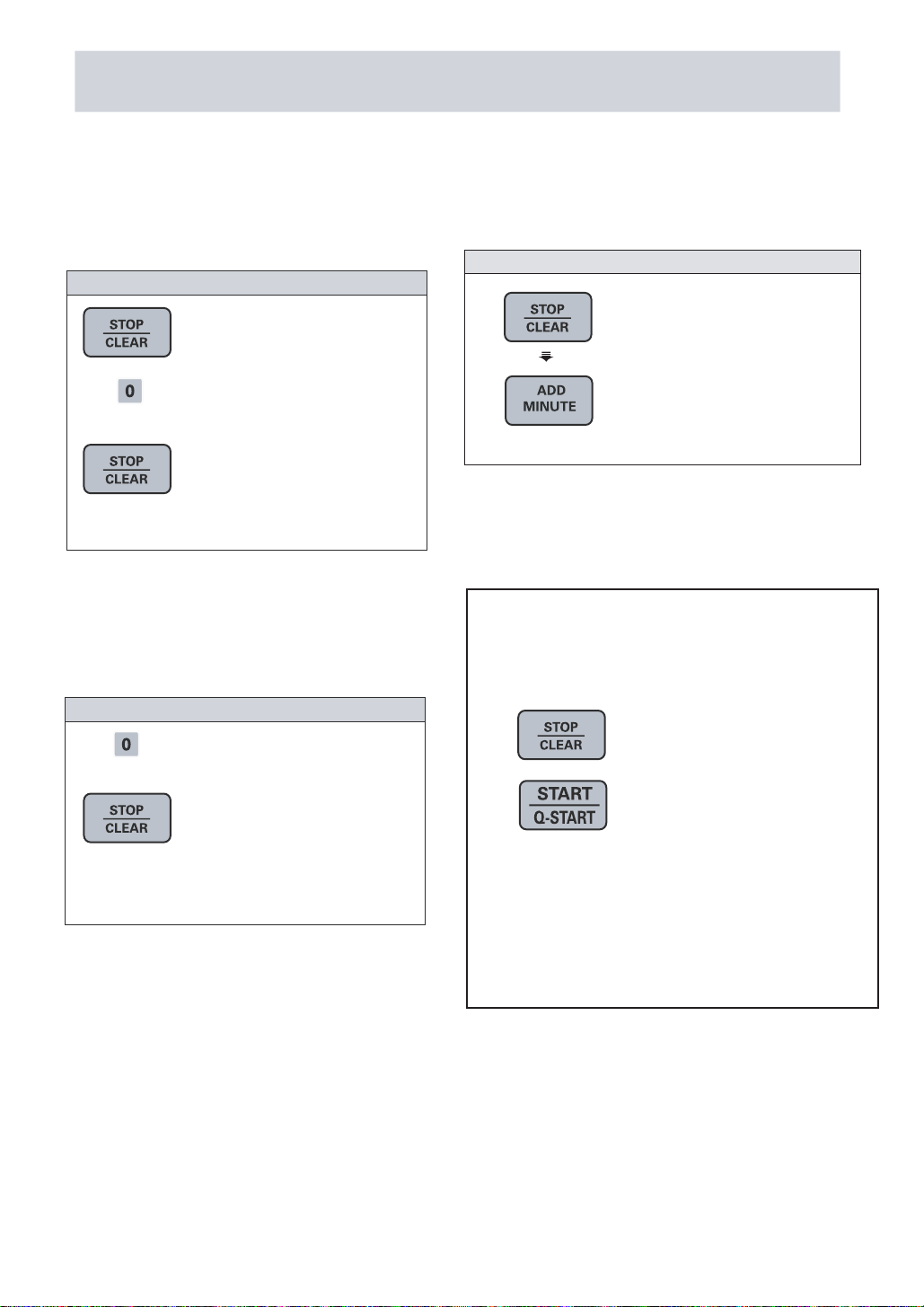
A time-saving pad, this simplified control lets
you quickly set and start microwave cooking
without the need to touch START.
NOTE:
If you touch ADD MINUTE, it will add 1 minute up to
99 minutes 59 seconds.
Example : To set ADD MINUTE cooking 2 minutes.
1. Touch STOP/CLEAR.
2. Touch ADD MINUTE
2 times.
The oven begins
cooking and display
shows time counting
down.
OPERATING INSTRUCTIONS (CONT’D)
8
CHILD LOCK
This is a unique safety feature that prevents
unwanted oven operation such as used by
children. Once the CHILD LOCK is set, no
cooking can take place.
If the CHILD LOCK was already set and you
touched another cooking pad, the word LOCKED
shows in the display. Then you can cancel the
CHILD LOCK according to below procedure.
After the CHILD LOCK is turned off, The oven
will operate normally.
Touch and hold 0 ,or
disappears in the display.
To cancel the child lock
1. Touch STOP/CLEAR.
2. Touch and hold 0,or
STOP/CLEAR
appears in the display
and two beeps are heard.
To set the child lock
or
until L
or
STOP/CLEAR until L
The QUICK START feature allows you to set 30 seconds
QUICK START
intervals of HIGH power cooking with a touch of the
Example: Set 2 minutes of cooking on high power.
1.
Four times on high power
START/Q-START.
2.
You oven will start before you have finished the
fouth press.
During QUICK START cooking,you can extend the
the START/Q-START key.
cooking time up to 10 minutes by repeatedly pressing
1. Touch STOP/CLEAR.
2. Touch START/Q-START

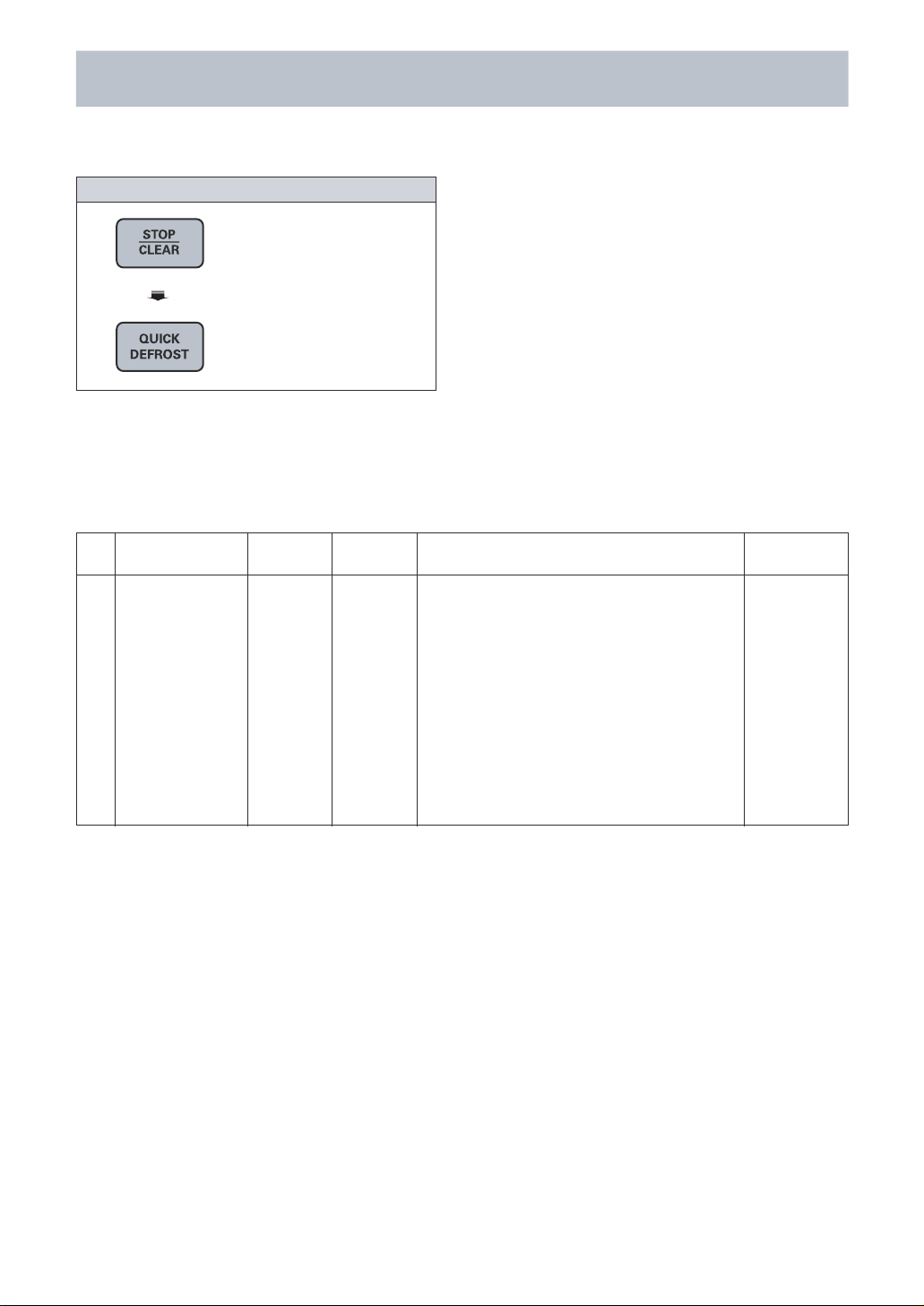
1. Touch STOP/CLEAR.
2. Touch QUICK
DEFROST.
Example: To defrost 0.5 kg meat.
9
QUICK DEFROST
Three Quick Defrost sequences are preset in the
oven. The Quick Defrost feature provides you with
the express defrosting method for 500g frozen
foods. The oven automatically sets the defrosting
time for each food.
NOTE:
The oven will beep during the DEFROST CYCLE.
At this time open the door and turn over, separate,
or rearrange the food.
Quick Defrost provides just enough defrosting that
the foods can be used in recipes or for cooking.
There will be some ice crystals remaining.
OPERATING INSTRUCTIONS (CONT’D)
QUICK DEFROST MENU INSTRUCTIONS
1
Use this function to defrost mince meat.
Remove the meat completely from it’s wrapping.
Place the mince onto a microwave- safe rack over a
plate or shallow dish. During the program the oven
will beep . At this point remove the mince from
the microwave oven,
remove any defrosted mince to a plate, cover and
set aside. Turn the frozen mince over and return to
the microwave oven. Press start to continue. At the
end of the program remove the mince from the
microwave oven, cover with foil and allow to stand
5- 20 minutes or until completely thawed.
Minced Meat
0.5 kg
Frozen 5 - 20
Initial
Temperature
Standing Time
(minutes)
Weight
Limit
Menu
Code
Instructions

10
ONE TOUCH AUTO MENU
One Touch Auto Menu made easy! Your oven 's
menu has been preprogrammed to cook food
automatically. Tell the oven what you want. Then
let your microwave oven cook your selections.
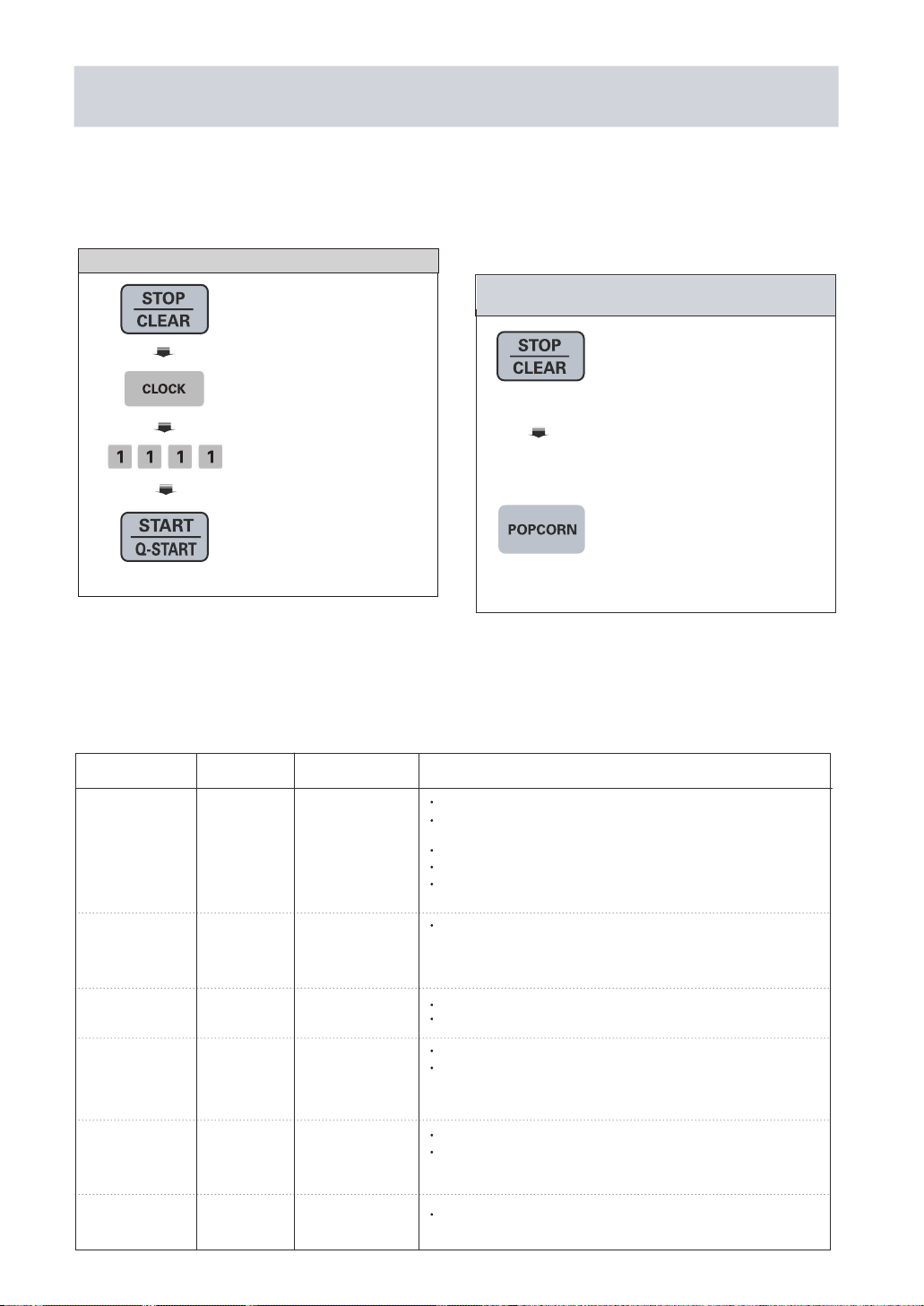
Touch STOP/CLEAR.
*Place popcorn in the
oven and close the door.
Touch POPCORN.
The oven begins the
cooking you selected
without the need to touch
START. Be sure to close
the door before selecting
categories.
Example: To cook popcorn, simply follow the
step below
1. Touch STOP/CLEAR.
2. Touch CLOCK one time.
3. Enter the time by using
the number key pads.
("11:11")
4. Touch START.
Example:To set 11:11 .
OPERATING INSTRUCTIONS (CONT’D)
Key Directions
1 Time 1 cup Prepare vegetable(wash and cut into 12.7mm pieces).
FRESH 2 Times 2 cups Cover with plastic wrap and vent.
VEGETABLE 3 Times 3 cups
4 Times 4 cups
1 Time Arrange food on turntable tray.
2 Times Cover with plastic wrap and vent.
FROZEN ENTREE
1 Time 284 g. Follow the package instructions.
Touch Serving size
Follow package instructions.
1 Time 100 g. Use popcorn package which is made
POPCORN 2 Times 85 g. especially for microwave cooking.
3 Times 50 g. Do not try to pop unpopped kernels.
Heat only 1 package at a time.
Do not leave the microwave oven
unattended while popping popcorn.
1 Time 1 ea Place in center of the oven on paper
POTATO 2 Times 2 ea towel. Pierce potato several times
with fork. After cooking, let stand for
3 Times 3 ea 5 minutes.
4 Times 4 ea
BEVERAGE 1 Time 1 cup Use mug or microwave-safe cup.
2 Times 2 cups Stir after reheating.
FROZEN 1 cup
2 cups
VEGETABLE 3 Times 3 cups
4 Times 4 cups
ONE TOUCH AUTO MENU CHART
SETTING CLOCK
When your oven is plugged in for the first time or
when power resumes after a power interruption,
the numbers in the display reset to "0".
NOTE :
If the clock (or display) shows any strange
looking symbols, unplug your oven from the
electrical socket and plug it back in and reset
the clock.
Questo manuale è adatto per i seguenti modelli
1
Indice
Altri manuali LG Forno a microonde

LG
LG LMVH1711 Series Manuale per l'uso e la cura

LG
LG MVEM1721 Seies Manuale utente

LG
LG CC-3082NR Manuale utente

LG
LG MS-2038IX Manuale utente

LG
LG MS3242XZ Manuale utente

LG
LG MC2844EB Manuale utente

LG
LG MS-2083ALB Manuale utente

LG
LG LMV1630WW Manuale utente

LG
LG MV1304W Manuale utente

LG
LG MJ3286BRUS Manuale utente

LG
LG MS284 Series Manuale utente

LG
LG MS204 series Manuale utente

LG
LG MJ3967ABC Manuale utente

LG
LG LMV2061SB Manuale utente

LG
LG MH635 Series Manuale utente

LG
LG MC7647B Manuale utente

LG
LG LMV2257 series Manuale utente

LG
LG MS-2023J Manuale utente

LG
LG LMV1635SW Manuale utente

LG
LG MB-4022W Manuale utente