Liberty IPEX6000TC-C Manuale utente

11675 Ridgeline Dr.
Colorado Springs, CO 80921
Rev 200311 Toll-Free: 800-530-8998
Fax: 719-260-0075
supportlibav@libav.com
IPEX6000TC-C, IPEX6001, & IPEX6002 Install Guide,
Device Manual, and Specifications

IPEX6000TC-C Install Guide
3
The IPEX6000TC-C is an AVoIP PoE powered A/V transceiver integrated with both encoder and decoder conguraon
which can transmit and receive video signals simultaneously. The DigitalinxIP IPEX6000TC-C supports IP-based
switching and extension of true 4K/60Hz (4:4:4) video with zero frame latency up to 100 meters when using CAT6A
F/UTP cabling. The transceiver supports independent roung of all AV, USB HID, IR, Ethernet and RS232 signals. All
transceivers on an AV network can simultaneously transmit and receive full 4K 60 4:4:4 signals. The IPEX6000TC-C
is HDMI 2.0 and HDCP 2.2 compliant and supports all video resoluons that t into the HDMI 2.0 ming envelope
of 594 MHz, such as 4K@60Hz 4:4:4 24bpp and 4K@60Hz 4:2:0 30bpp HDR, including DolbyVision, HDR10 and
HLG. The transceiver features lite compression technology which is acvated automacally when the raw data
rate exceeds the Ethernet bandwidth so that all supported ming formats can be delivered through a single 10G
Ethernet cable.
The IPEX6000TC-C can be used in a point to point installaon or in a matrix conguraon that supports roung of
one to one and one to many including mul-view for single display outputs and video wall conguraons up to
an 8x5 (Rows x Columns).
When mulple IPEX6000TC-C transceivers are deployed on an AV network, for basic system access and operaon,
a license code from Liberty’s Arranger oering is required.
Port speed requirements for each transceiver is ~6-8Gbps for 4K signals and 3.2Gbps for 1080P signals, therefore
the IPEX6000TC-C requires a 10GbE PoE managed network switch for opmal performance.
Note: 1GbE managed network switches are not supported.
Product Features
IPEX6000TC-C Transceiver
Package Contents
1. Installaon Guide
2. DC 12V 2A Power Supply with US, UK, EU, and AU adapters
3. 3-pin Removable Phoenix Screw Terminal
4. Mounng Ears (2 ea)
5. IR Emier
6. IR Receiver

Product Features
IPEX6001 / 6002 Encoder / Decoder
IPEX6001 / 6002 encoders and decoders provide the economical, flexible and powerful solution at resolutions up
to 4096x2160@60Hz, 3840x2160@60Hz (4:4:4) and 3840x2160@60Hz (4:2:0 10-bit HDR). They allow
uncompressed UHD media to be switched and distributed over standard 10GbE Ethernet networks with zero
frame latency.
Flexible and Cost-effective Deployment
IPEX6001/6002 series products can work together with full-feature 6000 Series DigiIP products including
IPEX6000TC transceivers and 6000 series wall plate encoder / decoder in AV distribution / signal routing
applications. IPEX6001/6002 do not include video processing or scaling keeping cost down for applications where
these features are unnecessary. IPEX6002 cannot be used within a video wall (IPEX6001 can feed a video wall
with appropriate decoders), and IPEX6001 and 6002 can not be part of a multi-view application.
Multiple Signal Delivery
Standard features like bi-directional serial, bi-directional IR, Gigabit Ethernet, and independent analog audio
input/output are included. They are the perfect solution for any zero-frame latency and signal routing
applications. Common applications include classrooms, digital signage, conference rooms, performing arts and
broadcasts.
Port speed requirements for each encoder/decoder is ~6-8Gbps for 4K signals and 3.2Gbps for 1080P signals,
therefore the IPEX6001/6002 requires a 10GbE PoE managed network switch for optimal performance.
Note: 1GbE managed network switches are not supported.
Package Contents
1. Installation Guide
2. DC 12V 2A Power Supply with US, UK, EU, and AU adapters
3. 3-pin Removable Phoenix Screw Terminal
4. Mounting Ears (2 ea)
5. IR Emitter or Receiver

IPEX6000TC-C Install Guide
4
Front and Rear Panels
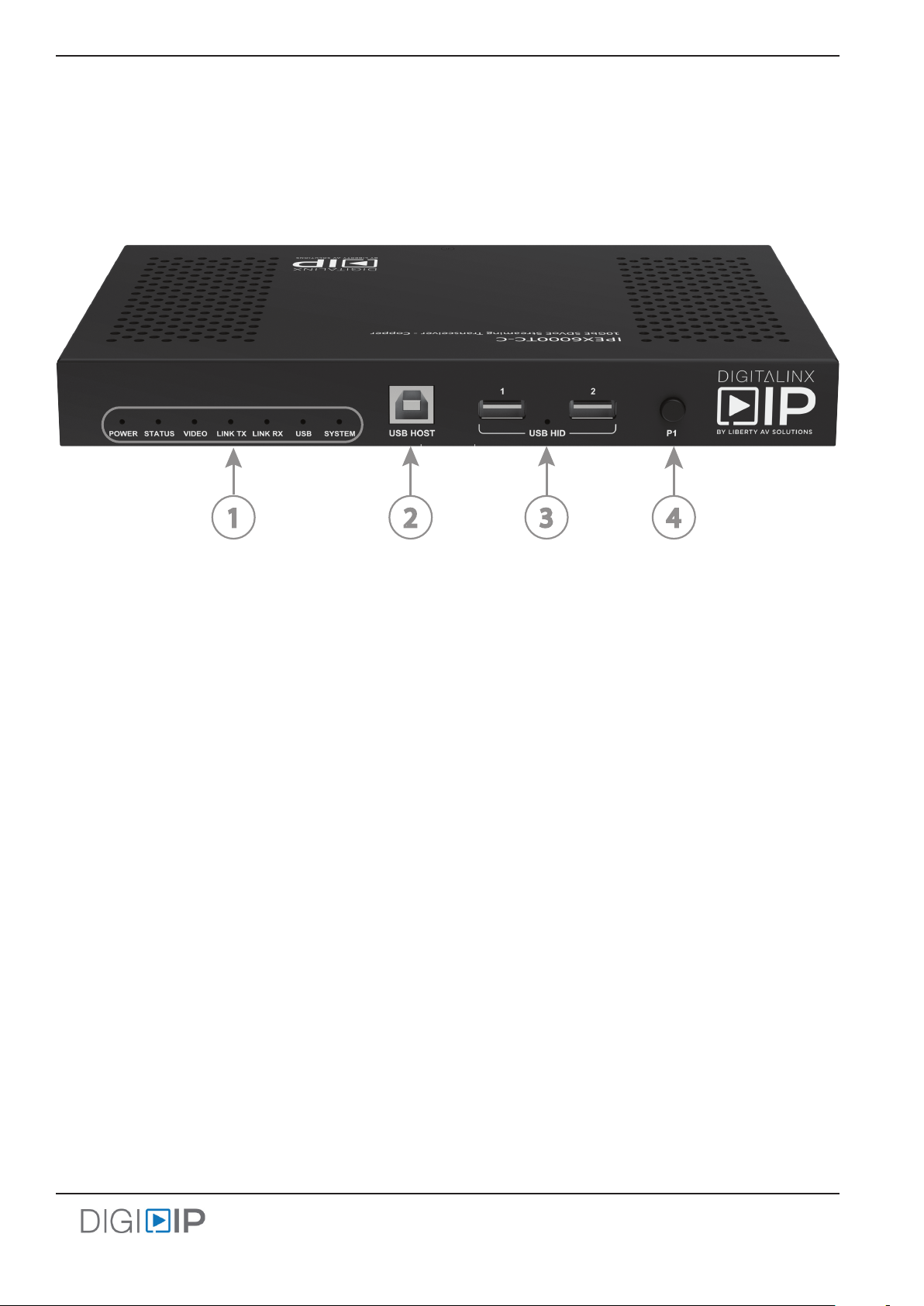
IPEX6000TC-C Front Panel
1. Status / Diagnosc LEDs
• POWER:
• ON; device is on
•OFF; device is o
• STATUS:
•ON; device has entered HDMI cong mode
•BLINKING; The device is working in default mode
•OFF; the HDMI output has been congured as a LOOP output
• VIDEO
• ON; video signal is stable
• OFF; no video signal detected
• LINK TX
•BLINKING; device is connected to switch and or another device
• OFF; device is not connected to switch or another device
• LINK RX
•BLINKING; device is connected to switch and or another device
• OFF; device is not connected to switch or another device
•USB
• ON; the device is powered on
•BLINKING; This device is linked to another device, and its USB Host port is connected to a USB
host device.
• SYSTEM - for future use
2. USB B Host Connecon
3. USB HID Device Client Connecon
4. HDMI cong mode (Transceiver mode only)
•Press and hold 5 seconds to enter HDMI cong mode
•Press this buon once: when HDMI ports are in normal state, press this buon once to switch
the HDMI ports to support local loop out mode; when HDMI ports are in local loop out state,
press this buon once to switch the HDMI ports to original normal state i.e. Input, Output
1 2 3 4

IPEX6000TC-C Install Guide
5
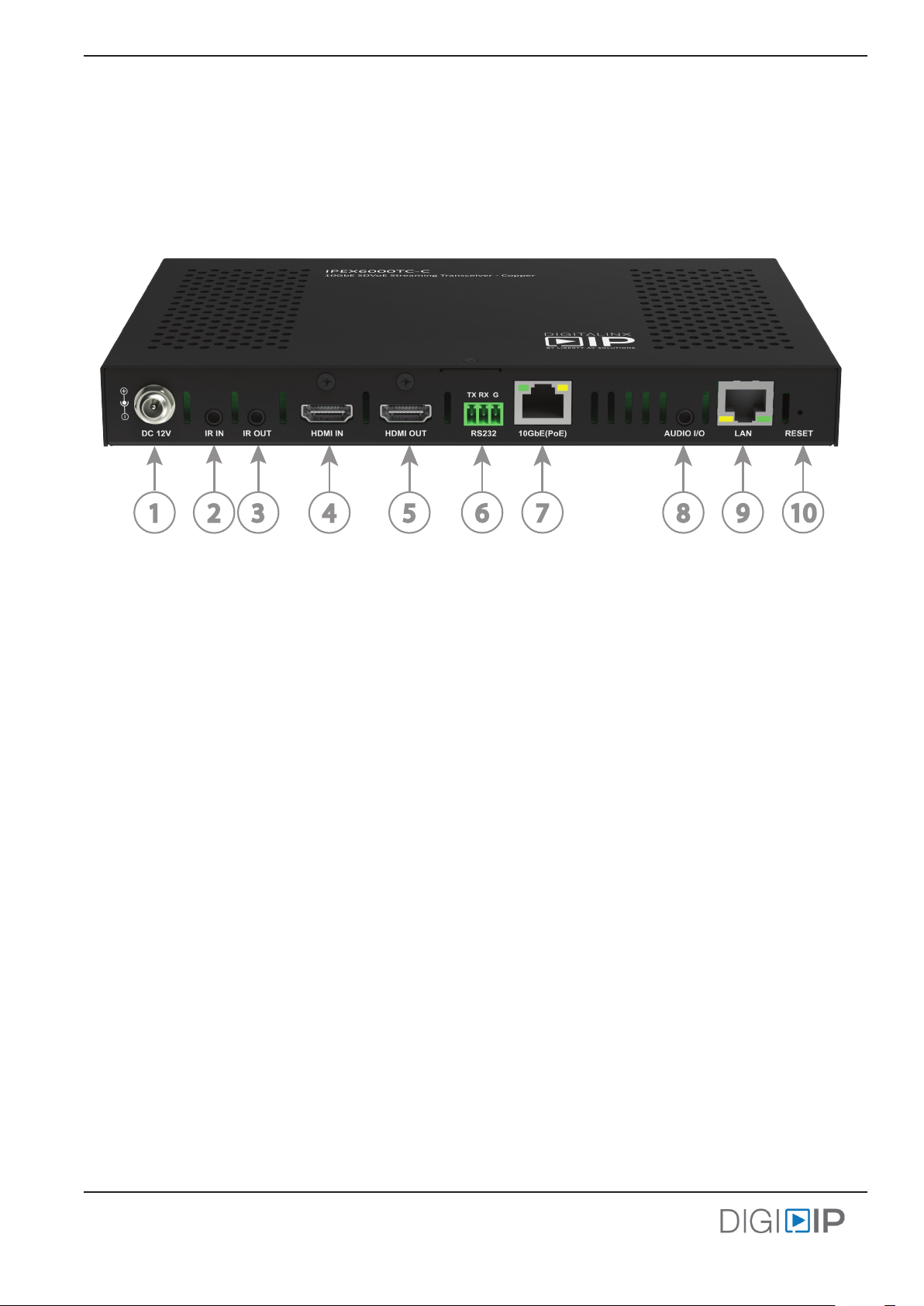
IPEX6000TC-C Rear Panel
1. 12V DC power input
2. IR receiver input
3. IR emier output
4. HDMI input
5. HDMI output
6. RS232 / serial connecon
7. 10GBaseT AV Network connecon with PoE support
8. Analog audio input/output
9. 10/100/1000BaseT LAN connecon
10. Factory RESET buon
•To set factory default, power the device down. While unit is powered down, press and hold the
RESET buon and power on the device. Hold the RESET buon for 20 seconds and then release
the RESET buon. The unit will be reset to Factory defaults aer you release the RESET buon.
1 2 3 4 5 6 7 89 10

Front and Rear Panels
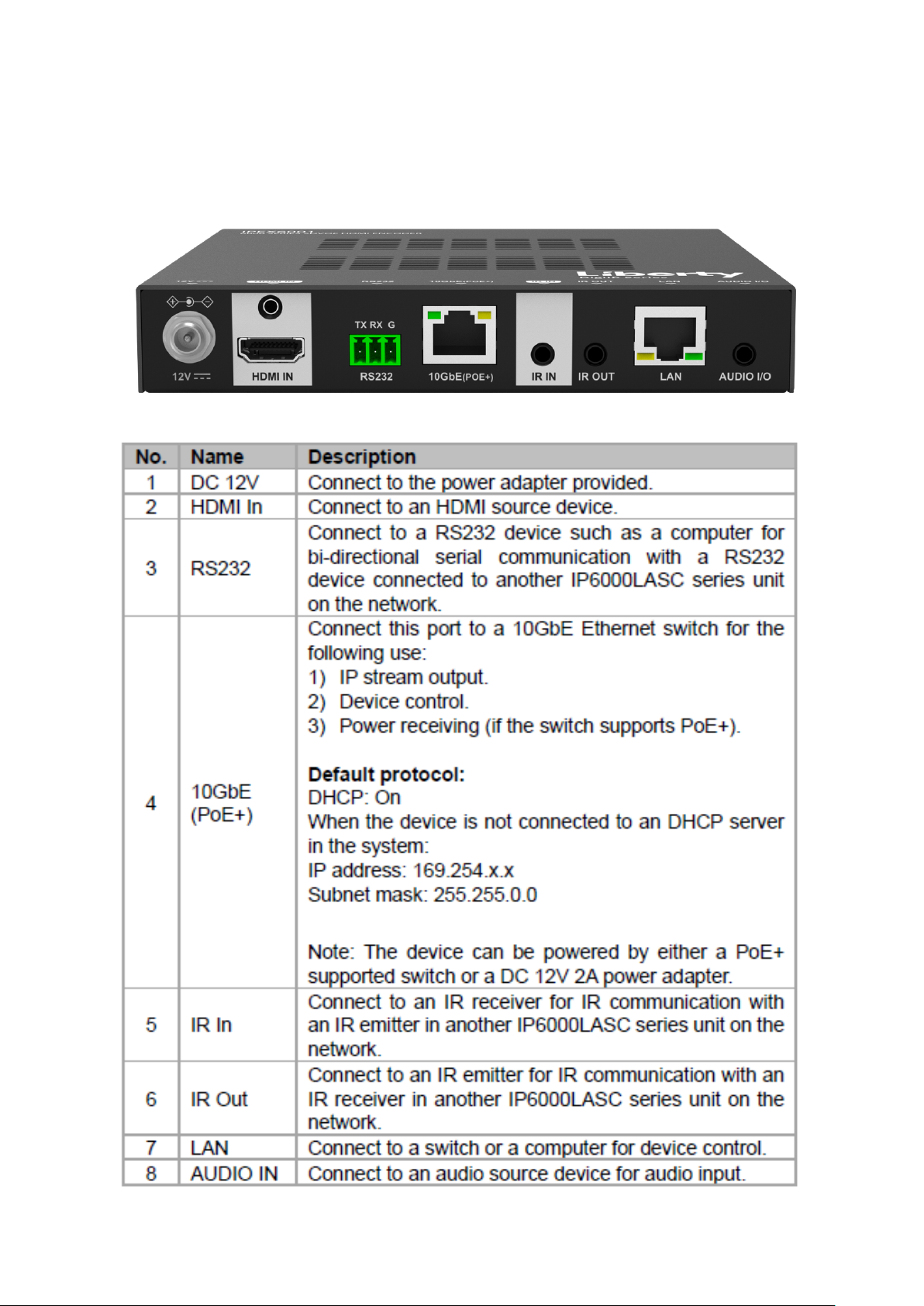
IPEX6001Front Panel

Front and Rear Panels
IPEX6001Rear Panel

Front and Rear Panels
IPEX6002Front Panel

Front and Rear Panels
IPEX6002Rear Panel

IPEX6000TC-C Install Guide
6
System Installation Instructions
Connect Transceivers / Encoders / Decoders to Network Switch
Configure a 10GbE managed PoE network switch for multicast video operation.
Note: A 1G network switch cannot be used with the 6000 series due to the high port speed requirements of the
IPEX6000TC-C, a 10GbE managed network switch is required.
Liberty has documented several network switch sengs for many common switch manufacturers, see
documents related to this product on the product page of the Liberty AV website (www.libav.com).
Connect Category 6A from the network switch to the appropriate transceivers 10GbE LAN port.
Use TIA/EIA-568B crimp paern for Category cable terminaon.
If the managed PoE network switch cannot provide adequate power to the transceiver, connect the included power
supply to the DC power input of the device and connect to a local AC power source.
Best Pracce
When installing the AV endpoints, create a spreadsheet of all AVoIP transceivers notang the MAC address, the
aached source/sync and the desired transceiver funcon, i.e. encoder, decoder or both. This will aid in fast
nal system commissioning that could be done remotely by accessing the AV system server via VPN or via port
forwarding. See Arranger Documentaon for more informaon on how to access the server and set up port
forwarding.
TIA/EIA-568B
Orange/White
Orange
Green/White
Blue
Blue/White
Green
Brown/White
Brown
Pin 1
Pin 2
Pin 3
Pin 4
Pin 5
Pin 6
Pin 7
Pin 8
1 8
The 6000 series devices default to DHCP so a router or DHCP server can assign an IP address to the device
automacally. If there is no router or DHCP server present it will default to APIPA i.e. 169.254/16 Network ID. You
will use the Arranger applicaon to nd and manage 6000 devices on a Network. See Device / System Control.
Device IP Sengs
Questo manuale è adatto per i seguenti modelli
2
Indice