
Liectroux T6S Manuale utente

Robot Vacuum Cleaner T6S
Please read this manual carefully before using the product and keep it safe.
Robot Vacuum Cleaner Instruction Manual


Welcome to use
Thank you for choosing the sweeping robots of Liectroux!
Liectroux T6S is a smart robot integrating with sweeping, mopping and suctioning features. It can assist you to complete
housekeeping work in a truly efficient and high-quality manner. It is featured with ultrahigh suction for dust collection,
and is also equipped with multiple sensors and ultra-powerful obstacle navigation capability, and thus it can easily adapt
to your distinct home environment. The robot can automatically recharge after cleaning without any human interference.
You may use a remote controller to control different modes - automatic cleaning, scheduled cleaning, fixed-point
cleaning and other cleaning modes, and set times and modes at any moment. Even if you are not home, it will clean
your house without any difficulty and make your home healthy and clear.
Free yourself from trivial housework and enjoy your life from now on.
Wish you be happy to use it!

Contents
APP Download...................................................................1
APP Operation...................................................................2
Safety Information..............................................................3
Product Parameter.............................................................4
Product Introduction...........................................................5
Product Installation............................................................8
Charging Operation...........................................................9
Product Operation............................................................10
Cleaning Modes...............................................................11
Reservation Operation.....................................................12
Remote Controller Operation.......................................... 13
Water Tank Operation......................................................14
Routine Maintenance.......................................................15
Alarm Prompt...................................................................17
Frequently Asked Questions............................................17
Hazardous Substances...................................................18
Product Warranty.............................................................19
Mobile APP Download
The product can be operated remotely via mobile APP, and please
operate in accordance with the following instructions or by reference
to the product guide described on the APP interface.
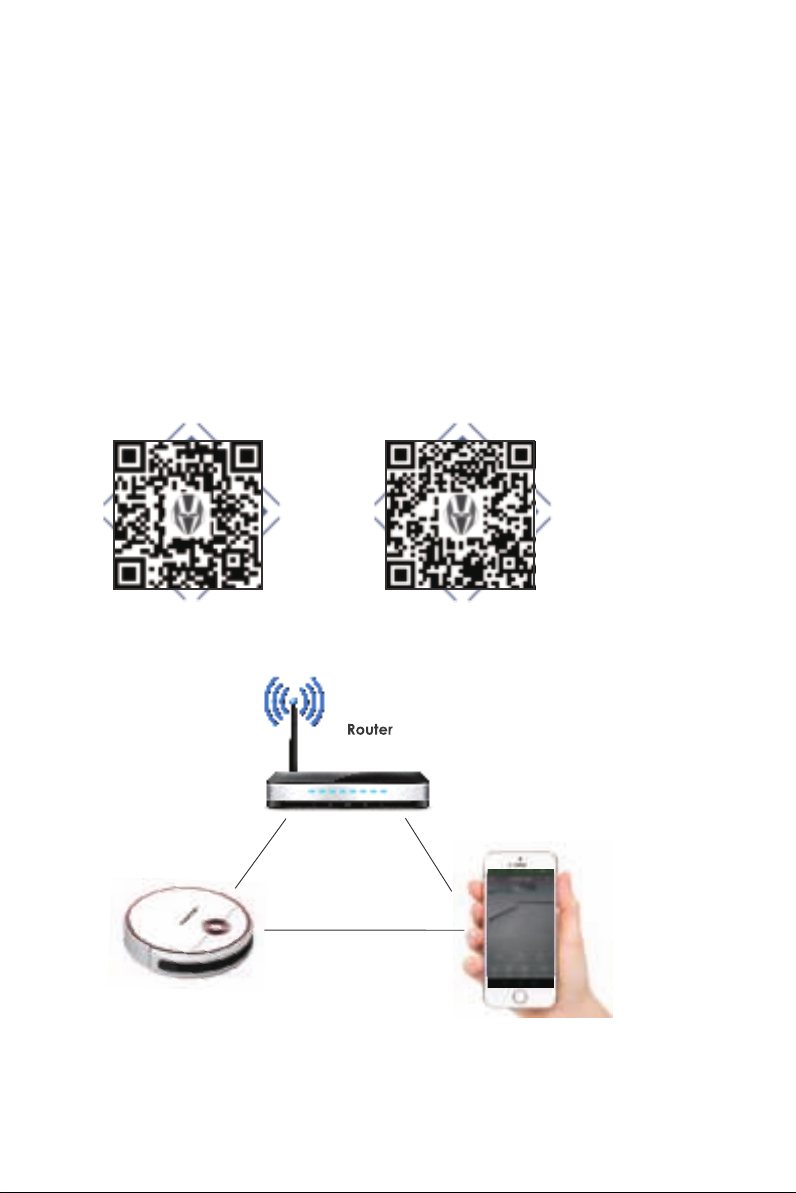
Search "Tuya Smart" in Google Play Store or APP Store, or scan the
following QR codes to download the Tuya Smart APP.
APP Download
Tips:
If the downloading fails, please try the following downloading approaches
1. Log on www.tuya.com, and download the installation package.
2. Contact the customer-service personnel of the sweeping robot, and ask for the APP
installation package.
3. Search the [Tuya Smart] in major mobile APP online stores, and directly download and
install it.
IOS APP Android APP
Suggested distance: less than 4M
1
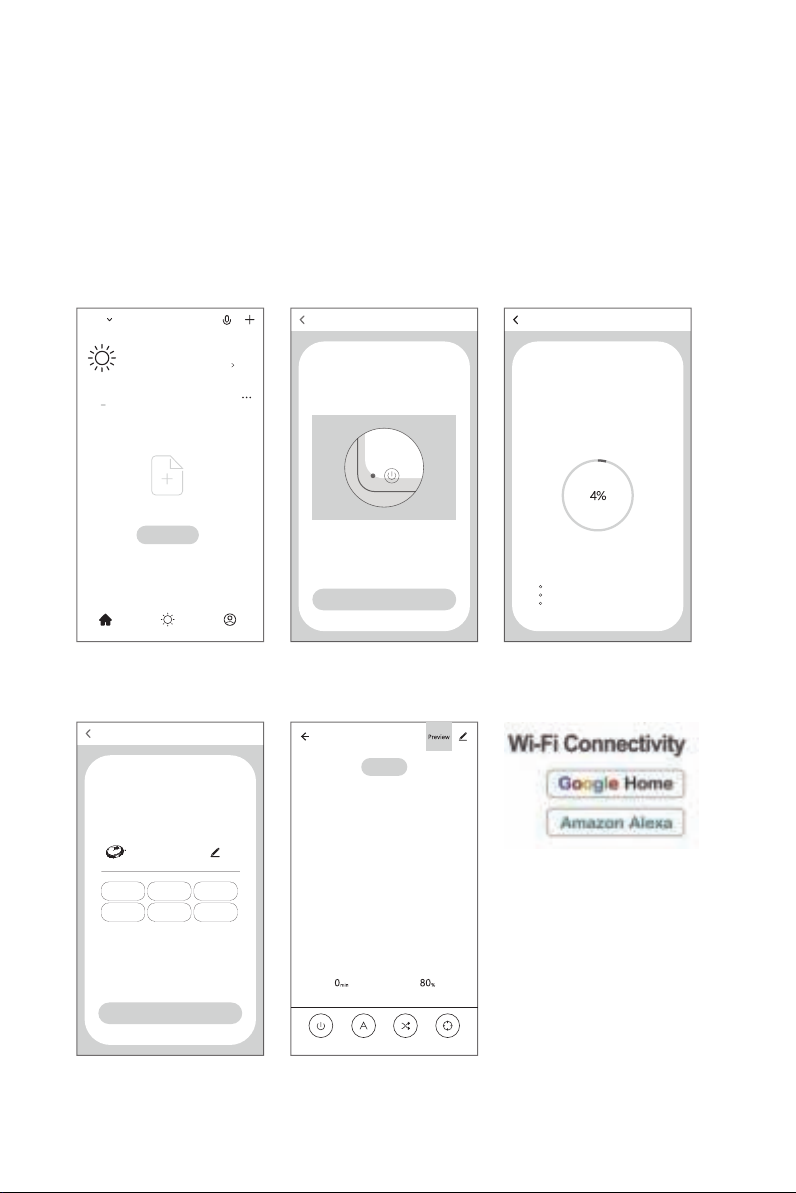
Mobile APP Network Interfacing Operation
Tips:
If network interfacing fails, please restart the product and reinitiate the network interfacing procedure.
1. Ensure that the mobile is connected to an available WIFI network in your house, and the signal of the network shall
be satisfactory.
2. Power on the product, hold the start key for 2S before a beeping sound and the voice of "Network Interfacing", and
then the network interfacing status is valid. Now please open your mobile APP for connection.
5. Please operate through the APP
3. The robot enters the network
interfacing mode, and the signal
indicator of network is blinking
4. Network interfacing success
1. Log on and register your account
of the mobile APP
2. Click "ensure the signal indicator
is blinking"
Add device
Compatible modeAdd device
Power on, and make sure that the signal indicator is blinking
View help
Make sure that the signal indicator is blinking
Add device
Connecting
Keep the equipment as close to the router and your
mobile as possible
Equipment identified
Register the equipment to the smart cloud
Equipment initialization
Robot
Add device
Equipment added
successfully
Living
room
Master
bedroom
Secondary
bedroom
Dining
room
Study
room
Kitchen
Completed
Robot
View help
Cleaning time
Standby
Surplus electricity
Switch Planned mode Random mode Fixed-point
mode
Welcome home
Set your home location for more information
All Devices
No devices ,please add
Add Device
Home MeSmart
2

Safety Information
1. Please use the robot as described in the manual. Any inconsistent operation may lead to its damage.
2. Children below 8 years old or mentally handicapped persons are prohibited from using the product. If it is
unavoidable, please make sure the operation is supervised and instructed by custodians. Please do not let your
children ride on or play with the robot.
3. Please clear up any power cord or small object on the floor before using the robot in case they hinder the
cleaning. Fold over the fringed hem of carpet and prevent curtain, tablecloth, etc. from touching the floor.
4. In case of elevated environment, e.g. stairs, please first test whether the product can detect the elevated area
without falling off. Please provide protective fencing on the verge of the elevated area to prevent the product's
fall-off, and please also make sure that the fencing shall not cause personal injury due to stumble, etc.
5. Please ensure a supply voltage corresponding to the voltage marked on the charging base.
6. This product is an indoor household product, and please do not use it outdoors.
7. Only use the rechargeable battery and charging base that come with the robot. Do not use non-rechargeable
batteries. For further specification, please refer to "Product Parameters".
8. Do not rinse the product directly with water.
9. Do not wipe the product with any wetted cleaning cloth.
10. Do not use the product on any ground with ponding.
11. Do not use the robot with fire or fragile objects around.
12. Do not use the product in any environment of extreme temperatures (above 40℃or below -5℃).
13. Keep the opening and running parts away from hair, clothes or finger.
14. Do not let the product be exposed to any flammable items, e.g. petroleum, toner of printer or copier, etc., and
do not use the product to clean any area containing flammable materials.
15. Do not use the robot to pick up burning objects, including cigarette, match, ash or anything that is likely to
cause fire.
16. Do not place any object at the suction port, and please clear the dust, cotton, hair and other foreign matters on
the suction port in a timely manner to ensure unobstructed air flow.
17. Do not use a damaged charging base.
18. Do not pull or drag the product and the charging base by the power cord, use the power cord as handle, insert
the power cord into door slots, pull the power cord from sharp corners or turnings, or allow the product running on
the power cord. Simultaneously, make sure that the power cord is kept away from any heat source.
19. Do not use without dust box and filters in place.
20. If the power cord is damaged, it must be replaced by staff from manufacturer's care service or any other
professionals to avoid danger.
21. A proper connection between the charger and socket is necessary to avoid potential fire.
22. The power cord to the charger must be tightened to reduce the chance of electric shock, short circuit, smoking
or fire.
23. Do not touch the power cord with a wet hand in case of electric shock.
24. Do not charge the product with any damaged power cord or power socket. Please do not use the product in
the event where the product malfunctions due to fall-off, damage, outdoor operation or water penetration. In order
to avoid damage, only the manufacturer or its after-sales service providers are authorized to repair the product.
25. Always remove the battery from your robot before long-term storage.
26. Always disconnect the robot from outlets and turn off power before cleaning and maintaining it.
27. Do not turn the robot to its side when mopping in case the PCPA plate is damaged due to an overflowing water
tank.
28. Clean up in time the universal wheels and brush clogged with hair.
29. Always wipe up the water tank after filling it up.
30. Please remove the waste in the dust box in a timely manner, in order to avoid obstruction due to HEPA and
adverse effect on dust suction performance.
31. Before discarding the product, disconnect the robot from charging base, turn off power and remove the battery.
Please remove and discard the battery in accordance with local laws and regulations.
32. Do not incinerate the product even with a severe damage since the battery might explode.
3
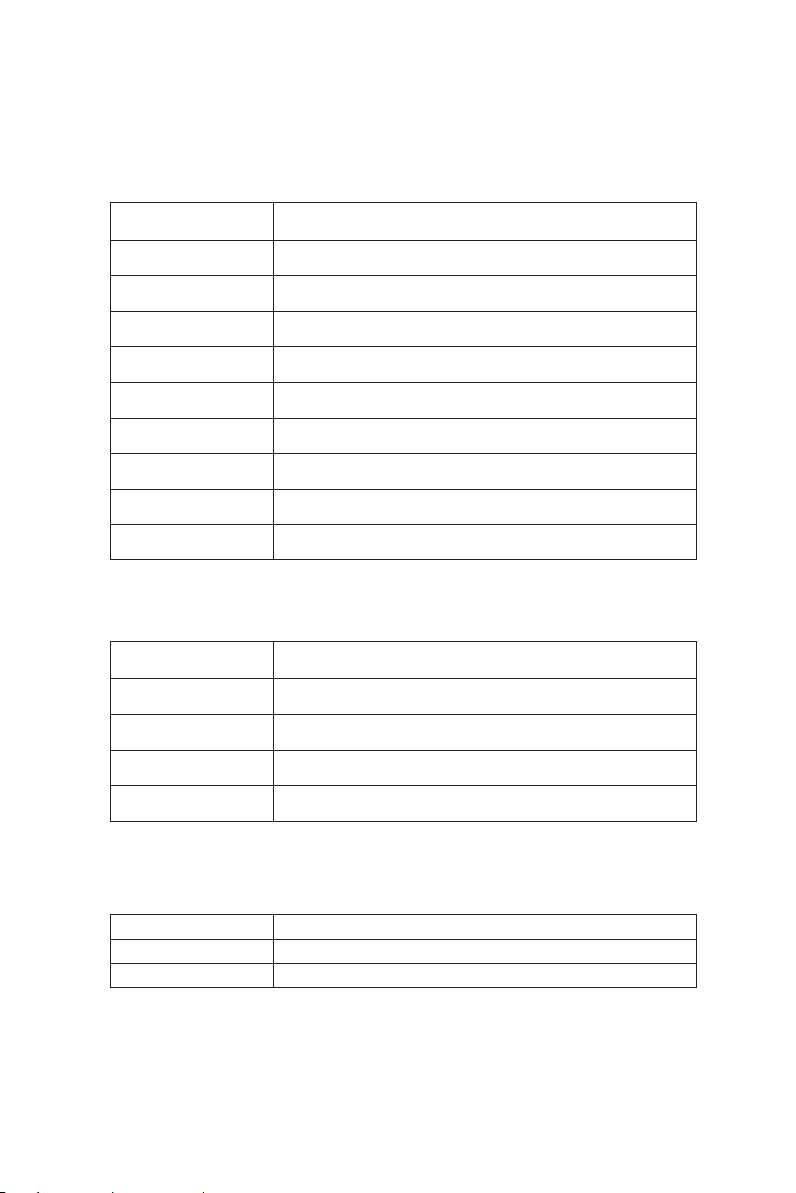
Product Parameter
Height 70mm* Diameter 310mm
2.3KG
14.8V
26W
2500mAh lithium battery
240-350min
100-120min
500ML
300ML
External Dimension
Net Weight
Rated Voltage
Rated Power
Battery Capacity
Charging Time
Cleaning Time
Capacity of Dust Box
Water Tank Capacity
PARAMETERS
Robot
AC 100-240V
50/60Hz
DC19V
600mA
Input Voltage
Input Frequency
Rated Voltage
Rated Current
PARAMETERS
Power Adapter
Remote Control Distance
PARAMETERS
≤5m
Wireless Remote Controller
NAME
NAME
NAME
4

Product Introduction
Robot and Sensor
Collision Sensor
Infrared Receiver
Start Button
Dust box cover
Middle Cover
Bumper
Cliff sensor
Auto Charging Pin
Side brush
Suck Passage
Side Wheel
Power switch
Power interface
Nose Wheel
5

Product Introduction
Charging Base
Dust Box
IR signal launch window
Signal indicator
Top cover
Charge Connecting Points
Power Supply Socket
Water Tank
6
Indice
Altri manuali Liectroux Aspirapolvere


