
LightSpeed Technologies CAT805iX Manuale utente

User Manual
Infrared Wireless Microphone System
805iX


TABLE OF CONTENTS
SECTION 1: 4 Important Safety Instructions
Overview 5 System Components and Unpacking
6 Optional Components
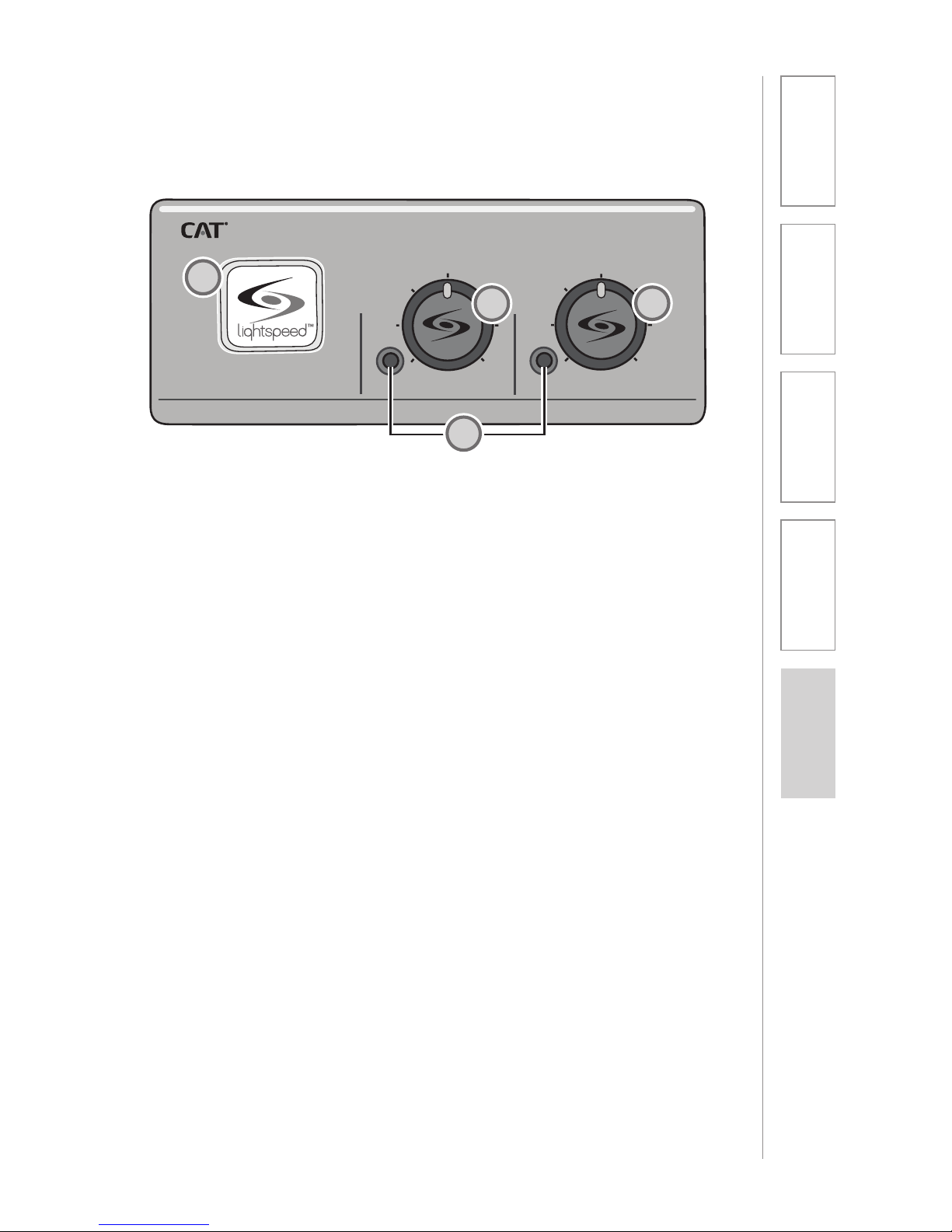
7 Front Panel Controls
8 Rear Panel Controls
9 ISR Connections
10 REDMIKE Controls and Connections
11 Cradle Charger Controls and Connections
SECTION 2: 12 Step 1. Location of the Amplifier
Set-up & Use 13 Step 2. ISR Sensor Installation
16 Step 3A. Connect the power supply
16 Step 3B. ISR connection
17 Step 3C. Connect CAT 805iX to an amplifier
18 Step 4. Charging the REDMIKE
19 Step 5. Operating the REDMIKE
20 Using REDMIKE to Amplify External Audio
Equipment
SECTION 3: 21 REDMIKE VC
Optional Accessories 21 Controls and Connections
22 Charging
22 Initial Set-Up
23 LT71
23 Controls and Connections
24 Charging
25 Initial Set-Up
26 REDMIKE Share
26 Controls and Connections
27 Charging
28 Initial Set-Up
29 iR Media Connector
30 Audio Integration
30 Other Optional Accessories
SECTION 4: 31 Troubleshooting Guide
Troubleshooting 32 Tips to Maintain Optimal Audio Performance
SECTION 5: 33 Warranty Statement
Warranty &
Specifications
34 Safety Warnings and Certifications
35 System Specifications

IMPORTANT SAFETY INSTRUCTIONS
1. Read these instructions.
2. Keep these instructions.
3. Heed all warnings.
4. Follow all instructions.
5. Do not use the apparatus
near water.
6. Clean only with dry cloth.
7. Do not block any ventilation
openings. Install in
accordance with the
manufacturer’s instructions.
8. Do not install near any heat
sources such as radiators,
heat registers, stoves, or
other apparatus (including
amplifiers) that produce
heat.
9. Do not defeat the safety
purpose of the polarized
or grounding-type plug.
A polarized plug has two
blades with one wider than
the other. A grounding-
type plug has two blades
and a third grounding
prong. The wide blade or
the third prong is provided
for your safety. If the
provided plug does not fit
into your outlet, consult an
electrician for replacement
of the obsolete outlet.
10. Protect the power cord
from being walked on
or pinched particularly
at plugs, convenience
receptacles, and the point
where they exit from the
apparatus.
11. Only use attachments/
accessories specified by the
manufacturer.
12. Use only with a cart,
stand, tripod, bracket or
table specified by the
manufacturer, or sold with
the apparatus. When a cart
is used, use caution when
moving the cart/apparatus
combination to avoid injury
from tip-over.
13. Unplug this apparatus
during lighting storms
or when unused for long
periods of time.
14. Refer all servicing to
qualified service personnel.
Servicing is required when
the apparatus has been
damaged in any way, such
as power-supply cord or
plug is damaged, liquid has
been spilled or objects have
fallen into the apparatus,
the apparatus has been
exposed to rain or moisture,
does not operate normally,
or has been dropped.
15. When the mains plug or
appliance coupler used
as the disconnect device,
it shall remain readily
operable.
16. Please keep the unit
in a good ventilation
environment.
4

5
1. Overview 2. Setup & Use 3. Optional
Accessories 4. Troubleshooting 5. Warranty, Safety
& Specifications
Preamp Power
Supply
SECTION 1:
OVERVIEW
SYSTEM COMPONENTS AND UNPACKING
The standard configuration of the CAT 805iX will contain:
ISR Infrared Sensor/
Receiver and Cable
Charging Cradle and
Power Supply
REDMIKE®
Classroom
Microphone
CAT 805iX
Preamp

6
1. Overview 2. Setup & Use 3. Optional
Accessories 4. Troubleshooting 5. Warranty, Safety
& Specifications
OPTIONAL COMPONENTS
Optional equipment which may be part of your CAT 805iX system:
REDMIKE®VC
Volume Control
Microphone
LT- 71
LT71 LightMic
and Charger
Cable
Standard Accessories
805 Microphone preamp
24V-250 24V/250mA power supply for CAT 805iX
ISR Infrared sensor/receiver with mounting bracket
P5E50 50’ plenum-rated Cat 5e cable
RMT REDMIKE classroom microphone with battery
NH2A27 AA NiMH rechargeable sensing battery for REDMIKE
RMLC3 REDMIKE lavaliere cord
RMCC REDMIKE cradle charger
5V-1.0 5V/1.0A power supply for cradle charger
Optional Components
RMV REDMIKE VC microphone with battery
RMS REDMIKE Share handheld microphone with battery
pack
LT71 LightMic microphone with batteries
NH2APK NiMH rechargeable battery pack for REDMIKE Share
NH1 AA NiMH rechargeable battery for LT71 (2 per
microphone)
REDMIKE Share
Handheld Microphone
and Charger Cable
7
1. Overview 2. Setup & Use 3. Optional
Accessories 4. Troubleshooting 5. Warranty, Safety
& Specifications
805iX Infrared Wireless Microphone System
POWER
A VOLUME B VOLUME
FRONT PANEL CONTROLS
1. POWER SWITCH/INDICATOR:
Press this button to turn the CAT
805iX on (pushed in) or off. When
the POWER is switched on, the
blue LED indicator will light.
2. AUDIO INDICATORS: These
lights flash red when audio (voice)
from the microphone is detected.
3. A VOLUME: Controls the volume
of the teacher microphone (set to
channel A).
4. B VOLUME: Controls the volume
of the student or second teacher
microphone (set to channel B).
2
4
1
3
2

8
1. Overview 2. Setup & Use 3. Optional
Accessories 4. Troubleshooting 5. Warranty, Safety
& Specifications
SENSOR
INPUT
SENSOR
SHORT
CH A
CH B
MIXED
24VDC/250mA
REAR PANEL CONTROLS
1. DC POWER: Plug the power
supply (24V/250mA) into this jack.
2. MIXED OUTPUT: This balanced
output sends the audio from both
microphones (CH. A and CH. B) to
an input on an amplifier.
3. CH B OUTPUT: This balanced
output sends the audio from only
the microphone set to CH. B to an
input on an amplifier.
4. CH A OUTPUT: This balanced
output sends the audio from only
the microphone set to CH. A to an
input on an amplifier.
5. SENSOR INPUT: The infrared
microphone audio from the ISR is
connected to this input via Cat 5
cable.
6. SENSOR SHORT: This LED glows
red when there is a short in the
ISR or cable. The system will not
operate, but is protected from
damage when the LED is lighted.
1
2
3 4
5
6

9
1. Overview 2. Setup & Use 3. Optional
Accessories 4. Troubleshooting 5. Warranty, Safety
& Specifications
INFRARED SENSOR/RECEIVER (ISR)
CONNECTIONS
1. POWER INDICATOR: This light
will glow blue when the ISR is
receiving power from the CAT
805iX.
2. A/B IR INDICATORS: These lights
glow when the corresponding
microphone (set to channel A or
B) is turned on and transmitting.
A steady light indicates a strong
signal.
3. SENSOR OUT: Connect the Cat 5
sensor cable to this connection to
send audio from the microphones
to the CAT 805iX preamp.
4. IR EXPANSION: Connect up to
three passive IR sensors (SR70F)
to this connection for larger
classrooms. For more than one
additional sensor a 3-way coax
splitter is required (HS3-1).
1
2
3
4

10
1. Overview 2. Setup & Use 3. Optional
Accessories 4. Troubleshooting 5. Warranty, Safety
& Specifications
1. POWER BUTTON: Press this
button to turn the REDMIKE on,
press again to turn it off (mute).
2. POWER/LOW BATTERY
INDICATOR: A blue light
indicates the REDMIKE is on and
fully charged. A red light indicates
a charge is needed.
3. BATTERY COMPARTMENT: To
access the battery compartment,
slide the door downward. The
battery should only be replaced
by a Lightspeed AA rechargeable
sensing battery (part # NH2A27).
4. YELLOW PROTECTIVE TAB: Slide
the battery compartment door
open to remove this disposable
protective tab before use. NOTE:
do not attempt to remove the
tab without first opening the
compartment door, as it may tear,
leaving fragments.
5. AUDIO/MICROPHONE INPUT:
Use this input to plug in a laptop,
MP3 player or other audio
source to wirelessly transmit
audio to be played through the
system. Alternatively, an external
microphone can be connected.
6. CHANNEL SELECT SWITCH
(CH A/B): This switch allows
for selection between Channel
A or B. If you are using a single
microphone, we recommend using
Channel A.
7. CHARGER CONTACTS (+ -):
These contacts interface with the
charging tabs in the RMCC cradle
charger for daily charging. Simply
place the REDMIKE in the charger.
REDMIKE CONTROLS AND CONNECTIONS
1
2
3
5
6
7
S
li
d
e
b
at
t
e
ry
d
o
o
r
o
p
e
n
R
e
m
o
v
e
t
a
b
b
e
fo
r
e
u
s
e
4
Altri manuali per CAT805iX
1
Indice
Altri manuali LightSpeed Technologies Sistema microfonico


Manuali Sistema microfonico popolari di altre marche


Sennheiser
Sennheiser Evolution Wireless Digital EW-DX EM 2 Manuale utente

Alpha Technologies
Alpha Technologies RBMS Manuale utente

SWIT Electronics Co.,LTD.
SWIT Electronics Co.,LTD. CW-S150 Manuale utente

Shure
Shure UA844 Manuale utente

Panasonic
Panasonic SHFX70 - DVD HOME THEATER WIRELESS SYSTEM Manuale utente

Pyle
Pyle PDWM5000 Manuale utente